02曲線錯視 — 直線の糸だけで円を描く包絡線
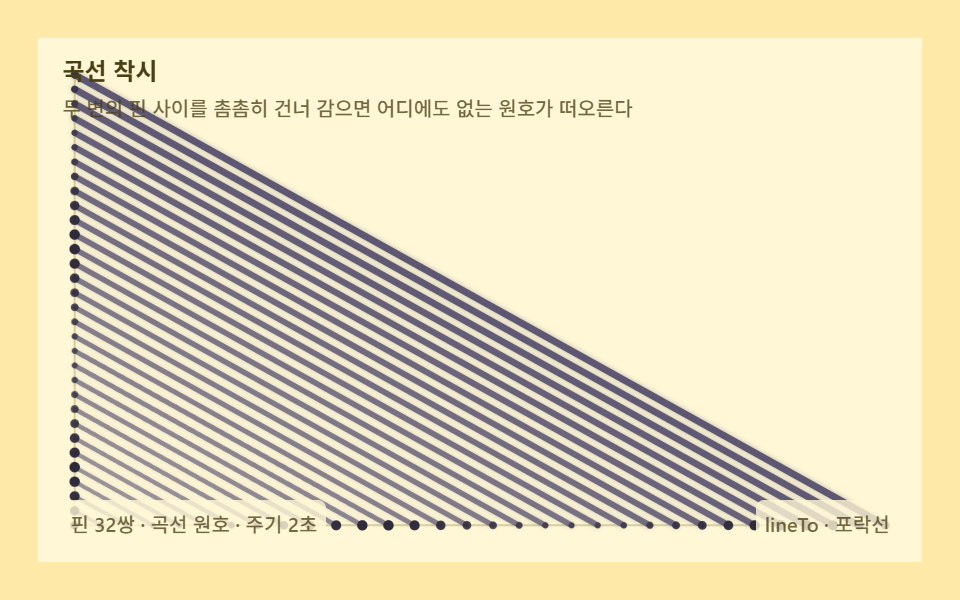
2辺のピンの間を密に渡ると、曲線を一切描いていないのに円弧が浮かびます。直線の包絡線が曲線を作るストリングアートの核心原理です。
使いどころ教育図解、インテリアアート
lineTobeginPathstroke
<main class="stage">
<div class="sb is-demo" id="sbRoot" role="application" aria-label="包絡線巻き板" tabindex="0">
  <canvas class="sb__cv" id="sbCv"></canvas>
  <p class="sb__hint">
    <span class="sb__title">曲線錯視</span>
    <span class="sb__desc">2辺のピンの間を密に巻くと、どこにもない円弧が浮かび上がります</span>
  </p>
  <div class="sb__bar">
    <span class="sb__meta">ピン32組 · 円弧包絡線 · 周期2秒</span>
    <span class="sb__meta sb__meta--dim">lineTo · 包絡線</span>
  </div>
</div>
</main>
@use "../../../../site/static/demo-tokens" as *;
// 스트링아트 곡선 착시(02) — @keyframes 를 두지 않는다. 움직임은 전부 캔버스 rAF 루프(감기 진행 재계산)가 만든다.
// 무대 노랑 — 밝은 판 위 잉크보라 실로 원호 포락선을 띄운다. 캔버스가 판 전체다.
$sb-stage: #ffe9a8;
@include stage($sb-stage);
$sb-panel: #fff7d6; // 감기판 바닥 — 무대보다 한 단계 밝은 크림옐로
$sb-text: #4a3f14; // 라벨 글자 — 진옐로 잉크
$sb-thread: #5a5470; // 실 — 잉크보라(밝은 판 위 직선)
$sb-pin: #2e2a3a; // 핀 — 먹
$sb-dim: #cdbd8a; // 아직 안 감긴 핀 — 저채도 모래
$sb-guide: #b3a770; // 두 변 가이드 — 저채도 올리브
$duration: $dur-loop;
$easing: $ease-out;
$color: $sb-thread;
.sb {
--sb-panel: #{$sb-panel};
--sb-thread: #{$sb-thread};
--sb-pin: #{$sb-pin};
--sb-dim: #{$sb-dim};
--sb-guide: #{$sb-guide};
position: relative;
display: flex; flex-direction: column;
width: 100%; height: 100%; min-height: 164px; // 폰 뷰포트(320×200) 안 — 스테이지 패딩 2회분 여유
overflow: hidden;
}
.sb__cv { position: absolute; inset: 0; display: block; width: 100%; height: 100%; }
.sb__hint {
position: relative; z-index: 1;
display: flex; flex-direction: column; gap: 0; margin: 0;
padding: $sp-2 $sp-3 0;
font-weight: 700; font-size: clamp(10px, 2.8vw, 12px); line-height: 1.35;
color: $sb-text;
}
.sb__desc {
margin-top: $sp-1;
font-weight: 500; font-size: clamp(9px, 2.4vw, 10px); line-height: 1.4;
color: rgba($sb-text, .78);
}
.sb__bar {
position: relative; z-index: 1;
margin-top: auto;
display: flex; align-items: baseline; justify-content: space-between; gap: $sp-2;
padding: 0 $sp-3 $sp-2;
}
.sb__meta {
font-size: 10px; font-weight: 500; color: rgba($sb-text, .78);
background: rgba($sb-panel, .8);
border-radius: $r-xs;
padding: 4px $sp-1;
}
.sb:focus-visible { outline: 2px solid $sb-thread; outline-offset: -2px; }
@media (max-width: 340px) {
.sb__meta--dim { display: none; }
}
// reduce — rAF 를 돌리지 않고 다 감긴 포락선 한 장만 남는다.
@media (prefers-reduced-motion: reduce) {
.sb.is-still { cursor: default !important; }
}html, body {
margin: 0;
overflow: hidden;
}
.stage {
box-sizing: border-box;
min-height: 100vh;
display: grid;
place-items: center;
margin: 0;
background: #ffe9a8;
font-family: -apple-system, "Segoe UI", "Noto Sans KR", sans-serif;
padding: clamp(8px, 4vw, 24px);
}
.sb {
--sb-panel: #fff7d6;
--sb-thread: #5a5470;
--sb-pin: #2e2a3a;
--sb-dim: #cdbd8a;
--sb-guide: #b3a770;
position: relative;
display: flex;
flex-direction: column;
width: 100%;
height: 100%;
min-height: 164px;
overflow: hidden;
}
.sb__cv {
position: absolute;
inset: 0;
display: block;
width: 100%;
height: 100%;
}
.sb__hint {
position: relative;
z-index: 1;
display: flex;
flex-direction: column;
gap: 0;
margin: 0;
padding: 8px 12px 0;
font-weight: 700;
font-size: clamp(10px, 2.8vw, 12px);
line-height: 1.35;
color: #4a3f14;
}
.sb__desc {
margin-top: 4px;
font-weight: 500;
font-size: clamp(9px, 2.4vw, 10px);
line-height: 1.4;
color: rgba(74, 63, 20, 0.78);
}
.sb__bar {
position: relative;
z-index: 1;
margin-top: auto;
display: flex;
align-items: baseline;
justify-content: space-between;
gap: 8px;
padding: 0 12px 8px;
}
.sb__meta {
font-size: 10px;
font-weight: 500;
color: rgba(74, 63, 20, 0.78);
background: rgba(255, 247, 214, 0.8);
border-radius: 4px;
padding: 4px 4px;
}
.sb:focus-visible {
outline: 2px solid #5a5470;
outline-offset: -2px;
}
@media (max-width: 340px) {
.sb__meta--dim {
display: none;
}
}
@media (prefers-reduced-motion: reduce) {
.sb.is-still {
cursor: default !important;
}
}// 스트링아트 曲線錯視(02) — 직선 현만으로 곡선을 만드는 포락선 원리.
// 왼변·아래변에 핀을 나란히 박고, 왼변의 i 번 핀을 아래변의 (M-1-i) 번 핀과 이으면
// 모든 현이 한 원호에 닿는다 — 현의 집합이 원호를 포락한다.
// 곡선을 한 번도 그리지 않았는데 눈은 원호를 본다. 감기가 차오르는 과정이 애니메이션이다.
(function () {
// ── 변형 상수 블록 — 아래 값 하나만 바꿔 변형을 만든다 ──
var M = 32; // 변마다 핀 개수 — 더 올리면 호가 더 매끈해진다
var CYCLE = 2.0; // 감기 완료 주기(초)
// ────────────────────────────────────────────────────
var root = document.getElementById('sbRoot');
var cvEl = document.getElementById('sbCv');
if (!root || !cvEl) return;
var css = getComputedStyle(root);
function tokRGB(name) {
var s = css.getPropertyValue(name).trim();
var hx = s.length === 4
? s.charAt(1) + s.charAt(1) + s.charAt(2) + s.charAt(2) + s.charAt(3) + s.charAt(3)
: s.slice(1);
return [parseInt(hx.slice(0, 2), 16), parseInt(hx.slice(2, 4), 16), parseInt(hx.slice(4, 6), 16)];
}
var COL_THRD = tokRGB('--sb-thread');
var COL_PIN = tokRGB('--sb-pin');
var COL_GUIDE = tokRGB('--sb-guide');
var COL_PANEL = tokRGB('--sb-panel');
var COL_DIM = tokRGB('--sb-dim');
var ctx = cvEl.getContext('2d');
var W = 0, H = 0, dpr = Math.min(window.devicePixelRatio || 1, 2);
var pad = 0;
function fit() {
var r = root.getBoundingClientRect();
W = Math.round(r.width); H = Math.round(r.height);
cvEl.width = Math.round(W * dpr); cvEl.height = Math.round(H * dpr);
ctx.setTransform(dpr, 0, 0, dpr, 0, 0);
pad = Math.min(W, H) * 0.07;
}
// 왼변 핀 i (위에서 아래) — 판 세로를 전부 쓴다
function pinL(i) { return [pad, pad + (H - 2 * pad) * i / (M - 1)]; }
// 아래변 핀 j (왼쪽에서 오른쪽) — 판 가로를 전부 쓴다
function pinB(j) { return [pad + (W - 2 * pad) * j / (M - 1), H - pad]; }
function draw(progress, t) {
ctx.clearRect(0, 0, W, H);
ctx.fillStyle = 'rgb(' + COL_PANEL.join(',') + ')';
ctx.fillRect(0, 0, W, H);
// 두 변 표시 — 실이 어느 틀에 감기는지 보여주는 가이드
ctx.strokeStyle = 'rgba(' + COL_GUIDE.join(',') + ',0.5)';
ctx.lineWidth = 1;
ctx.beginPath(); ctx.moveTo(pad, pad); ctx.lineTo(pad, H - pad); ctx.lineTo(W - pad, H - pad); ctx.stroke();
// 실 — 왼변 i ↔ 아래변 (M-1-i). 감는 손이 지나간 자리일수록 밝다
ctx.lineCap = 'round';
ctx.shadowBlur = 5;
for (var i = 0; i < M; i++) {
if (i / M >= progress) continue;
var a = pinL(i), b = pinB(M - 1 - i);
var recency = (progress * M - i) / M; // 1(방금 감은 올) → 0(처음 올)
var alpha = 0.55 + 0.42 * Math.pow(recency, 1.4);
ctx.strokeStyle = 'rgba(' + COL_THRD.join(',') + ',' + alpha.toFixed(3) + ')';
ctx.shadowColor = 'rgba(' + COL_THRD.join(',') + ',' + (alpha * 0.45).toFixed(3) + ')';
ctx.lineWidth = 1.8 + recency * 1.6;
ctx.beginPath(); ctx.moveTo(a[0], a[1]); ctx.lineTo(b[0], b[1]); ctx.stroke();
}
ctx.shadowBlur = 0;
// 핀 — 감긴 핀은 밝게 숨쉰다(유지 구간에도 순차 맥동)
for (var p = 0; p < M; p++) {
var la = pinL(p), ba = pinB(p);
var doneL = p / M < progress;
var doneB = (M - 1 - p) / M < progress;
var pulse = 0.5 + 0.5 * Math.sin(t * 4 - p * 0.4);
if (doneL) {
ctx.fillStyle = 'rgba(' + COL_PIN.join(',') + ',' + (0.65 + 0.35 * pulse).toFixed(3) + ')';
ctx.beginPath(); ctx.arc(la[0], la[1], 1.5 + 1.1 * pulse, 0, Math.PI * 2); ctx.fill();
} else {
ctx.fillStyle = 'rgb(' + COL_DIM.join(',') + ')';
ctx.beginPath(); ctx.arc(la[0], la[1], 1.3, 0, Math.PI * 2); ctx.fill();
}
if (doneB) {
ctx.fillStyle = 'rgba(' + COL_PIN.join(',') + ',' + (0.65 + 0.35 * pulse).toFixed(3) + ')';
ctx.beginPath(); ctx.arc(ba[0], ba[1], 1.5 + 1.1 * pulse, 0, Math.PI * 2); ctx.fill();
} else {
ctx.fillStyle = 'rgb(' + COL_DIM.join(',') + ')';
ctx.beginPath(); ctx.arc(ba[0], ba[1], 1.3, 0, Math.PI * 2); ctx.fill();
}
}
}
var reduce = window.matchMedia('(prefers-reduced-motion: reduce)').matches;
var t0 = -1;
function frame(now) {
if (t0 < 0) t0 = now;
var t = ((now - t0) / 1000) % CYCLE;
// 0→0.75 감기 · 0.75→1 유지(다 감긴 착시 원호를 볼 시간)
var progress = Math.min(1, t / CYCLE / 0.75);
draw(progress, t);
requestAnimationFrame(frame);
}
window.addEventListener('resize', function () {
fit();
if (reduce) draw(1, 0);
});
fit();
if (reduce) {
draw(1, 0); // reduce — 다 감긴 포락선 한 장만 고정
root.classList.add('is-still');
} else {
requestAnimationFrame(frame);
}
})();// StringHyperbolaCurveIllusion — vanilla 판(run/326/demo/02-string-hyperbola-curve-illusion/index.html) 의 React 포트.
// 직선 현만으로 곡선을 만드는 포락선 원리. 왼변·아래변에 핀을 나란히 박고,
// 왼변의 i 번 핀을 아래변의 (M-1-i) 번 핀과 이으면 모든 현이 한 원호에 닿는다 —
// 현의 집합이 원호를 포락한다. 곡선을 한 번도 그리지 않았는데 눈은 원호를 본다.
import { useEffect, useRef, useState } from "react";
import type { CSSProperties } from "react";
import styles from "./StringHyperbolaCurveIllusion.module.scss";
export type StringHyperbolaCurveIllusionProps = {
duration?: string;
easing?: string;
color?: string;
m?: number; // 변마다 핀 개수 — 더 올리면 호가 더 매끈해진다
cycle?: number; // 감기 완료 주기(초)
};
// ── 변형 상수(기본값) — vanilla 판과 동일 ──
const M = 32; // 변마다 핀 개수
const CYCLE = 2.0; // 감기 완료 주기(초) — 설정 초(2s)와 같아 한 감기가 한 루프
type Vars = CSSProperties & { "--duration"?: string; "--easing"?: string; "--color"?: string };
type Box<T> = { current: T };
type RGB = [number, number, number];
type XY = [number, number];
const BOARD_LABEL = "포락선 감기판";
const META_LEFT = "핀 32쌍 · 곡선 원호 · 주기 2초";
const META_RIGHT = "lineTo · 포락선";
const HINT_TITLE = "곡선 착시";
const HINT_DESC = "두 변의 핀 사이를 촘촘히 건너 감으면 어디에도 없는 원호가 떠오른다";
export default function StringHyperbolaCurveIllusion({
duration = "2s",
easing = "ease-out",
color = "#5a5470",
m = M,
cycle = CYCLE
}: StringHyperbolaCurveIllusionProps) {
const rootRef = useRef<HTMLDivElement | null>(null);
const cvRef = useRef<HTMLCanvasElement | null>(null);
const ctxRef = useRef<CanvasRenderingContext2D | null>(null);
const colRef = useRef<{ thrd: RGB; pin: RGB; guide: RGB; panel: RGB; dim: RGB } | null>(null);
const wRef = useRef(0) as Box<number>;
const hRef = useRef(0) as Box<number>;
const padRef = useRef(0) as Box<number>;
const rafRef = useRef(0) as Box<number>;
const [still, setStill] = useState(false);
const vars: Vars = { "--duration": duration, "--easing": easing, "--color": color };
function reduced(): boolean {
return window.matchMedia("(prefers-reduced-motion: reduce)").matches;
}
function tokRGB(root: HTMLDivElement, name: string): RGB {
const s = getComputedStyle(root).getPropertyValue(name).trim();
const hx = s.length === 4
? s.charAt(1) + s.charAt(1) + s.charAt(2) + s.charAt(2) + s.charAt(3) + s.charAt(3)
: s.slice(1);
return [parseInt(hx.slice(0, 2), 16), parseInt(hx.slice(2, 4), 16), parseInt(hx.slice(4, 6), 16)];
}
function fit(): void {
const root = rootRef.current;
const cv = cvRef.current;
const ctx = ctxRef.current;
if (!root || !cv || !ctx) return;
const r = root.getBoundingClientRect();
const dpr = Math.min(window.devicePixelRatio || 1, 2);
wRef.current = Math.round(r.width);
hRef.current = Math.round(r.height);
cv.width = Math.round(wRef.current * dpr);
cv.height = Math.round(hRef.current * dpr);
ctx.setTransform(dpr, 0, 0, dpr, 0, 0);
padRef.current = Math.min(wRef.current, hRef.current) * 0.07;
}
// 왼변 핀 i (위에서 아래) — 판 세로를 전부 쓴다
function pinL(i: number): XY {
const pad = padRef.current, H = hRef.current;
return [pad, pad + (H - 2 * pad) * i / (m - 1)];
}
// 아래변 핀 j (왼쪽에서 오른쪽) — 판 가로를 전부 쓴다
function pinB(j: number): XY {
const pad = padRef.current, W = wRef.current;
return [pad + (W - 2 * pad) * j / (m - 1), hRef.current - pad];
}
function draw(progress: number, t: number): void {
const ctx = ctxRef.current;
const col = colRef.current;
const W = wRef.current, H = hRef.current, pad = padRef.current;
if (!ctx || !col) return;
ctx.clearRect(0, 0, W, H);
ctx.fillStyle = "rgb(" + col.panel.join(",") + ")";
ctx.fillRect(0, 0, W, H);
// 두 변 표시 — 실이 어느 틀에 감기는지 보여주는 가이드
ctx.strokeStyle = "rgba(" + col.guide.join(",") + ",0.5)";
ctx.lineWidth = 1;
ctx.beginPath(); ctx.moveTo(pad, pad); ctx.lineTo(pad, H - pad); ctx.lineTo(W - pad, H - pad); ctx.stroke();
// 실 — 왼변 i ↔ 아래변 (m-1-i). 감는 손이 지나간 자리일수록 밝다
ctx.lineCap = "round";
ctx.shadowBlur = 5;
for (let i = 0; i < m; i++) {
if (i / m >= progress) continue;
const a = pinL(i), b = pinB(m - 1 - i);
const recency = (progress * m - i) / m; // 1(방금 감은 올) → 0(처음 올)
const alpha = 0.55 + 0.42 * Math.pow(recency, 1.4);
ctx.strokeStyle = "rgba(" + col.thrd.join(",") + "," + alpha.toFixed(3) + ")";
ctx.shadowColor = "rgba(" + col.thrd.join(",") + "," + (alpha * 0.45).toFixed(3) + ")";
ctx.lineWidth = 1.8 + recency * 1.6;
ctx.beginPath(); ctx.moveTo(a[0], a[1]); ctx.lineTo(b[0], b[1]); ctx.stroke();
}
ctx.shadowBlur = 0;
// 핀 — 감긴 핀은 밝게 숨쉰다(유지 구간에도 순차 맥동)
for (let p = 0; p < m; p++) {
const la = pinL(p), ba = pinB(p);
const doneL = p / m < progress;
const doneB = (m - 1 - p) / m < progress;
const pulse = 0.5 + 0.5 * Math.sin(t * 4 - p * 0.4);
if (doneL) {
ctx.fillStyle = "rgba(" + col.pin.join(",") + "," + (0.65 + 0.35 * pulse).toFixed(3) + ")";
ctx.beginPath(); ctx.arc(la[0], la[1], 1.5 + 1.1 * pulse, 0, Math.PI * 2); ctx.fill();
} else {
ctx.fillStyle = "rgb(" + col.dim.join(",") + ")";
ctx.beginPath(); ctx.arc(la[0], la[1], 1.3, 0, Math.PI * 2); ctx.fill();
}
if (doneB) {
ctx.fillStyle = "rgba(" + col.pin.join(",") + "," + (0.65 + 0.35 * pulse).toFixed(3) + ")";
ctx.beginPath(); ctx.arc(ba[0], ba[1], 1.5 + 1.1 * pulse, 0, Math.PI * 2); ctx.fill();
} else {
ctx.fillStyle = "rgb(" + col.dim.join(",") + ")";
ctx.beginPath(); ctx.arc(ba[0], ba[1], 1.3, 0, Math.PI * 2); ctx.fill();
}
}
}
let t0 = -1;
function frame(now: number): void {
if (t0 < 0) t0 = now;
const t = ((now - t0) / 1000) % cycle;
// 0→0.75 감기 · 0.75→1 유지(다 감긴 착시 원호를 볼 시간)
const progress = Math.min(1, t / cycle / 0.75);
draw(progress, t);
rafRef.current = requestAnimationFrame(frame);
}
useEffect(() => {
const root = rootRef.current;
const cv = cvRef.current;
if (!root || !cv) return;
colRef.current = {
thrd: tokRGB(root, "--sb-thread"),
pin: tokRGB(root, "--sb-pin"),
guide: tokRGB(root, "--sb-guide"),
panel: tokRGB(root, "--sb-panel"),
dim: tokRGB(root, "--sb-dim")
};
ctxRef.current = cv.getContext("2d");
fit();
function onResize(): void {
fit();
if (reduced()) draw(1, 0);
}
window.addEventListener("resize", onResize);
if (reduced()) {
draw(1, 0); // reduce — 다 감긴 포락선 한 장만 고정
setStill(true);
} else {
t0 = -1;
rafRef.current = requestAnimationFrame(frame);
}
return () => {
window.removeEventListener("resize", onResize);
cancelAnimationFrame(rafRef.current);
};
// eslint-disable-next-line react-hooks/exhaustive-deps
}, [m, cycle]);
const rootCls = still ? `${styles.root} ${styles.isStill}` : styles.root;
return (
<main className={styles.stage}>
<div
className={rootCls}
ref={rootRef}
style={vars}
role="application"
aria-label={BOARD_LABEL}
tabIndex={0}
>
<canvas className={styles.cv} ref={cvRef}></canvas>
<p className={styles.hint}>
<span className={styles.title}>{HINT_TITLE}</span>
<span className={styles.desc}>{HINT_DESC}</span>
</p>
<div className={styles.bar}>
<span className={styles.meta}>{META_LEFT}</span>
<span className={styles.metaDim}>{META_RIGHT}</span>
</div>
</div>
</main>
);
}02 曲線錯視 — 直線の糸だけで円を描く包絡線 — 計測 累積面積 30.669% · 動いたフレーム 23/23GODRICH オリジナル · SCSS と React は zip に同梱 · ストリングアート9種 — 糸の一本一本を計算するキャンバス
このデモが属する記事
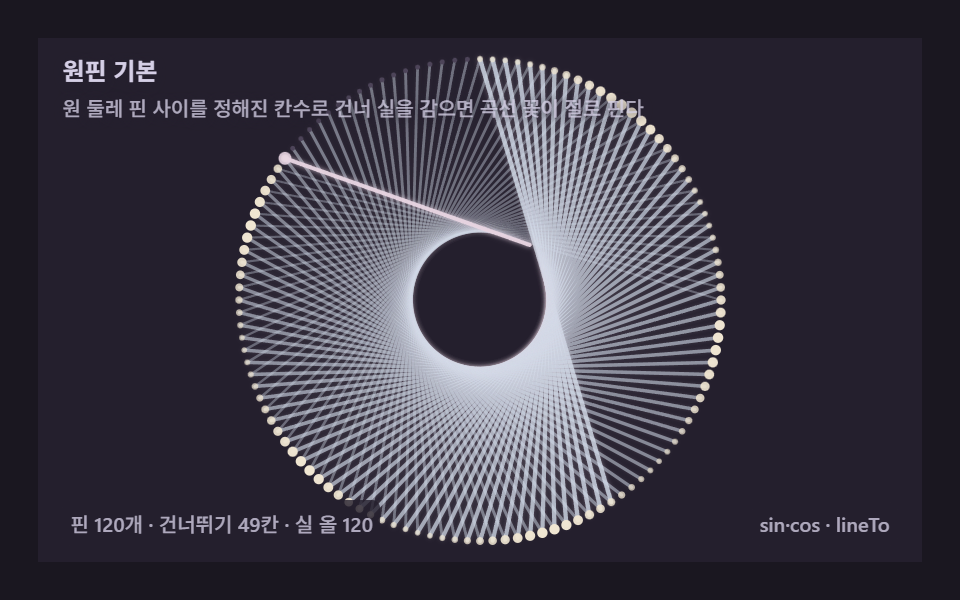 ストリングアート9種 — 糸の一本一本を計算するキャンバスピンの間を糸が規則で飛び移ると曲線がひとりでに生まれます。どこからどこへ巻くかを毎回計算するキャンバスエンジン — ライブラリなしのコピペです。ストリングアートとは、板に打ったピンの間に糸を規則で渡していくと、どこにも描いていない円弧や心臓 この記事のデモをすべて見る