07輪郭ピン配置 — 絵の縁からピンを抜き出す
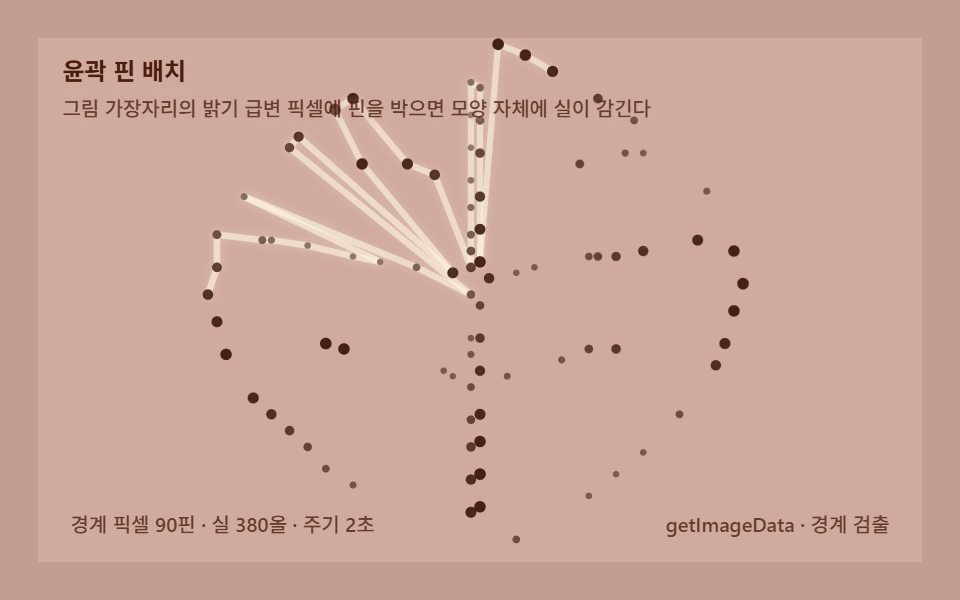
写真の輪郭に沿って明るさの急変ピクセルを選んでピンを打つと、枠ではなく絵の形そのものに糸が巻かれます。図案を画像から自動で作るパイプラインです。
使いどころ図案の自動生成、ロゴアート
getImageDatagetImageDatalineTobeginPath
<main class="stage">
<div class="sg is-demo" id="sgRoot" role="application" aria-label="輪郭巻き板" tabindex="0">
  <canvas class="sg__cv" id="sgCv"></canvas>
  <p class="sg__hint">
    <span class="sg__title">輪郭ピン配置</span>
    <span class="sg__desc">絵の縁の明るさ急変ピクセルにピンを打つと、形そのものに糸が巻かれます</span>
  </p>
  <div class="sg__bar">
    <span class="sg__meta">境界ピクセル90本 · 糸380本 · 周期2秒</span>
    <span class="sg__meta sg__meta--dim">getImageData · エッジ検出</span>
  </div>
</div>
</main>
@use "../../../../site/static/demo-tokens" as *;
// 스트링아트 윤곽 핀 배치(07) — @keyframes 를 두지 않는다. 움직임은 전부 캔버스 rAF 루프(경계 핀 감기)가 만든다.
// 무대 오렌지 — 따뜻한 판 위 크림 실로 잎 윤곽을 감는다. 캔버스가 판 전체다.
$sg-stage: #c49d92;
@include stage($sg-stage);
$sg-panel: #d0aa9f; // 감기판 바닥 — 무대보다 한 단계 밝은 연산호
$sg-text: #4a1d0d; // 라벨 글자 — 진적갈 잉크
$sg-thread: #fdf3e0; // 실 — 크림(연산호 판 위 밝은 올)
$sg-pin: #3a180b; // 핀 — 진갈먹
$duration: $dur-loop;
$easing: $ease-out;
$color: $sg-thread;
.sg {
--sg-panel: #{$sg-panel};
--sg-thread: #{$sg-thread};
--sg-pin: #{$sg-pin};
position: relative;
display: flex; flex-direction: column;
width: 100%; height: 100%; min-height: 164px; // 폰 뷰포트(320×200) 안 — 스테이지 패딩 2회분 여유
overflow: hidden;
}
.sg__cv { position: absolute; inset: 0; display: block; width: 100%; height: 100%; }
.sg__hint {
position: relative; z-index: 1;
display: flex; flex-direction: column; gap: 0; margin: 0;
padding: $sp-2 $sp-3 0;
font-weight: 700; font-size: clamp(10px, 2.8vw, 12px); line-height: 1.35;
color: $sg-text;
text-shadow: 0 1px 4px rgba($sg-panel, .9);
}
.sg__desc {
margin-top: $sp-1;
font-weight: 500; font-size: clamp(9px, 2.4vw, 10px); line-height: 1.4;
color: rgba($sg-text, .78);
text-shadow: 0 1px 4px rgba($sg-panel, .9);
}
.sg__bar {
position: relative; z-index: 1;
margin-top: auto;
display: flex; align-items: baseline; justify-content: space-between; gap: $sp-2;
padding: 0 $sp-3 $sp-2;
}
.sg__meta {
font-size: 10px; font-weight: 500; color: rgba($sg-text, .78);
background: rgba($sg-panel, .85);
border-radius: $r-xs;
padding: 4px $sp-1;
}
.sg:focus-visible { outline: 2px solid $sg-thread; outline-offset: -2px; }
@media (max-width: 340px) {
.sg__meta--dim { display: none; }
}
// reduce — rAF 를 돌리지 않고 다 감긴 잎 문양 한 장만 남는다.
@media (prefers-reduced-motion: reduce) {
.sg.is-still { cursor: default !important; }
}html, body {
margin: 0;
overflow: hidden;
}
.stage {
box-sizing: border-box;
min-height: 100vh;
display: grid;
place-items: center;
margin: 0;
background: #c49d92;
font-family: -apple-system, "Segoe UI", "Noto Sans KR", sans-serif;
padding: clamp(8px, 4vw, 24px);
}
.sg {
--sg-panel: #d0aa9f;
--sg-thread: #fdf3e0;
--sg-pin: #3a180b;
position: relative;
display: flex;
flex-direction: column;
width: 100%;
height: 100%;
min-height: 164px;
overflow: hidden;
}
.sg__cv {
position: absolute;
inset: 0;
display: block;
width: 100%;
height: 100%;
}
.sg__hint {
position: relative;
z-index: 1;
display: flex;
flex-direction: column;
gap: 0;
margin: 0;
padding: 8px 12px 0;
font-weight: 700;
font-size: clamp(10px, 2.8vw, 12px);
line-height: 1.35;
color: #4a1d0d;
text-shadow: 0 1px 4px rgba(208, 170, 159, 0.9);
}
.sg__desc {
margin-top: 4px;
font-weight: 500;
font-size: clamp(9px, 2.4vw, 10px);
line-height: 1.4;
color: rgba(74, 29, 13, 0.78);
text-shadow: 0 1px 4px rgba(208, 170, 159, 0.9);
}
.sg__bar {
position: relative;
z-index: 1;
margin-top: auto;
display: flex;
align-items: baseline;
justify-content: space-between;
gap: 8px;
padding: 0 12px 8px;
}
.sg__meta {
font-size: 10px;
font-weight: 500;
color: rgba(74, 29, 13, 0.78);
background: rgba(208, 170, 159, 0.85);
border-radius: 4px;
padding: 4px 4px;
}
.sg:focus-visible {
outline: 2px solid #fdf3e0;
outline-offset: -2px;
}
@media (max-width: 340px) {
.sg__meta--dim {
display: none;
}
}
@media (prefers-reduced-motion: reduce) {
.sg.is-still {
cursor: default !important;
}
}// 스트링아트 輪郭ピン配置(07) — 이미지 경계(엣지) 검출로 핀 위치를 자동으로 정하는 계산.
// 오프스크린 캔버스에 절차적으로 잎(leaf) 문양을 그리고 getImageData 로 밝기를 읽는다.
// 바깥에서 흰 배경을 홍수 채우기해 닿는 지점만 골라 바깥 테두리에 90개 핀을 박는다 —
// 잎맥 같은 속 무늬는 빼고 외곽선만 핀이 된다. 첫 바퀴는 이웃 핀을 이어 테두리를 그리고
// 둘째 바퀴부터 몇 칸 건너뛴 올로 속을 채운다 — 모양 자체가 핀판이 되는 국면.
(function () {
// ── 변형 상수 블록 — 아래 값 하나만 바꿔 변형을 만든다 ──
var NPIN = 90; // 경계에서 뽑는 핀 개수
var STR = 380; // 감는 실 올 수
var CYCLE = 2.0; // 감기 완료 주기(초)
var SS = 110; // 경계 검출 격자 크기(SS×SS)
// ────────────────────────────────────────────────────
var root = document.getElementById('sgRoot');
var cvEl = document.getElementById('sgCv');
if (!root || !cvEl) return;
var css = getComputedStyle(root);
function tokRGB(name) {
var s = css.getPropertyValue(name).trim();
var hx = s.length === 4
? s.charAt(1) + s.charAt(1) + s.charAt(2) + s.charAt(2) + s.charAt(3) + s.charAt(3)
: s.slice(1);
return [parseInt(hx.slice(0, 2), 16), parseInt(hx.slice(2, 4), 16), parseInt(hx.slice(4, 6), 16)];
}
var COL_THRD = tokRGB('--sg-thread');
var COL_PIN = tokRGB('--sg-pin');
var COL_PANEL = tokRGB('--sg-panel');
var ctx = cvEl.getContext('2d');
var W = 0, H = 0, dpr = Math.min(window.devicePixelRatio || 1, 2);
// ── 절차적 잎 문양 → 밝기 → 경계 픽셀 → 핀 90개(0..1 비율 좌표) ──
var PINS = [];
(function buildPins() {
var oc = document.createElement('canvas');
oc.width = SS; oc.height = SS;
var o = oc.getContext('2d');
// 배경 그라데이션 대신 두 톤 평면 — 경계가 또렷해야 핀이 정확히 나온다
o.fillStyle = '#fff'; o.fillRect(0, 0, SS, SS);
o.fillStyle = '#000';
// 잎 몸통 — 두 개의 2차 곡선으로 이은 통통한 잎사귀(폭을 넓게 — 실 감기 면적)
o.beginPath();
o.moveTo(SS * 0.50, SS * 0.06);
o.quadraticCurveTo(SS * 1.02, SS * 0.46, SS * 0.50, SS * 0.94);
o.quadraticCurveTo(SS * -0.02, SS * 0.46, SS * 0.50, SS * 0.06);
o.closePath(); o.fill();
// 잎맥 — 가운데 세로줄과 옆줄 3쌍을 하얗게 파낸다(경계 추가)
o.strokeStyle = '#fff'; o.lineWidth = 2.2; o.lineCap = 'round';
o.beginPath();
o.moveTo(SS * 0.50, SS * 0.14); o.lineTo(SS * 0.50, SS * 0.86);
o.stroke();
for (var v = 0; v < 3; v++) {
var yy = SS * (0.30 + v * 0.17);
var ww = SS * 0.30 * (1 - v * 0.22);
o.lineWidth = 1.6;
o.beginPath(); o.moveTo(SS * 0.50, yy); o.lineTo(SS * 0.50 - ww, yy - SS * 0.07); o.stroke();
o.beginPath(); o.moveTo(SS * 0.50, yy); o.lineTo(SS * 0.50 + ww, yy - SS * 0.07); o.stroke();
}
// 밝기 격자
var lum = new Float32Array(SS * SS);
var d = o.getImageData(0, 0, SS, SS).data;
for (var i = 0; i < SS * SS; i++) lum[i] = d[i * 4];
// 바깥 경계만 — 바깥에서 흰 배경을 홍수 채우기(BFS)해 어두운 몸통에 닿는 지점.
// 잎맥(속의 하얀 줄)은 어두운 몸에 둘러싸여 바깥과 이어지지 않으니 핀에서 제외된다.
var dark = new Uint8Array(SS * SS);
for (var b0 = 0; b0 < SS * SS; b0++) dark[b0] = lum[b0] < 128 ? 1 : 0;
var seen = new Uint8Array(SS * SS);
var bnd = new Uint8Array(SS * SS);
var stack = [0];
seen[0] = 1;
var NX = [1, -1, 0, 0], NY = [0, 0, 1, -1];
while (stack.length) {
var q = stack.pop();
var qx = q % SS, qy = (q - qx) / SS;
for (var d4 = 0; d4 < 4; d4++) {
var nx = qx + NX[d4], ny = qy + NY[d4];
if (nx < 0 || ny < 0 || nx >= SS || ny >= SS) continue;
var qi = ny * SS + nx;
if (dark[qi]) bnd[q] = 1; // 흰 픽셀 옆이 몸통 → 외곽선 바로 바깥 점
else if (!seen[qi]) { seen[qi] = 1; stack.push(qi); }
}
}
var ring = [];
for (var r0 = 0; r0 < SS * SS; r0++) if (bnd[r0]) ring.push([r0 % SS, (r0 - r0 % SS) / SS]);
// 각도 순 정렬 후 고리를 따라 일정 간격으로 NPIN개 — 감기가 모양을 따라 돌게
var cxg = SS / 2, cyg = SS / 2;
ring.sort(function (a, b) {
return Math.atan2(a[1] - cyg, a[0] - cxg) - Math.atan2(b[1] - cyg, b[0] - cxg);
});
var stepR = ring.length / NPIN;
for (var p = 0; p < NPIN; p++) {
var q2 = ring[Math.floor(p * stepR) % ring.length];
PINS.push([(q2[0] / SS - 0.5) * 1.12 + 0.5, (q2[1] / SS - 0.5) * 1.12 + 0.5]);
}
})();
var CX = 0, CY = 0;
function pinPx(i) {
var u = PINS[i % PINS.length];
var s = Math.min(W, H);
// 가로로 넓게 — 캔버스 폭(480)이 높이(300)보다 넓으니 잎을 넓적하게 펴 꽉 채운다
return [CX + (u[0] - 0.5) * s * 1.7, CY + (u[1] - 0.5) * s * 1.02];
}
function fit() {
var r = root.getBoundingClientRect();
W = Math.round(r.width); H = Math.round(r.height);
cvEl.width = Math.round(W * dpr); cvEl.height = Math.round(H * dpr);
ctx.setTransform(dpr, 0, 0, dpr, 0, 0);
CX = W / 2; CY = H / 2;
}
function draw(progress, t) {
ctx.clearRect(0, 0, W, H);
ctx.fillStyle = 'rgb(' + COL_PANEL.join(',') + ')';
ctx.fillRect(0, 0, W, H);
var n = PINS.length;
var full = Math.floor(progress * STR);
ctx.lineCap = 'round';
ctx.shadowBlur = 10;
ctx.shadowColor = 'rgba(' + COL_THRD.join(',') + ',0.4)';
for (var i = 0; i < full; i++) {
// 감기 규칙 — 첫 바퀴(n올)는 이웃 핀만 이어 잎 테두리를 그리고,
// 둘째 바퀴부터 7·11·16칸 건너뛴 올을 순환해 속을 채운다(포락선이 잎을 메운다)
var K = i < n ? 1 : [7, 11, 16][(i - n) % 3];
var a = pinPx(i % n), b = pinPx((i + K) % n);
var recency = (full - i) / STR;
var alpha = 0.6 + 0.34 * Math.pow(recency, 1.2);
ctx.strokeStyle = 'rgba(' + COL_THRD.join(',') + ',' + Math.min(0.95, alpha).toFixed(3) + ')';
ctx.lineWidth = 3.1 + recency * 2.2;
ctx.beginPath(); ctx.moveTo(a[0], a[1]); ctx.lineTo(b[0], b[1]); ctx.stroke();
}
ctx.shadowBlur = 0;
// 핀 — 감긴 올이 닿은 핀은 밝게 커진다. 스캔 하이라이트(경계 검출 순서 흔적)
for (var p = 0; p < n; p++) {
var xy = pinPx(p);
var pulse = 0.5 + 0.5 * Math.sin(t * 4 - p * 0.35);
var rr = 1.6 + 1.3 * pulse;
ctx.fillStyle = 'rgba(' + COL_PIN.join(',') + ',' + (0.55 + 0.4 * pulse).toFixed(3) + ')';
ctx.beginPath(); ctx.arc(xy[0], xy[1], rr, 0, Math.PI * 2); ctx.fill();
}
}
var reduce = window.matchMedia('(prefers-reduced-motion: reduce)').matches;
var t0 = -1;
function frame(now) {
if (t0 < 0) t0 = now;
var t = ((now - t0) / 1000) % CYCLE;
// 0→0.8 감기 · 0.8→1 유지 — 유지 구간에도 핀 맥동이 계속 움직인다
var progress = Math.min(1, t / CYCLE / 0.8);
draw(progress, t);
requestAnimationFrame(frame);
}
window.addEventListener('resize', function () {
fit();
if (reduce) draw(1, 0);
});
fit();
if (reduce) {
draw(1, 0); // reduce — 다 감긴 잎 문양 한 장만 고정
root.classList.add('is-still');
} else {
requestAnimationFrame(frame);
}
})();// StringPinsFromImageEdge — vanilla 판(run/326/demo/07-string-pins-from-image-edge/index.html) 의 React 포트.
// 이미지 경계(엣지) 검출로 핀 위치를 자동으로 정하는 계산. 오프스크린 캔버스에 절차적으로
// 잎(leaf) 문양을 그리고 getImageData 로 밝기를 읽는다. 바깥에서 흰 배경을 홍수 채우기해
// 닿는 지점만 골라 바깥 테두리에 90개 핀을 박는다 — 잎맥 같은 속 무늬는 빼고 외곽선만
// 핀이 된다. 첫 바퀴는 이웃 핀을 이어 테두리를 그리고 둘째 바퀴부터 몇 칸 건너뛴 올로
// 속을 채운다 — 모양 자체가 핀판이 되는 국면.
import { useEffect, useRef, useState } from "react";
import type { CSSProperties } from "react";
import styles from "./StringPinsFromImageEdge.module.scss";
export type StringPinsFromImageEdgeProps = {
duration?: string;
easing?: string;
color?: string;
npin?: number; // 경계에서 뽑는 핀 개수
str?: number; // 감는 실 올 수
cycle?: number; // 감기 완료 주기(초)
};
// ── 변형 상수(기본값) — vanilla 판과 동일 ──
const NPIN = 90; // 경계에서 뽑는 핀 개수
const STR = 380; // 감는 실 올 수
const CYCLE = 2.0; // 감기 완료 주기(초) — 설정 초(2s)와 같아 한 감기가 한 루프
const SS = 110; // 경계 검출 격자 크기(SS×SS)
type Vars = CSSProperties & { "--duration"?: string; "--easing"?: string; "--color"?: string };
type Box<T> = { current: T };
type RGB = [number, number, number];
type XY = [number, number];
const BOARD_LABEL = "윤곽 감기판";
const META_LEFT = "경계 픽셀 90핀 · 실 380올 · 주기 2초";
const META_RIGHT = "getImageData · 경계 검출";
const HINT_TITLE = "윤곽 핀 배치";
const HINT_DESC = "그림 가장자리의 밝기 급변 픽셀에 핀을 박으면 모양 자체에 실이 감긴다";
export default function StringPinsFromImageEdge({
duration = "2s",
easing = "ease-out",
color = "#fdf3e0",
npin = NPIN,
str = STR,
cycle = CYCLE
}: StringPinsFromImageEdgeProps) {
const rootRef = useRef<HTMLDivElement | null>(null);
const cvRef = useRef<HTMLCanvasElement | null>(null);
const ctxRef = useRef<CanvasRenderingContext2D | null>(null);
const colRef = useRef<{ thrd: RGB; pin: RGB; panel: RGB } | null>(null);
const wRef = useRef(0) as Box<number>;
const hRef = useRef(0) as Box<number>;
const cxRef = useRef(0) as Box<number>;
const cyRef = useRef(0) as Box<number>;
const rafRef = useRef(0) as Box<number>;
const pinsRef = useRef<XY[] | null>(null);
const [still, setStill] = useState(false);
const vars: Vars = { "--duration": duration, "--easing": easing, "--color": color };
function reduced(): boolean {
return window.matchMedia("(prefers-reduced-motion: reduce)").matches;
}
function tokRGB(root: HTMLDivElement, name: string): RGB {
const s = getComputedStyle(root).getPropertyValue(name).trim();
const hx = s.length === 4
? s.charAt(1) + s.charAt(1) + s.charAt(2) + s.charAt(2) + s.charAt(3) + s.charAt(3)
: s.slice(1);
return [parseInt(hx.slice(0, 2), 16), parseInt(hx.slice(2, 4), 16), parseInt(hx.slice(4, 6), 16)];
}
// ── 절차적 잎 문양 → 밝기 → 경계 픽셀 → 핀 90개(0..1 비율 좌표) ──
function buildPins(): XY[] {
const pins: XY[] = [];
const oc = document.createElement("canvas");
oc.width = SS; oc.height = SS;
const o = oc.getContext("2d");
if (!o) return pins;
// 배경 그라데이션 대신 두 톤 평면 — 경계가 또렷해야 핀이 정확히 나온다
o.fillStyle = "#fff"; o.fillRect(0, 0, SS, SS);
o.fillStyle = "#000";
// 잎 몸통 — 두 개의 2차 곡선으로 이은 통통한 잎사귀(폭을 넓게 — 실 감기 면적)
o.beginPath();
o.moveTo(SS * 0.50, SS * 0.06);
o.quadraticCurveTo(SS * 1.02, SS * 0.46, SS * 0.50, SS * 0.94);
o.quadraticCurveTo(SS * -0.02, SS * 0.46, SS * 0.50, SS * 0.06);
o.closePath(); o.fill();
// 잎맥 — 가운데 세로줄과 옆줄 3쌍을 하얗게 파낸다(경계 추가)
o.strokeStyle = "#fff"; o.lineWidth = 2.2; o.lineCap = "round";
o.beginPath();
o.moveTo(SS * 0.50, SS * 0.14); o.lineTo(SS * 0.50, SS * 0.86);
o.stroke();
for (let v = 0; v < 3; v++) {
const yy = SS * (0.30 + v * 0.17);
const ww = SS * 0.30 * (1 - v * 0.22);
o.lineWidth = 1.6;
o.beginPath(); o.moveTo(SS * 0.50, yy); o.lineTo(SS * 0.50 - ww, yy - SS * 0.07); o.stroke();
o.beginPath(); o.moveTo(SS * 0.50, yy); o.lineTo(SS * 0.50 + ww, yy - SS * 0.07); o.stroke();
}
// 밝기 격자
const lum = new Float32Array(SS * SS);
const d = o.getImageData(0, 0, SS, SS).data;
for (let i = 0; i < SS * SS; i++) lum[i] = d[i * 4];
// 바깥 경계만 — 바깥에서 흰 배경을 홍수 채우기(BFS)해 어두운 몸통에 닿는 지점.
// 잎맥(속의 하얀 줄)은 어두운 몸에 둘러싸여 바깥과 이어지지 않으니 핀에서 제외된다.
const dark = new Uint8Array(SS * SS);
for (let b0 = 0; b0 < SS * SS; b0++) dark[b0] = lum[b0] < 128 ? 1 : 0;
const seen = new Uint8Array(SS * SS);
const bnd = new Uint8Array(SS * SS);
const stack: number[] = [0];
seen[0] = 1;
const NX = [1, -1, 0, 0], NY = [0, 0, 1, -1];
while (stack.length) {
const q = stack.pop() as number;
const qx = q % SS, qy = (q - qx) / SS;
for (let d4 = 0; d4 < 4; d4++) {
const nx = qx + NX[d4], ny = qy + NY[d4];
if (nx < 0 || ny < 0 || nx >= SS || ny >= SS) continue;
const qi = ny * SS + nx;
if (dark[qi]) bnd[q] = 1; // 흰 픽셀 옆이 몸통 → 외곽선 바로 바깥 점
else if (!seen[qi]) { seen[qi] = 1; stack.push(qi); }
}
}
const ring: XY[] = [];
for (let r0 = 0; r0 < SS * SS; r0++) if (bnd[r0]) ring.push([r0 % SS, (r0 - r0 % SS) / SS]);
// 각도 순 정렬 후 고리를 따라 일정 간격으로 npin개 — 감기가 모양을 따라 돌게
const cxg = SS / 2, cyg = SS / 2;
ring.sort(function (a: XY, b: XY): number {
return Math.atan2(a[1] - cyg, a[0] - cxg) - Math.atan2(b[1] - cyg, b[0] - cxg);
});
const stepR = ring.length / npin;
for (let p = 0; p < npin; p++) {
const q2 = ring[Math.floor(p * stepR) % ring.length];
pins.push([(q2[0] / SS - 0.5) * 1.12 + 0.5, (q2[1] / SS - 0.5) * 1.12 + 0.5]);
}
return pins;
}
function pinPx(i: number): XY {
const pins = pinsRef.current;
if (!pins) return [0, 0];
const u = pins[i % pins.length];
const s = Math.min(wRef.current, hRef.current);
// 가로로 넓게 — 캔버스 폭이 높이보다 넓으니 잎을 넓적하게 펴 꽉 채운다
return [cxRef.current + (u[0] - 0.5) * s * 1.7, cyRef.current + (u[1] - 0.5) * s * 1.02];
}
function fit(): void {
const root = rootRef.current;
const cv = cvRef.current;
const ctx = ctxRef.current;
if (!root || !cv || !ctx) return;
const r = root.getBoundingClientRect();
const dpr = Math.min(window.devicePixelRatio || 1, 2);
wRef.current = Math.round(r.width);
hRef.current = Math.round(r.height);
cv.width = Math.round(wRef.current * dpr);
cv.height = Math.round(hRef.current * dpr);
ctx.setTransform(dpr, 0, 0, dpr, 0, 0);
cxRef.current = wRef.current / 2;
cyRef.current = hRef.current / 2;
}
function draw(progress: number, t: number): void {
const ctx = ctxRef.current;
const col = colRef.current;
const pins = pinsRef.current;
const W = wRef.current, H = hRef.current;
if (!ctx || !col || !pins) return;
ctx.clearRect(0, 0, W, H);
ctx.fillStyle = "rgb(" + col.panel.join(",") + ")";
ctx.fillRect(0, 0, W, H);
const n = pins.length;
const full = Math.floor(progress * str);
ctx.lineCap = "round";
ctx.shadowBlur = 10;
ctx.shadowColor = "rgba(" + col.thrd.join(",") + ",0.4)";
for (let i = 0; i < full; i++) {
// 감기 규칙 — 첫 바퀴(n올)는 이웃 핀만 이어 잎 테두리를 그리고,
// 둘째 바퀴부터 7·11·16칸 건너뛴 올을 순환해 속을 채운다(포락선이 잎을 메운다)
const K = i < n ? 1 : [7, 11, 16][(i - n) % 3];
const a = pinPx(i % n), b = pinPx((i + K) % n);
const recency = (full - i) / str;
const alpha = 0.6 + 0.34 * Math.pow(recency, 1.2);
ctx.strokeStyle = "rgba(" + col.thrd.join(",") + "," + Math.min(0.95, alpha).toFixed(3) + ")";
ctx.lineWidth = 3.1 + recency * 2.2;
ctx.beginPath(); ctx.moveTo(a[0], a[1]); ctx.lineTo(b[0], b[1]); ctx.stroke();
}
ctx.shadowBlur = 0;
// 핀 — 감긴 올이 닿은 핀은 밝게 커진다. 스캔 하이라이트(경계 검출 순서 흔적)
for (let p = 0; p < n; p++) {
const xy = pinPx(p);
const pulse = 0.5 + 0.5 * Math.sin(t * 4 - p * 0.35);
const rr = 1.6 + 1.3 * pulse;
ctx.fillStyle = "rgba(" + col.pin.join(",") + "," + (0.55 + 0.4 * pulse).toFixed(3) + ")";
ctx.beginPath(); ctx.arc(xy[0], xy[1], rr, 0, Math.PI * 2); ctx.fill();
}
}
let t0 = -1;
function frame(now: number): void {
if (t0 < 0) t0 = now;
const t = ((now - t0) / 1000) % cycle;
// 0→0.8 감기 · 0.8→1 유지 — 유지 구간에도 핀 맥동이 계속 움직인다
const progress = Math.min(1, t / cycle / 0.8);
draw(progress, t);
rafRef.current = requestAnimationFrame(frame);
}
useEffect(() => {
const root = rootRef.current;
const cv = cvRef.current;
if (!root || !cv) return;
colRef.current = {
thrd: tokRGB(root, "--sg-thread"),
pin: tokRGB(root, "--sg-pin"),
panel: tokRGB(root, "--sg-panel")
};
ctxRef.current = cv.getContext("2d");
pinsRef.current = buildPins(); // 홍수 채우기 윤곽 핀을 미리 계산(결정적)
fit();
function onResize(): void {
fit();
if (reduced()) draw(1, 0);
}
window.addEventListener("resize", onResize);
if (reduced()) {
draw(1, 0); // reduce — 다 감긴 잎 문양 한 장만 고정
setStill(true);
} else {
t0 = -1;
rafRef.current = requestAnimationFrame(frame);
}
return () => {
window.removeEventListener("resize", onResize);
cancelAnimationFrame(rafRef.current);
};
// eslint-disable-next-line react-hooks/exhaustive-deps
}, [npin, str, cycle]);
const rootCls = still ? `${styles.root} ${styles.isStill}` : styles.root;
return (
<main className={styles.stage}>
<div
className={rootCls}
ref={rootRef}
style={vars}
role="application"
aria-label={BOARD_LABEL}
tabIndex={0}
>
<canvas className={styles.cv} ref={cvRef}></canvas>
<p className={styles.hint}>
<span className={styles.title}>{HINT_TITLE}</span>
<span className={styles.desc}>{HINT_DESC}</span>
</p>
<div className={styles.bar}>
<span className={styles.meta}>{META_LEFT}</span>
<span className={styles.metaDim}>{META_RIGHT}</span>
</div>
</div>
</main>
);
}07 輪郭ピン配置 — 絵の縁からピンを抜き出す — 計測 累積面積 32.166% · 動いたフレーム 23/23GODRICH オリジナル · SCSS と React は zip に同梱 · ストリングアート9種 — 糸の一本一本を計算するキャンバス
このデモが属する記事
 ストリングアート9種 — 糸の一本一本を計算するキャンバスピンの間を糸が規則で飛び移ると曲線がひとりでに生まれます。どこからどこへ巻くかを毎回計算するキャンバスエンジン — ライブラリなしのコピペです。ストリングアートとは、板に打ったピンの間に糸を規則で渡していくと、どこにも描いていない円弧や心臓 この記事のデモをすべて見る