07動画レビューのサムネイルグリッド
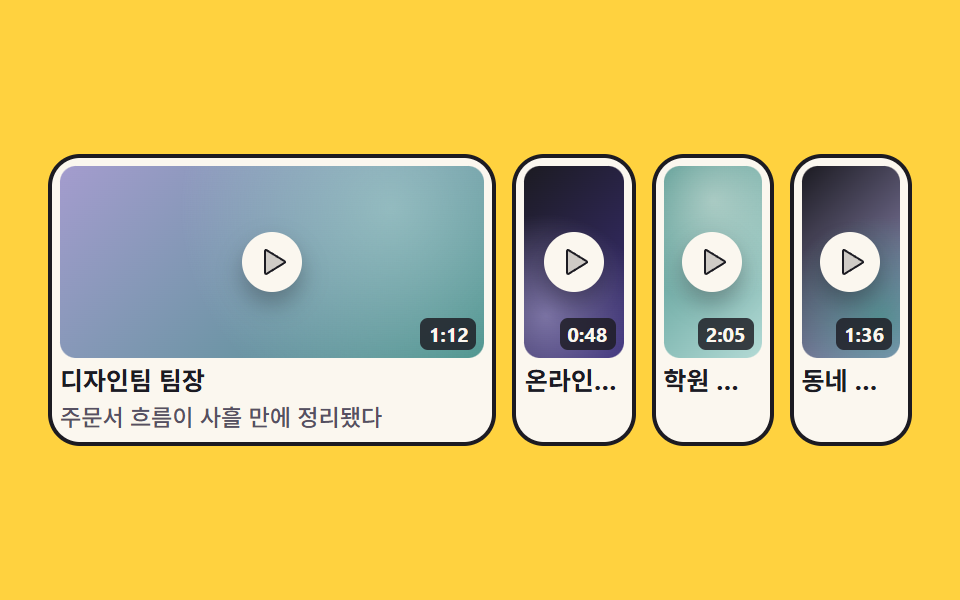
再生マークの乗ったサムネイル4枚が並び、選んだ1枚が隣の枠を押しのけて広がり、名前と一言がその中で開きます。
使いどころ動画インタビューのあるレビューセクション
grid-template-columnsaria-expandedclip-path
<main class="stage">
  <section class="vg is-demo" aria-label="動画レビューまとめ">
    <div class="vg__grid">
      <button class="vg__item vg__item--1" type="button" aria-expanded="false">
        <span class="vg__thumb vg__thumb--a">
          <span class="vg__play"><svg viewBox="0 0 256 256" width="16" height="16" aria-hidden="true" focusable="false" fill="currentColor"><path d="M228.23,134.69,84.15,222.81A8,8,0,0,1,72,216.12V39.88a8,8,0,0,1,12.15-6.69l144.08,88.12A7.82,7.82,0,0,1,228.23,134.69Z" opacity="0.2"/><path d="M232.4,114.49,88.32,26.35a16,16,0,0,0-16.2-.3A15.86,15.86,0,0,0,64,39.87V216.13A15.94,15.94,0,0,0,80,232a16.07,16.07,0,0,0,8.36-2.35L232.4,141.51a15.81,15.81,0,0,0,0-27ZM80,215.94V40l143.83,88Z"/></svg></span>
          <span class="vg__time">1:12</span>
        </span>
        <span class="vg__name">デザインチームリーダー</span>
        <span class="vg__reveal"><span class="vg__quote">注文フローが3日で整った</span></span>
      </button>

      <button class="vg__item vg__item--2" type="button" aria-expanded="false">
        <span class="vg__thumb vg__thumb--b">
          <span class="vg__play"><svg viewBox="0 0 256 256" width="16" height="16" aria-hidden="true" focusable="false" fill="currentColor"><path d="M228.23,134.69,84.15,222.81A8,8,0,0,1,72,216.12V39.88a8,8,0,0,1,12.15-6.69l144.08,88.12A7.82,7.82,0,0,1,228.23,134.69Z" opacity="0.2"/><path d="M232.4,114.49,88.32,26.35a16,16,0,0,0-16.2-.3A15.86,15.86,0,0,0,64,39.87V216.13A15.94,15.94,0,0,0,80,232a16.07,16.07,0,0,0,8.36-2.35L232.4,141.51a15.81,15.81,0,0,0,0-27ZM80,215.94V40l143.83,88Z"/></svg></span>
          <span class="vg__time">0:48</span>
        </span>
        <span class="vg__name">オンライン書店の代表</span>
        <span class="vg__reveal"><span class="vg__quote">在庫画面を自分で直せるようになった</span></span>
      </button>

      <button class="vg__item vg__item--3" type="button" aria-expanded="false">
        <span class="vg__thumb vg__thumb--c">
          <span class="vg__play"><svg viewBox="0 0 256 256" width="16" height="16" aria-hidden="true" focusable="false" fill="currentColor"><path d="M228.23,134.69,84.15,222.81A8,8,0,0,1,72,216.12V39.88a8,8,0,0,1,12.15-6.69l144.08,88.12A7.82,7.82,0,0,1,228.23,134.69Z" opacity="0.2"/><path d="M232.4,114.49,88.32,26.35a16,16,0,0,0-16.2-.3A15.86,15.86,0,0,0,64,39.87V216.13A15.94,15.94,0,0,0,80,232a16.07,16.07,0,0,0,8.36-2.35L232.4,141.51a15.81,15.81,0,0,0,0-27ZM80,215.94V40l143.83,88Z"/></svg></span>
          <span class="vg__time">2:05</span>
        </span>
        <span class="vg__name">学習塾の運営者</span>
        <span class="vg__reveal"><span class="vg__quote">夜でもレッスンの申し込みが来る</span></span>
      </button>

      <button class="vg__item vg__item--4" type="button" aria-expanded="false">
        <span class="vg__thumb vg__thumb--d">
          <span class="vg__play"><svg viewBox="0 0 256 256" width="16" height="16" aria-hidden="true" focusable="false" fill="currentColor"><path d="M228.23,134.69,84.15,222.81A8,8,0,0,1,72,216.12V39.88a8,8,0,0,1,12.15-6.69l144.08,88.12A7.82,7.82,0,0,1,228.23,134.69Z" opacity="0.2"/><path d="M232.4,114.49,88.32,26.35a16,16,0,0,0-16.2-.3A15.86,15.86,0,0,0,64,39.87V216.13A15.94,15.94,0,0,0,80,232a16.07,16.07,0,0,0,8.36-2.35L232.4,141.51a15.81,15.81,0,0,0,0-27ZM80,215.94V40l143.83,88Z"/></svg></span>
          <span class="vg__time">1:36</span>
        </span>
        <span class="vg__name">街のカフェ店主</span>
        <span class="vg__reveal"><span class="vg__quote">予約の電話が半分に減った</span></span>
      </button>
    </div>
  </section>
</main>@use "../../../../site/static/demo-tokens" as *;
// 276 후기·소셜 프루프 팔레트 — 아홉 항목이 같은 값을 쓴다
$pf-ink: #1c1b22; // 앰버 무대 위 글자는 전부 이 색이다 (흰 글자는 1.44:1 이라 못 쓴다)
$pf-cream: #fbf7ef; // 카드 바탕
$pf-stone: #565062; // 크림 위 보조 글자
$pf-amber: $stage-yellow;
$pf-teal: #479089;
$pf-violet: #a49cce;
$pf-mint: #b3dad5;
$duration: $dur-loop; // 한 칸이 넓어졌다 제자리로 돌아오는 한 바퀴
$easing: $ease-spring; // 칸 폭이 벌어지는 감속
$color: $pf-amber; // 무대
@include stage($pf-amber);
.vg {
box-sizing: border-box;
width: 100%;
max-width: 432px;
}
// ── 정적 경로 먼저 ────────────────────────────────────────
// .is-demo 없이도 네 칸이 고르게 보이고, 누른 칸이 넓어진다.
// 실제 조작은 transition 이 맡는다 (루프만 아래에서 키프레임으로 같은 값을 돈다)
.vg__grid {
display: grid;
grid-template-columns: 1fr 1fr 1fr 1fr;
gap: $sp-2;
transition: grid-template-columns $dur-base $easing;
}
.vg__grid.is-open-0 { grid-template-columns: 2.2fr .6fr .6fr .6fr; }
.vg__grid.is-open-1 { grid-template-columns: .6fr 2.2fr .6fr .6fr; }
.vg__grid.is-open-2 { grid-template-columns: .6fr .6fr 2.2fr .6fr; }
.vg__grid.is-open-3 { grid-template-columns: .6fr .6fr .6fr 2.2fr; }
.vg__item {
box-sizing: border-box;
min-width: 0; // fr 트랙이 내용 폭에 밀리지 않게 (자동 최소 크기 해제)
overflow: hidden;
display: grid;
// auto 트랙은 max-content 로 자라 칸 밖으로 넘친다 — 한 줄짜리 한마디가 칸을 밀어냈다 (실측)
grid-template-columns: minmax(0, 1fr);
gap: $sp-1;
padding: $sp-1;
margin: 0;
border: 2px solid $pf-ink;
border-radius: $r-card;
background: $pf-cream;
color: $pf-ink;
font-family: inherit;
text-align: left;
cursor: pointer;
}
.vg__item:focus-visible {
outline: 3px solid $pf-teal;
outline-offset: 2px;
}
.vg__item[aria-expanded="true"] { box-shadow: $shadow-press; }
// 썸네일 — 실제 영상 대신 도형 배경. 가운데 재생 표시, 오른쪽 아래 길이
.vg__thumb {
position: relative;
display: grid;
place-items: center;
height: clamp(56px, 20vw, 96px);
border-radius: $r-sm;
overflow: hidden;
}
.vg__thumb--a { background: radial-gradient(circle at 78% 22%, rgba($pf-mint, .55), transparent 58%), linear-gradient(135deg, $pf-violet, $pf-teal); }
.vg__thumb--b { background: radial-gradient(circle at 22% 78%, rgba($pf-violet, .65), transparent 60%), linear-gradient(135deg, $pf-ink, #3b2f7a); }
.vg__thumb--c { background: radial-gradient(circle at 50% 18%, rgba($pf-cream, .45), transparent 62%), linear-gradient(135deg, $pf-teal, $pf-mint); }
.vg__thumb--d { background: radial-gradient(circle at 80% 80%, rgba($pf-teal, .8), transparent 60%), linear-gradient(135deg, $pf-ink, $pf-violet); }
.vg__play {
display: grid;
place-items: center;
width: 30px;
height: 30px;
border-radius: 50%;
background: $pf-cream;
color: $pf-ink;
box-shadow: $shadow-press;
}
.vg__time {
position: absolute;
right: 4px;
bottom: 4px;
padding: 0 $sp-1;
border-radius: $r-xs;
background: rgba($pf-ink, .82);
color: $pf-cream;
font-weight: 700;
font-size: 10px;
line-height: 16px;
}
.vg__name {
color: $pf-ink;
font-weight: 700;
font-size: clamp(10px, 2.6vw, 13px);
line-height: 1.25;
white-space: nowrap;
overflow: hidden;
text-overflow: ellipsis;
}
// 한마디는 왼쪽부터 드러난다 — clip-path 위프
.vg__reveal {
clip-path: inset(0 100% 0 0);
transition: clip-path $dur-base $ease-out;
}
.vg__item[aria-expanded="true"] .vg__reveal { clip-path: inset(0 0 0 0); }
.vg__quote {
display: block;
color: $pf-stone;
font-weight: 500;
font-size: clamp(9px, 2.4vw, 12px);
line-height: 1.3;
white-space: nowrap;
}
// ── 자동 재생 ─────────────────────────────────────────────
// 첫 칸이 넓어지며 옆 세 칸을 밀어내고, 그 뒤에야 한마디가 왼쪽부터 드러난다.
// 위프를 폭보다 늦게 열어야 "칸은 반쯤인데 글자는 다 보이는" 중간 장면이 안 생긴다.
// animation 단축은 delay·fill-mode 를 리셋하므로 낱개 속성으로 쓴다
.vg.is-demo .vg__grid {
animation-name: vgCols;
animation-duration: $duration;
animation-timing-function: $easing;
animation-iteration-count: infinite;
animation-fill-mode: backwards;
transition: none;
}
// clip-path 는 steps() 안에서 보간되지 않는다 — 위프는 이징 짝 애니메이션으로 따로 돈다
.vg.is-demo .vg__item--1 .vg__reveal {
animation-name: vgWipe;
animation-duration: $duration;
animation-timing-function: $ease-out;
animation-iteration-count: infinite;
animation-fill-mode: backwards;
transition: none;
}
// 폭 변화를 **뒤로 몰고**(키프레임 안 이징) 닫힘은 길고 고르게 편다.
// poster 는 앞 장과 가장 크게 달라진 장이라, 이렇게 해야 「다 펼쳐지고 한마디까지 나온 장」이
// 대표가 된다 — 닫힘이 더 급하면 「글자는 없고 칸만 줄어드는 장」이 이긴다 (실측 2026-09-12)
@keyframes vgCols {
0%, 6% { grid-template-columns: 1fr 1fr 1fr 1fr; animation-timing-function: cubic-bezier(.7, 0, .9, .3); }
33%, 66% { grid-template-columns: 2.2fr .6fr .6fr .6fr; animation-timing-function: linear; }
90%, 100% { grid-template-columns: 1fr 1fr 1fr 1fr; }
}
// 복귀는 90% 안에 끝낸다 — 24프레임의 마지막 장은 95.8% 지점이다
// 위프는 한 눈금 안에 끝낸다 — 24프레임 눈금은 4.1667% 간격이라, 30~54% 처럼 길게 끌면
// 한마디가 낱말 중간에서 잘린 장이 여러 장 생기고 그중 하나가 대표 이미지로 뽑힌다
// (실측 2026-09-12: 33.3% 장이 「주문서 흐름이 사」 에서 끊긴 채 poster 가 됐다).
// 0.2ms 폭이라 사실상 컷이지만 steps() 가 아니므로 clip-path 값이 정상 보간된다
@keyframes vgWipe {
0%, 33% { clip-path: inset(0 100% 0 0); }
33.01%, 66% { clip-path: inset(0 0 0 0); }
66.01%, 100% { clip-path: inset(0 100% 0 0); }
}
// 좁은 화면 — 네 칸을 유지하고 간격·재생 표시만 줄인다
@media (max-width: 340px), (max-height: 220px) {
.vg__grid { gap: $sp-1; }
.vg__item { border-width: 2px; }
.vg__play { width: 24px; height: 24px; }
.vg__play svg { width: 13px; height: 13px; }
.vg__time { font-size: 9px; line-height: 14px; }
}
@media (prefers-reduced-motion: reduce) {
// .vg.is-demo .vg__grid (0,3,0) 를 이기려면 !important 가 필요하다
.vg__grid, .vg__reveal { animation: none !important; transition: none !important; }
}html, body {
margin: 0;
overflow: hidden;
}
.stage {
box-sizing: border-box;
min-height: 100vh;
display: grid;
place-items: center;
margin: 0;
background: #ffd23f;
font-family: -apple-system, "Segoe UI", "Noto Sans KR", sans-serif;
padding: clamp(8px, 4vw, 24px);
}
.vg {
box-sizing: border-box;
width: 100%;
max-width: 432px;
}
.vg__grid {
display: grid;
grid-template-columns: 1fr 1fr 1fr 1fr;
gap: 8px;
transition: grid-template-columns 300ms cubic-bezier(0.2, 0.8, 0.2, 1);
}
.vg__grid.is-open-0 {
grid-template-columns: 2.2fr 0.6fr 0.6fr 0.6fr;
}
.vg__grid.is-open-1 {
grid-template-columns: 0.6fr 2.2fr 0.6fr 0.6fr;
}
.vg__grid.is-open-2 {
grid-template-columns: 0.6fr 0.6fr 2.2fr 0.6fr;
}
.vg__grid.is-open-3 {
grid-template-columns: 0.6fr 0.6fr 0.6fr 2.2fr;
}
.vg__item {
box-sizing: border-box;
min-width: 0;
overflow: hidden;
display: grid;
grid-template-columns: minmax(0, 1fr);
gap: 4px;
padding: 4px;
margin: 0;
border: 2px solid #1c1b22;
border-radius: 16px;
background: #fbf7ef;
color: #1c1b22;
font-family: inherit;
text-align: left;
cursor: pointer;
}
.vg__item:focus-visible {
outline: 3px solid #479089;
outline-offset: 2px;
}
.vg__item[aria-expanded=true] {
box-shadow: 0 6px 12px rgba(23, 20, 26, 0.32);
}
.vg__thumb {
position: relative;
display: grid;
place-items: center;
height: clamp(56px, 20vw, 96px);
border-radius: 8px;
overflow: hidden;
}
.vg__thumb--a {
background: radial-gradient(circle at 78% 22%, rgba(179, 218, 213, 0.55), transparent 58%), linear-gradient(135deg, #a49cce, #479089);
}
.vg__thumb--b {
background: radial-gradient(circle at 22% 78%, rgba(164, 156, 206, 0.65), transparent 60%), linear-gradient(135deg, #1c1b22, #3b2f7a);
}
.vg__thumb--c {
background: radial-gradient(circle at 50% 18%, rgba(251, 247, 239, 0.45), transparent 62%), linear-gradient(135deg, #479089, #b3dad5);
}
.vg__thumb--d {
background: radial-gradient(circle at 80% 80%, rgba(71, 144, 137, 0.8), transparent 60%), linear-gradient(135deg, #1c1b22, #a49cce);
}
.vg__play {
display: grid;
place-items: center;
width: 30px;
height: 30px;
border-radius: 50%;
background: #fbf7ef;
color: #1c1b22;
box-shadow: 0 6px 12px rgba(23, 20, 26, 0.32);
}
.vg__time {
position: absolute;
right: 4px;
bottom: 4px;
padding: 0 4px;
border-radius: 4px;
background: rgba(28, 27, 34, 0.82);
color: #fbf7ef;
font-weight: 700;
font-size: 10px;
line-height: 16px;
}
.vg__name {
color: #1c1b22;
font-weight: 700;
font-size: clamp(10px, 2.6vw, 13px);
line-height: 1.25;
white-space: nowrap;
overflow: hidden;
text-overflow: ellipsis;
}
.vg__reveal {
clip-path: inset(0 100% 0 0);
transition: clip-path 300ms ease-out;
}
.vg__item[aria-expanded=true] .vg__reveal {
clip-path: inset(0 0 0 0);
}
.vg__quote {
display: block;
color: #565062;
font-weight: 500;
font-size: clamp(9px, 2.4vw, 12px);
line-height: 1.3;
white-space: nowrap;
}
.vg.is-demo .vg__grid {
animation-name: vgCols;
animation-duration: 2s;
animation-timing-function: cubic-bezier(0.2, 0.8, 0.2, 1);
animation-iteration-count: infinite;
animation-fill-mode: backwards;
transition: none;
}
.vg.is-demo .vg__item--1 .vg__reveal {
animation-name: vgWipe;
animation-duration: 2s;
animation-timing-function: ease-out;
animation-iteration-count: infinite;
animation-fill-mode: backwards;
transition: none;
}
@keyframes vgCols {
0%, 6% {
grid-template-columns: 1fr 1fr 1fr 1fr;
animation-timing-function: cubic-bezier(0.7, 0, 0.9, 0.3);
}
33%, 66% {
grid-template-columns: 2.2fr 0.6fr 0.6fr 0.6fr;
animation-timing-function: linear;
}
90%, 100% {
grid-template-columns: 1fr 1fr 1fr 1fr;
}
}
@keyframes vgWipe {
0%, 33% {
clip-path: inset(0 100% 0 0);
}
33.01%, 66% {
clip-path: inset(0 0 0 0);
}
66.01%, 100% {
clip-path: inset(0 100% 0 0);
}
}
@media (max-width: 340px), (max-height: 220px) {
.vg__grid {
gap: 4px;
}
.vg__item {
border-width: 2px;
}
.vg__play {
width: 24px;
height: 24px;
}
.vg__play svg {
width: 13px;
height: 13px;
}
.vg__time {
font-size: 9px;
line-height: 14px;
}
}
@media (prefers-reduced-motion: reduce) {
.vg__grid, .vg__reveal {
animation: none !important;
transition: none !important;
}
}(function () {
var root = document.querySelector('.vg');
var grid = root.querySelector('.vg__grid');
var items = [].slice.call(root.querySelectorAll('.vg__item'));
function stopLoop() { root.classList.remove('is-demo'); }
// 한 칸만 열린다 — 열린 칸 번호를 격자 클래스로 옮겨 grid-template-columns 를 바꾼다
function open(i) {
stopLoop();
items.forEach(function (b, n) {
b.setAttribute('aria-expanded', n === i ? 'true' : 'false');
grid.classList.toggle('is-open-' + n, n === i);
});
}
items.forEach(function (b, i) {
b.addEventListener('click', function () {
open(b.getAttribute('aria-expanded') === 'true' ? -1 : i);
});
b.addEventListener('keydown', function (e) {
var to = -1;
if (e.key === 'ArrowRight') { to = (i + 1) % items.length; }
if (e.key === 'ArrowLeft') { to = (i - 1 + items.length) % items.length; }
if (e.key === 'Home') { to = 0; }
if (e.key === 'End') { to = items.length - 1; }
if (to < 0) { return; }
e.preventDefault();
stopLoop();
items[to].focus({ preventScroll: true });
});
});
root.addEventListener('pointerenter', stopLoop);
root.addEventListener('focusin', stopLoop);
})();import { useRef, useState } from "react";
import type { CSSProperties, ReactNode } from "react";
import styles from "./VideoThumbGrid.module.scss";
/* ambient 에 KeyboardEvent 가 없어 파일 안에 필요한 만큼만 선언한다 */
type KeyEvt = { key: string; preventDefault(): void };
type Box<T> = { current: T };
export type VideoClip = {
/** 후기를 남긴 사람의 직함 한 줄 */
name: string;
/** 영상 길이 (예 "1:12") */
time: string;
/** 칸이 넓어졌을 때 드러나는 한마디 */
quote: string;
};
export type VideoThumbGridProps = {
label?: string;
clips?: VideoClip[];
/** 한 칸이 넓어졌다 제자리로 돌아오는 한 바퀴(ms) */
duration?: number;
easing?: string;
/** 무대 색 */
color?: string;
};
type Vars = CSSProperties & { "--duration"?: string; "--easing"?: string; "--color"?: string };
const PlayIcon = (): ReactNode => (
<svg viewBox="0 0 256 256" width="16" height="16" aria-hidden="true" focusable="false" fill="currentColor">
<path d="M228.23,134.69,84.15,222.81A8,8,0,0,1,72,216.12V39.88a8,8,0,0,1,12.15-6.69l144.08,88.12A7.82,7.82,0,0,1,228.23,134.69Z" opacity="0.2" />
<path d="M232.4,114.49,88.32,26.35a16,16,0,0,0-16.2-.3A15.86,15.86,0,0,0,64,39.87V216.13A15.94,15.94,0,0,0,80,232a16.07,16.07,0,0,0,8.36-2.35L232.4,141.51a15.81,15.81,0,0,0,0-27ZM80,215.94V40l143.83,88Z" />
</svg>
);
const DEFAULT_CLIPS: VideoClip[] = [
{ name: "디자인팀 팀장", time: "1:12", quote: "주문서 흐름이 사흘 만에 정리됐다" },
{ name: "온라인 서점 대표", time: "0:48", quote: "재고 화면을 직접 고칠 수 있게 됐다" },
{ name: "학원 운영자", time: "2:05", quote: "수업 신청이 밤에도 들어온다" },
{ name: "동네 카페 사장", time: "1:36", quote: "예약 전화가 절반으로 줄었다" },
];
const THUMBS = [styles.thumbA, styles.thumbB, styles.thumbC, styles.thumbD];
const OPEN = [styles.open0, styles.open1, styles.open2, styles.open3];
export default function VideoThumbGrid({
label = "영상 후기 모음",
clips = DEFAULT_CLIPS,
duration = 2000,
easing = "cubic-bezier(.2,.8,.2,1)",
color = "#ffd23f",
}: VideoThumbGridProps): ReactNode {
const [loop, setLoop] = useState<boolean>(true);
const [open, setOpen] = useState<number>(-1);
const refs = useRef<Array<HTMLButtonElement | null>>([]) as Box<Array<HTMLButtonElement | null>>;
const vars: Vars = { "--duration": `${duration}ms`, "--easing": easing, "--color": color };
/* 한 칸만 열린다 — 열린 칸 번호가 격자의 grid-template-columns 를 바꾼다 */
const toggle = (i: number): void => {
setLoop(false);
setOpen(open === i ? -1 : i);
};
/* 좌우 화살표로 칸을 옮긴다 (Home·End 는 양 끝) */
const onKey = (e: KeyEvt, i: number): void => {
const list = refs.current;
let to = -1;
if (e.key === "ArrowRight") { to = (i + 1) % clips.length; }
if (e.key === "ArrowLeft") { to = (i - 1 + clips.length) % clips.length; }
if (e.key === "Home") { to = 0; }
if (e.key === "End") { to = clips.length - 1; }
if (to < 0) { return; }
e.preventDefault();
setLoop(false);
const next = list[to];
if (next) { next.focus({ preventScroll: true }); }
};
const gridClass = [styles.grid, open >= 0 ? OPEN[open % OPEN.length] : ""].join(" ").trim();
return (
<section
className={loop ? `${styles.vg} ${styles.isDemo}` : styles.vg}
style={vars}
aria-label={label}
onPointerEnter={() => setLoop(false)}
onFocus={() => setLoop(false)}
>
<div className={gridClass}>
{clips.map((c: VideoClip, i: number) => (
<button
className={styles.item}
key={c.name}
type="button"
aria-expanded={open === i}
ref={(el: HTMLButtonElement | null) => { refs.current[i] = el; }}
onClick={() => toggle(i)}
onKeyDown={(e: KeyEvt) => onKey(e, i)}
>
<span className={`${styles.thumb} ${THUMBS[i % THUMBS.length]}`}>
<span className={styles.play}><PlayIcon /></span>
<span className={styles.time}>{c.time}</span>
</span>
<span className={styles.name}>{c.name}</span>
<span className={styles.reveal}><span className={styles.quote}>{c.quote}</span></span>
</button>
))}
</div>
</section>
);
}07 動画レビューのサムネイルグリッド — 計測 累積面積 35.518% · 動いたフレーム 14/23GODRICH オリジナル · SCSS と React は zip に同梱 · お客様の声 デザインの型9選、そのまま貼れる
このデモが属する記事
 お客様の声 デザインの型9選、そのまま貼れるお客様の声 デザインで探しているのは、紹介文を並べただけでは伝わらない信頼を、画面の動きで示す区画のひな形です。ここにはレビュー3件の小さな帯から料金表の横の指標まで、九つの型をそのまま貼れるHTMLとSCSSでまとめました。どれもこの画面 この記事のデモをすべて見る