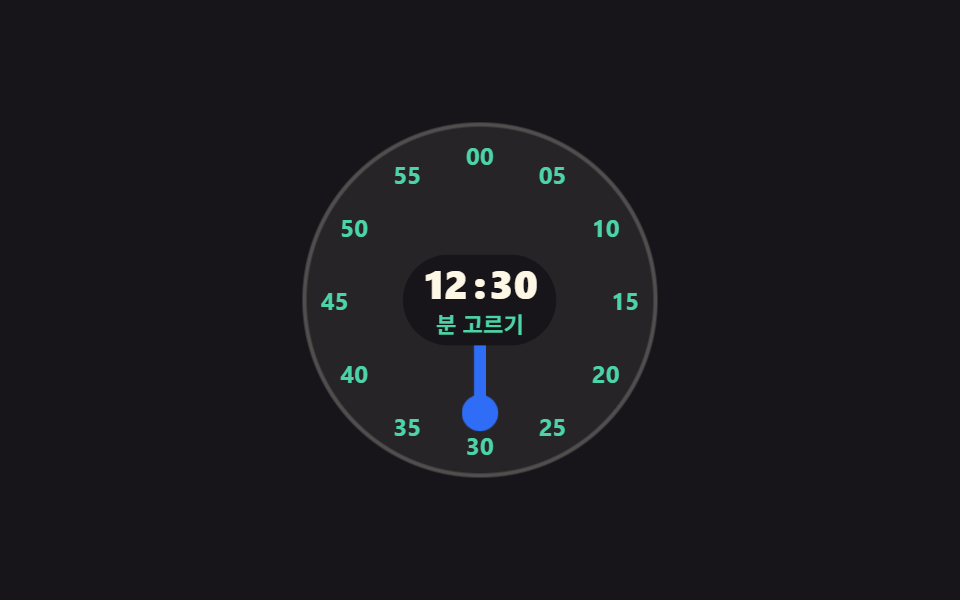
01針を回して選ぶ丸いダイヤル
丸い盤の針をドラッグすると指の角度が時刻に変わり、時を決めると盤が分の目盛りへ一度切り替わって、同じ場所で二段階を終えます。
使いどころアラームや起床時刻のように、おおよその時刻を指でつかむモバイルの設定画面
Math.atan2rotatearia-valuetext

<main class="stage">
  <div class="dl is-demo" data-stage="h">
    <div class="dl__dial" id="dl-dial" role="slider" tabindex="0"
         aria-label="時刻ダイヤル" aria-valuemin="1" aria-valuemax="12" aria-valuenow="9"
         aria-valuetext="午前9時30分" data-fmt="午前{h}時{m}分">
      <span class="dl__ring" data-ring="hour" aria-hidden="true">
        <span class="dl__tick" style="--i:1">1</span><span class="dl__tick" style="--i:2">2</span>
        <span class="dl__tick" style="--i:3">3</span><span class="dl__tick" style="--i:4">4</span>
        <span class="dl__tick" style="--i:5">5</span><span class="dl__tick" style="--i:6">6</span>
        <span class="dl__tick" style="--i:7">7</span><span class="dl__tick" style="--i:8">8</span>
        <span class="dl__tick" style="--i:9">9</span><span class="dl__tick" style="--i:10">10</span>
        <span class="dl__tick" style="--i:11">11</span><span class="dl__tick" style="--i:12">12</span>
      </span>
      <span class="dl__ring" data-ring="min" aria-hidden="true">
        <span class="dl__tick" style="--i:1">05</span><span class="dl__tick" style="--i:2">10</span>
        <span class="dl__tick" style="--i:3">15</span><span class="dl__tick" style="--i:4">20</span>
        <span class="dl__tick" style="--i:5">25</span><span class="dl__tick" style="--i:6">30</span>
        <span class="dl__tick" style="--i:7">35</span><span class="dl__tick" style="--i:8">40</span>
        <span class="dl__tick" style="--i:9">45</span><span class="dl__tick" style="--i:10">50</span>
        <span class="dl__tick" style="--i:11">55</span><span class="dl__tick" style="--i:12">00</span>
      </span>
      <span class="dl__hand" aria-hidden="true"><span class="dl__tip"></span></span>
      <span class="dl__read" aria-hidden="true">
        <span class="dl__val">
          <span class="dl__num">
            <span class="dl__d" data-live="h">09</span>
            <span class="dl__d" data-d="h10">10</span>
            <span class="dl__d" data-d="h11">11</span>
            <span class="dl__d" data-d="h12">12</span>
          </span>
          <span class="dl__sep">:</span>
          <span class="dl__num">
            <span class="dl__d" data-live="m">30</span>
            <span class="dl__d" data-d="m45">45</span>
            <span class="dl__d" data-d="m00">00</span>
          </span>
        </span>
        <span class="dl__step">
          <span class="dl__sv" data-live="s" data-h="時を選択" data-m="分を選択">時を選択</span>
          <span class="dl__sv" data-s="m">分を選択</span>
        </span>
      </span>
    </div>
  </div>
</main>@use "../../../../site/static/demo-tokens" as *;
$duration: $dur-loop;
$easing: $ease-spring;
$color: $subject-blue;
@include stage($stage-ink);
.dl {
box-sizing: border-box;
display: grid;
place-items: center;
font-family: -apple-system, "Segoe UI", "Noto Sans KR", sans-serif;
}
.dl__dial {
--d: clamp(148px, 44vw, 176px);
--r: calc(var(--d) / 2 - 16px);
--ang: 270deg;
position: relative;
box-sizing: border-box;
width: var(--d);
height: var(--d);
border-radius: 50%;
background-color: rgba(255, 247, 230, .07);
box-shadow: inset 0 0 0 2px rgba(255, 247, 230, .2);
touch-action: none;
cursor: grab;
}
.dl__dial:focus-visible { outline: 3px solid $subject-cream; outline-offset: 3px; }
// ── 눈금: rotate 로 자리를 잡고 숫자 자체는 되돌려 세운다 ──
.dl__ring { position: absolute; inset: 0; opacity: 0; }
.dl__tick {
position: absolute;
left: 50%;
top: 50%;
font-size: clamp(10px, 2.8vw, 12px);
line-height: 1;
font-weight: 700;
color: $subject-cream;
transform:
translate(-50%, -50%)
rotate(calc(var(--i) * 30deg))
translateY(calc(var(--r) * -1))
rotate(calc(var(--i) * -30deg));
}
.dl__ring[data-ring="min"] .dl__tick { color: $subject-mint; }
// 정적 표시가 먼저 — 단계는 data-stage 한 곳에만 적힌다
.dl:not(.is-demo)[data-stage="h"] .dl__ring[data-ring="hour"],
.dl:not(.is-demo)[data-stage="m"] .dl__ring[data-ring="min"] { opacity: 1; }
// ── 바늘: 각도 한 개(--ang)가 시각이다 ──
.dl__hand {
position: absolute;
inset: 0;
z-index: 1;
pointer-events: none;
transform: rotate(var(--ang));
}
.dl__hand::after {
content: "";
position: absolute;
left: calc(50% - 3px);
top: 18%;
width: 6px;
height: 26%;
border-radius: $r-pill;
background-color: $color;
}
.dl__tip {
position: absolute;
left: calc(50% - 9px);
top: calc(18% - 9px);
width: 18px;
height: 18px;
border-radius: 50%;
background-color: $color;
}
.dl[data-stage="m"] .dl__hand::after,
.dl[data-stage="m"] .dl__tip { background-color: $subject-mint; }
// ── 가운데 값 칩: 바늘은 이 뒤로 지나간다 ──
.dl__read {
position: absolute;
left: 50%;
top: 50%;
z-index: 2;
display: grid;
justify-items: center;
gap: $sp-1;
padding: $sp-1 $sp-2;
border-radius: $r-pill;
background-color: $stage-ink;
transform: translate(-50%, -50%);
}
.dl__val { display: flex; align-items: center; color: $subject-cream; }
.dl__num {
position: relative;
display: inline-block;
width: 1.35em;
height: 1em;
font-size: clamp(16px, 4.6vw, 20px);
line-height: 1;
font-weight: 800;
}
.dl__d { position: absolute; left: 0; right: 0; top: 0; text-align: center; opacity: 0; }
.dl__d[data-live] { opacity: 1; }
.dl__sep {
font-size: clamp(16px, 4.6vw, 20px);
line-height: 1;
font-weight: 800;
}
.dl__step {
position: relative;
width: 5em;
height: 13px;
font-size: clamp(9px, 2.6vw, 11px);
line-height: 13px;
font-weight: 600;
color: $subject-mint;
}
.dl__sv { position: absolute; left: 0; right: 0; top: 0; text-align: center; white-space: nowrap; opacity: 0; }
.dl__sv[data-live] { opacity: 1; }
// ── 자동 루프: 시를 몇 칸 돌다 → 분 눈금으로 한 프레임 컷 → 분을 돌고 → 90% 안에 복귀 ──
.dl.is-demo .dl__ring,
.dl.is-demo .dl__d,
.dl.is-demo .dl__sv {
animation-duration: $duration;
animation-timing-function: steps(1, end);
animation-iteration-count: infinite;
}
.dl.is-demo .dl__ring[data-ring="hour"] { animation-name: dl-ring-h; }
.dl.is-demo .dl__ring[data-ring="min"] { animation-name: dl-ring-m; }
@keyframes dl-ring-h { 0% { opacity: 1; } 46% { opacity: 0; } 90% { opacity: 1; } 100% { opacity: 1; } }
@keyframes dl-ring-m { 0% { opacity: 0; } 46% { opacity: 1; } 84% { opacity: 0; } 100% { opacity: 0; } }
.dl.is-demo .dl__d[data-live="h"] { animation-name: dl-h09; }
.dl.is-demo .dl__d[data-d="h10"] { animation-name: dl-h10; }
.dl.is-demo .dl__d[data-d="h11"] { animation-name: dl-h11; }
.dl.is-demo .dl__d[data-d="h12"] { animation-name: dl-h12; }
.dl.is-demo .dl__d[data-live="m"] { animation-name: dl-m30; }
.dl.is-demo .dl__d[data-d="m45"] { animation-name: dl-m45; }
.dl.is-demo .dl__d[data-d="m00"] { animation-name: dl-m00; }
@keyframes dl-h09 { 0% { opacity: 1; } 12% { opacity: 0; } 88% { opacity: 1; } 100% { opacity: 1; } }
@keyframes dl-h10 { 0% { opacity: 0; } 12% { opacity: 1; } 24% { opacity: 0; } 100% { opacity: 0; } }
@keyframes dl-h11 { 0% { opacity: 0; } 24% { opacity: 1; } 36% { opacity: 0; } 100% { opacity: 0; } }
@keyframes dl-h12 { 0% { opacity: 0; } 36% { opacity: 1; } 88% { opacity: 0; } 100% { opacity: 0; } }
@keyframes dl-m30 { 0% { opacity: 1; } 58% { opacity: 0; } 88% { opacity: 1; } 100% { opacity: 1; } }
@keyframes dl-m45 { 0% { opacity: 0; } 58% { opacity: 1; } 70% { opacity: 0; } 100% { opacity: 0; } }
@keyframes dl-m00 { 0% { opacity: 0; } 70% { opacity: 1; } 88% { opacity: 0; } 100% { opacity: 0; } }
.dl.is-demo .dl__sv[data-live] { animation-name: dl-step-h; }
.dl.is-demo .dl__sv[data-s="m"] { animation-name: dl-step-m; }
@keyframes dl-step-h { 0% { opacity: 1; } 46% { opacity: 0; } 90% { opacity: 1; } 100% { opacity: 1; } }
@keyframes dl-step-m { 0% { opacity: 0; } 46% { opacity: 1; } 90% { opacity: 0; } 100% { opacity: 0; } }
// 바늘은 눈금에 딱딱 붙는다 — steps 로 한 칸씩
.dl.is-demo .dl__hand {
animation-name: dl-hand;
animation-duration: $duration;
animation-timing-function: steps(1, end);
animation-iteration-count: infinite;
}
@keyframes dl-hand {
0% { transform: rotate(270deg); }
12% { transform: rotate(300deg); }
24% { transform: rotate(330deg); }
36% { transform: rotate(360deg); }
46% { transform: rotate(540deg); }
58% { transform: rotate(630deg); }
70% { transform: rotate(720deg); }
88% { transform: rotate(270deg); }
100% { transform: rotate(270deg); }
}
// 컷 두 번만으로는 움직인 프레임이 안 차니 바늘 끝이 계속 숨쉰다
.dl.is-demo .dl__tip {
animation-name: dl-tip;
animation-duration: 500ms;
animation-timing-function: $easing;
animation-iteration-count: infinite;
}
@keyframes dl-tip {
0% { transform: scale(1); }
50% { transform: scale(1.28); }
100% { transform: scale(1); }
}
// 분 눈금으로 갈리는 순간 판이 한 번 눌렸다 펴진다
.dl.is-demo .dl__dial {
animation-name: dl-pop;
animation-duration: $duration;
animation-timing-function: $easing;
animation-iteration-count: infinite;
}
@keyframes dl-pop {
0% { transform: scale(1); }
44% { transform: scale(1); }
48% { transform: scale(.94); }
54% { transform: scale(1.02); }
60% { transform: scale(1); }
100% { transform: scale(1); }
}
@media (max-width: 340px) {
.dl__read { gap: 0; padding: 0 $sp-1; }
.dl__step { height: 12px; line-height: 12px; }
}
@media (prefers-reduced-motion: reduce) {
.dl.is-demo .dl__ring,
.dl.is-demo .dl__d,
.dl.is-demo .dl__sv,
.dl.is-demo .dl__hand,
.dl.is-demo .dl__tip,
.dl.is-demo .dl__dial { animation: none !important; }
.dl.is-demo .dl__ring[data-ring="hour"] { opacity: 1; }
}html, body {
margin: 0;
overflow: hidden;
}
.stage {
box-sizing: border-box;
min-height: 100vh;
display: grid;
place-items: center;
margin: 0;
background: #17141a;
font-family: -apple-system, "Segoe UI", "Noto Sans KR", sans-serif;
padding: clamp(8px, 4vw, 24px);
}
.dl {
box-sizing: border-box;
display: grid;
place-items: center;
font-family: -apple-system, "Segoe UI", "Noto Sans KR", sans-serif;
}
.dl__dial {
--d: clamp(148px, 44vw, 176px);
--r: calc(var(--d) / 2 - 16px);
--ang: 270deg;
position: relative;
box-sizing: border-box;
width: var(--d);
height: var(--d);
border-radius: 50%;
background-color: rgba(255, 247, 230, 0.07);
box-shadow: inset 0 0 0 2px rgba(255, 247, 230, 0.2);
touch-action: none;
cursor: grab;
}
.dl__dial:focus-visible {
outline: 3px solid #fff7e6;
outline-offset: 3px;
}
.dl__ring {
position: absolute;
inset: 0;
opacity: 0;
}
.dl__tick {
position: absolute;
left: 50%;
top: 50%;
font-size: clamp(10px, 2.8vw, 12px);
line-height: 1;
font-weight: 700;
color: #fff7e6;
transform: translate(-50%, -50%) rotate(calc(var(--i) * 30deg)) translateY(calc(var(--r) * -1)) rotate(calc(var(--i) * -30deg));
}
.dl__ring[data-ring=min] .dl__tick {
color: #4cd4a6;
}
.dl:not(.is-demo)[data-stage=h] .dl__ring[data-ring=hour],
.dl:not(.is-demo)[data-stage=m] .dl__ring[data-ring=min] {
opacity: 1;
}
.dl__hand {
position: absolute;
inset: 0;
z-index: 1;
pointer-events: none;
transform: rotate(var(--ang));
}
.dl__hand::after {
content: "";
position: absolute;
left: calc(50% - 3px);
top: 18%;
width: 6px;
height: 26%;
border-radius: 999px;
background-color: #2f6df6;
}
.dl__tip {
position: absolute;
left: calc(50% - 9px);
top: calc(18% - 9px);
width: 18px;
height: 18px;
border-radius: 50%;
background-color: #2f6df6;
}
.dl[data-stage=m] .dl__hand::after,
.dl[data-stage=m] .dl__tip {
background-color: #4cd4a6;
}
.dl__read {
position: absolute;
left: 50%;
top: 50%;
z-index: 2;
display: grid;
justify-items: center;
gap: 4px;
padding: 4px 8px;
border-radius: 999px;
background-color: #17141a;
transform: translate(-50%, -50%);
}
.dl__val {
display: flex;
align-items: center;
color: #fff7e6;
}
.dl__num {
position: relative;
display: inline-block;
width: 1.35em;
height: 1em;
font-size: clamp(16px, 4.6vw, 20px);
line-height: 1;
font-weight: 800;
}
.dl__d {
position: absolute;
left: 0;
right: 0;
top: 0;
text-align: center;
opacity: 0;
}
.dl__d[data-live] {
opacity: 1;
}
.dl__sep {
font-size: clamp(16px, 4.6vw, 20px);
line-height: 1;
font-weight: 800;
}
.dl__step {
position: relative;
width: 5em;
height: 13px;
font-size: clamp(9px, 2.6vw, 11px);
line-height: 13px;
font-weight: 600;
color: #4cd4a6;
}
.dl__sv {
position: absolute;
left: 0;
right: 0;
top: 0;
text-align: center;
white-space: nowrap;
opacity: 0;
}
.dl__sv[data-live] {
opacity: 1;
}
.dl.is-demo .dl__ring,
.dl.is-demo .dl__d,
.dl.is-demo .dl__sv {
animation-duration: 2s;
animation-timing-function: steps(1, end);
animation-iteration-count: infinite;
}
.dl.is-demo .dl__ring[data-ring=hour] {
animation-name: dl-ring-h;
}
.dl.is-demo .dl__ring[data-ring=min] {
animation-name: dl-ring-m;
}
@keyframes dl-ring-h {
0% {
opacity: 1;
}
46% {
opacity: 0;
}
90% {
opacity: 1;
}
100% {
opacity: 1;
}
}
@keyframes dl-ring-m {
0% {
opacity: 0;
}
46% {
opacity: 1;
}
84% {
opacity: 0;
}
100% {
opacity: 0;
}
}
.dl.is-demo .dl__d[data-live=h] {
animation-name: dl-h09;
}
.dl.is-demo .dl__d[data-d=h10] {
animation-name: dl-h10;
}
.dl.is-demo .dl__d[data-d=h11] {
animation-name: dl-h11;
}
.dl.is-demo .dl__d[data-d=h12] {
animation-name: dl-h12;
}
.dl.is-demo .dl__d[data-live=m] {
animation-name: dl-m30;
}
.dl.is-demo .dl__d[data-d=m45] {
animation-name: dl-m45;
}
.dl.is-demo .dl__d[data-d=m00] {
animation-name: dl-m00;
}
@keyframes dl-h09 {
0% {
opacity: 1;
}
12% {
opacity: 0;
}
88% {
opacity: 1;
}
100% {
opacity: 1;
}
}
@keyframes dl-h10 {
0% {
opacity: 0;
}
12% {
opacity: 1;
}
24% {
opacity: 0;
}
100% {
opacity: 0;
}
}
@keyframes dl-h11 {
0% {
opacity: 0;
}
24% {
opacity: 1;
}
36% {
opacity: 0;
}
100% {
opacity: 0;
}
}
@keyframes dl-h12 {
0% {
opacity: 0;
}
36% {
opacity: 1;
}
88% {
opacity: 0;
}
100% {
opacity: 0;
}
}
@keyframes dl-m30 {
0% {
opacity: 1;
}
58% {
opacity: 0;
}
88% {
opacity: 1;
}
100% {
opacity: 1;
}
}
@keyframes dl-m45 {
0% {
opacity: 0;
}
58% {
opacity: 1;
}
70% {
opacity: 0;
}
100% {
opacity: 0;
}
}
@keyframes dl-m00 {
0% {
opacity: 0;
}
70% {
opacity: 1;
}
88% {
opacity: 0;
}
100% {
opacity: 0;
}
}
.dl.is-demo .dl__sv[data-live] {
animation-name: dl-step-h;
}
.dl.is-demo .dl__sv[data-s=m] {
animation-name: dl-step-m;
}
@keyframes dl-step-h {
0% {
opacity: 1;
}
46% {
opacity: 0;
}
90% {
opacity: 1;
}
100% {
opacity: 1;
}
}
@keyframes dl-step-m {
0% {
opacity: 0;
}
46% {
opacity: 1;
}
90% {
opacity: 0;
}
100% {
opacity: 0;
}
}
.dl.is-demo .dl__hand {
animation-name: dl-hand;
animation-duration: 2s;
animation-timing-function: steps(1, end);
animation-iteration-count: infinite;
}
@keyframes dl-hand {
0% {
transform: rotate(270deg);
}
12% {
transform: rotate(300deg);
}
24% {
transform: rotate(330deg);
}
36% {
transform: rotate(360deg);
}
46% {
transform: rotate(540deg);
}
58% {
transform: rotate(630deg);
}
70% {
transform: rotate(720deg);
}
88% {
transform: rotate(270deg);
}
100% {
transform: rotate(270deg);
}
}
.dl.is-demo .dl__tip {
animation-name: dl-tip;
animation-duration: 500ms;
animation-timing-function: cubic-bezier(0.2, 0.8, 0.2, 1);
animation-iteration-count: infinite;
}
@keyframes dl-tip {
0% {
transform: scale(1);
}
50% {
transform: scale(1.28);
}
100% {
transform: scale(1);
}
}
.dl.is-demo .dl__dial {
animation-name: dl-pop;
animation-duration: 2s;
animation-timing-function: cubic-bezier(0.2, 0.8, 0.2, 1);
animation-iteration-count: infinite;
}
@keyframes dl-pop {
0% {
transform: scale(1);
}
44% {
transform: scale(1);
}
48% {
transform: scale(0.94);
}
54% {
transform: scale(1.02);
}
60% {
transform: scale(1);
}
100% {
transform: scale(1);
}
}
@media (max-width: 340px) {
.dl__read {
gap: 0;
padding: 0 4px;
}
.dl__step {
height: 12px;
line-height: 12px;
}
}
@media (prefers-reduced-motion: reduce) {
.dl.is-demo .dl__ring,
.dl.is-demo .dl__d,
.dl.is-demo .dl__sv,
.dl.is-demo .dl__hand,
.dl.is-demo .dl__tip,
.dl.is-demo .dl__dial {
animation: none !important;
}
.dl.is-demo .dl__ring[data-ring=hour] {
opacity: 1;
}
}// 각도 → 값은 Math.atan2 로 실제 계산한다. 시를 확정하면 같은 바늘이 分 눈금을 맡는다
(function () {
var dl = document.querySelector('.dl'), dial = document.getElementById('dl-dial');
var hv = dl.querySelector('[data-live="h"]'), mv = dl.querySelector('[data-live="m"]');
var sv = dl.querySelector('[data-live="s"]');
var s = { h: 9, m: 30, hour: true };
function pad(n) { return (n < 10 ? '0' : '') + n; }
function paint() {
dl.setAttribute('data-stage', s.hour ? 'h' : 'm');
dial.style.setProperty('--ang', (s.hour ? s.h * 30 : s.m * 6) + 'deg');
hv.textContent = pad(s.h); mv.textContent = pad(s.m);
sv.textContent = s.hour ? sv.dataset.h : sv.dataset.m;
dial.setAttribute('aria-valuemin', s.hour ? '1' : '0');
dial.setAttribute('aria-valuemax', s.hour ? '12' : '55');
dial.setAttribute('aria-valuenow', String(s.hour ? s.h : s.m));
dial.setAttribute('aria-valuetext', dial.dataset.fmt.replace('{h}', s.h).replace('{m}', s.m));
}
function fromPointer(e) {
var r = dial.getBoundingClientRect();
var a = Math.atan2(e.clientX - r.left - r.width / 2, r.top + r.height / 2 - e.clientY) * 180 / Math.PI;
a = (a + 360) % 360;
if (s.hour) { s.h = Math.round(a / 30) || 12; } else { s.m = (Math.round(a / 30) * 5) % 60; }
paint();
}
dial.addEventListener('pointerdown', function (e) {
dl.classList.remove('is-demo'); dial.setPointerCapture(e.pointerId);
dial.dataset.drag = '1'; fromPointer(e); e.preventDefault();
});
dial.addEventListener('pointermove', function (e) { if (dial.dataset.drag) fromPointer(e); });
dial.addEventListener('pointerup', function () {
if (!dial.dataset.drag) return;
delete dial.dataset.drag;
if (s.hour) { s.hour = false; paint(); } // 시가 확정되면 판이 分 눈금으로 갈린다
});
dial.addEventListener('keydown', function (e) {
var k = e.key, d = (k === 'ArrowRight' || k === 'ArrowUp') ? 1 : (k === 'ArrowLeft' || k === 'ArrowDown') ? -1 : 0;
var jump = k === 'Home' || k === 'End', turn = k === 'Enter' || k === ' ';
if (!d && !jump && !turn) return;
e.preventDefault(); dl.classList.remove('is-demo');
if (turn) { s.hour = !s.hour; }
else if (s.hour) { s.h = k === 'Home' ? 1 : k === 'End' ? 12 : ((s.h - 1 + d + 12) % 12) + 1; }
else { s.m = k === 'Home' ? 0 : k === 'End' ? 55 : (s.m + d * 5 + 60) % 60; }
paint();
});
paint();
})();import { useRef, useState } from "react";
import type { CSSProperties } from "react";
import styles from "./AnalogDialPicker.module.scss";
export type AnalogDialPickerProps = {
labels?: { dial: string; hour: string; minute: string; meridiem: string };
duration?: number;
easing?: string;
color?: string;
};
type Vars = CSSProperties & {
"--duration"?: string;
"--easing"?: string;
"--color"?: string;
"--ang"?: string;
};
type TickVars = CSSProperties & { "--i"?: number };
type KeyEvt = { key: string; preventDefault(): void };
type PtrEvt = {
clientX: number;
clientY: number;
pointerId: number;
preventDefault(): void;
currentTarget: {
setPointerCapture(id: number): void;
getBoundingClientRect(): { left: number; top: number; width: number; height: number };
};
};
const HOURS = [1, 2, 3, 4, 5, 6, 7, 8, 9, 10, 11, 12];
const MINS = ["05", "10", "15", "20", "25", "30", "35", "40", "45", "50", "55", "00"];
const pad = (n: number) => (n < 10 ? "0" : "") + n;
export default function AnalogDialPicker({
labels = { dial: "Time dial", hour: "Set hour", minute: "Set min", meridiem: "AM" },
duration = 2000,
easing = "cubic-bezier(.2,.8,.2,1)",
color = "#2f6df6",
}: AnalogDialPickerProps) {
const [demo, setDemo] = useState(true);
const [hour, setHour] = useState(9);
const [minute, setMinute] = useState(30);
const [pickHour, setPickHour] = useState(true);
const dragging = useRef(false);
const vars: Vars = {
"--duration": `${duration}ms`,
"--easing": easing,
"--color": color,
"--ang": `${pickHour ? hour * 30 : minute * 6}deg`,
};
const valueText = `${hour}:${pad(minute)} ${labels.meridiem}`;
// 각도 → 값은 Math.atan2 로 실제 계산한다
function fromPointer(e: PtrEvt) {
const r = e.currentTarget.getBoundingClientRect();
let a = (Math.atan2(e.clientX - r.left - r.width / 2, r.top + r.height / 2 - e.clientY) * 180) / Math.PI;
a = (a + 360) % 360;
if (pickHour) setHour(Math.round(a / 30) || 12);
else setMinute((Math.round(a / 30) * 5) % 60);
}
function onDown(e: PtrEvt) {
setDemo(false);
e.currentTarget.setPointerCapture(e.pointerId);
dragging.current = true;
fromPointer(e);
e.preventDefault();
}
function onUp() {
if (!dragging.current) return;
dragging.current = false;
if (pickHour) setPickHour(false); // 시가 확정되면 판이 분 눈금으로 갈린다
}
function onKey(e: KeyEvt) {
const d = e.key === "ArrowRight" || e.key === "ArrowUp" ? 1 : e.key === "ArrowLeft" || e.key === "ArrowDown" ? -1 : 0;
const jump = e.key === "Home" || e.key === "End";
const turn = e.key === "Enter" || e.key === " ";
if (!d && !jump && !turn) return;
e.preventDefault();
setDemo(false);
if (turn) setPickHour((v) => !v);
else if (pickHour) setHour(e.key === "Home" ? 1 : e.key === "End" ? 12 : ((hour - 1 + d + 12) % 12) + 1);
else setMinute(e.key === "Home" ? 0 : e.key === "End" ? 55 : (minute + d * 5 + 60) % 60);
}
return (
<div className={`${styles.wrap} ${demo ? styles.isDemo : ""}`} data-stage={pickHour ? "h" : "m"} style={vars}>
<div
className={styles.dial}
role="slider"
tabIndex={0}
aria-label={labels.dial}
aria-valuemin={pickHour ? 1 : 0}
aria-valuemax={pickHour ? 12 : 55}
aria-valuenow={pickHour ? hour : minute}
aria-valuetext={valueText}
onPointerDown={onDown}
onPointerMove={(e: PtrEvt) => { if (dragging.current) fromPointer(e); }}
onPointerUp={onUp}
onKeyDown={onKey}
>
<span className={styles.ring} data-ring="hour" aria-hidden="true">
{HOURS.map((n) => (
<span key={n} className={styles.tick} style={{ "--i": n } as TickVars}>{n}</span>
))}
</span>
<span className={styles.ring} data-ring="min" aria-hidden="true">
{MINS.map((t, i) => (
<span key={t} className={styles.tick} style={{ "--i": i + 1 } as TickVars}>{t}</span>
))}
</span>
<span className={styles.hand} aria-hidden="true"><span className={styles.tip} /></span>
<span className={styles.read} aria-hidden="true">
<span className={styles.val}>
<span className={styles.num}>
<span className={styles.d} data-live="h">{pad(hour)}</span>
<span className={styles.d} data-d="h10">10</span>
<span className={styles.d} data-d="h11">11</span>
<span className={styles.d} data-d="h12">12</span>
</span>
<span className={styles.sep}>:</span>
<span className={styles.num}>
<span className={styles.d} data-live="m">{pad(minute)}</span>
<span className={styles.d} data-d="m45">45</span>
<span className={styles.d} data-d="m00">00</span>
</span>
</span>
<span className={styles.step}>
<span className={styles.sv} data-live="s">{pickHour ? labels.hour : labels.minute}</span>
<span className={styles.sv} data-s="m">{labels.minute}</span>
</span>
</span>
</div>
</div>
);
}01 針を回して選ぶ丸いダイヤル — 計測 累積面積 7.094% · 動いたフレーム 23/23GODRICH オリジナル · SCSS と React は zip に同梱 · タイムピッカー ui 9選 — 一点から区間まで
このデモが属する記事
 タイムピッカー ui 9選 — 一点から区間までタイムピッカー ui とは、何時何分という一点だけでなく、いつからいつまでという長さまで画面上で決めるための部品のことです。ダイヤル・ドラム・枠の格子から、区間バー・繰り返しルール・時差表まで、実際に動く9つを置きました。 この記事のデモをすべて見る