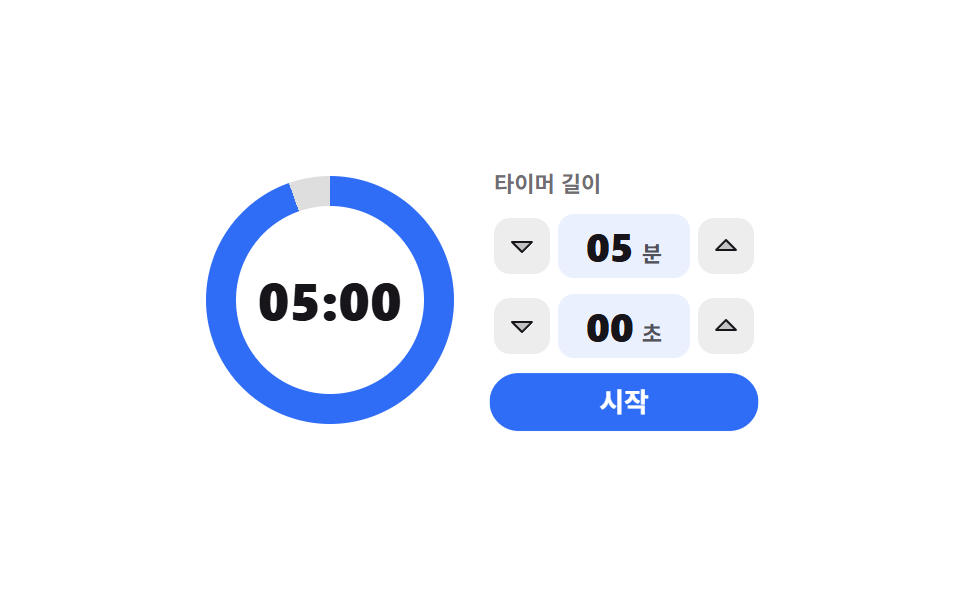
08分と秒を上げると輪が回るカウントダウン
分と秒の欄を矢印キーで上げて時間を作り、開始を押すと周りの輪がその分だけ減ります。輪の角度は登録済みのカスタムプロパティでないと滑らかにつながりません。
使いどころタイマーや休憩時間のように、今からどれだけの長さかを決める画面
@propertyconic-gradientaria-valuenow
<main class="stage">
  <div class="cd is-demo">
    <div class="cd__ring" id="cd-ring">
      <span class="cd__hole">
        <span class="cd__num" id="cd-num">05:00</span>
        <span class="cd__f" data-k="1">05:00</span>
        <span class="cd__f" data-k="2">03:45</span>
        <span class="cd__f" data-k="3">02:30</span>
      </span>
    </div>

    <div class="cd__side">
      <span class="cd__cap">タイマーの長さ</span>

      <div class="cd__field">
        <button class="cd__step" type="button" data-t="min" data-d="-1" aria-label="分を下げる"><svg viewBox="0 0 256 256" width="16" height="16" aria-hidden="true"><g fill="currentColor"><path d="m208 96l-80 80l-80-80Z" opacity=".2"/><path d="M215.39 92.94A8 8 0 0 0 208 88H48a8 8 0 0 0-5.66 13.66l80 80a8 8 0 0 0 11.32 0l80-80a8 8 0 0 0 1.73-8.72M128 164.69L67.31 104h121.38Z"/></g></svg></button>
        <span class="cd__val" role="spinbutton" tabindex="0" id="cd-min" data-t="min" aria-label="分" aria-valuemin="0" aria-valuemax="59" aria-valuenow="5" aria-valuetext="5分"><b class="cd__n" id="cd-min-n">05</b><i class="cd__u">分</i></span>
        <button class="cd__step" type="button" data-t="min" data-d="1" aria-label="分を上げる"><svg viewBox="0 0 256 256" width="16" height="16" aria-hidden="true"><g fill="currentColor"><path d="M208 160H48l80-80Z" opacity=".2"/><path d="m213.66 154.34l-80-80a8 8 0 0 0-11.32 0l-80 80A8 8 0 0 0 48 168h160a8 8 0 0 0 5.66-13.66M67.31 152L128 91.31L188.69 152Z"/></g></svg></button>
      </div>

      <div class="cd__field">
        <button class="cd__step" type="button" data-t="sec" data-d="-1" aria-label="秒を下げる"><svg viewBox="0 0 256 256" width="16" height="16" aria-hidden="true"><g fill="currentColor"><path d="m208 96l-80 80l-80-80Z" opacity=".2"/><path d="M215.39 92.94A8 8 0 0 0 208 88H48a8 8 0 0 0-5.66 13.66l80 80a8 8 0 0 0 11.32 0l80-80a8 8 0 0 0 1.73-8.72M128 164.69L67.31 104h121.38Z"/></g></svg></button>
        <span class="cd__val" role="spinbutton" tabindex="0" id="cd-sec" data-t="sec" aria-label="秒" aria-valuemin="0" aria-valuemax="55" aria-valuenow="0" aria-valuetext="0秒"><b class="cd__n" id="cd-sec-n">00</b><i class="cd__u">秒</i></span>
        <button class="cd__step" type="button" data-t="sec" data-d="1" aria-label="秒を上げる"><svg viewBox="0 0 256 256" width="16" height="16" aria-hidden="true"><g fill="currentColor"><path d="M208 160H48l80-80Z" opacity=".2"/><path d="m213.66 154.34l-80-80a8 8 0 0 0-11.32 0l-80 80A8 8 0 0 0 48 168h160a8 8 0 0 0 5.66-13.66M67.31 152L128 91.31L188.69 152Z"/></g></svg></button>
      </div>

      <button class="cd__go" type="button" id="cd-go">開始</button>
    </div>

    <span class="cd__tpl" data-k="min" hidden>{n}分</span>
    <span class="cd__tpl" data-k="sec" hidden>{n}秒</span>
  </div>
</main>@use "../../../../site/static/demo-tokens" as *;
$duration: $dur-base;
$easing: $ease-spring;
$color: $subject-blue;
@include stage($stage-paper);
// 등록하지 않은 커스텀 속성은 보간되지 않는다 — 각도를 애니메이션하려면 이 선언이 먼저다
@property --ring-angle {
syntax: "<angle>";
inherits: false;
initial-value: 360deg;
}
.cd {
box-sizing: border-box;
display: flex;
align-items: center;
gap: $sp-5;
color: $subject-ink;
font-family: -apple-system, "Segoe UI", "Noto Sans KR", sans-serif;
}
// ── 둘레 링: conic-gradient 한 장 + 가운데 구멍 ──────────
.cd__ring {
position: relative;
flex: 0 0 auto;
display: grid;
place-items: center;
width: 124px;
height: 124px;
border-radius: 50%;
background: conic-gradient($color 0deg var(--ring-angle), rgba($subject-ink, .14) var(--ring-angle) 360deg);
}
.cd__hole {
display: grid;
place-items: center;
width: 94px;
height: 94px;
border-radius: 50%;
background-color: $stage-paper;
}
.cd__num,
.cd__f {
grid-area: 1 / 1;
font-size: 26px;
line-height: 30px;
font-weight: 800;
letter-spacing: .01em;
font-variant-numeric: tabular-nums;
}
// 루프 전용 숫자 석 장 — 사람이 조작하면 위의 실제 값이 다시 보인다
.cd__f { display: none; }
.cd.is-demo .cd__f { display: block; }
.cd.is-demo .cd__num { display: none; }
// ── 분·초 칸 ────────────────────────────────────────────
.cd__side {
display: flex;
flex-direction: column;
gap: $sp-2;
}
.cd__cap {
font-size: 11px;
line-height: 14px;
font-weight: 600;
color: rgba($subject-ink, .62);
}
.cd__field {
display: flex;
align-items: center;
gap: $sp-1;
}
.cd__step {
box-sizing: border-box;
display: inline-flex;
align-items: center;
justify-content: center;
margin: 0;
padding: 0;
width: 28px;
height: 28px;
border: 0;
border-radius: $r-sm;
background-color: rgba($subject-ink, .08);
color: $subject-ink;
cursor: pointer;
}
.cd__step:focus-visible,
.cd__val:focus-visible,
.cd__go:focus-visible { outline: 3px solid $color; outline-offset: 2px; }
.cd__step svg { display: block; }
.cd__val {
box-sizing: border-box;
display: inline-flex;
align-items: baseline;
justify-content: center;
gap: $sp-1;
padding: $sp-1 $sp-2;
min-width: 66px;
border-radius: $r-sm;
background-color: rgba($color, .1);
cursor: ns-resize;
}
.cd__n {
font-size: 20px;
line-height: 24px;
font-weight: 800;
font-variant-numeric: tabular-nums;
}
.cd__u {
font-size: 11px;
line-height: 14px;
font-weight: 700;
font-style: normal;
color: rgba($subject-ink, .72);
}
.cd__go {
box-sizing: border-box;
margin: 0;
padding: $sp-1 $sp-4;
border: 0;
border-radius: $r-pill;
background-color: $color;
color: $stage-paper;
font-family: inherit;
font-size: 13px;
line-height: 20px;
font-weight: 700;
cursor: pointer;
}
.cd__tpl { display: none; }
// ── 자동 루프: 링은 이어서 줄고, 숫자는 한 프레임에 컷 ──
// 다 닳아서 비는 프레임이 없도록 72deg 에서 멈추고, 되감기는 여러 프레임으로 나눠 돌린다
.cd.is-demo .cd__ring {
animation-name: cd-drain;
animation-duration: $dur-loop;
animation-timing-function: linear;
animation-iteration-count: infinite;
animation-fill-mode: backwards;
}
@keyframes cd-drain {
0% { --ring-angle: 360deg; }
62% { --ring-angle: 72deg; }
86% { --ring-angle: 360deg; }
100% { --ring-angle: 360deg; }
}
.cd.is-demo .cd__f {
animation-duration: $dur-loop;
animation-timing-function: steps(1, end);
animation-iteration-count: infinite;
animation-fill-mode: backwards;
}
.cd.is-demo .cd__f[data-k="1"] { animation-name: cd-n1; }
.cd.is-demo .cd__f[data-k="2"] { animation-name: cd-n2; }
.cd.is-demo .cd__f[data-k="3"] { animation-name: cd-n3; }
@keyframes cd-n1 {
0% { opacity: 1; }
21% { opacity: 0; }
62% { opacity: 1; }
100% { opacity: 1; }
}
@keyframes cd-n2 {
0% { opacity: 0; }
21% { opacity: 1; }
41% { opacity: 0; }
100% { opacity: 0; }
}
@keyframes cd-n3 {
0% { opacity: 0; }
41% { opacity: 1; }
62% { opacity: 0; }
100% { opacity: 0; }
}
// 시작 버튼이 한 번 눌렸다 펴지며 루프의 출발을 알린다
.cd.is-demo .cd__go {
animation-name: cd-press;
animation-duration: $dur-loop;
animation-timing-function: $easing;
animation-iteration-count: infinite;
animation-fill-mode: backwards;
}
@keyframes cd-press {
0% { transform: scale(.92); }
8% { transform: scale(1.04); }
16% { transform: scale(1); }
100% { transform: scale(1); }
}
@media (max-width: 340px) {
.cd { gap: $sp-3; }
.cd__ring { width: 100px; height: 100px; }
.cd__hole { width: 76px; height: 76px; }
.cd__num,
.cd__f { font-size: 20px; line-height: 24px; }
.cd__val { min-width: 56px; padding: 0 $sp-1; gap: 0; }
.cd__n { font-size: 17px; line-height: 22px; }
.cd__step { width: 24px; height: 24px; }
.cd__go { padding: $sp-1 $sp-3; font-size: 12px; line-height: 18px; }
}
@media (prefers-reduced-motion: reduce) {
.cd.is-demo .cd__ring,
.cd.is-demo .cd__f,
.cd.is-demo .cd__go { animation: none !important; }
.cd.is-demo .cd__f[data-k="2"],
.cd.is-demo .cd__f[data-k="3"] { display: none; }
}html, body {
margin: 0;
overflow: hidden;
}
.stage {
box-sizing: border-box;
min-height: 100vh;
display: grid;
place-items: center;
margin: 0;
background: #ffffff;
font-family: -apple-system, "Segoe UI", "Noto Sans KR", sans-serif;
padding: clamp(8px, 4vw, 24px);
}
@property --ring-angle {
syntax: "<angle>";
inherits: false;
initial-value: 360deg;
}
.cd {
box-sizing: border-box;
display: flex;
align-items: center;
gap: 20px;
color: #17141a;
font-family: -apple-system, "Segoe UI", "Noto Sans KR", sans-serif;
}
.cd__ring {
position: relative;
flex: 0 0 auto;
display: grid;
place-items: center;
width: 124px;
height: 124px;
border-radius: 50%;
background: conic-gradient(#2f6df6 0deg var(--ring-angle), rgba(23, 20, 26, 0.14) var(--ring-angle) 360deg);
}
.cd__hole {
display: grid;
place-items: center;
width: 94px;
height: 94px;
border-radius: 50%;
background-color: #ffffff;
}
.cd__num,
.cd__f {
grid-area: 1/1;
font-size: 26px;
line-height: 30px;
font-weight: 800;
letter-spacing: 0.01em;
font-variant-numeric: tabular-nums;
}
.cd__f {
display: none;
}
.cd.is-demo .cd__f {
display: block;
}
.cd.is-demo .cd__num {
display: none;
}
.cd__side {
display: flex;
flex-direction: column;
gap: 8px;
}
.cd__cap {
font-size: 11px;
line-height: 14px;
font-weight: 600;
color: rgba(23, 20, 26, 0.62);
}
.cd__field {
display: flex;
align-items: center;
gap: 4px;
}
.cd__step {
box-sizing: border-box;
display: inline-flex;
align-items: center;
justify-content: center;
margin: 0;
padding: 0;
width: 28px;
height: 28px;
border: 0;
border-radius: 8px;
background-color: rgba(23, 20, 26, 0.08);
color: #17141a;
cursor: pointer;
}
.cd__step:focus-visible,
.cd__val:focus-visible,
.cd__go:focus-visible {
outline: 3px solid #2f6df6;
outline-offset: 2px;
}
.cd__step svg {
display: block;
}
.cd__val {
box-sizing: border-box;
display: inline-flex;
align-items: baseline;
justify-content: center;
gap: 4px;
padding: 4px 8px;
min-width: 66px;
border-radius: 8px;
background-color: rgba(47, 109, 246, 0.1);
cursor: ns-resize;
}
.cd__n {
font-size: 20px;
line-height: 24px;
font-weight: 800;
font-variant-numeric: tabular-nums;
}
.cd__u {
font-size: 11px;
line-height: 14px;
font-weight: 700;
font-style: normal;
color: rgba(23, 20, 26, 0.72);
}
.cd__go {
box-sizing: border-box;
margin: 0;
padding: 4px 16px;
border: 0;
border-radius: 999px;
background-color: #2f6df6;
color: #ffffff;
font-family: inherit;
font-size: 13px;
line-height: 20px;
font-weight: 700;
cursor: pointer;
}
.cd__tpl {
display: none;
}
.cd.is-demo .cd__ring {
animation-name: cd-drain;
animation-duration: 2s;
animation-timing-function: linear;
animation-iteration-count: infinite;
animation-fill-mode: backwards;
}
@keyframes cd-drain {
0% {
--ring-angle: 360deg;
}
62% {
--ring-angle: 72deg;
}
86% {
--ring-angle: 360deg;
}
100% {
--ring-angle: 360deg;
}
}
.cd.is-demo .cd__f {
animation-duration: 2s;
animation-timing-function: steps(1, end);
animation-iteration-count: infinite;
animation-fill-mode: backwards;
}
.cd.is-demo .cd__f[data-k="1"] {
animation-name: cd-n1;
}
.cd.is-demo .cd__f[data-k="2"] {
animation-name: cd-n2;
}
.cd.is-demo .cd__f[data-k="3"] {
animation-name: cd-n3;
}
@keyframes cd-n1 {
0% {
opacity: 1;
}
21% {
opacity: 0;
}
62% {
opacity: 1;
}
100% {
opacity: 1;
}
}
@keyframes cd-n2 {
0% {
opacity: 0;
}
21% {
opacity: 1;
}
41% {
opacity: 0;
}
100% {
opacity: 0;
}
}
@keyframes cd-n3 {
0% {
opacity: 0;
}
41% {
opacity: 1;
}
62% {
opacity: 0;
}
100% {
opacity: 0;
}
}
.cd.is-demo .cd__go {
animation-name: cd-press;
animation-duration: 2s;
animation-timing-function: cubic-bezier(0.2, 0.8, 0.2, 1);
animation-iteration-count: infinite;
animation-fill-mode: backwards;
}
@keyframes cd-press {
0% {
transform: scale(0.92);
}
8% {
transform: scale(1.04);
}
16% {
transform: scale(1);
}
100% {
transform: scale(1);
}
}
@media (max-width: 340px) {
.cd {
gap: 12px;
}
.cd__ring {
width: 100px;
height: 100px;
}
.cd__hole {
width: 76px;
height: 76px;
}
.cd__num,
.cd__f {
font-size: 20px;
line-height: 24px;
}
.cd__val {
min-width: 56px;
padding: 0 4px;
gap: 0;
}
.cd__n {
font-size: 17px;
line-height: 22px;
}
.cd__step {
width: 24px;
height: 24px;
}
.cd__go {
padding: 4px 12px;
font-size: 12px;
line-height: 18px;
}
}
@media (prefers-reduced-motion: reduce) {
.cd.is-demo .cd__ring,
.cd.is-demo .cd__f,
.cd.is-demo .cd__go {
animation: none !important;
}
.cd.is-demo .cd__f[data-k="2"],
.cd.is-demo .cd__f[data-k="3"] {
display: none;
}
}// 실제 동작: 分·秒 칸은 진짜 spinbutton 이라 ↑↓ 로 값이 오르내리고(分 1, 秒 5), 시작을 누르면
// 남은 비율이 --ring-angle 로 나간다. 이 커스텀 속성은 @property 로 등록돼 있어야 각도가 보간된다
var root = document.querySelector('.cd');
var ringEl = document.getElementById('cd-ring');
var num = document.getElementById('cd-num');
var V = { min: 5, sec: 0 }, STEP = { min: 1, sec: 5 }, MAX = { min: 59, sec: 55 };
var timer = null;
function pad(n) { return (n < 10 ? '0' : '') + n; }
function tpl(k, n) { return root.querySelector('.cd__tpl[data-k="' + k + '"]').textContent.replace('{n}', String(n)); }
function show(s) { num.textContent = pad(Math.floor(s / 60)) + ':' + pad(s % 60); }
function ring(f) { ringEl.style.setProperty('--ring-angle', (360 * f).toFixed(1) + 'deg'); }
function stop() { if (timer) { clearInterval(timer); timer = null; } }
function paint() {
['min', 'sec'].forEach(function (k) {
var el = document.getElementById('cd-' + k);
el.setAttribute('aria-valuenow', String(V[k]));
el.setAttribute('aria-valuetext', tpl(k, V[k])); // 읽히는 값은 숫자가 아니라 사람 말이다
document.getElementById('cd-' + k + '-n').textContent = pad(V[k]);
});
show(V.min * 60 + V.sec);
ring(1);
}
function bump(k, d) {
root.classList.remove('is-demo'); stop();
V[k] = Math.max(0, Math.min(MAX[k], V[k] + d * STEP[k]));
paint();
}
function start() {
root.classList.remove('is-demo'); stop();
var total = V.min * 60 + V.sec, left = total;
if (!total) return;
timer = setInterval(function () {
left -= 1; show(left); ring(left / total);
if (left <= 0) stop();
}, 1000);
}
root.addEventListener('click', function (e) {
var b = e.target.closest('.cd__step');
if (b) { bump(b.getAttribute('data-t'), Number(b.getAttribute('data-d'))); return; }
if (e.target.closest('.cd__go')) start();
});
root.addEventListener('keydown', function (e) {
var s = e.target.closest('[role="spinbutton"]');
if (!s) return;
var k = s.getAttribute('data-t');
var d = e.key === 'ArrowUp' ? 1 : e.key === 'ArrowDown' ? -1 : 0;
if (d) { e.preventDefault(); bump(k, d); return; }
if (e.key === 'Home' || e.key === 'End') {
e.preventDefault(); root.classList.remove('is-demo'); stop();
V[k] = e.key === 'Home' ? 0 : MAX[k]; paint();
}
});import { useRef, useState } from "react";
import type { CSSProperties } from "react";
import styles from "./CountdownRingSetter.module.scss";
type KeyEvt = { key: string; preventDefault(): void };
type Box<T> = { current: T };
type Vars = CSSProperties & { "--duration"?: string; "--easing"?: string; "--color"?: string };
type RingVars = CSSProperties & { "--ring-angle"?: string };
type Unit = "min" | "sec";
export type CountdownRingSetterProps = {
minutes?: number;
seconds?: number;
labels?: {
cap: string;
start: string;
min: string;
sec: string;
minUp: string;
minDown: string;
secUp: string;
secDown: string;
minUnit: string;
secUnit: string;
};
/** {n} 자리에 값이 들어가는 aria-valuetext 틀 */
valueText?: { min: string; sec: string };
/** 격자 미리보기(.isDemo) 루프에서만 보이는 숫자 석 장 */
demoFrames?: [string, string, string];
duration?: number;
easing?: string;
color?: string;
};
const STEP: { min: number; sec: number } = { min: 1, sec: 5 };
const MAX: { min: number; sec: number } = { min: 59, sec: 55 };
const CARET_DOWN = (
<g fill="currentColor">
<path d="m208 96l-80 80l-80-80Z" opacity=".2" />
<path d="M215.39 92.94A8 8 0 0 0 208 88H48a8 8 0 0 0-5.66 13.66l80 80a8 8 0 0 0 11.32 0l80-80a8 8 0 0 0 1.73-8.72M128 164.69L67.31 104h121.38Z" />
</g>
);
const CARET_UP = (
<g fill="currentColor">
<path d="M208 160H48l80-80Z" opacity=".2" />
<path d="m213.66 154.34l-80-80a8 8 0 0 0-11.32 0l-80 80A8 8 0 0 0 48 168h160a8 8 0 0 0 5.66-13.66M67.31 152L128 91.31L188.69 152Z" />
</g>
);
function pad(n: number) {
return (n < 10 ? "0" : "") + n;
}
export default function CountdownRingSetter({
minutes = 5,
seconds = 0,
labels = {
cap: "Timer length",
start: "Start",
min: "minutes",
sec: "seconds",
minUp: "minutes up",
minDown: "minutes down",
secUp: "seconds up",
secDown: "seconds down",
minUnit: "m",
secUnit: "s",
},
valueText = { min: "{n} minutes", sec: "{n} seconds" },
demoFrames = ["05:00", "03:45", "02:30"],
duration = 300,
easing = "cubic-bezier(.2,.8,.2,1)",
color = "#2f6df6",
}: CountdownRingSetterProps) {
const [demo, setDemo] = useState(true);
const [v, setV] = useState({ min: minutes, sec: seconds });
const [left, setLeft] = useState<number | null>(null);
const timer = useRef<number | null>(null) as Box<number | null>;
const total = v.min * 60 + v.sec;
const shown = left === null ? total : left;
// 남은 비율이 그대로 각도가 된다 — @property 로 등록된 값이라야 이 각도가 보간된다
const angle = left === null || total === 0 ? 360 : (left / total) * 360;
const vars: Vars = { "--duration": `${duration}ms`, "--easing": easing, "--color": color };
const ringVars: RingVars = { "--ring-angle": `${angle.toFixed(1)}deg` };
function stop() {
if (timer.current !== null) {
window.clearInterval(timer.current);
timer.current = null;
}
}
function set(k: Unit, n: number) {
setDemo(false);
stop();
setLeft(null);
const c = Math.max(0, Math.min(MAX[k], n));
setV((p) => (k === "min" ? { min: c, sec: p.sec } : { min: p.min, sec: c }));
}
function bump(k: Unit, d: number) {
set(k, v[k] + d * STEP[k]);
}
function start() {
setDemo(false);
stop();
if (!total) return;
setLeft(total);
timer.current = window.setInterval(() => {
setLeft((p) => {
const n = (p === null ? total : p) - 1;
if (n <= 0) stop();
return n < 0 ? 0 : n;
});
}, 1000);
}
function onKey(e: KeyEvt, k: Unit) {
const d = e.key === "ArrowUp" ? 1 : e.key === "ArrowDown" ? -1 : 0;
if (d) {
e.preventDefault();
bump(k, d);
return;
}
if (e.key === "Home" || e.key === "End") {
e.preventDefault();
set(k, e.key === "Home" ? 0 : MAX[k]);
}
}
function field(k: Unit, lab: string, unit: string, up: string, down: string) {
return (
<div className={styles.field}>
<button className={styles.step} type="button" aria-label={down} onClick={() => bump(k, -1)}>
<svg viewBox="0 0 256 256" width="16" height="16" aria-hidden="true">{CARET_DOWN}</svg>
</button>
<span
className={styles.val}
role="spinbutton"
tabIndex={0}
aria-label={lab}
aria-valuemin={0}
aria-valuemax={MAX[k]}
aria-valuenow={v[k]}
aria-valuetext={valueText[k].replace("{n}", String(v[k]))}
onKeyDown={(e: KeyEvt) => onKey(e, k)}
>
<b className={styles.n}>{pad(v[k])}</b>
<i className={styles.u}>{unit}</i>
</span>
<button className={styles.step} type="button" aria-label={up} onClick={() => bump(k, 1)}>
<svg viewBox="0 0 256 256" width="16" height="16" aria-hidden="true">{CARET_UP}</svg>
</button>
</div>
);
}
return (
<div className={`${styles.cd} ${demo ? styles.isDemo : ""}`} style={vars}>
<div className={styles.ring} style={ringVars}>
<span className={styles.hole}>
<span className={styles.num}>{pad(Math.floor(shown / 60))}:{pad(shown % 60)}</span>
{demoFrames.map((t, i) => (
<span className={styles.f} data-k={i + 1} key={t}>{t}</span>
))}
</span>
</div>
<div className={styles.side}>
<span className={styles.cap}>{labels.cap}</span>
{field("min", labels.min, labels.minUnit, labels.minUp, labels.minDown)}
{field("sec", labels.sec, labels.secUnit, labels.secUp, labels.secDown)}
<button className={styles.go} type="button" onClick={start}>{labels.start}</button>
</div>
</div>
);
}08 分と秒を上げると輪が回るカウントダウン — 計測 累積面積 4.353% · 動いたフレーム 21/23GODRICH オリジナル · SCSS と React は zip に同梱 · タイムピッカー ui 9選 — 一点から区間まで
このデモが属する記事
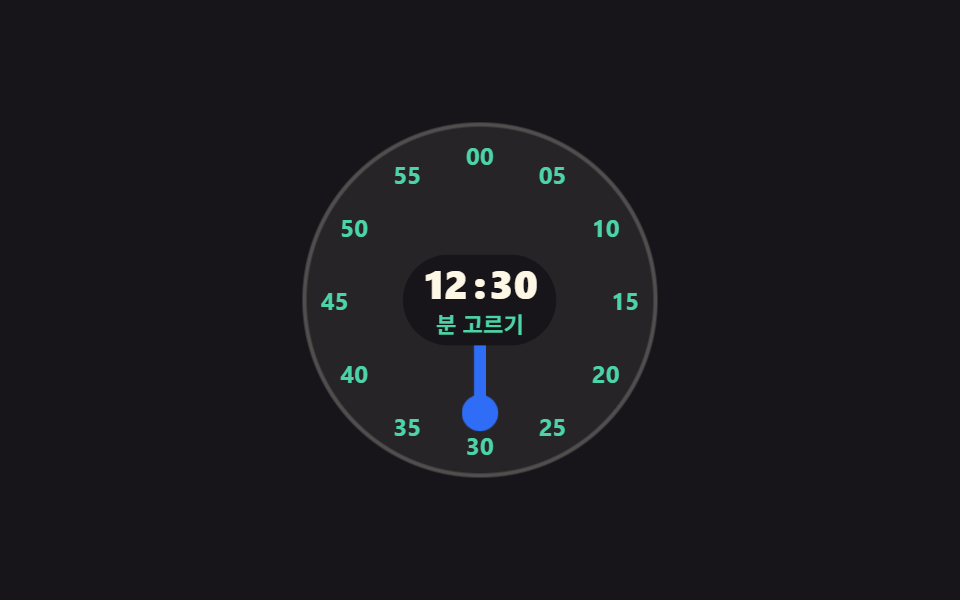 タイムピッカー ui 9選 — 一点から区間までタイムピッカー ui とは、何時何分という一点だけでなく、いつからいつまでという長さまで画面上で決めるための部品のことです。ダイヤル・ドラム・枠の格子から、区間バー・繰り返しルール・時差表まで、実際に動く9つを置きました。 この記事のデモをすべて見る