02種類ごとのアイコンと色
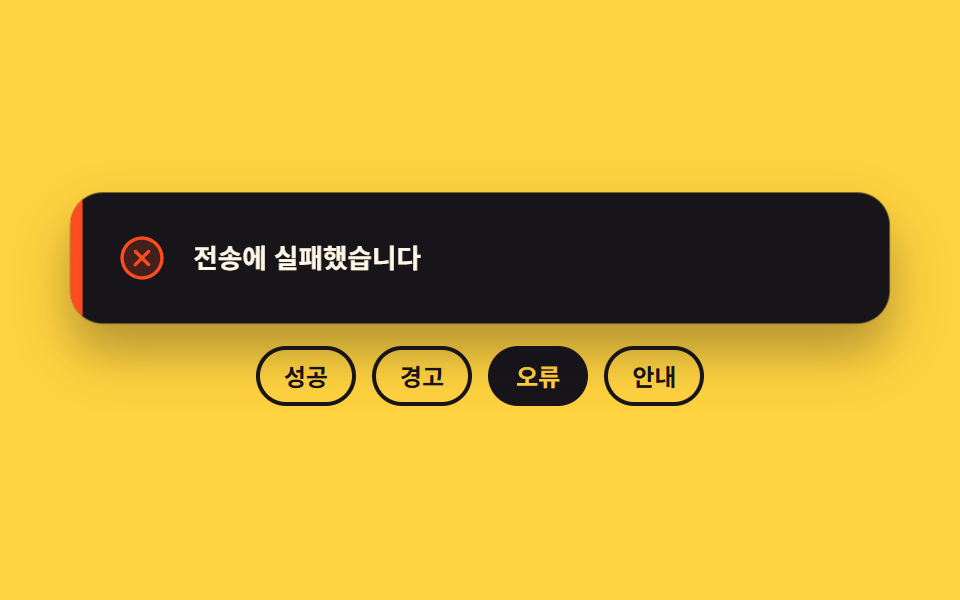
成功・警告・エラー・情報の四種類がそれぞれ違うアイコンと縁の色を持ち、種類が切り替わる瞬間は一フレームで切り替えるので二つが重なりません。
使いどころ一つの部品で四つの結果を出すフォームやアップロード画面
data-kindsteps(1, end)currentColor
<main class="stage">
  <div class="tk is-demo">
    <div class="tk__box">
      <div class="tk__card" id="tk-card" data-kind="ok" role="status" aria-live="polite">
        <span class="tk__bar" aria-hidden="true"></span>
        <span class="tk__face" data-kind="ok">
          <span class="tk__ic" aria-hidden="true"><svg viewBox="0 0 256 256" width="26" height="26"><g fill="currentColor"><path d="M224 128a96 96 0 1 1-96-96a96 96 0 0 1 96 96" opacity=".2"/><path d="M173.66 98.34a8 8 0 0 1 0 11.32l-56 56a8 8 0 0 1-11.32 0l-24-24a8 8 0 0 1 11.32-11.32L112 148.69l50.34-50.35a8 8 0 0 1 11.32 0M232 128A104 104 0 1 1 128 24a104.11 104.11 0 0 1 104 104m-16 0a88 88 0 1 0-88 88a88.1 88.1 0 0 0 88-88"/></g></svg></span>
          <span class="tk__msg">保存が終わりました</span>
        </span>
        <span class="tk__face" data-kind="warn">
          <span class="tk__ic" aria-hidden="true"><svg viewBox="0 0 256 256" width="26" height="26"><g fill="currentColor"><path d="M215.46 216H40.54c-12.62 0-20.54-13.21-14.41-23.91l87.46-151.87c6.3-11 22.52-11 28.82 0l87.46 151.87c6.13 10.7-1.79 23.91-14.41 23.91" opacity=".2"/><path d="M236.8 188.09L149.35 36.22a24.76 24.76 0 0 0-42.7 0L19.2 188.09a23.51 23.51 0 0 0 0 23.72A24.35 24.35 0 0 0 40.55 224h174.9a24.35 24.35 0 0 0 21.33-12.19a23.51 23.51 0 0 0 .02-23.72m-13.87 15.71a8.5 8.5 0 0 1-7.48 4.2H40.55a8.5 8.5 0 0 1-7.48-4.2a7.59 7.59 0 0 1 0-7.72l87.45-151.87a8.75 8.75 0 0 1 15 0l87.45 151.87a7.59 7.59 0 0 1-.04 7.72M120 144v-40a8 8 0 0 1 16 0v40a8 8 0 0 1-16 0m20 36a12 12 0 1 1-12-12a12 12 0 0 1 12 12"/></g></svg></span>
          <span class="tk__msg">容量がほぼ埋まりました</span>
        </span>
        <span class="tk__face" data-kind="bad">
          <span class="tk__ic" aria-hidden="true"><svg viewBox="0 0 256 256" width="26" height="26"><g fill="currentColor"><path d="M224 128a96 96 0 1 1-96-96a96 96 0 0 1 96 96" opacity=".2"/><path d="M165.66 101.66L139.31 128l26.35 26.34a8 8 0 0 1-11.32 11.32L128 139.31l-26.34 26.35a8 8 0 0 1-11.32-11.32L116.69 128l-26.35-26.34a8 8 0 0 1 11.32-11.32L128 116.69l26.34-26.35a8 8 0 0 1 11.32 11.32M232 128A104 104 0 1 1 128 24a104.11 104.11 0 0 1 104 104m-16 0a88 88 0 1 0-88 88a88.1 88.1 0 0 0 88-88"/></g></svg></span>
          <span class="tk__msg">送信に失敗しました</span>
        </span>
        <span class="tk__face" data-kind="info">
          <span class="tk__ic" aria-hidden="true"><svg viewBox="0 0 256 256" width="26" height="26"><g fill="currentColor"><path d="M224 128a96 96 0 1 1-96-96a96 96 0 0 1 96 96" opacity=".2"/><path d="M144 176a8 8 0 0 1-8 8a16 16 0 0 1-16-16v-40a8 8 0 0 1 0-16a16 16 0 0 1 16 16v40a8 8 0 0 1 8 8m88-48A104 104 0 1 1 128 24a104.11 104.11 0 0 1 104 104m-16 0a88 88 0 1 0-88 88a88.1 88.1 0 0 0 88-88m-92-32a12 12 0 1 0-12-12a12 12 0 0 0 12 12"/></g></svg></span>
          <span class="tk__msg">新しいバージョンが出ました</span>
        </span>
      </div>
    </div>
    <div class="tk__row" role="group" aria-label="通知の種類を選ぶ">
      <button class="tk__pick" type="button" data-pick="ok" aria-pressed="true">成功</button>
      <button class="tk__pick" type="button" data-pick="warn" aria-pressed="false">警告</button>
      <button class="tk__pick" type="button" data-pick="bad" aria-pressed="false">エラー</button>
      <button class="tk__pick" type="button" data-pick="info" aria-pressed="false">お知らせ</button>
    </div>
  </div>
</main>@use "../../../../site/static/demo-tokens" as *;
$duration: $dur-quick;
$easing: $ease-pop;
$color: $subject-mint;
@include stage($stage-yellow);
.tk {
box-sizing: border-box;
width: min(400px, 88vw);
display: flex;
flex-direction: column;
gap: $sp-3;
font-family: -apple-system, "Segoe UI", "Noto Sans KR", sans-serif;
color: $subject-ink;
}
.tk__box {
display: flex;
justify-content: center;
height: 64px;
}
.tk__card {
position: relative;
box-sizing: border-box;
width: 100%;
height: 100%;
overflow: hidden;
border-radius: $r-card;
background: $subject-ink;
box-shadow: $shadow-raised;
}
// 왼쪽 색 띠 — 종류를 문구보다 먼저 알려 준다
.tk__bar {
position: absolute;
left: 0;
top: 0;
bottom: 0;
width: 6px;
background-color: $color;
}
.tk__face {
position: absolute;
left: 6px;
right: 0;
top: 0;
bottom: 0;
display: flex;
align-items: center;
gap: $sp-3;
padding: 0 $sp-4;
opacity: 0;
}
.tk__face[data-kind="ok"] { color: $subject-mint; }
.tk__face[data-kind="warn"] { color: $stage-yellow; }
.tk__face[data-kind="bad"] { color: $stage-orange; }
.tk__face[data-kind="info"] { color: $subject-sky; }
.tk__ic { display: inline-flex; flex: 0 0 auto; }
.tk__ic svg { display: block; }
.tk__msg {
flex: 1 1 auto;
min-width: 0;
font-size: 13px;
line-height: 20px;
font-weight: 700;
color: $subject-cream;
white-space: nowrap;
overflow: hidden;
text-overflow: ellipsis;
}
// 사람이 고른 종류만 보이고, 색 띠도 그 얼굴의 색을 그대로 쓴다
.tk:not(.is-demo) .tk__card[data-kind="ok"] .tk__face[data-kind="ok"],
.tk:not(.is-demo) .tk__card[data-kind="warn"] .tk__face[data-kind="warn"],
.tk:not(.is-demo) .tk__card[data-kind="bad"] .tk__face[data-kind="bad"],
.tk:not(.is-demo) .tk__card[data-kind="info"] .tk__face[data-kind="info"] { opacity: 1; }
.tk:not(.is-demo) .tk__card[data-kind="ok"] .tk__bar { background-color: $subject-mint; }
.tk:not(.is-demo) .tk__card[data-kind="warn"] .tk__bar { background-color: $stage-yellow; }
.tk:not(.is-demo) .tk__card[data-kind="bad"] .tk__bar { background-color: $stage-orange; }
.tk:not(.is-demo) .tk__card[data-kind="info"] .tk__bar { background-color: $subject-sky; }
.tk__card.is-pop {
animation-name: tk-pop;
animation-duration: $duration;
animation-timing-function: $easing;
animation-iteration-count: 1;
}
.tk__row {
display: flex;
gap: $sp-2;
justify-content: center;
}
.tk__pick {
box-sizing: border-box;
margin: 0;
padding: $sp-1 $sp-3;
border: 2px solid $subject-ink;
border-radius: $r-pill;
background: transparent;
color: $subject-ink;
font-family: inherit;
font-size: 12px;
line-height: 18px;
font-weight: 700;
cursor: pointer;
}
.tk__pick[aria-pressed="true"] { background: $subject-ink; color: $stage-yellow; }
.tk__pick:focus-visible { outline: 2px solid $subject-ink; outline-offset: 2px; }
// ── 자동 루프: 네 종류를 0.5초마다 한 프레임에 끊어 바꾼다. 크로스페이드로 섞으면 두 얼굴이 겹친 유령 프레임이 남는다 ──
.tk.is-demo .tk__face {
animation-name: tk-face;
animation-duration: $dur-loop;
animation-timing-function: steps(1, end);
animation-iteration-count: infinite;
}
.tk.is-demo .tk__face[data-kind="ok"] { animation-delay: 0s; }
.tk.is-demo .tk__face[data-kind="warn"] { animation-delay: -1.5s; }
.tk.is-demo .tk__face[data-kind="bad"] { animation-delay: -1s; }
.tk.is-demo .tk__face[data-kind="info"] { animation-delay: -0.5s; }
@keyframes tk-face {
0% { opacity: 1; }
25% { opacity: 0; }
100% { opacity: 0; }
}
.tk.is-demo .tk__bar {
animation-name: tk-bar;
animation-duration: $dur-loop;
animation-timing-function: steps(1, end);
animation-iteration-count: infinite;
}
@keyframes tk-bar {
0% { background-color: $subject-mint; }
25% { background-color: $stage-yellow; }
50% { background-color: $stage-orange; }
75% { background-color: $subject-sky; }
100% { background-color: $subject-mint; }
}
// 아래 고르기 버튼도 같은 시계로 따라간다 — 카드만 바뀌면 무엇이 눌린 상태인지 어긋나 보인다
.tk.is-demo .tk__pick {
animation-name: tk-pick;
animation-duration: $dur-loop;
animation-timing-function: steps(1, end);
animation-iteration-count: infinite;
}
.tk.is-demo .tk__pick[data-pick="ok"] { animation-delay: 0s; }
.tk.is-demo .tk__pick[data-pick="warn"] { animation-delay: -1.5s; }
.tk.is-demo .tk__pick[data-pick="bad"] { animation-delay: -1s; }
.tk.is-demo .tk__pick[data-pick="info"] { animation-delay: -0.5s; }
@keyframes tk-pick {
0% { background-color: $subject-ink; color: $stage-yellow; }
25% { background-color: rgba(255, 255, 255, 0); color: $subject-ink; }
100% { background-color: rgba(255, 255, 255, 0); color: $subject-ink; }
}
// 종류가 바뀌는 순간마다 카드가 한 번 눌렸다 펴진다 — 0.5초 주기라 2초 루프 안에 네 번 돈다
.tk.is-demo .tk__card {
animation-name: tk-pop;
animation-duration: 500ms;
animation-timing-function: $easing;
animation-iteration-count: infinite;
}
@keyframes tk-pop {
0% { transform: scale(.94); }
34% { transform: scale(1.02); }
60% { transform: scale(1); }
100% { transform: scale(1); }
}
@media (max-width: 340px) {
.tk { gap: $sp-2; }
.tk__box { height: 52px; }
.tk__face { gap: $sp-2; padding: 0 $sp-3; }
.tk__msg { font-size: 11px; line-height: 16px; }
.tk__pick { padding: $sp-1 $sp-2; font-size: 11px; line-height: 16px; }
}
@media (prefers-reduced-motion: reduce) {
.tk.is-demo .tk__face,
.tk.is-demo .tk__bar,
.tk.is-demo .tk__card,
.tk.is-demo .tk__pick,
.tk__card.is-pop { animation: none !important; }
.tk.is-demo .tk__face[data-kind="ok"] { opacity: 1; }
}html, body {
margin: 0;
overflow: hidden;
}
.stage {
box-sizing: border-box;
min-height: 100vh;
display: grid;
place-items: center;
margin: 0;
background: #ffd23f;
font-family: -apple-system, "Segoe UI", "Noto Sans KR", sans-serif;
padding: clamp(8px, 4vw, 24px);
}
.tk {
box-sizing: border-box;
width: min(400px, 88vw);
display: flex;
flex-direction: column;
gap: 12px;
font-family: -apple-system, "Segoe UI", "Noto Sans KR", sans-serif;
color: #17141a;
}
.tk__box {
display: flex;
justify-content: center;
height: 64px;
}
.tk__card {
position: relative;
box-sizing: border-box;
width: 100%;
height: 100%;
overflow: hidden;
border-radius: 16px;
background: #17141a;
box-shadow: 0 14px 24px rgba(23, 20, 26, 0.32);
}
.tk__bar {
position: absolute;
left: 0;
top: 0;
bottom: 0;
width: 6px;
background-color: #4cd4a6;
}
.tk__face {
position: absolute;
left: 6px;
right: 0;
top: 0;
bottom: 0;
display: flex;
align-items: center;
gap: 12px;
padding: 0 16px;
opacity: 0;
}
.tk__face[data-kind=ok] {
color: #4cd4a6;
}
.tk__face[data-kind=warn] {
color: #ffd23f;
}
.tk__face[data-kind=bad] {
color: #ff4d1f;
}
.tk__face[data-kind=info] {
color: #6ec8ff;
}
.tk__ic {
display: inline-flex;
flex: 0 0 auto;
}
.tk__ic svg {
display: block;
}
.tk__msg {
flex: 1 1 auto;
min-width: 0;
font-size: 13px;
line-height: 20px;
font-weight: 700;
color: #fff7e6;
white-space: nowrap;
overflow: hidden;
text-overflow: ellipsis;
}
.tk:not(.is-demo) .tk__card[data-kind=ok] .tk__face[data-kind=ok],
.tk:not(.is-demo) .tk__card[data-kind=warn] .tk__face[data-kind=warn],
.tk:not(.is-demo) .tk__card[data-kind=bad] .tk__face[data-kind=bad],
.tk:not(.is-demo) .tk__card[data-kind=info] .tk__face[data-kind=info] {
opacity: 1;
}
.tk:not(.is-demo) .tk__card[data-kind=ok] .tk__bar {
background-color: #4cd4a6;
}
.tk:not(.is-demo) .tk__card[data-kind=warn] .tk__bar {
background-color: #ffd23f;
}
.tk:not(.is-demo) .tk__card[data-kind=bad] .tk__bar {
background-color: #ff4d1f;
}
.tk:not(.is-demo) .tk__card[data-kind=info] .tk__bar {
background-color: #6ec8ff;
}
.tk__card.is-pop {
animation-name: tk-pop;
animation-duration: 220ms;
animation-timing-function: cubic-bezier(0.2, 1.4, 0.4, 1);
animation-iteration-count: 1;
}
.tk__row {
display: flex;
gap: 8px;
justify-content: center;
}
.tk__pick {
box-sizing: border-box;
margin: 0;
padding: 4px 12px;
border: 2px solid #17141a;
border-radius: 999px;
background: transparent;
color: #17141a;
font-family: inherit;
font-size: 12px;
line-height: 18px;
font-weight: 700;
cursor: pointer;
}
.tk__pick[aria-pressed=true] {
background: #17141a;
color: #ffd23f;
}
.tk__pick:focus-visible {
outline: 2px solid #17141a;
outline-offset: 2px;
}
.tk.is-demo .tk__face {
animation-name: tk-face;
animation-duration: 2s;
animation-timing-function: steps(1, end);
animation-iteration-count: infinite;
}
.tk.is-demo .tk__face[data-kind=ok] {
animation-delay: 0s;
}
.tk.is-demo .tk__face[data-kind=warn] {
animation-delay: -1.5s;
}
.tk.is-demo .tk__face[data-kind=bad] {
animation-delay: -1s;
}
.tk.is-demo .tk__face[data-kind=info] {
animation-delay: -0.5s;
}
@keyframes tk-face {
0% {
opacity: 1;
}
25% {
opacity: 0;
}
100% {
opacity: 0;
}
}
.tk.is-demo .tk__bar {
animation-name: tk-bar;
animation-duration: 2s;
animation-timing-function: steps(1, end);
animation-iteration-count: infinite;
}
@keyframes tk-bar {
0% {
background-color: #4cd4a6;
}
25% {
background-color: #ffd23f;
}
50% {
background-color: #ff4d1f;
}
75% {
background-color: #6ec8ff;
}
100% {
background-color: #4cd4a6;
}
}
.tk.is-demo .tk__pick {
animation-name: tk-pick;
animation-duration: 2s;
animation-timing-function: steps(1, end);
animation-iteration-count: infinite;
}
.tk.is-demo .tk__pick[data-pick=ok] {
animation-delay: 0s;
}
.tk.is-demo .tk__pick[data-pick=warn] {
animation-delay: -1.5s;
}
.tk.is-demo .tk__pick[data-pick=bad] {
animation-delay: -1s;
}
.tk.is-demo .tk__pick[data-pick=info] {
animation-delay: -0.5s;
}
@keyframes tk-pick {
0% {
background-color: #17141a;
color: #ffd23f;
}
25% {
background-color: rgba(255, 255, 255, 0);
color: #17141a;
}
100% {
background-color: rgba(255, 255, 255, 0);
color: #17141a;
}
}
.tk.is-demo .tk__card {
animation-name: tk-pop;
animation-duration: 500ms;
animation-timing-function: cubic-bezier(0.2, 1.4, 0.4, 1);
animation-iteration-count: infinite;
}
@keyframes tk-pop {
0% {
transform: scale(0.94);
}
34% {
transform: scale(1.02);
}
60% {
transform: scale(1);
}
100% {
transform: scale(1);
}
}
@media (max-width: 340px) {
.tk {
gap: 8px;
}
.tk__box {
height: 52px;
}
.tk__face {
gap: 8px;
padding: 0 12px;
}
.tk__msg {
font-size: 11px;
line-height: 16px;
}
.tk__pick {
padding: 4px 8px;
font-size: 11px;
line-height: 16px;
}
}
@media (prefers-reduced-motion: reduce) {
.tk.is-demo .tk__face,
.tk.is-demo .tk__bar,
.tk.is-demo .tk__card,
.tk.is-demo .tk__pick,
.tk__card.is-pop {
animation: none !important;
}
.tk.is-demo .tk__face[data-kind=ok] {
opacity: 1;
}
}// 실제 동작: 버튼을 누르면 카드의 data-kind 가 바뀌고, 그 값에 걸린 CSS 가 아이콘·색·문구를 한꺼번에 갈아 끼운다
var root = document.querySelector('.tk');
var card = document.getElementById('tk-card');
var picks = [].slice.call(document.querySelectorAll('.tk__pick'));
function pick(kind) {
root.classList.remove('is-demo');
card.setAttribute('data-kind', kind);
picks.forEach(function (b) { b.setAttribute('aria-pressed', String(b.getAttribute('data-pick') === kind)); });
card.classList.remove('is-pop');
void card.offsetWidth; // 같은 종류를 다시 눌러도 팝이 한 번 더 돌게 리플로를 강제한다
card.classList.add('is-pop');
}
picks.forEach(function (b) {
b.addEventListener('click', function () { pick(b.getAttribute('data-pick')); });
});import { useState } from "react";
import type { CSSProperties } from "react";
import styles from "./ToastKinds.module.scss";
export type ToastKind = "ok" | "warn" | "bad" | "info";
export type ToastKindsProps = {
messages?: Record<ToastKind, string>;
picks?: Record<ToastKind, string>;
groupLabel?: string;
duration?: number;
easing?: string;
};
type Vars = CSSProperties & { "--duration"?: string; "--easing"?: string };
const ORDER: ToastKind[] = ["ok", "warn", "bad", "info"];
const ICON: Record<ToastKind, any> = {
ok: <g fill="currentColor"><path d="M224 128a96 96 0 1 1-96-96a96 96 0 0 1 96 96" opacity=".2" /><path d="M173.66 98.34a8 8 0 0 1 0 11.32l-56 56a8 8 0 0 1-11.32 0l-24-24a8 8 0 0 1 11.32-11.32L112 148.69l50.34-50.35a8 8 0 0 1 11.32 0M232 128A104 104 0 1 1 128 24a104.11 104.11 0 0 1 104 104m-16 0a88 88 0 1 0-88 88a88.1 88.1 0 0 0 88-88" /></g>,
warn: <g fill="currentColor"><path d="M215.46 216H40.54c-12.62 0-20.54-13.21-14.41-23.91l87.46-151.87c6.3-11 22.52-11 28.82 0l87.46 151.87c6.13 10.7-1.79 23.91-14.41 23.91" opacity=".2" /><path d="M236.8 188.09L149.35 36.22a24.76 24.76 0 0 0-42.7 0L19.2 188.09a23.51 23.51 0 0 0 0 23.72A24.35 24.35 0 0 0 40.55 224h174.9a24.35 24.35 0 0 0 21.33-12.19a23.51 23.51 0 0 0 .02-23.72m-13.87 15.71a8.5 8.5 0 0 1-7.48 4.2H40.55a8.5 8.5 0 0 1-7.48-4.2a7.59 7.59 0 0 1 0-7.72l87.45-151.87a8.75 8.75 0 0 1 15 0l87.45 151.87a7.59 7.59 0 0 1-.04 7.72M120 144v-40a8 8 0 0 1 16 0v40a8 8 0 0 1-16 0m20 36a12 12 0 1 1-12-12a12 12 0 0 1 12 12" /></g>,
bad: <g fill="currentColor"><path d="M224 128a96 96 0 1 1-96-96a96 96 0 0 1 96 96" opacity=".2" /><path d="M165.66 101.66L139.31 128l26.35 26.34a8 8 0 0 1-11.32 11.32L128 139.31l-26.34 26.35a8 8 0 0 1-11.32-11.32L116.69 128l-26.35-26.34a8 8 0 0 1 11.32-11.32L128 116.69l26.34-26.35a8 8 0 0 1 11.32 11.32M232 128A104 104 0 1 1 128 24a104.11 104.11 0 0 1 104 104m-16 0a88 88 0 1 0-88 88a88.1 88.1 0 0 0 88-88" /></g>,
info: <g fill="currentColor"><path d="M224 128a96 96 0 1 1-96-96a96 96 0 0 1 96 96" opacity=".2" /><path d="M144 176a8 8 0 0 1-8 8a16 16 0 0 1-16-16v-40a8 8 0 0 1 0-16a16 16 0 0 1 16 16v40a8 8 0 0 1 8 8m88-48A104 104 0 1 1 128 24a104.11 104.11 0 0 1 104 104m-16 0a88 88 0 1 0-88 88a88.1 88.1 0 0 0 88-88m-92-32a12 12 0 1 0-12-12a12 12 0 0 0 12 12" /></g>,
};
export default function ToastKinds({
messages = { ok: "Saved", warn: "Storage almost full", bad: "Sending failed", info: "A new version is out" },
picks = { ok: "Success", warn: "Warning", bad: "Error", info: "Info" },
groupLabel = "Pick a toast kind",
duration = 220,
easing = "cubic-bezier(.2,1.4,.4,1)",
}: ToastKindsProps) {
const [demo, setDemo] = useState(true);
const [kind, setKind] = useState<ToastKind>("ok");
const [pop, setPop] = useState(0);
const vars: Vars = { "--duration": `${duration}ms`, "--easing": easing };
function pick(k: ToastKind) {
setDemo(false);
setKind(k);
setPop((v) => v + 1); // key 를 바꿔 같은 종류를 다시 눌러도 팝이 한 번 더 돈다
}
return (
<div className={`${styles.tk} ${demo ? styles.isDemo : ""}`} style={vars}>
<div className={styles.box}>
<div key={pop} className={`${styles.card} ${demo ? "" : styles.isPop}`} data-kind={kind} role="status" aria-live="polite">
<span className={styles.bar} data-kind={kind} aria-hidden="true" />
{ORDER.map((k) => (
<span key={k} className={styles.face} data-kind={k} data-on={!demo && k === kind ? "1" : "0"}>
<span className={styles.ic} aria-hidden="true">
<svg viewBox="0 0 256 256" width="26" height="26">{ICON[k]}</svg>
</span>
<span className={styles.msg}>{messages[k]}</span>
</span>
))}
</div>
</div>
<div className={styles.row} role="group" aria-label={groupLabel}>
{ORDER.map((k) => (
<button key={k} className={styles.pick} type="button" data-pick={k} aria-pressed={!demo && k === kind} onClick={() => pick(k)}>
{picks[k]}
</button>
))}
</div>
</div>
);
}02 種類ごとのアイコンと色 — 計測 累積面積 10.784% · 動いたフレーム 19/23GODRICH オリジナル · SCSS と React は zip に同梱 · トースト通知 UI 9選 — 積み上がるスタック実装
このデモが属する記事
 トースト通知 UI 9選 — 積み上がるスタック実装トースト通知 ui とは、画面の隅に一瞬だけ出て消える知らせをどう積み、どう片づけるかを決める仕組みのことです。9つともライブラリなしでバニラ JS と SCSS だけで動き、最初の1つは新しい通知が前のカードを押し上げる動きだけを扱います この記事のデモをすべて見る