04スワイプで飛ばす
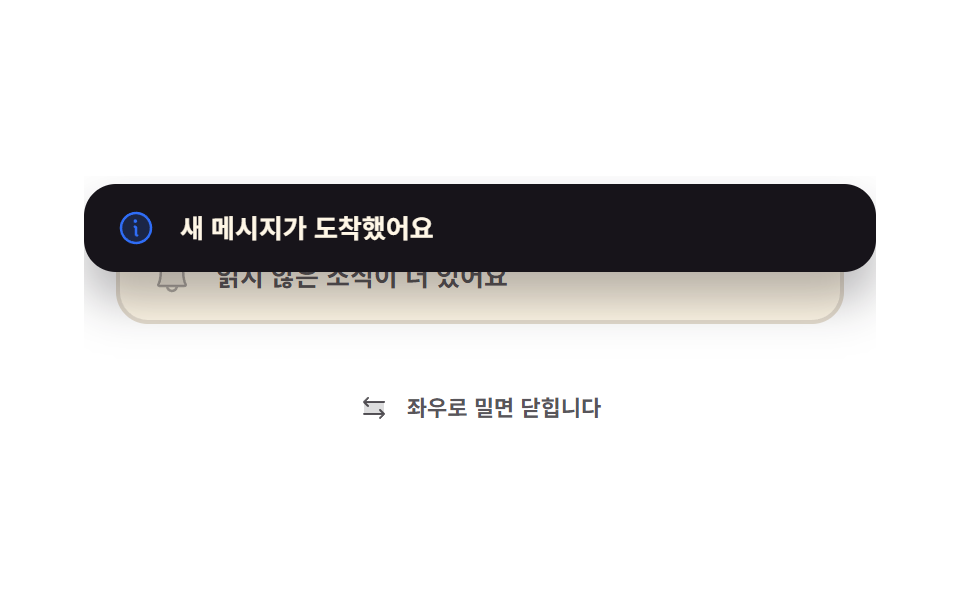
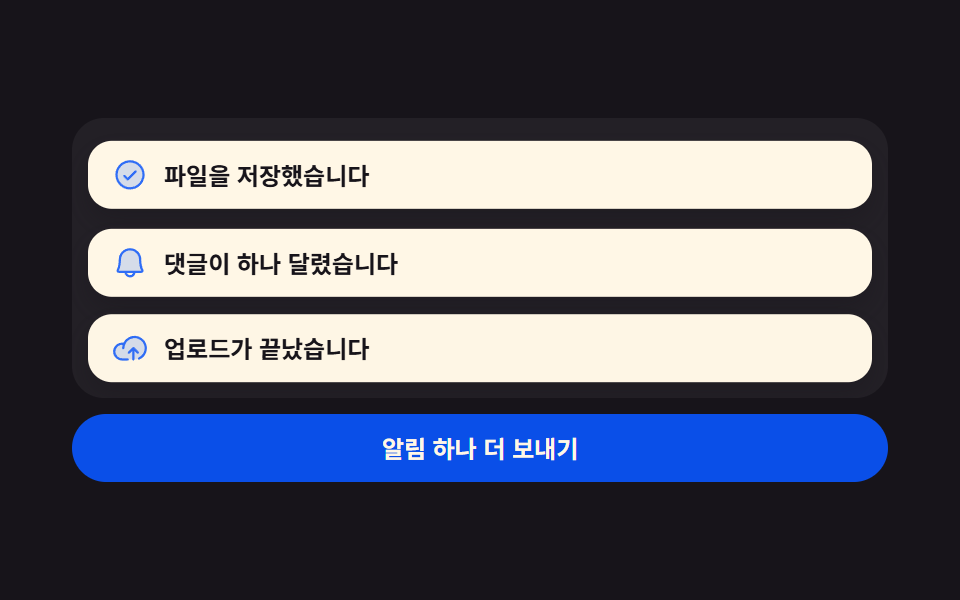
カードを押したまま横に引くと指にそのまま追従し、72px を超えて離すとその方向へ飛んで閉じ、足りなければ元の位置に戻ります。
使いどころ指で払って消すモバイルの通知トレイ
setPointerCapturepointermovetranslateX(var(--dx))
<main class="stage">
  <div class="sw is-demo">
    <div class="sw__box">
      <article class="sw__under" aria-hidden="true">
        <span class="sw__ic"><svg viewBox="0 0 256 256" width="20" height="20"><g fill="currentColor"><path d="M208 192H48a8 8 0 0 1-6.88-12C47.71 168.6 56 139.81 56 104a72 72 0 0 1 144 0c0 35.82 8.3 64.6 14.9 76a8 8 0 0 1-6.9 12" opacity=".2"/><path d="M221.8 175.94c-5.55-9.56-13.8-36.61-13.8-71.94a80 80 0 1 0-160 0c0 35.34-8.26 62.38-13.81 71.94A16 16 0 0 0 48 200h40.81a40 40 0 0 0 78.38 0H208a16 16 0 0 0 13.8-24.06M128 216a24 24 0 0 1-22.62-16h45.24A24 24 0 0 1 128 216m-80-32c7.7-13.24 16-43.92 16-80a64 64 0 1 1 128 0c0 36.05 8.28 66.73 16 80Z"/></g></svg></span>
        <span class="sw__msg">未読のお知らせがまだあります</span>
      </article>
      <article class="sw__card" id="sw-card" tabindex="0" role="region" aria-label="スワイプで閉じる通知">
        <span class="sw__ic"><svg viewBox="0 0 256 256" width="20" height="20"><g fill="currentColor"><path d="M224 128a96 96 0 1 1-96-96a96 96 0 0 1 96 96" opacity=".2"/><path d="M144 176a8 8 0 0 1-8 8a16 16 0 0 1-16-16v-40a8 8 0 0 1 0-16a16 16 0 0 1 16 16v40a8 8 0 0 1 8 8m88-48A104 104 0 1 1 128 24a104.11 104.11 0 0 1 104 104m-16 0a88 88 0 1 0-88 88a88.1 88.1 0 0 0 88-88m-92-32a12 12 0 1 0-12-12a12 12 0 0 0 12 12"/></g></svg></span>
        <span class="sw__msg">新しいメッセージが届きました</span>
      </article>
    </div>
    <p class="sw__hint">
      <span class="sw__hic" aria-hidden="true"><svg viewBox="0 0 256 256" width="16" height="16"><g fill="currentColor"><path d="M208 80v96H48V80Z" opacity=".2"/><path d="m213.66 181.66l-32 32a8 8 0 0 1-11.32-11.32L188.69 184H48a8 8 0 0 1 0-16h140.69l-18.35-18.34a8 8 0 0 1 11.32-11.32l32 32a8 8 0 0 1 0 11.32m-139.32-64a8 8 0 0 0 11.32-11.32L67.31 88H208a8 8 0 0 0 0-16H67.31l18.35-18.34a8 8 0 0 0-11.32-11.32l-32 32a8 8 0 0 0 0 11.32Z"/></g></svg></span>
      左右にドラッグすると閉じます
    </p>
  </div>
</main>
@use "../../../../site/static/demo-tokens" as *;
$duration: $dur-base;
$easing: $ease-spring;
$color: $subject-blue;
@include stage($stage-paper);
.sw {
box-sizing: border-box;
width: min(396px, 88vw);
display: flex;
flex-direction: column;
gap: $sp-3;
font-family: -apple-system, "Segoe UI", "Noto Sans KR", sans-serif;
color: $subject-ink;
}
// 날아간 카드는 이 상자 밖으로 나가므로 여기서 잘려 화면을 넓히지 않는다
.sw__box {
position: relative;
overflow: hidden;
height: 96px;
}
.sw__card,
.sw__under {
position: absolute;
box-sizing: border-box;
display: flex;
align-items: center;
gap: $sp-3;
margin: 0;
padding: $sp-3 $sp-4;
border-radius: $r-card;
}
.sw__under {
left: 16px;
right: 16px;
top: 26px;
background: $subject-cream;
border: 2px solid rgba(23, 20, 26, .12);
color: rgba($stage-ink, .72);
}
.sw__card {
left: 0;
right: 0;
top: 4px;
--dx: 0px;
background: $subject-ink;
color: $subject-cream;
box-shadow: $shadow-raised;
cursor: grab;
touch-action: pan-y;
transform: translateX(var(--dx));
transition: transform $duration $easing;
}
.sw__card.is-drag { cursor: grabbing; transition: none; }
.sw__card.is-out { transition: transform $dur-enter $ease-out; }
.sw__card:focus-visible { outline: 2px solid $color; outline-offset: 2px; }
.sw__ic { display: inline-flex; flex: 0 0 auto; color: $color; }
.sw__ic svg { display: block; }
.sw__under .sw__ic { color: rgba(23, 20, 26, .34); }
.sw__msg {
flex: 1 1 auto;
min-width: 0;
font-size: 13px;
line-height: 20px;
font-weight: 700;
white-space: nowrap;
overflow: hidden;
text-overflow: ellipsis;
}
.sw__hint {
display: flex;
align-items: center;
justify-content: center;
gap: $sp-2;
margin: 0;
font-size: 11px;
line-height: 16px;
font-weight: 700;
color: rgba($stage-ink, .72);
}
.sw__hic { display: inline-flex; }
.sw__hic svg { display: block; }
// ── 자동 루프: 살짝 밀었다 되돌아오고(문턱 미만), 한 번 더 세게 밀어 날린 뒤 제자리에서 다시 뜬다 ──
// 카드가 빠진 사이에도 아래 카드가 남아 있어 어느 프레임도 빈 화면이 아니다
.sw.is-demo .sw__card {
transition: none;
animation-name: sw-loop;
animation-duration: $dur-loop;
animation-timing-function: $easing;
animation-iteration-count: infinite;
}
@keyframes sw-loop {
0%, 10% { opacity: 1; transform: translateX(0) rotate(0deg); }
22% { opacity: 1; transform: translateX(48px) rotate(1.4deg); }
34% { opacity: 1; transform: translateX(0) rotate(0deg); }
46% { opacity: 1; transform: translateX(-78px) rotate(-2.2deg); }
62% { opacity: 1; transform: translateX(-420px) rotate(-6deg); }
70.5% { opacity: 0; transform: translateX(-420px) rotate(-6deg); }
71.5% { opacity: 0; transform: translateX(0) rotate(0deg); }
73% { opacity: 1; transform: translateX(0) rotate(0deg); }
90%, 100% { opacity: 1; transform: translateX(0) rotate(0deg); }
}
@media (max-width: 340px) {
.sw { gap: $sp-2; }
.sw__box { height: 84px; }
.sw__card,
.sw__under { padding: $sp-2 $sp-3; gap: $sp-2; }
.sw__under { top: 22px; }
.sw__msg { font-size: 11px; line-height: 16px; }
.sw__hint { font-size: 10px; line-height: 14px; }
}
@media (prefers-reduced-motion: reduce) {
.sw.is-demo .sw__card { animation: none !important; opacity: 1; transform: translateX(0); }
.sw__card { transition: none; }
}html, body {
margin: 0;
overflow: hidden;
}
.stage {
box-sizing: border-box;
min-height: 100vh;
display: grid;
place-items: center;
margin: 0;
background: #ffffff;
font-family: -apple-system, "Segoe UI", "Noto Sans KR", sans-serif;
padding: clamp(8px, 4vw, 24px);
}
.sw {
box-sizing: border-box;
width: min(396px, 88vw);
display: flex;
flex-direction: column;
gap: 12px;
font-family: -apple-system, "Segoe UI", "Noto Sans KR", sans-serif;
color: #17141a;
}
.sw__box {
position: relative;
overflow: hidden;
height: 96px;
}
.sw__card,
.sw__under {
position: absolute;
box-sizing: border-box;
display: flex;
align-items: center;
gap: 12px;
margin: 0;
padding: 12px 16px;
border-radius: 16px;
}
.sw__under {
left: 16px;
right: 16px;
top: 26px;
background: #fff7e6;
border: 2px solid rgba(23, 20, 26, 0.12);
color: rgba(23, 20, 26, 0.72);
}
.sw__card {
left: 0;
right: 0;
top: 4px;
--dx: 0px;
background: #17141a;
color: #fff7e6;
box-shadow: 0 14px 24px rgba(23, 20, 26, 0.32);
cursor: grab;
touch-action: pan-y;
transform: translateX(var(--dx));
transition: transform 300ms cubic-bezier(0.2, 0.8, 0.2, 1);
}
.sw__card.is-drag {
cursor: grabbing;
transition: none;
}
.sw__card.is-out {
transition: transform 600ms ease-out;
}
.sw__card:focus-visible {
outline: 2px solid #2f6df6;
outline-offset: 2px;
}
.sw__ic {
display: inline-flex;
flex: 0 0 auto;
color: #2f6df6;
}
.sw__ic svg {
display: block;
}
.sw__under .sw__ic {
color: rgba(23, 20, 26, 0.34);
}
.sw__msg {
flex: 1 1 auto;
min-width: 0;
font-size: 13px;
line-height: 20px;
font-weight: 700;
white-space: nowrap;
overflow: hidden;
text-overflow: ellipsis;
}
.sw__hint {
display: flex;
align-items: center;
justify-content: center;
gap: 8px;
margin: 0;
font-size: 11px;
line-height: 16px;
font-weight: 700;
color: rgba(23, 20, 26, 0.72);
}
.sw__hic {
display: inline-flex;
}
.sw__hic svg {
display: block;
}
.sw.is-demo .sw__card {
transition: none;
animation-name: sw-loop;
animation-duration: 2s;
animation-timing-function: cubic-bezier(0.2, 0.8, 0.2, 1);
animation-iteration-count: infinite;
}
@keyframes sw-loop {
0%, 10% {
opacity: 1;
transform: translateX(0) rotate(0deg);
}
22% {
opacity: 1;
transform: translateX(48px) rotate(1.4deg);
}
34% {
opacity: 1;
transform: translateX(0) rotate(0deg);
}
46% {
opacity: 1;
transform: translateX(-78px) rotate(-2.2deg);
}
62% {
opacity: 1;
transform: translateX(-420px) rotate(-6deg);
}
70.5% {
opacity: 0;
transform: translateX(-420px) rotate(-6deg);
}
71.5% {
opacity: 0;
transform: translateX(0) rotate(0deg);
}
73% {
opacity: 1;
transform: translateX(0) rotate(0deg);
}
90%, 100% {
opacity: 1;
transform: translateX(0) rotate(0deg);
}
}
@media (max-width: 340px) {
.sw {
gap: 8px;
}
.sw__box {
height: 84px;
}
.sw__card,
.sw__under {
padding: 8px 12px;
gap: 8px;
}
.sw__under {
top: 22px;
}
.sw__msg {
font-size: 11px;
line-height: 16px;
}
.sw__hint {
font-size: 10px;
line-height: 14px;
}
}
@media (prefers-reduced-motion: reduce) {
.sw.is-demo .sw__card {
animation: none !important;
opacity: 1;
transform: translateX(0);
}
.sw__card {
transition: none;
}
}// 실제 동작: 포인터를 잡아 두고(--dx) 끌다가 72px 을 넘겨 놓으면 그 방향으로 날린다
var OUT = 72;
var root = document.querySelector('.sw');
var card = document.getElementById('sw-card');
var x0 = 0, dx = 0, down = false;
function set(v) { card.style.setProperty('--dx', v + 'px'); }
card.addEventListener('pointerdown', function (e) {
root.classList.remove('is-demo');
down = true; x0 = e.clientX; dx = 0;
card.setPointerCapture(e.pointerId); // 손가락이 카드 밖으로 나가도 move 가 계속 온다
card.classList.add('is-drag');
});
card.addEventListener('pointermove', function (e) {
if (!down) return;
dx = e.clientX - x0;
set(dx);
});
card.addEventListener('pointerup', function () {
if (!down) return;
down = false;
card.classList.remove('is-drag');
if (Math.abs(dx) > OUT) fling(dx < 0 ? -1 : 1); else set(0);
});
card.addEventListener('keydown', function (e) {
if (e.key !== 'ArrowLeft' && e.key !== 'ArrowRight') return;
root.classList.remove('is-demo');
e.preventDefault();
fling(e.key === 'ArrowLeft' ? -1 : 1);
});
function fling(dir) {
card.classList.add('is-out');
set(dir * 420);
setTimeout(function () { // 잠시 뒤 다음 알림이 제자리에서 다시 뜬다
card.classList.remove('is-out');
set(0);
}, 900);
}import { useRef, useState } from "react";
import type { CSSProperties } from "react";
import styles from "./SwipeToast.module.scss";
export type SwipeToastProps = {
message?: string;
under?: string;
hint?: string;
regionLabel?: string;
threshold?: number;
duration?: number;
easing?: string;
color?: string;
};
type Vars = CSSProperties & { "--dx"?: string; "--duration"?: string; "--easing"?: string; "--color"?: string };
// React 이벤트 타입은 'react' 에서 import 하지 않는다 — 필요한 모양만 여기서 선언한다
type PointerEvt = { clientX: number; pointerId: number; currentTarget: { setPointerCapture: (id: number) => void } };
type KeyEvt = { key: string; preventDefault: () => void };
export default function SwipeToast({
message = "You have a new message",
under = "More unread updates behind this",
hint = "Drag sideways to dismiss",
regionLabel = "Swipe-to-dismiss notification",
threshold = 72,
duration = 300,
easing = "cubic-bezier(.2,.8,.2,1)",
color = "#2f6df6",
}: SwipeToastProps) {
const [demo, setDemo] = useState(true);
const [dx, setDx] = useState(0);
const [drag, setDrag] = useState(false);
const [out, setOut] = useState(false);
const from = useRef<number[]>([0]);
const back = useRef<number[]>([0]);
const vars: Vars = { "--duration": `${duration}ms`, "--easing": easing, "--color": color };
const cardVars: CSSProperties & { "--dx"?: string } = { "--dx": `${dx}px` };
function fling(dir: number) {
setOut(true);
setDx(dir * 420);
const b = back.current ?? [0];
clearTimeout(b[0]);
b[0] = setTimeout(() => { setOut(false); setDx(0); }, 900) as unknown as number;
}
return (
<div className={`${styles.sw} ${demo ? styles.isDemo : ""}`} style={vars}>
<div className={styles.box}>
<article className={styles.under} aria-hidden="true">
<span className={styles.ic}>
<svg viewBox="0 0 256 256" width="20" height="20"><g fill="currentColor"><path d="M208 192H48a8 8 0 0 1-6.88-12C47.71 168.6 56 139.81 56 104a72 72 0 0 1 144 0c0 35.82 8.3 64.6 14.9 76a8 8 0 0 1-6.9 12" opacity=".2" /><path d="M221.8 175.94c-5.55-9.56-13.8-36.61-13.8-71.94a80 80 0 1 0-160 0c0 35.34-8.26 62.38-13.81 71.94A16 16 0 0 0 48 200h40.81a40 40 0 0 0 78.38 0H208a16 16 0 0 0 13.8-24.06M128 216a24 24 0 0 1-22.62-16h45.24A24 24 0 0 1 128 216m-80-32c7.7-13.24 16-43.92 16-80a64 64 0 1 1 128 0c0 36.05 8.28 66.73 16 80Z" /></g></svg>
</span>
<span className={styles.msg}>{under}</span>
</article>
<article
className={`${styles.card} ${drag ? styles.isDrag : ""} ${out ? styles.isOut : ""}`}
style={cardVars}
tabIndex={0}
role="region"
aria-label={regionLabel}
onPointerDown={(e: PointerEvt) => {
setDemo(false);
setDrag(true);
const f = from.current ?? [0];
f[0] = e.clientX;
e.currentTarget.setPointerCapture(e.pointerId); // 손가락이 카드를 벗어나도 move 가 계속 온다
}}
onPointerMove={(e: PointerEvt) => {
if (!drag) return;
setDx(e.clientX - (from.current ?? [0])[0]);
}}
onPointerUp={() => {
if (!drag) return;
setDrag(false);
if (Math.abs(dx) > threshold) fling(dx < 0 ? -1 : 1); else setDx(0);
}}
onKeyDown={(e: KeyEvt) => {
if (e.key !== "ArrowLeft" && e.key !== "ArrowRight") return;
setDemo(false);
e.preventDefault();
fling(e.key === "ArrowLeft" ? -1 : 1);
}}
>
<span className={styles.ic}>
<svg viewBox="0 0 256 256" width="20" height="20"><g fill="currentColor"><path d="M224 128a96 96 0 1 1-96-96a96 96 0 0 1 96 96" opacity=".2" /><path d="M144 176a8 8 0 0 1-8 8a16 16 0 0 1-16-16v-40a8 8 0 0 1 0-16a16 16 0 0 1 16 16v40a8 8 0 0 1 8 8m88-48A104 104 0 1 1 128 24a104.11 104.11 0 0 1 104 104m-16 0a88 88 0 1 0-88 88a88.1 88.1 0 0 0 88-88m-92-32a12 12 0 1 0-12-12a12 12 0 0 0 12 12" /></g></svg>
</span>
<span className={styles.msg}>{message}</span>
</article>
</div>
<p className={styles.hint}>
<span className={styles.hic} aria-hidden="true">
<svg viewBox="0 0 256 256" width="16" height="16"><g fill="currentColor"><path d="M208 80v96H48V80Z" opacity=".2" /><path d="m213.66 181.66l-32 32a8 8 0 0 1-11.32-11.32L188.69 184H48a8 8 0 0 1 0-16h140.69l-18.35-18.34a8 8 0 0 1 11.32-11.32l32 32a8 8 0 0 1 0 11.32m-139.32-64a8 8 0 0 0 11.32-11.32L67.31 88H208a8 8 0 0 0 0-16H67.31l18.35-18.34a8 8 0 0 0-11.32-11.32l-32 32a8 8 0 0 0 0 11.32Z" /></g></svg>
</span>
{hint}
</p>
</div>
);
}04 スワイプで飛ばす — 計測 累積面積 19.567% · 動いたフレーム 13/23GODRICH オリジナル · SCSS と React は zip に同梱 · トースト通知 UI 9選 — 積み上がるスタック実装
このデモが属する記事
 トースト通知 UI 9選 — 積み上がるスタック実装トースト通知 ui とは、画面の隅に一瞬だけ出て消える知らせをどう積み、どう片づけるかを決める仕組みのことです。9つともライブラリなしでバニラ JS と SCSS だけで動き、最初の1つは新しい通知が前のカードを押し上げる動きだけを扱います この記事のデモをすべて見る