03正解と並べるミスの照合
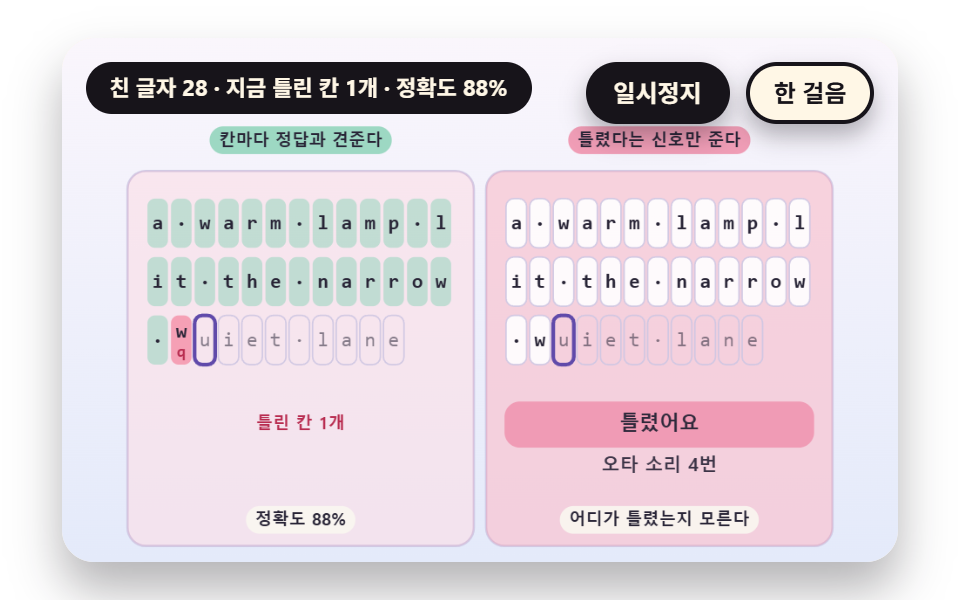
打った文字列と正解の文字列を同じマスに一文字ずつ置いて比べ、違うマスは下に正解の文字を重ねて赤い地で示します。消して打ち直すとマスがすぐ元に戻り、右の盤は間違ったことしか知らせずどこが違うのか分からない対比版です。 正解はTARGET_TEXTの37文字で、一回の練習で違うマスが同時に最大3マスまで出て、打ち直すと0マスに戻り、正確さは87.0%のまま残ります。
使いどころ間違った位置をすぐ見せて直させるミス表示
TARGET_TEXTmissCellsMISS_TINT
<main class="stage">
<div class="vj is-demo" id="vj">
  <div class="vj__pad" data-role="pad" tabindex="0" role="application" aria-label="タイピング練習の舞台 — キーを押すと自分で練習、Esc で最初から">
    <canvas class="vj__canvas" data-role="canvas" width="480" height="300" role="img" aria-label="正解の文を13マスずつ3行に置いた二つの格子です。左は打った文字を同じマスで正解と比べ、合っているマスはミント色、違うマスはピンク色の地に正解の文字を下へ重ねて示し、消して打ち直すとマスが元に戻ります。右は間違えたときにミスの合図が点滅するだけで、どこが違うのかは教えません。"></canvas>
  </div>
  <p class="vj__status" data-role="status" aria-live="off">タイピング練習のデモ</p>
  <div class="vj__ctrl">
    <button class="vj__pause" data-role="pause" type="button" aria-pressed="false">一時停止</button>
    <button class="vj__step" data-role="step" type="button">一歩進める</button>
  </div>
  <p class="vj__done" data-role="done" role="status" aria-live="polite"></p>
</div>
</main>
@use "../../../../site/static/demo-tokens" as *;
@include stage($stage-paper);
.vj {
position: relative;
width: min(92vw, calc(160vh - 12.8vw));
aspect-ratio: 480 / 300;
margin: 0 auto;
border-radius: $r-card;
overflow: hidden;
box-shadow: $shadow-raised;
background: $subject-cream;
}
// 무대 상자 — 누르면 키보드 포커스를 받는다. 글자 키는 직접 연습하고 Esc 는 처음부터 다시 시작한다(touch-action: none 은 이 상자에만). 무대 밖 터치는 페이지 스크롤 그대로
.vj__pad {
position: absolute;
inset: 0;
border-radius: inherit;
outline: none;
touch-action: none;
cursor: text;
}
// 바깥 .vj 가 넘침을 자르므로 포커스 테두리는 안쪽으로 들인다
.vj__pad:focus-visible {
outline: 3px solid $subject-ink;
outline-offset: -3px;
}
.vj__canvas {
position: absolute;
inset: 0;
display: block;
width: 100%;
height: 100%;
}
.vj__ctrl {
position: absolute;
right: $sp-3;
top: $sp-3;
display: flex;
gap: $sp-2;
}
.vj__pause,
.vj__step {
padding: $sp-1 $sp-3;
border: 2px solid $subject-ink;
border-radius: $r-pill;
background: $subject-ink;
color: $subject-cream;
font-family: inherit;
font-weight: 700;
font-size: 12px;
line-height: 1.6;
cursor: pointer;
box-shadow: $shadow-press;
transition: transform $dur-quick $ease-spring;
}
.vj__step {
background: $subject-cream;
color: $subject-ink;
}
// 스크린리더에만 읽히는 완료 알림
.vj__done {
position: absolute;
width: 1px;
height: 1px;
margin: 0;
overflow: hidden;
clip-path: inset(50%);
white-space: nowrap;
}
// 눌린 상태(멈춤) — 바탕과 글자색을 뒤집어 aria-pressed 가 눈에도 보이게
.vj__pause[aria-pressed="true"] {
background: $subject-cream;
color: $subject-ink;
}
.vj__pause:hover,
.vj__step:hover {
transform: translateY(-2px);
}
.vj__pause:active,
.vj__step:active {
transform: translateY(1px);
}
.vj__pause:focus-visible,
.vj__step:focus-visible {
outline: 3px solid $subject-ink;
outline-offset: 3px;
}
// 상태 줄 — 지금 장면의 수치를 글자로. 시연 중에는 aria-live off, 사람이 처음 손대면 polite
.vj__status {
position: absolute;
left: $sp-3;
top: $sp-3;
max-width: calc(100% - 190px);
margin: 0;
padding: $sp-1 $sp-3;
border-radius: $r-pill;
background: $subject-ink;
color: $subject-cream;
font-weight: 700;
font-size: 11px;
line-height: 1.6;
white-space: nowrap;
overflow: hidden;
text-overflow: ellipsis;
pointer-events: none;
}
@media (max-width: 340px) {
.vj__pause,
.vj__step,
.vj__status { font-size: 10px; padding: 0 $sp-2; }
}
// 움직임 줄이기 — 장면은 스크립트가 정지 장면 한 장으로 멈춘다. 버튼도 떠오르지 않게
@media (prefers-reduced-motion: reduce) {
.vj__pause,
.vj__step { transition: none !important; }
.vj__pause:hover,
.vj__pause:active,
.vj__step:hover,
.vj__step:active { transform: none !important; }
}html, body {
margin: 0;
overflow: hidden;
}
.stage {
box-sizing: border-box;
min-height: 100vh;
display: grid;
place-items: center;
margin: 0;
background: #ffffff;
font-family: -apple-system, "Segoe UI", "Noto Sans KR", sans-serif;
padding: clamp(8px, 4vw, 24px);
}
.vj {
position: relative;
width: min(92vw, 160vh - 12.8vw);
aspect-ratio: 480/300;
margin: 0 auto;
border-radius: 16px;
overflow: hidden;
box-shadow: 0 14px 24px rgba(23, 20, 26, 0.32);
background: #fff7e6;
}
.vj__pad {
position: absolute;
inset: 0;
border-radius: inherit;
outline: none;
touch-action: none;
cursor: text;
}
.vj__pad:focus-visible {
outline: 3px solid #17141a;
outline-offset: -3px;
}
.vj__canvas {
position: absolute;
inset: 0;
display: block;
width: 100%;
height: 100%;
}
.vj__ctrl {
position: absolute;
right: 12px;
top: 12px;
display: flex;
gap: 8px;
}
.vj__pause,
.vj__step {
padding: 4px 12px;
border: 2px solid #17141a;
border-radius: 999px;
background: #17141a;
color: #fff7e6;
font-family: inherit;
font-weight: 700;
font-size: 12px;
line-height: 1.6;
cursor: pointer;
box-shadow: 0 6px 12px rgba(23, 20, 26, 0.32);
transition: transform 220ms cubic-bezier(0.2, 0.8, 0.2, 1);
}
.vj__step {
background: #fff7e6;
color: #17141a;
}
.vj__done {
position: absolute;
width: 1px;
height: 1px;
margin: 0;
overflow: hidden;
clip-path: inset(50%);
white-space: nowrap;
}
.vj__pause[aria-pressed=true] {
background: #fff7e6;
color: #17141a;
}
.vj__pause:hover,
.vj__step:hover {
transform: translateY(-2px);
}
.vj__pause:active,
.vj__step:active {
transform: translateY(1px);
}
.vj__pause:focus-visible,
.vj__step:focus-visible {
outline: 3px solid #17141a;
outline-offset: 3px;
}
.vj__status {
position: absolute;
left: 12px;
top: 12px;
max-width: calc(100% - 190px);
margin: 0;
padding: 4px 12px;
border-radius: 999px;
background: #17141a;
color: #fff7e6;
font-weight: 700;
font-size: 11px;
line-height: 1.6;
white-space: nowrap;
overflow: hidden;
text-overflow: ellipsis;
pointer-events: none;
}
@media (max-width: 340px) {
.vj__pause,
.vj__step,
.vj__status {
font-size: 10px;
padding: 0 8px;
}
}
@media (prefers-reduced-motion: reduce) {
.vj__pause,
.vj__step {
transition: none !important;
}
.vj__pause:hover,
.vj__pause:active,
.vj__step:hover,
.vj__step:active {
transform: none !important;
}
}(function () {
const root = document.getElementById("vj");
if (!root) return;
// 무대 좌표 — 캔버스 안 계산은 늘 480×300. 화면에 보이는 크기와 상관없다
const W = 480;
const H = 300;
const PI = Math.PI;
const TAU = Math.PI * 2;
function clamp(v, lo, hi) { return v < lo ? lo : (v > hi ? hi : v); }
function lerp(a, b, k) { return a + (b - a) * k; }
function ease(x) { const c = clamp(x, 0, 1); return c * c * (3 - 2 * c); }
// 시드 고정 난수 — 선형 합동 생성기(곱 1664525, 더함 1013904223). 같은 시드면 같은 수열
function seeded(seed) {
let s = (seed >>> 0) || 1;
return function () {
s = (Math.imul(s, 1664525) + 1013904223) >>> 0;
return s / 4294967296;
};
}
// 파스텔 팔레트 — 글자는 늘 INK 나 진한 색, 면은 연한 색. 맞음은 민트, 틀림은 분홍, 내 커서는 라벤더
const BG_TOP = [250, 246, 252];
const BG_BOT = [228, 234, 250];
const FACE = [255, 253, 248];
const FACE_EDGE = [206, 198, 226];
const SKY = [176, 210, 246];
const SKY_DEEP = [60, 104, 162];
const GOLD = [250, 226, 150];
const GOLD_DEEP = [150, 108, 20];
const ROSE = [240, 150, 176];
const ROSE_DEEP = [184, 44, 80];
const MINT = [150, 214, 190];
const MINT_DEEP = [18, 104, 76];
const LAV = [188, 172, 236];
const LAV_DEEP = [96, 74, 170];
const INK = [40, 36, 54];
const PAPER = [250, 246, 240];
function mix(a, b, k) { return [lerp(a[0], b[0], k), lerp(a[1], b[1], k), lerp(a[2], b[2], k)]; }
function rgba(c, a) {
return 'rgba(' + Math.round(clamp(c[0], 0, 255)) + ',' + Math.round(clamp(c[1], 0, 255)) + ',' + Math.round(clamp(c[2], 0, 255)) + ',' + clamp(a, 0, 1).toFixed(3) + ')';
}
// 장면 시계(초)·판 반복 번호·시간표 — 시간표는 (시각, 할 일) 목록이고 시각이 지나면 한 번씩 부른다
// sceneT 는 rAF 타임스탬프 차이(dt, 한 프레임 0.05초 상한)를 쌓은 값 하나뿐이다 — 이 장면의 시간 원천은 이것 하나
let sceneT = 0;
let lap = 0;
let script = [];
let evAt = 0;
// 자동 시연이 끝나는 시각과 한 판이 되풀이되는 시각 — build() 가 시간표를 짜면서 정한다
let doneAt = 12;
let lapEnd = 14;
// 사람이 직접 키를 치는 중인가 — 켜지면 시간표의 가상 타자는 빠지고 판은 되풀이되지 않는다
let live = false;
function sched(t, f) { script.push({ t: t, f: f }); }
// ── 타자 기록 ─────────────────────────────────────────────
// 한 번의 키 입력은 (누른 시각, 키) 두 값이다. 타수도 오타도 열지도도 이 목록에서만 계산한다
const BS = 'Backspace';
let target = '';
let buf = '';
let strokes = [];
function sessReset(text) {
target = text;
buf = '';
strokes = [];
}
// 키 하나를 받는다 — 지우기는 마지막 글자를 빼고, 글자는 그 자리의 정답과 견줘 ok 를 정한다
function press(k, t) {
if (k === BS) {
if (buf.length > 0) {
buf = buf.slice(0, -1);
}
strokes.push({ t: t, k: k, ok: false });
return;
}
if (buf.length >= target.length) {
return;
}
const ok = k === target.charAt(buf.length);
buf += k;
strokes.push({ t: t, k: k, ok: ok });
}
// 글자 키 수와 맞은 수 — 지우기 키는 세지 않는다
function keyCount() {
let n = 0;
for (let i = 0; i < strokes.length; i += 1) {
if (strokes[i].k !== BS) {
n += 1;
}
}
return n;
}
function okCount() {
let n = 0;
for (let i = 0; i < strokes.length; i += 1) {
if (strokes[i].ok) {
n += 1;
}
}
return n;
}
// 정확도 — 맞은 글자 키 ÷ 글자 키 전체. 지워도 이미 친 틀린 키는 남는다
function accuracy() {
const n = keyCount();
return n === 0 ? 100 : (okCount() / n) * 100;
}
// 자리 옆 키 — 틀린 키는 같은 줄의 이웃 글쇠에서 고른다(스페이스 바는 c, 글자가 아닌 키는 n)
function nearKey(ch, rnd) {
const rows = ['qwertyuiop', 'asdfghjkl', 'zxcvbnm'];
for (let r = 0; r < rows.length; r += 1) {
const i = rows[r].indexOf(ch);
if (i >= 0) {
const j = i === 0 ? 1 : (i === rows[r].length - 1 ? i - 1 : (rnd() < 0.5 ? i - 1 : i + 1));
return rows[r].charAt(j);
}
}
return ch === ' ' ? 'c' : 'n';
}
// 시드 가상 타자 — 글자마다 간격은 pace(지금 시각) 의 ±20%, 오타는 지정한 자리에서만 낸다
// miss 는 [글자 자리, 알아채기 전에 더 치는 글자 수, 틀린 키 수(생략하면 1)] 목록. 틀린 키를 치고 lag 글자를 더 친 뒤 한 번에 지우고 다시 친다
function genStrokes(seed, text, pace, miss, t0) {
const rnd = seeded(seed);
const out = [];
let t = t0;
let i = 0;
const handled = {};
while (i < text.length) {
let hit = null;
for (let m = 0; m < miss.length; m += 1) {
if (miss[m][0] === i && !handled[i]) {
hit = miss[m];
}
}
t += pace(t) * (0.8 + 0.4 * rnd());
if (hit) {
handled[i] = true;
const lag = Math.min(hit[1], text.length - 1 - i);
const bad = hit.length > 2 ? hit[2] : 1;
for (let j = 0; j <= lag; j += 1) {
if (j > 0) {
t += pace(t) * (0.8 + 0.4 * rnd());
}
out.push({ t: t, k: j < bad ? nearKey(text.charAt(i + j), rnd) : text.charAt(i + j) });
}
t += 0.26 + 0.16 * rnd();
for (let j = 0; j <= lag; j += 1) {
out.push({ t: t, k: BS });
t += 0.09;
}
continue;
}
out.push({ t: t, k: text.charAt(i) });
i += 1;
}
return out;
}
// 시간표에 가상 타자의 키를 모두 올린다 — 끝나는 시각(doneAt)과 되풀이 시각(lapEnd)도 여기서 정한다
function schedule(raw, hold) {
for (let i = 0; i < raw.length; i += 1) {
const r = raw[i];
sched(r.t, function () { onKey(r.k, r.t); });
}
doneAt = raw.length > 0 ? raw[raw.length - 1].t + 0.35 : 1;
lapEnd = doneAt + hold;
}
function defaultFinished() {
return live ? buf.length >= target.length : sceneT >= doneAt;
}
const canvasEl = root.querySelector('[data-role="canvas"]');
const padEl = root.querySelector('[data-role="pad"]');
const pauseEl = root.querySelector('[data-role="pause"]');
const statusEl = root.querySelector('[data-role="status"]');
const stepEl = root.querySelector('[data-role="step"]');
const doneEl = root.querySelector('[data-role="done"]');
const ctxRaw = canvasEl ? canvasEl.getContext('2d') : null;
if (!canvasEl || !ctxRaw || !pauseEl || !padEl || !stepEl || !doneEl) {
return;
}
const cv = canvasEl;
const ctx = ctxRaw;
const pauseBtn = pauseEl;
const stepBtn = stepEl;
const doneP = doneEl;
const pad = padEl;
// 외부 웹폰트는 부르지 않는다 — 기기에 있는 글꼴 목록만. 타자 글자는 고정폭이라 칸 폭이 흔들리지 않는다
const FONT_STACK = 'system-ui, -apple-system, "Segoe UI", "Noto Sans KR", sans-serif';
const MONO_STACK = 'ui-monospace, "SF Mono", Menlo, Consolas, "Courier New", monospace';
let dpr = 1;
function fitCanvas() {
// 배율은 2 에서 자른다 — 배율 3 기기에서 화소가 2.25배로 늘지 않게
dpr = Math.min(window.devicePixelRatio || 1, 2);
cv.width = Math.round(W * dpr);
cv.height = Math.round(H * dpr);
ctx.setTransform(dpr, 0, 0, dpr, 0, 0);
}
const VIEW_S = 0.88;
function skyFill(top, bot) {
ctx.setTransform(dpr, 0, 0, dpr, 0, 0);
const g = ctx.createLinearGradient(0, 0, 0, H);
g.addColorStop(0, rgba(top, 1));
g.addColorStop(1, rgba(bot, 1));
ctx.fillStyle = g;
ctx.fillRect(0, 0, W, H);
// 위쪽 一時停止·상태 알약이 덮는 띠를 비우려고 장면 전체를 VIEW_S 배로 줄여 아래 가운데에 붙인다 — 이 줄 뒤에 그리는 것은 모두 줄어든 좌표계
ctx.translate(W / 2, H - 3);
ctx.scale(VIEW_S, VIEW_S);
ctx.translate(-W / 2, -(H - 3));
}
function disc(x, y, r, c, a) {
if (r <= 0.2 || a <= 0) {
return;
}
ctx.beginPath();
ctx.arc(x, y, r, 0, TAU);
ctx.fillStyle = rgba(c, a);
ctx.fill();
}
function ring(x, y, r, width, c, a) {
if (r <= 0.2 || a <= 0) {
return;
}
ctx.beginPath();
ctx.arc(x, y, r, 0, TAU);
ctx.lineWidth = width;
ctx.strokeStyle = rgba(c, a);
ctx.stroke();
}
function seg(x1, y1, x2, y2, width, c, a) {
if (a <= 0) {
return;
}
ctx.beginPath();
ctx.moveTo(x1, y1);
ctx.lineTo(x2, y2);
ctx.lineWidth = width;
ctx.lineCap = 'round';
ctx.strokeStyle = rgba(c, a);
ctx.stroke();
}
function box(x, y, w, h, r, c, a) {
if (w <= 0.2 || h <= 0.2 || a <= 0) {
return;
}
ctx.beginPath();
ctx.roundRect(x, y, w, h, Math.max(0, Math.min(r, w / 2, h / 2)));
ctx.fillStyle = rgba(c, a);
ctx.fill();
}
function outline(x, y, w, h, r, width, c, a) {
if (w <= 0.2 || h <= 0.2 || a <= 0) {
return;
}
ctx.beginPath();
ctx.roundRect(x, y, w, h, Math.max(0, Math.min(r, w / 2, h / 2)));
ctx.lineWidth = width;
ctx.strokeStyle = rgba(c, a);
ctx.stroke();
}
function text(s, x, y, c, a, px, weight, align) {
ctx.font = weight + ' ' + px + 'px ' + FONT_STACK;
ctx.textAlign = align;
ctx.textBaseline = 'middle';
ctx.fillStyle = rgba(c, a);
ctx.fillText(s, x, y);
}
// 고정폭 글자 — 칸마다 같은 폭이라 커서와 오타 칸이 글자에 정확히 겹친다
function mono(s, x, y, c, a, px, weight, align) {
ctx.font = weight + ' ' + px + 'px ' + MONO_STACK;
ctx.textAlign = align;
ctx.textBaseline = 'middle';
ctx.fillStyle = rgba(c, a);
ctx.fillText(s, x, y);
}
// 고정폭 글꼴 한 칸의 폭 — 글꼴이 바뀌면 같이 바뀐다
function monoW(px) {
ctx.font = '400 ' + px + 'px ' + MONO_STACK;
return ctx.measureText('M').width;
}
// 글자 이름표 — 바탕 알약 위에 글자
function tag(s, x, y, bg, fg, px, align) {
ctx.font = '700 ' + px + 'px ' + FONT_STACK;
const w = ctx.measureText(s).width + px * 1.1;
const left = align === 'center' ? x - w / 2 : (align === 'right' ? x - w : x);
box(left, y - px * 0.82, w, px * 1.64, px * 0.82, bg, 0.92);
text(s, left + w / 2, y + 0.5, fg, 1, px, 700, 'center');
}
function panel(x, y, w, h, c, a) {
box(x, y, w, h, 12, c, a);
outline(x, y, w, h, 12, 1.5, FACE_EDGE, 0.9);
}
// ── 공통 틀 ───────────────────────────────────────────────
let shownStatus = '';
function pushStatus(s) {
if (!statusEl || s === shownStatus) {
return;
}
shownStatus = s;
statusEl.textContent = s;
}
let paused = false;
const reduceQuery = window.matchMedia('(prefers-reduced-motion: reduce)');
// 페이지를 연 채 움직임 줄이기 설정을 바꿔도 change 리스너가 다시 읽는다
let still = reduceQuery.matches;
// 자동 시연 표시 — 사람이 처음 손대면 떼고 상태 줄을 polite 로 켠다
let demo = root.classList.contains('is-demo');
const off = new AbortController();
function wake() {
if (!demo) {
return;
}
demo = false;
root.classList.remove('is-demo');
if (statusEl) {
statusEl.setAttribute('aria-live', 'polite');
}
}
// 한 판이 끝났음을 스크린리더에 한 번만 알린다 — 판이 되풀이돼도 다시 읽지 않는다
let doneSaid = false;
function checkDone() {
if (!doneSaid && finished()) {
doneSaid = true;
doneP.textContent = statusText();
}
}
function advance(dt) {
sceneT += dt;
while (evAt < script.length && script[evAt].t <= sceneT) {
const ev = script[evAt];
evAt += 1;
ev.f();
}
if (!live && sceneT >= lapEnd) {
lap += 1;
begin();
return;
}
update(dt);
}
// 시간표를 새로 짠다 — 같은 시각이면 짠 순서대로 부른다(정렬은 안정)
function fresh() {
sceneT = 0;
evAt = 0;
script = [];
build();
script.sort(function (a, b) { return a.t - b.t; });
}
// 첫 판은 START_S 만큼 앞서 시작한다 — 타자가 이미 치고 있는 장면에서 보인다
function runTo(t) {
while (sceneT < t - 1e-6) {
advance(Math.min(1 / 30, t - sceneT));
}
}
function begin() {
fresh();
if (lap === 0 && !still) {
runTo(START_S);
}
}
const DT_MAX = 0.05;
function showNow() {
draw();
pushStatus(statusText());
checkDone();
}
let rafId = 0;
let lastTs = -1;
function frame(ts) {
if (still || paused) {
rafId = 0;
return;
}
if (lastTs < 0) {
lastTs = ts;
}
const dt = Math.min((ts - lastTs) / 1000, DT_MAX);
lastTs = ts;
if (dt > 0) {
advance(dt);
}
showNow();
rafId = window.requestAnimationFrame(frame);
}
function startLoop() {
if (rafId) {
return;
}
// 멈췄던 사이의 시간을 첫 프레임 dt 로 넘기지 않는다
lastTs = -1;
rafId = window.requestAnimationFrame(frame);
}
function stopLoop() {
if (rafId) {
window.cancelAnimationFrame(rafId);
rafId = 0;
}
}
// 움직임 줄이기 — 루프 없이 한 판이 끝난 멈춘 한 장. 시간표를 끝까지 돌려 결과 화면에서 멈춘다
function showRest() {
stopLoop();
live = false;
fresh();
runTo(doneAt);
doneSaid = false;
showNow();
}
function play() {
begin();
showNow();
if (!paused) {
startLoop();
}
}
function togglePause() {
paused = !paused;
pauseBtn.setAttribute('aria-pressed', paused ? 'true' : 'false');
wake();
if (paused) {
stopLoop();
}
else if (!still) {
startLoop();
}
}
// 처음부터 — 자동 시연은 시간표를 다시, 직접 치던 중이면 빈 연습판을 다시
function restart() {
lap += 1;
doneSaid = false;
if (still) {
showRest();
return;
}
begin();
showNow();
if (!paused) {
startLoop();
}
}
// 직접 치기 — 첫 키가 오면 가상 타자를 빼고 빈 판에서 시작한다
let lastStamp = -1;
function goLive() {
live = true;
doneSaid = false;
lastStamp = -1;
shownStatus = '';
fresh();
if (still) {
showNow();
}
else {
lastTs = -1;
showNow();
if (!paused) {
startLoop();
}
}
}
// 이벤트 시각 e.timeStamp 와 rAF 시각은 같은 원점이라 빼면 마지막 프레임 이후의 간격이 나온다
function liveKey(k, stamp) {
let t = sceneT;
if (still) {
if (lastStamp >= 0) {
sceneT += clamp((stamp - lastStamp) / 1000, 0, 2);
}
lastStamp = stamp;
t = sceneT;
}
else if (lastTs >= 0) {
t = sceneT + clamp((stamp - lastTs) / 1000, 0, DT_MAX);
}
onKey(k, t);
if (still) {
update(0);
showNow();
}
}
// 一歩進める — 멈춘 채 시간표의 다음 키 하나까지 시계를 보낸다. 더 부를 일이 없으면 판을 다시 연다
function stepOnce() {
if (live) {
return;
}
wake();
if (!paused) {
paused = true;
pauseBtn.setAttribute('aria-pressed', 'true');
stopLoop();
}
if (evAt >= script.length) {
restart();
return;
}
runTo(script[evAt].t + 0.05);
showNow();
}
// 키 이름 바꾸기 — 한글 자모 장면은 이 함수를 덮어쓴다. 글자 키와 지우기 키만 받고 나머지는 빈 문자열
let keyMap = null;
function keyOf(e) {
if (keyMap) {
return keyMap(e);
}
if (e.key === 'Backspace') {
return BS;
}
return e.key.length === 1 ? e.key : '';
}
pauseBtn.addEventListener('click', togglePause, { signal: off.signal });
stepBtn.addEventListener('click', stepOnce, { signal: off.signal });
// 키보드 — 무대에 포커스가 있을 때만. 글자 키는 직접 치기, Esc 는 처음부터. Tab 은 그대로 두어 포커스가 나갈 수 있다
pad.addEventListener('keydown', function (e) {
if (e.altKey || e.ctrlKey || e.metaKey) {
return;
}
if (e.key === 'Escape') {
e.preventDefault();
wake();
if (live) {
goLive();
}
else {
restart();
}
return;
}
const k = keyOf(e);
if (k === '') {
return;
}
e.preventDefault();
if (paused) {
return;
}
if (!live) {
wake();
goLive();
}
liveKey(k, e.timeStamp);
}, { signal: off.signal });
// 마우스·터치 — 무대를 누르면 키보드 포커스만 준다
pad.addEventListener('click', function () {
pad.focus({ preventScroll: true });
}, { signal: off.signal });
// 탭이 숨으면 멈추고, 돌아오면 시계를 다시 맞춰 시작 — 숨은 동안의 몇 초가 한 프레임에 몰리지 않게
document.addEventListener('visibilitychange', function () {
if (document.hidden) {
stopLoop();
}
else if (!paused && !still) {
startLoop();
}
}, { signal: off.signal });
// 설정이 바뀌면 — 켜지면 결과 한 장, 꺼지면 다시 움직인다
reduceQuery.addEventListener('change', function () {
still = reduceQuery.matches;
if (still) {
showRest();
}
else {
live = false;
lap = 0;
play();
}
}, { signal: off.signal });
window.addEventListener('resize', function () {
fitCanvas();
showNow();
}, { signal: off.signal });
// ── 03 정답과 나란히 놓는 오타 대조 ─────────────────────────
// 친 글자열과 TARGET_TEXT 를 같은 칸에 한 글자씩 놓고 견준다. 틀린 칸은 MISS_TINT 바탕에 정답 글자를 아래에 겹쳐 보이고
// 지우고 다시 치면 칸이 바로 되살아난다. 오른쪽 판은 틀렸다는 신호만 깜빡여 어디가 틀렸는지 알 수 없다
const TARGET_TEXT = 'a warm lamp lit the narrow quiet lane';
const MISS_TINT = [244, 156, 178];
const COLS = 13;
const CELL_W = 15.4;
const CELL_H = 32;
const START_S = 6.9;
let lastMissT = -9;
let missBeeps = 0;
// SIM-BEGIN
function makeRun() {
return genStrokes(31, TARGET_TEXT, function () { return 0.17; }, [[6, 2, 2], [17, 1, 1], [27, 3, 3]], 0.4);
}
// 틀린 칸 — 친 글자와 같은 자리의 정답 글자가 다른 칸 번호 목록
function missCells() {
const out = [];
for (let i = 0; i < buf.length; i += 1) {
if (buf.charAt(i) !== target.charAt(i)) {
out.push(i);
}
}
return out;
}
// SIM-END
function build() {
sessReset(TARGET_TEXT);
lastMissT = -9;
missBeeps = 0;
if (!live) {
schedule(makeRun(), 2.6);
}
}
function onKey(k, t) {
press(k, t);
const s = strokes[strokes.length - 1];
if (s && s.k === k && k !== BS && !s.ok && s.t === t) {
lastMissT = t;
missBeeps += 1;
}
}
function finished() { return defaultFinished(); }
function update(dt) { if (dt < 0) {
return;
} }
function grid(x0, y0, marked) {
const c = buf.length;
for (let i = 0; i < target.length; i += 1) {
const col = i % COLS;
const row = Math.floor(i / COLS);
const x = x0 + col * CELL_W;
const y = y0 + row * (CELL_H + 6);
const typed = i < c;
const wrong = typed && buf.charAt(i) !== target.charAt(i);
if (!typed) {
outline(x + 1, y, CELL_W - 2, CELL_H, 5, 1, FACE_EDGE, 0.9);
mono(target.charAt(i) === ' ' ? '·' : target.charAt(i), x + CELL_W / 2, y + CELL_H / 2 + 1, INK, 0.55, 13, 400, 'center');
}
else if (marked) {
box(x + 1, y, CELL_W - 2, CELL_H, 5, wrong ? MISS_TINT : MINT, wrong ? 0.95 : 0.55);
mono(buf.charAt(i) === ' ' ? '·' : buf.charAt(i), x + CELL_W / 2, y + (wrong ? 10 : CELL_H / 2) + 1, INK, 1, 13, 700, 'center');
if (wrong) {
mono(target.charAt(i) === ' ' ? '·' : target.charAt(i), x + CELL_W / 2, y + 24, ROSE_DEEP, 1, 11, 700, 'center');
}
}
else {
box(x + 1, y, CELL_W - 2, CELL_H, 5, [255, 255, 255], 0.9);
outline(x + 1, y, CELL_W - 2, CELL_H, 5, 1, FACE_EDGE, 0.9);
mono(buf.charAt(i) === ' ' ? '·' : buf.charAt(i), x + CELL_W / 2, y + CELL_H / 2 + 1, INK, 1, 13, 700, 'center');
}
}
// 다음에 칠 칸의 테두리
if (c < target.length) {
const x = x0 + (c % COLS) * CELL_W;
const y = y0 + Math.floor(c / COLS) * (CELL_H + 6);
outline(x + 1, y, CELL_W - 2, CELL_H, 5, 2.4, LAV_DEEP, 1);
}
}
function draw() {
skyFill(BG_TOP, BG_BOT);
panel(10, 46, 226, 244, [255, 255, 255], 0.5);
panel(244, 46, 226, 244, [255, 255, 255], 0.5);
// 왼쪽 바탕은 지금 틀린 칸 수만큼 분홍으로 물들고, 오른쪽은 틀린 순간 판 전체가 번쩍인다
const fl = clamp(1 - (sceneT - lastMissT) / 0.7, 0, 1);
const cells = missCells();
box(10, 46, 226, 244, 12, MISS_TINT, Math.min(0.45, 0.2 * cells.length));
box(244, 46, 226, 244, 12, MISS_TINT, 0.45 * fl);
grid(22, 64, true);
grid(256, 64, false);
// 오른쪽 — 틀린 순간에만 번쩍이는 신호
box(256, 196, 202, 30, 10, ROSE, 0.15 + 0.8 * fl);
text('ミス', 357, 211, INK, 0.35 + 0.65 * fl, 13, 800, 'center');
text('違うマス {n}個'.replace('{n}', String(cells.length)), 123, 211, cells.length > 0 ? ROSE_DEEP : MINT_DEEP, 1, 11, 700, 'center');
text('ミスの合図 {n}回'.replace('{n}', String(missBeeps)), 357, 238, INK, 0.9, 12, 700, 'center');
tag('マスごとに正解と比べる', 123, 26, MINT, INK, 11, 'center');
tag('ミスの合図だけ出す', 357, 26, ROSE, INK, 11, 'center');
tag('正確さ {p}%'.replace('{p}', accuracy().toFixed(0)), 123, 273, PAPER, INK, 11, 'center');
tag('どこが違うか分からない', 357, 273, PAPER, INK, 11, 'center');
}
function statusText() {
return '打鍵 {n}・違うマス {m}個・正確さ {p}%'.replace('{n}', String(buf.length)).replace('{m}', String(missCells().length)).replace('{p}', accuracy().toFixed(0));
}
fitCanvas();
if (still) {
showRest();
}
else {
play();
}
return function () {
stopLoop();
off.abort();
};
})();// TargetDiffMissCellMark - 같은 항목 vanilla index.html 의 React 판. 같은 계산을 useEffect 안에서 돌린다
import { useEffect, useRef } from "react";
import styles from "./TargetDiffMissCellMark.module.scss";
const cx = (s: string): string => s.split(" ").map((n) => styles[n] ?? n).join(" ");
export default function TargetDiffMissCellMark() {
const rootRef = useRef<HTMLDivElement | null>(null);
useEffect(() => {
const rootEl = rootRef.current;
if (!rootEl) return;
const root: HTMLElement = rootEl;
type RGB = [number, number, number];
// 무대 좌표 — 캔버스 안 계산은 늘 480×300. 화면에 보이는 크기와 상관없다
const W = 480;
const H = 300;
const PI = Math.PI;
const TAU = Math.PI * 2;
function clamp(v: number, lo: number, hi: number): number { return v < lo ? lo : (v > hi ? hi : v); }
function lerp(a: number, b: number, k: number): number { return a + (b - a) * k; }
function ease(x: number): number { const c = clamp(x, 0, 1); return c * c * (3 - 2 * c); }
// 시드 고정 난수 — 선형 합동 생성기(곱 1664525, 더함 1013904223). 같은 시드면 같은 수열
function seeded(seed: number): () => number {
let s = (seed >>> 0) || 1;
return function (): number {
s = (Math.imul(s, 1664525) + 1013904223) >>> 0;
return s / 4294967296;
};
}
// 파스텔 팔레트 — 글자는 늘 INK 나 진한 색, 면은 연한 색. 맞음은 민트, 틀림은 분홍, 내 커서는 라벤더
const BG_TOP: RGB = [250, 246, 252];
const BG_BOT: RGB = [228, 234, 250];
const FACE: RGB = [255, 253, 248];
const FACE_EDGE: RGB = [206, 198, 226];
const SKY: RGB = [176, 210, 246];
const SKY_DEEP: RGB = [60, 104, 162];
const GOLD: RGB = [250, 226, 150];
const GOLD_DEEP: RGB = [150, 108, 20];
const ROSE: RGB = [240, 150, 176];
const ROSE_DEEP: RGB = [184, 44, 80];
const MINT: RGB = [150, 214, 190];
const MINT_DEEP: RGB = [18, 104, 76];
const LAV: RGB = [188, 172, 236];
const LAV_DEEP: RGB = [96, 74, 170];
const INK: RGB = [40, 36, 54];
const PAPER: RGB = [250, 246, 240];
function mix(a: RGB, b: RGB, k: number): RGB { return [lerp(a[0], b[0], k), lerp(a[1], b[1], k), lerp(a[2], b[2], k)]; }
function rgba(c: RGB, a: number): string {
return 'rgba(' + Math.round(clamp(c[0], 0, 255)) + ',' + Math.round(clamp(c[1], 0, 255)) + ',' + Math.round(clamp(c[2], 0, 255)) + ',' + clamp(a, 0, 1).toFixed(3) + ')';
}
// 장면 시계(초)·판 반복 번호·시간표 — 시간표는 (시각, 할 일) 목록이고 시각이 지나면 한 번씩 부른다
// sceneT 는 rAF 타임스탬프 차이(dt, 한 프레임 0.05초 상한)를 쌓은 값 하나뿐이다 — 이 장면의 시간 원천은 이것 하나
let sceneT = 0;
let lap = 0;
type Ev = { t: number; f: () => void };
let script: Ev[] = [];
let evAt = 0;
// 자동 시연이 끝나는 시각과 한 판이 되풀이되는 시각 — build() 가 시간표를 짜면서 정한다
let doneAt = 12;
let lapEnd = 14;
// 사람이 직접 키를 치는 중인가 — 켜지면 시간표의 가상 타자는 빠지고 판은 되풀이되지 않는다
let live = false;
function sched(t: number, f: () => void): void { script.push({ t: t, f: f }); }
// ── 타자 기록 ─────────────────────────────────────────────
// 한 번의 키 입력은 (누른 시각, 키) 두 값이다. 타수도 오타도 열지도도 이 목록에서만 계산한다
const BS = 'Backspace';
type Raw = { t: number; k: string };
type Stroke = { t: number; k: string; ok: boolean };
let target = '';
let buf = '';
let strokes: Stroke[] = [];
function sessReset(text: string): void {
target = text;
buf = '';
strokes = [];
}
// 키 하나를 받는다 — 지우기는 마지막 글자를 빼고, 글자는 그 자리의 정답과 견줘 ok 를 정한다
function press(k: string, t: number): void {
if (k === BS) {
if (buf.length > 0) { buf = buf.slice(0, -1); }
strokes.push({ t: t, k: k, ok: false });
return;
}
if (buf.length >= target.length) { return; }
const ok = k === target.charAt(buf.length);
buf += k;
strokes.push({ t: t, k: k, ok: ok });
}
// 글자 키 수와 맞은 수 — 지우기 키는 세지 않는다
function keyCount(): number {
let n = 0;
for (let i = 0; i < strokes.length; i += 1) { if (strokes[i].k !== BS) { n += 1; } }
return n;
}
function okCount(): number {
let n = 0;
for (let i = 0; i < strokes.length; i += 1) { if (strokes[i].ok) { n += 1; } }
return n;
}
// 정확도 — 맞은 글자 키 ÷ 글자 키 전체. 지워도 이미 친 틀린 키는 남는다
function accuracy(): number {
const n = keyCount();
return n === 0 ? 100 : (okCount() / n) * 100;
}
// 자리 옆 키 — 틀린 키는 같은 줄의 이웃 글쇠에서 고른다(스페이스 바는 c, 글자가 아닌 키는 n)
function nearKey(ch: string, rnd: () => number): string {
const rows = ['qwertyuiop', 'asdfghjkl', 'zxcvbnm'];
for (let r = 0; r < rows.length; r += 1) {
const i = rows[r].indexOf(ch);
if (i >= 0) {
const j = i === 0 ? 1 : (i === rows[r].length - 1 ? i - 1 : (rnd() < 0.5 ? i - 1 : i + 1));
return rows[r].charAt(j);
}
}
return ch === ' ' ? 'c' : 'n';
}
// 시드 가상 타자 — 글자마다 간격은 pace(지금 시각) 의 ±20%, 오타는 지정한 자리에서만 낸다
// miss 는 [글자 자리, 알아채기 전에 더 치는 글자 수, 틀린 키 수(생략하면 1)] 목록. 틀린 키를 치고 lag 글자를 더 친 뒤 한 번에 지우고 다시 친다
function genStrokes(seed: number, text: string, pace: (t: number) => number, miss: number[][], t0: number): Raw[] {
const rnd = seeded(seed);
const out: Raw[] = [];
let t = t0;
let i = 0;
const handled: Record<number, boolean> = {};
while (i < text.length) {
let hit: number[] | null = null;
for (let m = 0; m < miss.length; m += 1) { if (miss[m][0] === i && !handled[i]) { hit = miss[m]; } }
t += pace(t) * (0.8 + 0.4 * rnd());
if (hit) {
handled[i] = true;
const lag = Math.min(hit[1], text.length - 1 - i);
const bad = hit.length > 2 ? hit[2] : 1;
for (let j = 0; j <= lag; j += 1) {
if (j > 0) { t += pace(t) * (0.8 + 0.4 * rnd()); }
out.push({ t: t, k: j < bad ? nearKey(text.charAt(i + j), rnd) : text.charAt(i + j) });
}
t += 0.26 + 0.16 * rnd();
for (let j = 0; j <= lag; j += 1) {
out.push({ t: t, k: BS });
t += 0.09;
}
continue;
}
out.push({ t: t, k: text.charAt(i) });
i += 1;
}
return out;
}
// 시간표에 가상 타자의 키를 모두 올린다 — 끝나는 시각(doneAt)과 되풀이 시각(lapEnd)도 여기서 정한다
function schedule(raw: Raw[], hold: number): void {
for (let i = 0; i < raw.length; i += 1) {
const r = raw[i];
sched(r.t, function (): void { onKey(r.k, r.t); });
}
doneAt = raw.length > 0 ? raw[raw.length - 1].t + 0.35 : 1;
lapEnd = doneAt + hold;
}
function defaultFinished(): boolean {
return live ? buf.length >= target.length : sceneT >= doneAt;
}
const canvasEl = root.querySelector('[data-role="canvas"]') as HTMLCanvasElement | null;
const padEl = root.querySelector('[data-role="pad"]') as HTMLElement | null;
const pauseEl = root.querySelector('[data-role="pause"]') as HTMLButtonElement | null;
const statusEl = root.querySelector('[data-role="status"]') as HTMLElement | null;
const stepEl = root.querySelector('[data-role="step"]') as HTMLButtonElement | null;
const doneEl = root.querySelector('[data-role="done"]') as HTMLElement | null;
const ctxRaw = canvasEl ? canvasEl.getContext('2d') : null;
if (!canvasEl || !ctxRaw || !pauseEl || !padEl || !stepEl || !doneEl) { return; }
const cv: HTMLCanvasElement = canvasEl;
const ctx: CanvasRenderingContext2D = ctxRaw;
const pauseBtn: HTMLButtonElement = pauseEl;
const stepBtn: HTMLButtonElement = stepEl;
const doneP: HTMLElement = doneEl;
const pad: HTMLElement = padEl;
// 외부 웹폰트는 부르지 않는다 — 기기에 있는 글꼴 목록만. 타자 글자는 고정폭이라 칸 폭이 흔들리지 않는다
const FONT_STACK = 'system-ui, -apple-system, "Segoe UI", "Noto Sans KR", sans-serif';
const MONO_STACK = 'ui-monospace, "SF Mono", Menlo, Consolas, "Courier New", monospace';
let dpr = 1;
function fitCanvas(): void {
// 배율은 2 에서 자른다 — 배율 3 기기에서 화소가 2.25배로 늘지 않게
dpr = Math.min(window.devicePixelRatio || 1, 2);
cv.width = Math.round(W * dpr);
cv.height = Math.round(H * dpr);
ctx.setTransform(dpr, 0, 0, dpr, 0, 0);
}
const VIEW_S = 0.88;
function skyFill(top: RGB, bot: RGB): void {
ctx.setTransform(dpr, 0, 0, dpr, 0, 0);
const g = ctx.createLinearGradient(0, 0, 0, H);
g.addColorStop(0, rgba(top, 1));
g.addColorStop(1, rgba(bot, 1));
ctx.fillStyle = g;
ctx.fillRect(0, 0, W, H);
// 위쪽 일시정지·상태 알약이 덮는 띠를 비우려고 장면 전체를 VIEW_S 배로 줄여 아래 가운데에 붙인다 — 이 줄 뒤에 그리는 것은 모두 줄어든 좌표계
ctx.translate(W / 2, H - 3);
ctx.scale(VIEW_S, VIEW_S);
ctx.translate(-W / 2, -(H - 3));
}
function disc(x: number, y: number, r: number, c: RGB, a: number): void {
if (r <= 0.2 || a <= 0) { return; }
ctx.beginPath();
ctx.arc(x, y, r, 0, TAU);
ctx.fillStyle = rgba(c, a);
ctx.fill();
}
function ring(x: number, y: number, r: number, width: number, c: RGB, a: number): void {
if (r <= 0.2 || a <= 0) { return; }
ctx.beginPath();
ctx.arc(x, y, r, 0, TAU);
ctx.lineWidth = width;
ctx.strokeStyle = rgba(c, a);
ctx.stroke();
}
function seg(x1: number, y1: number, x2: number, y2: number, width: number, c: RGB, a: number): void {
if (a <= 0) { return; }
ctx.beginPath();
ctx.moveTo(x1, y1);
ctx.lineTo(x2, y2);
ctx.lineWidth = width;
ctx.lineCap = 'round';
ctx.strokeStyle = rgba(c, a);
ctx.stroke();
}
function box(x: number, y: number, w: number, h: number, r: number, c: RGB, a: number): void {
if (w <= 0.2 || h <= 0.2 || a <= 0) { return; }
ctx.beginPath();
ctx.roundRect(x, y, w, h, Math.max(0, Math.min(r, w / 2, h / 2)));
ctx.fillStyle = rgba(c, a);
ctx.fill();
}
function outline(x: number, y: number, w: number, h: number, r: number, width: number, c: RGB, a: number): void {
if (w <= 0.2 || h <= 0.2 || a <= 0) { return; }
ctx.beginPath();
ctx.roundRect(x, y, w, h, Math.max(0, Math.min(r, w / 2, h / 2)));
ctx.lineWidth = width;
ctx.strokeStyle = rgba(c, a);
ctx.stroke();
}
function text(s: string, x: number, y: number, c: RGB, a: number, px: number, weight: number, align: CanvasTextAlign): void {
ctx.font = weight + ' ' + px + 'px ' + FONT_STACK;
ctx.textAlign = align;
ctx.textBaseline = 'middle';
ctx.fillStyle = rgba(c, a);
ctx.fillText(s, x, y);
}
// 고정폭 글자 — 칸마다 같은 폭이라 커서와 오타 칸이 글자에 정확히 겹친다
function mono(s: string, x: number, y: number, c: RGB, a: number, px: number, weight: number, align: CanvasTextAlign): void {
ctx.font = weight + ' ' + px + 'px ' + MONO_STACK;
ctx.textAlign = align;
ctx.textBaseline = 'middle';
ctx.fillStyle = rgba(c, a);
ctx.fillText(s, x, y);
}
// 고정폭 글꼴 한 칸의 폭 — 글꼴이 바뀌면 같이 바뀐다
function monoW(px: number): number {
ctx.font = '400 ' + px + 'px ' + MONO_STACK;
return ctx.measureText('M').width;
}
// 글자 이름표 — 바탕 알약 위에 글자
function tag(s: string, x: number, y: number, bg: RGB, fg: RGB, px: number, align: CanvasTextAlign): void {
ctx.font = '700 ' + px + 'px ' + FONT_STACK;
const w = ctx.measureText(s).width + px * 1.1;
const left = align === 'center' ? x - w / 2 : (align === 'right' ? x - w : x);
box(left, y - px * 0.82, w, px * 1.64, px * 0.82, bg, 0.92);
text(s, left + w / 2, y + 0.5, fg, 1, px, 700, 'center');
}
function panel(x: number, y: number, w: number, h: number, c: RGB, a: number): void {
box(x, y, w, h, 12, c, a);
outline(x, y, w, h, 12, 1.5, FACE_EDGE, 0.9);
}
// ── 공통 틀 ───────────────────────────────────────────────
let shownStatus = '';
function pushStatus(s: string): void {
if (!statusEl || s === shownStatus) { return; }
shownStatus = s;
statusEl.textContent = s;
}
let paused = false;
const reduceQuery = window.matchMedia('(prefers-reduced-motion: reduce)');
// 페이지를 연 채 움직임 줄이기 설정을 바꿔도 change 리스너가 다시 읽는다
let still = reduceQuery.matches;
// 자동 시연 표시 — 사람이 처음 손대면 떼고 상태 줄을 polite 로 켠다
let demo = root.classList.contains('is-demo');
const off = new AbortController();
function wake(): void {
if (!demo) { return; }
demo = false;
root.classList.remove('is-demo');
if (statusEl) { statusEl.setAttribute('aria-live', 'polite'); }
}
// 한 판이 끝났음을 스크린리더에 한 번만 알린다 — 판이 되풀이돼도 다시 읽지 않는다
let doneSaid = false;
function checkDone(): void {
if (!doneSaid && finished()) {
doneSaid = true;
doneP.textContent = statusText();
}
}
function advance(dt: number): void {
sceneT += dt;
while (evAt < script.length && script[evAt].t <= sceneT) {
const ev = script[evAt];
evAt += 1;
ev.f();
}
if (!live && sceneT >= lapEnd) { lap += 1; begin(); return; }
update(dt);
}
// 시간표를 새로 짠다 — 같은 시각이면 짠 순서대로 부른다(정렬은 안정)
function fresh(): void {
sceneT = 0;
evAt = 0;
script = [];
build();
script.sort(function (a: Ev, b: Ev): number { return a.t - b.t; });
}
// 첫 판은 START_S 만큼 앞서 시작한다 — 타자가 이미 치고 있는 장면에서 보인다
function runTo(t: number): void {
while (sceneT < t - 1e-6) { advance(Math.min(1 / 30, t - sceneT)); }
}
function begin(): void {
fresh();
if (lap === 0 && !still) { runTo(START_S); }
}
const DT_MAX = 0.05;
function showNow(): void {
draw();
pushStatus(statusText());
checkDone();
}
let rafId = 0;
let lastTs = -1;
function frame(ts: number): void {
if (still || paused) { rafId = 0; return; }
if (lastTs < 0) { lastTs = ts; }
const dt = Math.min((ts - lastTs) / 1000, DT_MAX);
lastTs = ts;
if (dt > 0) { advance(dt); }
showNow();
rafId = window.requestAnimationFrame(frame);
}
function startLoop(): void {
if (rafId) { return; }
// 멈췄던 사이의 시간을 첫 프레임 dt 로 넘기지 않는다
lastTs = -1;
rafId = window.requestAnimationFrame(frame);
}
function stopLoop(): void {
if (rafId) { window.cancelAnimationFrame(rafId); rafId = 0; }
}
// 움직임 줄이기 — 루프 없이 한 판이 끝난 멈춘 한 장. 시간표를 끝까지 돌려 결과 화면에서 멈춘다
function showRest(): void {
stopLoop();
live = false;
fresh();
runTo(doneAt);
doneSaid = false;
showNow();
}
function play(): void {
begin();
showNow();
if (!paused) { startLoop(); }
}
function togglePause(): void {
paused = !paused;
pauseBtn.setAttribute('aria-pressed', paused ? 'true' : 'false');
wake();
if (paused) { stopLoop(); } else if (!still) { startLoop(); }
}
// 처음부터 — 자동 시연은 시간표를 다시, 직접 치던 중이면 빈 연습판을 다시
function restart(): void {
lap += 1;
doneSaid = false;
if (still) { showRest(); return; }
begin();
showNow();
if (!paused) { startLoop(); }
}
// 직접 치기 — 첫 키가 오면 가상 타자를 빼고 빈 판에서 시작한다
let lastStamp = -1;
function goLive(): void {
live = true;
doneSaid = false;
lastStamp = -1;
shownStatus = '';
fresh();
if (still) { showNow(); } else { lastTs = -1; showNow(); if (!paused) { startLoop(); } }
}
// 이벤트 시각 e.timeStamp 와 rAF 시각은 같은 원점이라 빼면 마지막 프레임 이후의 간격이 나온다
function liveKey(k: string, stamp: number): void {
let t = sceneT;
if (still) {
if (lastStamp >= 0) { sceneT += clamp((stamp - lastStamp) / 1000, 0, 2); }
lastStamp = stamp;
t = sceneT;
} else if (lastTs >= 0) {
t = sceneT + clamp((stamp - lastTs) / 1000, 0, DT_MAX);
}
onKey(k, t);
if (still) { update(0); showNow(); }
}
// 한 걸음 — 멈춘 채 시간표의 다음 키 하나까지 시계를 보낸다. 더 부를 일이 없으면 판을 다시 연다
function stepOnce(): void {
if (live) { return; }
wake();
if (!paused) {
paused = true;
pauseBtn.setAttribute('aria-pressed', 'true');
stopLoop();
}
if (evAt >= script.length) {
restart();
return;
}
runTo(script[evAt].t + 0.05);
showNow();
}
// 키 이름 바꾸기 — 한글 자모 장면은 이 함수를 덮어쓴다. 글자 키와 지우기 키만 받고 나머지는 빈 문자열
let keyMap: ((e: KeyboardEvent) => string) | null = null;
function keyOf(e: KeyboardEvent): string {
if (keyMap) { return keyMap(e); }
if (e.key === 'Backspace') { return BS; }
return e.key.length === 1 ? e.key : '';
}
pauseBtn.addEventListener('click', togglePause, { signal: off.signal });
stepBtn.addEventListener('click', stepOnce, { signal: off.signal });
// 키보드 — 무대에 포커스가 있을 때만. 글자 키는 직접 치기, Esc 는 처음부터. Tab 은 그대로 두어 포커스가 나갈 수 있다
pad.addEventListener('keydown', function (e: KeyboardEvent): void {
if (e.altKey || e.ctrlKey || e.metaKey) { return; }
if (e.key === 'Escape') {
e.preventDefault();
wake();
if (live) { goLive(); } else { restart(); }
return;
}
const k = keyOf(e);
if (k === '') { return; }
e.preventDefault();
if (paused) { return; }
if (!live) {
wake();
goLive();
}
liveKey(k, e.timeStamp);
}, { signal: off.signal });
// 마우스·터치 — 무대를 누르면 키보드 포커스만 준다
pad.addEventListener('click', function (): void {
pad.focus({ preventScroll: true });
}, { signal: off.signal });
// 탭이 숨으면 멈추고, 돌아오면 시계를 다시 맞춰 시작 — 숨은 동안의 몇 초가 한 프레임에 몰리지 않게
document.addEventListener('visibilitychange', function (): void {
if (document.hidden) { stopLoop(); } else if (!paused && !still) { startLoop(); }
}, { signal: off.signal });
// 설정이 바뀌면 — 켜지면 결과 한 장, 꺼지면 다시 움직인다
reduceQuery.addEventListener('change', function (): void {
still = reduceQuery.matches;
if (still) { showRest(); } else { live = false; lap = 0; play(); }
}, { signal: off.signal });
window.addEventListener('resize', function (): void {
fitCanvas();
showNow();
}, { signal: off.signal });
// ── 03 정답과 나란히 놓는 오타 대조 ─────────────────────────
// 친 글자열과 TARGET_TEXT 를 같은 칸에 한 글자씩 놓고 견준다. 틀린 칸은 MISS_TINT 바탕에 정답 글자를 아래에 겹쳐 보이고
// 지우고 다시 치면 칸이 바로 되살아난다. 오른쪽 판은 틀렸다는 신호만 깜빡여 어디가 틀렸는지 알 수 없다
const TARGET_TEXT = 'a warm lamp lit the narrow quiet lane';
const MISS_TINT: RGB = [244, 156, 178];
const COLS = 13;
const CELL_W = 15.4;
const CELL_H = 32;
const START_S = 6.9;
let lastMissT = -9;
let missBeeps = 0;
// SIM-BEGIN
function makeRun(): Raw[] {
return genStrokes(31, TARGET_TEXT, function (): number { return 0.17; }, [[6, 2, 2], [17, 1, 1], [27, 3, 3]], 0.4);
}
// 틀린 칸 — 친 글자와 같은 자리의 정답 글자가 다른 칸 번호 목록
function missCells(): number[] {
const out: number[] = [];
for (let i = 0; i < buf.length; i += 1) { if (buf.charAt(i) !== target.charAt(i)) { out.push(i); } }
return out;
}
// SIM-END
function build(): void {
sessReset(TARGET_TEXT);
lastMissT = -9;
missBeeps = 0;
if (!live) { schedule(makeRun(), 2.6); }
}
function onKey(k: string, t: number): void {
press(k, t);
const s = strokes[strokes.length - 1];
if (s && s.k === k && k !== BS && !s.ok && s.t === t) { lastMissT = t; missBeeps += 1; }
}
function finished(): boolean { return defaultFinished(); }
function update(dt: number): void { if (dt < 0) { return; } }
function grid(x0: number, y0: number, marked: boolean): void {
const c = buf.length;
for (let i = 0; i < target.length; i += 1) {
const col = i % COLS;
const row = Math.floor(i / COLS);
const x = x0 + col * CELL_W;
const y = y0 + row * (CELL_H + 6);
const typed = i < c;
const wrong = typed && buf.charAt(i) !== target.charAt(i);
if (!typed) {
outline(x + 1, y, CELL_W - 2, CELL_H, 5, 1, FACE_EDGE, 0.9);
mono(target.charAt(i) === ' ' ? '·' : target.charAt(i), x + CELL_W / 2, y + CELL_H / 2 + 1, INK, 0.55, 13, 400, 'center');
} else if (marked) {
box(x + 1, y, CELL_W - 2, CELL_H, 5, wrong ? MISS_TINT : MINT, wrong ? 0.95 : 0.55);
mono(buf.charAt(i) === ' ' ? '·' : buf.charAt(i), x + CELL_W / 2, y + (wrong ? 10 : CELL_H / 2) + 1, INK, 1, 13, 700, 'center');
if (wrong) { mono(target.charAt(i) === ' ' ? '·' : target.charAt(i), x + CELL_W / 2, y + 24, ROSE_DEEP, 1, 11, 700, 'center'); }
} else {
box(x + 1, y, CELL_W - 2, CELL_H, 5, [255, 255, 255], 0.9);
outline(x + 1, y, CELL_W - 2, CELL_H, 5, 1, FACE_EDGE, 0.9);
mono(buf.charAt(i) === ' ' ? '·' : buf.charAt(i), x + CELL_W / 2, y + CELL_H / 2 + 1, INK, 1, 13, 700, 'center');
}
}
// 다음에 칠 칸의 테두리
if (c < target.length) {
const x = x0 + (c % COLS) * CELL_W;
const y = y0 + Math.floor(c / COLS) * (CELL_H + 6);
outline(x + 1, y, CELL_W - 2, CELL_H, 5, 2.4, LAV_DEEP, 1);
}
}
function draw(): void {
skyFill(BG_TOP, BG_BOT);
panel(10, 46, 226, 244, [255, 255, 255], 0.5);
panel(244, 46, 226, 244, [255, 255, 255], 0.5);
// 왼쪽 바탕은 지금 틀린 칸 수만큼 분홍으로 물들고, 오른쪽은 틀린 순간 판 전체가 번쩍인다
const fl = clamp(1 - (sceneT - lastMissT) / 0.7, 0, 1);
const cells = missCells();
box(10, 46, 226, 244, 12, MISS_TINT, Math.min(0.45, 0.2 * cells.length));
box(244, 46, 226, 244, 12, MISS_TINT, 0.45 * fl);
grid(22, 64, true);
grid(256, 64, false);
// 오른쪽 — 틀린 순간에만 번쩍이는 신호
box(256, 196, 202, 30, 10, ROSE, 0.15 + 0.8 * fl);
text('틀렸어요', 357, 211, INK, 0.35 + 0.65 * fl, 13, 800, 'center');
text('틀린 칸 {n}개'.replace('{n}', String(cells.length)), 123, 211, cells.length > 0 ? ROSE_DEEP : MINT_DEEP, 1, 11, 700, 'center');
text('오타 소리 {n}번'.replace('{n}', String(missBeeps)), 357, 238, INK, 0.9, 12, 700, 'center');
tag('칸마다 정답과 견준다', 123, 26, MINT, INK, 11, 'center');
tag('틀렸다는 신호만 준다', 357, 26, ROSE, INK, 11, 'center');
tag('정확도 {p}%'.replace('{p}', accuracy().toFixed(0)), 123, 273, PAPER, INK, 11, 'center');
tag('어디가 틀렸는지 모른다', 357, 273, PAPER, INK, 11, 'center');
}
function statusText(): string {
return '친 글자 {n} · 지금 틀린 칸 {m}개 · 정확도 {p}%'.replace('{n}', String(buf.length)).replace('{m}', String(missCells().length)).replace('{p}', accuracy().toFixed(0));
}
fitCanvas();
if (still) { showRest(); } else { play(); }
return function (): void {
stopLoop();
off.abort();
};
}, []);
return (
<div className={cx("vj") + " is-demo"} ref={rootRef}>
<div className={cx("vj__pad")} data-role="pad" tabIndex={0} role="application" aria-label={'타자 연습 시연 무대 — 키를 누르면 직접 연습, Esc 로 처음부터'}>
<canvas className={cx("vj__canvas")} data-role="canvas" width={480} height={300} role="img" aria-label={'정답 문장을 열세 칸씩 세 줄로 놓은 두 격자. 왼쪽은 친 글자를 정답과 같은 칸에서 견주어 맞은 칸은 민트색, 틀린 칸은 분홍색 바탕에 정답 글자를 아래에 겹쳐 보이고 지우고 다시 치면 칸이 되살아난다. 오른쪽은 틀릴 때만 틀렸어요 신호가 깜빡이고 어디가 틀렸는지는 알려 주지 않는다.'}></canvas>
</div>
<p className={cx("vj__status")} data-role="status" aria-live="off">{'타자 연습 시연'}</p>
<div className={cx("vj__ctrl")}>
<button className={cx("vj__pause")} data-role="pause" type="button" aria-pressed="false">{'일시정지'}</button>
<button className={cx("vj__step")} data-role="step" type="button">{'한 걸음'}</button>
</div>
<p className={cx("vj__done")} data-role="done" role="status" aria-live="polite"></p>
</div>
);
}03 正解と並べるミスの照合 — 計測 累積面積 38.865% · 動いたフレーム 18/23GODRICH オリジナル · SCSS と React は zip に同梱 · タイピング練習 9種 — 毎分の打鍵数の計算からミスの照合とキーのヒートマップまで
このデモが属する記事
 タイピング練習 9種 — 毎分の打鍵数の計算からミスの照合とキーのヒートマップまでタイピング練習は打鍵の記録をどうやって速さと正確さに変えるのでしょうか。01番は直近の数秒の文字数だけで毎分の打鍵数を出し、03番は正解の文字と並べて比べてミスの位置を示し、07番は過去の記録の歩みをゴーストのカーソルでたどり直します。 この記事のデモをすべて見る