02二点波源の干渉フィールド
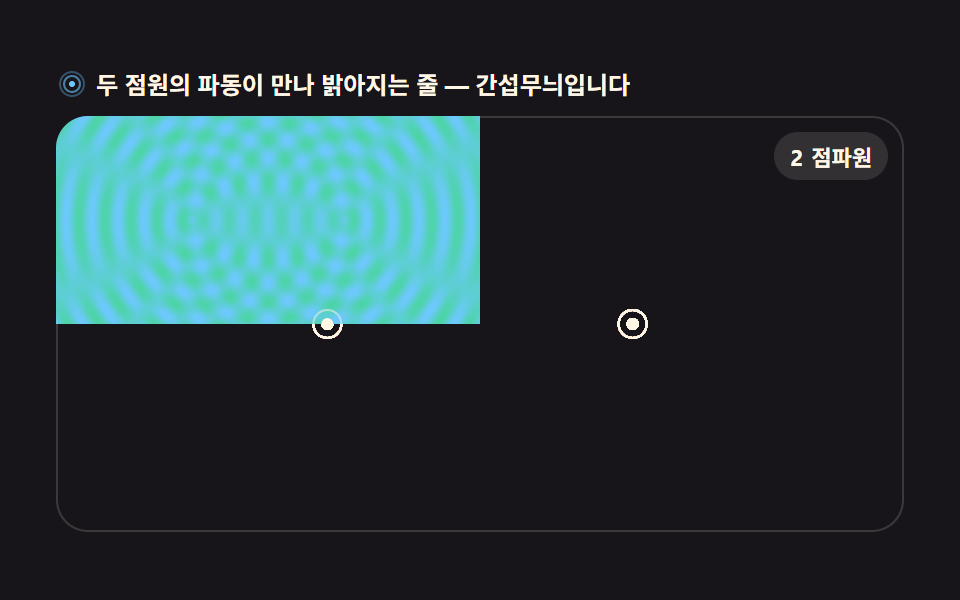
各ピクセルまでの距離を Math.hypot でまず求め、二点から広がる円形波の振幅を足し合わせて getImageData で明るさを計算します。位相が合う場所は明るく重なり、ずれる場所は暗い縞になります。
使いどころ物理教育用の干渉縞可視化、背景アンビエント演出
createImageDataputImageDataMath.hypot
<main class="stage">
<div class="ri" id="ri">
  <p class="ri__hint">
    <svg class="ri__ico" viewBox="0 0 256 256" aria-hidden="true"><g fill="currentColor"><path d="M128 24a104 104 0 1 0 104 104A104.11 104.11 0 0 0 128 24Zm0 192a88 88 0 1 1 88-88a88.1 88.1 0 0 1-88 88Z" opacity=".35"/><path d="M128 56a72 72 0 1 0 72 72a72.08 72.08 0 0 0-72-72Zm0 128a56 56 0 1 1 56-56a56.06 56.06 0 0 1-56 56Z" opacity=".6"/><circle cx="128" cy="128" r="24"/></g></svg>
    <span>2つの波源の波が出会って明るくなる縞 — 干渉縞です</span>
  </p>
  <div class="ri__field" id="field" role="application" aria-label="波の干渉の実験盤">
    <canvas class="ri__cv" id="cv"></canvas>
    <b class="ri__badge" aria-hidden="true"><span class="ri__badgeNum">2</span><span class="ri__badgeUnit">点波源</span></b>
  </div>
</div>
</main>
@use "../../../../site/static/demo-tokens" as *;
// 이중 점파원 간섭 필드 — 두 점원에서 퍼지는 원형 파동의 겹침을 픽셀 단위로 계산한다.
// 움직임은 전부 캔버스 rAF 루프(getImageData/putImageData) 안에 있다. @keyframes 0개.
$duration: $dur-loop;
$easing: $ease-spring;
$color: $subject-sky;
@include stage($stage-ink);
.ri {
--field-bg: #{$stage-ink};
--ink-line: #{$subject-sky};
--halo: #{$subject-mint};
--badge-bg: #{rgba($subject-cream, .12)};
--badge-fg: #{$subject-cream};
display: flex; flex-direction: column; gap: $sp-2;
width: 100%; max-width: 424px;
}
.ri__hint {
display: flex; align-items: center; gap: $sp-1; margin: 0;
font-weight: 700; font-size: clamp(10px, 2.8vw, 12px); line-height: 1.35;
color: $subject-cream;
}
.ri__ico { width: 16px; height: 16px; flex: 0 0 auto; color: $subject-sky; }
.ri__field {
position: relative; height: 208px;
border-radius: $r-card; overflow: hidden;
background: var(--field-bg);
box-shadow: inset 0 0 0 1px rgba($subject-cream, .16);
}
.ri__cv { display: block; width: 100%; height: 100%; }
.ri__badge {
position: absolute; right: $sp-2; top: $sp-2;
display: flex; align-items: baseline; gap: $sp-1;
padding: $sp-1 $sp-2; border-radius: $r-pill;
background: var(--badge-bg);
color: var(--badge-fg); font-weight: 700; font-size: 11px;
}
@media (max-width: 340px) {
.ri__field { height: 124px; }
.ri__badge { font-size: 10px; padding: 0 $sp-1; }
}
@media (prefers-reduced-motion: reduce) {
.ri.is-still .ri__badge { opacity: .92 !important; }
}html, body {
margin: 0;
overflow: hidden;
}
.stage {
box-sizing: border-box;
min-height: 100vh;
display: grid;
place-items: center;
margin: 0;
background: #17141a;
font-family: -apple-system, "Segoe UI", "Noto Sans KR", sans-serif;
padding: clamp(8px, 4vw, 24px);
}
.ri {
--field-bg: #17141a;
--ink-line: #6ec8ff;
--halo: #4cd4a6;
--badge-bg: rgba(255, 247, 230, 0.12);
--badge-fg: #fff7e6;
display: flex;
flex-direction: column;
gap: 8px;
width: 100%;
max-width: 424px;
}
.ri__hint {
display: flex;
align-items: center;
gap: 4px;
margin: 0;
font-weight: 700;
font-size: clamp(10px, 2.8vw, 12px);
line-height: 1.35;
color: #fff7e6;
}
.ri__ico {
width: 16px;
height: 16px;
flex: 0 0 auto;
color: #6ec8ff;
}
.ri__field {
position: relative;
height: 208px;
border-radius: 16px;
overflow: hidden;
background: var(--field-bg);
box-shadow: inset 0 0 0 1px rgba(255, 247, 230, 0.16);
}
.ri__cv {
display: block;
width: 100%;
height: 100%;
}
.ri__badge {
position: absolute;
right: 8px;
top: 8px;
display: flex;
align-items: baseline;
gap: 4px;
padding: 4px 8px;
border-radius: 999px;
background: var(--badge-bg);
color: var(--badge-fg);
font-weight: 700;
font-size: 11px;
}
@media (max-width: 340px) {
.ri__field {
height: 124px;
}
.ri__badge {
font-size: 10px;
padding: 0 4px;
}
}
@media (prefers-reduced-motion: reduce) {
.ri.is-still .ri__badge {
opacity: 0.92 !important;
}
}// 이중 点波源 간섭 필드 — 매 픽셀에서 두 점원까지의 거리를 Math.hypot 으로 잰 뒤
// 두 파동의 사인 합으로 진폭을 계산한다. 위상이 맞는 곳(보강 간섭)은 밝게,
// 어긋나는 곳(상쇄 간섭)은 어두운 쌍곡선 줄이 된다.
var root = document.getElementById('ri');
var field = document.getElementById('field');
var cv = document.getElementById('cv');
// willReadFrequently — 매 프레임 putImageData 로 되돌리는 캔버스는 이 힌트로 GPU 왕복을 줄인다
var ctx = cv.getContext('2d', { willReadFrequently: true });
var css = getComputedStyle(root);
var INK = css.getPropertyValue('--ink-line').trim();
var HALO = css.getPropertyValue('--halo').trim();
var BGN = css.getPropertyValue('--field-bg').trim();
var LOOP = 2; // 파동 한 주기(초). 캡처 창과 같아 gif 가 이어진다
var WAVE = 26; // 파장(CSS px) — 짧을수록 무늬가 촘촘해진다
var STEP = 2; // 계산 픽셀 간격 — 2px 씩 계산해 4픽셀 뭉치로 찍는다(속도)
var reduce = window.matchMedia('(prefers-reduced-motion: reduce)').matches;
var W = 0, H = 0, dpr = 1, raf = 0;
var img = null, buf = null; // createImageData 로 만든 프레임 버퍼
// 색을 [r,g,b] 로 미리 풀어둔다 — 매 픽셀마다 파싱하면 느리다
function parse(c) {
var m = c.match(/^#([0-9a-f]{6})$/i);
if (!m) return [110, 200, 255];
return [parseInt(m[1].slice(0, 2), 16), parseInt(m[1].slice(2, 4), 16), parseInt(m[1].slice(4, 6), 16)];
}
var C1 = parse(INK);
var C2 = parse(HALO);
var BGC = parse(BGN);
function fit() {
var r = field.getBoundingClientRect();
dpr = window.devicePixelRatio || 1;
W = Math.round(r.width); H = Math.round(r.height);
cv.width = Math.round(W * dpr);
cv.height = Math.round(H * dpr);
ctx.setTransform(dpr, 0, 0, dpr, 0, 0);
img = ctx.createImageData(W, H);
buf = img.data;
}
// 두 점원의 위치 — 화면 폭의 32% 지점에 좌우로 마주 본다
function sources() {
return [
{ x: W * 0.32, y: H * 0.5 },
{ x: W * 0.68, y: H * 0.5 }
];
}
// 간섭 계산 — 픽셀마다 sin(d/λ·2π − t·2π) 두 개를 더해 진폭(-2..2)을 밝기로 눕힌다
function interference(sec) {
var s = sources();
var t = (sec % LOOP) / LOOP * Math.PI * 2;
var k = Math.PI * 2 / WAVE;
var cx1 = s[0].x, cy1 = s[0].y, cx2 = s[1].x, cy2 = s[1].y;
for (var y = 0; y < H; y++) {
for (var x = 0; x < W; x++) {
var d1 = Math.hypot(x - cx1, y - cy1);
var d2 = Math.hypot(x - cx2, y - cy2);
// 보강(+)·상쇄(-)를 같은 비율로 두고 0.5 오프셋으로 밝기 축에 올린다
var a1 = Math.sin(k * d1 - t);
var a2 = Math.sin(k * d2 - t);
var v = (a1 + a2) * 0.25 + 0.5; // 0..1
var i = (y * W + x) * 4;
// 파랑(바다) → 민트(고 에너지) 두 색을 v 로 섞는다 — 파스텔 톤 안에서 대비를 만든다
buf[i] = Math.round(C1[0] + (C2[0] - C1[0]) * v);
buf[i + 1] = Math.round(C1[1] + (C2[1] - C1[1]) * v);
buf[i + 2] = Math.round(C1[2] + (C2[2] - C1[2]) * v);
buf[i + 3] = 255;
}
}
ctx.putImageData(img, 0, 0);
// 点波源 두 개 표시 — 흰 점과 얇은 고리
for (var j = 0; j < 2; j++) {
ctx.fillStyle = '#fff7e6';
ctx.beginPath();
ctx.arc(s[j].x, s[j].y, 3, 0, Math.PI * 2);
ctx.fill();
ctx.strokeStyle = 'rgba(255,247,230,0.5)';
ctx.lineWidth = 1;
ctx.beginPath();
ctx.arc(s[j].x, s[j].y, 7, 0, Math.PI * 2);
ctx.stroke();
}
}
function frame(now) {
interference(now / 1000);
raf = requestAnimationFrame(frame);
}
fit();
window.addEventListener('resize', function () { fit(); if (reduce) interference(0.25); });
if (reduce) {
// reduce — 루프 없이 위상 0.25의 한 장만 그린다(빈 화면이 아니다)
root.classList.add('is-still');
interference(0.25);
} else {
raf = requestAnimationFrame(frame);
}// RippleInterferenceField — vanilla 판(run/303/demo/02-wave-ripple-interference-field/index.html) 의 React 포트.
// 매 픽셀에서 두 점원까지의 거리를 Math.hypot 으로 잰 뒤 두 파동의 사인 합으로 진폭을
// 계산한다. 위상이 맞는 곳(보강)은 밝게, 어긋나는 곳(상쇄)은 어두운 쌍곡선 줄이 된다.
import { useEffect, useRef } from "react";
import type { CSSProperties } from "react";
import styles from "./RippleInterferenceField.module.scss";
export type RippleInterferenceFieldProps = {
duration?: number;
easing?: string;
accentColor?: string;
};
type Vars = CSSProperties & { "--duration"?: string; "--easing"?: string; "--color"?: string };
const TITLE = "이중 점파원 간섭 필드 데모";
const HINT = "두 점원의 파동이 만나 밝아지는 줄 — 간섭무늬입니다";
const FIELD_LABEL = "파동 간섭 실험판";
const BADGE_NUM = "2";
const BADGE_UNIT = "점파원";
const LOOP = 2; // 파동 한 주기(초)
const WAVE = 26; // 파장(CSS px) — 짧을수록 무늬가 촘촘해진다
// 색을 [r,g,b] 로 미리 풀어둔다 — 매 픽셀마다 파싱하면 느리다
function parse(c: string): [number, number, number] {
const m = c.match(/^#([0-9a-f]{6})$/i);
if (!m) return [110, 200, 255];
return [
parseInt(m[1].slice(0, 2), 16),
parseInt(m[1].slice(2, 4), 16),
parseInt(m[1].slice(4, 6), 16),
];
}
export default function RippleInterferenceField({
duration = 2000,
easing = "cubic-bezier(.2, .8, .2, 1)",
accentColor = "#6ec8ff",
}: RippleInterferenceFieldProps) {
const rootRef = useRef<HTMLDivElement>(null);
const fieldRef = useRef<HTMLDivElement>(null);
const cvRef = useRef<HTMLCanvasElement>(null);
const vars: Vars = { "--duration": `${duration}ms`, "--easing": easing, "--color": accentColor };
useEffect(() => {
const root0 = rootRef.current;
const field0 = fieldRef.current;
const cv0 = cvRef.current;
if (!root0 || !field0 || !cv0) return;
// willReadFrequently — 매 프레임 putImageData 로 되돌리는 캔버스는 이 힌트로 GPU 왕복을 줄인다
const ctx0 = cv0.getContext("2d", { willReadFrequently: true });
if (!ctx0) return;
// 중첩 함수(클로저) 안에서는 가드로 좁힌 널 타입이 전달되지 않는다 — 확인된 값으로 다시 상수를 묶는다
const root: HTMLDivElement = root0;
const field: HTMLDivElement = field0;
const cv: HTMLCanvasElement = cv0;
const ctx: CanvasRenderingContext2D = ctx0;
const css = getComputedStyle(root);
const INK = css.getPropertyValue("--ink-line").trim();
const HALO = css.getPropertyValue("--halo").trim();
const C1 = parse(INK);
const C2 = parse(HALO);
const reduce = window.matchMedia("(prefers-reduced-motion: reduce)").matches;
let W = 0, H = 0, dpr = 1, raf = 0;
let img: ImageData | null = null;
let buf: Uint8ClampedArray | null = null; // createImageData 로 만든 프레임 버퍼
function fit() {
const r = field.getBoundingClientRect();
dpr = window.devicePixelRatio || 1;
W = Math.round(r.width); H = Math.round(r.height);
cv.width = Math.round(W * dpr);
cv.height = Math.round(H * dpr);
ctx.setTransform(dpr, 0, 0, dpr, 0, 0);
img = ctx.createImageData(W, H);
buf = img.data;
}
// 두 점원의 위치 — 화면 폭의 32% 지점에 좌우로 마주 본다
function sources() {
return [
{ x: W * 0.32, y: H * 0.5 },
{ x: W * 0.68, y: H * 0.5 },
];
}
// 간섭 계산 — 픽셀마다 sin(d/λ·2π − t·2π) 두 개를 더해 진폭(-2..2)을 밝기로 눕힌다
function interference(sec: number) {
if (!img || !buf) return;
const s = sources();
const t = ((sec % LOOP) / LOOP) * Math.PI * 2;
const k = (Math.PI * 2) / WAVE;
const cx1 = s[0].x, cy1 = s[0].y, cx2 = s[1].x, cy2 = s[1].y;
for (let y = 0; y < H; y++) {
for (let x = 0; x < W; x++) {
const d1 = Math.hypot(x - cx1, y - cy1);
const d2 = Math.hypot(x - cx2, y - cy2);
// 보강(+)·상쇄(-)를 같은 비율로 두고 0.5 오프셋으로 밝기 축에 올린다
const a1 = Math.sin(k * d1 - t);
const a2 = Math.sin(k * d2 - t);
const v = (a1 + a2) * 0.25 + 0.5; // 0..1
const i = (y * W + x) * 4;
// 파랑(바다) → 민트(고 에너지) 두 색을 v 로 섞는다 — 파스텔 톤 안에서 대비를 만든다
buf[i] = Math.round(C1[0] + (C2[0] - C1[0]) * v);
buf[i + 1] = Math.round(C1[1] + (C2[1] - C1[1]) * v);
buf[i + 2] = Math.round(C1[2] + (C2[2] - C1[2]) * v);
buf[i + 3] = 255;
}
}
ctx.putImageData(img, 0, 0);
// 점파원 두 개 표시 — 흰 점과 얇은 고리
for (let j = 0; j < 2; j++) {
ctx.fillStyle = "#fff7e6";
ctx.beginPath();
ctx.arc(s[j].x, s[j].y, 3, 0, Math.PI * 2);
ctx.fill();
ctx.strokeStyle = "rgba(255,247,230,0.5)";
ctx.lineWidth = 1;
ctx.beginPath();
ctx.arc(s[j].x, s[j].y, 7, 0, Math.PI * 2);
ctx.stroke();
}
}
function frame(now: number) {
interference(now / 1000);
raf = requestAnimationFrame(frame);
}
function onResize() {
fit();
if (reduce) interference(0.25);
}
fit();
window.addEventListener("resize", onResize);
if (reduce) {
// reduce — 루프 없이 위상 0.25의 한 장만 그린다(빈 화면이 아니다)
root.classList.add("is-still");
interference(0.25);
} else {
raf = requestAnimationFrame(frame);
}
return () => {
cancelAnimationFrame(raf);
window.removeEventListener("resize", onResize);
};
}, []);
return (
<main className={styles.stage}>
<div className={styles.ri} style={vars} ref={rootRef}>
<p className={styles["ri__hint"]}>
<svg className={styles["ri__ico"]} viewBox="0 0 256 256" aria-hidden="true" focusable="false">
<g fill="currentColor">
<path d="M128 24a104 104 0 1 0 104 104A104.11 104.11 0 0 0 128 24Zm0 192a88 88 0 1 1 88-88a88.1 88.1 0 0 1-88 88Z" opacity=".35" />
<path d="M128 56a72 72 0 1 0 72 72a72.08 72.08 0 0 0-72-72Zm0 128a56 56 0 1 1 56-56a56.06 56.06 0 0 1-56 56Z" opacity=".6" />
<circle cx="128" cy="128" r="24" />
</g>
</svg>
<span>{HINT}</span>
</p>
<div className={styles["ri__field"]} role="application" aria-label={FIELD_LABEL} ref={fieldRef}>
<canvas className={styles["ri__cv"]} ref={cvRef} aria-label={TITLE} />
<b className={styles["ri__badge"]} aria-hidden="true">
<span className={styles["ri__badgeNum"]}>{BADGE_NUM}</span>
<span className={styles["ri__badgeUnit"]}>{BADGE_UNIT}</span>
</b>
</div>
</div>
</main>
);
}02 二点波源の干渉フィールド — 計測 累積面積 54.069% · 動いたフレーム 23/23GODRICH オリジナル · SCSS と React は zip に同梱 · リサージュ曲線 作り方9選 — 波の干渉で描くキャンバス
このデモが属する記事
 リサージュ曲線 作り方9選 — 波の干渉で描くキャンバスリサージュ曲線とは、周波数の異なる二つのサイン波をX軸とY軸にそれぞれ与えたときにペンが描く閉曲線で、オシロスコープの画面で位相差を目で確かめるために使われる図形です。ここではその原理をMath.sinとキャンバスだけで九つの場面に広げ、す この記事のデモをすべて見る