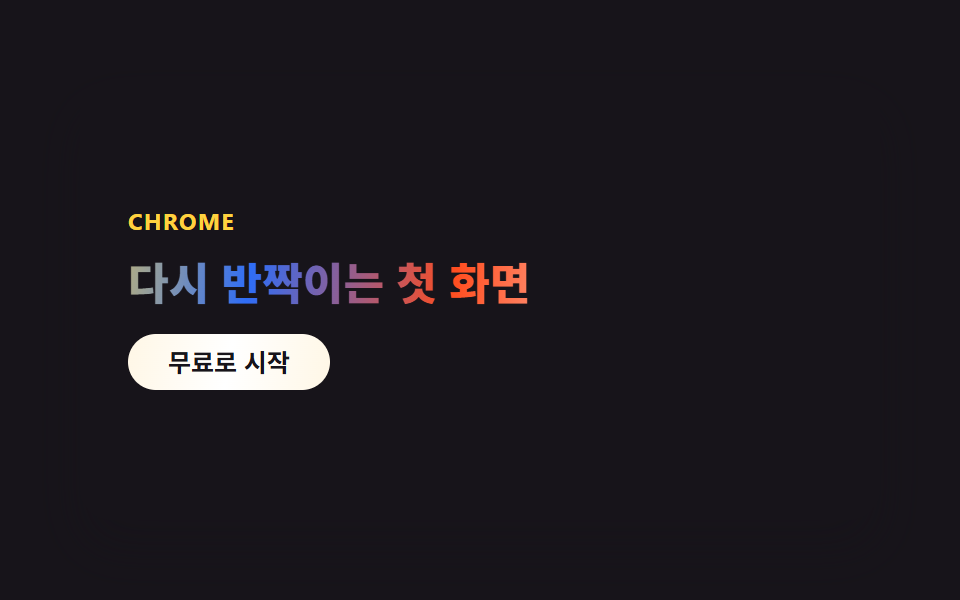
01クロム見出しヒーロー
見出しの文字が銀色から虹色へ移ろうクロムグラデーションをまとい、斜めのハイライトが背景をゆっくり横切ります。
使いどころSaaSランディングの最初の画面・プロダクトティザーカバー
background-clip: text다중 stop gradientbackground-position 스윕
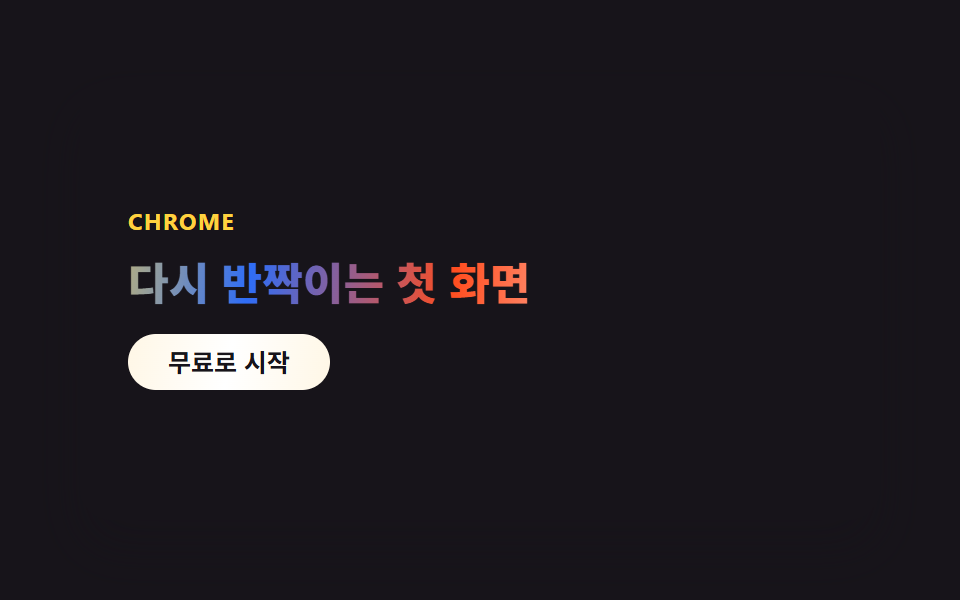
<main class="stage">
  <section class="hero-c">
    <p class="hero-c__eyebrow">CHROME</p>
    <h2 class="hero-c__title">また輝きはじめる最初の画面</h2>
    <button class="hero-c__cta" type="button">無料で始める</button>
  </section>
</main>
@use "../../../../site/static/demo-tokens" as *;
// ── 변수 3개 ──────────────────────────────────────────
$duration: $dur-loop; // 크롬 밴드가 한 바퀴 흐르는 시간
$easing: $ease-out;
$color: $subject-blue; // 그라디언트 안 포인트 색 하나
@include stage($stage-ink);
.hero-c {
position: relative;
overflow: hidden;
box-sizing: border-box;
width: clamp(260px, 86vw, 400px);
min-height: clamp(172px, 48vw, 220px);
border-radius: $r-card;
background: $stage-ink;
box-shadow: $shadow-raised;
padding: $sp-6;
display: flex;
flex-direction: column;
justify-content: center;
gap: $sp-3;
}
.hero-c__eyebrow {
position: relative;
z-index: 1;
margin: 0;
color: $stage-yellow;
font-weight: 700;
font-size: clamp(10px, 2.4vw, 12px);
line-height: 1;
letter-spacing: .06em;
text-transform: uppercase;
font-family: -apple-system, "Segoe UI", "Noto Sans KR", sans-serif;
}
// 헤드라인 — 크롬 그라디언트를 글자 모양으로 잘라내고, 그 안의 밝은 밴드가 background-position 만 바뀌며 흐른다 (유일한 애니메이션)
.hero-c__title {
position: relative;
z-index: 1;
margin: 0;
font-weight: 800;
font-size: clamp(18px, 4.6vw, 23px);
line-height: 1.2;
font-family: -apple-system, "Segoe UI", "Noto Sans KR", sans-serif;
background: linear-gradient(100deg,
$stage-paper 0%, rgba($stage-paper, .35) 14%, $subject-cream 28%,
$stage-yellow 40%, $color 52%, $stage-orange 64%,
$stage-paper 80%, rgba($stage-paper, .4) 100%);
background-size: 240% 100%;
-webkit-background-clip: text;
background-clip: text;
color: transparent;
animation: chromeFlow $duration $easing infinite;
}
.hero-c__cta {
position: relative;
z-index: 1;
align-self: flex-start;
border: 0;
border-radius: $r-pill;
background: linear-gradient(100deg, $subject-cream, $stage-paper, $subject-cream);
color: $stage-ink;
padding: $sp-2 $sp-5;
font-weight: 700;
font-size: clamp(11px, 2.6vw, 13px);
line-height: 1;
font-family: inherit;
}
@keyframes chromeFlow { 0% { background-position: 0% 50%; } 100% { background-position: 240% 50%; } }
@media (prefers-reduced-motion: reduce) {
.hero-c__title { animation: none; }
}html, body {
margin: 0;
overflow: hidden;
}
.stage {
box-sizing: border-box;
min-height: 100vh;
display: grid;
place-items: center;
margin: 0;
background: #17141a;
font-family: -apple-system, "Segoe UI", "Noto Sans KR", sans-serif;
padding: clamp(8px, 4vw, 24px);
}
.hero-c {
position: relative;
overflow: hidden;
box-sizing: border-box;
width: clamp(260px, 86vw, 400px);
min-height: clamp(172px, 48vw, 220px);
border-radius: 16px;
background: #17141a;
box-shadow: 0 14px 24px rgba(23, 20, 26, 0.32);
padding: 24px;
display: flex;
flex-direction: column;
justify-content: center;
gap: 12px;
}
.hero-c__eyebrow {
position: relative;
z-index: 1;
margin: 0;
color: #ffd23f;
font-weight: 700;
font-size: clamp(10px, 2.4vw, 12px);
line-height: 1;
letter-spacing: 0.06em;
text-transform: uppercase;
font-family: -apple-system, "Segoe UI", "Noto Sans KR", sans-serif;
}
.hero-c__title {
position: relative;
z-index: 1;
margin: 0;
font-weight: 800;
font-size: clamp(18px, 4.6vw, 23px);
line-height: 1.2;
font-family: -apple-system, "Segoe UI", "Noto Sans KR", sans-serif;
background: linear-gradient(100deg, #ffffff 0%, rgba(255, 255, 255, 0.35) 14%, #fff7e6 28%, #ffd23f 40%, #2f6df6 52%, #ff4d1f 64%, #ffffff 80%, rgba(255, 255, 255, 0.4) 100%);
background-size: 240% 100%;
-webkit-background-clip: text;
background-clip: text;
color: transparent;
animation: chromeFlow 2s ease-out infinite;
}
.hero-c__cta {
position: relative;
z-index: 1;
align-self: flex-start;
border: 0;
border-radius: 999px;
background: linear-gradient(100deg, #fff7e6, #ffffff, #fff7e6);
color: #17141a;
padding: 8px 20px;
font-weight: 700;
font-size: clamp(11px, 2.6vw, 13px);
line-height: 1;
font-family: inherit;
}
@keyframes chromeFlow {
0% {
background-position: 0% 50%;
}
100% {
background-position: 240% 50%;
}
}
@media (prefers-reduced-motion: reduce) {
.hero-c__title {
animation: none;
}
}import type { CSSProperties } from "react";
import styles from "./HeroChrome.module.scss";
export type HeroChromeProps = {
eyebrow?: string;
title?: string;
cta?: string;
/** 한 주기(기본 2000ms) */
duration?: number;
easing?: string;
color?: string;
};
type Vars = CSSProperties & { "--duration"?: string; "--easing"?: string; "--color"?: string };
export default function HeroChrome({
eyebrow = "CHROME",
title = "The first screen, shining again",
cta = "Start for free",
duration = 2000,
easing = "ease-out",
color = "#2f6df6",
}: HeroChromeProps) {
const vars: Vars = { "--duration": `${duration}ms`, "--easing": easing, "--color": color };
return (
<section className={styles.hero} style={vars}>
<p className={styles.eyebrow}>{eyebrow}</p>
<h2 className={styles.title}>{title}</h2>
<button type="button" className={styles.cta}>{cta}</button>
</section>
);
}01 クロム見出しヒーロー — 計測 累積面積 1.539% · 動いたフレーム 23/23GODRICH オリジナル · SCSS と React は zip に同梱 · y2k webデザインとは?クロムとホログラフィックのLPパーツ9選
このデモが属する記事
 y2k webデザインとは?クロムとホログラフィックのLPパーツ9選y2k webデザインとは、2000年代のCDやホログラム包装紙にあったクロムの輝きと虹色の反射を、CSSだけで蘇らせるスタイルです。CDの裏で虹色ににじんでいたあの光が、今度はボタンや見出しの中に入ってきました。 この記事のデモをすべて見る