09글자를 이루는 떼 — 포인터를 피해 모이는 문장
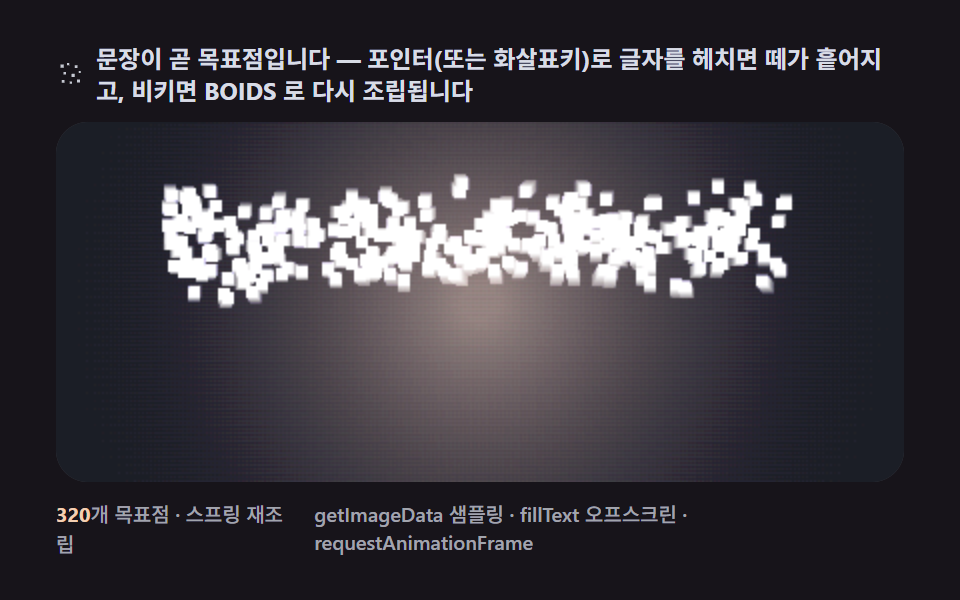
글자의 픽셀 위치를 목표점으로 나눠 주고 포인터 근처에서만 도망 벡터를 더하면, 헤치면 흩어지고 비키면 다시 문장으로 돌아오는 떼가 됩니다.
쓰임히어로 헤드라인·전시 소개 문구
fillTextpointermoverequestAnimationFrame
<main class="stage">
<div class="cd is-demo" id="cdRoot">
  <p class="cd__hint">
    <svg class="cd__ico" viewBox="0 0 256 256" aria-hidden="true"><g fill="currentColor" opacity=".9"><rect x="36" y="52" width="26" height="26" rx="4"/><rect x="88" y="40" width="18" height="18" rx="3"/><rect x="150" y="58" width="22" height="22" rx="4"/><rect x="60" y="112" width="20" height="20" rx="4"/><rect x="124" y="126" width="26" height="26" rx="5"/><rect x="182" y="104" width="16" height="16" rx="3"/><rect x="46" y="176" width="22" height="22" rx="4"/><rect x="110" y="188" width="18" height="18" rx="3"/><rect x="168" y="172" width="24" height="24" rx="4"/></g></svg>
    <span>문장이 곧 목표점입니다 — 포인터(또는 화살표키)로 글자를 헤치면 떼가 흩어지고, 비키면 BOIDS 로 다시 조립됩니다</span>
  </p>
  <div class="cd__field" id="cdField" role="application" aria-label="글자를 이루는 군집 실험판 — 화살표키로 글자를 헤칠 수 있습니다" tabindex="0">
    <canvas class="cd__cv" id="cdCv"></canvas>
  </div>
  <div class="cd__bar">
    <span class="cd__meta"><b class="cd__val" id="cdN">320</b>개 목표점 · 스프링 재조립</span>
    <span class="cd__meta cd__meta--dim">getImageData 샘플링 · fillText 오프스크린 · requestAnimationFrame</span>
  </div>
</div>
</main>
@use "../../../../site/static/demo-tokens" as *;
// 글자를 이루는 떼(09). CSS 애니메이션·@keyframes 를 아예 두지 않는다 —
// 움직임은 전부 캔버스 rAF 루프(목표점 스프링 + 군집 3벡터 + 도망)가 만든다.
// 무대는 어스름 잉크. 파스텔 고정 팔레트를 --flock-* 로 편 공통 규격(07~09 동일).
$duration: $dur-loop;
$easing: $ease-spring;
$color: $subject-lilac;
@include stage($stage-ink);
// ── 편 공통 파스텔 팔레트(315 07~09 — BD9~11 원칙) ──
$flock-ink: #1b1e26; // 어스름 무대
$flock-dusk: #3d4358; // 하늘 깊은 슬레이트
$flock-glow: #f4cfb2; // 지평선 따뜻한 파스텔
$flock-bird: #23262f; // 실루엣 잉크
$flock-lilac: #b9a0ff; // 변형 색(흩어진 개체가 물드는 색)
$flock-mist: #d8dce6; // 글자 색 — 먼 개체 흐릿
.cd {
// 렌더러가 읽는 색 — JS 는 getComputedStyle 로 --flock-* 를 받아 쓴다
--flock-ink: #{$flock-ink};
--flock-dusk: #{$flock-dusk};
--flock-glow: #{$flock-glow};
--flock-bird: #{$flock-bird};
--flock-lilac: #{$flock-lilac};
--flock-mist: #{$flock-mist};
display: flex; flex-direction: column; gap: $sp-2;
width: 100%; max-width: 424px;
}
.cd__hint {
display: flex; align-items: center; gap: $sp-1; margin: 0;
font-weight: 700; font-size: clamp(10px, 2.8vw, 12px); line-height: 1.35;
color: $flock-mist;
}
.cd__ico { width: 16px; height: 16px; flex: 0 0 auto; color: $flock-mist; }
.cd__field {
position: relative; height: 180px;
border-radius: $r-card; overflow: hidden;
background: $flock-ink;
box-shadow: inset 0 0 0 1px rgba($flock-mist, .16);
cursor: crosshair; touch-action: none;
}
.cd__field:focus-visible { outline: 2px solid $flock-glow; outline-offset: 2px; }
.cd__cv { display: block; width: 100%; height: 100%; }
.cd__bar { display: flex; align-items: baseline; justify-content: space-between; gap: $sp-2; }
.cd__meta { font-size: 10px; font-weight: 500; color: rgba($flock-mist, .72); }
.cd__val { color: $flock-glow; font-weight: 700; }
.cd__meta--dim { font-size: 10px; }
@media (max-width: 340px) {
.cd { gap: $sp-1; }
.cd__field { height: 100px; }
.cd__meta--dim { display: none; }
}
// reduce — rAF 를 돌리지 않고 한 장만 남는다. 커서 신호만 거둔다.
@media (prefers-reduced-motion: reduce) {
.cd.is-still .cd__field { cursor: default !important; }
}html, body {
margin: 0;
overflow: hidden;
}
.stage {
box-sizing: border-box;
min-height: 100vh;
display: grid;
place-items: center;
margin: 0;
background: #17141a;
font-family: -apple-system, "Segoe UI", "Noto Sans KR", sans-serif;
padding: clamp(8px, 4vw, 24px);
}
.cd {
--flock-ink: #1b1e26;
--flock-dusk: #3d4358;
--flock-glow: #f4cfb2;
--flock-bird: #23262f;
--flock-lilac: #b9a0ff;
--flock-mist: #d8dce6;
display: flex;
flex-direction: column;
gap: 8px;
width: 100%;
max-width: 424px;
}
.cd__hint {
display: flex;
align-items: center;
gap: 4px;
margin: 0;
font-weight: 700;
font-size: clamp(10px, 2.8vw, 12px);
line-height: 1.35;
color: #d8dce6;
}
.cd__ico {
width: 16px;
height: 16px;
flex: 0 0 auto;
color: #d8dce6;
}
.cd__field {
position: relative;
height: 180px;
border-radius: 16px;
overflow: hidden;
background: #1b1e26;
box-shadow: inset 0 0 0 1px rgba(216, 220, 230, 0.16);
cursor: crosshair;
touch-action: none;
}
.cd__field:focus-visible {
outline: 2px solid #f4cfb2;
outline-offset: 2px;
}
.cd__cv {
display: block;
width: 100%;
height: 100%;
}
.cd__bar {
display: flex;
align-items: baseline;
justify-content: space-between;
gap: 8px;
}
.cd__meta {
font-size: 10px;
font-weight: 500;
color: rgba(216, 220, 230, 0.72);
}
.cd__val {
color: #f4cfb2;
font-weight: 700;
}
.cd__meta--dim {
font-size: 10px;
}
@media (max-width: 340px) {
.cd {
gap: 4px;
}
.cd__field {
height: 100px;
}
.cd__meta--dim {
display: none;
}
}
@media (prefers-reduced-motion: reduce) {
.cd.is-still .cd__field {
cursor: default !important;
}
}// 글자를 이루는 떼(09). 오프스크린 캔버스에 굵은 산세리프로 "BOIDS" 를 fillText 로 칠고
// getImageData 로 밝은 픽셀 좌표를 샘플(약 300~400점)해 개체별 목표점으로 배정한다.
// 스티어링 = 목표점 스프링(강) + 군집 3규칙(약) + 포인터 도망 벡터.
// 포인터가 없는 렌더 환경에서는 시드 고정 가상 포인터가 주기적으로 문장을 가로질러
// 흩었다 모으게 한다(23/23 프레임 보장). 오프스크린은 화면에 안 보인다.
(function () {
// ── 변형 상수 블록 — 아래 값 하나만 바꿔 변형 3종을 만든다 ──
var N = 320; // 개체 수(샘플 점 수에 맞춰 상한에서 잘린다)
var FLEE_R = 120; // 도망 반경(px) — 변형 "도망 반경" 축(28 → 120), 화면 넓은 영역까지 흩어진다
var SPRING = 6.0; // 목표점 스프링 세기 — 낮춰 흩어진 뒤 되돌아오는 데 시간이 걸리게 한다
var TRAIL = 0.07; // 잔상 덮개 알파 — 흩어지는 궤적을 남겨 누적면적을 넓힌다
// ────────────────────────────────────────────────────
var root = document.getElementById('cdRoot');
var field = document.getElementById('cdField');
var cv = document.getElementById('cdCv');
var ctx = cv.getContext('2d');
var nOut = document.getElementById('cdN');
// 시드 고정 PRNG — mulberry32
var SEED = 0x09b0d5;
var prngState = SEED >>> 0;
function rand() {
prngState = (prngState + 0x6D2B79F5) >>> 0;
var t = prngState;
t = Math.imul(t ^ (t >>> 15), t | 1);
t ^= t + Math.imul(t ^ (t >>> 7), t | 61);
return ((t ^ (t >>> 14)) >>> 0) / 4294967296;
}
var css = getComputedStyle(root);
function tokRGB(name) {
var s = css.getPropertyValue(name).trim();
var hx = s.length === 4
? s.charAt(1) + s.charAt(1) + s.charAt(2) + s.charAt(2) + s.charAt(3) + s.charAt(3)
: s.slice(1);
return [parseInt(hx.slice(0, 2), 16), parseInt(hx.slice(2, 4), 16), parseInt(hx.slice(4, 6), 16)];
}
var C_INK = tokRGB('--flock-ink');
var C_MIST = tokRGB('--flock-mist');
var C_LILAC = tokRGB('--flock-lilac');
var C_GLOW = tokRGB('--flock-glow');
var TAU = Math.PI * 2;
var reduce = window.matchMedia('(prefers-reduced-motion: reduce)').matches;
var W = 0, H = 0;
var raf = 0, t0 = -1;
var px01 = 0.5, py01 = 0.5; // 포인터(0..1) — 없으면 가상
var manual = false;
var firstFrame = true; // 리사이즈마다 잔상 캔버스를 다시 깔아야 한다
// ── 이웃 반경 안 3벡터(약하게) ──
var NEI_R = 22, NEI_R2 = NEI_R * NEI_R, SEP_R = 8;
var W_SEP = 9, W_ALI = 2.4, W_COH = 1.2;
// ── 목표점 샘플 — 오프스크린 fillText → getImageData ──
var targets = []; // {x,y} 정규화(0..1) 좌표
var boids = [];
var FONT_STACK = '900 100px "Segoe UI", "Helvetica Neue", Arial, sans-serif';
var sampleGap = 4; // 픽셀 샘플 간격
function buildTargets() {
targets = [];
var off = document.createElement('canvas');
off.width = Math.max(64, Math.round(W));
off.height = Math.max(32, Math.round(H));
var octx = off.getContext('2d');
octx.fillStyle = '#000';
octx.fillRect(0, 0, off.width, off.height);
octx.fillStyle = '#fff';
octx.font = FONT_STACK;
octx.textAlign = 'center';
octx.textBaseline = 'middle';
var word = 'BOIDS';
octx.fillText(word, off.width / 2, off.height / 2);
var availW = off.width * 0.92;
var m = octx.measureText(word);
if (m.width > availW) {
// 폭이 넘치면 글꼴 크기를 비례 축소해 다시 칠한다
var scale = availW / m.width;
var px2 = Math.max(28, Math.floor(100 * scale));
octx.font = '900 ' + px2 + 'px "Segoe UI", "Helvetica Neue", Arial, sans-serif';
octx.fillText(word, off.width / 2, off.height / 2);
}
var img = octx.getImageData(0, 0, off.width, off.height);
var d = img.data, ow = off.width, oh = off.height;
for (var yy = 0; yy < oh; yy += sampleGap) {
for (var xx = 0; xx < ow; xx += sampleGap) {
if (d[(yy * ow + xx) * 4] > 128) {
targets.push({ x: xx / ow, y: yy / oh });
}
}
}
// 개체 수를 목표점 수에 맞춰 재배치(목표 인덱스는 그대로 유지)
var count = Math.min(N, targets.length);
boids = [];
for (var i = 0; i < count; i++) {
var tg = targets[i % targets.length];
boids.push({
x: tg.x * W + (rand() - 0.5) * 40,
y: tg.y * H + (rand() - 0.5) * 40,
vx: (rand() - 0.5) * 20,
vy: (rand() - 0.5) * 20,
tx: tg.x, ty: tg.y,
ph: rand() * TAU
});
}
nOut.textContent = String(count);
}
function flockForce(idx) {
var p = boids[idx];
var sepX = 0, sepY = 0, aliX = 0, aliY = 0, cohX = 0, cohY = 0, cnt = 0;
for (var j = 0; j < boids.length; j++) {
if (j === idx) continue;
var q = boids[j];
var dx = q.x - p.x, dy = q.y - p.y;
if (dx > W / 2) dx -= W; else if (dx < -W / 2) dx += W;
if (dy > H / 2) dy -= H; else if (dy < -H / 2) dy += H;
var d2 = dx * dx + dy * dy;
if (d2 > NEI_R2) continue;
var d = Math.sqrt(d2) || 0.0001;
if (d < SEP_R) { sepX -= dx / d; sepY -= dy / d; }
aliX += q.vx; aliY += q.vy;
cohX += dx; cohY += dy;
cnt++;
}
var fx = sepX * W_SEP, fy = sepY * W_SEP;
if (cnt > 0) {
fx += (aliX / cnt - p.vx) * (W_ALI / 10);
fy += (aliY / cnt - p.vy) * (W_ALI / 10);
fx += (cohX / cnt) * (W_COH / 40);
fy += (cohY / cnt) * (W_COH / 40);
}
return [fx, fy];
}
var STILL_T = 1.5;
function draw(tSec, dt) {
// 잔상 덮개 — 첫 프레임은 불투명 full, 이후 반투명 TRAIL 로 흩어지는 궤적을 남긴다
ctx.globalCompositeOperation = 'source-over';
ctx.fillStyle = 'rgba(' + C_INK[0] + ',' + C_INK[1] + ',' + C_INK[2] + ',' + (firstFrame ? 1 : TRAIL).toFixed(3) + ')';
ctx.fillRect(0, 0, W, H);
firstFrame = false;
// 가상 포인터 — 주기적으로 문장을 가로질러 흩었다 모으게(23/23 보장)
var sX, sY;
if (manual) { sX = px01 * W; sY = py01 * H; }
else {
var cyc = (tSec % 6.2) / 6.2; // 6.2초 주기 — 더 자주 문장을 가로지른다
var sweep = Math.sin(cyc * TAU);
sX = W * (0.5 + sweep * 0.5);
sY = H * (0.5 + 0.4 * Math.cos(cyc * TAU * 2));
}
// ── 목표점 미광 — 문장 자리를 은은히 비춘다(재조립 방향 감각) ──
var breathe = 0.85 + 0.15 * Math.sin(tSec * 1.8);
var gA = 0.05 * breathe;
var rg = ctx.createRadialGradient(W / 2, H / 2, Math.min(W, H) * 0.05, W / 2, H / 2, Math.max(W, H) * 0.52);
rg.addColorStop(0, 'rgba(' + C_GLOW[0] + ',' + C_GLOW[1] + ',' + C_GLOW[2] + ',' + gA.toFixed(3) + ')');
rg.addColorStop(1, 'rgba(0,0,0,0)');
ctx.globalCompositeOperation = 'lighter';
ctx.fillStyle = rg;
ctx.fillRect(0, 0, W, H);
// ── 개체 — 목표 스프링 + 군집(약) + 도망 ──
for (var i = 0; i < boids.length; i++) {
var p = boids[i];
var dx = p.tx * W - p.x, dy = p.ty * H - p.y;
var ax = dx * SPRING, ay = dy * SPRING;
var ff = flockForce(i);
ax += ff[0]; ay += ff[1];
var dxs = p.x - sX, dys = p.y - sY;
var ds = Math.hypot(dxs, dys) || 0.0001;
if (ds < FLEE_R) {
var fm = (1 - ds / FLEE_R) * 460;
ax += (dxs / ds) * fm;
ay += (dys / ds) * fm;
}
var jitX = Math.sin(tSec * 6.3 + p.ph) * 34;
var jitY = Math.cos(tSec * 5.1 + p.ph * 1.3) * 30;
ax += jitX; ay += jitY;
p.vx += ax * dt; p.vy += ay * dt;
var damp = Math.pow(0.86, dt * 60);
p.vx *= damp; p.vy *= damp;
var sp = Math.hypot(p.vx, p.vy);
var maxV = 260;
if (sp > maxV) { p.vx = p.vx / sp * maxV; p.vy = p.vy / sp * maxV; }
p.x += p.vx * dt; p.y += p.vy * dt;
// 글자 색 $flock-mist — 도망 중(목표에서 멀수록) 라일락으로 물든다
var far = Math.min(1, Math.hypot(dx, dy) / 60);
var rC = C_MIST[0] + (C_LILAC[0] - C_MIST[0]) * far;
var gC = C_MIST[1] + (C_LILAC[1] - C_MIST[1]) * far;
var bC = C_MIST[2] + (C_LILAC[2] - C_MIST[2]) * far;
var rad = 2.6;
ctx.fillStyle = 'rgba(' + (rC | 0) + ',' + (gC | 0) + ',' + (bC | 0) + ',0.85)';
ctx.fillRect(p.x - rad, p.y - rad, rad * 2, rad * 2);
}
ctx.globalCompositeOperation = 'source-over';
}
function fit() {
var r = field.getBoundingClientRect();
W = r.width; H = r.height;
cv.width = Math.round(W); cv.height = Math.round(H);
firstFrame = true; // 리사이즈마다 잔상 캔버스를 다시 깔아야 한다
}
function frame(now) {
if (t0 < 0) t0 = now;
var t = (now - t0) / 1000;
var dt = Math.min(0.05, (now - (frame.prev || now)) / 1000);
frame.prev = now;
draw(t, dt);
raf = requestAnimationFrame(frame);
}
field.addEventListener('pointermove', function (e) {
var r = field.getBoundingClientRect();
px01 = Math.min(1, Math.max(0, (e.clientX - r.left) / r.width));
py01 = Math.min(1, Math.max(0, (e.clientY - r.top) / r.height));
if (!manual) { manual = true; root.classList.remove('is-demo'); }
if (reduce) draw(STILL_T, 0.016);
});
field.addEventListener('pointerleave', function () { manual = false; });
field.addEventListener('keydown', function (e) {
var d = { ArrowLeft: [-0.07, 0], ArrowRight: [0.07, 0], ArrowUp: [0, -0.06], ArrowDown: [0, 0.06] }[e.key];
if (!d) return;
e.preventDefault();
if (!manual) { manual = true; root.classList.remove('is-demo'); px01 = 0.5; py01 = 0.5; }
px01 = Math.max(0, Math.min(1, px01 + d[0]));
py01 = Math.max(0, Math.min(1, py01 + d[1]));
if (reduce) draw(STILL_T, 0.016);
});
window.addEventListener('resize', function () { fit(); buildTargets(); if (reduce) draw(STILL_T, 0.016); });
fit();
buildTargets();
if (reduce) {
draw(STILL_T, 0);
root.classList.add('is-still');
} else {
raf = requestAnimationFrame(frame);
}
})();// TextGlyphSwarm — vanilla 판(run/315/demo/09-flock-text-glyph-swarm/index.html) 의 React 포트.
// 오프스크린 캔버스에 굵은 산세리프로 "BOIDS" 를 fillText 로 칠고 getImageData 로 밝은 픽셀
// 좌표를 샘플해 개체별 목표점으로 배정한다. 스티어링 = 목표점 스프링(강) + 군집 3규칙(약) +
// 포인터 도망 벡터. 포인터가 없으면 시드 고정 가상 포인터가 주기적으로 문장을 가로지른다.
import { useEffect, useRef, useState } from "react";
import type { CSSProperties } from "react";
import styles from "./TextGlyphSwarm.module.scss";
export type TextGlyphSwarmProps = {
duration?: string;
easing?: string;
color?: string;
count?: number; // 개체 수(샘플 점 수에 맞춰 상한에서 잘린다)
fleeR?: number; // 도망 반경(px) — 변형 "도망 반경" 축(28 → 120)
spring?: number; // 목표점 스프링 세기
};
type Vars = CSSProperties & { "--duration"?: string; "--easing"?: string; "--color"?: string };
type Box<T> = { current: T };
type RGB = [number, number, number];
type Target = { x: number; y: number };
type Boid = { x: number; y: number; vx: number; vy: number; tx: number; ty: number; ph: number };
type Colors = { ink: RGB; mist: RGB; lilac: RGB; glow: RGB };
const TAU = Math.PI * 2;
const FIELD_LABEL = "글자를 이루는 군집 실험판 — 화살표키로 글자를 헤칠 수 있습니다";
const STILL_T = 1.5;
const TRAIL = 0.07;
const NEI_R = 22, NEI_R2 = NEI_R * NEI_R, SEP_R = 8;
const W_SEP = 9, W_ALI = 2.4, W_COH = 1.2;
const FONT_STACK = '900 100px "Segoe UI", "Helvetica Neue", Arial, sans-serif';
const SAMPLE_GAP = 4;
const WORD = "BOIDS";
const ARROW_STEP: Record<string, [number, number]> = {
ArrowLeft: [-0.07, 0], ArrowRight: [0.07, 0], ArrowUp: [0, -0.06], ArrowDown: [0, 0.06],
};
// 시드 고정 PRNG — mulberry32
function makePRNG(seed: number): () => number {
let s = seed >>> 0;
return function () {
s = (s + 0x6d2b79f5) >>> 0;
let t = s;
t = Math.imul(t ^ (t >>> 15), t | 1);
t ^= t + Math.imul(t ^ (t >>> 7), t | 61);
return ((t ^ (t >>> 14)) >>> 0) / 4294967296;
};
}
export default function TextGlyphSwarm({
duration = "2s",
easing = "cubic-bezier(.2, .8, .2, 1)",
color = "#b9a0ff",
count = 320,
fleeR = 120,
spring = 6.0,
}: TextGlyphSwarmProps) {
const rootRef = useRef<HTMLDivElement | null>(null);
const fieldRef = useRef<HTMLDivElement | null>(null);
const cvRef = useRef<HTMLCanvasElement | null>(null);
const ctxRef = useRef<CanvasRenderingContext2D | null>(null);
const sizeRef = useRef({ w: 0, h: 0 }) as Box<{ w: number; h: number }>;
const colRef = useRef<Colors | null>(null);
const boidsRef = useRef<Boid[]>([]) as Box<Boid[]>;
const randRef = useRef<() => number>(makePRNG(0x09b0d5)) as Box<() => number>;
const firstRef = useRef(true) as Box<boolean>;
const rafRef = useRef(0) as Box<number>;
const t0Ref = useRef(-1) as Box<number>;
const prevRef = useRef(0) as Box<number>;
const pxRef = useRef(0.5) as Box<number>;
const pyRef = useRef(0.5) as Box<number>;
const manualRef = useRef(false) as Box<boolean>;
const reduceRef = useRef(false) as Box<boolean>;
const [n, setN] = useState(String(count));
const [still, setStill] = useState(false);
const vars: Vars = { "--duration": duration, "--easing": easing, "--color": color };
function tokRGB(root: HTMLDivElement, name: string): RGB {
const s = getComputedStyle(root).getPropertyValue(name).trim();
const hx = s.length === 4
? s.charAt(1) + s.charAt(1) + s.charAt(2) + s.charAt(2) + s.charAt(3) + s.charAt(3)
: s.slice(1);
return [parseInt(hx.slice(0, 2), 16), parseInt(hx.slice(2, 4), 16), parseInt(hx.slice(4, 6), 16)];
}
// 오프스크린 fillText → getImageData 로 목표점 샘플, 개체 재배치
function buildTargets(): void {
const rand = randRef.current;
const { w: W, h: H } = sizeRef.current;
const targets: Target[] = [];
const off = document.createElement("canvas");
off.width = Math.max(64, Math.round(W));
off.height = Math.max(32, Math.round(H));
const octx = off.getContext("2d");
if (!octx) return;
octx.fillStyle = "#000";
octx.fillRect(0, 0, off.width, off.height);
octx.fillStyle = "#fff";
octx.font = FONT_STACK;
octx.textAlign = "center";
octx.textBaseline = "middle";
octx.fillText(WORD, off.width / 2, off.height / 2);
const availW = off.width * 0.92;
const m = octx.measureText(WORD);
if (m.width > availW) {
const scale = availW / m.width;
const px2 = Math.max(28, Math.floor(100 * scale));
octx.font = `900 ${px2}px "Segoe UI", "Helvetica Neue", Arial, sans-serif`;
octx.fillText(WORD, off.width / 2, off.height / 2);
}
const img = octx.getImageData(0, 0, off.width, off.height);
const d = img.data, ow = off.width, oh = off.height;
for (let yy = 0; yy < oh; yy += SAMPLE_GAP) {
for (let xx = 0; xx < ow; xx += SAMPLE_GAP) {
if (d[(yy * ow + xx) * 4] > 128) targets.push({ x: xx / ow, y: yy / oh });
}
}
const cnt = Math.min(count, targets.length);
const arr: Boid[] = [];
for (let i = 0; i < cnt; i++) {
const tg = targets[i % targets.length];
arr.push({
x: tg.x * W + (rand() - 0.5) * 40,
y: tg.y * H + (rand() - 0.5) * 40,
vx: (rand() - 0.5) * 20,
vy: (rand() - 0.5) * 20,
tx: tg.x, ty: tg.y,
ph: rand() * TAU,
});
}
boidsRef.current = arr;
setN(String(cnt));
}
function fit(): void {
const field = fieldRef.current;
const cv = cvRef.current;
if (!field || !cv) return;
const ctx = cv.getContext("2d");
if (!ctx) return;
const r = field.getBoundingClientRect();
sizeRef.current.w = r.width;
sizeRef.current.h = r.height;
cv.width = Math.round(r.width);
cv.height = Math.round(r.height);
ctxRef.current = ctx;
firstRef.current = true;
}
function flockForce(idx: number): [number, number] {
const boids = boidsRef.current;
const { w: W, h: H } = sizeRef.current;
const p = boids[idx];
let sepX = 0, sepY = 0, aliX = 0, aliY = 0, cohX = 0, cohY = 0, cnt = 0;
for (let j = 0; j < boids.length; j++) {
if (j === idx) continue;
const q = boids[j];
let dx = q.x - p.x, dy = q.y - p.y;
if (dx > W / 2) dx -= W; else if (dx < -W / 2) dx += W;
if (dy > H / 2) dy -= H; else if (dy < -H / 2) dy += H;
const d2 = dx * dx + dy * dy;
if (d2 > NEI_R2) continue;
const d = Math.sqrt(d2) || 0.0001;
if (d < SEP_R) { sepX -= dx / d; sepY -= dy / d; }
aliX += q.vx; aliY += q.vy;
cohX += dx; cohY += dy;
cnt++;
}
let fx = sepX * W_SEP, fy = sepY * W_SEP;
if (cnt > 0) {
fx += (aliX / cnt - p.vx) * (W_ALI / 10);
fy += (aliY / cnt - p.vy) * (W_ALI / 10);
fx += (cohX / cnt) * (W_COH / 40);
fy += (cohY / cnt) * (W_COH / 40);
}
return [fx, fy];
}
function draw(tSec: number, dt: number): void {
const ctx = ctxRef.current;
const col = colRef.current;
const boids = boidsRef.current;
if (!ctx || !col) return;
const { w: W, h: H } = sizeRef.current;
ctx.globalCompositeOperation = "source-over";
ctx.fillStyle = `rgba(${col.ink[0]},${col.ink[1]},${col.ink[2]},${firstRef.current ? 1 : TRAIL})`;
ctx.fillRect(0, 0, W, H);
firstRef.current = false;
let sX: number, sY: number;
if (manualRef.current) { sX = pxRef.current * W; sY = pyRef.current * H; }
else {
const cyc = (tSec % 6.2) / 6.2;
const sweep = Math.sin(cyc * TAU);
sX = W * (0.5 + sweep * 0.5);
sY = H * (0.5 + 0.4 * Math.cos(cyc * TAU * 2));
}
const breathe = 0.85 + 0.15 * Math.sin(tSec * 1.8);
const gA = 0.05 * breathe;
const rg = ctx.createRadialGradient(W / 2, H / 2, Math.min(W, H) * 0.05, W / 2, H / 2, Math.max(W, H) * 0.52);
rg.addColorStop(0, `rgba(${col.glow[0]},${col.glow[1]},${col.glow[2]},${gA.toFixed(3)})`);
rg.addColorStop(1, "rgba(0,0,0,0)");
ctx.globalCompositeOperation = "lighter";
ctx.fillStyle = rg;
ctx.fillRect(0, 0, W, H);
for (let i = 0; i < boids.length; i++) {
const p = boids[i];
const dx = p.tx * W - p.x, dy = p.ty * H - p.y;
let ax = dx * spring, ay = dy * spring;
const ff = flockForce(i);
ax += ff[0]; ay += ff[1];
const dxs = p.x - sX, dys = p.y - sY;
const ds = Math.hypot(dxs, dys) || 0.0001;
if (ds < fleeR) {
const fm = (1 - ds / fleeR) * 460;
ax += (dxs / ds) * fm;
ay += (dys / ds) * fm;
}
const jitX = Math.sin(tSec * 6.3 + p.ph) * 34;
const jitY = Math.cos(tSec * 5.1 + p.ph * 1.3) * 30;
ax += jitX; ay += jitY;
p.vx += ax * dt; p.vy += ay * dt;
const damp = Math.pow(0.86, dt * 60);
p.vx *= damp; p.vy *= damp;
const sp = Math.hypot(p.vx, p.vy);
const maxV = 260;
if (sp > maxV) { p.vx = (p.vx / sp) * maxV; p.vy = (p.vy / sp) * maxV; }
p.x += p.vx * dt; p.y += p.vy * dt;
const far = Math.min(1, Math.hypot(dx, dy) / 60);
const rC = col.mist[0] + (col.lilac[0] - col.mist[0]) * far;
const gC = col.mist[1] + (col.lilac[1] - col.mist[1]) * far;
const bC = col.mist[2] + (col.lilac[2] - col.mist[2]) * far;
const rad = 2.6;
ctx.fillStyle = `rgba(${rC | 0},${gC | 0},${bC | 0},0.85)`;
ctx.fillRect(p.x - rad, p.y - rad, rad * 2, rad * 2);
}
ctx.globalCompositeOperation = "source-over";
}
function frame(now: number): void {
if (t0Ref.current < 0) t0Ref.current = now;
const t = (now - t0Ref.current) / 1000;
const dt = Math.min(0.05, (now - (prevRef.current || now)) / 1000);
prevRef.current = now;
draw(t, dt);
rafRef.current = requestAnimationFrame(frame);
}
function onPointerMove(e: React.PointerEvent<HTMLDivElement>): void {
const field = fieldRef.current;
if (!field) return;
const r = field.getBoundingClientRect();
pxRef.current = Math.min(1, Math.max(0, (e.clientX - r.left) / r.width));
pyRef.current = Math.min(1, Math.max(0, (e.clientY - r.top) / r.height));
if (!manualRef.current) manualRef.current = true;
if (reduceRef.current) draw(STILL_T, 0.016);
}
function onPointerLeave(): void { manualRef.current = false; }
function onKeyDown(e: React.KeyboardEvent<HTMLDivElement>): void {
const d = ARROW_STEP[e.key];
if (!d) return;
e.preventDefault();
if (!manualRef.current) { manualRef.current = true; pxRef.current = 0.5; pyRef.current = 0.5; }
pxRef.current = Math.max(0, Math.min(1, pxRef.current + d[0]));
pyRef.current = Math.max(0, Math.min(1, pyRef.current + d[1]));
if (reduceRef.current) draw(STILL_T, 0.016);
}
useEffect(() => {
const root = rootRef.current;
if (!root) return;
reduceRef.current = window.matchMedia("(prefers-reduced-motion: reduce)").matches;
colRef.current = {
ink: tokRGB(root, "--flock-ink"),
mist: tokRGB(root, "--flock-mist"),
lilac: tokRGB(root, "--flock-lilac"),
glow: tokRGB(root, "--flock-glow"),
};
randRef.current = makePRNG(0x09b0d5);
fit();
buildTargets();
function onResize(): void {
fit();
buildTargets();
if (reduceRef.current) draw(STILL_T, 0.016);
}
window.addEventListener("resize", onResize);
if (reduceRef.current) {
draw(STILL_T, 0);
setStill(true);
} else {
rafRef.current = requestAnimationFrame(frame);
}
return () => {
window.removeEventListener("resize", onResize);
cancelAnimationFrame(rafRef.current);
};
// eslint-disable-next-line react-hooks/exhaustive-deps
}, [count, fleeR, spring]);
const rootCls = still ? `${styles.root} ${styles.isStill}` : styles.root;
return (
<main className={styles.stage}>
<div className={rootCls} ref={rootRef} style={vars}>
<p className={styles.hint}>
<svg className={styles.ico} viewBox="0 0 256 256" aria-hidden="true"><g fill="currentColor" opacity=".9"><rect x="36" y="52" width="26" height="26" rx="4" /><rect x="88" y="40" width="18" height="18" rx="3" /><rect x="150" y="58" width="22" height="22" rx="4" /><rect x="60" y="112" width="20" height="20" rx="4" /><rect x="124" y="126" width="26" height="26" rx="5" /><rect x="182" y="104" width="16" height="16" rx="3" /><rect x="46" y="176" width="22" height="22" rx="4" /><rect x="110" y="188" width="18" height="18" rx="3" /><rect x="168" y="172" width="24" height="24" rx="4" /></g></svg>
<span>문장이 곧 목표점입니다 — 포인터(또는 화살표키)로 글자를 헤치면 떼가 흩어지고, 비키면 BOIDS 로 다시 조립됩니다</span>
</p>
<div
className={styles.field}
ref={fieldRef}
role="application"
aria-label={FIELD_LABEL}
tabIndex={0}
onPointerMove={onPointerMove}
onPointerLeave={onPointerLeave}
onKeyDown={onKeyDown}
>
<canvas className={styles.cv} ref={cvRef}></canvas>
</div>
<div className={styles.bar}>
<span className={styles.meta}><b className={styles.val}>{n}</b>개 목표점 · 스프링 재조립</span>
<span className={styles.metaDim}>getImageData 샘플링 · fillText 오프스크린 · requestAnimationFrame</span>
</div>
</div>
</main>
);
}09 글자를 이루는 떼 — 포인터를 피해 모이는 문장 — 측정 누적면적 31.423% · 움직인 프레임 23/23GODRICH 원작 · zip 에 SCSS·React 포함 · 캔버스 보이드(boids javascript) 군집 9종 — 새떼 애니메이션
이 데모가 속한 글
 캔버스 보이드(boids javascript) 군집 9종 — 새떼 애니메이션보이드(boids javascript)는 이웃 반경 안 개체끼리 분리·정렬·결합 세 벡터를 더해 리더 없이 무리를 짓는 군집 시뮬레이션이며, 라이브러리·WebGL 없이 세 개의 벡터 규칙만으로 수백 마리 새떼가 짓는 이 글의 데모 전부 보기