04두 겹을 포개 그라데이션을 바꾸는 크로스페이드
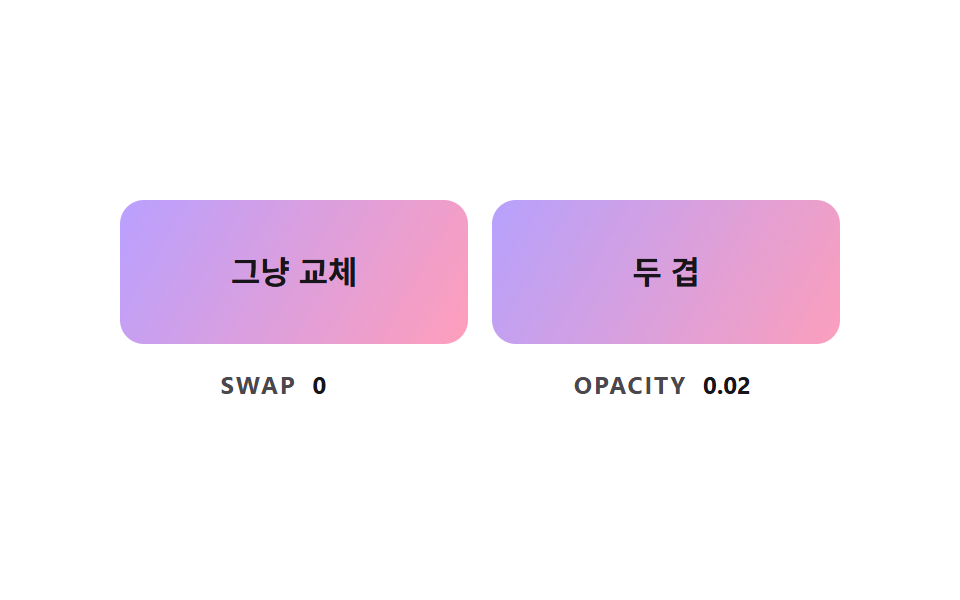
배경 그라데이션은 그대로 transition 이 되지 않으므로 아래 그라데이션 위에 다른 그라데이션 겹을 포개고 그 겹의 투명도만 올려 색 조합을 바꾼다.
쓰임css 버튼 그라데이션 hover 를 부드럽게 만들기
FADE_RATESTART_MSON_MS
<main class="stage">
<div class="bc is-demo" id="bcRoot">
  <div class="bc__pair">
    <div class="bc__cell">
      <button class="bc__btn" id="bcSwap" type="button"><span class="bc__label">그냥 교체</span></button>
      <p class="bc__meta"><span class="bc__tag">SWAP</span> <b id="bcSwapVal">0</b></p>
    </div>
    <div class="bc__cell">
      <button class="bc__btn" id="bcFade" type="button"><span class="bc__layer" id="bcLayer"></span><span class="bc__label">두 겹</span></button>
      <p class="bc__meta"><span class="bc__tag">OPACITY</span> <b id="bcFadeVal">0.00</b></p>
    </div>
  </div>
</div>
</main>
@use "../../../../site/static/demo-tokens" as *;
// 핵심: 그라데이션은 transition 으로 보간되지 않는다. 아래 겹(버튼 배경)과 위 겹(.bc__layer)을 포개고 위 겹의 opacity 만 옮긴다.
$layer-a: linear-gradient(120deg, $subject-lilac, $subject-pink);
$layer-b: linear-gradient(120deg, $subject-mint, $subject-sky);
@include stage($stage-paper);
.bc { width: min(100%, 360px); }
.bc__pair {
display: grid;
grid-template-columns: repeat(2, minmax(0, 1fr));
gap: $sp-3;
}
.bc__cell { display: grid; gap: $sp-3; justify-items: center; min-width: 0; }
.bc__btn {
position: relative;
isolation: isolate;
overflow: hidden;
box-sizing: border-box;
width: 100%;
height: 72px;
border: 0;
border-radius: $r-control;
background: $layer-a;
color: $subject-ink;
font-family: inherit;
font-size: 16px;
font-weight: 700;
line-height: 20px;
cursor: pointer;
}
.bc__btn:focus-visible { outline: 3px solid $subject-ink; outline-offset: 3px; }
.bc__btn.bc__on { background: $layer-b; }
.bc__layer {
position: absolute;
inset: 0;
z-index: -1;
background: $layer-b;
opacity: 0;
}
.bc__label { position: relative; }
.bc__meta {
margin: 0;
display: flex;
align-items: baseline;
gap: $sp-2;
font-size: 12px;
line-height: 16px;
color: rgba($subject-ink, .78);
}
.bc__tag { font-weight: 700; letter-spacing: .08em; }
.bc__meta b { min-width: 4ch; font-variant-numeric: tabular-nums; color: $subject-ink; }
@media (prefers-reduced-motion: reduce) {
.bc__btn { transition: none; }
}html, body {
margin: 0;
overflow: hidden;
}
.stage {
box-sizing: border-box;
min-height: 100vh;
display: grid;
place-items: center;
margin: 0;
background: #ffffff;
font-family: -apple-system, "Segoe UI", "Noto Sans KR", sans-serif;
padding: clamp(8px, 4vw, 24px);
}
.bc {
width: min(100%, 360px);
}
.bc__pair {
display: grid;
grid-template-columns: repeat(2, minmax(0, 1fr));
gap: 12px;
}
.bc__cell {
display: grid;
gap: 12px;
justify-items: center;
min-width: 0;
}
.bc__btn {
position: relative;
isolation: isolate;
overflow: hidden;
box-sizing: border-box;
width: 100%;
height: 72px;
border: 0;
border-radius: 12px;
background: linear-gradient(120deg, #b9a0ff, #ff9ebb);
color: #17141a;
font-family: inherit;
font-size: 16px;
font-weight: 700;
line-height: 20px;
cursor: pointer;
}
.bc__btn:focus-visible {
outline: 3px solid #17141a;
outline-offset: 3px;
}
.bc__btn.bc__on {
background: linear-gradient(120deg, #4cd4a6, #6ec8ff);
}
.bc__layer {
position: absolute;
inset: 0;
z-index: -1;
background: linear-gradient(120deg, #4cd4a6, #6ec8ff);
opacity: 0;
}
.bc__label {
position: relative;
}
.bc__meta {
margin: 0;
display: flex;
align-items: baseline;
gap: 8px;
font-size: 12px;
line-height: 16px;
color: rgba(23, 20, 26, 0.78);
}
.bc__tag {
font-weight: 700;
letter-spacing: 0.08em;
}
.bc__meta b {
min-width: 4ch;
font-variant-numeric: tabular-nums;
color: #17141a;
}
@media (prefers-reduced-motion: reduce) {
.bc__btn {
transition: none;
}
}(function () {
// 기법: background 의 그라데이션은 transition 으로 보간되지 않는다 (왼쪽처럼 한 번에 바뀐다).
// 그래서 아래 겹에 첫 그라데이션, 위 겹에 두 번째 그라데이션을 깔고 위 겹의 opacity 만 움직인다 (오른쪽).
// opacity 는 JS 가 목표로 일정 비율씩 끌어 옮긴다.
var FADE_RATE = 6;
var START_MS = 200;
var ON_MS = 1000;
var CYCLE_MS = 2000;
var root = document.getElementById('bcRoot');
var swapBtn = document.getElementById('bcSwap');
var fadeBtn = document.getElementById('bcFade');
var layer = document.getElementById('bcLayer');
var swapVal = document.getElementById('bcSwapVal');
var fadeVal = document.getElementById('bcFadeVal');
var reduce = window.matchMedia('(prefers-reduced-motion: reduce)').matches;
var amount = 0;
var pointerIn = false;
var kbFocus = false;
var t0 = null;
var lastTs = null;
function demoOn(now) {
return root.classList.contains('is-demo') && now >= START_MS && (now - START_MS) % CYCLE_MS < ON_MS;
}
function goal(now) { return demoOn(now) || pointerIn || kbFocus ? 1 : 0; }
function paint() {
layer.style.opacity = amount.toFixed(3);
fadeVal.textContent = amount.toFixed(2);
var on = amount >= 0.5;
swapBtn.classList.toggle('bc__on', on);
swapVal.textContent = on ? '1' : '0';
}
function stopDemo() { root.classList.remove('is-demo'); }
function jump() { amount = pointerIn || kbFocus ? 1 : 0; paint(); }
[swapBtn, fadeBtn].forEach(function (b) {
b.addEventListener('pointerenter', function () { stopDemo(); pointerIn = true; if (reduce) jump(); });
b.addEventListener('pointerleave', function () { pointerIn = false; if (reduce) jump(); });
b.addEventListener('focus', function () { kbFocus = b.matches(':focus-visible'); if (kbFocus) stopDemo(); if (reduce) jump(); });
b.addEventListener('blur', function () { kbFocus = false; if (reduce) jump(); });
});
function tick(ts) {
if (t0 === null) t0 = ts;
var now = ts - t0;
var dt = lastTs === null ? 0.016 : Math.min(0.05, (ts - lastTs) / 1000);
lastTs = ts;
var g = goal(now);
amount += (g - amount) * (1 - Math.exp(-dt * FADE_RATE));
if (Math.abs(g - amount) < 0.004) amount = g;
paint();
requestAnimationFrame(tick);
}
if (reduce) {
stopDemo();
paint();
} else {
requestAnimationFrame(tick);
}
})();// TwoLayerGradientFade — vanilla 판(04-btn-gradient-two-layer-crossfade) 의 React 포트.
// 왼쪽은 그라데이션을 통째로 교체(보간 없음), 오른쪽은 위 겹의 opacity 만 옮겨 두 그라데이션을 섞는다.
import { useEffect, useRef } from "react";
import styles from "./TwoLayerGradientFade.module.scss";
type Box<T> = { current: T };
const FADE_RATE = 6;
const START_MS = 200;
const ON_MS = 1000;
const CYCLE_MS = 2000;
export default function TwoLayerGradientFade() {
const swapRef = useRef<HTMLButtonElement | null>(null) as Box<HTMLButtonElement | null>;
const fadeRef = useRef<HTMLButtonElement | null>(null) as Box<HTMLButtonElement | null>;
const layerRef = useRef<HTMLSpanElement | null>(null) as Box<HTMLSpanElement | null>;
const swapValRef = useRef<HTMLElement | null>(null) as Box<HTMLElement | null>;
const fadeValRef = useRef<HTMLElement | null>(null) as Box<HTMLElement | null>;
useEffect(() => {
const swapBtn = swapRef.current;
const fadeBtn = fadeRef.current;
const layer = layerRef.current;
const swapVal = swapValRef.current;
const fadeVal = fadeValRef.current;
if (!swapBtn || !fadeBtn || !layer || !swapVal || !fadeVal) return;
const reduce = window.matchMedia("(prefers-reduced-motion: reduce)").matches;
let amount = 0;
let demo = !reduce;
let pointerIn = false;
let kbFocus = false;
let t0: number | null = null;
let lastTs: number | null = null;
let raf = 0;
const demoOn = (now: number): boolean => demo && now >= START_MS && (now - START_MS) % CYCLE_MS < ON_MS;
const paint = (): void => {
layer.style.opacity = amount.toFixed(3);
fadeVal.textContent = amount.toFixed(2);
const on = amount >= 0.5;
swapBtn.classList.toggle(styles.bc__on, on);
swapVal.textContent = on ? "1" : "0";
};
const stopDemo = (): void => { demo = false; };
const jump = (): void => { amount = pointerIn || kbFocus ? 1 : 0; paint(); };
const cleanups: Array<() => void> = [];
[swapBtn, fadeBtn].forEach((b) => {
const onEnter = (): void => { stopDemo(); pointerIn = true; if (reduce) jump(); };
const onLeave = (): void => { pointerIn = false; if (reduce) jump(); };
const onFocus = (): void => { kbFocus = b.matches(":focus-visible"); if (kbFocus) stopDemo(); if (reduce) jump(); };
const onBlur = (): void => { kbFocus = false; if (reduce) jump(); };
b.addEventListener("pointerenter", onEnter);
b.addEventListener("pointerleave", onLeave);
b.addEventListener("focus", onFocus);
b.addEventListener("blur", onBlur);
cleanups.push(() => {
b.removeEventListener("pointerenter", onEnter);
b.removeEventListener("pointerleave", onLeave);
b.removeEventListener("focus", onFocus);
b.removeEventListener("blur", onBlur);
});
});
function tick(ts: number): void {
if (t0 === null) t0 = ts;
const now = ts - t0;
const dt = lastTs === null ? 0.016 : Math.min(0.05, (ts - lastTs) / 1000);
lastTs = ts;
const g = demoOn(now) || pointerIn || kbFocus ? 1 : 0;
amount += (g - amount) * (1 - Math.exp(-dt * FADE_RATE));
if (Math.abs(g - amount) < 0.004) amount = g;
paint();
raf = requestAnimationFrame(tick);
}
if (reduce) paint();
else raf = requestAnimationFrame(tick);
return () => {
cancelAnimationFrame(raf);
cleanups.forEach((fn) => fn());
};
}, []);
return (
<main className={styles.stage}>
<div className={styles.bc}>
<div className={styles.bc__pair}>
<div className={styles.bc__cell}>
<button className={styles.bc__btn} type="button" ref={swapRef}><span className={styles.bc__label}>그냥 교체</span></button>
<p className={styles.bc__meta}><span className={styles.bc__tag}>SWAP</span> <b ref={swapValRef}>0</b></p>
</div>
<div className={styles.bc__cell}>
<button className={styles.bc__btn} type="button" ref={fadeRef}>
<span className={styles.bc__layer} ref={layerRef}></span>
<span className={styles.bc__label}>두 겹</span>
</button>
<p className={styles.bc__meta}><span className={styles.bc__tag}>OPACITY</span> <b ref={fadeValRef}>0.00</b></p>
</div>
</div>
</div>
</main>
);
}04 두 겹을 포개 그라데이션을 바꾸는 크로스페이드 — 측정 누적면적 17.253% · 움직인 프레임 22/23GODRICH 원작 · zip 에 SCSS·React 포함 · css 버튼 색상 변경 9가지 — hover 중간 색이 탁해지지 않게 계산한 장면
이 데모가 속한 글
 css 버튼 색상 변경 9가지 — hover 중간 색이 탁해지지 않게 계산한 장면버튼 색을 hover 에서 바꾸는 건 한 줄이면 되지만, 그 줄은 중간 색을 탁하게 만들고 그라데이션은 아예 움직이지 못하게 하고 글자는 중간에 안 읽히게 둔다 — 02번·04번·07번이 하나씩 막는다. css 버튼 이 글의 데모 전부 보기