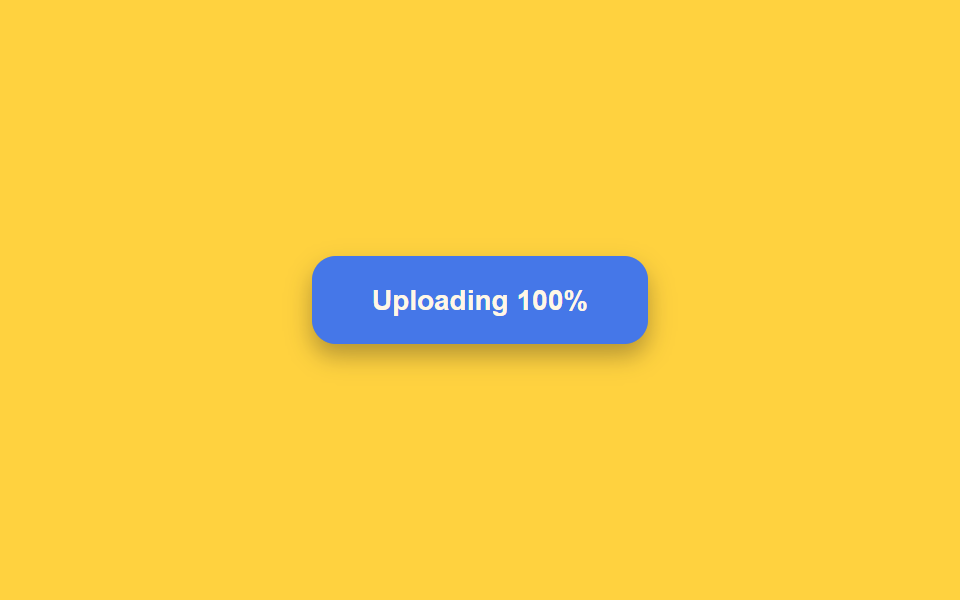
02버튼 배경이 진행률만큼 차오르는 미니 진행 표시
버튼을 누르면 테두리 안쪽 배경이 왼쪽부터 오른쪽으로 옅은 색이 차오르며 진행률을 나타내고, 끝까지 차면 잠깐 멈췄다가 다음 상태로 넘어간다.
쓰임파일 업로드·긴 처리 작업의 진행 상태 표시
easeOutCubictransform-originscaleX
<main class="stage">
<div class="scene is-demo" id="scene">
  <button class="btn" id="btn" type="button">
    <span class="btnFill" id="fill" aria-hidden="true"></span>
    <span class="btnText" id="text">Upload file</span>
  </button>
  <span class="visuallyHidden" id="status" role="status" aria-live="polite"></span>
</div>
</main>
@use "../../../../site/static/demo-tokens" as *;
// 변수 3개
$duration: $dur-enter;
$easing: $ease-out;
$color: $subject-blue-deep;
// 계산 겹: index.html 의 drive() 가 easeOutCubic 진행률을 매 프레임 계산해 채움 막대의
// scaleX 와 라벨 퍼센트 숫자를 같은 값으로 동시에 갱신한다.
@include stage($stage-yellow);
.scene {
display: grid;
place-items: center;
}
.btn {
position: relative;
display: inline-flex;
align-items: center;
justify-content: center;
min-width: 168px;
height: 44px;
padding: 0 $sp-5;
border: none;
border-radius: $r-control;
background: $color;
color: $subject-cream;
font-weight: 600;
font-size: 14px;
line-height: 1;
box-shadow: $shadow-press;
cursor: pointer;
overflow: hidden;
&:focus-visible { outline: 2px solid $subject-ink; outline-offset: 3px; }
&:disabled { cursor: default; }
}
.btnFill {
position: absolute;
inset: 0;
transform: scaleX(0);
transform-origin: left center; // 채움 막대가 시작 변에서 자란다 — BD 예외 규칙
background: rgba($subject-cream, .24);
}
.btnText {
position: relative;
z-index: 1;
white-space: nowrap;
font-variant-numeric: tabular-nums;
}
.visuallyHidden {
position: absolute;
width: 1px;
height: 1px;
overflow: hidden;
clip: rect(0 0 0 0);
white-space: nowrap;
}
@media (max-width: 340px) {
.btn { min-width: 148px; height: 40px; padding: 0 $sp-4; font-size: 13px; }
}
@media (prefers-reduced-motion: reduce) {
// 실사용 경로 적용 — index.html 의 runReduced() 가 채움 트윈 없이 즉시 값을 바꾼다.
// scss 만: 남은 트랜지션을 전부 끈다.
* { transition: none !important; }
}html, body {
margin: 0;
overflow: hidden;
}
.stage {
box-sizing: border-box;
min-height: 100vh;
display: grid;
place-items: center;
margin: 0;
background: #ffd23f;
font-family: -apple-system, "Segoe UI", "Noto Sans KR", sans-serif;
padding: clamp(8px, 4vw, 24px);
}
.scene {
display: grid;
place-items: center;
}
.btn {
position: relative;
display: inline-flex;
align-items: center;
justify-content: center;
min-width: 168px;
height: 44px;
padding: 0 20px;
border: none;
border-radius: 12px;
background: #0a4fe8;
color: #fff7e6;
font-weight: 600;
font-size: 14px;
line-height: 1;
box-shadow: 0 6px 12px rgba(23, 20, 26, 0.32);
cursor: pointer;
overflow: hidden;
}
.btn:focus-visible {
outline: 2px solid #17141a;
outline-offset: 3px;
}
.btn:disabled {
cursor: default;
}
.btnFill {
position: absolute;
inset: 0;
transform: scaleX(0);
transform-origin: left center;
background: rgba(255, 247, 230, 0.24);
}
.btnText {
position: relative;
z-index: 1;
white-space: nowrap;
font-variant-numeric: tabular-nums;
}
.visuallyHidden {
position: absolute;
width: 1px;
height: 1px;
overflow: hidden;
clip: rect(0 0 0 0);
white-space: nowrap;
}
@media (max-width: 340px) {
.btn {
min-width: 148px;
height: 40px;
padding: 0 16px;
font-size: 13px;
}
}
@media (prefers-reduced-motion: reduce) {
* {
transition: none !important;
}
}(function () {
var FILL_MS = 1100;
var HOLD_AT_FULL_MS = 500;
var SUCCESS_HOLD_MS = 350;
var GAP_MS = 450;
var START_DELAY_MS = 200;
var scene = document.getElementById('scene');
var btn = document.getElementById('btn');
var fill = document.getElementById('fill');
var text = document.getElementById('text');
var status = document.getElementById('status');
var reduce = window.matchMedia('(prefers-reduced-motion: reduce)').matches;
var gen = 0;
var timers = [];
function human() {
if (scene.classList.contains('is-demo')) {
scene.classList.remove('is-demo');
timers.forEach(function (t) { clearTimeout(t); });
timers = [];
}
}
function easeOutCubic(p) { return 1 - Math.pow(1 - p, 3); }
// 계산 겹: 채움 막대는 scaleX 로만 늘어난다(transform-origin: left — 시작 변에서 자란다는
// 예외적 origin, 채움 막대이므로 허용). 진행률 p 는 easeOutCubic 으로 매 프레임 계산해
// 같은 값을 style.transform 과 라벨의 퍼센트 숫자 둘 다에 쓴다.
function drive(myGen, onDone) {
var start = null;
function step(now) {
if (myGen !== gen) return;
if (start === null) start = now;
var raw = Math.min(1, (now - start) / FILL_MS);
var p = easeOutCubic(raw);
fill.style.transform = 'scaleX(' + p.toFixed(4) + ')';
text.textContent = 'Uploading ' + Math.round(p * 100) + '%';
if (raw < 1) requestAnimationFrame(step); else onDone();
}
requestAnimationFrame(step);
}
function fadeOutFill(myGen, ms, onDone) {
var start = null;
function step(now) {
if (myGen !== gen) return;
if (start === null) start = now;
var p = Math.min(1, (now - start) / ms);
fill.style.opacity = String(1 - p);
if (p < 1) requestAnimationFrame(step); else onDone();
}
requestAnimationFrame(step);
}
function runAnimated() {
gen++;
var myGen = gen;
btn.disabled = true;
btn.setAttribute('aria-busy', 'true');
status.textContent = '업로드하는 중';
fill.style.opacity = '1';
fill.style.transform = 'scaleX(0)';
drive(myGen, function () {
timers.push(setTimeout(function () {
text.textContent = 'Uploaded';
status.textContent = '업로드 완료';
fadeOutFill(myGen, 260, function () {
timers.push(setTimeout(function () {
btn.disabled = false;
btn.removeAttribute('aria-busy');
text.textContent = 'Upload file';
fill.style.transform = 'scaleX(0)';
}, SUCCESS_HOLD_MS));
});
}, HOLD_AT_FULL_MS));
});
}
function runReduced() {
gen++;
btn.disabled = true;
btn.setAttribute('aria-busy', 'true');
status.textContent = '업로드하는 중';
fill.style.opacity = '1';
fill.style.transform = 'scaleX(1)';
text.textContent = 'Uploading 100%';
timers.push(setTimeout(function () {
text.textContent = 'Uploaded';
status.textContent = '업로드 완료';
fill.style.opacity = '0';
timers.push(setTimeout(function () {
btn.disabled = false;
btn.removeAttribute('aria-busy');
text.textContent = 'Upload file';
fill.style.transform = 'scaleX(0)';
}, SUCCESS_HOLD_MS));
}, HOLD_AT_FULL_MS));
}
btn.addEventListener('click', function () {
if (btn.disabled) return;
human();
if (reduce) runReduced(); else runAnimated();
});
// reduce: 실사용 경로 적용 — runReduced() 는 채움 트윈 없이 즉시 꽉 찬 상태로 바꾼다.
// 아래 자동 루프는 시연 게이트만 — reduce 에서는 돌지 않는다.
function cycle() {
if (!scene.classList.contains('is-demo')) return;
runAnimated();
timers.push(setTimeout(function () {
timers.push(setTimeout(cycle, GAP_MS));
}, FILL_MS + HOLD_AT_FULL_MS + 260 + SUCCESS_HOLD_MS));
}
if (!reduce) {
timers.push(setTimeout(cycle, START_DELAY_MS));
}
})();import { useEffect, useRef } from 'react';
import styles from './ButtonLoadingProgressFill.module.scss';
const FILL_MS = 1100;
const HOLD_AT_FULL_MS = 500;
const SUCCESS_HOLD_MS = 350;
const GAP_MS = 450;
const START_DELAY_MS = 200;
export default function ButtonLoadingProgressFill() {
const sceneRef = useRef<HTMLDivElement>(null);
const btnRef = useRef<HTMLButtonElement>(null);
const fillRef = useRef<HTMLSpanElement>(null);
const textRef = useRef<HTMLSpanElement>(null);
const statusRef = useRef<HTMLSpanElement>(null);
useEffect(() => {
const scene = sceneRef.current;
const btn = btnRef.current;
const fill = fillRef.current;
const text = textRef.current;
const status = statusRef.current;
if (!scene || !btn || !fill || !text || !status) return undefined;
const reduce = window.matchMedia('(prefers-reduced-motion: reduce)').matches;
let gen = 0;
let timers: number[] = [];
function human() {
if (scene!.classList.contains(styles['is-demo'])) {
scene!.classList.remove(styles['is-demo']);
timers.forEach((t) => window.clearTimeout(t));
timers = [];
}
}
function easeOutCubic(p: number) { return 1 - Math.pow(1 - p, 3); }
// 계산 겹: 채움 막대는 scaleX 로만 늘어난다(transform-origin: left — 시작 변에서 자란다는
// 예외적 origin, 채움 막대이므로 허용). 진행률 p 는 easeOutCubic 으로 매 프레임 계산해
// 같은 값을 style.transform 과 라벨의 퍼센트 숫자 둘 다에 쓴다.
function drive(myGen: number, onDone: () => void) {
let start: number | null = null;
function step(now: number) {
if (myGen !== gen) return;
if (start === null) start = now;
const raw = Math.min(1, (now - start) / FILL_MS);
const p = easeOutCubic(raw);
fill!.style.transform = 'scaleX(' + p.toFixed(4) + ')';
text!.textContent = 'Uploading ' + Math.round(p * 100) + '%';
if (raw < 1) requestAnimationFrame(step); else onDone();
}
requestAnimationFrame(step);
}
function fadeOutFill(myGen: number, ms: number, onDone: () => void) {
let start: number | null = null;
function step(now: number) {
if (myGen !== gen) return;
if (start === null) start = now;
const p = Math.min(1, (now - start) / ms);
fill!.style.opacity = String(1 - p);
if (p < 1) requestAnimationFrame(step); else onDone();
}
requestAnimationFrame(step);
}
function runAnimated() {
gen++;
const myGen = gen;
btn!.disabled = true;
btn!.setAttribute('aria-busy', 'true');
status!.textContent = '업로드하는 중';
fill!.style.opacity = '1';
fill!.style.transform = 'scaleX(0)';
drive(myGen, () => {
timers.push(window.setTimeout(() => {
text!.textContent = 'Uploaded';
status!.textContent = '업로드 완료';
fadeOutFill(myGen, 260, () => {
timers.push(window.setTimeout(() => {
btn!.disabled = false;
btn!.removeAttribute('aria-busy');
text!.textContent = 'Upload file';
fill!.style.transform = 'scaleX(0)';
}, SUCCESS_HOLD_MS));
});
}, HOLD_AT_FULL_MS));
});
}
function runReduced() {
gen++;
btn!.disabled = true;
btn!.setAttribute('aria-busy', 'true');
status!.textContent = '업로드하는 중';
fill!.style.opacity = '1';
fill!.style.transform = 'scaleX(1)';
text!.textContent = 'Uploading 100%';
timers.push(window.setTimeout(() => {
text!.textContent = 'Uploaded';
status!.textContent = '업로드 완료';
fill!.style.opacity = '0';
timers.push(window.setTimeout(() => {
btn!.disabled = false;
btn!.removeAttribute('aria-busy');
text!.textContent = 'Upload file';
fill!.style.transform = 'scaleX(0)';
}, SUCCESS_HOLD_MS));
}, HOLD_AT_FULL_MS));
}
function onClick() {
if (btn!.disabled) return;
human();
if (reduce) runReduced(); else runAnimated();
}
btn.addEventListener('click', onClick);
// reduce: 실사용 경로 적용 — runReduced() 는 채움 트윈 없이 즉시 값을 바꾼다.
// 아래 자동 루프는 시연 게이트만 — reduce 에서는 돌지 않는다.
function cycle() {
if (!scene!.classList.contains(styles['is-demo'])) return;
runAnimated();
timers.push(window.setTimeout(() => {
timers.push(window.setTimeout(cycle, GAP_MS));
}, FILL_MS + HOLD_AT_FULL_MS + 260 + SUCCESS_HOLD_MS));
}
if (!reduce) {
timers.push(window.setTimeout(cycle, START_DELAY_MS));
}
return () => {
btn.removeEventListener('click', onClick);
timers.forEach((t) => window.clearTimeout(t));
};
}, []);
return (
<main className={styles.stage}>
<div className={styles.scene + ' ' + styles['is-demo']} ref={sceneRef}>
<button className={styles.btn} ref={btnRef} type="button">
<span className={styles.btnFill} ref={fillRef} aria-hidden="true" />
<span className={styles.btnText} ref={textRef}>Upload file</span>
</button>
<span className={styles.visuallyHidden} ref={statusRef} role="status" aria-live="polite" />
</div>
</main>
);
}02 버튼 배경이 진행률만큼 차오르는 미니 진행 표시 — 측정 누적면적 5.052% · 움직인 프레임 14/23GODRICH 원작 · zip 에 SCSS·React 포함 · 버튼 로딩 9종 — 스피너부터 성공 체크까지 상태 전환
이 데모가 속한 글
 버튼 로딩 9종 — 스피너부터 성공 체크까지 상태 전환버튼 로딩 9종 가운데 하나는 스피너가 돌다가 선을 그리듯 체크 표시로 모양을 바꾸고, 하나는 글자 대신 점 세 개가 순서대로 커졌다 작아지며, 하나는 라벨이 일정 시간마다 다음 단계 문구로 위아래 슬라이드해 바뀝니 이 글의 데모 전부 보기