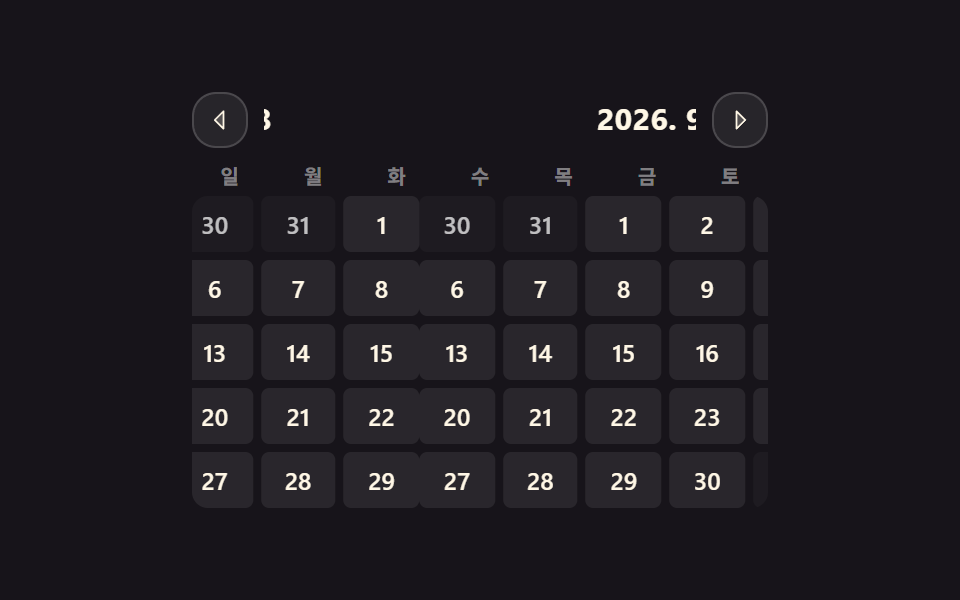
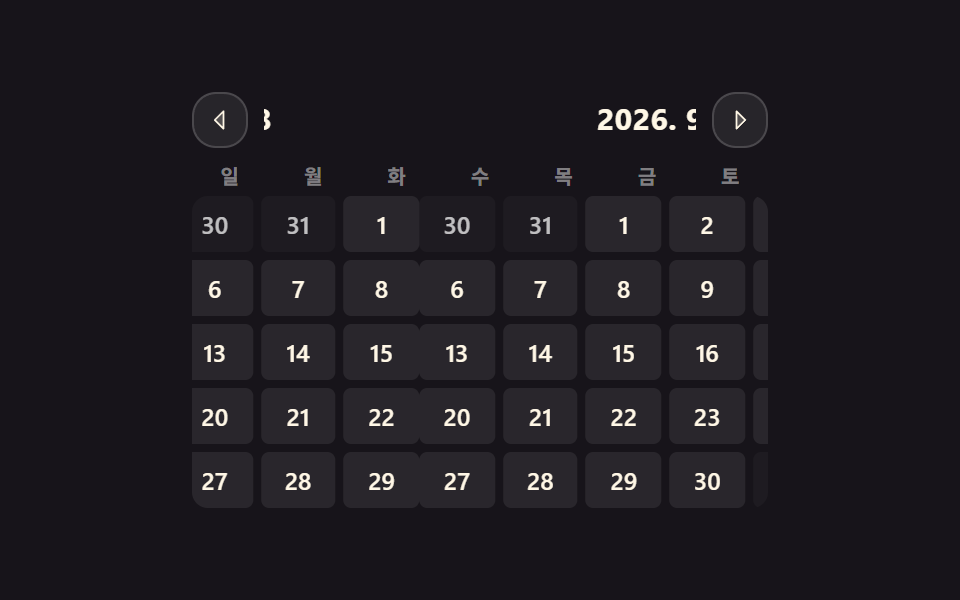
01두 트랙으로 넘어가는 월 이동
화살표를 누르면 나가는 달과 들어오는 달이 두 겹의 트랙으로 같이 미끄러져, 마지막에 처음으로 튀는 구간이 없습니다.
쓰임달을 넘길 때 숫자만 바뀌어서 어느 방향으로 갔는지 알 수 없는 달력을 고칠 때
translateXaria-live@keyframes cal-slide
<main class="stage">
  <div class="cal is-demo">
    <span class="cal__sr" id="cal-live" aria-live="polite">2026. 9</span>
    <div class="cal__bar">
      <button class="cal__nav" type="button" id="cal-prev" aria-label="이전 달"><svg viewBox="0 0 256 256" width="14" height="14" aria-hidden="true"><g fill="currentColor"><path d="M160 48v160l-80-80Z" opacity=".2"/><path d="M163.06 40.61a8 8 0 0 0-8.72 1.73l-80 80a8 8 0 0 0 0 11.32l80 80A8 8 0 0 0 168 208V48a8 8 0 0 0-4.94-7.39M152 188.69L91.31 128L152 67.31Z"/></g></svg></button>
      <div class="cal__titles" aria-hidden="true"><div class="cal__titlestrip" id="cal-strip"></div></div>
      <button class="cal__nav" type="button" id="cal-next" aria-label="다음 달"><svg viewBox="0 0 256 256" width="14" height="14" aria-hidden="true"><g fill="currentColor"><path d="m176 128l-80 80V48Z" opacity=".2"/><path d="m181.66 122.34l-80-80A8 8 0 0 0 88 48v160a8 8 0 0 0 13.66 5.66l80-80a8 8 0 0 0 0-11.32M104 188.69V67.31L164.69 128Z"/></g></svg></button>
    </div>
    <div class="cal__dows" aria-hidden="true"><span>일</span><span>월</span><span>화</span><span>수</span><span>목</span><span>금</span><span>토</span></div>
    <div class="cal__viewport"><div class="cal__track" id="cal-track"></div></div>
  </div>
</main>
@use "../../../../site/static/demo-tokens" as *;
$duration: $dur-base;
$easing: $ease-spring;
$color: $subject-blue;
@include stage($stage-ink);
.cal {
position: relative;
box-sizing: border-box;
width: min(288px, 88vw);
color: $subject-cream;
}
.cal__sr {
position: absolute; width: 1px; height: 1px;
overflow: hidden; clip-path: inset(50%); white-space: nowrap;
}
// ── 상단 바: 화살표 두 개 + 미끄러지는 월 제목 트랙 ──
.cal__bar {
display: flex; align-items: center; gap: $sp-2;
margin: 0 0 $sp-2;
}
.cal__nav {
flex: 0 0 auto;
box-sizing: border-box;
width: clamp(22px, 6.5vw, 28px); height: clamp(22px, 6.5vw, 28px);
display: inline-flex; align-items: center; justify-content: center;
padding: 0;
border: 1px solid rgba(255, 255, 255, .16);
background: rgba(255, 255, 255, .07);
border-radius: $r-control;
color: $subject-cream;
cursor: pointer;
transition: background $duration $easing, border-color $duration $easing;
}
.cal__nav:hover { background: rgba(255, 255, 255, .14); }
.cal__nav:focus-visible { outline: 2px solid $color; outline-offset: 2px; }
.cal__titles { flex: 1 1 auto; min-width: 0; overflow: hidden; }
.cal__titlestrip {
display: flex; width: 300%;
transform: translateX(-33.3333%);
}
.cal__t {
flex: 0 0 33.3333%;
text-align: center;
font-size: clamp(12px, 3.2vw, 15px);
line-height: 1.3;
font-weight: 700;
letter-spacing: .02em;
}
// ── 요일 머리 (달과 함께 미끄러지지 않는다) ──
.cal__dows {
display: grid; grid-template-columns: repeat(7, 1fr); gap: $sp-1;
margin: 0 0 $sp-1;
font-size: clamp(8px, 2.2vw, 10px);
line-height: 1.2;
font-weight: 700;
color: rgba(255, 255, 255, .45);
text-align: center;
}
// ── 두 트랙: 나가는 달과 들어오는 달이 동시에 존재한다 ──
.cal__viewport { overflow: hidden; border-radius: $r-sm; }
.cal__track {
display: flex; width: 300%;
transform: translateX(-33.3333%);
}
.cal.is-anim .cal__track,
.cal.is-anim .cal__titlestrip { transition: transform $duration $easing; }
.cal__month {
flex: 0 0 33.3333%;
display: grid; gap: $sp-1;
}
.cal__row { display: grid; grid-template-columns: repeat(7, 1fr); gap: $sp-1; }
.cal__cell {
height: clamp(20px, 6vw, 28px);
display: grid; place-items: center;
background: rgba(255, 255, 255, .08);
border-radius: $r-xs;
font-size: clamp(9px, 2.6vw, 12px);
line-height: 1;
font-weight: 600;
color: $subject-cream;
cursor: pointer;
}
.cal__cell.is-out { background: rgba(255, 255, 255, .03); color: rgba(255, 255, 255, .72); } // .28 은 2.51:1 이었다 — AA 4.5 (9.75:1)
.cal__cell[aria-selected="true"] { background: $color; color: $subject-cream; }
.cal__cell:focus-visible { outline: 2px solid $color; outline-offset: 1px; }
// ── 자동 루프: 가운데 → 다음 달 → 가운데 → 이전 달 → 가운데.
// 0% 와 100% 가 같은 위치라 끝 프레임이 첫 프레임으로 이어진다 (텔레포트 없음) ──
.cal.is-demo .cal__track,
.cal.is-demo .cal__titlestrip {
animation-name: cal-slide;
animation-duration: $dur-loop;
animation-timing-function: $easing;
animation-iteration-count: infinite;
}
@keyframes cal-slide {
0% { transform: translateX(-33.3333%); } // 이번 달
20% { transform: translateX(-66.6667%); } // 다음 달로
33% { transform: translateX(-66.6667%); }
50% { transform: translateX(-33.3333%); } // 되돌아온다
58% { transform: translateX(-33.3333%); }
75% { transform: translateX(0); } // 이전 달로
85% { transform: translateX(0); }
100% { transform: translateX(-33.3333%); } // 첫 프레임과 같은 자리 — 텔레포트 없음
}
@media (prefers-reduced-motion: reduce) {
.cal.is-demo .cal__track,
.cal.is-demo .cal__titlestrip { animation: none !important; }
.cal.is-anim .cal__track,
.cal.is-anim .cal__titlestrip,
.cal__nav { transition: none; }
}html, body {
margin: 0;
overflow: hidden;
}
.stage {
box-sizing: border-box;
min-height: 100vh;
display: grid;
place-items: center;
margin: 0;
background: #17141a;
font-family: -apple-system, "Segoe UI", "Noto Sans KR", sans-serif;
padding: clamp(8px, 4vw, 24px);
}
.cal {
position: relative;
box-sizing: border-box;
width: min(288px, 88vw);
color: #fff7e6;
}
.cal__sr {
position: absolute;
width: 1px;
height: 1px;
overflow: hidden;
clip-path: inset(50%);
white-space: nowrap;
}
.cal__bar {
display: flex;
align-items: center;
gap: 8px;
margin: 0 0 8px;
}
.cal__nav {
flex: 0 0 auto;
box-sizing: border-box;
width: clamp(22px, 6.5vw, 28px);
height: clamp(22px, 6.5vw, 28px);
display: inline-flex;
align-items: center;
justify-content: center;
padding: 0;
border: 1px solid rgba(255, 255, 255, 0.16);
background: rgba(255, 255, 255, 0.07);
border-radius: 12px;
color: #fff7e6;
cursor: pointer;
transition: background 300ms cubic-bezier(0.2, 0.8, 0.2, 1), border-color 300ms cubic-bezier(0.2, 0.8, 0.2, 1);
}
.cal__nav:hover {
background: rgba(255, 255, 255, 0.14);
}
.cal__nav:focus-visible {
outline: 2px solid #2f6df6;
outline-offset: 2px;
}
.cal__titles {
flex: 1 1 auto;
min-width: 0;
overflow: hidden;
}
.cal__titlestrip {
display: flex;
width: 300%;
transform: translateX(-33.3333%);
}
.cal__t {
flex: 0 0 33.3333%;
text-align: center;
font-size: clamp(12px, 3.2vw, 15px);
line-height: 1.3;
font-weight: 700;
letter-spacing: 0.02em;
}
.cal__dows {
display: grid;
grid-template-columns: repeat(7, 1fr);
gap: 4px;
margin: 0 0 4px;
font-size: clamp(8px, 2.2vw, 10px);
line-height: 1.2;
font-weight: 700;
color: rgba(255, 255, 255, 0.45);
text-align: center;
}
.cal__viewport {
overflow: hidden;
border-radius: 8px;
}
.cal__track {
display: flex;
width: 300%;
transform: translateX(-33.3333%);
}
.cal.is-anim .cal__track,
.cal.is-anim .cal__titlestrip {
transition: transform 300ms cubic-bezier(0.2, 0.8, 0.2, 1);
}
.cal__month {
flex: 0 0 33.3333%;
display: grid;
gap: 4px;
}
.cal__row {
display: grid;
grid-template-columns: repeat(7, 1fr);
gap: 4px;
}
.cal__cell {
height: clamp(20px, 6vw, 28px);
display: grid;
place-items: center;
background: rgba(255, 255, 255, 0.08);
border-radius: 4px;
font-size: clamp(9px, 2.6vw, 12px);
line-height: 1;
font-weight: 600;
color: #fff7e6;
cursor: pointer;
}
.cal__cell.is-out {
background: rgba(255, 255, 255, 0.03);
color: rgba(255, 255, 255, 0.72);
}
.cal__cell[aria-selected=true] {
background: #2f6df6;
color: #fff7e6;
}
.cal__cell:focus-visible {
outline: 2px solid #2f6df6;
outline-offset: 1px;
}
.cal.is-demo .cal__track,
.cal.is-demo .cal__titlestrip {
animation-name: cal-slide;
animation-duration: 2s;
animation-timing-function: cubic-bezier(0.2, 0.8, 0.2, 1);
animation-iteration-count: infinite;
}
@keyframes cal-slide {
0% {
transform: translateX(-33.3333%);
}
20% {
transform: translateX(-66.6667%);
}
33% {
transform: translateX(-66.6667%);
}
50% {
transform: translateX(-33.3333%);
}
58% {
transform: translateX(-33.3333%);
}
75% {
transform: translateX(0);
}
85% {
transform: translateX(0);
}
100% {
transform: translateX(-33.3333%);
}
}
@media (prefers-reduced-motion: reduce) {
.cal.is-demo .cal__track,
.cal.is-demo .cal__titlestrip {
animation: none !important;
}
.cal.is-anim .cal__track,
.cal.is-anim .cal__titlestrip,
.cal__nav {
transition: none;
}
}(function () {
var cal = document.querySelector('.cal');
var track = document.getElementById('cal-track');
var strip = document.getElementById('cal-strip');
var live = document.getElementById('cal-live');
var BASE = -100 / 3, busy = false, idx = 16;
var cur = new Date(2026, 8, 1);
function pad(n) { return (n < 10 ? '0' : '') + n; }
function label(d) { return d.getFullYear() + '. ' + (d.getMonth() + 1); }
function cells() {
return [].slice.call(track.children[1].children).reduce(function (a, r) { return a.concat([].slice.call(r.children)); }, []);
}
function build(d) {
var y = d.getFullYear(), m = d.getMonth(), off = 1 - new Date(y, m, 1).getDay();
var g = document.createElement('div');
g.className = 'cal__month'; g.setAttribute('role', 'grid'); g.setAttribute('aria-label', label(d));
for (var w = 0; w < 5; w++) {
var r = document.createElement('div');
r.className = 'cal__row'; r.setAttribute('role', 'row');
for (var i = 0; i < 7; i++) {
var t = new Date(y, m, off + w * 7 + i), c = document.createElement('div');
c.className = 'cal__cell' + (t.getMonth() === m ? '' : ' is-out');
c.setAttribute('role', 'gridcell');
c.setAttribute('aria-selected', 'false');
c.setAttribute('aria-label', t.getFullYear() + '-' + pad(t.getMonth() + 1) + '-' + pad(t.getDate()));
c.tabIndex = -1; c.textContent = t.getDate();
r.appendChild(c);
}
g.appendChild(r);
}
return g;
}
function render() {
track.textContent = ''; strip.textContent = '';
[-1, 0, 1].forEach(function (k) {
var d = new Date(cur.getFullYear(), cur.getMonth() + k, 1);
track.appendChild(build(d));
var s = document.createElement('span');
s.className = 'cal__t'; s.textContent = label(d);
strip.appendChild(s);
});
cells()[idx].tabIndex = 0;
}
function move(n) {
var cs = cells(); n = Math.max(0, Math.min(cs.length - 1, n));
cs.forEach(function (c, k) { c.tabIndex = k === n ? 0 : -1; c.setAttribute('aria-selected', String(k === n)); });
cs[n].focus({ preventScroll: true }); idx = n;
}
function finish(dir) {
if (!busy) return;
busy = false; cal.classList.remove('is-anim');
cur = new Date(cur.getFullYear(), cur.getMonth() + dir, 1);
render(); // 리셋은 transition 이 꺼진 순간에 — 눈에 보이지 않는다
track.style.transform = ''; strip.style.transform = '';
live.textContent = label(cur);
}
function go(dir) {
if (busy) return;
busy = true; cal.classList.remove('is-demo'); cal.classList.add('is-anim');
var to = BASE - dir * (100 / 3);
track.style.transform = strip.style.transform = 'translateX(' + to + '%)';
var done = function () { track.removeEventListener('transitionend', done); finish(dir); };
track.addEventListener('transitionend', done);
window.setTimeout(done, 700);
}
document.getElementById('cal-prev').addEventListener('click', function () { go(-1); });
document.getElementById('cal-next').addEventListener('click', function () { go(1); });
track.addEventListener('click', function (e) {
var c = e.target.closest ? e.target.closest('.cal__cell') : null;
var n = c ? cells().indexOf(c) : -1;
if (n < 0) return;
cal.classList.remove('is-demo'); move(n);
});
track.addEventListener('keydown', function (e) {
var n = cells().indexOf(document.activeElement);
if (n < 0) return;
var to = null;
if (e.key === 'ArrowRight') to = n + 1;
else if (e.key === 'ArrowLeft') to = n - 1;
else if (e.key === 'ArrowDown') to = n + 7;
else if (e.key === 'ArrowUp') to = n - 7;
else if (e.key === 'Home') to = n - (n % 7);
else if (e.key === 'End') to = n - (n % 7) + 6;
else return;
e.preventDefault(); cal.classList.remove('is-demo'); move(to);
});
render();
})();import { useRef, useState } from "react";
import type { CSSProperties } from "react";
import styles from "./MonthSlideCalendar.module.scss";
export type MonthSlideCalendarProps = {
/** 시작 달 (기본: 오늘) */
initialMonth?: Date;
/** 슬라이드 시간(ms) */
duration?: number;
easing?: string;
color?: string;
dayNames?: string[];
prevLabel?: string;
nextLabel?: string;
};
type Vars = CSSProperties & { "--duration"?: string; "--easing"?: string; "--color"?: string };
type KeyEvt = { key: string; preventDefault: () => void };
const BASE = -100 / 3;
function pad(n: number) {
return (n < 10 ? "0" : "") + n;
}
function label(d: Date) {
return d.getFullYear() + ". " + (d.getMonth() + 1);
}
/** 한 달을 5주 × 7일 = 35칸으로. 6행은 좁은 폭에서 넘친다 */
function monthCells(d: Date) {
const y = d.getFullYear();
const m = d.getMonth();
const off = 1 - new Date(y, m, 1).getDay();
const out: { date: Date; outside: boolean }[] = [];
for (let i = 0; i < 35; i++) {
const t = new Date(y, m, off + i);
out.push({ date: t, outside: t.getMonth() !== m });
}
return out;
}
export default function MonthSlideCalendar({
initialMonth,
duration = 300,
easing = "cubic-bezier(.2,.8,.2,1)",
color = "#2f6df6",
dayNames = ["S", "M", "T", "W", "T", "F", "S"],
prevLabel = "Previous month",
nextLabel = "Next month",
}: MonthSlideCalendarProps) {
const first = initialMonth ?? new Date();
const [cur, setCur] = useState(new Date(first.getFullYear(), first.getMonth(), 1));
const [shift, setShift] = useState(0); // -1 · 0 · +1 트랙 오프셋
const [animating, setAnimating] = useState(false);
const [focused, setFocused] = useState(16);
const busy = useRef(false);
const cellRefs = useRef<(HTMLDivElement | null)[]>([]);
const vars: Vars = { "--duration": `${duration}ms`, "--easing": easing, "--color": color };
const months = [-1, 0, 1].map((k) => new Date(cur.getFullYear(), cur.getMonth() + k, 1));
function go(dir: number) {
if (busy.current) return;
busy.current = true;
setAnimating(true);
setShift(dir);
window.setTimeout(() => {
// 전환이 끝나면 들어온 달이 유일한 트랙이 된다. 리셋은 transition 이 꺼진 프레임에
setAnimating(false);
setShift(0);
setCur((c) => new Date(c.getFullYear(), c.getMonth() + dir, 1));
busy.current = false;
}, duration);
}
function setCell(n: number) {
return (el: HTMLDivElement | null) => {
const a = cellRefs.current;
if (a) a[n] = el;
};
}
function move(n: number) {
const to = Math.max(0, Math.min(34, n));
setFocused(to);
cellRefs.current?.[to]?.focus({ preventScroll: true });
}
function onKeyDown(e: KeyEvt, n: number) {
let to: number | null = null;
if (e.key === "ArrowRight") to = n + 1;
else if (e.key === "ArrowLeft") to = n - 1;
else if (e.key === "ArrowDown") to = n + 7;
else if (e.key === "ArrowUp") to = n - 7;
else if (e.key === "Home") to = n - (n % 7);
else if (e.key === "End") to = n - (n % 7) + 6;
if (to === null) return;
e.preventDefault();
move(to);
}
const offset = `translateX(${BASE - shift * (100 / 3)}%)`;
const trackStyle: CSSProperties = { transform: offset };
return (
<div className={styles.cal} style={vars}>
<span className={styles.sr} aria-live="polite">{label(cur)}</span>
<div className={styles.bar}>
<button type="button" className={styles.nav} aria-label={prevLabel} onClick={() => go(-1)}>
<svg viewBox="0 0 256 256" width="14" height="14" aria-hidden="true">
<g fill="currentColor">
<path d="M160 48v160l-80-80Z" opacity=".2" />
<path d="M163.06 40.61a8 8 0 0 0-8.72 1.73l-80 80a8 8 0 0 0 0 11.32l80 80A8 8 0 0 0 168 208V48a8 8 0 0 0-4.94-7.39M152 188.69L91.31 128L152 67.31Z" />
</g>
</svg>
</button>
<div className={styles.titles} aria-hidden="true">
<div className={`${styles.titlestrip} ${animating ? styles.isAnim : ""}`} style={trackStyle}>
{months.map((m) => (
<span key={m.getTime()} className={styles.t}>{label(m)}</span>
))}
</div>
</div>
<button type="button" className={styles.nav} aria-label={nextLabel} onClick={() => go(1)}>
<svg viewBox="0 0 256 256" width="14" height="14" aria-hidden="true">
<g fill="currentColor">
<path d="m176 128l-80 80V48Z" opacity=".2" />
<path d="m181.66 122.34l-80-80A8 8 0 0 0 88 48v160a8 8 0 0 0 13.66 5.66l80-80a8 8 0 0 0 0-11.32M104 188.69V67.31L164.69 128Z" />
</g>
</svg>
</button>
</div>
<div className={styles.dows} aria-hidden="true">
{dayNames.map((d, i) => <span key={`${d}-${i}`}>{d}</span>)}
</div>
<div className={styles.viewport}>
<div className={`${styles.track} ${animating ? styles.isAnim : ""}`} style={trackStyle}>
{months.map((m, mi) => (
<div key={m.getTime()} className={styles.month} role="grid" aria-label={label(m)}>
{[0, 1, 2, 3, 4].map((w) => (
<div key={w} className={styles.row} role="row">
{monthCells(m).slice(w * 7, w * 7 + 7).map((c, i) => {
const n = w * 7 + i;
const live = mi === 1; // 가운데(현재) 달만 키보드 대상
return (
<div
key={c.date.getTime()}
ref={live ? setCell(n) : undefined}
className={`${styles.cell} ${c.outside ? styles.isOut : ""}`}
role="gridcell"
aria-selected={live && n === focused}
aria-label={`${c.date.getFullYear()}-${pad(c.date.getMonth() + 1)}-${pad(c.date.getDate())}`}
tabIndex={live && n === focused ? 0 : -1}
onClick={() => { if (live) move(n); }}
onKeyDown={(e: KeyEvt) => { if (live) onKeyDown(e, n); }}
>
{c.date.getDate()}
</div>
);
})}
</div>
))}
</div>
))}
</div>
</div>
</div>
);
}01 두 트랙으로 넘어가는 월 이동 — 측정 누적면적 19.754% · 움직인 프레임 18/23GODRICH 원작 · zip 에 SCSS·React 포함 · css 달력 만들기 9종 — 진짜 넘어가는 월간 캘린더
이 데모가 속한 글
 css 달력 만들기 9종 — 진짜 넘어가는 월간 캘린더css 달력 만들기는 브라우저가 주는 조그만 날짜 고르기 창 대신, 한 달을 통째로 펼쳐 놓는 격자를 직접 짜는 일입니다. 아홉 개 중 하나는 달을 넘길 때 두 장의 격자가 나란히 미끄러지고, 또 하나는 1년을 네모 이 글의 데모 전부 보기