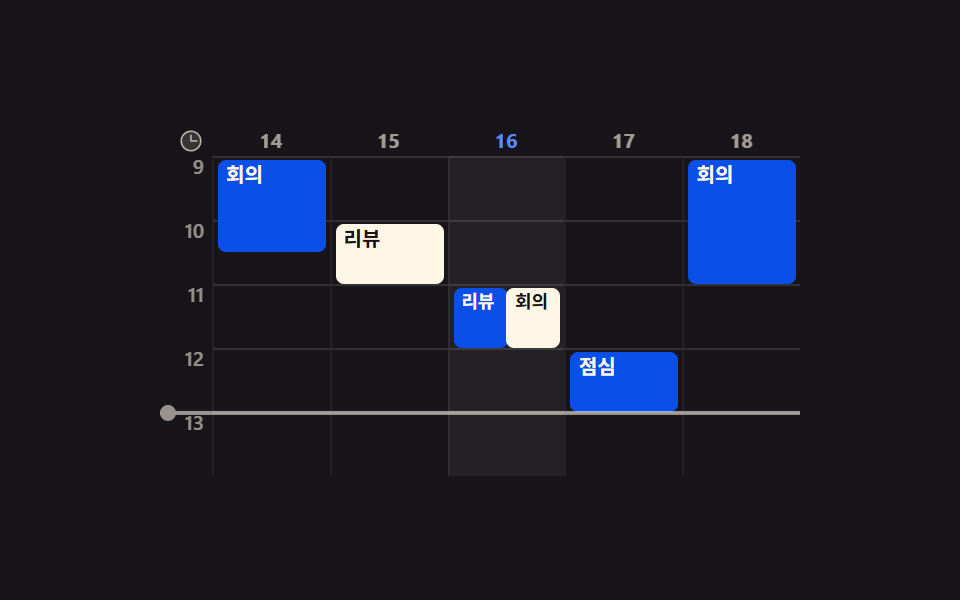
05시간 축 위의 주간 타임라인
왼쪽 시간 눈금 위에 일정 블록이 시작 시각만큼 내려와 앉고, 지금 시각 선이 가로로 천천히 내려옵니다.
쓰임월간 격자로는 '몇 시에 겹치는지'가 안 보여서 회의가 충돌하는 팀 화면에 붙일 때
@keyframes wt-nowrole=gridtranslateY
<main class="stage">
  <div class="wt is-demo">
    <div class="wt__body">
      <div class="wt__side" aria-hidden="true">
        <span class="wt__ico"><svg xmlns="http://www.w3.org/2000/svg" width="13" height="13" viewBox="0 0 256 256"><g fill="currentColor"><path d="M224 128a96 96 0 1 1-96-96a96 96 0 0 1 96 96" opacity=".2"/><path d="M128 24a104 104 0 1 0 104 104A104.11 104.11 0 0 0 128 24m0 192a88 88 0 1 1 88-88a88.1 88.1 0 0 1-88 88m64-88a8 8 0 0 1-8 8h-56a8 8 0 0 1-8-8V72a8 8 0 0 1 16 0v48h48a8 8 0 0 1 8 8"/></g></svg></span>
        <span class="wt__hr">9</span>
        <span class="wt__hr">10</span>
        <span class="wt__hr">11</span>
        <span class="wt__hr">12</span>
        <span class="wt__hr">13</span>
      </div>
      <div class="wt__grid" id="wt-grid" role="grid" aria-label="주간 일정 타임라인">
        <div class="wt__r wt__r--h" role="row">
          <span class="wt__h" role="columnheader">14</span>
          <span class="wt__h" role="columnheader">15</span>
          <span class="wt__h is-today" role="columnheader" aria-current="date">16</span>
          <span class="wt__h" role="columnheader">17</span>
          <span class="wt__h" role="columnheader">18</span>
        </div>
        <div class="wt__r" role="row">
          <div class="wt__c" role="gridcell" tabindex="0" data-h="9"><span class="wt__ev" style="--n:1.5">회의</span></div>
          <div class="wt__c" role="gridcell" tabindex="-1" data-h="9"></div>
          <div class="wt__c is-today" role="gridcell" tabindex="-1" data-h="9"></div>
          <div class="wt__c" role="gridcell" tabindex="-1" data-h="9"></div>
          <div class="wt__c" role="gridcell" tabindex="-1" data-h="9"><span class="wt__ev" style="--n:2">회의</span></div>
        </div>
        <div class="wt__r" role="row">
          <div class="wt__c" role="gridcell" tabindex="-1" data-h="10"></div>
          <div class="wt__c" role="gridcell" tabindex="-1" data-h="10"><span class="wt__ev wt__ev--b" style="--n:1">리뷰</span></div>
          <div class="wt__c is-today" role="gridcell" tabindex="-1" data-h="10"></div>
          <div class="wt__c" role="gridcell" tabindex="-1" data-h="10"></div>
          <div class="wt__c" role="gridcell" tabindex="-1" data-h="10"></div>
        </div>
        <div class="wt__r" role="row">
          <div class="wt__c" role="gridcell" tabindex="-1" data-h="11"></div>
          <div class="wt__c" role="gridcell" tabindex="-1" data-h="11"></div>
          <div class="wt__c is-today" role="gridcell" tabindex="-1" data-h="11"><span class="wt__ev wt__ev--l" style="--n:1">리뷰</span><span class="wt__ev wt__ev--b wt__ev--r" style="--n:1">회의</span></div>
          <div class="wt__c" role="gridcell" tabindex="-1" data-h="11"></div>
          <div class="wt__c" role="gridcell" tabindex="-1" data-h="11"></div>
        </div>
        <div class="wt__r" role="row">
          <div class="wt__c" role="gridcell" tabindex="-1" data-h="12"></div>
          <div class="wt__c" role="gridcell" tabindex="-1" data-h="12"></div>
          <div class="wt__c is-today" role="gridcell" tabindex="-1" data-h="12"></div>
          <div class="wt__c" role="gridcell" tabindex="-1" data-h="12"><span class="wt__ev" style="--n:1">점심</span></div>
          <div class="wt__c" role="gridcell" tabindex="-1" data-h="12"></div>
        </div>
        <div class="wt__r" role="row">
          <div class="wt__c" role="gridcell" tabindex="-1" data-h="13"></div>
          <div class="wt__c" role="gridcell" tabindex="-1" data-h="13"></div>
          <div class="wt__c is-today" role="gridcell" tabindex="-1" data-h="13"></div>
          <div class="wt__c" role="gridcell" tabindex="-1" data-h="13"></div>
          <div class="wt__c" role="gridcell" tabindex="-1" data-h="13"></div>
        </div>
      </div>
      <div class="wt__now" aria-hidden="true"><i class="wt__dot"></i></div>
    </div>
  </div>
</main>@use "../../../../site/static/demo-tokens" as *;
$duration: $dur-base;
$easing: $ease-out;
$color: $subject-blue-deep;
@include stage($stage-ink);
.wt {
--rowh: clamp(24px, 8.5vw, 32px);
--headh: clamp(12px, 4vw, 16px);
box-sizing: border-box;
width: min(320px, 90vw);
color: $subject-cream;
font-family: -apple-system, "Segoe UI", "Noto Sans KR", sans-serif;
}
.wt__body { position: relative; display: flex; gap: $sp-1; }
// 왼쪽 시간 눈금 — 머리에 clock 아이콘
.wt__side {
flex: 0 0 auto;
width: clamp(16px, 5vw, 22px);
display: flex;
flex-direction: column;
text-align: right;
}
.wt__ico {
height: var(--headh);
display: flex;
align-items: center;
justify-content: flex-end;
opacity: .7;
}
.wt__hr {
height: var(--rowh);
font-size: clamp(8px, 2.4vw, 10px);
font-weight: 600;
line-height: 1.1;
opacity: .55;
}
.wt__grid { flex: 1 1 auto; min-width: 0; display: flex; flex-direction: column; }
.wt__r {
height: var(--rowh);
display: grid;
grid-template-columns: repeat(5, 1fr);
position: relative;
}
.wt__r--h { height: var(--headh); }
.wt__h {
display: flex;
align-items: center;
justify-content: center;
font-size: clamp(8px, 2.4vw, 10px);
font-weight: 700;
opacity: .6;
}
.wt__h.is-today { opacity: 1; color: $subject-blue-light; } // 먹 무대 위 파란 글자 — 5.69:1
.wt__c {
position: relative;
border-top: 1px solid rgba(255, 255, 255, .12);
border-left: 1px solid rgba(255, 255, 255, .06);
}
.wt__c.is-today { background: rgba(255, 255, 255, .05); }
.wt__c:focus-visible { outline: 2px solid $subject-cream; outline-offset: -2px; }
// 일정 블록 — 시작 시각의 칸 안에서 자기 길이(--n)만큼 아래로 자란다
.wt__ev {
position: absolute;
left: 2px; right: 2px; top: 1px;
z-index: 2;
box-sizing: border-box;
height: calc(var(--rowh) * var(--n) - 2px);
padding: 0 $sp-1;
border-radius: $r-xs;
background: $color;
color: $subject-cream;
font-size: clamp(8px, 2.4vw, 10px);
font-weight: 700;
line-height: 1.5;
overflow: hidden;
text-overflow: ellipsis;
white-space: nowrap;
transition: box-shadow $duration $easing;
}
.wt__c:focus-visible .wt__ev { box-shadow: 0 0 0 2px rgba(255, 255, 255, .85); }
.wt__ev--b { background: $subject-cream; color: $stage-ink; }
// 겹치는 두 블록은 폭을 반씩 나눠 나란히 — 폭이 절반이니 글자도 한 눈금 줄인다(ja 가 가장 길다)
.wt__ev--l, .wt__ev--r { font-size: clamp(7px, 2.1vw, 9px); }
.wt__ev--l { right: 50%; }
.wt__ev--r { left: 50%; }
// ── 지금 시각 선: 위에서 아래로 천천히. 0%·100% 를 모두 투명으로 두어 이어 붙인다 ──
.wt__now {
position: absolute;
left: 0; right: 0;
top: var(--headh);
height: 2px;
z-index: 3;
background: $subject-cream;
pointer-events: none;
opacity: 0;
}
.wt__dot {
position: absolute;
left: 0; top: -3px;
display: block;
width: 8px; height: 8px;
border-radius: 50%;
background: $subject-cream;
}
.wt.is-demo .wt__now {
animation-name: wt-now;
animation-duration: $dur-loop;
animation-timing-function: linear;
animation-iteration-count: infinite;
}
// 첫·끝 프레임을 넉넉히 투명하게 잡아 둔다 — 헤드리스 캡처가 시작 두 프레임을
// 컴포지터 지연으로 늦게 잡는 일이 있어(실측), 0 구간이 짧으면 첫 프레임에 선이 남는다
// transform 은 0%·100% 에만 적어 선이 일정 속도로 내려오게 두고, opacity 만 끝을 물린다
@keyframes wt-now {
0% { transform: translateY(calc(var(--rowh) * .4)); opacity: 0; }
10% { opacity: 0; }
22% { opacity: 1; }
78% { opacity: 1; }
90% { opacity: 0; }
100% { transform: translateY(calc(var(--rowh) * 4.7)); opacity: 0; }
}
@media (prefers-reduced-motion: reduce) {
.wt.is-demo .wt__now { animation: none !important; opacity: 1; transform: translateY(calc(var(--rowh) * 2.4)); }
.wt__c { transition: none; }
}html, body {
margin: 0;
overflow: hidden;
}
.stage {
box-sizing: border-box;
min-height: 100vh;
display: grid;
place-items: center;
margin: 0;
background: #17141a;
font-family: -apple-system, "Segoe UI", "Noto Sans KR", sans-serif;
padding: clamp(8px, 4vw, 24px);
}
.wt {
--rowh: clamp(24px, 8.5vw, 32px);
--headh: clamp(12px, 4vw, 16px);
box-sizing: border-box;
width: min(320px, 90vw);
color: #fff7e6;
font-family: -apple-system, "Segoe UI", "Noto Sans KR", sans-serif;
}
.wt__body {
position: relative;
display: flex;
gap: 4px;
}
.wt__side {
flex: 0 0 auto;
width: clamp(16px, 5vw, 22px);
display: flex;
flex-direction: column;
text-align: right;
}
.wt__ico {
height: var(--headh);
display: flex;
align-items: center;
justify-content: flex-end;
opacity: 0.7;
}
.wt__hr {
height: var(--rowh);
font-size: clamp(8px, 2.4vw, 10px);
font-weight: 600;
line-height: 1.1;
opacity: 0.55;
}
.wt__grid {
flex: 1 1 auto;
min-width: 0;
display: flex;
flex-direction: column;
}
.wt__r {
height: var(--rowh);
display: grid;
grid-template-columns: repeat(5, 1fr);
position: relative;
}
.wt__r--h {
height: var(--headh);
}
.wt__h {
display: flex;
align-items: center;
justify-content: center;
font-size: clamp(8px, 2.4vw, 10px);
font-weight: 700;
opacity: 0.6;
}
.wt__h.is-today {
opacity: 1;
color: #5b8cf8;
}
.wt__c {
position: relative;
border-top: 1px solid rgba(255, 255, 255, 0.12);
border-left: 1px solid rgba(255, 255, 255, 0.06);
}
.wt__c.is-today {
background: rgba(255, 255, 255, 0.05);
}
.wt__c:focus-visible {
outline: 2px solid #fff7e6;
outline-offset: -2px;
}
.wt__ev {
position: absolute;
left: 2px;
right: 2px;
top: 1px;
z-index: 2;
box-sizing: border-box;
height: calc(var(--rowh) * var(--n) - 2px);
padding: 0 4px;
border-radius: 4px;
background: #0a4fe8;
color: #fff7e6;
font-size: clamp(8px, 2.4vw, 10px);
font-weight: 700;
line-height: 1.5;
overflow: hidden;
text-overflow: ellipsis;
white-space: nowrap;
transition: box-shadow 300ms ease-out;
}
.wt__c:focus-visible .wt__ev {
box-shadow: 0 0 0 2px rgba(255, 255, 255, 0.85);
}
.wt__ev--b {
background: #fff7e6;
color: #17141a;
}
.wt__ev--l, .wt__ev--r {
font-size: clamp(7px, 2.1vw, 9px);
}
.wt__ev--l {
right: 50%;
}
.wt__ev--r {
left: 50%;
}
.wt__now {
position: absolute;
left: 0;
right: 0;
top: var(--headh);
height: 2px;
z-index: 3;
background: #fff7e6;
pointer-events: none;
opacity: 0;
}
.wt__dot {
position: absolute;
left: 0;
top: -3px;
display: block;
width: 8px;
height: 8px;
border-radius: 50%;
background: #fff7e6;
}
.wt.is-demo .wt__now {
animation-name: wt-now;
animation-duration: 2s;
animation-timing-function: linear;
animation-iteration-count: infinite;
}
@keyframes wt-now {
0% {
transform: translateY(calc(var(--rowh) * 0.4));
opacity: 0;
}
10% {
opacity: 0;
}
22% {
opacity: 1;
}
78% {
opacity: 1;
}
90% {
opacity: 0;
}
100% {
transform: translateY(calc(var(--rowh) * 4.7));
opacity: 0;
}
}
@media (prefers-reduced-motion: reduce) {
.wt.is-demo .wt__now {
animation: none !important;
opacity: 1;
transform: translateY(calc(var(--rowh) * 2.4));
}
.wt__c {
transition: none;
}
}// role="grid" 위에서 화살표 키로 블록 사이를 옮겨 다닌다.
// 지금 시각 선은 사람이 만져도 계속 내려와야 하므로 .is-demo 를 떼지 않는다 (시계지 연출이 아니다).
var grid = document.getElementById('wt-grid');
var cells = [].slice.call(grid.querySelectorAll('.wt__c'));
var COLS = 5;
for (var i = 0; i < cells.length; i++) {
var t = cells[i].textContent.replace(/\s+/g, ' ').trim();
cells[i].setAttribute('aria-label', cells[i].getAttribute('data-h') + ':00' + (t ? ' ' + t : ''));
}
function rove(i) {
for (var k = 0; k < cells.length; k++) cells[k].setAttribute('tabindex', k === i ? '0' : '-1');
cells[i].focus({ preventScroll: true });
}
grid.addEventListener('pointerdown', function (e) {
var c = e.target.closest ? e.target.closest('.wt__c') : null;
if (!c) return;
rove(cells.indexOf(c));
});
grid.addEventListener('keydown', function (e) {
var i = cells.indexOf(document.activeElement);
if (i < 0) return;
var n = i;
if (e.key === 'ArrowLeft') n = i - 1;
else if (e.key === 'ArrowRight') n = i + 1;
else if (e.key === 'ArrowUp') n = i - COLS;
else if (e.key === 'ArrowDown') n = i + COLS;
else if (e.key === 'Home') n = i - (i % COLS);
else if (e.key === 'End') n = i - (i % COLS) + COLS - 1;
else return;
if (n < 0 || n >= cells.length) return;
e.preventDefault();
rove(n);
});import { useEffect, useRef, useState } from "react";
import type { CSSProperties } from "react";
import styles from "./WeekTimelineCalendar.module.scss";
export type TimelineEvent = {
/** 열 index (0 = 첫 요일) */
col: number;
/** 시작 시각 — hours 배열의 값 */
hour: number;
/** 길이(시간 단위) */
span: number;
title: string;
/** 같은 시각에 겹치는 두 블록: "l" = 왼쪽 절반, "r" = 오른쪽 절반 */
half?: "l" | "r";
tone?: "a" | "b";
};
export type WeekTimelineCalendarProps = {
hours?: number[];
cols?: string[];
events?: TimelineEvent[];
/** 지금 시각 선이 한 바퀴 도는 시간(ms) */
duration?: number;
easing?: string;
color?: string;
todayCol?: number;
};
type Vars = CSSProperties & {
"--duration"?: string; "--easing"?: string; "--color"?: string; "--n"?: number;
};
type KeyEvt = { key: string; preventDefault: () => void };
const DEFAULT_EVENTS: TimelineEvent[] = [
{ col: 0, hour: 9, span: 1.5, title: "회의" },
{ col: 4, hour: 9, span: 2, title: "회의" },
{ col: 1, hour: 10, span: 1, title: "리뷰", tone: "b" },
{ col: 2, hour: 11, span: 1, title: "리뷰", half: "l" },
{ col: 2, hour: 11, span: 1, title: "회의", half: "r", tone: "b" },
{ col: 3, hour: 12, span: 1, title: "점심" },
];
export default function WeekTimelineCalendar({
hours = [9, 10, 11, 12, 13],
cols = ["14", "15", "16", "17", "18"],
events = DEFAULT_EVENTS,
duration = 2000,
easing = "linear",
color = "#2f6df6",
todayCol = 2,
}: WeekTimelineCalendarProps) {
const [focus, setFocus] = useState(0);
const cellRefs = useRef<(HTMLDivElement | null)[]>([]);
const moved = useRef(false);
const n = cols.length;
const vars: Vars = { "--duration": `${duration}ms`, "--easing": easing, "--color": color };
useEffect(() => {
if (!moved.current) return;
const el = cellRefs.current ? cellRefs.current[focus] : null;
if (el) el.focus({ preventScroll: true });
}, [focus]);
function onKeyDown(i: number, e: KeyEvt) {
let k = i;
if (e.key === "ArrowLeft") k = i - 1;
else if (e.key === "ArrowRight") k = i + 1;
else if (e.key === "ArrowUp") k = i - n;
else if (e.key === "ArrowDown") k = i + n;
else if (e.key === "Home") k = i - (i % n);
else if (e.key === "End") k = i - (i % n) + n - 1;
else return;
if (k < 0 || k >= hours.length * n) return;
e.preventDefault();
moved.current = true;
setFocus(k);
}
return (
<div className={styles.wt} style={vars}>
<div className={styles.body}>
<div className={styles.side} aria-hidden="true">
<span className={styles.ico}>
<svg xmlns="http://www.w3.org/2000/svg" width="13" height="13" viewBox="0 0 256 256">
<g fill="currentColor">
<path d="M224 128a96 96 0 1 1-96-96a96 96 0 0 1 96 96" opacity=".2" />
<path d="M128 24a104 104 0 1 0 104 104A104.11 104.11 0 0 0 128 24m0 192a88 88 0 1 1 88-88a88.1 88.1 0 0 1-88 88m64-88a8 8 0 0 1-8 8h-56a8 8 0 0 1-8-8V72a8 8 0 0 1 16 0v48h48a8 8 0 0 1 8 8" />
</g>
</svg>
</span>
{hours.map((h) => <span className={styles.hr} key={h}>{h}</span>)}
</div>
<div className={styles.grid} role="grid">
<div className={`${styles.row} ${styles.rowHead}`} role="row">
{cols.map((c, i) => (
<span
key={c}
className={`${styles.h} ${i === todayCol ? styles.isToday : ""}`}
role="columnheader"
aria-current={i === todayCol ? "date" : undefined}
>
{c}
</span>
))}
</div>
{hours.map((h, r) => (
<div className={styles.row} role="row" key={h}>
{cols.map((c, ci) => {
const i = r * n + ci;
const here = events.filter((e) => e.col === ci && e.hour === h);
return (
<div
key={c}
ref={(el: HTMLDivElement | null) => { if (cellRefs.current) cellRefs.current[i] = el; }}
className={`${styles.cell} ${ci === todayCol ? styles.isToday : ""}`}
role="gridcell"
tabIndex={i === focus ? 0 : -1}
aria-label={`${h}:00 ${here.map((e) => e.title).join(" ")}`.trim()}
onKeyDown={(e: KeyEvt) => onKeyDown(i, e)}
>
{here.map((e, k) => (
<span
key={`${e.title}-${k}`}
className={[
styles.ev,
e.tone === "b" ? styles.evB : "",
e.half === "l" ? styles.evL : "",
e.half === "r" ? styles.evR : "",
].join(" ")}
style={{ "--n": e.span } as Vars}
>
{e.title}
</span>
))}
</div>
);
})}
</div>
))}
</div>
<div className={styles.now} aria-hidden="true"><i className={styles.dot} /></div>
</div>
</div>
);
}05 시간 축 위의 주간 타임라인 — 측정 누적면적 11.513% · 움직인 프레임 20/23GODRICH 원작 · zip 에 SCSS·React 포함 · css 달력 만들기 9종 — 진짜 넘어가는 월간 캘린더
이 데모가 속한 글
 css 달력 만들기 9종 — 진짜 넘어가는 월간 캘린더css 달력 만들기는 브라우저가 주는 조그만 날짜 고르기 창 대신, 한 달을 통째로 펼쳐 놓는 격자를 직접 짜는 일입니다. 아홉 개 중 하나는 달을 넘길 때 두 장의 격자가 나란히 미끄러지고, 또 하나는 1년을 네모 이 글의 데모 전부 보기