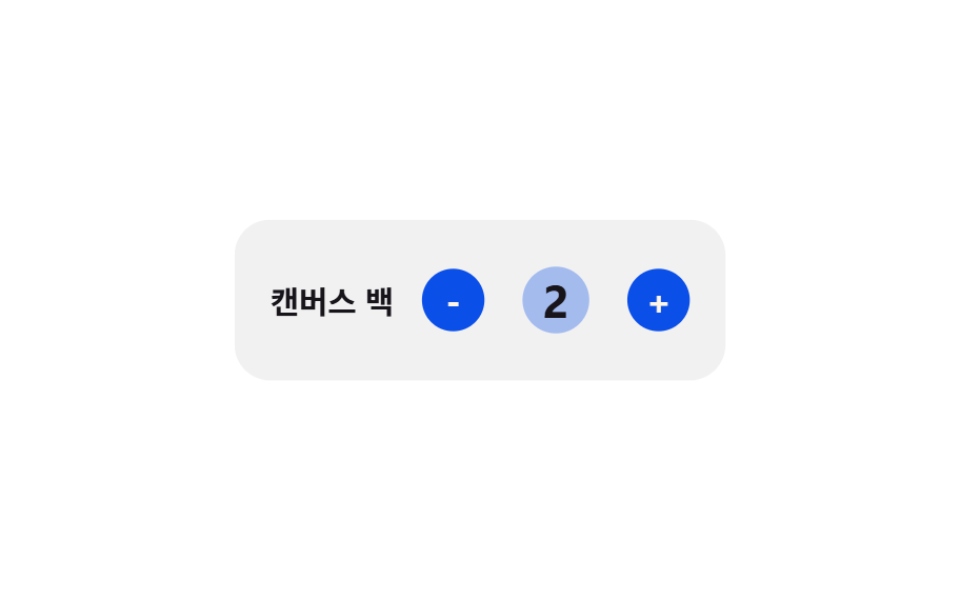
04수량 탄성 범프 — 늘어난 값만큼 커졌다가 되돌아오는 수량 숫자
수량 값이 바뀐 상태가 되면 그 숫자의 크기 값이 변화 폭에 비례해 커졌다가 탄성 곡선을 따라 원래 크기로 되돌아오고, 값이 줄어든 상태에서는 반대 방향의 작은 크기 값을 거쳐 되돌아옵니다.
쓰임수량 증감 버튼이 있는 장바구니 줄
elasticPulseAMPLITUDEapplyRipple
<main class="stage">
<div class="cqbe is-demo" id="cqbe">
  <div class="cqbe__row">
    <span class="cqbe__name">캔버스 백</span>
    <div class="cqbe__stepper">
      <button class="cqbe__btn" id="cqbeMinus" type="button" aria-label="수량 줄이기">-</button>
      <span class="cqbe__badge">
        <span class="cqbe__ripple" id="cqbeRipple"></span>
        <span class="cqbe__qty" id="cqbeQty">1</span>
      </span>
      <button class="cqbe__btn" id="cqbePlus" type="button" aria-label="수량 늘리기">+</button>
    </div>
  </div>
</div>
</main>
@use "../../../../site/static/demo-tokens" as *;
// 계산 겹: 값이 바뀐 시각부터 지난 시간에 감쇠 사인파(elasticPulse(), index.html)를 매 프레임
// 계산해 scale 에 대입한다 — 고정 keyframes 곡선이 아니라 변경 시각 기준으로 다시 푼다.
$duration: $dur-quick;
$easing: $ease-pop;
$color: $subject-blue-deep;
@include stage($stage-paper);
.stage { position: relative; }
.cqbe {
width: min(220px, 68vw);
}
.cqbe__row {
display: flex;
align-items: center;
justify-content: space-between;
padding: $sp-4;
border-radius: $r-card;
background: rgba(23, 20, 26, .06);
transform-origin: center;
will-change: transform;
}
.cqbe__name {
color: $subject-ink;
font-weight: 700;
font-size: 14px;
}
.cqbe__stepper {
display: flex;
align-items: center;
gap: $sp-3;
}
.cqbe__btn {
width: 28px;
height: 28px;
border: 0;
border-radius: $r-pill;
background: $color;
color: $subject-cream;
font-family: inherit;
font-weight: 700;
font-size: 16px;
line-height: 1;
display: grid;
place-items: center;
cursor: pointer;
}
.cqbe__badge {
position: relative;
width: 40px;
height: 40px;
display: grid;
place-items: center;
}
.cqbe__ripple {
position: absolute;
left: 50%;
top: 50%;
width: 40px;
height: 40px;
border-radius: $r-pill;
background: $color;
opacity: 0;
transform: translate(-50%, -50%) scale(.4);
transform-origin: center;
pointer-events: none;
}
.cqbe__qty {
position: relative;
min-width: 20px;
text-align: center;
color: $subject-ink;
font-weight: 700;
font-size: 18px;
display: inline-block;
transform-origin: center;
}
@media (max-width: 340px) {
.cqbe__row { padding: $sp-3; }
.cqbe__btn { width: 24px; height: 24px; font-size: 14px; }
}
@media (prefers-reduced-motion: reduce) {
.cqbe__qty { transition: none !important; }
}html, body {
margin: 0;
overflow: hidden;
}
.stage {
box-sizing: border-box;
min-height: 100vh;
display: grid;
place-items: center;
margin: 0;
background: #ffffff;
font-family: -apple-system, "Segoe UI", "Noto Sans KR", sans-serif;
padding: clamp(8px, 4vw, 24px);
}
.stage {
position: relative;
}
.cqbe {
width: min(220px, 68vw);
}
.cqbe__row {
display: flex;
align-items: center;
justify-content: space-between;
padding: 16px;
border-radius: 16px;
background: rgba(23, 20, 26, 0.06);
transform-origin: center;
will-change: transform;
}
.cqbe__name {
color: #17141a;
font-weight: 700;
font-size: 14px;
}
.cqbe__stepper {
display: flex;
align-items: center;
gap: 12px;
}
.cqbe__btn {
width: 28px;
height: 28px;
border: 0;
border-radius: 999px;
background: #0a4fe8;
color: #fff7e6;
font-family: inherit;
font-weight: 700;
font-size: 16px;
line-height: 1;
display: grid;
place-items: center;
cursor: pointer;
}
.cqbe__badge {
position: relative;
width: 40px;
height: 40px;
display: grid;
place-items: center;
}
.cqbe__ripple {
position: absolute;
left: 50%;
top: 50%;
width: 40px;
height: 40px;
border-radius: 999px;
background: #0a4fe8;
opacity: 0;
transform: translate(-50%, -50%) scale(0.4);
transform-origin: center;
pointer-events: none;
}
.cqbe__qty {
position: relative;
min-width: 20px;
text-align: center;
color: #17141a;
font-weight: 700;
font-size: 18px;
display: inline-block;
transform-origin: center;
}
@media (max-width: 340px) {
.cqbe__row {
padding: 12px;
}
.cqbe__btn {
width: 24px;
height: 24px;
font-size: 14px;
}
}
@media (prefers-reduced-motion: reduce) {
.cqbe__qty {
transition: none !important;
}
}(function () {
var root = document.getElementById('cqbe');
var qtyEl = document.getElementById('cqbeQty');
var minusBtn = document.getElementById('cqbeMinus');
var plusBtn = document.getElementById('cqbePlus');
// 계산 겹: 값이 바뀐 순간부터 지난 시간(t)에 감쇠 사인파(elasticPulse())를 매 프레임 계산해
// scale 에 대입한다 — CSS keyframes 의 고정 퍼센트 곡선이 아니라 값 변경 시각을 기준으로 다시 푼다.
var AMPLITUDE = 0.3;
var FREQ = 18;
var DECAY = 9;
function elasticPulse(tSec) {
if (tSec <= 0) { return 1; }
return 1 + AMPLITUDE * Math.sin(tSec * FREQ) * Math.exp(-DECAY * tSec);
}
// 계산 겹 2: 범프와 별도로, 배지 둘레의 번짐(ripple)은 ease-out 곡선으로 반지름을 키우고
// 동시에 옅어지게 계산한다 — 하나의 진행값(p)에서 scale·opacity 둘을 같이 뽑는다(depth-scale 항목과 같은 패턴, 다른 대상).
function easeOutCubic(p) { return 1 - Math.pow(1 - p, 3); }
var rippleEl = document.getElementById('cqbeRipple');
function applyRipple(tSec) {
var p = Math.min(1, Math.max(0, tSec / 0.5));
var eased = easeOutCubic(p);
var s = 0.4 + eased * 2.1;
var op = (1 - eased) * 0.4;
rippleEl.style.transform = 'translate(-50%, -50%) scale(' + s.toFixed(3) + ')';
rippleEl.style.opacity = op.toFixed(3);
}
var qty = 1;
var pulseStart = null;
var raf = null;
var rowEl = root.querySelector('.cqbe__row');
function frame(now) {
var t = (now - pulseStart) / 1000;
var scale = elasticPulse(t);
rowEl.style.transform = 'scale(' + scale.toFixed(4) + ')';
qtyEl.style.transform = 'scale(' + scale.toFixed(4) + ')';
applyRipple(t);
if (t < 0.5) {
raf = requestAnimationFrame(frame);
} else {
rowEl.style.transform = 'scale(1)';
qtyEl.style.transform = 'scale(1)';
rippleEl.style.opacity = '0';
raf = null;
}
}
function bump() {
if (raf) { cancelAnimationFrame(raf); }
pulseStart = performance.now();
raf = requestAnimationFrame(frame);
}
function setQty(n) {
qty = Math.max(1, Math.min(9, n));
qtyEl.textContent = String(qty);
bump();
}
minusBtn.addEventListener('click', function () {
root.classList.remove('is-demo');
stopAutoplay();
setQty(qty - 1);
});
plusBtn.addEventListener('click', function () {
root.classList.remove('is-demo');
stopAutoplay();
setQty(qty + 1);
});
var autoplayTimer = null;
var dir = 1;
function stopAutoplay() {
if (autoplayTimer) { clearInterval(autoplayTimer); autoplayTimer = null; }
}
function autoplayTick() {
if (qty >= 5) { dir = -1; }
if (qty <= 1) { dir = 1; }
setQty(qty + dir);
}
var reduce = window.matchMedia('(prefers-reduced-motion: reduce)').matches;
if (!reduce) {
autoplayTimer = setInterval(autoplayTick, 700);
}
})();import { useEffect, useRef, useState } from "react";
import type { CSSProperties } from "react";
import styles from "./CartDrawerQtyBumpElastic.module.scss";
export type CartDrawerQtyBumpElasticProps = {
duration?: number;
color?: string;
};
// 계산 겹: 값이 바뀐 순간부터 지난 시간(t)에 감쇠 사인파(elasticPulse())를 매 프레임 계산해
// scale 에 대입한다 — CSS keyframes 의 고정 퍼센트 곡선이 아니라 값 변경 시각을 기준으로 다시 푼다.
const AMPLITUDE = 0.3;
const FREQ = 18;
const DECAY = 9;
function elasticPulse(tSec: number): number {
if (tSec <= 0) return 1;
return 1 + AMPLITUDE * Math.sin(tSec * FREQ) * Math.exp(-DECAY * tSec);
}
// 계산 겹 2: 범프와 별도로, 배지 둘레의 번짐(ripple)은 ease-out 곡선으로 반지름을 키우고
// 동시에 옅어지게 계산한다 — 하나의 진행값(p)에서 scale·opacity 둘을 같이 뽑는다.
function easeOutCubic(p: number): number {
return 1 - Math.pow(1 - p, 3);
}
export default function CartDrawerQtyBumpElastic({
color = "#0a4fe8",
}: CartDrawerQtyBumpElasticProps) {
const rootRef = useRef<HTMLDivElement | null>(null);
const rowRef = useRef<HTMLDivElement | null>(null);
const qtyRef = useRef<HTMLSpanElement | null>(null);
const rippleRef = useRef<HTMLSpanElement | null>(null);
const [qty, setQtyState] = useState(1);
const qtyValRef = useRef(1);
const rafRef = useRef<number | null>(null);
const timerRef = useRef<ReturnType<typeof setInterval> | null>(null);
useEffect(() => {
function applyRipple(tSec: number) {
const el = rippleRef.current;
if (!el) return;
const p = Math.min(1, Math.max(0, tSec / 0.5));
const eased = easeOutCubic(p);
const s = 0.4 + eased * 2.1;
const op = (1 - eased) * 0.4;
el.style.transform = `translate(-50%, -50%) scale(${s.toFixed(3)})`;
el.style.opacity = op.toFixed(3);
}
function bump() {
if (rafRef.current) cancelAnimationFrame(rafRef.current);
const start = performance.now();
function frame(now: number) {
const t = (now - start) / 1000;
const scale = elasticPulse(t);
if (rowRef.current) rowRef.current.style.transform = `scale(${scale.toFixed(4)})`;
if (qtyRef.current) qtyRef.current.style.transform = `scale(${scale.toFixed(4)})`;
applyRipple(t);
if (t < 0.5) {
rafRef.current = requestAnimationFrame(frame);
} else {
if (rowRef.current) rowRef.current.style.transform = "scale(1)";
if (qtyRef.current) qtyRef.current.style.transform = "scale(1)";
if (rippleRef.current) rippleRef.current.style.opacity = "0";
rafRef.current = null;
}
}
rafRef.current = requestAnimationFrame(frame);
}
function setQty(n: number) {
qtyValRef.current = Math.max(1, Math.min(9, n));
setQtyState(qtyValRef.current);
bump();
}
function stopAutoplay() {
if (timerRef.current) {
clearInterval(timerRef.current);
timerRef.current = null;
}
}
const onMinus = () => {
rootRef.current?.classList.remove(styles.isDemo);
stopAutoplay();
setQty((qtyValRef.current ?? 1) - 1);
};
const onPlus = () => {
rootRef.current?.classList.remove(styles.isDemo);
stopAutoplay();
setQty((qtyValRef.current ?? 1) + 1);
};
const minusEl = rootRef.current?.querySelector<HTMLButtonElement>(`.${styles.minus}`);
const plusEl = rootRef.current?.querySelector<HTMLButtonElement>(`.${styles.plus}`);
minusEl?.addEventListener("click", onMinus);
plusEl?.addEventListener("click", onPlus);
let dir = 1;
function autoplayTick() {
const cur = qtyValRef.current ?? 1;
if (cur >= 5) dir = -1;
if (cur <= 1) dir = 1;
setQty(cur + dir);
}
const reduce = window.matchMedia("(prefers-reduced-motion: reduce)").matches;
if (!reduce) {
timerRef.current = setInterval(autoplayTick, 700);
}
return () => {
stopAutoplay();
if (rafRef.current) cancelAnimationFrame(rafRef.current);
minusEl?.removeEventListener("click", onMinus);
plusEl?.removeEventListener("click", onPlus);
};
}, []);
return (
<div ref={rootRef} className={`${styles.stage} ${styles.isDemo}`} style={{ "--color": color } as CSSProperties}>
<div ref={rowRef} className={styles.row}>
<span className={styles.name}>캔버스 백</span>
<div className={styles.stepper}>
<button className={styles.minus} type="button" aria-label="수량 줄이기">-</button>
<span className={styles.badge}>
<span ref={rippleRef} className={styles.ripple} />
<span ref={qtyRef} className={styles.qty}>{qty}</span>
</span>
<button className={styles.plus} type="button" aria-label="수량 늘리기">+</button>
</div>
</div>
</div>
);
}04 수량 탄성 범프 — 늘어난 값만큼 커졌다가 되돌아오는 수량 숫자 — 측정 누적면적 8.746% · 움직인 프레임 16/23GODRICH 원작 · zip 에 SCSS·React 포함 · 장바구니 담기 UI 9종 — 스프링부터 배지 관성까지
이 데모가 속한 글
 장바구니 담기 UI 9종 — 스프링부터 배지 관성까지장바구니 담기 UI는 상품을 화면 옆 패널로 열어 바로 보여주는 장치인데, 아홉 개 중 하나는 여는 위치 값이 목표를 살짝 지나쳤다가 스프링 곡선을 따라 되돌아오고, 하나는 끄는 거리 값이 기준을 넘은 상태에서 저항 이 글의 데모 전부 보기