07명령이 스스로 쳐지는 터미널
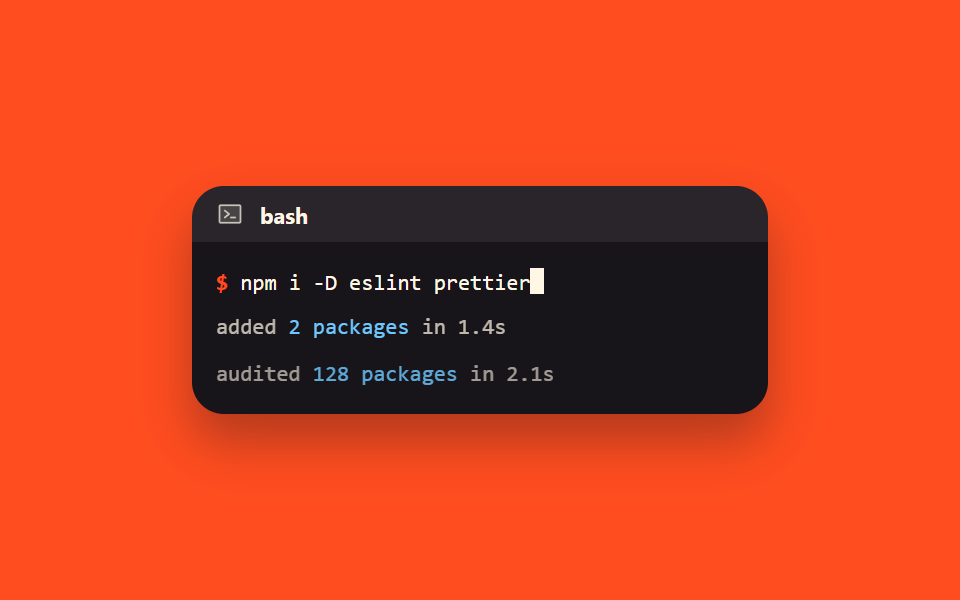
명령 한 줄이 steps 로 한 글자씩 늘어나고 그 끝에서 블록 커서가 깜빡입니다. 다 쳐지면 아래에 출력 두 줄이 차례로 올라와, 붙여 넣었을 때 무엇이 나오는지 미리 보여 줍니다.
쓰임설치 명령과 그 결과를 같이 보여 주는 시작하기 문서
steps(24, end)animation-fill-modemonospace
<main class="stage">
  <div class="term is-demo" id="term" role="button" tabindex="0" aria-label="다시 재생">
    <div class="term__head">
      <svg viewBox="0 0 256 256" width="14" height="14" aria-hidden="true"><g fill="currentColor"><path d="M224 56v144a8 8 0 0 1-8 8H40a8 8 0 0 1-8-8V56a8 8 0 0 1 8-8h176a8 8 0 0 1 8 8" opacity=".2"/><path d="M128 128a8 8 0 0 1-3 6.25l-40 32a8 8 0 1 1-10-12.5L107.19 128L75 102.25a8 8 0 1 1 10-12.5l40 32a8 8 0 0 1 3 6.25m48 24h-40a8 8 0 0 0 0 16h40a8 8 0 0 0 0-16m56-96v144a16 16 0 0 1-16 16H40a16 16 0 0 1-16-16V56a16 16 0 0 1 16-16h176a16 16 0 0 1 16 16m-16 144V56H40v144z"/></g></svg>
      <span class="term__name">bash</span>
    </div>
    <div class="term__body">
      <div class="term__line">
        <span class="term__prompt" aria-hidden="true">$</span>
        <span class="term__cmd" id="term-cmd">npm i -D eslint prettier</span><span class="term__cursor" aria-hidden="true"></span>
      </div>
      <div class="term__out" id="term-out1"><span class="c">added </span><span class="n">2 packages</span><span class="c"> in 1.4s</span></div>
      <div class="term__out" id="term-out2"><span class="c">audited </span><span class="n">128 packages</span><span class="c"> in 2.1s</span></div>
    </div>
  </div>
</main>
@use "../../../../site/static/demo-tokens" as *;
$duration: $dur-loop;
$easing: $ease-out;
$color: $subject-sky;
@include stage($stage-orange);
// 구문 색 — 어두운 패널
$syn-key: $stage-orange;
$syn-str: $stage-yellow;
$syn-num: $subject-sky;
$syn-dim: rgba($subject-cream, .72);
$syn-txt: $subject-cream;
.term {
box-sizing: border-box;
width: 288px;
border-radius: $r-card;
overflow: hidden;
box-shadow: $shadow-raised;
background: $stage-ink;
cursor: pointer;
}
.term:focus-visible { outline: 2px solid $subject-cream; outline-offset: 2px; }
.term__head {
display: flex;
align-items: center;
gap: $sp-2;
height: 28px;
padding: 0 $sp-3;
color: $syn-dim;
background: rgba(255, 247, 230, .08);
}
.term__name {
font-size: 11px;
font-weight: 700;
color: $syn-txt;
}
.term__body {
box-sizing: border-box;
padding: $sp-3;
font-family: ui-monospace, "SFMono-Regular", Menlo, Consolas, monospace;
font-size: 11px;
line-height: 18px;
color: $syn-txt;
}
.term__line { white-space: nowrap; }
.term__prompt { color: $syn-key; font-weight: 700; }
.term__cmd {
display: inline-block;
overflow: hidden;
white-space: nowrap;
vertical-align: bottom;
width: 24ch; // 정적 상태 — 명령이 이미 다 쳐진 채로 보인다
}
.term__cursor {
display: inline-block;
width: 7px;
height: 13px;
margin-left: 0;
vertical-align: -2px;
background: $subject-cream;
animation-name: term-blink;
animation-duration: 1s;
animation-timing-function: steps(1, end);
animation-iteration-count: infinite;
}
.term__out {
margin-top: $sp-1;
opacity: 1; // 정적 상태 — 출력이 이미 보인다
transform: translateY(0);
}
.term__out .n { color: $syn-num; }
.term__out .c { color: $syn-dim; }
// ── 자동 루프 (2s) ────────────────────────────────────
// 0~44% 타이핑(steps 24) · 46% 커서는 별도 요소라 폭이 늘면 저절로 줄 끝에 선다 ·
// 50~64% 출력1 등장 · 66~80% 출력2 등장 · 86% 컷으로 리셋(다음 루프 준비) · 86~100% 정지
.term.is-demo .term__cmd {
animation-name: term-type;
animation-duration: $duration;
animation-timing-function: linear;
animation-iteration-count: infinite;
animation-fill-mode: backwards; // 0% 프레임(폭 0)을 시작 전에도 고정 — 지연이 생겨도 깜빡임 없음
}
.term.is-demo #term-out1 {
animation-name: term-out1;
animation-duration: $duration;
animation-timing-function: linear;
animation-iteration-count: infinite;
animation-fill-mode: backwards;
}
.term.is-demo #term-out2 {
animation-name: term-out2;
animation-duration: $duration;
animation-timing-function: linear;
animation-iteration-count: infinite;
animation-fill-mode: backwards;
}
@keyframes term-type {
0% { width: 0ch; animation-timing-function: steps(24, end); }
44% { width: 24ch; animation-timing-function: steps(1, end); }
86% { width: 24ch; animation-timing-function: steps(1, end); }
100% { width: 0ch; }
}
@keyframes term-out1 {
0% { opacity: 0; transform: translateY(8px); }
50% { opacity: 0; transform: translateY(8px); animation-timing-function: $easing; }
64% { opacity: 1; transform: translateY(0); animation-timing-function: steps(1, end); }
86% { opacity: 1; transform: translateY(0); animation-timing-function: steps(1, end); }
100% { opacity: 0; transform: translateY(8px); }
}
@keyframes term-out2 {
0% { opacity: 0; transform: translateY(8px); }
66% { opacity: 0; transform: translateY(8px); animation-timing-function: $easing; }
80% { opacity: 1; transform: translateY(0); animation-timing-function: steps(1, end); }
86% { opacity: 1; transform: translateY(0); animation-timing-function: steps(1, end); }
100% { opacity: 0; transform: translateY(8px); }
}
@media (max-width: 340px) {
.term { width: 100%; }
.term__body { font-size: 10px; line-height: 16px; padding: $sp-2; }
.term__cursor { height: 12px; }
}
@media (prefers-reduced-motion: reduce) {
.term.is-demo .term__cmd,
.term.is-demo #term-out1,
.term.is-demo #term-out2,
.term__cursor { animation: none !important; }
.term.is-demo .term__cmd { width: 24ch; }
.term.is-demo #term-out1,
.term.is-demo #term-out2 { opacity: 1; transform: translateY(0); }
}html, body {
margin: 0;
overflow: hidden;
}
.stage {
box-sizing: border-box;
min-height: 100vh;
display: grid;
place-items: center;
margin: 0;
background: #ff4d1f;
font-family: -apple-system, "Segoe UI", "Noto Sans KR", sans-serif;
padding: clamp(8px, 4vw, 24px);
}
.term {
box-sizing: border-box;
width: 288px;
border-radius: 16px;
overflow: hidden;
box-shadow: 0 14px 24px rgba(23, 20, 26, 0.32);
background: #17141a;
cursor: pointer;
}
.term:focus-visible {
outline: 2px solid #fff7e6;
outline-offset: 2px;
}
.term__head {
display: flex;
align-items: center;
gap: 8px;
height: 28px;
padding: 0 12px;
color: rgba(255, 247, 230, 0.72);
background: rgba(255, 247, 230, 0.08);
}
.term__name {
font-size: 11px;
font-weight: 700;
color: #fff7e6;
}
.term__body {
box-sizing: border-box;
padding: 12px;
font-family: ui-monospace, "SFMono-Regular", Menlo, Consolas, monospace;
font-size: 11px;
line-height: 18px;
color: #fff7e6;
}
.term__line {
white-space: nowrap;
}
.term__prompt {
color: #ff4d1f;
font-weight: 700;
}
.term__cmd {
display: inline-block;
overflow: hidden;
white-space: nowrap;
vertical-align: bottom;
width: 24ch;
}
.term__cursor {
display: inline-block;
width: 7px;
height: 13px;
margin-left: 0;
vertical-align: -2px;
background: #fff7e6;
animation-name: term-blink;
animation-duration: 1s;
animation-timing-function: steps(1, end);
animation-iteration-count: infinite;
}
.term__out {
margin-top: 4px;
opacity: 1;
transform: translateY(0);
}
.term__out .n {
color: #6ec8ff;
}
.term__out .c {
color: rgba(255, 247, 230, 0.72);
}
.term.is-demo .term__cmd {
animation-name: term-type;
animation-duration: 2s;
animation-timing-function: linear;
animation-iteration-count: infinite;
animation-fill-mode: backwards;
}
.term.is-demo #term-out1 {
animation-name: term-out1;
animation-duration: 2s;
animation-timing-function: linear;
animation-iteration-count: infinite;
animation-fill-mode: backwards;
}
.term.is-demo #term-out2 {
animation-name: term-out2;
animation-duration: 2s;
animation-timing-function: linear;
animation-iteration-count: infinite;
animation-fill-mode: backwards;
}
@keyframes term-type {
0% {
width: 0ch;
animation-timing-function: steps(24, end);
}
44% {
width: 24ch;
animation-timing-function: steps(1, end);
}
86% {
width: 24ch;
animation-timing-function: steps(1, end);
}
100% {
width: 0ch;
}
}
@keyframes term-out1 {
0% {
opacity: 0;
transform: translateY(8px);
}
50% {
opacity: 0;
transform: translateY(8px);
animation-timing-function: ease-out;
}
64% {
opacity: 1;
transform: translateY(0);
animation-timing-function: steps(1, end);
}
86% {
opacity: 1;
transform: translateY(0);
animation-timing-function: steps(1, end);
}
100% {
opacity: 0;
transform: translateY(8px);
}
}
@keyframes term-out2 {
0% {
opacity: 0;
transform: translateY(8px);
}
66% {
opacity: 0;
transform: translateY(8px);
animation-timing-function: ease-out;
}
80% {
opacity: 1;
transform: translateY(0);
animation-timing-function: steps(1, end);
}
86% {
opacity: 1;
transform: translateY(0);
animation-timing-function: steps(1, end);
}
100% {
opacity: 0;
transform: translateY(8px);
}
}
@media (max-width: 340px) {
.term {
width: 100%;
}
.term__body {
font-size: 10px;
line-height: 16px;
padding: 8px;
}
.term__cursor {
height: 12px;
}
}
@media (prefers-reduced-motion: reduce) {
.term.is-demo .term__cmd,
.term.is-demo #term-out1,
.term.is-demo #term-out2,
.term__cursor {
animation: none !important;
}
.term.is-demo .term__cmd {
width: 24ch;
}
.term.is-demo #term-out1,
.term.is-demo #term-out2 {
opacity: 1;
transform: translateY(0);
}
}// 실제 동작: 사람이 터미널을 누르거나 Enter/Space 로 초점을 주면 실제 setTimeout 으로 다시 타이핑한다 (CSS 루프는 멈춘다)
(function () {
var CMD = 'npm i -D eslint prettier';
var root = document.getElementById('term');
var cmd = document.getElementById('term-cmd');
var out1 = document.getElementById('term-out1');
var out2 = document.getElementById('term-out2');
var timers = [];
function clear() { timers.forEach(function (t) { clearTimeout(t); }); timers = []; }
function show(el, on) { el.style.opacity = on ? '1' : '0'; el.style.transform = on ? 'translateY(0)' : 'translateY(8px)'; }
function play() {
root.classList.remove('is-demo');
clear();
cmd.textContent = '';
cmd.style.width = '0ch';
show(out1, false);
show(out2, false);
var i = 0;
(function tick() {
i += 1;
cmd.textContent = CMD.slice(0, i);
cmd.style.width = i + 'ch';
if (i < CMD.length) {
timers.push(setTimeout(tick, 36));
} else {
timers.push(setTimeout(function () { show(out1, true); }, 240));
timers.push(setTimeout(function () { show(out2, true); }, 520));
}
})();
}
root.addEventListener('click', play);
root.addEventListener('keydown', function (e) {
if (e.key === 'Enter' || e.key === ' ') { e.preventDefault(); play(); }
});
})();import { useEffect, useRef, useState } from "react";
import type { CSSProperties } from "react";
import styles from "./TerminalTypingCursor.module.scss";
export type TerminalTypingCursorProps = {
cmd?: string;
replayLabel?: string;
/** 자동 재생 루프 (갤러리용). 사람이 누르면 꺼진다 */
demo?: boolean;
duration?: number;
easing?: string;
color?: string;
};
type Vars = CSSProperties & { "--duration"?: string; "--easing"?: string; "--color"?: string };
type KeyEvt = { key: string; preventDefault(): void };
type Box<T> = { current: T | null };
const CMD = "npm i -D eslint prettier";
function TerminalIcon() {
return (
<svg viewBox="0 0 256 256" width="14" height="14" aria-hidden="true">
<g fill="currentColor">
<path d="M224 56v144a8 8 0 0 1-8 8H40a8 8 0 0 1-8-8V56a8 8 0 0 1 8-8h176a8 8 0 0 1 8 8" opacity=".2" />
<path d="M128 128a8 8 0 0 1-3 6.25l-40 32a8 8 0 1 1-10-12.5L107.19 128L75 102.25a8 8 0 1 1 10-12.5l40 32a8 8 0 0 1 3 6.25m48 24h-40a8 8 0 0 0 0 16h40a8 8 0 0 0 0-16m56-96v144a16 16 0 0 1-16 16H40a16 16 0 0 1-16-16V56a16 16 0 0 1 16-16h176a16 16 0 0 1 16 16m-16 144V56H40v144z" />
</g>
</svg>
);
}
export default function TerminalTypingCursor({
cmd = CMD,
replayLabel = "Replay",
demo = true,
duration = 2000,
easing = "ease-out",
color = "#6ec8ff",
}: TerminalTypingCursorProps) {
const [live, setLive] = useState(demo);
const [typed, setTyped] = useState(cmd);
const [out1, setOut1] = useState(true);
const [out2, setOut2] = useState(true);
const timers = useRef<number[]>([]) as Box<number[]>;
useEffect(() => {
return () => {
(timers.current || []).forEach((t) => window.clearTimeout(t));
};
}, []);
function clear() {
(timers.current || []).forEach((t) => window.clearTimeout(t));
timers.current = [];
}
function play() {
setLive(false);
clear();
setTyped("");
setOut1(false);
setOut2(false);
let i = 0;
function tick() {
i += 1;
setTyped(cmd.slice(0, i));
if (i < cmd.length) {
const id = window.setTimeout(tick, 36);
(timers.current || (timers.current = [])).push(id);
} else {
const a = window.setTimeout(() => setOut1(true), 240);
const b = window.setTimeout(() => setOut2(true), 520);
timers.current = [...(timers.current || []), a, b];
}
}
tick();
}
const vars: Vars = { "--duration": `${duration}ms`, "--easing": easing, "--color": color };
return (
<div
className={[styles.term, live ? styles.isDemo : ""].join(" ")}
style={vars}
role="button"
tabIndex={0}
aria-label={replayLabel}
onClick={play}
onKeyDown={(e: KeyEvt) => {
if (e.key === "Enter" || e.key === " ") {
e.preventDefault();
play();
}
}}
>
<div className={styles.head}>
<TerminalIcon />
<span className={styles.name}>bash</span>
</div>
<div className={styles.body}>
<div className={styles.line}>
<span className={styles.prompt} aria-hidden="true">$</span>
<span className={styles.cmd} style={live ? undefined : { width: `${typed.length}ch` }}>{live ? cmd : typed}</span>
<span className={styles.cursor} aria-hidden="true" />
</div>
<div
className={[styles.out, styles.out1].join(" ")}
style={live ? undefined : { opacity: out1 ? 1 : 0, transform: out1 ? "translateY(0)" : "translateY(8px)" }}
>
<span className={styles.c}>added </span>
<span className={styles.n}>2 packages</span>
<span className={styles.c}> in 1.4s</span>
</div>
<div
className={[styles.out, styles.out2].join(" ")}
style={live ? undefined : { opacity: out2 ? 1 : 0, transform: out2 ? "translateY(0)" : "translateY(8px)" }}
>
<span className={styles.c}>audited </span>
<span className={styles.n}>128 packages</span>
<span className={styles.c}> in 2.1s</span>
</div>
</div>
</div>
);
}07 명령이 스스로 쳐지는 터미널 — 측정 누적면적 2.603% · 움직인 프레임 18/23GODRICH 원작 · zip 에 SCSS·React 포함 · 코드 블록 UI 9종 — 하이라이터 없이 붙여 쓰는 코드 창
이 데모가 속한 글
 코드 블록 UI 9종 — 하이라이터 없이 붙여 쓰는 코드 창코드 블록은 문서 안에 프로그래밍 언어를 그대로 옮겨 담은 상자이고, 아홉 가지 모두 복사·전환·펼침·타이핑 같은 동작이 실제로 붙어 있는 화면입니다. 이 글의 데모 전부 보기