09낱말을 짚으면 뜻이 뜨는 인라인 코드
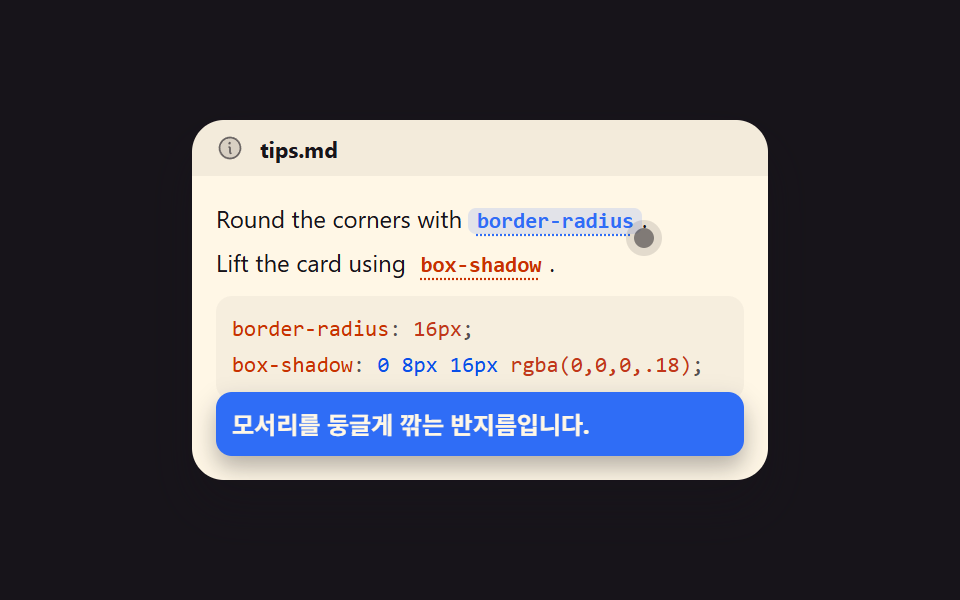
본문 속 인라인 코드에 점선 밑줄이 그어져 있고, 올리거나 탭으로 가면 그 낱말이 무엇인지 적은 쪽지가 아래로 떠오릅니다. 쪽지는 절대 배치라 부모 높이에 안 잡히므로 그만큼 아래 여백을 미리 비워 둡니다.
쓰임생소한 속성 이름이 자주 나오는 기술 설명 문단
aria-describedbytext-decorationfocus-visible
<main class="stage">
  <div class="tp is-demo" id="tp">
    <div class="tp__head">
      <svg viewBox="0 0 256 256" width="14" height="14" aria-hidden="true"><g fill="currentColor"><path d="M224 128a96 96 0 1 1-96-96a96 96 0 0 1 96 96" opacity=".2"/><path d="M144 176a8 8 0 0 1-8 8a16 16 0 0 1-16-16v-40a8 8 0 0 1 0-16a16 16 0 0 1 16 16v40a8 8 0 0 1 8 8m88-48A104 104 0 1 1 128 24a104.11 104.11 0 0 1 104 104m-16 0a88 88 0 1 0-88 88a88.1 88.1 0 0 0 88-88m-92-32a12 12 0 1 0-12-12a12 12 0 0 0 12 12"/></g></svg>
      <span class="tp__label">tips.md</span>
    </div>
    <div class="tp__body" id="tp-body">
      <p class="tp__line">Round the corners with <button class="tok" id="tp-tok1" type="button" aria-describedby="tp-pop1" aria-label="설명 보기">border-radius</button>.</p>
      <p class="tp__line">Lift the card using <button class="tok" id="tp-tok2" type="button" aria-describedby="tp-pop2" aria-label="설명 보기">box-shadow</button>.</p>
      <pre class="tp__code"><code><span class="ln"><span class="k">border-radius</span><span class="c">:</span> <span class="n">16px</span><span class="c">;</span></span><span class="ln"><span class="k">box-shadow</span><span class="c">:</span> <span class="s">0 8px 16px</span> <span class="n">rgba(0,0,0,.18)</span><span class="c">;</span></span></code></pre>
      <span class="tp__ptr" id="tp-ptr" aria-hidden="true"></span>
      <div class="tp__pop" id="tp-pop1" role="tooltip">모서리를 둥글게 깎는 반지름입니다.</div>
      <div class="tp__pop" id="tp-pop2" role="tooltip">떠 있는 느낌을 주는 그림자입니다.</div>
    </div>
  </div>
</main>
@use "../../../../site/static/demo-tokens" as *;
$duration: $dur-loop;
$easing: $ease-spring;
$color: $subject-blue;
@include stage($stage-ink);
// 구문 색 — 밝은 패널
$syn-key: $subject-orange-deep;
$syn-str: $subject-blue-deep;
$syn-num: $error;
$syn-dim: rgba($subject-ink, .72);
$syn-txt: $subject-ink;
.tp {
box-sizing: border-box;
width: 288px;
border-radius: $r-card;
overflow: hidden;
box-shadow: $shadow-raised;
background: $subject-cream;
color: $subject-ink;
}
.tp__head {
display: flex;
align-items: center;
gap: $sp-2;
height: 28px;
padding: 0 $sp-3;
color: rgba(23, 20, 26, .6);
background: rgba(23, 20, 26, .05);
}
.tp__label { font-size: 11px; font-weight: 700; color: $subject-ink; }
.tp__body {
position: relative;
box-sizing: border-box;
padding: $sp-3;
padding-bottom: $sp-10; // 함정 7 — 팝오버는 position:absolute 라 뿌리 높이에 안 잡힌다. 미리 확보
font-family: -apple-system, "Segoe UI", "Noto Sans KR", sans-serif;
font-size: 12px;
line-height: 18px;
}
.tp__line { margin: 0 0 $sp-1 0; }
.tp__line:last-of-type { margin-bottom: $sp-2; }
.tok {
display: inline;
padding: 0 $sp-1;
border: 0;
border-radius: $r-xs;
background: transparent;
color: $syn-key;
font-family: ui-monospace, "SFMono-Regular", Menlo, Consolas, monospace;
font-size: 11px;
font-weight: 700;
text-decoration: underline dotted;
text-underline-offset: 3px;
cursor: pointer;
}
.tok.is-on { background: rgba(47, 109, 246, .14); color: $subject-blue-deep; text-decoration: none; }
.tok:focus-visible { outline: 2px solid $subject-blue; outline-offset: 2px; }
.tp__code {
box-sizing: border-box;
margin: 0;
padding: $sp-2;
border-radius: $r-sm;
background: rgba(23, 20, 26, .04);
font-family: ui-monospace, "SFMono-Regular", Menlo, Consolas, monospace;
font-size: 11px;
line-height: 18px;
color: $syn-txt;
}
.tp__code .k { color: $syn-key; }
.tp__code .s { color: $syn-str; }
.tp__code .n { color: $syn-num; }
.tp__code .c { color: $syn-dim; }
.ln { display: block; }
.tp__ptr {
position: absolute;
top: 26px;
left: 221px;
width: 10px;
height: 10px;
border-radius: 50%;
background: rgba(23, 20, 26, .55);
box-shadow: 0 0 0 4px rgba(23, 20, 26, .12);
pointer-events: none;
}
.tp__pop {
box-sizing: border-box;
position: absolute;
left: $sp-3;
right: $sp-3;
bottom: $sp-3;
padding: $sp-2;
border-radius: $r-sm;
background: $subject-blue;
color: $subject-cream;
font-size: 12px;
line-height: 16px;
font-weight: 700;
box-shadow: $shadow-press;
opacity: 0;
visibility: hidden;
transform: translateY(6px) scale(.96);
}
// 정적 상태 — 사람이 눌러/짚어 열면 바로 보인다 (함정 10)
.tp__pop.is-open { opacity: 1; visibility: visible; transform: translateY(0) scale(1); }
// ── 자동 루프 (2s) ────────────────────────────────────
// 0~14% 포인터가 첫 tok · 16% 팝오버A 등장+tok1 켬 · 34~48% 포인터가 둘째 tok ·
// 50% 컷 A→B 교체(+tok2 켬, tok1 끔) · 52~64% B 정착 · 66~84% 포인터 복귀 + B 서서히 사라짐(tok2 끔) · 86~100% 정지
.tp.is-demo #tp-ptr {
animation-name: tp-ptr;
animation-duration: $duration;
animation-timing-function: linear;
animation-iteration-count: infinite;
}
.tp.is-demo #tp-tok1 {
animation-name: tp-tok1-on;
animation-duration: $duration;
animation-timing-function: linear;
animation-iteration-count: infinite;
}
.tp.is-demo #tp-tok2 {
animation-name: tp-tok2-on;
animation-duration: $duration;
animation-timing-function: linear;
animation-iteration-count: infinite;
}
.tp.is-demo #tp-pop1 {
animation-name: tp-pop1;
animation-duration: $duration;
animation-timing-function: linear;
animation-iteration-count: infinite;
}
.tp.is-demo #tp-pop2 {
animation-name: tp-pop2;
animation-duration: $duration;
animation-timing-function: linear;
animation-iteration-count: infinite;
}
@keyframes tp-ptr {
0% { transform: translate(0, 0); }
14% { transform: translate(0, 0); animation-timing-function: $easing; }
34% { transform: translate(0, 0); animation-timing-function: $easing; }
48% { transform: translate(-46px, 22px); animation-timing-function: $easing; }
66% { transform: translate(-46px, 22px); animation-timing-function: $easing; }
84% { transform: translate(0, 0); }
100% { transform: translate(0, 0); }
}
@keyframes tp-tok1-on {
0% { background: transparent; color: $syn-key; }
16% { background: transparent; color: $syn-key; animation-timing-function: steps(1, end); }
18% { background: rgba(47, 109, 246, .14); color: $subject-blue; animation-timing-function: steps(1, end); }
// 첫 낱말은 둘째 낱말이 켜지는 50% 에 **그 프레임에** 꺼진다.
// 66% 까지 남겨 두면 두 낱말이 동시에 켜져 무엇을 설명 중인지 흐려진다 (poster 육안 실측)
49% { background: rgba(47, 109, 246, .14); color: $subject-blue; animation-timing-function: steps(1, end); }
50% { background: transparent; color: $syn-key; animation-timing-function: steps(1, end); }
100% { background: transparent; color: $syn-key; }
}
@keyframes tp-tok2-on {
0% { background: transparent; color: $syn-key; }
49% { background: transparent; color: $syn-key; animation-timing-function: steps(1, end); }
50% { background: rgba(47, 109, 246, .14); color: $subject-blue; animation-timing-function: steps(1, end); }
83% { background: rgba(47, 109, 246, .14); color: $subject-blue; animation-timing-function: steps(1, end); }
84% { background: transparent; color: $syn-key; }
100% { background: transparent; color: $syn-key; }
}
// 쪽지 두 장은 **같은 자리**에 겹쳐 있다. A→B 교체는 글자만 바뀌므로 변화 면적이 작고,
// 등장(18%)과 퇴장이 훨씬 크다. 그래서 등장은 한 프레임 컷으로 크게 만들고,
// 퇴장은 76~88% 에 걸쳐 아래로 **미끄러져 잘려 나가게** 해 프레임당 변화를 잘게 쪼갠다.
// (opacity 로 빼면 반투명 유령 프레임이 생기고, 컷으로 빼면 그 한 장이 poster 가 된다)
@keyframes tp-pop1 {
0% { opacity: 0; visibility: hidden; transform: translateY(44px); animation-timing-function: steps(1, end); }
17% { opacity: 0; visibility: hidden; transform: translateY(44px); animation-timing-function: steps(1, end); }
18% { opacity: 1; visibility: visible; transform: translateY(0); animation-timing-function: steps(1, end); }
49% { opacity: 1; visibility: visible; transform: translateY(0); animation-timing-function: steps(1, end); }
50% { opacity: 0; visibility: hidden; transform: translateY(44px); animation-timing-function: steps(1, end); }
100% { opacity: 0; visibility: hidden; transform: translateY(44px); }
}
@keyframes tp-pop2 {
0% { opacity: 0; visibility: hidden; transform: translateY(44px); animation-timing-function: steps(1, end); }
49% { opacity: 0; visibility: hidden; transform: translateY(44px); animation-timing-function: steps(1, end); }
50% { opacity: 1; visibility: visible; transform: translateY(0); animation-timing-function: steps(1, end); }
76% { opacity: 1; visibility: visible; transform: translateY(0); animation-timing-function: $easing; }
88% { opacity: 1; visibility: visible; transform: translateY(44px); animation-timing-function: steps(1, end); }
100% { opacity: 0; visibility: hidden; transform: translateY(44px); }
}
@media (max-width: 340px) {
.tp { width: 100%; }
.tp__body { font-size: 11px; line-height: 16px; padding: $sp-2; padding-bottom: $sp-10; }
.tp__code { font-size: 10px; line-height: 16px; }
}
@media (prefers-reduced-motion: reduce) {
.tp.is-demo #tp-ptr,
.tp.is-demo #tp-tok1,
.tp.is-demo #tp-tok2,
.tp.is-demo #tp-pop1,
.tp.is-demo #tp-pop2 { animation: none !important; }
.tp.is-demo #tp-pop1,
.tp.is-demo #tp-pop2 { opacity: 0; visibility: hidden; }
}html, body {
margin: 0;
overflow: hidden;
}
.stage {
box-sizing: border-box;
min-height: 100vh;
display: grid;
place-items: center;
margin: 0;
background: #17141a;
font-family: -apple-system, "Segoe UI", "Noto Sans KR", sans-serif;
padding: clamp(8px, 4vw, 24px);
}
.tp {
box-sizing: border-box;
width: 288px;
border-radius: 16px;
overflow: hidden;
box-shadow: 0 14px 24px rgba(23, 20, 26, 0.32);
background: #fff7e6;
color: #17141a;
}
.tp__head {
display: flex;
align-items: center;
gap: 8px;
height: 28px;
padding: 0 12px;
color: rgba(23, 20, 26, 0.6);
background: rgba(23, 20, 26, 0.05);
}
.tp__label {
font-size: 11px;
font-weight: 700;
color: #17141a;
}
.tp__body {
position: relative;
box-sizing: border-box;
padding: 12px;
padding-bottom: 40px;
font-family: -apple-system, "Segoe UI", "Noto Sans KR", sans-serif;
font-size: 12px;
line-height: 18px;
}
.tp__line {
margin: 0 0 4px 0;
}
.tp__line:last-of-type {
margin-bottom: 8px;
}
.tok {
display: inline;
padding: 0 4px;
border: 0;
border-radius: 4px;
background: transparent;
color: #c93000;
font-family: ui-monospace, "SFMono-Regular", Menlo, Consolas, monospace;
font-size: 11px;
font-weight: 700;
text-decoration: underline dotted;
text-underline-offset: 3px;
cursor: pointer;
}
.tok.is-on {
background: rgba(47, 109, 246, 0.14);
color: #0a4fe8;
text-decoration: none;
}
.tok:focus-visible {
outline: 2px solid #2f6df6;
outline-offset: 2px;
}
.tp__code {
box-sizing: border-box;
margin: 0;
padding: 8px;
border-radius: 8px;
background: rgba(23, 20, 26, 0.04);
font-family: ui-monospace, "SFMono-Regular", Menlo, Consolas, monospace;
font-size: 11px;
line-height: 18px;
color: #17141a;
}
.tp__code .k {
color: #c93000;
}
.tp__code .s {
color: #0a4fe8;
}
.tp__code .n {
color: #c2361a;
}
.tp__code .c {
color: rgba(23, 20, 26, 0.72);
}
.ln {
display: block;
}
.tp__ptr {
position: absolute;
top: 26px;
left: 221px;
width: 10px;
height: 10px;
border-radius: 50%;
background: rgba(23, 20, 26, 0.55);
box-shadow: 0 0 0 4px rgba(23, 20, 26, 0.12);
pointer-events: none;
}
.tp__pop {
box-sizing: border-box;
position: absolute;
left: 12px;
right: 12px;
bottom: 12px;
padding: 8px;
border-radius: 8px;
background: #2f6df6;
color: #fff7e6;
font-size: 12px;
line-height: 16px;
font-weight: 700;
box-shadow: 0 6px 12px rgba(23, 20, 26, 0.32);
opacity: 0;
visibility: hidden;
transform: translateY(6px) scale(0.96);
}
.tp__pop.is-open {
opacity: 1;
visibility: visible;
transform: translateY(0) scale(1);
}
.tp.is-demo #tp-ptr {
animation-name: tp-ptr;
animation-duration: 2s;
animation-timing-function: linear;
animation-iteration-count: infinite;
}
.tp.is-demo #tp-tok1 {
animation-name: tp-tok1-on;
animation-duration: 2s;
animation-timing-function: linear;
animation-iteration-count: infinite;
}
.tp.is-demo #tp-tok2 {
animation-name: tp-tok2-on;
animation-duration: 2s;
animation-timing-function: linear;
animation-iteration-count: infinite;
}
.tp.is-demo #tp-pop1 {
animation-name: tp-pop1;
animation-duration: 2s;
animation-timing-function: linear;
animation-iteration-count: infinite;
}
.tp.is-demo #tp-pop2 {
animation-name: tp-pop2;
animation-duration: 2s;
animation-timing-function: linear;
animation-iteration-count: infinite;
}
@keyframes tp-ptr {
0% {
transform: translate(0, 0);
}
14% {
transform: translate(0, 0);
animation-timing-function: cubic-bezier(0.2, 0.8, 0.2, 1);
}
34% {
transform: translate(0, 0);
animation-timing-function: cubic-bezier(0.2, 0.8, 0.2, 1);
}
48% {
transform: translate(-46px, 22px);
animation-timing-function: cubic-bezier(0.2, 0.8, 0.2, 1);
}
66% {
transform: translate(-46px, 22px);
animation-timing-function: cubic-bezier(0.2, 0.8, 0.2, 1);
}
84% {
transform: translate(0, 0);
}
100% {
transform: translate(0, 0);
}
}
@keyframes tp-tok1-on {
0% {
background: transparent;
color: #c93000;
}
16% {
background: transparent;
color: #c93000;
animation-timing-function: steps(1, end);
}
18% {
background: rgba(47, 109, 246, 0.14);
color: #2f6df6;
animation-timing-function: steps(1, end);
}
49% {
background: rgba(47, 109, 246, 0.14);
color: #2f6df6;
animation-timing-function: steps(1, end);
}
50% {
background: transparent;
color: #c93000;
animation-timing-function: steps(1, end);
}
100% {
background: transparent;
color: #c93000;
}
}
@keyframes tp-tok2-on {
0% {
background: transparent;
color: #c93000;
}
49% {
background: transparent;
color: #c93000;
animation-timing-function: steps(1, end);
}
50% {
background: rgba(47, 109, 246, 0.14);
color: #2f6df6;
animation-timing-function: steps(1, end);
}
83% {
background: rgba(47, 109, 246, 0.14);
color: #2f6df6;
animation-timing-function: steps(1, end);
}
84% {
background: transparent;
color: #c93000;
}
100% {
background: transparent;
color: #c93000;
}
}
@keyframes tp-pop1 {
0% {
opacity: 0;
visibility: hidden;
transform: translateY(44px);
animation-timing-function: steps(1, end);
}
17% {
opacity: 0;
visibility: hidden;
transform: translateY(44px);
animation-timing-function: steps(1, end);
}
18% {
opacity: 1;
visibility: visible;
transform: translateY(0);
animation-timing-function: steps(1, end);
}
49% {
opacity: 1;
visibility: visible;
transform: translateY(0);
animation-timing-function: steps(1, end);
}
50% {
opacity: 0;
visibility: hidden;
transform: translateY(44px);
animation-timing-function: steps(1, end);
}
100% {
opacity: 0;
visibility: hidden;
transform: translateY(44px);
}
}
@keyframes tp-pop2 {
0% {
opacity: 0;
visibility: hidden;
transform: translateY(44px);
animation-timing-function: steps(1, end);
}
49% {
opacity: 0;
visibility: hidden;
transform: translateY(44px);
animation-timing-function: steps(1, end);
}
50% {
opacity: 1;
visibility: visible;
transform: translateY(0);
animation-timing-function: steps(1, end);
}
76% {
opacity: 1;
visibility: visible;
transform: translateY(0);
animation-timing-function: cubic-bezier(0.2, 0.8, 0.2, 1);
}
88% {
opacity: 1;
visibility: visible;
transform: translateY(44px);
animation-timing-function: steps(1, end);
}
100% {
opacity: 0;
visibility: hidden;
transform: translateY(44px);
}
}
@media (max-width: 340px) {
.tp {
width: 100%;
}
.tp__body {
font-size: 11px;
line-height: 16px;
padding: 8px;
padding-bottom: 40px;
}
.tp__code {
font-size: 10px;
line-height: 16px;
}
}
@media (prefers-reduced-motion: reduce) {
.tp.is-demo #tp-ptr,
.tp.is-demo #tp-tok1,
.tp.is-demo #tp-tok2,
.tp.is-demo #tp-pop1,
.tp.is-demo #tp-pop2 {
animation: none !important;
}
.tp.is-demo #tp-pop1,
.tp.is-demo #tp-pop2 {
opacity: 0;
visibility: hidden;
}
}// real JS: hover/focus/click shows the matching popover, Esc closes it
(function () {
var root = document.getElementById('tp');
var tok1 = document.getElementById('tp-tok1');
var tok2 = document.getElementById('tp-tok2');
var pop1 = document.getElementById('tp-pop1');
var pop2 = document.getElementById('tp-pop2');
function reset() {
root.classList.remove('is-demo');
tok1.classList.remove('is-on');
tok2.classList.remove('is-on');
pop1.classList.remove('is-open');
pop2.classList.remove('is-open');
}
function open(tok, pop) {
reset();
tok.classList.add('is-on');
pop.classList.add('is-open');
}
tok1.addEventListener('pointerenter', function () { open(tok1, pop1); });
tok1.addEventListener('focus', function () { open(tok1, pop1); });
tok1.addEventListener('click', function () { open(tok1, pop1); });
tok2.addEventListener('pointerenter', function () { open(tok2, pop2); });
tok2.addEventListener('focus', function () { open(tok2, pop2); });
tok2.addEventListener('click', function () { open(tok2, pop2); });
root.addEventListener('keydown', function (e) {
if (e.key === 'Escape') { reset(); }
});
})();import { useState } from "react";
import type { CSSProperties } from "react";
import styles from "./InlineTokenPopover.module.scss";
export type InlineTokenPopoverProps = {
fileName?: string;
describeLabel?: string;
pop1Text?: string;
pop2Text?: string;
/** 자동 재생 루프 (갤러리용). 사람이 누르면 꺼진다 */
demo?: boolean;
duration?: number;
easing?: string;
color?: string;
};
type Vars = CSSProperties & { "--duration"?: string; "--easing"?: string; "--color"?: string };
type KeyEvt = { key: string; preventDefault(): void };
function InfoIcon() {
return (
<svg viewBox="0 0 256 256" width="14" height="14" aria-hidden="true">
<g fill="currentColor">
<path d="M224 128a96 96 0 1 1-96-96a96 96 0 0 1 96 96" opacity=".2" />
<path d="M144 176a8 8 0 0 1-8 8a16 16 0 0 1-16-16v-40a8 8 0 0 1 0-16a16 16 0 0 1 16 16v40a8 8 0 0 1 8 8m88-48A104 104 0 1 1 128 24a104.11 104.11 0 0 1 104 104m-16 0a88 88 0 1 0-88 88a88.1 88.1 0 0 0 88-88m-92-32a12 12 0 1 0-12-12a12 12 0 0 0 12 12" />
</g>
</svg>
);
}
export default function InlineTokenPopover({
fileName = "tips.md",
describeLabel = "Show description",
pop1Text = "The radius that rounds off the corners.",
pop2Text = "The shadow that gives a floating feel.",
demo = true,
duration = 2000,
easing = "cubic-bezier(.2,.8,.2,1)",
color = "#2f6df6",
}: InlineTokenPopoverProps) {
const [live, setLive] = useState(demo);
const [openTok, setOpenTok] = useState<0 | 1 | 2>(0);
function open(i: 1 | 2) {
setLive(false);
setOpenTok(i);
}
function reset() {
setOpenTok(0);
}
const vars: Vars = { "--duration": `${duration}ms`, "--easing": easing, "--color": color };
const tok1Style: CSSProperties | undefined = live
? undefined
: openTok === 1
? { background: "rgba(47,109,246,.14)", color: "var(--color)" }
: undefined;
const tok2Style: CSSProperties | undefined = live
? undefined
: openTok === 2
? { background: "rgba(47,109,246,.14)", color: "var(--color)" }
: undefined;
const pop1Style: CSSProperties | undefined = live
? undefined
: { opacity: openTok === 1 ? 1 : 0, visibility: openTok === 1 ? "visible" : "hidden", transform: openTok === 1 ? "translateY(0) scale(1)" : "translateY(6px) scale(.96)" };
const pop2Style: CSSProperties | undefined = live
? undefined
: { opacity: openTok === 2 ? 1 : 0, visibility: openTok === 2 ? "visible" : "hidden", transform: openTok === 2 ? "translateY(0) scale(1)" : "translateY(6px) scale(.96)" };
return (
<div
className={[styles.tp, live ? styles.isDemo : ""].join(" ")}
style={vars}
onKeyDown={(e: KeyEvt) => {
if (e.key === "Escape") { e.preventDefault(); reset(); }
}}
>
<div className={styles.head}>
<InfoIcon />
<span className={styles.label}>{fileName}</span>
</div>
<div className={styles.body}>
<p className={styles.line}>
Round the corners with{" "}
<button
className={[styles.tok, styles.tok1, openTok === 1 ? styles.isOn : ""].join(" ")}
type="button"
aria-describedby="tp-pop1"
aria-label={describeLabel}
style={tok1Style}
onPointerEnter={() => open(1)}
onFocus={() => open(1)}
onClick={() => open(1)}
>
border-radius
</button>
.
</p>
<p className={styles.line}>
Lift the card using{" "}
<button
className={[styles.tok, styles.tok2, openTok === 2 ? styles.isOn : ""].join(" ")}
type="button"
aria-describedby="tp-pop2"
aria-label={describeLabel}
style={tok2Style}
onPointerEnter={() => open(2)}
onFocus={() => open(2)}
onClick={() => open(2)}
>
box-shadow
</button>
.
</p>
<pre className={styles.code}><code><span className={styles.ln}><span className={styles.k}>border-radius</span><span className={styles.c}>:</span> <span className={styles.n}>16px</span><span className={styles.c}>;</span></span><span className={styles.ln}><span className={styles.k}>box-shadow</span><span className={styles.c}>:</span> <span className={styles.s}>0 8px 16px</span> <span className={styles.n}>rgba(0,0,0,.18)</span><span className={styles.c}>;</span></span></code></pre>
<span className={styles.ptr} aria-hidden="true" />
<div id="tp-pop1" className={[styles.pop, styles.pop1, openTok === 1 ? styles.isOpen : ""].join(" ")} style={pop1Style} role="tooltip">
{pop1Text}
</div>
<div id="tp-pop2" className={[styles.pop, styles.pop2, openTok === 2 ? styles.isOpen : ""].join(" ")} style={pop2Style} role="tooltip">
{pop2Text}
</div>
</div>
</div>
);
}09 낱말을 짚으면 뜻이 뜨는 인라인 코드 — 측정 누적면적 10.227% · 움직인 프레임 11/23GODRICH 원작 · zip 에 SCSS·React 포함 · 코드 블록 UI 9종 — 하이라이터 없이 붙여 쓰는 코드 창
이 데모가 속한 글
 코드 블록 UI 9종 — 하이라이터 없이 붙여 쓰는 코드 창코드 블록은 문서 안에 프로그래밍 언어를 그대로 옮겨 담은 상자이고, 아홉 가지 모두 복사·전환·펼침·타이핑 같은 동작이 실제로 붙어 있는 화면입니다. 이 글의 데모 전부 보기