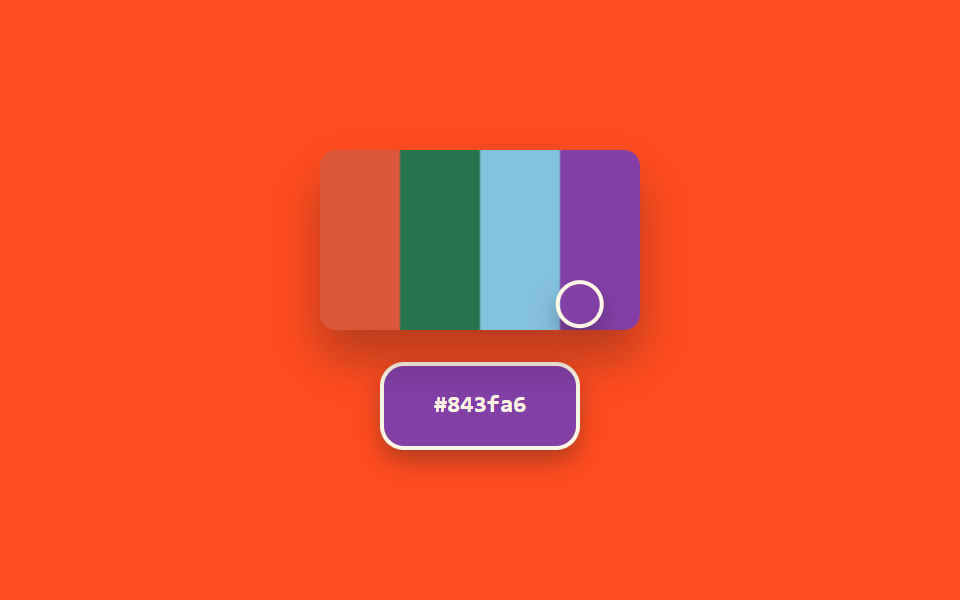
08스포이드 — 추출된 색의 밝기로 미리보기를 다시 구하는 컬러피커
화면에서 추출된 색의 밝기 값을 계산해, 그 값에 따라 미리보기 칸의 글자색과 테두리 두께가 함께 다시 정해지는 스포이드형 컬러피커입니다.
쓰임화면 색상 추출 도구, 디자인 QA 색상 검증
getImageDataBANDSaria-hidden
<main class="stage">
<section class="panel">
  <div class="screenWrap">
    <canvas class="screen" id="screen" width="160" height="90" aria-hidden="true"></canvas>
    <div class="loupe" id="loupe"></div>
  </div>
  <div class="preview" id="preview">
    <span class="hex" id="hex">#000000</span>
  </div>
</section>
</main>
@use "../../../../site/static/demo-tokens" as *;
@include stage($stage-orange);
.panel {
display: flex;
flex-direction: column;
align-items: center;
gap: $sp-4;
}
.screenWrap {
position: relative;
width: 160px;
height: 90px;
border-radius: $r-sm;
overflow: hidden;
box-shadow: $shadow-raised;
}
.screen {
display: block;
width: 160px;
height: 90px;
}
.loupe {
position: absolute;
top: 0;
left: 0;
width: 20px;
height: 20px;
border-radius: $r-pill;
border: 2px solid $subject-cream;
box-shadow: $shadow-press;
pointer-events: none;
}
.preview {
display: flex;
align-items: center;
justify-content: center;
width: 96px;
height: 40px;
border-radius: $r-control;
border-style: solid;
border-color: $subject-cream;
color: $subject-cream;
box-shadow: $shadow-press;
&.is-ink {
color: $subject-ink;
border-color: $subject-ink;
}
}
.hex {
font-family: "Space Mono", ui-monospace, monospace;
font-weight: 700;
font-size: 12px;
line-height: 1.3;
}
@media (prefers-reduced-motion: reduce) {
.loupe,
.preview { transition: none; }
}html, body {
margin: 0;
overflow: hidden;
}
.stage {
box-sizing: border-box;
min-height: 100vh;
display: grid;
place-items: center;
margin: 0;
background: #ff4d1f;
font-family: -apple-system, "Segoe UI", "Noto Sans KR", sans-serif;
padding: clamp(8px, 4vw, 24px);
}
.panel {
display: flex;
flex-direction: column;
align-items: center;
gap: 16px;
}
.screenWrap {
position: relative;
width: 160px;
height: 90px;
border-radius: 8px;
overflow: hidden;
box-shadow: 0 14px 24px rgba(23, 20, 26, 0.32);
}
.screen {
display: block;
width: 160px;
height: 90px;
}
.loupe {
position: absolute;
top: 0;
left: 0;
width: 20px;
height: 20px;
border-radius: 999px;
border: 2px solid #fff7e6;
box-shadow: 0 6px 12px rgba(23, 20, 26, 0.32);
pointer-events: none;
}
.preview {
display: flex;
align-items: center;
justify-content: center;
width: 96px;
height: 40px;
border-radius: 12px;
border-style: solid;
border-color: #fff7e6;
color: #fff7e6;
box-shadow: 0 6px 12px rgba(23, 20, 26, 0.32);
}
.preview.is-ink {
color: #17141a;
border-color: #17141a;
}
.hex {
font-family: "Space Mono", ui-monospace, monospace;
font-weight: 700;
font-size: 12px;
line-height: 1.3;
}
@media (prefers-reduced-motion: reduce) {
.loupe,
.preview {
transition: none;
}
}// 스포이드(08) — 캔버스에서 커서 위치의 실제 픽셀 값을 getImageData 로 추출해
// 밝기 값을 계산하고, 그 값에 따라 미리보기 글자색과 테두리 두께를 함께 다시 정한다.
// 브라우저 EyeDropper API 는 지원 범위가 좁아 쓰지 않는다 — 캔버스 픽셀 샘플링 시뮬레이션.
// 실키·실서버 요청 없음.
(function () {
var screenEl = document.getElementById('screen');
var loupeEl = document.getElementById('loupe');
var previewEl = document.getElementById('preview');
var hexEl = document.getElementById('hex');
if (!screenEl || !loupeEl || !previewEl || !hexEl || !screenEl.getContext) return;
var ctx = screenEl.getContext('2d');
if (!ctx) return;
var reduce = window.matchMedia('(prefers-reduced-motion: reduce)').matches;
var CANVAS_W = 160;
var CANVAS_H = 90;
var CYCLE_MS = 2600;
var MIN_BORDER = 1;
var MAX_BORDER = 6;
var BANDS = [
{ x0: 0, x1: 40, h: 10, s: 70, l: 55 },
{ x0: 40, x1: 80, h: 150, s: 50, l: 30 },
{ x0: 80, x1: 120, h: 200, s: 60, l: 70 },
{ x0: 120, x1: 160, h: 280, s: 45, l: 45 }
];
BANDS.forEach(function (b) {
ctx.fillStyle = 'hsl(' + b.h + 'deg ' + b.s + '% ' + b.l + '%)';
ctx.fillRect(b.x0, 0, b.x1 - b.x0, CANVAS_H);
});
function toHex(n) {
return n.toString(16).padStart(2, '0');
}
function apply(t) {
var p = (t / CYCLE_MS) % 1;
var triangle = p < .5 ? p * 2 : (1 - p) * 2;
var x = 8 + triangle * (CANVAS_W - 16);
var y = CANVAS_H / 2 + Math.sin(p * Math.PI * 4) * (CANVAS_H / 2 - 6);
var xi = Math.max(0, Math.min(CANVAS_W - 1, Math.round(x)));
var yi = Math.max(0, Math.min(CANVAS_H - 1, Math.round(y)));
var pixel = ctx.getImageData(xi, yi, 1, 1).data;
var r = pixel[0], g = pixel[1], b = pixel[2];
var hex = '#' + toHex(r) + toHex(g) + toHex(b);
var brightness = (r * 299 + g * 587 + b * 114) / 1000;
var ink = brightness > 150;
var borderPx = MIN_BORDER + (brightness / 255) * (MAX_BORDER - MIN_BORDER);
loupeEl.style.transform = 'translate(-50%, -50%) translate(' + x.toFixed(2) + 'px, ' + y.toFixed(2) + 'px)';
previewEl.style.background = hex;
previewEl.style.borderWidth = borderPx.toFixed(1) + 'px';
previewEl.classList.toggle('is-ink', ink);
hexEl.textContent = hex;
}
if (reduce) {
apply(0);
return;
}
var start = null;
function loop(ts) {
if (start === null) start = ts;
var t = (ts - start) % CYCLE_MS;
apply(t);
requestAnimationFrame(loop);
}
requestAnimationFrame(loop);
})();import { useEffect, useRef } from "react";
import styles from "./ColorPickerEyedropper.module.scss";
// 스포이드 — 캔버스에서 커서 위치의 실제 픽셀 값을 getImageData 로 추출해 밝기 값을
// 계산하고, 그 값에 따라 미리보기 글자색과 테두리 두께를 함께 다시 정한다.
// 브라우저 스포이드 API는 지원 범위가 좁아 쓰지 않는다 — 캔버스 픽셀 샘플링 시뮬레이션.
// 실키·실서버 요청 없음.
const CANVAS_W = 160;
const CANVAS_H = 90;
const CYCLE_MS = 2600;
const MIN_BORDER = 1;
const MAX_BORDER = 6;
const BANDS = [
{ x0: 0, x1: 40, h: 10, s: 70, l: 55 },
{ x0: 40, x1: 80, h: 150, s: 50, l: 30 },
{ x0: 80, x1: 120, h: 200, s: 60, l: 70 },
{ x0: 120, x1: 160, h: 280, s: 45, l: 45 },
];
function toHex(n: number) {
return n.toString(16).padStart(2, "0");
}
export default function ColorPickerEyedropper() {
const screenRef = useRef<HTMLCanvasElement>(null);
const loupeRef = useRef<HTMLDivElement>(null);
const previewRef = useRef<HTMLDivElement>(null);
const hexRef = useRef<HTMLSpanElement>(null);
useEffect(() => {
const screen = screenRef.current;
const loupe = loupeRef.current;
const preview = previewRef.current;
const hexEl = hexRef.current;
if (!screen || !loupe || !preview || !hexEl) return;
const ctx = screen.getContext("2d");
if (!ctx) return;
const reduce = window.matchMedia("(prefers-reduced-motion: reduce)").matches;
BANDS.forEach((b) => {
ctx.fillStyle = `hsl(${b.h}deg ${b.s}% ${b.l}%)`;
ctx.fillRect(b.x0, 0, b.x1 - b.x0, CANVAS_H);
});
function apply(t: number) {
const p = (t / CYCLE_MS) % 1;
const triangle = p < .5 ? p * 2 : (1 - p) * 2;
const x = 8 + triangle * (CANVAS_W - 16);
const y = CANVAS_H / 2 + Math.sin(p * Math.PI * 4) * (CANVAS_H / 2 - 6);
const xi = Math.max(0, Math.min(CANVAS_W - 1, Math.round(x)));
const yi = Math.max(0, Math.min(CANVAS_H - 1, Math.round(y)));
const pixel = ctx!.getImageData(xi, yi, 1, 1).data;
const r = pixel[0], g = pixel[1], b = pixel[2];
const hex = "#" + toHex(r) + toHex(g) + toHex(b);
const brightness = (r * 299 + g * 587 + b * 114) / 1000;
const ink = brightness > 150;
const borderPx = MIN_BORDER + (brightness / 255) * (MAX_BORDER - MIN_BORDER);
loupe!.style.transform = `translate(-50%, -50%) translate(${x.toFixed(2)}px, ${y.toFixed(2)}px)`;
preview!.style.background = hex;
preview!.style.borderWidth = `${borderPx.toFixed(1)}px`;
preview!.classList.toggle(styles.isInk, ink);
hexEl!.textContent = hex;
}
if (reduce) {
apply(0);
return;
}
let start: number | null = null;
let raf = 0;
function loop(ts: number) {
if (start === null) start = ts;
const t = (ts - start) % CYCLE_MS;
apply(t);
raf = requestAnimationFrame(loop);
}
raf = requestAnimationFrame(loop);
return () => cancelAnimationFrame(raf);
}, []);
return (
<div className={styles.stage}>
<section className={styles.panel}>
<div className={styles.screenWrap}>
<canvas className={styles.screen} ref={screenRef} width={CANVAS_W} height={CANVAS_H} aria-hidden="true" />
<div className={styles.loupe} ref={loupeRef} />
</div>
<div className={styles.preview} ref={previewRef}>
<span className={styles.hex} ref={hexRef}>#000000</span>
</div>
</section>
</div>
);
}08 스포이드 — 추출된 색의 밝기로 미리보기를 다시 구하는 컬러피커 — 측정 누적면적 8.365% · 움직인 프레임 23/23GODRICH 원작 · zip 에 SCSS·React 포함 · 컬러피커 UI 디자인 9종 — 휠부터 최근 색상까지
이 데모가 속한 글
 컬러피커 UI 디자인 9종 — 휠부터 최근 색상까지선택 지점의 각도가 색상값으로 다시 계산되고, 스와치 밝기 값에 따라 체크 아이콘 색이 뒤바뀌고, 최근 색상 사이 거리가 계산되어 가까운 색끼리 합쳐지는 컬러피커 UI 9종입니다. 아홉 화면 전부 속성 값 바꾸기로 이 글의 데모 전부 보기