04원+화살표 호버
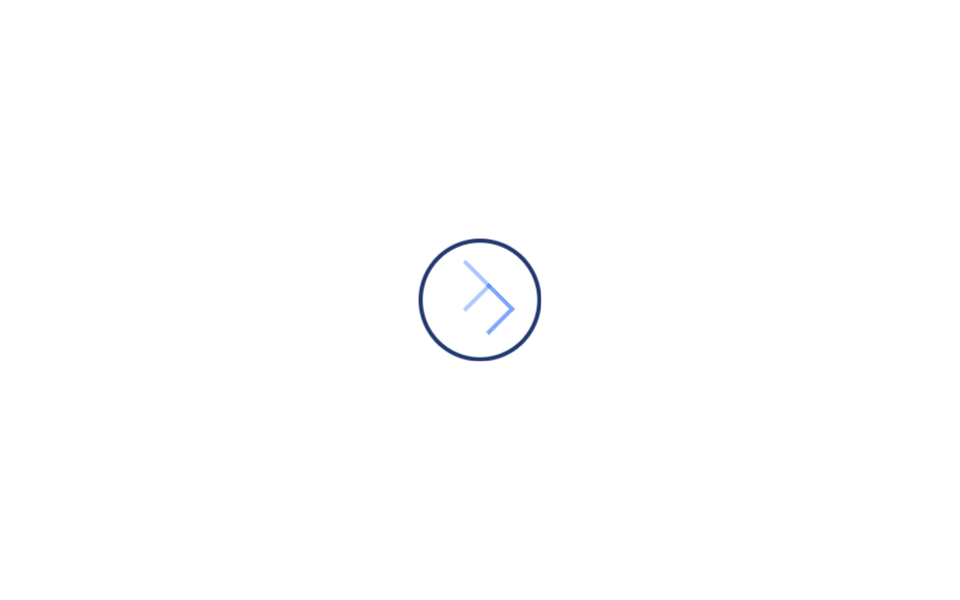
원형 버튼에 마우스를 올리면 화살표가 왼쪽에서 오른쪽으로 슬며시 자리를 바꾸며 버튼을 누르라고 안내합니다.
쓰임원형 CTA 버튼, 플로팅 액션 버튼
translateXopacityhover
<main class="stage">
  <a class="cx-btn is-demo" href="#" aria-label="Next">
    <span class="cx-btn__arrow cx-btn__arrow--a"></span>
    <span class="cx-btn__arrow cx-btn__arrow--b"></span>
    <span class="cx-btn__trail cx-btn__trail--a" aria-hidden="true"></span>
    <span class="cx-btn__trail cx-btn__trail--b" aria-hidden="true"></span>
  </a>
</main>
@use "../../../../site/static/demo-tokens" as *;
// ── 변수 3개 ──────────────────────────────────────────
$duration: $dur-loop; // is-demo 강제 루프 주기. 실제 호버 전환은 아래 280ms 를 쓴다
$easing: $ease-elastic; // 고무줄식 오버슛 — 커졌다 살짝 되돌아와 멈춘다
$color: $subject-blue;
@include stage($stage-paper);
.cx-btn {
position: relative;
display: inline-flex;
align-items: center;
justify-content: center;
width: 56px;
height: 56px;
border-radius: 50%;
border: 2px solid $subject-ink;
text-decoration: none;
transform: scale(1);
transition: transform 280ms $easing, border-color 280ms $easing;
}
.cx-btn:hover { transform: scale(1.06); border-color: $color; }
.cx-btn__arrow {
position: absolute;
width: 16px;
height: 16px;
border-top: 2px solid $color;
border-right: 2px solid $color;
transform: rotate(45deg);
}
// 두 화살표가 겹쳐 있다가 호버 시 한쪽은 오른쪽으로 빠지고 다른 한쪽이 왼쪽에서 들어와 자리를 대신한다
.cx-btn__arrow--a { opacity: 1; transform: rotate(45deg) translateX(0); transition: transform 280ms $easing, opacity 280ms $easing; }
.cx-btn__arrow--b { opacity: 0; transform: rotate(45deg) translateX(-16px); transition: transform 280ms $easing, opacity 280ms $easing; }
.cx-btn:hover .cx-btn__arrow--a { opacity: 0; transform: rotate(45deg) translateX(16px); }
.cx-btn:hover .cx-btn__arrow--b { opacity: 1; transform: rotate(45deg) translateX(0); }
// 트레일 파티클 — 교차하는 두 화살표 각각 뒤로 작은 점이 지연·감쇠하며 따라붙는다
.cx-btn__trail {
position: absolute;
width: 4px;
height: 4px;
border-radius: 50%;
background: $color;
opacity: 0;
}
@keyframes cx-trail-a-hover {
0% { opacity: 0; transform: translateX(0) rotate(45deg); }
50% { opacity: .4; transform: translateX(10px) rotate(45deg); }
100% { opacity: 0; transform: translateX(16px) rotate(45deg); }
}
@keyframes cx-trail-b-hover {
0% { opacity: 0; transform: translateX(-16px) rotate(45deg); }
50% { opacity: .4; transform: translateX(-4px) rotate(45deg); }
100% { opacity: 0; transform: translateX(0) rotate(45deg); }
}
.cx-btn:hover .cx-btn__trail--a { animation: cx-trail-a-hover 280ms $ease-out forwards; }
.cx-btn:hover .cx-btn__trail--b { animation: cx-trail-b-hover 280ms $ease-out forwards; }
// 데모 루프: is-demo 는 :hover 를 흉내 낸 keyframes 로 무한 반복 (헤드리스는 :hover 를 못 건다)
@keyframes cx-btn-scale {
0%, 20% { transform: scale(1); border-color: $subject-ink; }
50%, 70% { transform: scale(1.06); border-color: $color; }
100% { transform: scale(1); border-color: $subject-ink; }
}
@keyframes cx-arrow-a {
0%, 20% { opacity: 1; transform: rotate(45deg) translateX(0); }
50%, 70% { opacity: 0; transform: rotate(45deg) translateX(16px); }
100% { opacity: 1; transform: rotate(45deg) translateX(0); }
}
@keyframes cx-arrow-b {
0%, 20% { opacity: 0; transform: rotate(45deg) translateX(-16px); }
50%, 70% { opacity: 1; transform: rotate(45deg) translateX(0); }
100% { opacity: 0; transform: rotate(45deg) translateX(-16px); }
}
@keyframes cx-trail-a-loop {
0%, 20% { opacity: 0; transform: translateX(0) rotate(45deg); }
40% { opacity: .4; transform: translateX(10px) rotate(45deg); }
50%, 70% { opacity: 0; transform: translateX(16px) rotate(45deg); }
100% { opacity: 0; transform: translateX(0) rotate(45deg); }
}
@keyframes cx-trail-b-loop {
0%, 20% { opacity: 0; transform: translateX(-16px) rotate(45deg); }
55% { opacity: .4; transform: translateX(-4px) rotate(45deg); }
70%, 100% { opacity: 0; transform: translateX(0) rotate(45deg); }
}
.cx-btn.is-demo { animation: cx-btn-scale $duration $easing infinite; }
.cx-btn.is-demo .cx-btn__arrow--a { animation: cx-arrow-a $duration $easing infinite; }
.cx-btn.is-demo .cx-btn__arrow--b { animation: cx-arrow-b $duration $easing infinite; }
.cx-btn.is-demo .cx-btn__trail--a { animation: cx-trail-a-loop $duration $ease-out infinite; }
.cx-btn.is-demo .cx-btn__trail--b { animation: cx-trail-b-loop $duration $ease-out infinite; }
@media (prefers-reduced-motion: reduce) {
.cx-btn,
.cx-btn.is-demo,
.cx-btn__arrow--a,
.cx-btn__arrow--b,
.cx-btn.is-demo .cx-btn__arrow--a,
.cx-btn.is-demo .cx-btn__arrow--b {
animation: none !important;
transition: none !important;
}
.cx-btn { transform: scale(1) !important; border-color: $subject-ink !important; }
.cx-btn__arrow--a { opacity: 1 !important; transform: rotate(45deg) translateX(0) !important; }
.cx-btn__arrow--b { opacity: 0 !important; transform: rotate(45deg) translateX(-16px) !important; }
.cx-btn__trail,
.cx-btn:hover .cx-btn__trail,
.cx-btn.is-demo .cx-btn__trail {
animation: none !important;
opacity: 0 !important;
}
}html, body {
margin: 0;
overflow: hidden;
}
.stage {
box-sizing: border-box;
min-height: 100vh;
display: grid;
place-items: center;
margin: 0;
background: #ffffff;
font-family: -apple-system, "Segoe UI", "Noto Sans KR", sans-serif;
padding: clamp(8px, 4vw, 24px);
}
.cx-btn {
position: relative;
display: inline-flex;
align-items: center;
justify-content: center;
width: 56px;
height: 56px;
border-radius: 50%;
border: 2px solid #17141a;
text-decoration: none;
transform: scale(1);
transition: transform 280ms cubic-bezier(0.34, 1.56, 0.64, 1), border-color 280ms cubic-bezier(0.34, 1.56, 0.64, 1);
}
.cx-btn:hover {
transform: scale(1.06);
border-color: #2f6df6;
}
.cx-btn__arrow {
position: absolute;
width: 16px;
height: 16px;
border-top: 2px solid #2f6df6;
border-right: 2px solid #2f6df6;
transform: rotate(45deg);
}
.cx-btn__arrow--a {
opacity: 1;
transform: rotate(45deg) translateX(0);
transition: transform 280ms cubic-bezier(0.34, 1.56, 0.64, 1), opacity 280ms cubic-bezier(0.34, 1.56, 0.64, 1);
}
.cx-btn__arrow--b {
opacity: 0;
transform: rotate(45deg) translateX(-16px);
transition: transform 280ms cubic-bezier(0.34, 1.56, 0.64, 1), opacity 280ms cubic-bezier(0.34, 1.56, 0.64, 1);
}
.cx-btn:hover .cx-btn__arrow--a {
opacity: 0;
transform: rotate(45deg) translateX(16px);
}
.cx-btn:hover .cx-btn__arrow--b {
opacity: 1;
transform: rotate(45deg) translateX(0);
}
.cx-btn__trail {
position: absolute;
width: 4px;
height: 4px;
border-radius: 50%;
background: #2f6df6;
opacity: 0;
}
@keyframes cx-trail-a-hover {
0% {
opacity: 0;
transform: translateX(0) rotate(45deg);
}
50% {
opacity: 0.4;
transform: translateX(10px) rotate(45deg);
}
100% {
opacity: 0;
transform: translateX(16px) rotate(45deg);
}
}
@keyframes cx-trail-b-hover {
0% {
opacity: 0;
transform: translateX(-16px) rotate(45deg);
}
50% {
opacity: 0.4;
transform: translateX(-4px) rotate(45deg);
}
100% {
opacity: 0;
transform: translateX(0) rotate(45deg);
}
}
.cx-btn:hover .cx-btn__trail--a {
animation: cx-trail-a-hover 280ms ease-out forwards;
}
.cx-btn:hover .cx-btn__trail--b {
animation: cx-trail-b-hover 280ms ease-out forwards;
}
@keyframes cx-btn-scale {
0%, 20% {
transform: scale(1);
border-color: #17141a;
}
50%, 70% {
transform: scale(1.06);
border-color: #2f6df6;
}
100% {
transform: scale(1);
border-color: #17141a;
}
}
@keyframes cx-arrow-a {
0%, 20% {
opacity: 1;
transform: rotate(45deg) translateX(0);
}
50%, 70% {
opacity: 0;
transform: rotate(45deg) translateX(16px);
}
100% {
opacity: 1;
transform: rotate(45deg) translateX(0);
}
}
@keyframes cx-arrow-b {
0%, 20% {
opacity: 0;
transform: rotate(45deg) translateX(-16px);
}
50%, 70% {
opacity: 1;
transform: rotate(45deg) translateX(0);
}
100% {
opacity: 0;
transform: rotate(45deg) translateX(-16px);
}
}
@keyframes cx-trail-a-loop {
0%, 20% {
opacity: 0;
transform: translateX(0) rotate(45deg);
}
40% {
opacity: 0.4;
transform: translateX(10px) rotate(45deg);
}
50%, 70% {
opacity: 0;
transform: translateX(16px) rotate(45deg);
}
100% {
opacity: 0;
transform: translateX(0) rotate(45deg);
}
}
@keyframes cx-trail-b-loop {
0%, 20% {
opacity: 0;
transform: translateX(-16px) rotate(45deg);
}
55% {
opacity: 0.4;
transform: translateX(-4px) rotate(45deg);
}
70%, 100% {
opacity: 0;
transform: translateX(0) rotate(45deg);
}
}
.cx-btn.is-demo {
animation: cx-btn-scale 2s cubic-bezier(0.34, 1.56, 0.64, 1) infinite;
}
.cx-btn.is-demo .cx-btn__arrow--a {
animation: cx-arrow-a 2s cubic-bezier(0.34, 1.56, 0.64, 1) infinite;
}
.cx-btn.is-demo .cx-btn__arrow--b {
animation: cx-arrow-b 2s cubic-bezier(0.34, 1.56, 0.64, 1) infinite;
}
.cx-btn.is-demo .cx-btn__trail--a {
animation: cx-trail-a-loop 2s ease-out infinite;
}
.cx-btn.is-demo .cx-btn__trail--b {
animation: cx-trail-b-loop 2s ease-out infinite;
}
@media (prefers-reduced-motion: reduce) {
.cx-btn,
.cx-btn.is-demo,
.cx-btn__arrow--a,
.cx-btn__arrow--b,
.cx-btn.is-demo .cx-btn__arrow--a,
.cx-btn.is-demo .cx-btn__arrow--b {
animation: none !important;
transition: none !important;
}
.cx-btn {
transform: scale(1) !important;
border-color: #17141a !important;
}
.cx-btn__arrow--a {
opacity: 1 !important;
transform: rotate(45deg) translateX(0) !important;
}
.cx-btn__arrow--b {
opacity: 0 !important;
transform: rotate(45deg) translateX(-16px) !important;
}
.cx-btn__trail,
.cx-btn:hover .cx-btn__trail,
.cx-btn.is-demo .cx-btn__trail {
animation: none !important;
opacity: 0 !important;
}
}import { CSSProperties } from "react";
import styles from "./CircleArrowHover.module.scss";
export interface CircleArrowHoverProps {
duration?: string;
easing?: string;
color?: string;
}
export default function CircleArrowHover({
duration = "280ms",
easing = "cubic-bezier(.34, 1.56, .64, 1)",
color = "#2f6df6",
}: CircleArrowHoverProps) {
const style = { "--duration": duration, "--easing": easing, "--color": color } as CSSProperties;
return (
<a className={styles.btn} href="#" aria-label="Next" style={style}>
<span className={`${styles.arrow} ${styles.a}`} />
<span className={`${styles.arrow} ${styles.b}`} />
<span className={`${styles.trail} ${styles.trailA}`} aria-hidden="true" />
<span className={`${styles.trail} ${styles.trailB}`} aria-hidden="true" />
</a>
);
}04 원+화살표 호버 — 측정 누적면적 1.206% · 움직인 프레임 19/23GODRICH 원작 · zip 에 SCSS·React 포함 · CSS 화살표 애니메이션 9종
이 데모가 속한 글
 CSS 화살표 애니메이션 9종화살표 아이콘이 저절로 움직이는 웹사이트를 본 적 있으신가요? 마우스를 올리면 화살표가 길어지거나, 버튼을 눌러 보라는 듯 통통 튀거나 — 이런 작은 움직임 하나가 방문자의 시선을 붙잡아 줍니다. 이 글은 그런 CS 이 글의 데모 전부 보기