02빛줄기 스윕 버튼
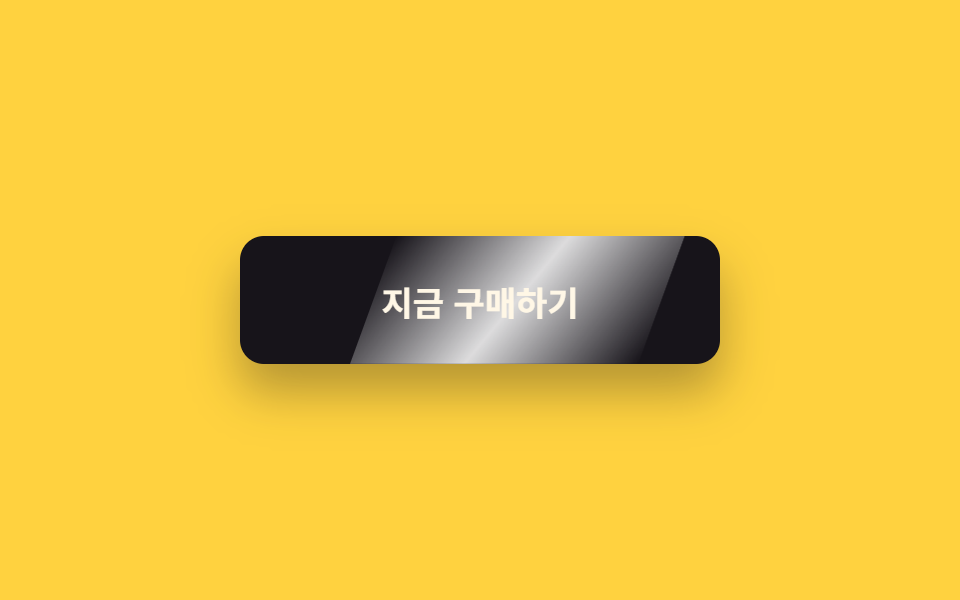
기울여 놓은 흰 빛 띠(::after)가 overflow: hidden 안을 translateX 로 지나가, 유리에 빛이 스치는 것 같은 하이라이트를 남긴다.
쓰임결제·구매 버튼, 프로모션 배너의 눌러야 하는 버튼
translateX(±150%)skewX(-20deg)overflow: hidden
<main class="stage is-demo">
  <button class="btn" type="button"><span class="btn__label">지금 구매하기</span></button>
</main>
@use "../../../../site/static/demo-tokens" as *;
// ── 변수 3개 ──────────────────────────────────────────
$duration: $dur-loop; // 2s — 스윕 한 주기
$easing: $ease-out;
$color: $subject-ink; // 버튼 바탕
@include stage($stage-yellow);
.btn {
box-sizing: border-box;
position: relative;
width: 240px;
height: 64px;
border: none;
border-radius: $r-control;
background: $color;
color: $subject-cream;
font-family: -apple-system, "Segoe UI", "Noto Sans KR", sans-serif;
font-weight: 700;
font-size: 17px;
cursor: pointer;
overflow: hidden; // 빛 띠가 밖으로 새지 않게
box-shadow: $shadow-raised;
}
.btn__label { position: relative; z-index: 1; }
// 기울어진 흰 빛 띠 — transform 만으로 통과시킨다
.btn::after {
content: "";
position: absolute;
top: 0; bottom: 0;
left: -60%;
width: 60%;
background: linear-gradient(115deg,
transparent 0%, rgba(255, 255, 255, .85) 50%, transparent 100%);
transform: skewX(-20deg) translateX(-10%);
}
// 실사용: 올릴 때마다 한 번 쓸고 지나감
.btn:hover::after { animation: sweep $dur-enter $easing 1; }
.btn:focus-visible { outline: 3px solid $subject-ink; outline-offset: 4px; }
// 격자 미리보기: 2초 루프로 강제 발동
.stage.is-demo .btn::after { animation: sweep $duration $easing infinite; }
@keyframes sweep {
0%, 10% { transform: skewX(-20deg) translateX(-10%); }
55% { transform: skewX(-20deg) translateX(310%); }
100% { transform: skewX(-20deg) translateX(310%); }
}
@media (prefers-reduced-motion: reduce) {
.btn:hover::after, .stage.is-demo .btn::after { animation: none; transform: skewX(-20deg) translateX(-10%); }
}html, body {
margin: 0;
overflow: hidden;
}
.stage {
box-sizing: border-box;
min-height: 100vh;
display: grid;
place-items: center;
margin: 0;
background: #ffd23f;
font-family: -apple-system, "Segoe UI", "Noto Sans KR", sans-serif;
padding: clamp(8px, 4vw, 24px);
}
.btn {
box-sizing: border-box;
position: relative;
width: 240px;
height: 64px;
border: none;
border-radius: 12px;
background: #17141a;
color: #fff7e6;
font-family: -apple-system, "Segoe UI", "Noto Sans KR", sans-serif;
font-weight: 700;
font-size: 17px;
cursor: pointer;
overflow: hidden;
box-shadow: 0 14px 24px rgba(23, 20, 26, 0.32);
}
.btn__label {
position: relative;
z-index: 1;
}
.btn::after {
content: "";
position: absolute;
top: 0;
bottom: 0;
left: -60%;
width: 60%;
background: linear-gradient(115deg, transparent 0%, rgba(255, 255, 255, 0.85) 50%, transparent 100%);
transform: skewX(-20deg) translateX(-10%);
}
.btn:hover::after {
animation: sweep 600ms ease-out 1;
}
.btn:focus-visible {
outline: 3px solid #17141a;
outline-offset: 4px;
}
.stage.is-demo .btn::after {
animation: sweep 2s ease-out infinite;
}
@keyframes sweep {
0%, 10% {
transform: skewX(-20deg) translateX(-10%);
}
55% {
transform: skewX(-20deg) translateX(310%);
}
100% {
transform: skewX(-20deg) translateX(310%);
}
}
@media (prefers-reduced-motion: reduce) {
.btn:hover::after, .stage.is-demo .btn::after {
animation: none;
transform: skewX(-20deg) translateX(-10%);
}
}import type { CSSProperties, ReactNode } from "react";
import styles from "./ShineSweepButton.module.scss";
export type ShineSweepButtonProps = {
duration?: number;
easing?: string;
color?: string;
children?: ReactNode;
};
export default function ShineSweepButton({
duration = 600,
easing = "ease-out",
color = "#17141a",
children = "지금 구매하기",
}: ShineSweepButtonProps) {
const vars: CSSProperties = { "--duration": `${duration}ms`, "--easing": easing, "--color": color } as CSSProperties;
return (
<button className={styles.btn} style={vars} type="button">
<span className={styles.label}>{children}</span>
</button>
);
}02 빛줄기 스윕 버튼 — 측정 누적면적 10.349% · 움직인 프레임 9/23GODRICH 원작 · zip 에 SCSS·React 포함 · css 버튼 디자인 9종 — 캔디 그라데이션·눌림·로딩 버튼 코드
이 데모가 속한 글
 css 버튼 디자인 9종 — 캔디 그라데이션·눌림·로딩 버튼 코드css 버튼 디자인은 버튼의 색과 모양, 마우스를 올렀을 때와 눌렀을 때의 반응까지 코드 몇 줄로 정하는 일이다. 어느 랜딩 페이지에서 본 캔디 같은 그라데이션 버튼, 손끝에 꾹 눌리는 입체 버튼을 내 사이트에 그대 이 글의 데모 전부 보기