06밑줄 글로우
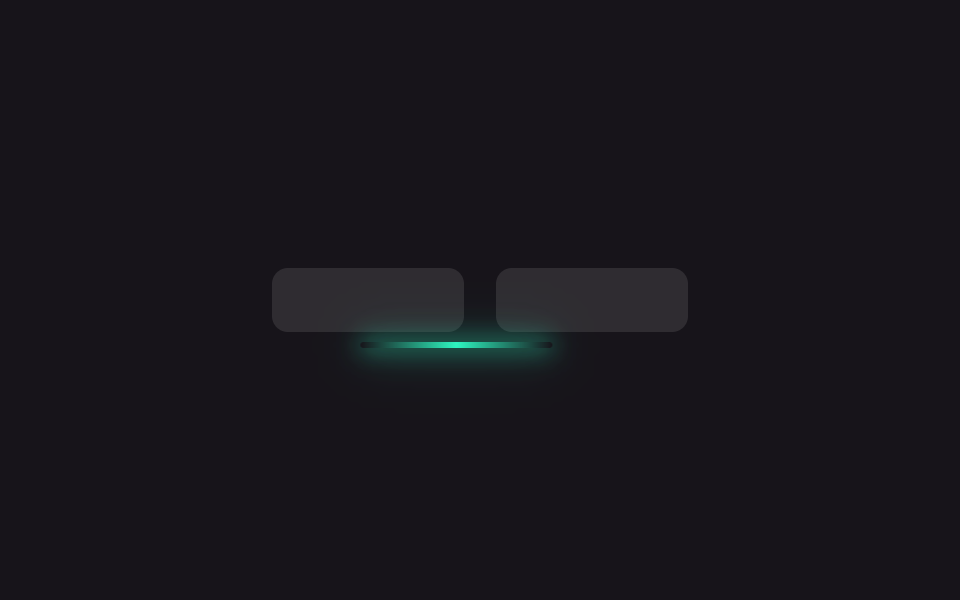
네온색 그라데이션이 깔린 밑줄이 고른 메뉴 아래까지 translateX 로만 미끄러지고, box-shadow 로 번진 빛이 같이 따라간다.
쓰임다크 테마 내비게이션 메뉴, 게임·스트리밍 사이트 탭
translateXbox-shadowlinear-gradient
<main class="stage is-demo">
  <nav class="nav" aria-hidden="true">
    <span class="tab"></span>
    <span class="tab"></span>
    <span class="indicator"></span>
  </nav>
</main>
@use "../../../../site/static/demo-tokens" as *;
// ── 변수 3개 ──────────────────────────────────────────
$duration: $dur-loop; // 2s — 왕복 한 번
$easing: $ease-spring;
$color: #2df5c0; // 네온 틸
@include stage($stage-ink);
// 탭 두 개가 같은 고정 폭이라 인디케이터는 그 폭+간격만큼만 옮기면 된다 (짐작 없는 값 — BD19)
$tab-w: 96px;
$tab-gap: $sp-4;
.nav { position: relative; display: flex; gap: $tab-gap; }
.tab {
flex: 0 0 auto;
width: $tab-w; height: $sp-8;
border-radius: $r-sm;
background: rgba($stage-paper, .1);
}
.indicator {
position: absolute; left: 0; bottom: -$sp-2;
width: $tab-w; height: 3px;
border-radius: $r-xs;
background: linear-gradient(90deg, transparent, $color, transparent);
box-shadow: 0 0 $sp-3 $color, 0 0 $sp-6 rgba($color, .6);
}
// translateX 만 움직인다 — 폭이 고정값이라 도착 지점도 고정값이다
.stage.is-demo .indicator {
animation: slide $duration $easing infinite;
}
@keyframes slide {
0%, 40% { transform: translateX(0); }
60%, 90% { transform: translateX(#{$tab-w + $tab-gap}); }
100% { transform: translateX(0); }
}
@media (prefers-reduced-motion: reduce) {
.stage.is-demo .indicator { animation: none; }
}html, body {
margin: 0;
overflow: hidden;
}
.stage {
box-sizing: border-box;
min-height: 100vh;
display: grid;
place-items: center;
margin: 0;
background: #17141a;
font-family: -apple-system, "Segoe UI", "Noto Sans KR", sans-serif;
padding: clamp(8px, 4vw, 24px);
}
.nav {
position: relative;
display: flex;
gap: 16px;
}
.tab {
flex: 0 0 auto;
width: 96px;
height: 32px;
border-radius: 8px;
background: rgba(255, 255, 255, 0.1);
}
.indicator {
position: absolute;
left: 0;
bottom: -8px;
width: 96px;
height: 3px;
border-radius: 4px;
background: linear-gradient(90deg, transparent, #2df5c0, transparent);
box-shadow: 0 0 12px #2df5c0, 0 0 24px rgba(45, 245, 192, 0.6);
}
.stage.is-demo .indicator {
animation: slide 2s cubic-bezier(0.2, 0.8, 0.2, 1) infinite;
}
@keyframes slide {
0%, 40% {
transform: translateX(0);
}
60%, 90% {
transform: translateX(112px);
}
100% {
transform: translateX(0);
}
}
@media (prefers-reduced-motion: reduce) {
.stage.is-demo .indicator {
animation: none;
}
}import { useState } from "react";
import type { CSSProperties } from "react";
import styles from "./UnderlineGlow.module.scss";
export type UnderlineGlowProps = {
/** 슬라이드 시간 (기본 300ms) */
duration?: number;
easing?: string;
color?: string;
labels?: [string, string];
};
export default function UnderlineGlow({
duration = 300,
easing = "cubic-bezier(.2,.8,.2,1)",
color = "#2df5c0",
labels = ["탭 1", "탭 2"],
}: UnderlineGlowProps) {
const [active, setActive] = useState(0);
const vars: CSSProperties = { "--duration": `${duration}ms`, "--easing": easing, "--color": color } as CSSProperties;
return (
<nav className={styles.nav} style={vars}>
{labels.map((label, i) => (
<button
key={label}
type="button"
className={styles.tab}
aria-current={active === i}
onClick={() => setActive(i)}
>
{label}
</button>
))}
<span className={styles.indicator} data-active={active} />
</nav>
);
}06 밑줄 글로우 — 측정 누적면적 3.618% · 움직인 프레임 7/23GODRICH 원작 · zip 에 SCSS·React 포함 · CSS 글로우 효과 9종 — 네온사인처럼 빛나는 버튼과 텍스트
이 데모가 속한 글
 CSS 글로우 효과 9종 — 네온사인처럼 빛나는 버튼과 텍스트CSS 글로우 효과는 버튼이나 글자 주위에 빛이 번지는 것처럼 보이게 만드는 장식이다. 네온사인처럼 빛나 보이지만 이미지나 동영상이 아니라 코드 몇 줄로 만든다. 한 줄 복붙으로 그대로 옮겨 쓸 수 있는 CSS 글로 이 글의 데모 전부 보기