03인증 배지 홀로그램 링
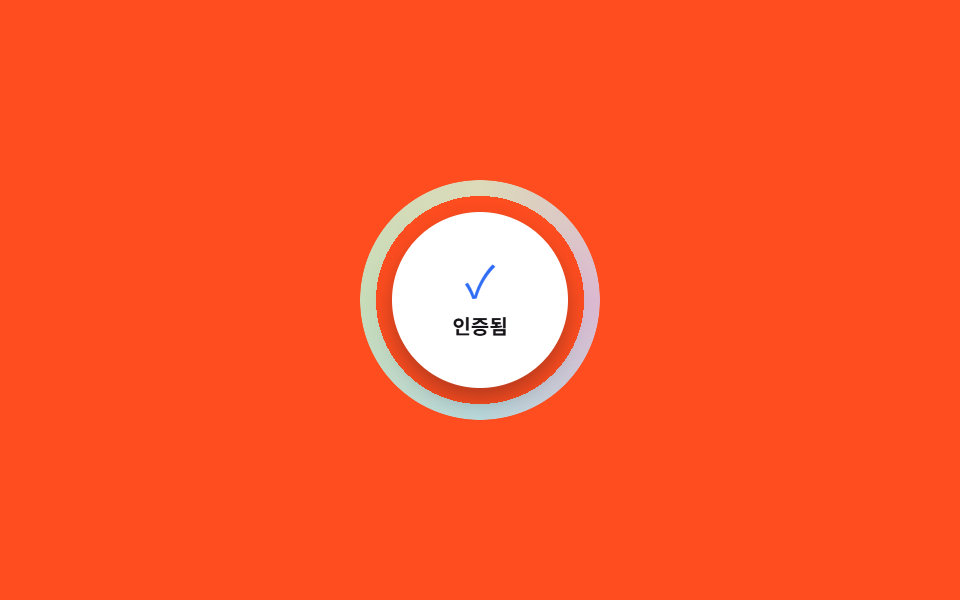
원형 배지 테두리를 따라 무지개 빛이 쉬지 않고 한 바퀴씩 돕니다. 각도에 따라 색이 달라 보이도록 conic-gradient를 씁니다.
쓰임정품 인증 배지, 검증된 판매자 표시, 한정판 굿즈 스탬프
conic-gradientmask: radial-gradient@keyframes rotate
<main class="stage">
  <div class="v-badge">
    <span class="v-badge__ring" aria-hidden="true"></span>
    <span class="v-badge__inner">
      <span class="v-badge__check" aria-hidden="true">✓</span>
      <span class="v-badge__label">인증됨</span>
    </span>
  </div>
</main>
@use "../../../../site/static/demo-tokens" as *;
$duration: $dur-loop; // 링이 한 바퀴 도는 시간
$easing: linear;
$color: $subject-blue; // 체크 아이콘 색
@include stage($stage-orange);
.v-badge {
position: relative;
width: min(120px, 40vw);
aspect-ratio: 1;
display: grid;
place-items: center;
}
.v-badge__ring {
position: absolute; inset: 0;
border-radius: $r-pill;
background: conic-gradient(from 0deg, #dcb9d1, #b9d9dc, #c8dcb9, #dcdab9, #dcb9d1);
-webkit-mask: radial-gradient(farthest-side, transparent calc(100% - 8px), #000 calc(100% - 8px));
mask: radial-gradient(farthest-side, transparent calc(100% - 8px), #000 calc(100% - 8px));
animation: ring-spin $duration $easing infinite;
}
.v-badge__inner {
position: relative; z-index: 1;
width: 74%; aspect-ratio: 1;
border-radius: $r-pill;
background: $stage-paper;
box-shadow: $shadow-press;
display: flex; flex-direction: column; align-items: center; justify-content: center; gap: $sp-1;
}
.v-badge__check { font-size: 22px; line-height: 1; color: $color; }
.v-badge__label { font-size: 10px; font-weight: 700; color: $stage-ink; font-family: inherit; }
@keyframes ring-spin { to { transform: rotate(360deg); } }
@media (prefers-reduced-motion: reduce) {
.v-badge__ring { animation: none; }
}html, body {
margin: 0;
overflow: hidden;
}
.stage {
box-sizing: border-box;
min-height: 100vh;
display: grid;
place-items: center;
margin: 0;
background: #ff4d1f;
font-family: -apple-system, "Segoe UI", "Noto Sans KR", sans-serif;
padding: clamp(8px, 4vw, 24px);
}
.v-badge {
position: relative;
width: min(120px, 40vw);
aspect-ratio: 1;
display: grid;
place-items: center;
}
.v-badge__ring {
position: absolute;
inset: 0;
border-radius: 999px;
background: conic-gradient(from 0deg, #dcb9d1, #b9d9dc, #c8dcb9, #dcdab9, #dcb9d1);
-webkit-mask: radial-gradient(farthest-side, transparent calc(100% - 8px), #000 calc(100% - 8px));
mask: radial-gradient(farthest-side, transparent calc(100% - 8px), #000 calc(100% - 8px));
animation: ring-spin 2s linear infinite;
}
.v-badge__inner {
position: relative;
z-index: 1;
width: 74%;
aspect-ratio: 1;
border-radius: 999px;
background: #ffffff;
box-shadow: 0 6px 12px rgba(23, 20, 26, 0.32);
display: flex;
flex-direction: column;
align-items: center;
justify-content: center;
gap: 4px;
}
.v-badge__check {
font-size: 22px;
line-height: 1;
color: #2f6df6;
}
.v-badge__label {
font-size: 10px;
font-weight: 700;
color: #17141a;
font-family: inherit;
}
@keyframes ring-spin {
to {
transform: rotate(360deg);
}
}
@media (prefers-reduced-motion: reduce) {
.v-badge__ring {
animation: none;
}
}import type { CSSProperties } from "react";
import styles from "./VerifiedBadgeRing.module.scss";
export type VerifiedBadgeRingProps = {
label: string;
/** 링이 한 바퀴 도는 시간 (기본 2000ms) */
duration?: number;
easing?: string;
/** 체크 아이콘 색 */
color?: string;
};
type Vars = CSSProperties & { "--duration"?: string; "--easing"?: string; "--color"?: string };
export default function VerifiedBadgeRing({
label,
duration = 2000,
easing = "linear",
color = "#2f6df6",
}: VerifiedBadgeRingProps) {
const vars: Vars = { "--duration": `${duration}ms`, "--easing": easing, "--color": color };
return (
<div className={styles.badge} style={vars}>
<span className={styles.ring} aria-hidden="true" />
<span className={styles.inner}>
<span className={styles.check} aria-hidden="true">✓</span>
<span className={styles.label}>{label}</span>
</span>
</div>
);
}03 인증 배지 홀로그램 링 — 측정 누적면적 2.312% · 움직인 프레임 23/23GODRICH 원작 · zip 에 SCSS·React 포함 · CSS 홀로그램 카드 효과 9가지 — 스티커·뱃지·티켓
이 데모가 속한 글
 CSS 홀로그램 카드 효과 9가지 — 스티커·뱃지·티켓CSS 홀로그램 효과는 각도에 따라 빛이 다르게 반사되는 홀로그램 재질을, CSS 그라디언트와 애니메이션만으로 흉내 내는 기법입니다. 포켓몬 카드처럼 빛나는 표면을 눈으로는 자주 보지만 막상 코드로 옮기려면 막막한 이 글의 데모 전부 보기