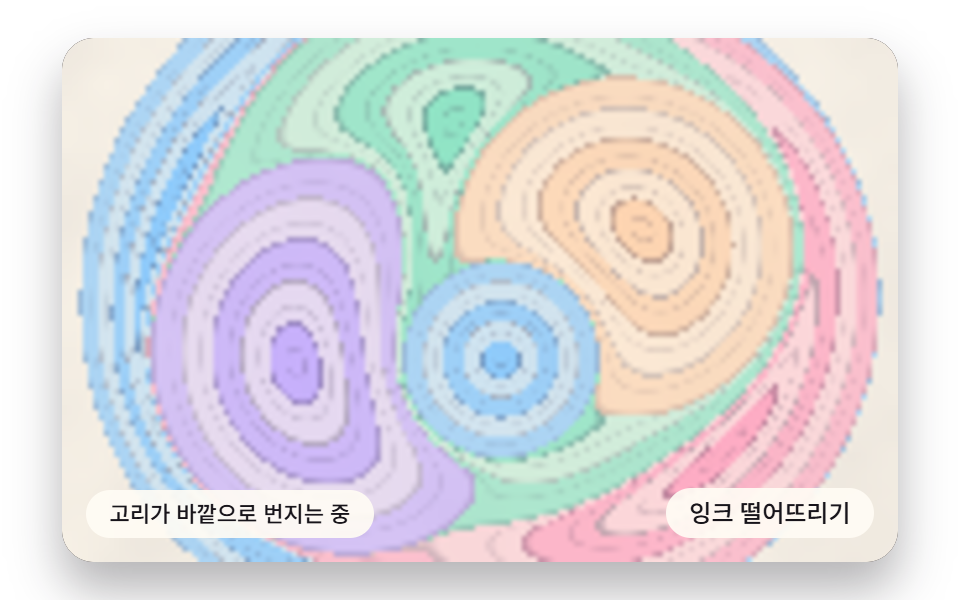
01떨어진 잉크가 고리를 만들며 바깥으로 번지는 방울 피짐
떨어진 점을 중심으로 거리별 확산량을 반경 띠에 누적해 바깥으로 옅어지는 고리를 그린다. 농도가 쌓인 고리 안쪽은 다시 안쪽으로 밀려 이중 띠가 생긴다.
쓰임인트로 배경·포스터 헤더
BLOOM_RADIUSRING_NEDGE_PUSH

<main class="stage">
<div class="hs is-demo" id="hs">
  <canvas class="hs__canvas" data-role="canvas" width="480" height="300" tabindex="0" aria-label="떨어진 잉크가 고리를 만들며 바깥으로 번지는 방울 피짐"></canvas>
  <p class="hs__status" data-role="status" aria-live="off">고리가 바깥으로 번지는 중</p>
  <div class="hs__tools">
    <button class="hs__btn" data-role="btn" type="button">잉크 떨어뜨리기</button>
  </div>
</div>
</main>
@use "../../../../site/static/demo-tokens" as *;
@include stage($stage-paper);
.hs {
position: relative;
width: min(92vw, calc(160vh - 12.8vw));
aspect-ratio: 480 / 300;
margin: 0 auto;
border-radius: $r-card;
overflow: hidden;
box-shadow: $shadow-raised;
background: $subject-ink;
}
.hs__canvas {
display: block;
width: 100%;
height: 100%;
cursor: crosshair;
}
.hs__canvas:focus-visible {
outline: 2px solid rgba(58, 48, 76, .9);
outline-offset: -6px;
}
.hs__status {
position: absolute;
left: $sp-3;
bottom: $sp-3;
max-width: 46%;
margin: 0;
padding: $sp-1 $sp-3;
border-radius: $r-control;
background: rgba(255, 252, 244, .92);
color: $subject-ink;
font: inherit;
font-weight: 500;
font-size: 11px;
line-height: 1.4;
pointer-events: none;
}
.hs__tools {
position: absolute;
right: $sp-3;
bottom: $sp-3;
display: flex;
gap: $sp-2;
}
.hs__btn {
margin: 0;
padding: $sp-1 $sp-3;
border: 0;
border-radius: $r-pill;
background: rgba(255, 252, 244, .92);
color: $subject-ink;
font: inherit;
font-weight: 500;
font-size: 12px;
line-height: 1.4;
cursor: pointer;
transition: background-color $dur-quick ease-out;
}
.hs__btn:hover {
background: $subject-cream;
}
.hs__btn[aria-pressed="true"] {
background: $subject-mint;
}
.hs__btn:focus-visible {
outline: 2px solid rgba(58, 48, 76, .9);
outline-offset: 2px;
}
// 포인터로는 잉크를 다루고, 쓸어 넘기는 손가락 제스처는 브라우저에 남겨 페이지 스크롤이 막히지 않게 한다
.hs__canvas { touch-action: pan-y; }
@media (max-width: 340px) {
.hs__btn { font-size: 10px; padding: $sp-1 $sp-2; }
.hs__status { font-size: 10px; padding: $sp-1 $sp-2; }
}
@media (prefers-reduced-motion: reduce) {
.hs__btn { transition: none; }
}html, body {
margin: 0;
overflow: hidden;
}
.stage {
box-sizing: border-box;
min-height: 100vh;
display: grid;
place-items: center;
margin: 0;
background: #ffffff;
font-family: -apple-system, "Segoe UI", "Noto Sans KR", sans-serif;
padding: clamp(8px, 4vw, 24px);
}
.hs {
position: relative;
width: min(92vw, 160vh - 12.8vw);
aspect-ratio: 480/300;
margin: 0 auto;
border-radius: 16px;
overflow: hidden;
box-shadow: 0 14px 24px rgba(23, 20, 26, 0.32);
background: #17141a;
}
.hs__canvas {
display: block;
width: 100%;
height: 100%;
cursor: crosshair;
}
.hs__canvas:focus-visible {
outline: 2px solid rgba(58, 48, 76, 0.9);
outline-offset: -6px;
}
.hs__status {
position: absolute;
left: 12px;
bottom: 12px;
max-width: 46%;
margin: 0;
padding: 4px 12px;
border-radius: 12px;
background: rgba(255, 252, 244, 0.92);
color: #17141a;
font: inherit;
font-weight: 500;
font-size: 11px;
line-height: 1.4;
pointer-events: none;
}
.hs__tools {
position: absolute;
right: 12px;
bottom: 12px;
display: flex;
gap: 8px;
}
.hs__btn {
margin: 0;
padding: 4px 12px;
border: 0;
border-radius: 999px;
background: rgba(255, 252, 244, 0.92);
color: #17141a;
font: inherit;
font-weight: 500;
font-size: 12px;
line-height: 1.4;
cursor: pointer;
transition: background-color 220ms ease-out;
}
.hs__btn:hover {
background: #fff7e6;
}
.hs__btn[aria-pressed=true] {
background: #4cd4a6;
}
.hs__btn:focus-visible {
outline: 2px solid rgba(58, 48, 76, 0.9);
outline-offset: 2px;
}
.hs__canvas {
touch-action: pan-y;
}
@media (max-width: 340px) {
.hs__btn {
font-size: 10px;
padding: 4px 8px;
}
.hs__status {
font-size: 10px;
padding: 4px 8px;
}
}
@media (prefers-reduced-motion: reduce) {
.hs__btn {
transition: none;
}
}(function () {
const root = document.getElementById("hs");
if (!root) return;
const W = 480;
const H = 300;
const FIXED_DT = 16;
// 마블링 팔레트 — 종이 물면(PAPER) 위에 파스텔 잉크 결이 흐른다
const PAPER = [252, 246, 234];
const INK = [58, 48, 76];
const MINT = [126, 226, 192];
const SKY = [124, 196, 255];
const LILAC = [190, 164, 255];
const PINK = [255, 160, 190];
const PEACH = [255, 208, 168];
const TINTS = [SKY, PINK, MINT, LILAC, PEACH];
function clamp(v, lo, hi) { return v < lo ? lo : (v > hi ? hi : v); }
function lerp(a, b, k) { return a + (b - a) * k; }
function smooth(x) { const c = clamp(x, 0, 1); return c * c * (3 - 2 * c); }
function rgba(c, a) {
return 'rgba(' + Math.round(c[0]) + ',' + Math.round(c[1]) + ',' + Math.round(c[2]) + ',' + clamp(a, 0, 1).toFixed(3) + ')';
}
function mix(a, b, k) { return [lerp(a[0], b[0], k), lerp(a[1], b[1], k), lerp(a[2], b[2], k)]; }
const canvasEl = root.querySelector('[data-role="canvas"]');
const statusEl = root.querySelector('[data-role="status"]');
const ctxRaw = canvasEl ? canvasEl.getContext('2d') : null;
if (!canvasEl || !ctxRaw || !statusEl) {
return;
}
const cv = canvasEl;
const ctx = ctxRaw;
const status = statusEl;
const reduceQuery = window.matchMedia('(prefers-reduced-motion: reduce)');
const still = reduceQuery.matches;
// 자동 시연 중인가 — 사람이 처음 만지는 순간 시연을 멈추고 상태 줄을 읽어 주기 시작한다
let demo = root.classList.contains('is-demo');
function wake() {
if (!demo) {
return;
}
demo = false;
root.classList.remove('is-demo');
status.setAttribute('aria-live', 'polite');
}
function say(text) {
if (status.textContent !== text) {
status.textContent = text;
}
}
// 시연 시계가 loop 주기 안의 at 시각을 이번 스텝에 막 지났는가
function crossed(t, at, loop) {
const p = t % loop;
return p >= at && p - FIXED_DT < at;
}
function fitCanvas() {
// 캔버스 내부 해상도는 480x300 고정, 배율은 devicePixelRatio 에 상한 2 를 둔다
const dpr = Math.min(window.devicePixelRatio || 1, 2);
cv.width = Math.round(W * dpr);
cv.height = Math.round(H * dpr);
ctx.setTransform(dpr, 0, 0, dpr, 0, 0);
}
function onResize() {
fitCanvas();
draw();
}
fitCanvas();
window.addEventListener('resize', onResize);
// 화면 좌표(CSS px) → 장면 좌표(480x300). 리사이즈 뒤에도 늘 현재 크기로 다시 잰다
function toScene(ev) {
const r = cv.getBoundingClientRect();
return [((ev.clientX - r.left) / r.width) * W, ((ev.clientY - r.top) / r.height) * H];
}
// ── 필드 버퍼(077 방식) — 항목이 정한 낮은 해상도 버퍼에 픽셀 값을 굽고 drawImage 로 부드럽게 확대한다
const small = document.createElement('canvas');
let sctx = null;
let buf = null;
let px = null;
// 종이 결은 시간이 지나도 안 변한다 — 필드를 만들 때 한 번만 구워 두고 픽셀마다 꺼내 쓴다
let grainF = new Float32Array(0);
function initField(nw, nh) {
small.width = nw;
small.height = nh;
const c = small.getContext('2d');
if (!c) {
return;
}
sctx = c;
buf = c.createImageData(nw, nh);
px = buf.data;
grainF = new Float32Array(nw * nh);
for (let y = 0; y < nh; y += 1) {
for (let x = 0; x < nw; x += 1) {
grainF[y * nw + x] = paperGrain(x * W / nw, y * H / nh);
}
}
}
function blitField(nw, nh) {
if (!sctx || !buf) {
return;
}
sctx.putImageData(buf, 0, 0);
ctx.imageSmoothingEnabled = true;
ctx.imageSmoothingQuality = 'high';
ctx.drawImage(small, 0, 0, nw, nh, 0, 0, W, H);
}
// ── 결정적 값노이즈 — 난수 소스를 못 쓰므로 정수 해시로 같은 시드에 같은 값
const SEED = 463;
function hash1(n, seed) {
let h = Math.imul(n ^ seed, 374761393);
h = Math.imul(h ^ (h >>> 13), 1274126177);
return ((h ^ (h >>> 16)) >>> 0) / 4294967296;
}
function hash2(x, y, seed) {
return hash1((Math.imul(x, 73856093) ^ Math.imul(y, 19349663)) | 0, seed);
}
function fade(t) { return t * t * (3 - 2 * t); }
function vnoise2(x, y, seed) {
const xi = Math.floor(x), yi = Math.floor(y);
const u = fade(x - xi), v = fade(y - yi);
const a = hash2(xi, yi, seed), b = hash2(xi + 1, yi, seed);
const c = hash2(xi, yi + 1, seed), d = hash2(xi + 1, yi + 1, seed);
return lerp(lerp(a, b, u), lerp(c, d, u), v);
}
function fbm2(x, y, oct, seed) {
let sum = 0, amp = 0.5, norm = 0, f = 1;
for (let i = 0; i < oct; i += 1) {
sum += vnoise2(x * f, y * f, seed + i * 131) * amp;
norm += amp;
amp *= 0.5;
f *= 2;
}
return sum / norm;
}
// 종이 결 — 옅은 얼룩으로 종이가 느껴지게 하는 바닥 값(0~1)
function paperGrain(x, y) {
return fbm2(x * 0.021, y * 0.021, 3, 71);
}
// 01 방울 피짐 — 착탄점 거리별 확산량을 반경 띠에 누적, 농고리 안쪽 역류로 이중 띠
const BLOOM_RADIUS = 96; // 방울 하나가 번져 닿는 반경(px)
const RING_N = 5; // 방울 하나가 남기는 고리(띠) 수
const EDGE_PUSH = 0.35; // 고리 한 칸 폭 가운데 안쪽으로 되밀린 농띠의 자리(0~1) — 이중 띠의 안쪽 줄
const GROW_MS = 1100; // 방울이 다 번지는 데 걸리는 시간
const DROP_MAX = 7; // 화면에 남겨 두는 방울 수 — 더 오래된 방울은 이미 화면 밖으로 밀려나 있다
const DEMO_LOOP = 3200;
const FW = 160;
const FH = 100;
const SPOTS = [[214, 138], [292, 162], [236, 112], [170, 178], [322, 120], [252, 184]];
const TXT_BLOOM = '고리가 바깥으로 번지는 중';
const TXT_DOUBLE = '농고리 안쪽이 밀려 이중 띠';
const TXT_SETTLE = '번짐이 멎음';
const TXT_GUIDE = '화살표로 위치를 옮기고 엔터로 떨어뜨림';
let blooms = [];
let dropCount = 0;
let spotI = 0;
let cursorX = W / 2;
let cursorY = H / 2;
let showCursor = false;
function addBloom(x, y, t0) {
blooms.push({ x: x, y: y, tint: dropCount % TINTS.length, t0: t0 });
dropCount += 1;
if (blooms.length > DROP_MAX) {
blooms.shift();
}
}
function nextSpot(t0) {
const s = SPOTS[spotI % SPOTS.length];
spotI += 1;
addBloom(s[0], s[1], t0);
}
// 지금 반경 — 처음엔 빨리, 끝으로 갈수록 천천히 번진다(1−(1−a)² 의 제곱근)
function radiusOf(b, now) {
const a = clamp((now - b.t0) / GROW_MS, 0, 1);
return BLOOM_RADIUS * Math.sqrt(1 - (1 - a) * (1 - a));
}
// 화면 점이 어느 방울의 몇 번째 띠 위에 있나 — 새 방울부터 거꾸로 되짚는다.
// 반경 R 방울이 떨어지면 바깥 점 p 는 c + (p−c)·√(1 + R²/|p−c|²) 로 밀려난다(넓이 보존).
// 그러니 지금 화면 점이 방울 전에 있던 자리는 c + (p−c)·√(1 − R²/|p−c|²) 이다
let hitI = -1;
let hitQ = 0;
function inkAt(x, y, now) {
let qx = x, qy = y;
hitI = -1;
for (let i = blooms.length - 1; i >= 0; i -= 1) {
const b = blooms[i];
const R = radiusOf(b, now);
if (R <= 0) {
continue;
}
const dx = qx - b.x, dy = qy - b.y;
const d2 = dx * dx + dy * dy;
if (d2 < R * R) {
hitI = i;
hitQ = Math.sqrt(d2) / R;
return;
}
const s = Math.sqrt(1 - (R * R) / d2);
qx = b.x + dx * s;
qy = b.y + dy * s;
}
}
// 띠 하나의 색 — 안쪽 띠일수록 잉크가 많이 쌓여 진하고(거리별 확산량 누적), 띠 바깥 가장자리는 농고리,
// 농고리 바로 안쪽에서 EDGE_PUSH 자리로 되밀린 잉크가 한 줄 더 생겨 이중 띠가 된다
function bandColor(base, tint, q) {
const f = q * RING_N;
const band = Math.floor(f);
const fr = f - band;
const amount = 1 - (band / RING_N) * 0.62;
let col = band % 2 === 0 ? mix(base, tint, 0.34 + 0.5 * amount) : mix(base, mix(tint, PAPER, 0.55), 0.5 + 0.3 * amount);
const rim = smooth((fr - 0.84) / 0.12);
const back = 1 - smooth(Math.abs(fr - EDGE_PUSH) / 0.07);
col = mix(col, INK, rim * 0.34 * amount + back * 0.2 * amount);
return col;
}
function draw() {
if (!px || !sctx) {
return;
}
const now = clock;
const sx = W / FW, sy = H / FH;
let i4 = 0;
for (let y = 0; y < FH; y += 1) {
for (let x = 0; x < FW; x += 1) {
const g = grainF[y * FW + x];
const base = mix(PAPER, INK, g * 0.07 + 0.015);
inkAt((x + 0.5) * sx, (y + 0.5) * sy, now);
const col = hitI < 0 ? base : bandColor(base, TINTS[blooms[hitI].tint], hitQ);
px[i4] = col[0];
px[i4 + 1] = col[1];
px[i4 + 2] = col[2];
px[i4 + 3] = 255;
i4 += 4;
}
}
blitField(FW, FH);
if (showCursor) {
ctx.beginPath();
ctx.arc(cursorX, cursorY, 7, 0, Math.PI * 2);
ctx.strokeStyle = rgba(INK, 0.8);
ctx.lineWidth = 1.5;
ctx.stroke();
}
}
function seedBlooms() {
blooms = [];
for (let i = 0; i < 4; i += 1) {
nextSpot(-1e9);
}
}
function settle() {
seedBlooms();
say(TXT_SETTLE);
}
function step() {
if (!demo || !blooms.length) {
return;
}
const last = blooms[blooms.length - 1];
say(clock - last.t0 < GROW_MS ? TXT_BLOOM : TXT_DOUBLE);
}
function dropAt(x, y) {
addBloom(x, y, still ? -1e9 : clock);
say(still ? TXT_DOUBLE : TXT_BLOOM);
if (still) {
draw();
}
}
function demoTick(t) {
if (crossed(t, 200, DEMO_LOOP) || crossed(t, 700, DEMO_LOOP) || crossed(t, 1200, DEMO_LOOP)) {
nextSpot(clock);
}
}
seedBlooms();
initField(FW, FH);
const btn = root.querySelector('[data-role="btn"]');
if (btn) {
btn.addEventListener('click', function () {
wake();
const s = SPOTS[spotI % SPOTS.length];
spotI += 1;
dropAt(s[0], s[1]);
});
}
cv.addEventListener('pointerdown', function (ev) {
wake();
const p = toScene(ev);
cursorX = p[0];
cursorY = p[1];
dropAt(p[0], p[1]);
});
cv.addEventListener('keydown', function (ev) {
const k = ev.key;
if (k !== 'ArrowLeft' && k !== 'ArrowRight' && k !== 'ArrowUp' && k !== 'ArrowDown' && k !== 'Enter' && k !== ' ') {
return;
}
ev.preventDefault();
wake();
showCursor = true;
if (k === 'Enter' || k === ' ') {
dropAt(cursorX, cursorY);
return;
}
cursorX = clamp(cursorX + (k === 'ArrowLeft' ? -16 : (k === 'ArrowRight' ? 16 : 0)), 8, W - 8);
cursorY = clamp(cursorY + (k === 'ArrowUp' ? -12 : (k === 'ArrowDown' ? 12 : 0)), 8, H - 8);
say(TXT_GUIDE);
if (still) {
draw();
}
});
let rafId = 0;
let lastTs = -1;
let acc = 0;
let clock = 0;
function frame(ts) {
if (lastTs < 0) {
lastTs = ts;
}
// 탭이 숨었다 돌아와도 한 번에 100ms 까지만 따라잡는다 — 순간이동 대신 이어서 움직인다
acc += Math.min(ts - lastTs, 100);
lastTs = ts;
let n = 0;
while (acc >= FIXED_DT && n < 6) {
clock += FIXED_DT;
if (demo) {
demoTick(clock);
}
step();
acc -= FIXED_DT;
n += 1;
}
draw();
rafId = window.requestAnimationFrame(frame);
}
if (still) {
settle();
draw();
}
else {
rafId = window.requestAnimationFrame(frame);
}
return function () {
window.cancelAnimationFrame(rafId);
window.removeEventListener('resize', onResize);
};
})();// MblDropBloomRadialDiffusion - vanilla 판(01-mbl-drop-bloom-radial-diffusion) 의 React 포트. 같은 계산을 useEffect 안에서 돌린다.
import { useEffect, useRef } from "react";
import styles from "./MblDropBloomRadialDiffusion.module.scss";
const cx = (s: string): string => s.split(" ").map((n) => styles[n] ?? n).join(" ");
export default function MblDropBloomRadialDiffusion() {
const rootRef = useRef<HTMLDivElement | null>(null);
useEffect(() => {
const rootEl = rootRef.current;
if (!rootEl) return;
const root: HTMLElement = rootEl;
type RGB = [number, number, number];
const W = 480;
const H = 300;
const FIXED_DT = 16;
// 마블링 팔레트 — 종이 물면(PAPER) 위에 파스텔 잉크 결이 흐른다
const PAPER: RGB = [252, 246, 234];
const INK: RGB = [58, 48, 76];
const MINT: RGB = [126, 226, 192];
const SKY: RGB = [124, 196, 255];
const LILAC: RGB = [190, 164, 255];
const PINK: RGB = [255, 160, 190];
const PEACH: RGB = [255, 208, 168];
const TINTS: RGB[] = [SKY, PINK, MINT, LILAC, PEACH];
function clamp(v: number, lo: number, hi: number): number { return v < lo ? lo : (v > hi ? hi : v); }
function lerp(a: number, b: number, k: number): number { return a + (b - a) * k; }
function smooth(x: number): number { const c = clamp(x, 0, 1); return c * c * (3 - 2 * c); }
function rgba(c: RGB, a: number): string {
return 'rgba(' + Math.round(c[0]) + ',' + Math.round(c[1]) + ',' + Math.round(c[2]) + ',' + clamp(a, 0, 1).toFixed(3) + ')';
}
function mix(a: RGB, b: RGB, k: number): RGB { return [lerp(a[0], b[0], k), lerp(a[1], b[1], k), lerp(a[2], b[2], k)]; }
const canvasEl = root.querySelector('[data-role="canvas"]') as HTMLCanvasElement | null;
const statusEl = root.querySelector('[data-role="status"]') as HTMLElement | null;
const ctxRaw = canvasEl ? canvasEl.getContext('2d') : null;
if (!canvasEl || !ctxRaw || !statusEl) { return; }
const cv: HTMLCanvasElement = canvasEl;
const ctx: CanvasRenderingContext2D = ctxRaw;
const status: HTMLElement = statusEl;
const reduceQuery = window.matchMedia('(prefers-reduced-motion: reduce)');
const still = reduceQuery.matches;
// 자동 시연 중인가 — 사람이 처음 만지는 순간 시연을 멈추고 상태 줄을 읽어 주기 시작한다
let demo = root.classList.contains('is-demo');
function wake(): void {
if (!demo) { return; }
demo = false;
root.classList.remove('is-demo');
status.setAttribute('aria-live', 'polite');
}
function say(text: string): void {
if (status.textContent !== text) { status.textContent = text; }
}
// 시연 시계가 loop 주기 안의 at 시각을 이번 스텝에 막 지났는가
function crossed(t: number, at: number, loop: number): boolean {
const p = t % loop;
return p >= at && p - FIXED_DT < at;
}
function fitCanvas(): void {
// 캔버스 내부 해상도는 480x300 고정, 배율은 devicePixelRatio 에 상한 2 를 둔다
const dpr = Math.min(window.devicePixelRatio || 1, 2);
cv.width = Math.round(W * dpr);
cv.height = Math.round(H * dpr);
ctx.setTransform(dpr, 0, 0, dpr, 0, 0);
}
function onResize(): void {
fitCanvas();
draw();
}
fitCanvas();
window.addEventListener('resize', onResize);
// 화면 좌표(CSS px) → 장면 좌표(480x300). 리사이즈 뒤에도 늘 현재 크기로 다시 잰다
function toScene(ev: PointerEvent): [number, number] {
const r = cv.getBoundingClientRect();
return [((ev.clientX - r.left) / r.width) * W, ((ev.clientY - r.top) / r.height) * H];
}
// ── 필드 버퍼(077 방식) — 항목이 정한 낮은 해상도 버퍼에 픽셀 값을 굽고 drawImage 로 부드럽게 확대한다
const small = document.createElement('canvas');
let sctx: CanvasRenderingContext2D | null = null;
let buf: ImageData | null = null;
let px: Uint8ClampedArray | null = null;
// 종이 결은 시간이 지나도 안 변한다 — 필드를 만들 때 한 번만 구워 두고 픽셀마다 꺼내 쓴다
let grainF: Float32Array = new Float32Array(0);
function initField(nw: number, nh: number): void {
small.width = nw;
small.height = nh;
const c = small.getContext('2d');
if (!c) { return; }
sctx = c;
buf = c.createImageData(nw, nh);
px = buf.data;
grainF = new Float32Array(nw * nh);
for (let y = 0; y < nh; y += 1) {
for (let x = 0; x < nw; x += 1) { grainF[y * nw + x] = paperGrain(x * W / nw, y * H / nh); }
}
}
function blitField(nw: number, nh: number): void {
if (!sctx || !buf) { return; }
sctx.putImageData(buf, 0, 0);
ctx.imageSmoothingEnabled = true;
ctx.imageSmoothingQuality = 'high';
ctx.drawImage(small, 0, 0, nw, nh, 0, 0, W, H);
}
// ── 결정적 값노이즈 — 난수 소스를 못 쓰므로 정수 해시로 같은 시드에 같은 값
const SEED = 463;
function hash1(n: number, seed: number): number {
let h = Math.imul(n ^ seed, 374761393);
h = Math.imul(h ^ (h >>> 13), 1274126177);
return ((h ^ (h >>> 16)) >>> 0) / 4294967296;
}
function hash2(x: number, y: number, seed: number): number {
return hash1((Math.imul(x, 73856093) ^ Math.imul(y, 19349663)) | 0, seed);
}
function fade(t: number): number { return t * t * (3 - 2 * t); }
function vnoise2(x: number, y: number, seed: number): number {
const xi = Math.floor(x), yi = Math.floor(y);
const u = fade(x - xi), v = fade(y - yi);
const a = hash2(xi, yi, seed), b = hash2(xi + 1, yi, seed);
const c = hash2(xi, yi + 1, seed), d = hash2(xi + 1, yi + 1, seed);
return lerp(lerp(a, b, u), lerp(c, d, u), v);
}
function fbm2(x: number, y: number, oct: number, seed: number): number {
let sum = 0, amp = 0.5, norm = 0, f = 1;
for (let i = 0; i < oct; i += 1) {
sum += vnoise2(x * f, y * f, seed + i * 131) * amp;
norm += amp;
amp *= 0.5;
f *= 2;
}
return sum / norm;
}
// 종이 결 — 옅은 얼룩으로 종이가 느껴지게 하는 바닥 값(0~1)
function paperGrain(x: number, y: number): number {
return fbm2(x * 0.021, y * 0.021, 3, 71);
}
// 01 방울 피짐 — 착탄점 거리별 확산량을 반경 띠에 누적, 농고리 안쪽 역류로 이중 띠
const BLOOM_RADIUS = 96; // 방울 하나가 번져 닿는 반경(px)
const RING_N = 5; // 방울 하나가 남기는 고리(띠) 수
const EDGE_PUSH = 0.35; // 고리 한 칸 폭 가운데 안쪽으로 되밀린 농띠의 자리(0~1) — 이중 띠의 안쪽 줄
const GROW_MS = 1100; // 방울이 다 번지는 데 걸리는 시간
const DROP_MAX = 7; // 화면에 남겨 두는 방울 수 — 더 오래된 방울은 이미 화면 밖으로 밀려나 있다
const DEMO_LOOP = 3200;
const FW = 160;
const FH = 100;
const SPOTS: [number, number][] = [[214, 138], [292, 162], [236, 112], [170, 178], [322, 120], [252, 184]];
const TXT_BLOOM = '고리가 바깥으로 번지는 중';
const TXT_DOUBLE = '농고리 안쪽이 밀려 이중 띠';
const TXT_SETTLE = '번짐이 멎음';
const TXT_GUIDE = '화살표로 위치를 옮기고 엔터로 떨어뜨림';
type Bloom = { x: number; y: number; tint: number; t0: number };
let blooms: Bloom[] = [];
let dropCount = 0;
let spotI = 0;
let cursorX = W / 2;
let cursorY = H / 2;
let showCursor = false;
function addBloom(x: number, y: number, t0: number): void {
blooms.push({ x: x, y: y, tint: dropCount % TINTS.length, t0: t0 });
dropCount += 1;
if (blooms.length > DROP_MAX) { blooms.shift(); }
}
function nextSpot(t0: number): void {
const s = SPOTS[spotI % SPOTS.length];
spotI += 1;
addBloom(s[0], s[1], t0);
}
// 지금 반경 — 처음엔 빨리, 끝으로 갈수록 천천히 번진다(1−(1−a)² 의 제곱근)
function radiusOf(b: Bloom, now: number): number {
const a = clamp((now - b.t0) / GROW_MS, 0, 1);
return BLOOM_RADIUS * Math.sqrt(1 - (1 - a) * (1 - a));
}
// 화면 점이 어느 방울의 몇 번째 띠 위에 있나 — 새 방울부터 거꾸로 되짚는다.
// 반경 R 방울이 떨어지면 바깥 점 p 는 c + (p−c)·√(1 + R²/|p−c|²) 로 밀려난다(넓이 보존).
// 그러니 지금 화면 점이 방울 전에 있던 자리는 c + (p−c)·√(1 − R²/|p−c|²) 이다
let hitI = -1;
let hitQ = 0;
function inkAt(x: number, y: number, now: number): void {
let qx = x, qy = y;
hitI = -1;
for (let i = blooms.length - 1; i >= 0; i -= 1) {
const b = blooms[i];
const R = radiusOf(b, now);
if (R <= 0) { continue; }
const dx = qx - b.x, dy = qy - b.y;
const d2 = dx * dx + dy * dy;
if (d2 < R * R) {
hitI = i;
hitQ = Math.sqrt(d2) / R;
return;
}
const s = Math.sqrt(1 - (R * R) / d2);
qx = b.x + dx * s;
qy = b.y + dy * s;
}
}
// 띠 하나의 색 — 안쪽 띠일수록 잉크가 많이 쌓여 진하고(거리별 확산량 누적), 띠 바깥 가장자리는 농고리,
// 농고리 바로 안쪽에서 EDGE_PUSH 자리로 되밀린 잉크가 한 줄 더 생겨 이중 띠가 된다
function bandColor(base: RGB, tint: RGB, q: number): RGB {
const f = q * RING_N;
const band = Math.floor(f);
const fr = f - band;
const amount = 1 - (band / RING_N) * 0.62;
let col = band % 2 === 0 ? mix(base, tint, 0.34 + 0.5 * amount) : mix(base, mix(tint, PAPER, 0.55), 0.5 + 0.3 * amount);
const rim = smooth((fr - 0.84) / 0.12);
const back = 1 - smooth(Math.abs(fr - EDGE_PUSH) / 0.07);
col = mix(col, INK, rim * 0.34 * amount + back * 0.2 * amount);
return col;
}
function draw(): void {
if (!px || !sctx) { return; }
const now = clock;
const sx = W / FW, sy = H / FH;
let i4 = 0;
for (let y = 0; y < FH; y += 1) {
for (let x = 0; x < FW; x += 1) {
const g = grainF[y * FW + x];
const base = mix(PAPER, INK, g * 0.07 + 0.015);
inkAt((x + 0.5) * sx, (y + 0.5) * sy, now);
const col = hitI < 0 ? base : bandColor(base, TINTS[blooms[hitI].tint], hitQ);
px[i4] = col[0]; px[i4 + 1] = col[1]; px[i4 + 2] = col[2]; px[i4 + 3] = 255;
i4 += 4;
}
}
blitField(FW, FH);
if (showCursor) {
ctx.beginPath();
ctx.arc(cursorX, cursorY, 7, 0, Math.PI * 2);
ctx.strokeStyle = rgba(INK, 0.8);
ctx.lineWidth = 1.5;
ctx.stroke();
}
}
function seedBlooms(): void {
blooms = [];
for (let i = 0; i < 4; i += 1) { nextSpot(-1e9); }
}
function settle(): void {
seedBlooms();
say(TXT_SETTLE);
}
function step(): void {
if (!demo || !blooms.length) { return; }
const last = blooms[blooms.length - 1];
say(clock - last.t0 < GROW_MS ? TXT_BLOOM : TXT_DOUBLE);
}
function dropAt(x: number, y: number): void {
addBloom(x, y, still ? -1e9 : clock);
say(still ? TXT_DOUBLE : TXT_BLOOM);
if (still) { draw(); }
}
function demoTick(t: number): void {
if (crossed(t, 200, DEMO_LOOP) || crossed(t, 700, DEMO_LOOP) || crossed(t, 1200, DEMO_LOOP)) { nextSpot(clock); }
}
seedBlooms();
initField(FW, FH);
const btn = root.querySelector('[data-role="btn"]') as HTMLButtonElement | null;
if (btn) {
btn.addEventListener('click', function (): void {
wake();
const s = SPOTS[spotI % SPOTS.length];
spotI += 1;
dropAt(s[0], s[1]);
});
}
cv.addEventListener('pointerdown', function (ev: PointerEvent): void {
wake();
const p = toScene(ev);
cursorX = p[0];
cursorY = p[1];
dropAt(p[0], p[1]);
});
cv.addEventListener('keydown', function (ev: KeyboardEvent): void {
const k = ev.key;
if (k !== 'ArrowLeft' && k !== 'ArrowRight' && k !== 'ArrowUp' && k !== 'ArrowDown' && k !== 'Enter' && k !== ' ') { return; }
ev.preventDefault();
wake();
showCursor = true;
if (k === 'Enter' || k === ' ') {
dropAt(cursorX, cursorY);
return;
}
cursorX = clamp(cursorX + (k === 'ArrowLeft' ? -16 : (k === 'ArrowRight' ? 16 : 0)), 8, W - 8);
cursorY = clamp(cursorY + (k === 'ArrowUp' ? -12 : (k === 'ArrowDown' ? 12 : 0)), 8, H - 8);
say(TXT_GUIDE);
if (still) { draw(); }
});
let rafId = 0;
let lastTs = -1;
let acc = 0;
let clock = 0;
function frame(ts: number): void {
if (lastTs < 0) { lastTs = ts; }
// 탭이 숨었다 돌아와도 한 번에 100ms 까지만 따라잡는다 — 순간이동 대신 이어서 움직인다
acc += Math.min(ts - lastTs, 100);
lastTs = ts;
let n = 0;
while (acc >= FIXED_DT && n < 6) {
clock += FIXED_DT;
if (demo) { demoTick(clock); }
step();
acc -= FIXED_DT;
n += 1;
}
draw();
rafId = window.requestAnimationFrame(frame);
}
if (still) {
settle();
draw();
} else {
rafId = window.requestAnimationFrame(frame);
}
return function (): void {
window.cancelAnimationFrame(rafId);
window.removeEventListener('resize', onResize);
};
}, []);
return (
<div className={cx("hs") + " is-demo"} ref={rootRef}>
<canvas className={cx("hs__canvas")} data-role="canvas" width={480} height={300} tabIndex={0} aria-label="떨어진 잉크가 고리를 만들며 바깥으로 번지는 방울 피짐"></canvas>
<p className={cx("hs__status")} data-role="status" aria-live="off">고리가 바깥으로 번지는 중</p>
<div className={cx("hs__tools")}>
<button className={cx("hs__btn")} data-role="btn" type="button">잉크 떨어뜨리기</button>
</div>
</div>
);
}01 떨어진 잉크가 고리를 만들며 바깥으로 번지는 방울 피짐 — 측정 누적면적 71.384% · 움직인 프레임 16/23GODRICH 원작 · zip 에 SCSS·React 포함 · 마블링 효과 css 9가지 — 잉크 확산·빗 결·돌 결의 흐르는 배경
이 데모가 속한 글
 마블링 효과 css 9가지 — 잉크 확산·빗 결·돌 결의 흐르는 배경물 위의 잉크 한 방울은 표면장력이 붙잡아 매는 얇은 막이다 — 04번은 그 막을 한 방향으로 밀어 물결 띠로 굳히고, 05번은 어긋난 두 빗질로 결을 깃털로 갈라 놓으며, 08번은 층마다 밀도 값을 눌러 돌의 띠로 이 글의 데모 전부 보기