06장바구니로 날아가는 담기
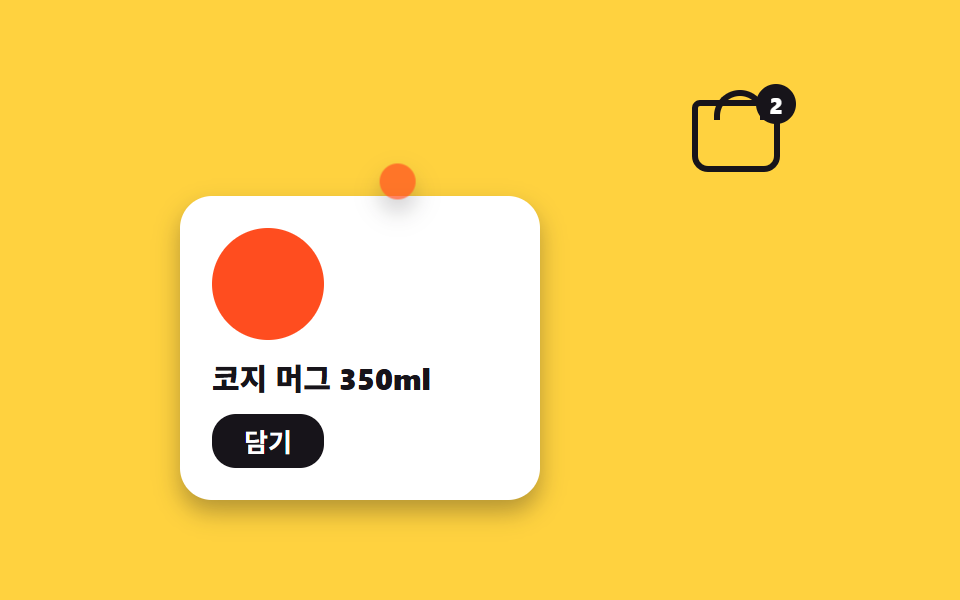
'담기'를 누르면 상품 색 동그라미가 카드에서 구석 장바구니 표시까지 포물선으로 날아가 옅어지며 사라지고, 장바구니 배지가 통통 튀어 개수가 늘었음을 알린다.
쓰임쇼핑몰 장바구니 담기, 위시리스트 저장
translateX translateY 포물선scale 축소배지 바운스
<main class="stage">
  <section class="cart is-demo" aria-label="담기를 누르면 상품 점이 포물선으로 장바구니까지 날아간다">
    <input class="cart__check" type="checkbox" id="cart-add">
    <div class="cart__bag" aria-hidden="true">
      <span class="cart__basket"></span>
      <span class="cart__badge">2</span>
    </div>
    <article class="cart__product">
      <span class="cart__swatch" aria-hidden="true"></span>
      <h2 class="cart__name">코지 머그 350ml</h2>
      <label class="cart__btn" for="cart-add">담기</label>
    </article>
    <span class="cart__fly" aria-hidden="true"><span class="cart__fly-y"></span></span>
  </section>
</main>
@use "../../../../site/static/demo-tokens" as *;
$duration: 700ms; // 점이 카트까지 날아가는 시간
$easing: $ease-out;
$color: $stage-orange; // 상품·점 색
@include stage($stage-yellow);
.cart { position: relative; width: min(300px, 90vw); }
.cart__check { position: absolute; opacity: 0; pointer-events: none; }
// ── 오른쪽 위 장바구니 표시 + 개수 배지
.cart__bag { position: absolute; top: 0; right: 0; }
.cart__basket {
position: relative; // 손잡이 ::before 가 바구니에 붙게
display: block;
width: 44px; height: 36px;
box-sizing: border-box;
border: 3px solid $stage-ink;
border-radius: $r-xs $r-xs $r-sm $r-sm; // 바구니 몸통
}
.cart__basket::before { // 손잡이
content: "";
position: absolute; top: -8px; left: 8px;
width: 20px; height: 12px;
border: 3px solid $stage-ink;
border-bottom: 0;
border-radius: $r-pill $r-pill 0 0;
}
.cart__badge {
position: absolute; top: -8px; right: -8px;
display: grid; place-items: center;
min-width: 20px; height: 20px;
padding: 0 4px;
box-sizing: border-box;
border-radius: $r-pill;
background: $stage-ink;
font-weight: 800;
font-size: 11px;
font-family: inherit;
color: $stage-paper;
transition: transform $dur-quick $ease-pop;
}
#cart-add:checked ~ .cart__bag .cart__badge { transform: scale(1.35); }
// ── 상품 카드
.cart__product {
display: grid;
gap: $sp-2;
justify-items: start;
margin-top: $sp-12;
padding: $sp-4;
width: 180px;
box-sizing: border-box;
border-radius: $r-card;
background: $stage-paper;
box-shadow: $shadow-press;
}
.cart__swatch {
width: 56px; height: 56px;
border-radius: 50%;
background: $color;
}
.cart__name {
margin: 0;
font-weight: 800;
font-size: clamp(13px, 3.8vw, 15px);
font-family: inherit;
color: $stage-ink;
}
.cart__btn {
padding: $sp-1 $sp-4;
border-radius: $r-control;
background: $stage-ink;
font-weight: 700;
font-size: 13px;
font-family: inherit;
color: $stage-paper;
cursor: pointer;
transition: transform $dur-quick $easing;
}
.cart__btn:active { transform: scale(.94); }
// ── 날아가는 점: 겹 요소 2개로 포물선 (x 는 등속, y 는 느렸다 빨라짐)
.cart__fly {
position: absolute; left: 16px; top: 64px; // 상품 스와치 위치
opacity: 0;
transition: opacity $dur-quick linear;
pointer-events: none;
z-index: 2;
}
.cart__fly-y {
display: block;
width: 18px; height: 18px;
border-radius: 50%;
background: $color;
box-shadow: $shadow-press;
}
#cart-add:checked ~ .cart__fly { transform: translateX(273px); opacity: 0; transition: transform $duration $easing, opacity $dur-quick linear $duration; }
#cart-add:checked ~ .cart__fly .cart__fly-y { transform: translateY(-71px); transition: transform $duration $easing; }
// 렌더·갤러리용 자동 루프: 대기 → 비행 → 배지 바운스 → 리셋
.cart.is-demo .cart__fly { animation: fly-x $dur-loop linear infinite; opacity: 1; }
.cart.is-demo .cart__fly-y { animation: fly-y $dur-loop $easing infinite; }
.cart.is-demo .cart__badge { animation: badge-loop $dur-loop $easing infinite; }
@keyframes fly-x {
0%, 30% { transform: translateX(0); opacity: 1; }
68%, 100% { transform: translateX(273px); opacity: 0; }
}
@keyframes fly-y {
0%, 30% { transform: translateY(0); }
68%, 100% { transform: translateY(-71px); }
}
@keyframes badge-loop {
0%, 66% { transform: scale(1); }
74% { transform: scale(1.35); }
84%, 100% { transform: scale(1); }
}
@media (max-width: 360px) { // 320×200 아이프레임 대응 — 카드를 위로 붙인다
.cart__product { margin-top: 8px; padding: 8px; width: 148px; gap: 4px; }
.cart__swatch { width: 36px; height: 36px; }
.cart__name { font-size: 12px; }
.cart__btn { padding: 4px 12px; font-size: 11px; }
.cart__fly { top: 40px; left: 12px; }
}
@media (prefers-reduced-motion: reduce) {
.cart__badge, .cart__btn { transition: none; }
.cart.is-demo .cart__fly,
.cart.is-demo .cart__fly-y,
.cart.is-demo .cart__badge { animation: none; } // 점이 순간 이동, 배지는 고정
.cart.is-demo .cart__fly { opacity: 0; }
#cart-add:checked ~ .cart__fly { transform: translateX(273px); }
}html, body {
margin: 0;
overflow: hidden;
}
.stage {
box-sizing: border-box;
min-height: 100vh;
display: grid;
place-items: center;
margin: 0;
background: #ffd23f;
font-family: -apple-system, "Segoe UI", "Noto Sans KR", sans-serif;
padding: clamp(8px, 4vw, 24px);
}
.cart {
position: relative;
width: min(300px, 90vw);
}
.cart__check {
position: absolute;
opacity: 0;
pointer-events: none;
}
.cart__bag {
position: absolute;
top: 0;
right: 0;
}
.cart__basket {
position: relative;
display: block;
width: 44px;
height: 36px;
box-sizing: border-box;
border: 3px solid #17141a;
border-radius: 4px 4px 8px 8px;
}
.cart__basket::before {
content: "";
position: absolute;
top: -8px;
left: 8px;
width: 20px;
height: 12px;
border: 3px solid #17141a;
border-bottom: 0;
border-radius: 999px 999px 0 0;
}
.cart__badge {
position: absolute;
top: -8px;
right: -8px;
display: grid;
place-items: center;
min-width: 20px;
height: 20px;
padding: 0 4px;
box-sizing: border-box;
border-radius: 999px;
background: #17141a;
font-weight: 800;
font-size: 11px;
font-family: inherit;
color: #ffffff;
transition: transform 220ms cubic-bezier(0.2, 1.4, 0.4, 1);
}
#cart-add:checked ~ .cart__bag .cart__badge {
transform: scale(1.35);
}
.cart__product {
display: grid;
gap: 8px;
justify-items: start;
margin-top: 48px;
padding: 16px;
width: 180px;
box-sizing: border-box;
border-radius: 16px;
background: #ffffff;
box-shadow: 0 6px 12px rgba(23, 20, 26, 0.32);
}
.cart__swatch {
width: 56px;
height: 56px;
border-radius: 50%;
background: #ff4d1f;
}
.cart__name {
margin: 0;
font-weight: 800;
font-size: clamp(13px, 3.8vw, 15px);
font-family: inherit;
color: #17141a;
}
.cart__btn {
padding: 4px 16px;
border-radius: 12px;
background: #17141a;
font-weight: 700;
font-size: 13px;
font-family: inherit;
color: #ffffff;
cursor: pointer;
transition: transform 220ms ease-out;
}
.cart__btn:active {
transform: scale(0.94);
}
.cart__fly {
position: absolute;
left: 16px;
top: 64px;
opacity: 0;
transition: opacity 220ms linear;
pointer-events: none;
z-index: 2;
}
.cart__fly-y {
display: block;
width: 18px;
height: 18px;
border-radius: 50%;
background: #ff4d1f;
box-shadow: 0 6px 12px rgba(23, 20, 26, 0.32);
}
#cart-add:checked ~ .cart__fly {
transform: translateX(273px);
opacity: 0;
transition: transform 700ms ease-out, opacity 220ms linear 700ms;
}
#cart-add:checked ~ .cart__fly .cart__fly-y {
transform: translateY(-71px);
transition: transform 700ms ease-out;
}
.cart.is-demo .cart__fly {
animation: fly-x 2s linear infinite;
opacity: 1;
}
.cart.is-demo .cart__fly-y {
animation: fly-y 2s ease-out infinite;
}
.cart.is-demo .cart__badge {
animation: badge-loop 2s ease-out infinite;
}
@keyframes fly-x {
0%, 30% {
transform: translateX(0);
opacity: 1;
}
68%, 100% {
transform: translateX(273px);
opacity: 0;
}
}
@keyframes fly-y {
0%, 30% {
transform: translateY(0);
}
68%, 100% {
transform: translateY(-71px);
}
}
@keyframes badge-loop {
0%, 66% {
transform: scale(1);
}
74% {
transform: scale(1.35);
}
84%, 100% {
transform: scale(1);
}
}
@media (max-width: 360px) {
.cart__product {
margin-top: 8px;
padding: 8px;
width: 148px;
gap: 4px;
}
.cart__swatch {
width: 36px;
height: 36px;
}
.cart__name {
font-size: 12px;
}
.cart__btn {
padding: 4px 12px;
font-size: 11px;
}
.cart__fly {
top: 40px;
left: 12px;
}
}
@media (prefers-reduced-motion: reduce) {
.cart__badge, .cart__btn {
transition: none;
}
.cart.is-demo .cart__fly,
.cart.is-demo .cart__fly-y,
.cart.is-demo .cart__badge {
animation: none;
}
.cart.is-demo .cart__fly {
opacity: 0;
}
#cart-add:checked ~ .cart__fly {
transform: translateX(273px);
}
}import type { CSSProperties } from "react";
import { useEffect, useState } from "react";
import styles from "./FlyToCart.module.scss";
export type FlyToCartProps = {
name: string;
addLabel: string;
/** 점이 카트까지 날아가는 시간 (기본 700ms) */
duration?: number;
easing?: string;
/** 상품·점 색 */
color?: string;
/** 카트에 이미 담겨 있는 개수 */
count?: number;
};
type Vars = CSSProperties & { "--duration"?: string; "--easing"?: string; "--color"?: string };
export default function FlyToCart({
name,
addLabel,
duration = 700,
easing = "ease-out",
color = "#ff4d1f",
count = 2,
}: FlyToCartProps) {
const [flying, setFlying] = useState(false);
const [added, setAdded] = useState(count);
const vars: Vars = { "--duration": `${duration}ms`, "--easing": easing, "--color": color };
useEffect(() => {
if (!flying) return;
const t = setTimeout(() => { setAdded((n) => n + 1); setFlying(false); }, duration);
return () => clearTimeout(t);
}, [flying, duration]);
return (
<section className={styles.cart} style={vars} aria-label={name}>
<div className={styles.bag} aria-hidden="true">
<span className={styles.basket} />
<span className={`${styles.badge} ${flying ? styles.badgeBump : ""}`}>{added}</span>
</div>
<article className={styles.product}>
<span className={styles.swatch} aria-hidden="true" />
<h2 className={styles.name}>{name}</h2>
<button type="button" className={styles.btn} onClick={() => setFlying(true)}>{addLabel}</button>
</article>
<span className={`${styles.fly} ${flying ? styles.flyGo : ""}`} aria-hidden="true">
<span className={styles.flyY} />
</span>
</section>
);
}06 장바구니로 날아가는 담기 — 측정 누적면적 2.603% · 움직인 프레임 13/23GODRICH 원작 · zip 에 SCSS·React 포함 · CSS 화면 전환 효과 9종 — 화면이 바뀌는 순간 모음
이 데모가 속한 글
 CSS 화면 전환 효과 9종 — 화면이 바뀌는 순간 모음CSS 화면 전환 효과는 페이지를 새로 불러오지 않고 한 화면 안에서 무엇이 다른 모습으로 바뀔 때, 그 바뀜을 부드럽게 눈에 보여 주는 장치입니다. 장이 바뀌듯 화면이 바뀌는 순간마다 붙일 수 있는 아홉 가지를 전 이 글의 데모 전부 보기


