09그림 위 픽셀을 집어 오는 스포이드
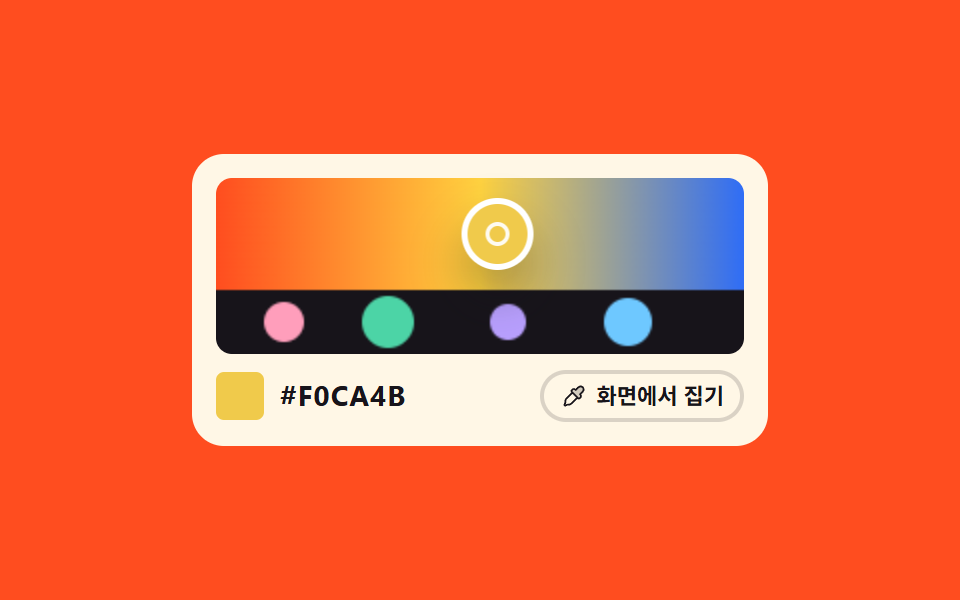
캔버스에 그린 그림 위를 지나가면 그 자리 픽셀을 getImageData 로 읽어 확대경과 값에 그대로 붙입니다.
쓰임사진에서 색 뽑기, 스크린샷 색 맞추기
getImageDataEyeDroppertranslate
<main class="stage">
  <div class="ed is-demo">
    <div class="ed__box" id="edBox" role="slider" tabindex="0"
         aria-label="그림 위에서 색 집기"
         aria-valuemin="0" aria-valuemax="264" aria-valuenow="40"
         aria-valuetext="가로 40픽셀 지점, #FF7528">
      <canvas class="ed__canvas" id="edCanvas" width="264" height="88"
              role="img" aria-label="주황에서 노랑을 지나 파랑으로 가는 색 띠"></canvas>
      <span class="ed__loupe" id="edLoupe" aria-hidden="true"></span>
    </div>
    <div class="ed__foot">
      <span class="ed__chip" aria-hidden="true"></span>
      <span class="ed__hex" aria-hidden="true"></span>
      <button type="button" class="ed__pick" id="edPick">
        <svg viewBox="0 0 256 256" fill="currentColor" aria-hidden="true"><path d="M207.8,87.6l-25.37,25.53,4.89,4.88a16,16,0,0,1,0,22.64l-9,9a8,8,0,0,1-11.32,0l-60.68-60.7a8,8,0,0,1,0-11.32l9-9a16,16,0,0,1,22.63,0l4.88,4.89,25-25.11c10.79-10.79,28.37-11.45,39.45-1A28,28,0,0,1,207.8,87.6Z" opacity="0.2"/><path d="M224,67.3a35.79,35.79,0,0,0-11.26-25.66c-14-13.28-36.72-12.78-50.62,1.13L142.8,62.2a24,24,0,0,0-33.14.77l-9,9a16,16,0,0,0,0,22.64l2,2.06-51,51a39.75,39.75,0,0,0-10.53,38l-8,18.41A13.68,13.68,0,0,0,36,219.3a15.92,15.92,0,0,0,17.71,3.35L71.23,215a39.89,39.89,0,0,0,37.06-10.75l51-51,2.06,2.06a16,16,0,0,0,22.62,0l9-9a24,24,0,0,0,.74-33.18l19.75-19.87A35.75,35.75,0,0,0,224,67.3ZM97,193a24,24,0,0,1-24,6,8,8,0,0,0-5.55.31l-18.1,7.91L57,189.41a8,8,0,0,0,.25-5.75A23.88,23.88,0,0,1,63,159l51-51,33.94,34ZM202.13,82l-25.37,25.52a8,8,0,0,0,0,11.3l4.89,4.89a8,8,0,0,1,0,11.32l-9,9L112,83.26l9-9a8,8,0,0,1,11.31,0l4.89,4.89a8,8,0,0,0,5.65,2.34h0a8,8,0,0,0,5.66-2.36l24.94-25.09c7.81-7.82,20.5-8.18,28.29-.81a20,20,0,0,1,.39,28.7Z"/></svg>
        <span>화면에서 집기</span>
      </button>
    </div>
    <span class="ed__live" aria-live="polite"></span>
  </div>
</main>
@use "../../../../site/static/demo-tokens" as *;
// 스포이드 — 캔버스에 그린 그림에서 한 점의 RGBA 를 getImageData 로 읽어 온다.
// 확대경 색도, 아래 칩도, HEX 글자도 전부 --r --g --b 세 값에서 나온다(계수기가 16진으로 찍는다).
// 미리보기 루프는 확대경의 자리와 세 값을 **같은 퍼센트·같은 linear 이징**으로 돌린다.
// 캔버스 그라디언트는 채널마다 1차 보간이므로, 위치를 선형으로 옮기면 색도 선형으로 따라온다 —
// 그래서 어느 프레임에서도 확대경 색이 그 자리 픽셀과 정확히 같다.
$duration: $dur-loop;
$easing: linear;
$color: $subject-blue;
@include stage($stage-orange);
@property --r { syntax: "<integer>"; inherits: true; initial-value: 255; }
@property --g { syntax: "<integer>"; inherits: true; initial-value: 117; }
@property --b { syntax: "<integer>"; inherits: true; initial-value: 40; }
// 0~15 를 16진 한 자리로 찍는 계수기 눈금. pad 2 "0" 이 0F 처럼 앞자리를 채운다
@counter-style hx {
system: numeric;
symbols: "0" "1" "2" "3" "4" "5" "6" "7" "8" "9" "A" "B" "C" "D" "E" "F";
pad: 2 "0";
}
.ed {
position: relative;
box-sizing: border-box;
width: 288px;
max-width: 100%;
padding: $sp-3;
border-radius: $r-card;
background: $subject-cream;
color: $subject-ink;
font-family: inherit;
}
.ed * { box-sizing: border-box; }
.ed__box { position: relative; }
.ed__box:focus-visible { outline: 3px solid $color; outline-offset: 3px; }
.ed__canvas {
display: block;
width: 264px;
max-width: 100%;
height: 88px;
border-radius: $r-sm;
cursor: crosshair;
touch-action: none;
}
// 확대경은 자기 중심이 집은 점 위에 놓인다 — 좌표 이동 뒤 자기 크기의 절반만큼 되민다
.ed__loupe {
position: absolute;
left: 0;
top: 0;
width: 36px;
height: 36px;
border-radius: 50%;
border: 3px solid #ffffff;
box-shadow: $shadow-raised;
background: rgb(var(--r) var(--g) var(--b));
pointer-events: none;
transform: translate(40px, 28px) translate(-50%, -50%);
}
.ed__loupe::after {
content: "";
position: absolute;
left: 50%;
top: 50%;
width: 8px;
height: 8px;
border-radius: 50%;
border: 2px solid rgba(255, 255, 255, .92);
transform: translate(-50%, -50%);
}
.ed__foot {
display: flex;
align-items: center;
gap: $sp-2;
margin-top: $sp-2;
}
.ed__chip {
width: 24px;
height: 24px;
border-radius: $r-xs;
background: rgb(var(--r) var(--g) var(--b));
}
// HEX 글자 — 값은 --r --g --b 뿐이고 계수기가 표기만 맡는다
.ed__hex {
counter-set: cr calc(var(--r)) cg calc(var(--g)) cb calc(var(--b));
font-size: 14px;
font-weight: 700;
line-height: 1.2;
letter-spacing: .04em;
}
.ed__hex::after { content: "#" counter(cr, hx) counter(cg, hx) counter(cb, hx); }
.ed__pick {
margin-left: auto;
display: flex;
align-items: center;
gap: $sp-1;
padding: $sp-1 $sp-2;
border: 2px solid rgba(23, 20, 26, .16);
border-radius: $r-pill;
background: transparent;
color: inherit;
cursor: pointer;
font-family: inherit;
font-size: 11px;
font-weight: 700;
line-height: 1.2;
}
.ed__pick svg { flex: 0 0 auto; width: 14px; height: 14px; }
.ed__pick:focus-visible { outline: 3px solid $color; outline-offset: 2px; }
// 화면에는 안 보이되 보조기술에는 읽히는 알림 줄
.ed__live {
position: absolute;
width: 1px;
height: 1px;
overflow: hidden;
clip-path: inset(50%);
white-space: nowrap;
}
// ── 미리보기 루프(정적 규칙 먼저, 그 위에 덧씌움) ─────────────────
// 두 애니메이션의 퍼센트와 이징이 같아야 확대경 색과 그 자리 픽셀이 어긋나지 않는다.
// x = 40 은 띠의 주황 쪽, x = 132 는 가운데 정지점(노랑), x = 224 는 파랑 쪽이다
.ed.is-demo .ed__loupe {
animation-name: edMove;
animation-duration: $duration;
animation-timing-function: $easing;
animation-iteration-count: infinite;
}
.ed.is-demo {
animation-name: edColor;
animation-duration: $duration;
animation-timing-function: $easing;
animation-iteration-count: infinite;
}
@keyframes edMove {
0% { transform: translate(40px, 28px) translate(-50%, -50%); }
22.5% { transform: translate(132px, 28px) translate(-50%, -50%); }
45%, 55% { transform: translate(224px, 28px) translate(-50%, -50%); }
72.5% { transform: translate(132px, 28px) translate(-50%, -50%); }
90%, 100% { transform: translate(40px, 28px) translate(-50%, -50%); }
}
@keyframes edColor {
0% { --r: 255; --g: 117; --b: 40; }
22.5% { --r: 254; --g: 209; --b: 63; }
45%, 55% { --r: 109; --g: 139; --b: 191; }
72.5% { --r: 254; --g: 209; --b: 63; }
90%, 100% { --r: 255; --g: 117; --b: 40; }
}
@media (prefers-reduced-motion: reduce) {
.ed.is-demo,
.ed.is-demo .ed__loupe {
animation: none !important;
}
}html, body {
margin: 0;
overflow: hidden;
}
.stage {
box-sizing: border-box;
min-height: 100vh;
display: grid;
place-items: center;
margin: 0;
background: #ff4d1f;
font-family: -apple-system, "Segoe UI", "Noto Sans KR", sans-serif;
padding: clamp(8px, 4vw, 24px);
}
@property --r {
syntax: "<integer>";
inherits: true;
initial-value: 255;
}
@property --g {
syntax: "<integer>";
inherits: true;
initial-value: 117;
}
@property --b {
syntax: "<integer>";
inherits: true;
initial-value: 40;
}
@counter-style hx {
system: numeric;
symbols: "0" "1" "2" "3" "4" "5" "6" "7" "8" "9" "A" "B" "C" "D" "E" "F";
pad: 2 "0";
}
.ed {
position: relative;
box-sizing: border-box;
width: 288px;
max-width: 100%;
padding: 12px;
border-radius: 16px;
background: #fff7e6;
color: #17141a;
font-family: inherit;
}
.ed * {
box-sizing: border-box;
}
.ed__box {
position: relative;
}
.ed__box:focus-visible {
outline: 3px solid #2f6df6;
outline-offset: 3px;
}
.ed__canvas {
display: block;
width: 264px;
max-width: 100%;
height: 88px;
border-radius: 8px;
cursor: crosshair;
touch-action: none;
}
.ed__loupe {
position: absolute;
left: 0;
top: 0;
width: 36px;
height: 36px;
border-radius: 50%;
border: 3px solid #ffffff;
box-shadow: 0 14px 24px rgba(23, 20, 26, 0.32);
background: rgb(var(--r), var(--g), var(--b));
pointer-events: none;
transform: translate(40px, 28px) translate(-50%, -50%);
}
.ed__loupe::after {
content: "";
position: absolute;
left: 50%;
top: 50%;
width: 8px;
height: 8px;
border-radius: 50%;
border: 2px solid rgba(255, 255, 255, 0.92);
transform: translate(-50%, -50%);
}
.ed__foot {
display: flex;
align-items: center;
gap: 8px;
margin-top: 8px;
}
.ed__chip {
width: 24px;
height: 24px;
border-radius: 4px;
background: rgb(var(--r), var(--g), var(--b));
}
.ed__hex {
counter-set: cr calc(var(--r)) cg calc(var(--g)) cb calc(var(--b));
font-size: 14px;
font-weight: 700;
line-height: 1.2;
letter-spacing: 0.04em;
}
.ed__hex::after {
content: "#" counter(cr, hx) counter(cg, hx) counter(cb, hx);
}
.ed__pick {
margin-left: auto;
display: flex;
align-items: center;
gap: 4px;
padding: 4px 8px;
border: 2px solid rgba(23, 20, 26, 0.16);
border-radius: 999px;
background: transparent;
color: inherit;
cursor: pointer;
font-family: inherit;
font-size: 11px;
font-weight: 700;
line-height: 1.2;
}
.ed__pick svg {
flex: 0 0 auto;
width: 14px;
height: 14px;
}
.ed__pick:focus-visible {
outline: 3px solid #2f6df6;
outline-offset: 2px;
}
.ed__live {
position: absolute;
width: 1px;
height: 1px;
overflow: hidden;
clip-path: inset(50%);
white-space: nowrap;
}
.ed.is-demo .ed__loupe {
animation-name: edMove;
animation-duration: 2s;
animation-timing-function: linear;
animation-iteration-count: infinite;
}
.ed.is-demo {
animation-name: edColor;
animation-duration: 2s;
animation-timing-function: linear;
animation-iteration-count: infinite;
}
@keyframes edMove {
0% {
transform: translate(40px, 28px) translate(-50%, -50%);
}
22.5% {
transform: translate(132px, 28px) translate(-50%, -50%);
}
45%, 55% {
transform: translate(224px, 28px) translate(-50%, -50%);
}
72.5% {
transform: translate(132px, 28px) translate(-50%, -50%);
}
90%, 100% {
transform: translate(40px, 28px) translate(-50%, -50%);
}
}
@keyframes edColor {
0% {
--r: 255;
--g: 117;
--b: 40;
}
22.5% {
--r: 254;
--g: 209;
--b: 63;
}
45%, 55% {
--r: 109;
--g: 139;
--b: 191;
}
72.5% {
--r: 254;
--g: 209;
--b: 63;
}
90%, 100% {
--r: 255;
--g: 117;
--b: 40;
}
}
@media (prefers-reduced-motion: reduce) {
.ed.is-demo,
.ed.is-demo .ed__loupe {
animation: none !important;
}
}(function () {
var root = document.querySelector('.ed');
var box = document.getElementById('edBox');
var canvas = document.getElementById('edCanvas');
var loupe = document.getElementById('edLoupe');
var pickBtn = document.getElementById('edPick');
var live = root.querySelector('.ed__live');
var spotFormat = '가로 %x픽셀 지점, %c';
var liveFormat = '집은 색 %c';
var ctx = canvas.getContext('2d');
var sx = 40, sy = 28;
// 위쪽 56px 은 가로 3색 띠 — 채널마다 1차 보간이라 x 좌표와 색이 정확히 대응한다.
// 아래 32px 은 장식이라 미리보기 루프의 스포이드 경로가 지나가지 않는다
function paint() {
var band = ctx.createLinearGradient(0, 0, 264, 0);
band.addColorStop(0, '#ff4d1f');
band.addColorStop(0.5, '#ffd23f');
band.addColorStop(1, '#2f6df6');
ctx.fillStyle = band;
ctx.fillRect(0, 0, 264, 56);
ctx.fillStyle = '#17141a';
ctx.fillRect(0, 56, 264, 32);
var dots = [[34, 72, 10, '#ff9ebb'], [86, 72, 13, '#4cd4a6'], [146, 72, 9, '#b9a0ff'], [206, 72, 12, '#6ec8ff']];
for (var i = 0; i < dots.length; i++) {
ctx.beginPath();
ctx.arc(dots[i][0], dots[i][1], dots[i][2], 0, Math.PI * 2);
ctx.fillStyle = dots[i][3];
ctx.fill();
}
}
function toHex(r, g, b) {
return '#' + [r, g, b].map(function (n) { return n.toString(16).padStart(2, '0'); }).join('').toUpperCase();
}
// 글자는 JS 가 쓰지 않는다 — --r --g --b 세 값만 넘기면 계수기가 HEX 를 찍고 칩·루페가 같은 색이 된다
function setColor(r, g, b) {
root.style.setProperty('--r', r);
root.style.setProperty('--g', g);
root.style.setProperty('--b', b);
loupe.style.transform = 'translate(' + sx + 'px, ' + sy + 'px) translate(-50%, -50%)';
var hex = toHex(r, g, b);
box.setAttribute('aria-valuenow', sx);
box.setAttribute('aria-valuetext', spotFormat.replace('%x', sx).replace('%c', hex));
live.textContent = liveFormat.replace('%c', hex);
}
function sample() {
var px = ctx.getImageData(sx, sy, 1, 1).data; // 그 한 점의 RGBA
setColor(px[0], px[1], px[2]);
}
function moveTo(e) {
var rect = canvas.getBoundingClientRect();
sx = Math.round(Math.min(263, Math.max(0, (e.clientX - rect.left) / rect.width * 264)));
sy = Math.round(Math.min(87, Math.max(0, (e.clientY - rect.top) / rect.height * 88)));
sample();
}
canvas.addEventListener('pointermove', function (e) {
root.classList.remove('is-demo');
moveTo(e);
});
canvas.addEventListener('pointerdown', function (e) {
root.classList.remove('is-demo');
moveTo(e);
});
box.addEventListener('keydown', function (e) {
var step = e.shiftKey ? 16 : 4;
if (e.key === 'ArrowRight') { sx = Math.min(263, sx + step); }
else if (e.key === 'ArrowLeft') { sx = Math.max(0, sx - step); }
else if (e.key === 'ArrowDown') { sy = Math.min(87, sy + step); }
else if (e.key === 'ArrowUp') { sy = Math.max(0, sy - step); }
else { return; }
e.preventDefault();
root.classList.remove('is-demo');
sample();
});
pickBtn.addEventListener('click', function () {
root.classList.remove('is-demo');
// 크롬 계열은 화면 어디서나 집는다. 없는 브라우저는 캔버스 위 집기로 조용히 내려간다
if ('EyeDropper' in window) {
new window.EyeDropper().open().then(function (res) {
var n = parseInt(res.sRGBHex.slice(1), 16);
setColor((n >> 16) & 255, (n >> 8) & 255, n & 255);
}).catch(function () { sample(); });
} else {
sample();
}
});
paint();
sample();
})();// EyedropperCanvas — vanilla 판(run/286/demo/09-color-picker-eyedropper-canvas) 의 React 포트.
// 변수 3개(duration·easing·color)는 props 로 받아 CSS 변수(var(--duration) 등)로 들어온다.
// 상태는 집은 점의 좌표와 RGB 세 값뿐이다. HEX 글자는 JS 가 쓰지 않는다 —
// --r --g --b 만 넘기면 module.scss 의 counter-set 과 @counter-style hx 가 16진으로 찍는다.
import { useEffect, useRef, useState } from "react";
import type { CSSProperties, PointerEvent as ReactPointerEvent } from "react";
import styles from "./EyedropperCanvas.module.scss";
type KeyEvt = { key: string; shiftKey: boolean; preventDefault(): void };
/** 화면 전체에서 집는 브라우저 API. 없는 브라우저에서는 캔버스 위 집기로 내려간다 */
type EyeDropperResult = { sRGBHex: string };
type EyeDropperLike = { open(): Promise<EyeDropperResult> };
type EyeDropperCtor = new () => EyeDropperLike;
export type EyedropperCanvasProps = {
boxLabel?: string;
canvasLabel?: string;
pickLabel?: string;
/** "가로 %x픽셀 지점, %c" 처럼 자리표시자 둘을 가진 틀 */
spotFormat?: string;
/** "집은 색 %c" 처럼 자리표시자 하나를 가진 틀 */
liveFormat?: string;
/** 격자 미리보기용 2초 자동 루프. 사람이 손대면 꺼진다 */
demo?: boolean;
duration?: number;
easing?: string;
color?: string;
};
type Vars = CSSProperties & {
"--duration"?: string;
"--easing"?: string;
"--color"?: string;
"--r"?: number;
"--g"?: number;
"--b"?: number;
};
const WIDTH = 264;
const HEIGHT = 88;
function toHex(r: number, g: number, b: number): string {
return "#" + [r, g, b].map((n) => n.toString(16).padStart(2, "0")).join("").toUpperCase();
}
export default function EyedropperCanvas({
boxLabel = "그림 위에서 색 집기",
canvasLabel = "주황에서 노랑을 지나 파랑으로 가는 색 띠",
pickLabel = "화면에서 집기",
spotFormat = "가로 %x픽셀 지점, %c",
liveFormat = "집은 색 %c",
demo = true,
duration = 2000,
easing = "linear",
color = "#2f6df6",
}: EyedropperCanvasProps) {
const [live, setLive] = useState(demo);
const [spot, setSpot] = useState({ x: 40, y: 28 });
const [rgb, setRgb] = useState({ r: 255, g: 117, b: 40 });
const canvasRef = useRef<HTMLCanvasElement>(null);
// 위쪽 56px 은 가로 3색 띠 — 채널마다 1차 보간이라 x 좌표와 색이 정확히 대응한다.
// 아래 32px 은 장식이라 미리보기 루프의 스포이드 경로가 지나가지 않는다
useEffect(() => {
const node = canvasRef.current;
if (!node) return;
const ctx = node.getContext("2d");
if (!ctx) return;
const band = ctx.createLinearGradient(0, 0, WIDTH, 0);
band.addColorStop(0, "#ff4d1f");
band.addColorStop(0.5, "#ffd23f");
band.addColorStop(1, "#2f6df6");
ctx.fillStyle = band;
ctx.fillRect(0, 0, WIDTH, 56);
ctx.fillStyle = "#17141a";
ctx.fillRect(0, 56, WIDTH, 32);
const dots: [number, number, number, string][] = [
[34, 72, 10, "#ff9ebb"],
[86, 72, 13, "#4cd4a6"],
[146, 72, 9, "#b9a0ff"],
[206, 72, 12, "#6ec8ff"],
];
dots.forEach(([cx, cy, radius, fill]) => {
ctx.beginPath();
ctx.arc(cx, cy, radius, 0, Math.PI * 2);
ctx.fillStyle = fill;
ctx.fill();
});
}, []);
function sample(x: number, y: number) {
const node = canvasRef.current;
if (!node) return;
const ctx = node.getContext("2d");
if (!ctx) return;
const px = ctx.getImageData(x, y, 1, 1).data; // 그 한 점의 RGBA
setSpot({ x, y });
setRgb({ r: px[0], g: px[1], b: px[2] });
}
function moveTo(e: ReactPointerEvent<HTMLCanvasElement>) {
const node = canvasRef.current;
if (!node) return;
const rect = node.getBoundingClientRect();
const x = Math.round(Math.min(WIDTH - 1, Math.max(0, ((e.clientX - rect.left) / rect.width) * WIDTH)));
const y = Math.round(Math.min(HEIGHT - 1, Math.max(0, ((e.clientY - rect.top) / rect.height) * HEIGHT)));
setLive(false);
sample(x, y);
}
function keyBox(e: KeyEvt) {
const step = e.shiftKey ? 16 : 4;
let { x, y } = spot;
if (e.key === "ArrowRight") x = Math.min(WIDTH - 1, x + step);
else if (e.key === "ArrowLeft") x = Math.max(0, x - step);
else if (e.key === "ArrowDown") y = Math.min(HEIGHT - 1, y + step);
else if (e.key === "ArrowUp") y = Math.max(0, y - step);
else return;
e.preventDefault();
setLive(false);
sample(x, y);
}
function pickFromScreen() {
setLive(false);
// 크롬 계열은 화면 어디서나 집는다. 없는 브라우저는 캔버스 위 집기로 조용히 내려간다
const ctor = (window as unknown as { EyeDropper?: EyeDropperCtor }).EyeDropper;
if (ctor) {
new ctor()
.open()
.then((res) => {
const n = parseInt(res.sRGBHex.slice(1), 16);
setRgb({ r: (n >> 16) & 255, g: (n >> 8) & 255, b: n & 255 });
})
.catch(() => sample(spot.x, spot.y));
} else {
sample(spot.x, spot.y);
}
}
const hex = toHex(rgb.r, rgb.g, rgb.b);
const vars: Vars = {
"--duration": `${duration}ms`,
"--easing": easing,
"--color": color,
"--r": rgb.r,
"--g": rgb.g,
"--b": rgb.b,
};
// 확대경은 자기 중심이 집은 점 위에 놓인다 — 좌표 이동 뒤 자기 크기의 절반만큼 되민다
const loupeStyle: CSSProperties = {
transform: `translate(${spot.x}px, ${spot.y}px) translate(-50%, -50%)`,
};
return (
<div className={[styles.ed, live ? styles.isDemo : ""].filter(Boolean).join(" ")} style={vars}>
<div
className={styles.box}
role="slider"
tabIndex={0}
aria-label={boxLabel}
aria-valuemin={0}
aria-valuemax={WIDTH}
aria-valuenow={spot.x}
aria-valuetext={spotFormat.replace("%x", String(spot.x)).replace("%c", hex)}
onKeyDown={keyBox}
>
<canvas
ref={canvasRef}
className={styles.canvas}
width={WIDTH}
height={HEIGHT}
role="img"
aria-label={canvasLabel}
onPointerDown={moveTo}
onPointerMove={moveTo}
/>
<span className={styles.loupe} style={loupeStyle} aria-hidden="true" />
</div>
<div className={styles.foot}>
<span className={styles.chip} aria-hidden="true" />
<span className={styles.hex} aria-hidden="true" />
<button type="button" className={styles.pick} onClick={pickFromScreen}>
<svg viewBox="0 0 256 256" fill="currentColor" aria-hidden="true">
<path
d="M207.8,87.6l-25.37,25.53,4.89,4.88a16,16,0,0,1,0,22.64l-9,9a8,8,0,0,1-11.32,0l-60.68-60.7a8,8,0,0,1,0-11.32l9-9a16,16,0,0,1,22.63,0l4.88,4.89,25-25.11c10.79-10.79,28.37-11.45,39.45-1A28,28,0,0,1,207.8,87.6Z"
opacity="0.2"
/>
<path d="M224,67.3a35.79,35.79,0,0,0-11.26-25.66c-14-13.28-36.72-12.78-50.62,1.13L142.8,62.2a24,24,0,0,0-33.14.77l-9,9a16,16,0,0,0,0,22.64l2,2.06-51,51a39.75,39.75,0,0,0-10.53,38l-8,18.41A13.68,13.68,0,0,0,36,219.3a15.92,15.92,0,0,0,17.71,3.35L71.23,215a39.89,39.89,0,0,0,37.06-10.75l51-51,2.06,2.06a16,16,0,0,0,22.62,0l9-9a24,24,0,0,0,.74-33.18l19.75-19.87A35.75,35.75,0,0,0,224,67.3ZM97,193a24,24,0,0,1-24,6,8,8,0,0,0-5.55.31l-18.1,7.91L57,189.41a8,8,0,0,0,.25-5.75A23.88,23.88,0,0,1,63,159l51-51,33.94,34ZM202.13,82l-25.37,25.52a8,8,0,0,0,0,11.3l4.89,4.89a8,8,0,0,1,0,11.32l-9,9L112,83.26l9-9a8,8,0,0,1,11.31,0l4.89,4.89a8,8,0,0,0,5.65,2.34h0a8,8,0,0,0,5.66-2.36l24.94-25.09c7.81-7.82,20.5-8.18,28.29-.81a20,20,0,0,1,.39,28.7Z" />
</svg>
<span>{pickLabel}</span>
</button>
</div>
<span className={styles.liveRegion} aria-live="polite">
{liveFormat.replace("%c", hex)}
</span>
</div>
);
}09 그림 위 픽셀을 집어 오는 스포이드 — 측정 누적면적 7.856% · 움직인 프레임 20/23GODRICH 원작 · zip 에 SCSS·React 포함 · 컬러 피커 직접 만들기 CSS+JS 9종 — 라이브러리 없이
이 데모가 속한 글
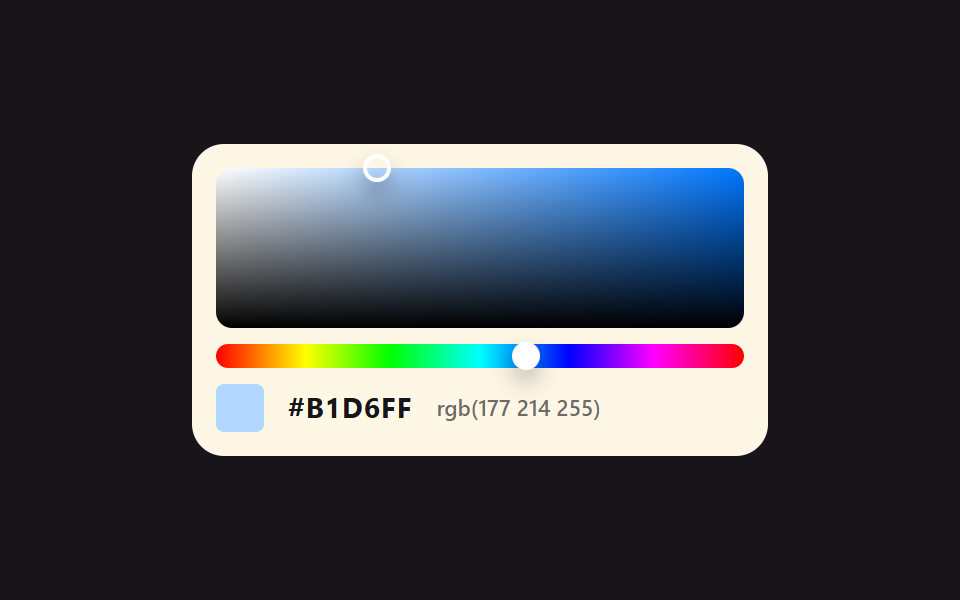 컬러 피커 직접 만들기 CSS+JS 9종 — 라이브러리 없이컬러 피커는 화면에서 색을 골라 HEX 코드로 돌려주는 선택 창입니다. 이 페이지에는 그 부품 아홉 벌이 라이브러리 없이 색 공간 계산까지 직접 짠 코드로 돌아가고 있고, 코드는 통째로 복사해 쓰면 됩니다. 채도·명 이 글의 데모 전부 보기