05지도·위치 임베드 카드
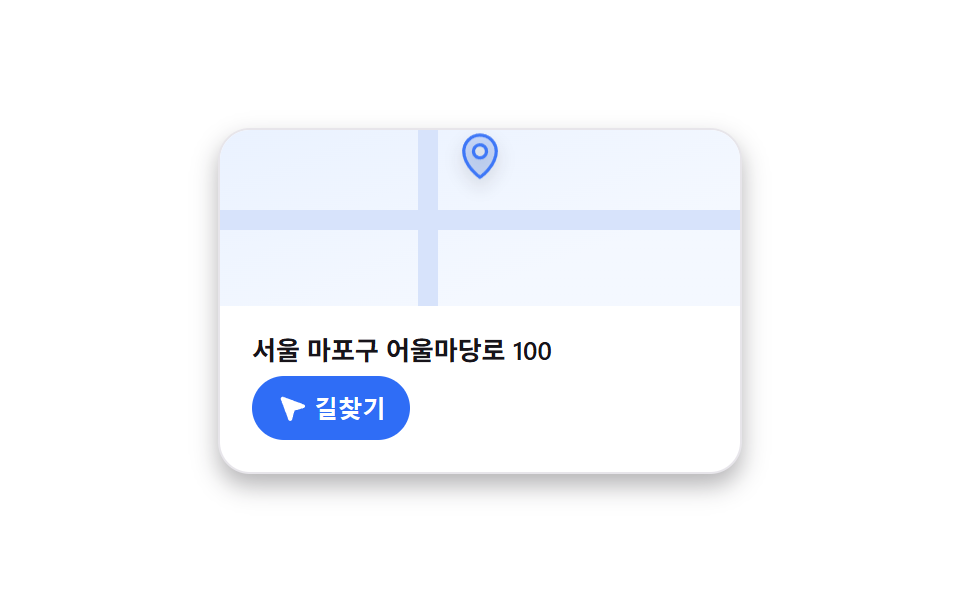
지도 위 핀이 위에서 떨어지듯 나타나 살짝 튕기고 자리를 잡으며, 길찾기 버튼을 누르면 거리·소요시간 패널이 실제로 열린다.
쓰임매장·사무실 소개 페이지의 위치 카드, 문의 페이지의 오시는 길
mcard-drop 바운스aria-expanded panelCSS-only abstract map
<main class="stage is-demo">
  <div class="mcard">
    <div class="mcard__map" aria-hidden="true">
      <span class="mcard__road mcard__road--h"></span>
      <span class="mcard__road mcard__road--v"></span>
      <span class="mcard__pin">
        <svg viewBox="0 0 256 256" width="26" height="26"><g fill="currentColor"><path d="M128 24a80 80 0 0 0-80 80c0 72 80 128 80 128s80-56 80-128a80 80 0 0 0-80-80m0 112a32 32 0 1 1 32-32a32 32 0 0 1-32 32" opacity=".2"/><path d="M128 64a40 40 0 1 0 40 40a40 40 0 0 0-40-40m0 64a24 24 0 1 1 24-24a24 24 0 0 1-24 24m0-112a88.1 88.1 0 0 0-88 88c0 31.4 14.51 64.68 42 96.25a254.2 254.2 0 0 0 41.45 38.3a8 8 0 0 0 9.18 0a254.2 254.2 0 0 0 41.37-38.3c27.45-31.57 42-64.85 42-96.25a88.1 88.1 0 0 0-88-88m0 206c-16.53-13-72-60.75-72-118a72 72 0 0 1 144 0c0 57.23-55.47 105-72 118"/></g></svg>
      </span>
    </div>
    <div class="mcard__body">
      <p class="mcard__addr">서울 마포구 어울마당로 100</p>
      <button class="mcard__nav" type="button" aria-expanded="false">
        <svg viewBox="0 0 256 256" width="15" height="15" aria-hidden="true"><g fill="currentColor"><path d="M234.35 129L152 152l-23 82.35a8 8 0 0 1-15.21.27l-65.28-176a8 8 0 0 1 10.12-10.16l176 65.28a8 8 0 0 1-.28 15.26" opacity=".2"/><path d="M237.33 106.21L61.41 41l-.16-.05a16 16 0 0 0-20.35 20.3a1 1 0 0 0 .05.16l65.26 175.92A15.77 15.77 0 0 0 121.28 248h.3a15.77 15.77 0 0 0 15-11.29l.06-.2l21.84-78l78-21.84l.2-.06a16 16 0 0 0 .62-30.38Z"/></g></svg>
        길찾기
      </button>
      <p class="mcard__info" hidden>2.4km · 도보 32분 · 버스 12분</p>
    </div>
  </div>
</main>
@use "../../../../site/static/demo-tokens" as *;
// ── 변수 3개 ──────────────────────────────────────────
$duration: $dur-loop; // 2s — 핀이 떨어졌다 튀는 한 주기
$easing: $ease-pop;
$color: $subject-blue;
@include stage($stage-paper);
.mcard {
width: 260px;
border-radius: $r-card;
overflow: hidden;
background: #fff;
box-shadow: $shadow-press;
border: 1px solid #e7e5ea;
}
.mcard__map {
position: relative;
height: 88px;
overflow: hidden;
background: linear-gradient(160deg, #eaf2ff, #f4f8ff 70%);
}
.mcard__road { position: absolute; background: #d7e3fb; }
.mcard__road--h { left: 0; right: 0; top: 46%; height: 10px; }
.mcard__road--v { top: 0; bottom: 0; left: 38%; width: 10px; }
.mcard__pin {
position: absolute; left: 50%; top: 38%;
transform: translate(-50%, -100%);
color: $color;
filter: drop-shadow(0 4px 4px rgba(23, 20, 26, .25));
transform-origin: 50% 100%; // 규칙8: 핀 끝점 50% 100% 기준
}
.mcard__body { padding: $sp-3 $sp-4 $sp-4; font-family: -apple-system, "Segoe UI", "Noto Sans KR", sans-serif; }
.mcard__addr { margin: 0 0 $sp-1; font-size: 13px; font-weight: 600; color: $stage-ink; }
.mcard__nav {
display: inline-flex; align-items: center; gap: $sp-1;
border: 0; border-radius: $r-pill;
background: $color; color: #fff;
padding: $sp-2 $sp-3;
font-size: 12px; font-weight: 600;
cursor: pointer;
}
.mcard__nav:hover { filter: brightness(1.08); }
.mcard__info { margin: $sp-2 0 0; font-size: 12px; color: #6b6875; }
// 자동 재생 루프 — 핀이 떨어졌다가 살짝 튄다
.stage.is-demo .mcard__pin { animation: mcard-drop $duration $easing infinite; }
@keyframes mcard-drop {
0% { transform: translate(-50%, -220%); opacity: 0; }
35% { transform: translate(-50%, -100%); opacity: 1; }
46% { transform: translate(-50%, -108%); }
56%, 100% { transform: translate(-50%, -100%); }
}
@media (prefers-reduced-motion: reduce) {
.stage.is-demo .mcard__pin { animation: none; transform: translate(-50%, -100%); opacity: 1; }
}html, body {
margin: 0;
overflow: hidden;
}
.stage {
box-sizing: border-box;
min-height: 100vh;
display: grid;
place-items: center;
margin: 0;
background: #ffffff;
font-family: -apple-system, "Segoe UI", "Noto Sans KR", sans-serif;
padding: clamp(8px, 4vw, 24px);
}
.mcard {
width: 260px;
border-radius: 16px;
overflow: hidden;
background: #fff;
box-shadow: 0 6px 12px rgba(23, 20, 26, 0.32);
border: 1px solid #e7e5ea;
}
.mcard__map {
position: relative;
height: 88px;
overflow: hidden;
background: linear-gradient(160deg, #eaf2ff, #f4f8ff 70%);
}
.mcard__road {
position: absolute;
background: #d7e3fb;
}
.mcard__road--h {
left: 0;
right: 0;
top: 46%;
height: 10px;
}
.mcard__road--v {
top: 0;
bottom: 0;
left: 38%;
width: 10px;
}
.mcard__pin {
position: absolute;
left: 50%;
top: 38%;
transform: translate(-50%, -100%);
color: #2f6df6;
filter: drop-shadow(0 4px 4px rgba(23, 20, 26, 0.25));
transform-origin: 50% 100%;
}
.mcard__body {
padding: 12px 16px 16px;
font-family: -apple-system, "Segoe UI", "Noto Sans KR", sans-serif;
}
.mcard__addr {
margin: 0 0 4px;
font-size: 13px;
font-weight: 600;
color: #17141a;
}
.mcard__nav {
display: inline-flex;
align-items: center;
gap: 4px;
border: 0;
border-radius: 999px;
background: #2f6df6;
color: #fff;
padding: 8px 12px;
font-size: 12px;
font-weight: 600;
cursor: pointer;
}
.mcard__nav:hover {
filter: brightness(1.08);
}
.mcard__info {
margin: 8px 0 0;
font-size: 12px;
color: #6b6875;
}
.stage.is-demo .mcard__pin {
animation: mcard-drop 2s cubic-bezier(0.2, 1.4, 0.4, 1) infinite;
}
@keyframes mcard-drop {
0% {
transform: translate(-50%, -220%);
opacity: 0;
}
35% {
transform: translate(-50%, -100%);
opacity: 1;
}
46% {
transform: translate(-50%, -108%);
}
56%, 100% {
transform: translate(-50%, -100%);
}
}
@media (prefers-reduced-motion: reduce) {
.stage.is-demo .mcard__pin {
animation: none;
transform: translate(-50%, -100%);
opacity: 1;
}
}// 실제 동작: 길찾기 버튼을 누르면 거리·소요시간 패널이 실제로 열리고 닫힌다.
var btn = document.querySelector('.mcard__nav');
var info = document.querySelector('.mcard__info');
btn.addEventListener('click', function () {
var open = btn.getAttribute('aria-expanded') === 'true';
btn.setAttribute('aria-expanded', String(!open));
info.hidden = open;
});import { useState } from "react";
import type { CSSProperties } from "react";
import styles from "./MapLocationCard.module.scss";
export type MapLocationCardProps = {
duration?: number;
easing?: string;
color?: string;
address?: string;
};
export default function MapLocationCard({ duration = 2000, easing = "cubic-bezier(.2,1.4,.4,1)", color = "#2f6df6", address = "서울 마포구 어울마당로 100" }: MapLocationCardProps) {
const vars: CSSProperties = { "--duration": `${duration}ms`, "--easing": easing, "--color": color } as CSSProperties;
const [open, setOpen] = useState(false);
return (
<div className={styles.card} style={vars}>
<div className={styles.map} aria-hidden="true">
<span className={`${styles.road} ${styles.roadH}`} />
<span className={`${styles.road} ${styles.roadV}`} />
<span className={styles.pin}>
<svg viewBox="0 0 256 256" width="26" height="26"><g fill="currentColor">
<path opacity=".2" d="M128 24a80 80 0 0 0-80 80c0 72 80 128 80 128s80-56 80-128a80 80 0 0 0-80-80m0 112a32 32 0 1 1 32-32a32 32 0 0 1-32 32" />
<path d="M128 64a40 40 0 1 0 40 40a40 40 0 0 0-40-40m0 64a24 24 0 1 1 24-24a24 24 0 0 1-24 24m0-112a88.1 88.1 0 0 0-88 88c0 31.4 14.51 64.68 42 96.25a254.2 254.2 0 0 0 41.45 38.3a8 8 0 0 0 9.18 0a254.2 254.2 0 0 0 41.37-38.3c27.45-31.57 42-64.85 42-96.25a88.1 88.1 0 0 0-88-88m0 206c-16.53-13-72-60.75-72-118a72 72 0 0 1 144 0c0 57.23-55.47 105-72 118" />
</g></svg>
</span>
</div>
<div className={styles.body}>
<p className={styles.addr}>{address}</p>
<button className={styles.nav} type="button" aria-expanded={open} onClick={() => setOpen((v) => !v)}>
<svg viewBox="0 0 256 256" width="15" height="15" aria-hidden="true"><g fill="currentColor">
<path opacity=".2" d="M234.35 129L152 152l-23 82.35a8 8 0 0 1-15.21.27l-65.28-176a8 8 0 0 1 10.12-10.16l176 65.28a8 8 0 0 1-.28 15.26" />
<path d="M237.33 106.21L61.41 41l-.16-.05a16 16 0 0 0-20.35 20.3a1 1 0 0 0 .05.16l65.26 175.92A15.77 15.77 0 0 0 121.28 248h.3a15.77 15.77 0 0 0 15-11.29l.06-.2l21.84-78l78-21.84l.2-.06a16 16 0 0 0 .62-30.38Z" />
</g></svg>
길찾기
</button>
{open && <p className={styles.info}>2.4km · 도보 32분 · 버스 12분</p>}
</div>
</div>
);
}05 지도·위치 임베드 카드 — 측정 누적면적 0.37% · 움직인 프레임 13/23GODRICH 원작 · zip 에 SCSS·React 포함 · 블로그 위젯 디자인 9종 — 공유·후기·지도 임베드 카드
이 데모가 속한 글
 블로그 위젯 디자인 9종 — 공유·후기·지도 임베드 카드블로그 위젯 디자인은 본문 옆이나 아래에 따로 붙어 공유·후기·문의 같은 한 가지 일을 대신하는 작은 카드다. 실제 유튜브·X·구글맵 API 를 불러오지 않고도 그 모양만 CSS 로 흉내 내면, 코드를 몰라도 복붙 이 글의 데모 전부 보기