06팟캐스트 플레이어 임베드 위젯
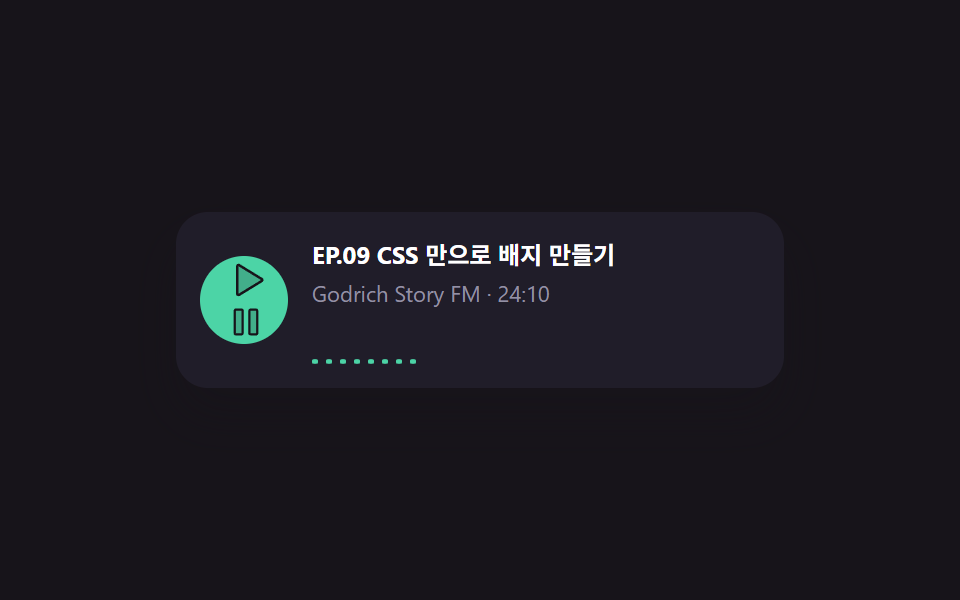
여덟 개 파형 막대가 서로 다른 배수로 어긋나며 오르내려 진짜 재생 중처럼 보이고, 재생 버튼을 누르면 파형이 실제로 멈췄다 다시 움직인다.
쓰임블로그 글 안 팟캐스트 회차 카드, 사이드바의 최신 에피소드 위젯
scaleY bar loopanimation-play-state toggletext-overflow ellipsis title
<main class="stage is-demo">
  <div class="pcast">
    <button class="pcast__play" type="button" aria-label="재생">
      <svg class="ic-play" viewBox="0 0 256 256" width="20" height="20" aria-hidden="true"><g fill="currentColor"><path d="M228.23 134.69L84.15 222.81A8 8 0 0 1 72 216.12V39.88a8 8 0 0 1 12.15-6.69l144.08 88.12a7.82 7.82 0 0 1 0 13.38" opacity=".2"/><path d="M232.4 114.49L88.32 26.35a16 16 0 0 0-16.2-.3A15.86 15.86 0 0 0 64 39.87v176.26A15.94 15.94 0 0 0 80 232a16.07 16.07 0 0 0 8.36-2.35l144.04-88.14a15.81 15.81 0 0 0 0-27ZM80 215.94V40l143.83 88Z"/></g></svg>
      <svg class="ic-pause" viewBox="0 0 256 256" width="18" height="18" aria-hidden="true" hidden><g fill="currentColor"><path d="M208 48v160a8 8 0 0 1-8 8h-40a8 8 0 0 1-8-8V48a8 8 0 0 1 8-8h40a8 8 0 0 1 8 8M96 40H56a8 8 0 0 0-8 8v160a8 8 0 0 0 8 8h40a8 8 0 0 0 8-8V48a8 8 0 0 0-8-8" opacity=".2"/><path d="M200 32h-40a16 16 0 0 0-16 16v160a16 16 0 0 0 16 16h40a16 16 0 0 0 16-16V48a16 16 0 0 0-16-16m0 176h-40V48h40ZM96 32H56a16 16 0 0 0-16 16v160a16 16 0 0 0 16 16h40a16 16 0 0 0 16-16V48a16 16 0 0 0-16-16m0 176H56V48h40Z"/></g></svg>
    </button>
    <div class="pcast__body">
      <p class="pcast__title">EP.09 CSS 만으로 배지 만들기</p>
      <p class="pcast__meta">Godrich Story FM · 24:10</p>
      <div class="pcast__wave" aria-hidden="true">
        <span></span><span></span><span></span><span></span><span></span><span></span><span></span><span></span>
      </div>
    </div>
  </div>
</main>
@use "../../../../site/static/demo-tokens" as *;
// ── 변수 3개 ──────────────────────────────────────────
$duration: $dur-base; // 300ms — 막대 하나가 오르내리는 한 주기(막대마다 다른 배수로 어긋난다)
$easing: $ease-out;
$color: $subject-mint;
@include stage($stage-ink);
.pcast {
display: flex;
align-items: center;
gap: $sp-3;
width: 280px;
padding: $sp-3;
border-radius: $r-card;
background: #201d29;
box-shadow: $shadow-raised;
font-family: -apple-system, "Segoe UI", "Noto Sans KR", sans-serif;
}
.pcast__play {
flex: 0 0 auto;
width: 44px; height: 44px;
border-radius: 50%;
border: 0;
display: grid; place-items: center;
background: $color;
color: $stage-ink;
cursor: pointer;
}
.pcast__play svg { transform: translateX(1px); }
.pcast__play:hover { filter: brightness(1.08); }
.pcast__body { flex: 1 1 auto; min-width: 0; }
.pcast__title { margin: 0; font-size: 12px; font-weight: 700; color: #fff; white-space: nowrap; overflow: hidden; text-overflow: ellipsis; }
.pcast__meta { margin: $sp-1 0 $sp-2; font-size: 11px; color: #9491a3; }
.pcast__wave { display: flex; align-items: flex-end; gap: $sp-1; height: 20px; }
.pcast__wave span {
display: block;
width: 3px;
height: 6px;
border-radius: $r-xs;
background: $color;
transform-origin: bottom; // 규칙8: 파형 막대 아래에서 오름
}
@for $i from 1 through 8 {
.pcast__wave span:nth-child(#{$i}) { animation-delay: $i * 80ms; }
}
// 자동 재생 루프 — 파형이 재생 중인 것처럼 오르내린다
.stage.is-demo .pcast__wave span { animation: pcast-bar #{$duration * 3} $easing infinite alternate; }
.pcast__wave.is-paused span { animation-play-state: paused; height: 6px; }
@keyframes pcast-bar {
from { transform: scaleY(.3); }
to { transform: scaleY(1); }
}
@media (prefers-reduced-motion: reduce) {
.stage.is-demo .pcast__wave span { animation: none; transform: scaleY(.6); }
}html, body {
margin: 0;
overflow: hidden;
}
.stage {
box-sizing: border-box;
min-height: 100vh;
display: grid;
place-items: center;
margin: 0;
background: #17141a;
font-family: -apple-system, "Segoe UI", "Noto Sans KR", sans-serif;
padding: clamp(8px, 4vw, 24px);
}
.pcast {
display: flex;
align-items: center;
gap: 12px;
width: 280px;
padding: 12px;
border-radius: 16px;
background: #201d29;
box-shadow: 0 14px 24px rgba(23, 20, 26, 0.32);
font-family: -apple-system, "Segoe UI", "Noto Sans KR", sans-serif;
}
.pcast__play {
flex: 0 0 auto;
width: 44px;
height: 44px;
border-radius: 50%;
border: 0;
display: grid;
place-items: center;
background: #4cd4a6;
color: #17141a;
cursor: pointer;
}
.pcast__play svg {
transform: translateX(1px);
}
.pcast__play:hover {
filter: brightness(1.08);
}
.pcast__body {
flex: 1 1 auto;
min-width: 0;
}
.pcast__title {
margin: 0;
font-size: 12px;
font-weight: 700;
color: #fff;
white-space: nowrap;
overflow: hidden;
text-overflow: ellipsis;
}
.pcast__meta {
margin: 4px 0 8px;
font-size: 11px;
color: #9491a3;
}
.pcast__wave {
display: flex;
align-items: flex-end;
gap: 4px;
height: 20px;
}
.pcast__wave span {
display: block;
width: 3px;
height: 6px;
border-radius: 4px;
background: #4cd4a6;
transform-origin: bottom;
}
.pcast__wave span:nth-child(1) {
animation-delay: 80ms;
}
.pcast__wave span:nth-child(2) {
animation-delay: 160ms;
}
.pcast__wave span:nth-child(3) {
animation-delay: 240ms;
}
.pcast__wave span:nth-child(4) {
animation-delay: 320ms;
}
.pcast__wave span:nth-child(5) {
animation-delay: 400ms;
}
.pcast__wave span:nth-child(6) {
animation-delay: 480ms;
}
.pcast__wave span:nth-child(7) {
animation-delay: 560ms;
}
.pcast__wave span:nth-child(8) {
animation-delay: 640ms;
}
.stage.is-demo .pcast__wave span {
animation: pcast-bar 900ms ease-out infinite alternate;
}
.pcast__wave.is-paused span {
animation-play-state: paused;
height: 6px;
}
@keyframes pcast-bar {
from {
transform: scaleY(0.3);
}
to {
transform: scaleY(1);
}
}
@media (prefers-reduced-motion: reduce) {
.stage.is-demo .pcast__wave span {
animation: none;
transform: scaleY(0.6);
}
}// 실제 동작: 재생 버튼을 누르면 아이콘이 바뀌고 파형 애니메이션이 실제로 멈췄다 다시 움직인다.
var btn = document.querySelector('.pcast__play');
var wave = document.querySelector('.pcast__wave');
var play = document.querySelector('.ic-play');
var pause = document.querySelector('.ic-pause');
var playing = false;
btn.addEventListener('click', function () {
playing = !playing;
play.hidden = playing;
pause.hidden = !playing;
wave.classList.toggle('is-paused', !playing);
btn.setAttribute('aria-label', playing ? '일시정지' : '재생');
});import { useState } from "react";
import type { CSSProperties } from "react";
import styles from "./PodcastPlayer.module.scss";
export type PodcastPlayerProps = {
duration?: number;
easing?: string;
color?: string;
title?: string;
};
export default function PodcastPlayer({ duration = 300, easing = "ease-out", color = "#4cd4a6", title = "EP.09 CSS 만으로 배지 만들기" }: PodcastPlayerProps) {
const vars: CSSProperties = { "--duration": `${duration}ms`, "--easing": easing, "--color": color } as CSSProperties;
const [playing, setPlaying] = useState(false);
return (
<div className={styles.player} style={vars}>
<button className={styles.play} type="button" aria-label={playing ? "일시정지" : "재생"} onClick={() => setPlaying((v) => !v)}>
{playing ? (
<svg viewBox="0 0 256 256" width="18" height="18" aria-hidden="true"><g fill="currentColor">
<path opacity=".2" d="M208 48v160a8 8 0 0 1-8 8h-40a8 8 0 0 1-8-8V48a8 8 0 0 1 8-8h40a8 8 0 0 1 8 8M96 40H56a8 8 0 0 0-8 8v160a8 8 0 0 0 8 8h40a8 8 0 0 0 8-8V48a8 8 0 0 0-8-8" />
<path d="M200 32h-40a16 16 0 0 0-16 16v160a16 16 0 0 0 16 16h40a16 16 0 0 0 16-16V48a16 16 0 0 0-16-16m0 176h-40V48h40ZM96 32H56a16 16 0 0 0-16 16v160a16 16 0 0 0 16 16h40a16 16 0 0 0 16-16V48a16 16 0 0 0-16-16m0 176H56V48h40Z" />
</g></svg>
) : (
<svg viewBox="0 0 256 256" width="20" height="20" aria-hidden="true"><g fill="currentColor">
<path opacity=".2" d="M228.23 134.69L84.15 222.81A8 8 0 0 1 72 216.12V39.88a8 8 0 0 1 12.15-6.69l144.08 88.12a7.82 7.82 0 0 1 0 13.38" />
<path d="M232.4 114.49L88.32 26.35a16 16 0 0 0-16.2-.3A15.86 15.86 0 0 0 64 39.87v176.26A15.94 15.94 0 0 0 80 232a16.07 16.07 0 0 0 8.36-2.35l144.04-88.14a15.81 15.81 0 0 0 0-27ZM80 215.94V40l143.83 88Z" />
</g></svg>
)}
</button>
<div className={styles.body}>
<p className={styles.title}>{title}</p>
<p className={styles.meta}>Godrich Story FM · 24:10</p>
<div className={`${styles.wave} ${!playing ? styles.paused : ""}`} aria-hidden="true">
{Array.from({ length: 8 }).map((_, i) => (
<span key={i} style={{ animationDelay: `${i * 80}ms` }} />
))}
</div>
</div>
</div>
);
}06 팟캐스트 플레이어 임베드 위젯 — 측정 누적면적 0.083% · 움직인 프레임 22/23GODRICH 원작 · zip 에 SCSS·React 포함 · 블로그 위젯 디자인 9종 — 공유·후기·지도 임베드 카드
이 데모가 속한 글
 블로그 위젯 디자인 9종 — 공유·후기·지도 임베드 카드블로그 위젯 디자인은 본문 옆이나 아래에 따로 붙어 공유·후기·문의 같은 한 가지 일을 대신하는 작은 카드다. 실제 유튜브·X·구글맵 API 를 불러오지 않고도 그 모양만 CSS 로 흉내 내면, 코드를 몰라도 복붙 이 글의 데모 전부 보기