02포커스에 뜨는 형식 예시 툴팁
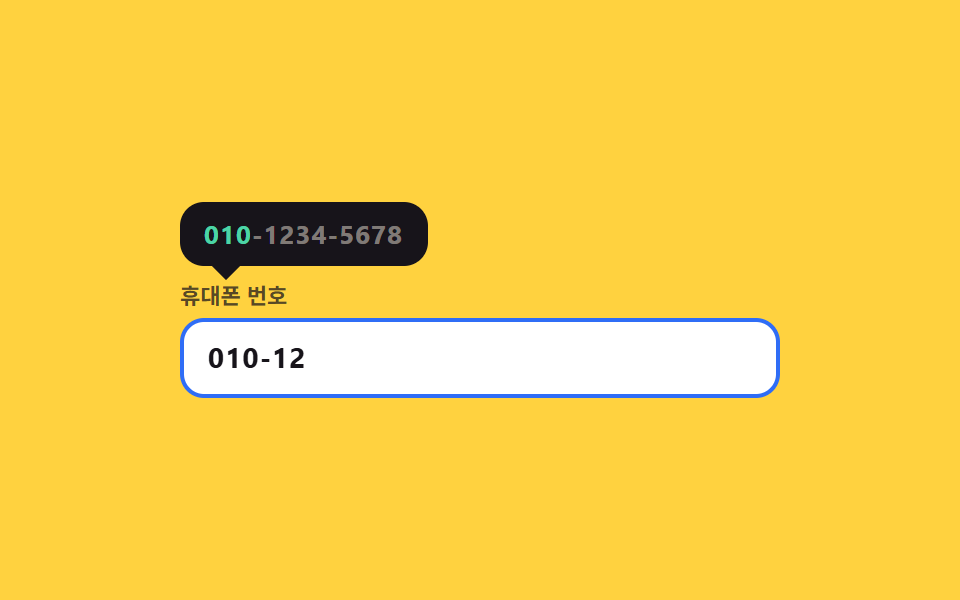
전화번호 칸에 들어가면 예시 010-1234-5678이 적힌 툴팁이 위에서 내려오고, 쳐 넣은 값이 정규식과 한 조각씩 맞을 때마다 예시 글자가 순서대로 확정 색으로 굳어갑니다.
쓰임전화번호·사업자번호처럼 정해진 꼴이 있는 칸
translateYRegExparia-describedby
<main class="stage">
  <div class="ph is-demo" id="ph">
    <div class="ph__tip" id="ph-tip" role="tooltip">
      <span class="ph__seg" data-seg="0">010</span><span class="ph__dash" data-seg="0">-</span><span class="ph__seg" data-seg="1">1234</span><span class="ph__dash" data-seg="1">-</span><span class="ph__seg" data-seg="2">5678</span>
    </div>
    <label class="ph__label" for="ph-input">휴대폰 번호</label>
    <div class="ph__field">
      <input class="ph__input" id="ph-input" type="tel" autocomplete="off" inputmode="numeric" aria-describedby="ph-tip" placeholder="숫자만 눌러 보세요">
      <span class="ph__ghost" aria-hidden="true">010-1234-5678</span>
    </div>
  </div>
</main>
@use "../../../../site/static/demo-tokens" as *;
$duration: $dur-quick;
$easing: $ease-pop;
$color: $subject-blue;
@include stage($stage-yellow);
$ok: #479075; // 노랑 무대에서 읽히는 확정 색 (민트는 노랑 위에서 흐려진다)
.ph {
position: relative;
box-sizing: border-box;
width: min(300px, 86vw);
// 툴팁은 절대배치라 뿌리 높이에 안 잡힌다 — 그만큼 위쪽을 미리 비워 둔다
padding-top: $sp-10;
font-family: -apple-system, "Segoe UI", "Noto Sans KR", sans-serif;
}
// ── 예시 형식 툴팁 (입력칸 위로 내려온다) ────────────────
.ph__tip {
position: absolute;
left: 0; top: 0;
box-sizing: border-box;
padding: $sp-2 $sp-3;
border-radius: $r-control;
background: $stage-ink;
color: rgba(255, 247, 230, .45);
font-size: 13px; line-height: 16px; font-weight: 700;
letter-spacing: .04em;
white-space: nowrap;
transform-origin: left bottom; // 규칙8: 참조 변(좌하) 툴팁 전개
transform: translateY(-6px) scale(.94);
opacity: 0;
transition: transform $duration $easing, opacity $duration $easing;
}
.ph__tip::after {
content: "";
position: absolute;
left: 18px; bottom: -5px;
width: 10px; height: 10px;
background: $stage-ink;
transform: rotate(45deg);
}
.ph.is-open .ph__tip { transform: translateY(0) scale(1); opacity: 1; }
// 조각이 굳는다 — 통과한 조각만 확정 색으로
.ph__seg, .ph__dash { transition: color $duration $easing; }
.ph[data-done="1"] .ph__seg[data-seg="0"],
.ph[data-done="2"] .ph__seg[data-seg="0"],
.ph[data-done="2"] .ph__seg[data-seg="1"],
.ph[data-done="2"] .ph__dash[data-seg="0"],
.ph[data-done="3"] .ph__seg,
.ph[data-done="3"] .ph__dash { color: $subject-mint; }
// ── 입력칸 ───────────────────────────────────────────
.ph__label {
display: block;
margin-bottom: $sp-1;
color: rgba(23, 20, 26, .72);
font-size: 11px; line-height: 14px; font-weight: 700;
}
.ph__field { position: relative; }
.ph__input {
box-sizing: border-box;
width: 100%; height: 40px;
padding: 0 $sp-3;
border: 2px solid rgba(23, 20, 26, .22);
border-radius: $r-control;
background: $stage-paper;
color: $subject-ink;
font-family: inherit;
font-size: 14px; line-height: 36px; font-weight: 700;
letter-spacing: .04em;
}
.ph__input::placeholder { color: rgba(23, 20, 26, .38); font-weight: 600; }
.ph__input:focus-visible { outline: 2px solid $color; outline-offset: 2px; }
.ph.is-open .ph__input { border-color: $color; }
.ph[data-done="3"] .ph__input { border-color: $ok; }
// 자동 루프에서만 보이는 "쳐 넣는 숫자". 진짜 placeholder 와 겹치지 않게 지운다
.ph.is-demo .ph__input::placeholder { color: transparent; }
.ph__ghost {
position: absolute;
left: 14px; top: 0;
color: $subject-ink;
font-size: 14px; line-height: 40px; font-weight: 700;
letter-spacing: .04em;
white-space: nowrap;
pointer-events: none;
opacity: 0;
}
// ── 자동 루프 (2s) ────────────────────────────────────
// 0~17% 앞자리만 친 칸(첫 조각은 이미 굳어 있다) → 20% 툴팁이 내려온다 = 가장 큰 변화 = poster
// 여닫기 구간(17~20%·76~79%)은 24프레임 샘플(4.1667% 간격) **사이**에 둔다 — 걸치면 반투명 유령이 poster 로 뽑힌다.
// → 30~62% 남은 두 조각 타이핑, 조각마다 예시가 굳는다 → 78% 툴팁 접힘 → 84% 앞자리로 되감기.
// 되감기를 툴팁이 닫힌 뒤로 미뤄야 조각 색 복귀가 프레임에 안 잡힌다 (최대 변화 프레임 = 툴팁 등장).
.ph.is-demo .ph__tip {
transition: none;
animation-name: ph-tip;
animation-duration: $dur-loop;
animation-timing-function: $easing;
animation-iteration-count: infinite;
}
.ph.is-demo .ph__ghost {
opacity: 1;
animation-name: ph-type;
animation-duration: $dur-loop;
animation-timing-function: steps(1, end);
animation-iteration-count: infinite;
}
.ph.is-demo .ph__input {
transition: none;
animation-name: ph-input;
animation-duration: $dur-loop;
animation-timing-function: steps(1, end);
animation-iteration-count: infinite;
}
.ph.is-demo .ph__seg,
.ph.is-demo .ph__dash {
transition: none;
animation-duration: $dur-loop;
animation-timing-function: steps(1, end);
animation-iteration-count: infinite;
}
.ph.is-demo .ph__seg[data-seg="0"] { animation-name: ph-s0; }
.ph.is-demo .ph__dash[data-seg="0"] { animation-name: ph-s1; }
.ph.is-demo .ph__seg[data-seg="1"] { animation-name: ph-s1; }
.ph.is-demo .ph__dash[data-seg="1"] { animation-name: ph-s2; }
.ph.is-demo .ph__seg[data-seg="2"] { animation-name: ph-s2; }
@keyframes ph-tip {
0% { opacity: 0; transform: translateY(-6px) scale(.94); }
17% { opacity: 0; transform: translateY(-6px) scale(.94); }
20% { opacity: 1; transform: translateY(0) scale(1); }
76% { opacity: 1; transform: translateY(0) scale(1); }
79% { opacity: 0; transform: translateY(-6px) scale(.94); }
100% { opacity: 0; transform: translateY(-6px) scale(.94); }
}
@keyframes ph-type {
0% { clip-path: inset(0 54% 0 0); }
30% { clip-path: inset(0 38% 0 0); }
46% { clip-path: inset(0 20% 0 0); }
62% { clip-path: inset(0 0 0 0); }
84% { clip-path: inset(0 54% 0 0); }
100% { clip-path: inset(0 54% 0 0); }
}
@keyframes ph-input {
0% { border-color: rgba(23, 20, 26, .22); }
20% { border-color: $color; }
62% { border-color: $ok; }
84% { border-color: rgba(23, 20, 26, .22); }
100% { border-color: rgba(23, 20, 26, .22); }
}
@keyframes ph-s0 {
0% { color: $subject-mint; }
100% { color: $subject-mint; }
}
@keyframes ph-s1 {
0% { color: rgba(255, 247, 230, .45); }
46% { color: $subject-mint; }
84% { color: rgba(255, 247, 230, .45); }
100% { color: rgba(255, 247, 230, .45); }
}
@keyframes ph-s2 {
0% { color: rgba(255, 247, 230, .45); }
62% { color: $subject-mint; }
84% { color: rgba(255, 247, 230, .45); }
100% { color: rgba(255, 247, 230, .45); }
}
// 320×200 — 무대 여백을 뺀 174px 안에 들어가도록 간격을 내린다(올리지 않는다)
@media (max-width: 360px) {
.ph { padding-top: $sp-8; }
.ph__input { height: 36px; line-height: 32px; }
.ph__ghost { line-height: 36px; }
}
@media (prefers-reduced-motion: reduce) {
.ph.is-demo .ph__tip,
.ph.is-demo .ph__ghost,
.ph.is-demo .ph__input,
.ph.is-demo .ph__seg,
.ph.is-demo .ph__dash { animation: none !important; }
.ph.is-demo .ph__tip { opacity: 1; transform: translateY(0) scale(1); }
.ph.is-demo .ph__ghost { opacity: 1; clip-path: inset(0 0 0 0); }
.ph.is-demo .ph__seg,
.ph.is-demo .ph__dash { color: $subject-mint; }
.ph.is-demo .ph__input { border-color: $ok; }
.ph__tip, .ph__seg, .ph__dash, .ph__input { transition: none; }
}html, body {
margin: 0;
overflow: hidden;
}
.stage {
box-sizing: border-box;
min-height: 100vh;
display: grid;
place-items: center;
margin: 0;
background: #ffd23f;
font-family: -apple-system, "Segoe UI", "Noto Sans KR", sans-serif;
padding: clamp(8px, 4vw, 24px);
}
.ph {
position: relative;
box-sizing: border-box;
width: min(300px, 86vw);
padding-top: 40px;
font-family: -apple-system, "Segoe UI", "Noto Sans KR", sans-serif;
}
.ph__tip {
position: absolute;
left: 0;
top: 0;
box-sizing: border-box;
padding: 8px 12px;
border-radius: 12px;
background: #17141a;
color: rgba(255, 247, 230, 0.45);
font-size: 13px;
line-height: 16px;
font-weight: 700;
letter-spacing: 0.04em;
white-space: nowrap;
transform-origin: left bottom;
transform: translateY(-6px) scale(0.94);
opacity: 0;
transition: transform 220ms cubic-bezier(0.2, 1.4, 0.4, 1), opacity 220ms cubic-bezier(0.2, 1.4, 0.4, 1);
}
.ph__tip::after {
content: "";
position: absolute;
left: 18px;
bottom: -5px;
width: 10px;
height: 10px;
background: #17141a;
transform: rotate(45deg);
}
.ph.is-open .ph__tip {
transform: translateY(0) scale(1);
opacity: 1;
}
.ph__seg, .ph__dash {
transition: color 220ms cubic-bezier(0.2, 1.4, 0.4, 1);
}
.ph[data-done="1"] .ph__seg[data-seg="0"],
.ph[data-done="2"] .ph__seg[data-seg="0"],
.ph[data-done="2"] .ph__seg[data-seg="1"],
.ph[data-done="2"] .ph__dash[data-seg="0"],
.ph[data-done="3"] .ph__seg,
.ph[data-done="3"] .ph__dash {
color: #4cd4a6;
}
.ph__label {
display: block;
margin-bottom: 4px;
color: rgba(23, 20, 26, 0.72);
font-size: 11px;
line-height: 14px;
font-weight: 700;
}
.ph__field {
position: relative;
}
.ph__input {
box-sizing: border-box;
width: 100%;
height: 40px;
padding: 0 12px;
border: 2px solid rgba(23, 20, 26, 0.22);
border-radius: 12px;
background: #ffffff;
color: #17141a;
font-family: inherit;
font-size: 14px;
line-height: 36px;
font-weight: 700;
letter-spacing: 0.04em;
}
.ph__input::placeholder {
color: rgba(23, 20, 26, 0.38);
font-weight: 600;
}
.ph__input:focus-visible {
outline: 2px solid #2f6df6;
outline-offset: 2px;
}
.ph.is-open .ph__input {
border-color: #2f6df6;
}
.ph[data-done="3"] .ph__input {
border-color: #479075;
}
.ph.is-demo .ph__input::placeholder {
color: transparent;
}
.ph__ghost {
position: absolute;
left: 14px;
top: 0;
color: #17141a;
font-size: 14px;
line-height: 40px;
font-weight: 700;
letter-spacing: 0.04em;
white-space: nowrap;
pointer-events: none;
opacity: 0;
}
.ph.is-demo .ph__tip {
transition: none;
animation-name: ph-tip;
animation-duration: 2s;
animation-timing-function: cubic-bezier(0.2, 1.4, 0.4, 1);
animation-iteration-count: infinite;
}
.ph.is-demo .ph__ghost {
opacity: 1;
animation-name: ph-type;
animation-duration: 2s;
animation-timing-function: steps(1, end);
animation-iteration-count: infinite;
}
.ph.is-demo .ph__input {
transition: none;
animation-name: ph-input;
animation-duration: 2s;
animation-timing-function: steps(1, end);
animation-iteration-count: infinite;
}
.ph.is-demo .ph__seg,
.ph.is-demo .ph__dash {
transition: none;
animation-duration: 2s;
animation-timing-function: steps(1, end);
animation-iteration-count: infinite;
}
.ph.is-demo .ph__seg[data-seg="0"] {
animation-name: ph-s0;
}
.ph.is-demo .ph__dash[data-seg="0"] {
animation-name: ph-s1;
}
.ph.is-demo .ph__seg[data-seg="1"] {
animation-name: ph-s1;
}
.ph.is-demo .ph__dash[data-seg="1"] {
animation-name: ph-s2;
}
.ph.is-demo .ph__seg[data-seg="2"] {
animation-name: ph-s2;
}
@keyframes ph-tip {
0% {
opacity: 0;
transform: translateY(-6px) scale(0.94);
}
17% {
opacity: 0;
transform: translateY(-6px) scale(0.94);
}
20% {
opacity: 1;
transform: translateY(0) scale(1);
}
76% {
opacity: 1;
transform: translateY(0) scale(1);
}
79% {
opacity: 0;
transform: translateY(-6px) scale(0.94);
}
100% {
opacity: 0;
transform: translateY(-6px) scale(0.94);
}
}
@keyframes ph-type {
0% {
clip-path: inset(0 54% 0 0);
}
30% {
clip-path: inset(0 38% 0 0);
}
46% {
clip-path: inset(0 20% 0 0);
}
62% {
clip-path: inset(0 0 0 0);
}
84% {
clip-path: inset(0 54% 0 0);
}
100% {
clip-path: inset(0 54% 0 0);
}
}
@keyframes ph-input {
0% {
border-color: rgba(23, 20, 26, 0.22);
}
20% {
border-color: #2f6df6;
}
62% {
border-color: #479075;
}
84% {
border-color: rgba(23, 20, 26, 0.22);
}
100% {
border-color: rgba(23, 20, 26, 0.22);
}
}
@keyframes ph-s0 {
0% {
color: #4cd4a6;
}
100% {
color: #4cd4a6;
}
}
@keyframes ph-s1 {
0% {
color: rgba(255, 247, 230, 0.45);
}
46% {
color: #4cd4a6;
}
84% {
color: rgba(255, 247, 230, 0.45);
}
100% {
color: rgba(255, 247, 230, 0.45);
}
}
@keyframes ph-s2 {
0% {
color: rgba(255, 247, 230, 0.45);
}
62% {
color: #4cd4a6;
}
84% {
color: rgba(255, 247, 230, 0.45);
}
100% {
color: rgba(255, 247, 230, 0.45);
}
}
@media (max-width: 360px) {
.ph {
padding-top: 32px;
}
.ph__input {
height: 36px;
line-height: 32px;
}
.ph__ghost {
line-height: 36px;
}
}
@media (prefers-reduced-motion: reduce) {
.ph.is-demo .ph__tip,
.ph.is-demo .ph__ghost,
.ph.is-demo .ph__input,
.ph.is-demo .ph__seg,
.ph.is-demo .ph__dash {
animation: none !important;
}
.ph.is-demo .ph__tip {
opacity: 1;
transform: translateY(0) scale(1);
}
.ph.is-demo .ph__ghost {
opacity: 1;
clip-path: inset(0 0 0 0);
}
.ph.is-demo .ph__seg,
.ph.is-demo .ph__dash {
color: #4cd4a6;
}
.ph.is-demo .ph__input {
border-color: #479075;
}
.ph__tip, .ph__seg, .ph__dash, .ph__input {
transition: none;
}
}// 실제 동작: 포커스에 예시 툴팁이 열리고, 친 값이 세 조각 정규식을 통과할 때마다 그 조각이 확정 색으로 굳는다.
var ph = document.getElementById('ph');
var phInput = document.getElementById('ph-input');
var PH_RULES = [/^010/, /^010-?\d{4}/, /^010-?\d{4}-?\d{4}$/];
function phPaint() {
ph.classList.remove('is-demo'); // 사람이 손대면 자동 루프를 멈춘다
var v = phInput.value;
var done = 0;
PH_RULES.forEach(function (re, i) { if (re.test(v)) done = i + 1; });
ph.setAttribute('data-done', String(done));
phInput.setAttribute('aria-invalid', done === 3 ? 'false' : 'true');
}
phInput.addEventListener('focus', function () { ph.classList.remove('is-demo'); ph.classList.add('is-open'); phPaint(); });
phInput.addEventListener('blur', function () { ph.classList.remove('is-open'); });
phInput.addEventListener('input', function () {
var d = phInput.value.replace(/\D/g, '').slice(0, 11);
phInput.value = d.length > 7 ? d.slice(0, 3) + '-' + d.slice(3, 7) + '-' + d.slice(7)
: d.length > 3 ? d.slice(0, 3) + '-' + d.slice(3) : d;
phPaint();
});import { useState } from "react";
import type { CSSProperties } from "react";
import styles from "./PatternHintTooltip.module.scss";
export type PatternHintTooltipProps = {
label?: string;
placeholder?: string;
/** 자동 재생 루프 (갤러리용). 사람이 손대면 꺼진다 */
demo?: boolean;
duration?: number;
easing?: string;
color?: string;
};
type Vars = CSSProperties & { "--duration"?: string; "--easing"?: string; "--color"?: string };
type ChangeEvt = { target: { value: string } };
const RULES: RegExp[] = [/^010/, /^010-?\d{4}/, /^010-?\d{4}-?\d{4}$/];
function format(raw: string) {
const d = raw.replace(/\D/g, "").slice(0, 11);
if (d.length > 7) return `${d.slice(0, 3)}-${d.slice(3, 7)}-${d.slice(7)}`;
if (d.length > 3) return `${d.slice(0, 3)}-${d.slice(3)}`;
return d;
}
export default function PatternHintTooltip({
label = "Mobile number",
placeholder = "Digits only",
demo = true,
duration = 220,
easing = "cubic-bezier(.2,1.4,.4,1)",
color = "#2f6df6",
}: PatternHintTooltipProps) {
const [value, setValue] = useState("010-12");
const [open, setOpen] = useState(false);
const [live, setLive] = useState(demo);
let done = 0;
RULES.forEach((re, i) => { if (re.test(value)) done = i + 1; });
const vars: Vars = { "--duration": `${duration}ms`, "--easing": easing, "--color": color };
const cls = [styles.root, live ? styles.isDemo : "", open ? styles.isOpen : ""].join(" ");
return (
<div className={cls} style={vars} data-done={done}>
<div className={styles.tip} id="ph-tip" role="tooltip">
<span className={styles.seg} data-seg="0">010</span>
<span className={styles.dash} data-seg="0">-</span>
<span className={styles.seg} data-seg="1">1234</span>
<span className={styles.dash} data-seg="1">-</span>
<span className={styles.seg} data-seg="2">5678</span>
</div>
<label className={styles.label} htmlFor="ph-input">{label}</label>
<div className={styles.field}>
<input
className={styles.input}
id="ph-input"
type="tel"
inputMode="numeric"
autoComplete="off"
placeholder={placeholder}
aria-describedby="ph-tip"
aria-invalid={done !== 3}
value={value}
onChange={(e: ChangeEvt) => { setValue(format(e.target.value)); setLive(false); }}
onFocus={() => { setOpen(true); setLive(false); }}
onBlur={() => setOpen(false)}
/>
<span className={styles.ghost} aria-hidden="true">010-1234-5678</span>
</div>
</div>
);
}02 포커스에 뜨는 형식 예시 툴팁 — 측정 누적면적 3.906% · 움직인 프레임 6/23GODRICH 원작 · zip 에 SCSS·React 포함 · 폼 유효성 검사 UI 9종 — 입력하는 순간 판정하는 오류 안내
이 데모가 속한 글
 폼 유효성 검사 UI 9종 — 입력하는 순간 판정하는 오류 안내폼 유효성 검사는 사람이 친 값이 규칙에 맞는지 그 자리에서 재서 화면으로 알려 주는 장치입니다. 아홉 개 모두 실제 정규식이 돌아가고, 입력하는 순간 판정하는 쪽과 제출을 눌러야 판정하는 쪽이 섞여 있습니다. 이 글의 데모 전부 보기