05점수를 재는 비밀번호 강도 게이지
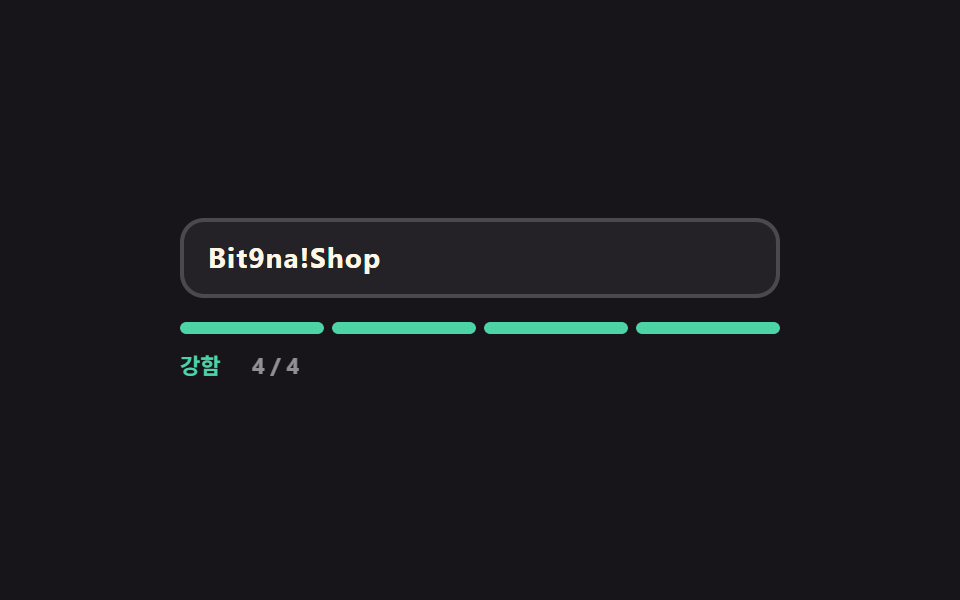
네 칸 게이지가 길이·대소문자·숫자·기호 네 조건을 각각 한 칸씩 채우고, 채워진 칸 수에 따라 약함·보통·강함 표시와 색이 한꺼번에 갈립니다.
쓰임계정 보안 설정·비밀번호 변경 화면
scaleXsteps(1, end)textContent
<main class="stage">
  <div class="pg is-demo" id="pg" data-score="1">
    <div class="pg__field">
      <input class="pg__input" id="pg-input" type="text" autocomplete="off" aria-describedby="pg-out" placeholder="비밀번호를 쳐 보세요">
      <span class="pg__ghost" aria-hidden="true">Bit9na!Shop</span>
    </div>
    <div class="pg__gauge" aria-hidden="true">
      <span class="pg__cell" data-cell="1"></span>
      <span class="pg__cell" data-cell="2"></span>
      <span class="pg__cell" data-cell="3"></span>
      <span class="pg__cell" data-cell="4"></span>
    </div>
    <p class="pg__out" id="pg-out">
      <span class="pg__words" aria-hidden="true">
        <span class="pg__w" data-w="low">약함</span><span class="pg__w" data-w="mid">보통</span><span class="pg__w" data-w="high">강함</span>
      </span>
      <span class="pg__nums" aria-hidden="true">
        <span class="pg__n" data-n="0">0 / 4</span><span class="pg__n" data-n="1">1 / 4</span><span class="pg__n" data-n="2">2 / 4</span><span class="pg__n" data-n="3">3 / 4</span><span class="pg__n" data-n="4">4 / 4</span>
      </span>
      <span class="pg__say" id="pg-say" role="status" aria-live="polite">네 조건 중 하나만 지켰어요</span>
    </p>
  </div>
</main>
@use "../../../../site/static/demo-tokens" as *;
$duration: $dur-quick;
$easing: $ease-spring;
$color: $subject-blue;
@include stage($stage-ink);
$low: $error;
$mid: #cab493;
$high: $subject-mint;
.pg {
box-sizing: border-box;
width: min(300px, 86vw);
font-family: -apple-system, "Segoe UI", "Noto Sans KR", sans-serif;
}
.pg__field { position: relative; }
.pg__input {
box-sizing: border-box;
width: 100%; height: 40px;
padding: 0 $sp-3;
border: 2px solid rgba(255, 255, 255, .18);
border-radius: $r-control;
background: rgba(255, 255, 255, .06);
color: $subject-cream;
font-family: inherit;
font-size: 14px; line-height: 36px; font-weight: 700;
letter-spacing: .04em;
}
.pg__input::placeholder { color: rgba(255, 255, 255, .38); font-weight: 600; letter-spacing: normal; }
.pg__input:focus-visible { outline: 2px solid $color; outline-offset: 2px; }
// 자동 루프에서만 보이는 "쳐 넣는 글자". 진짜 placeholder 와 겹치지 않게 지운다
.pg.is-demo .pg__input::placeholder { color: transparent; }
.pg__ghost {
position: absolute;
left: 14px; top: 0;
color: $subject-cream;
font-size: 14px; line-height: 40px; font-weight: 700;
letter-spacing: .04em;
white-space: nowrap;
pointer-events: none;
opacity: 0;
}
// ── 네 칸 게이지 — 칸마다 왼쪽에서 자란다 ────────────────
.pg__gauge {
// 격자로 넷을 똑같이 나눈다 — flex 균등분배(1 1 0)는 고정 px 지오메트리와 섞이면 어긋난다
display: grid;
grid-template-columns: repeat(4, 1fr);
gap: $sp-1;
margin-top: $sp-3;
}
.pg__cell {
position: relative;
height: 6px;
border-radius: $r-pill;
background: rgba(255, 255, 255, .14);
overflow: hidden;
}
.pg__cell::after {
content: "";
position: absolute;
inset: 0;
border-radius: $r-pill;
background: $low;
transform: scaleX(0);
transform-origin: left center; // 규칙8: 네 칸 게이지 좌측 채움
transition: transform $duration $easing, background $duration $easing;
}
.pg[data-score="1"] .pg__cell[data-cell="1"]::after,
.pg[data-score="2"] .pg__cell[data-cell="1"]::after,
.pg[data-score="2"] .pg__cell[data-cell="2"]::after,
.pg[data-score="3"] .pg__cell[data-cell="1"]::after,
.pg[data-score="3"] .pg__cell[data-cell="2"]::after,
.pg[data-score="3"] .pg__cell[data-cell="3"]::after,
.pg[data-score="4"] .pg__cell::after { transform: scaleX(1); }
.pg[data-score="2"] .pg__cell::after,
.pg[data-score="3"] .pg__cell::after { background: $mid; }
.pg[data-score="4"] .pg__cell::after { background: $high; }
// ── 등급 한 줄 — 낱말과 점수를 겹쳐 두고 하나만 켠다 ──────
.pg__out {
position: relative;
display: flex;
align-items: center;
gap: $sp-2;
height: 16px;
margin: $sp-2 0 0;
font-size: 11px; line-height: 16px; font-weight: 700;
}
.pg__words, .pg__nums {
position: relative;
display: inline-block;
flex: 0 0 auto;
height: 16px;
}
.pg__words { width: 28px; }
.pg__nums { width: 32px; color: rgba(255, 255, 255, .52); }
.pg__w, .pg__n {
position: absolute;
left: 0; top: 0;
white-space: nowrap;
opacity: 0;
}
.pg__w[data-w="low"] { color: $low; }
.pg__w[data-w="mid"] { color: $mid; }
.pg__w[data-w="high"] { color: $high; }
.pg[data-score="0"] .pg__w[data-w="low"],
.pg[data-score="1"] .pg__w[data-w="low"],
.pg[data-score="2"] .pg__w[data-w="mid"],
.pg[data-score="3"] .pg__w[data-w="mid"],
.pg[data-score="4"] .pg__w[data-w="high"] { opacity: 1; }
.pg[data-score="0"] .pg__n[data-n="0"],
.pg[data-score="1"] .pg__n[data-n="1"],
.pg[data-score="2"] .pg__n[data-n="2"],
.pg[data-score="3"] .pg__n[data-n="3"],
.pg[data-score="4"] .pg__n[data-n="4"] { opacity: 1; }
.pg__say {
// 등급은 눈으로 칸이 말해 준다 — 문장은 낭독기 쪽으로만 보낸다
position: absolute;
width: 1px; height: 1px;
overflow: hidden;
clip-path: inset(50%);
}
// ── 자동 루프 (2s) ────────────────────────────────────
// 0~16% 1점 → 24% 2점 → 42% 3점 → 60% 4점(강함이 가장 큰 변화 = poster)
// → 76·80·84% 칸을 하나씩 흩어서 끄고 88% 되감기. 등급 낱말 교체는 steps(1, end) 컷 — 겹치면 두 낱말이 반투명하게 포개진다.
.pg.is-demo .pg__ghost {
opacity: 1;
animation-name: pg-type;
animation-duration: $dur-loop;
animation-timing-function: steps(1, end);
animation-iteration-count: infinite;
}
.pg.is-demo .pg__cell::after {
transition: none;
animation-duration: $dur-loop;
animation-timing-function: $easing;
animation-iteration-count: infinite;
}
.pg.is-demo .pg__cell[data-cell="1"]::after { animation-name: pg-c1; }
.pg.is-demo .pg__cell[data-cell="2"]::after { animation-name: pg-c2; }
.pg.is-demo .pg__cell[data-cell="3"]::after { animation-name: pg-c3; }
.pg.is-demo .pg__cell[data-cell="4"]::after { animation-name: pg-c4; }
.pg.is-demo .pg__w,
.pg.is-demo .pg__n {
animation-duration: $dur-loop;
animation-timing-function: steps(1, end);
animation-iteration-count: infinite;
}
.pg.is-demo .pg__w[data-w="low"] { animation-name: pg-w-low; }
.pg.is-demo .pg__w[data-w="mid"] { animation-name: pg-w-mid; }
.pg.is-demo .pg__w[data-w="high"] { animation-name: pg-w-high; }
.pg.is-demo .pg__n[data-n="1"] { animation-name: pg-n1; }
.pg.is-demo .pg__n[data-n="2"] { animation-name: pg-n2; }
.pg.is-demo .pg__n[data-n="3"] { animation-name: pg-n3; }
.pg.is-demo .pg__n[data-n="4"] { animation-name: pg-n4; }
@keyframes pg-type {
0% { clip-path: inset(0 64% 0 0); }
24% { clip-path: inset(0 46% 0 0); }
42% { clip-path: inset(0 22% 0 0); }
60% { clip-path: inset(0 0 0 0); }
88% { clip-path: inset(0 64% 0 0); }
100% { clip-path: inset(0 64% 0 0); }
}
@keyframes pg-c1 {
0% { transform: scaleX(1); background: $low; }
23.4% { transform: scaleX(1); background: $low; }
24% { transform: scaleX(1); background: $mid; }
59.4% { transform: scaleX(1); background: $mid; }
60% { transform: scaleX(1); background: $high; }
84.4% { transform: scaleX(1); background: $high; }
85% { transform: scaleX(1); background: $low; }
100% { transform: scaleX(1); background: $low; }
}
@keyframes pg-c2 {
0% { transform: scaleX(0); background: $mid; }
20% { transform: scaleX(0); background: $mid; }
24% { transform: scaleX(1); background: $mid; }
30% { transform: scaleX(1); background: $mid; }
59.4% { transform: scaleX(1); background: $mid; }
60% { transform: scaleX(1); background: $high; }
83% { transform: scaleX(1); background: $high; }
84% { transform: scaleX(0); background: $high; }
100% { transform: scaleX(0); background: $high; }
}
@keyframes pg-c3 {
0% { transform: scaleX(0); background: $mid; }
38% { transform: scaleX(0); background: $mid; }
42% { transform: scaleX(1); background: $mid; }
59.4% { transform: scaleX(1); background: $mid; }
60% { transform: scaleX(1); background: $high; }
79% { transform: scaleX(1); background: $high; }
80% { transform: scaleX(0); background: $high; }
100% { transform: scaleX(0); background: $high; }
}
@keyframes pg-c4 {
0% { transform: scaleX(0); background: $high; }
56% { transform: scaleX(0); background: $high; }
60% { transform: scaleX(1); background: $high; }
75% { transform: scaleX(1); background: $high; }
76% { transform: scaleX(0); background: $high; }
100% { transform: scaleX(0); background: $high; }
}
@keyframes pg-w-low { 0% { opacity: 1; } 24% { opacity: 0; } 85% { opacity: 1; } 100% { opacity: 1; } }
@keyframes pg-w-mid { 0% { opacity: 0; } 24% { opacity: 1; } 60% { opacity: 0; } 100% { opacity: 0; } }
@keyframes pg-w-high { 0% { opacity: 0; } 60% { opacity: 1; } 85% { opacity: 0; } 100% { opacity: 0; } }
@keyframes pg-n1 { 0% { opacity: 1; } 24% { opacity: 0; } 85% { opacity: 1; } 100% { opacity: 1; } }
@keyframes pg-n2 { 0% { opacity: 0; } 24% { opacity: 1; } 42% { opacity: 0; } 100% { opacity: 0; } }
@keyframes pg-n3 { 0% { opacity: 0; } 42% { opacity: 1; } 60% { opacity: 0; } 100% { opacity: 0; } }
@keyframes pg-n4 { 0% { opacity: 0; } 60% { opacity: 1; } 85% { opacity: 0; } 100% { opacity: 0; } }
// 320×200 — 무대 여백을 뺀 174px 안에 들어가도록 간격을 내린다(올리지 않는다)
@media (max-width: 360px) {
.pg__input { height: 36px; line-height: 32px; }
.pg__ghost { line-height: 36px; }
.pg__gauge { margin-top: $sp-2; }
}
@media (prefers-reduced-motion: reduce) {
.pg.is-demo .pg__ghost,
.pg.is-demo .pg__cell::after,
.pg.is-demo .pg__w,
.pg.is-demo .pg__n { animation: none !important; }
.pg.is-demo .pg__ghost { opacity: 1; clip-path: inset(0 0 0 0); }
.pg.is-demo .pg__cell::after { transform: scaleX(1); background: $high; }
.pg.is-demo .pg__w[data-w="high"],
.pg.is-demo .pg__n[data-n="4"] { opacity: 1; }
.pg__cell::after { transition: none; }
}html, body {
margin: 0;
overflow: hidden;
}
.stage {
box-sizing: border-box;
min-height: 100vh;
display: grid;
place-items: center;
margin: 0;
background: #17141a;
font-family: -apple-system, "Segoe UI", "Noto Sans KR", sans-serif;
padding: clamp(8px, 4vw, 24px);
}
.pg {
box-sizing: border-box;
width: min(300px, 86vw);
font-family: -apple-system, "Segoe UI", "Noto Sans KR", sans-serif;
}
.pg__field {
position: relative;
}
.pg__input {
box-sizing: border-box;
width: 100%;
height: 40px;
padding: 0 12px;
border: 2px solid rgba(255, 255, 255, 0.18);
border-radius: 12px;
background: rgba(255, 255, 255, 0.06);
color: #fff7e6;
font-family: inherit;
font-size: 14px;
line-height: 36px;
font-weight: 700;
letter-spacing: 0.04em;
}
.pg__input::placeholder {
color: rgba(255, 255, 255, 0.38);
font-weight: 600;
letter-spacing: normal;
}
.pg__input:focus-visible {
outline: 2px solid #2f6df6;
outline-offset: 2px;
}
.pg.is-demo .pg__input::placeholder {
color: transparent;
}
.pg__ghost {
position: absolute;
left: 14px;
top: 0;
color: #fff7e6;
font-size: 14px;
line-height: 40px;
font-weight: 700;
letter-spacing: 0.04em;
white-space: nowrap;
pointer-events: none;
opacity: 0;
}
.pg__gauge {
display: grid;
grid-template-columns: repeat(4, 1fr);
gap: 4px;
margin-top: 12px;
}
.pg__cell {
position: relative;
height: 6px;
border-radius: 999px;
background: rgba(255, 255, 255, 0.14);
overflow: hidden;
}
.pg__cell::after {
content: "";
position: absolute;
inset: 0;
border-radius: 999px;
background: #c2361a;
transform: scaleX(0);
transform-origin: left center;
transition: transform 220ms cubic-bezier(0.2, 0.8, 0.2, 1), background 220ms cubic-bezier(0.2, 0.8, 0.2, 1);
}
.pg[data-score="1"] .pg__cell[data-cell="1"]::after,
.pg[data-score="2"] .pg__cell[data-cell="1"]::after,
.pg[data-score="2"] .pg__cell[data-cell="2"]::after,
.pg[data-score="3"] .pg__cell[data-cell="1"]::after,
.pg[data-score="3"] .pg__cell[data-cell="2"]::after,
.pg[data-score="3"] .pg__cell[data-cell="3"]::after,
.pg[data-score="4"] .pg__cell::after {
transform: scaleX(1);
}
.pg[data-score="2"] .pg__cell::after,
.pg[data-score="3"] .pg__cell::after {
background: #cab493;
}
.pg[data-score="4"] .pg__cell::after {
background: #4cd4a6;
}
.pg__out {
position: relative;
display: flex;
align-items: center;
gap: 8px;
height: 16px;
margin: 8px 0 0;
font-size: 11px;
line-height: 16px;
font-weight: 700;
}
.pg__words, .pg__nums {
position: relative;
display: inline-block;
flex: 0 0 auto;
height: 16px;
}
.pg__words {
width: 28px;
}
.pg__nums {
width: 32px;
color: rgba(255, 255, 255, 0.52);
}
.pg__w, .pg__n {
position: absolute;
left: 0;
top: 0;
white-space: nowrap;
opacity: 0;
}
.pg__w[data-w=low] {
color: #c2361a;
}
.pg__w[data-w=mid] {
color: #cab493;
}
.pg__w[data-w=high] {
color: #4cd4a6;
}
.pg[data-score="0"] .pg__w[data-w=low],
.pg[data-score="1"] .pg__w[data-w=low],
.pg[data-score="2"] .pg__w[data-w=mid],
.pg[data-score="3"] .pg__w[data-w=mid],
.pg[data-score="4"] .pg__w[data-w=high] {
opacity: 1;
}
.pg[data-score="0"] .pg__n[data-n="0"],
.pg[data-score="1"] .pg__n[data-n="1"],
.pg[data-score="2"] .pg__n[data-n="2"],
.pg[data-score="3"] .pg__n[data-n="3"],
.pg[data-score="4"] .pg__n[data-n="4"] {
opacity: 1;
}
.pg__say {
position: absolute;
width: 1px;
height: 1px;
overflow: hidden;
clip-path: inset(50%);
}
.pg.is-demo .pg__ghost {
opacity: 1;
animation-name: pg-type;
animation-duration: 2s;
animation-timing-function: steps(1, end);
animation-iteration-count: infinite;
}
.pg.is-demo .pg__cell::after {
transition: none;
animation-duration: 2s;
animation-timing-function: cubic-bezier(0.2, 0.8, 0.2, 1);
animation-iteration-count: infinite;
}
.pg.is-demo .pg__cell[data-cell="1"]::after {
animation-name: pg-c1;
}
.pg.is-demo .pg__cell[data-cell="2"]::after {
animation-name: pg-c2;
}
.pg.is-demo .pg__cell[data-cell="3"]::after {
animation-name: pg-c3;
}
.pg.is-demo .pg__cell[data-cell="4"]::after {
animation-name: pg-c4;
}
.pg.is-demo .pg__w,
.pg.is-demo .pg__n {
animation-duration: 2s;
animation-timing-function: steps(1, end);
animation-iteration-count: infinite;
}
.pg.is-demo .pg__w[data-w=low] {
animation-name: pg-w-low;
}
.pg.is-demo .pg__w[data-w=mid] {
animation-name: pg-w-mid;
}
.pg.is-demo .pg__w[data-w=high] {
animation-name: pg-w-high;
}
.pg.is-demo .pg__n[data-n="1"] {
animation-name: pg-n1;
}
.pg.is-demo .pg__n[data-n="2"] {
animation-name: pg-n2;
}
.pg.is-demo .pg__n[data-n="3"] {
animation-name: pg-n3;
}
.pg.is-demo .pg__n[data-n="4"] {
animation-name: pg-n4;
}
@keyframes pg-type {
0% {
clip-path: inset(0 64% 0 0);
}
24% {
clip-path: inset(0 46% 0 0);
}
42% {
clip-path: inset(0 22% 0 0);
}
60% {
clip-path: inset(0 0 0 0);
}
88% {
clip-path: inset(0 64% 0 0);
}
100% {
clip-path: inset(0 64% 0 0);
}
}
@keyframes pg-c1 {
0% {
transform: scaleX(1);
background: #c2361a;
}
23.4% {
transform: scaleX(1);
background: #c2361a;
}
24% {
transform: scaleX(1);
background: #cab493;
}
59.4% {
transform: scaleX(1);
background: #cab493;
}
60% {
transform: scaleX(1);
background: #4cd4a6;
}
84.4% {
transform: scaleX(1);
background: #4cd4a6;
}
85% {
transform: scaleX(1);
background: #c2361a;
}
100% {
transform: scaleX(1);
background: #c2361a;
}
}
@keyframes pg-c2 {
0% {
transform: scaleX(0);
background: #cab493;
}
20% {
transform: scaleX(0);
background: #cab493;
}
24% {
transform: scaleX(1);
background: #cab493;
}
30% {
transform: scaleX(1);
background: #cab493;
}
59.4% {
transform: scaleX(1);
background: #cab493;
}
60% {
transform: scaleX(1);
background: #4cd4a6;
}
83% {
transform: scaleX(1);
background: #4cd4a6;
}
84% {
transform: scaleX(0);
background: #4cd4a6;
}
100% {
transform: scaleX(0);
background: #4cd4a6;
}
}
@keyframes pg-c3 {
0% {
transform: scaleX(0);
background: #cab493;
}
38% {
transform: scaleX(0);
background: #cab493;
}
42% {
transform: scaleX(1);
background: #cab493;
}
59.4% {
transform: scaleX(1);
background: #cab493;
}
60% {
transform: scaleX(1);
background: #4cd4a6;
}
79% {
transform: scaleX(1);
background: #4cd4a6;
}
80% {
transform: scaleX(0);
background: #4cd4a6;
}
100% {
transform: scaleX(0);
background: #4cd4a6;
}
}
@keyframes pg-c4 {
0% {
transform: scaleX(0);
background: #4cd4a6;
}
56% {
transform: scaleX(0);
background: #4cd4a6;
}
60% {
transform: scaleX(1);
background: #4cd4a6;
}
75% {
transform: scaleX(1);
background: #4cd4a6;
}
76% {
transform: scaleX(0);
background: #4cd4a6;
}
100% {
transform: scaleX(0);
background: #4cd4a6;
}
}
@keyframes pg-w-low {
0% {
opacity: 1;
}
24% {
opacity: 0;
}
85% {
opacity: 1;
}
100% {
opacity: 1;
}
}
@keyframes pg-w-mid {
0% {
opacity: 0;
}
24% {
opacity: 1;
}
60% {
opacity: 0;
}
100% {
opacity: 0;
}
}
@keyframes pg-w-high {
0% {
opacity: 0;
}
60% {
opacity: 1;
}
85% {
opacity: 0;
}
100% {
opacity: 0;
}
}
@keyframes pg-n1 {
0% {
opacity: 1;
}
24% {
opacity: 0;
}
85% {
opacity: 1;
}
100% {
opacity: 1;
}
}
@keyframes pg-n2 {
0% {
opacity: 0;
}
24% {
opacity: 1;
}
42% {
opacity: 0;
}
100% {
opacity: 0;
}
}
@keyframes pg-n3 {
0% {
opacity: 0;
}
42% {
opacity: 1;
}
60% {
opacity: 0;
}
100% {
opacity: 0;
}
}
@keyframes pg-n4 {
0% {
opacity: 0;
}
60% {
opacity: 1;
}
85% {
opacity: 0;
}
100% {
opacity: 0;
}
}
@media (max-width: 360px) {
.pg__input {
height: 36px;
line-height: 32px;
}
.pg__ghost {
line-height: 36px;
}
.pg__gauge {
margin-top: 8px;
}
}
@media (prefers-reduced-motion: reduce) {
.pg.is-demo .pg__ghost,
.pg.is-demo .pg__cell::after,
.pg.is-demo .pg__w,
.pg.is-demo .pg__n {
animation: none !important;
}
.pg.is-demo .pg__ghost {
opacity: 1;
clip-path: inset(0 0 0 0);
}
.pg.is-demo .pg__cell::after {
transform: scaleX(1);
background: #4cd4a6;
}
.pg.is-demo .pg__w[data-w=high],
.pg.is-demo .pg__n[data-n="4"] {
opacity: 1;
}
.pg__cell::after {
transition: none;
}
}// 실제 동작: 길이·대소문자·숫자·기호 네 조건을 각각 재서 점수를 만들고, 그 점수 하나가 칸 수와 등급을 함께 정한다.
var pg = document.getElementById('pg');
var pgInput = document.getElementById('pg-input');
var pgSay = document.getElementById('pg-say');
var PG_SAY = ['네 조건 중 하나도 못 지켰어요', '네 조건 중 하나만 지켰어요', '두 조건까지 지켰어요',
'하나만 더 채우면 강해져요', '네 조건을 모두 지켰어요'];
function pgScore(v) {
var n = 0;
if (/^.{10,}$/.test(v)) n += 1;
if (/[a-z]/.test(v) && /[A-Z]/.test(v)) n += 1;
if (/\d/.test(v)) n += 1;
if (/[^\w\s]/.test(v)) n += 1;
return n;
}
function pgPaint() {
pg.classList.remove('is-demo'); // 사람이 손대면 자동 루프를 멈춘다
var n = pgScore(pgInput.value);
pg.setAttribute('data-score', String(n));
pgSay.textContent = PG_SAY[n];
}
pgInput.addEventListener('input', pgPaint);
pgInput.addEventListener('focus', pgPaint);import { useState } from "react";
import type { CSSProperties } from "react";
import styles from "./PasswordScoreGauge.module.scss";
export type PasswordScoreGaugeProps = {
placeholder?: string;
words?: [string, string, string];
messages?: string[];
/** 자동 재생 루프 (갤러리용). 사람이 손대면 꺼진다 */
demo?: boolean;
duration?: number;
easing?: string;
color?: string;
};
type Vars = CSSProperties & { "--duration"?: string; "--easing"?: string; "--color"?: string };
type ChangeEvt = { target: { value: string } };
const DEFAULT_MESSAGES = [
"None of the four rules are met",
"Only one of the four rules is met",
"Two rules are met",
"One more rule and it is strong",
"All four rules are met",
];
export function scoreOf(v: string) {
let n = 0;
if (/^.{10,}$/.test(v)) n += 1;
if (/[a-z]/.test(v) && /[A-Z]/.test(v)) n += 1;
if (/\d/.test(v)) n += 1;
if (/[^\w\s]/.test(v)) n += 1;
return n;
}
export default function PasswordScoreGauge({
placeholder = "Type a password",
words = ["Weak", "Fair", "Strong"],
messages = DEFAULT_MESSAGES,
demo = true,
duration = 220,
easing = "cubic-bezier(.2,.8,.2,1)",
color = "#2f6df6",
}: PasswordScoreGaugeProps) {
const [value, setValue] = useState("");
const [live, setLive] = useState(demo);
const score = scoreOf(value);
const vars: Vars = { "--duration": `${duration}ms`, "--easing": easing, "--color": color };
return (
<div className={`${styles.root} ${live ? styles.isDemo : ""}`} style={vars} data-score={score}>
<div className={styles.field}>
<input
className={styles.input}
id="pg-input"
type="text"
autoComplete="off"
placeholder={placeholder}
aria-describedby="pg-out"
value={value}
onChange={(e: ChangeEvt) => { setValue(e.target.value); setLive(false); }}
onFocus={() => setLive(false)}
/>
<span className={styles.ghost} aria-hidden="true">Bit9na!Shop</span>
</div>
<div className={styles.gauge} aria-hidden="true">
{[1, 2, 3, 4].map((n) => (
<span key={n} className={styles.cell} data-cell={n} />
))}
</div>
<p className={styles.out} id="pg-out">
<span className={styles.words} aria-hidden="true">
<span className={styles.w} data-w="low">{words[0]}</span>
<span className={styles.w} data-w="mid">{words[1]}</span>
<span className={styles.w} data-w="high">{words[2]}</span>
</span>
<span className={styles.nums} aria-hidden="true">
{[0, 1, 2, 3, 4].map((n) => (
<span key={n} className={styles.n} data-n={n}>{n} / 4</span>
))}
</span>
<span className={styles.say} role="status" aria-live="polite">{messages[score]}</span>
</p>
</div>
);
}05 점수를 재는 비밀번호 강도 게이지 — 측정 누적면적 1.597% · 움직인 프레임 10/23GODRICH 원작 · zip 에 SCSS·React 포함 · 폼 유효성 검사 UI 9종 — 입력하는 순간 판정하는 오류 안내
이 데모가 속한 글
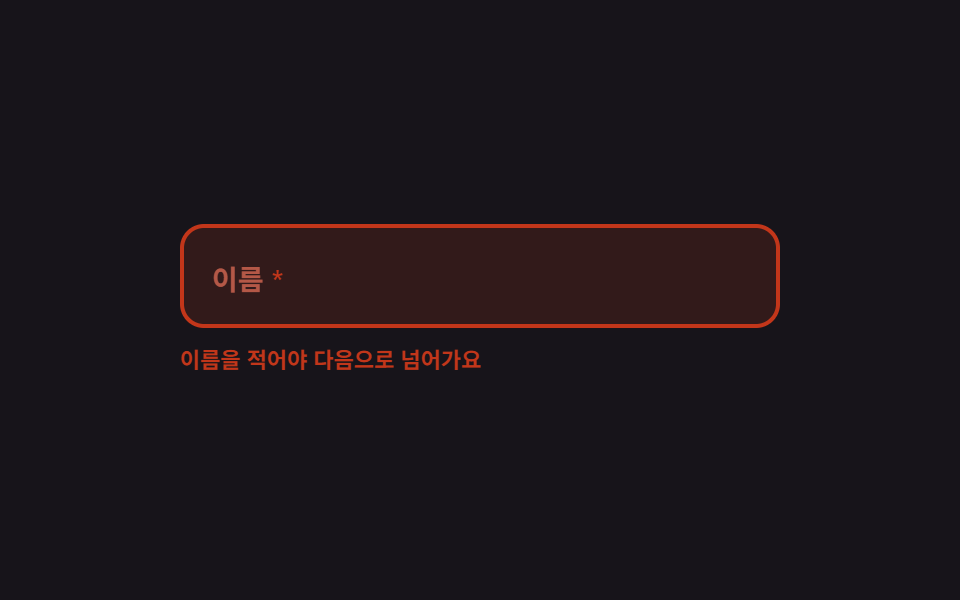 폼 유효성 검사 UI 9종 — 입력하는 순간 판정하는 오류 안내폼 유효성 검사는 사람이 친 값이 규칙에 맞는지 그 자리에서 재서 화면으로 알려 주는 장치입니다. 아홉 개 모두 실제 정규식이 돌아가고, 입력하는 순간 판정하는 쪽과 제출을 눌러야 판정하는 쪽이 섞여 있습니다. 이 글의 데모 전부 보기