07위상 모프 — 계수는 그대로 두고 위상만 돌리면 무늬가 변신하기
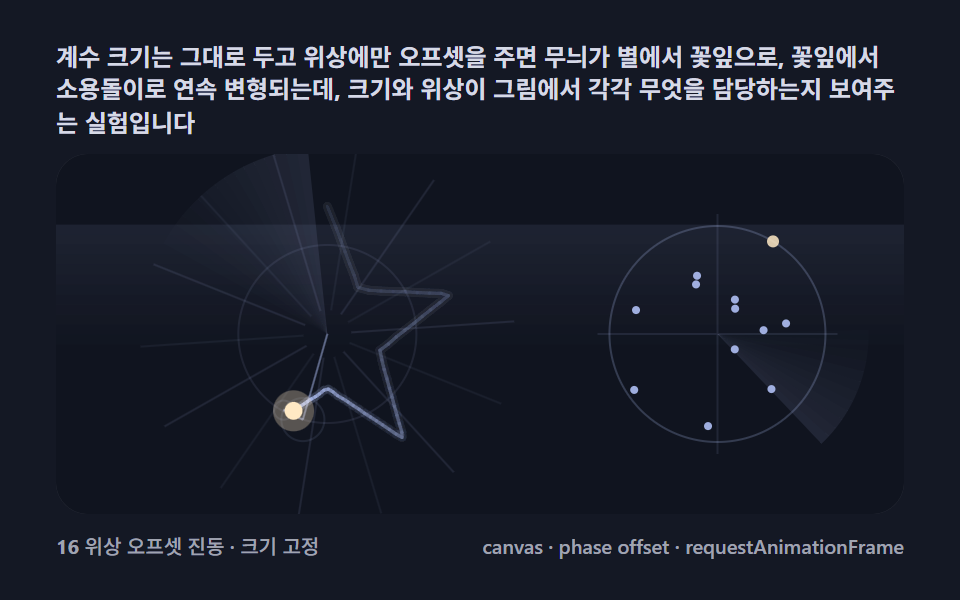
계수 크기는 그대로 두고 위상에만 오프셋을 주면 무늬가 별에서 꽃잎으로, 꽃잎에서 소용돌이로 연속 변형되는데, 크기와 위상이 그림에서 각각 무엇을 담당하는지 보여주는 실험입니다.
쓰임파라미터 놀이터, 생성 아트 배경
CanvasRenderingContext2DglobalAlpharequestAnimationFrame
<main class="stage">
<div class="fe is-demo" id="feRoot">
  <p class="fe__hint">
    <span>계수 크기는 그대로 두고 위상에만 오프셋을 주면 무늬가 별에서 꽃잎으로, 꽃잎에서 소용돌이로 연속 변형되는데, 크기와 위상이 그림에서 각각 무엇을 담당하는지 보여주는 실험입니다</span>
  </p>
  <div class="fe__field" id="feField" role="application" aria-label="위상 모프 실험판" tabindex="0">
    <canvas class="fe__cv" id="feCv"></canvas>
  </div>
  <div class="fe__bar">
    <span class="fe__meta"><b class="fe__val" id="feN">0</b><span id="feUnit"> 위상 오프셋 진동 · 크기 고정</span></span>
    <span class="fe__meta fe__meta--dim">canvas · phase offset · requestAnimationFrame</span>
  </div>
</div>
</main>
@use "../../../../site/static/demo-tokens" as *;
// 기본 에피사이클 체인(01). @keyframes 를 두지 않는다 —
// 움직임은 전부 캔버스 rAF 루프(복소 계수 체인 회전 → 펜 궤적 누적)가 만든다.
// 무대는 심야 관측 팔레트. 파스텔 주색을 --fe-* 로 편 전체(01~09) 공통 규격.
$duration: $dur-loop;
$easing: $ease-spring;
$color: $subject-lilac;
// ── 편 공통 심야 관측 팔레트(BD9~11 원칙: 편마다 다시 정하지 않는다) ──
$fe-stage: #141824; // 심야 그래프지 — 저채도 짙은 남색 (파스텔 검사 무관: 저채도·저명도)
@include stage($fe-stage);
$fe-ink: #10141f; // 필드 바닥 — 무대보다 한 톤 어두운 남흑
$fe-glow: #b7c8ff; // 궤적 주색 — 파스텔 페리윙클(고명도라 vivid 아님)
$fe-hot: #ffe9c4; // 펜 절정 — 파스텔 크림
$fe-text: #d6d9e6; // 라벨 글자 — 밝은 회청
.fe {
// 렌더러가 읽는 색 — JS 는 getComputedStyle 로 --fe-* 를 받아 쓴다
--fe-ink: #{$fe-ink};
--fe-glow: #{$fe-glow};
--fe-hot: #{$fe-hot};
display: flex; flex-direction: column; gap: $sp-2;
width: 100%; max-width: 424px;
}
.fe__hint {
display: flex; align-items: center; gap: $sp-1; margin: 0;
font-weight: 700; font-size: clamp(10px, 2.8vw, 12px); line-height: 1.35;
color: $fe-text;
}
.fe__field {
position: relative; height: 180px;
border-radius: $r-card; overflow: hidden;
background: $fe-ink;
box-shadow: inset 0 0 0 1px rgba($fe-text, .18);
}
.fe__field:focus-visible { outline: 2px solid $fe-glow; outline-offset: 2px; }
.fe__cv { display: block; width: 100%; height: 100%; }
.fe__bar { display: flex; align-items: baseline; justify-content: space-between; gap: $sp-2; }
.fe__meta { font-size: 10px; font-weight: 500; color: rgba($fe-text, .72); }
.fe__meta--dim { font-size: 10px; }
@media (max-width: 340px) {
.fe { gap: $sp-1; }
.fe__field { height: 100px; }
.fe__meta--dim { display: none; }
}
// reduce — rAF 를 돌리지 않고 궤적이 다 쌓인 한 장만 남는다.
@media (prefers-reduced-motion: reduce) {
.fe.is-still .fe__field { cursor: default !important; }
}html, body {
margin: 0;
overflow: hidden;
}
.stage {
box-sizing: border-box;
min-height: 100vh;
display: grid;
place-items: center;
margin: 0;
background: #141824;
font-family: -apple-system, "Segoe UI", "Noto Sans KR", sans-serif;
padding: clamp(8px, 4vw, 24px);
}
.fe {
--fe-ink: #10141f;
--fe-glow: #b7c8ff;
--fe-hot: #ffe9c4;
display: flex;
flex-direction: column;
gap: 8px;
width: 100%;
max-width: 424px;
}
.fe__hint {
display: flex;
align-items: center;
gap: 4px;
margin: 0;
font-weight: 700;
font-size: clamp(10px, 2.8vw, 12px);
line-height: 1.35;
color: #d6d9e6;
}
.fe__field {
position: relative;
height: 180px;
border-radius: 16px;
overflow: hidden;
background: #10141f;
box-shadow: inset 0 0 0 1px rgba(214, 217, 230, 0.18);
}
.fe__field:focus-visible {
outline: 2px solid #b7c8ff;
outline-offset: 2px;
}
.fe__cv {
display: block;
width: 100%;
height: 100%;
}
.fe__bar {
display: flex;
align-items: baseline;
justify-content: space-between;
gap: 8px;
}
.fe__meta {
font-size: 10px;
font-weight: 500;
color: rgba(214, 217, 230, 0.72);
}
.fe__meta--dim {
font-size: 10px;
}
@media (max-width: 340px) {
.fe {
gap: 4px;
}
.fe__field {
height: 100px;
}
.fe__meta--dim {
display: none;
}
}
@media (prefers-reduced-motion: reduce) {
.fe.is-still .fe__field {
cursor: default !important;
}
}// 위상 모프(07). 계수의 두 축 — 크기와 위상 — 중 위상만 흔든다.
// ① 별 경로(03 과 동일)의 DFT 계수에서 진폭은 얼리고 위상에만 오프셋 φ_k = d·k 를 더한다.
// ② d 가 0 이면 원래 별. d 가 커질수록 각 원의 시각이 어긋나 무늬가 별→꽃잎→소용돌이로 변한다.
// ③ d 를 사인파로 왕복시키면 무늬가 계속 모프한다 — 크기는 무늬의 "에너지"·위상은 "배치"임을 보여준다.
// 두 번째 시각화: 같은 계수를 오른쪽 위상 원반(각 계수를 단위원 위의 점으로)에 띄운다 —
// 위상이 흔들리면 점들이 원반을 따라 미끄러진다.
//
// 화면이 사는 장치 — 077 기준:
// · 궤적이 투명 캔버스에 쌓이며 혜성 감쇠 — 모프가 지나간 자리가 잔상으로 겹친다.
// · 방사 스윕·스포크가 매 프레임 재계산된다. 위상 원반 점들이 매 프레임 미끄러진다.
(function () {
// ── 변형 상수 블록 ──
var N = 256;
var SHOW = 16; // 체인에 쓰는 계수 수
var SWEEP = 2.4; // 위상 오프셋 왕복 주기(초)
// ──────────────────
var TAU = Math.PI * 2;
var root = document.getElementById('feRoot');
var field = document.getElementById('feField');
var cv = document.getElementById('feCv');
var nOut = document.getElementById('feN');
var css = getComputedStyle(root);
function tokRGB(name) {
var s = css.getPropertyValue(name).trim();
var hx = s.length === 4
? s.charAt(1) + s.charAt(1) + s.charAt(2) + s.charAt(2) + s.charAt(3) + s.charAt(3)
: s.slice(1);
return [parseInt(hx.slice(0, 2), 16), parseInt(hx.slice(2, 4), 16), parseInt(hx.slice(4, 6), 16)];
}
var C_INK = tokRGB('--fe-ink');
var C_GLOW = tokRGB('--fe-glow');
var C_HOT = tokRGB('--fe-hot');
var reduce = window.matchMedia('(prefers-reduced-motion: reduce)').matches;
var raf = 0, t0 = -1;
var W = 0, H = 0, dpr = 1;
var trailCv, trailCtx;
function starPath(u) {
var seg = u * 10;
var i = Math.floor(seg);
var f = seg - i;
var a1 = i / 10 * TAU - Math.PI / 2;
var a2 = (i + 1) / 10 * TAU - Math.PI / 2;
var r1 = (i % 2 === 0) ? 1 : 0.42;
var r2 = (i % 2 === 0) ? 0.42 : 1;
var x1 = Math.cos(a1) * r1, y1 = Math.sin(a1) * r1;
var x2 = Math.cos(a2) * r2, y2 = Math.sin(a2) * r2;
return { x: x1 + (x2 - x1) * f, y: y1 + (y2 - y1) * f };
}
function dft(path) {
var M = path.length;
var out = [];
for (var k = 0; k < M; k++) {
var freq = (k <= M / 2) ? k : k - M;
var re = 0, im = 0;
for (var n = 0; n < M; n++) {
var a = -TAU * k * n / M;
var c = Math.cos(a), s = Math.sin(a);
re += path[n].x * c - path[n].y * s;
im += path[n].x * s + path[n].y * c;
}
re /= M; im /= M;
out.push({ freq: freq, re: re, im: im, amp: Math.sqrt(re * re + im * im) });
}
out.sort(function (a, b) { return b.amp - a.amp; });
return out;
}
var PATH = [], COEF = [];
function fit() {
var r = field.getBoundingClientRect();
W = Math.round(r.width); H = Math.round(r.height);
dpr = Math.min(2, window.devicePixelRatio || 1);
cv.width = W * dpr; cv.height = H * dpr;
cv.style.width = '100%'; cv.style.height = '100%';
trailCv = document.createElement('canvas');
trailCv.width = W * dpr; trailCv.height = H * dpr;
trailCtx = trailCv.getContext('2d');
trailCtx.scale(dpr, dpr);
if (!PATH.length) {
for (var i = 0; i < N; i++) PATH.push(starPath(i / N));
COEF = dft(PATH);
}
}
function rgba(c, a) { return 'rgba(' + c[0] + ',' + c[1] + ',' + c[2] + ',' + a + ')'; }
// 위상 오프셋 체인 — d 만큼 각 계수 위상을 민다
function chainAt(u, d, show) {
var base = Math.min(W, H) * 0.36;
var cx = W * 0.32, cy = H * 0.5;
var pts = [{ x: cx, y: cy }];
for (var i = 0; i < show && i < COEF.length; i++) {
var c = COEF[i];
var ph = Math.atan2(c.im, c.re) + c.freq * d;
var ang = c.freq * u * TAU + ph;
pts.push({
x: pts[i].x + Math.cos(ang) * c.amp * base,
y: pts[i].y + Math.sin(ang) * c.amp * base
});
}
return pts;
}
function drawGrid(t) {
var ctx = cv.getContext('2d');
// 왼쪽 체인 자리 스윕
var cx = W * 0.32, cy = H * 0.5;
var maxR = Math.min(W, H) * 0.52;
var sweep = t * 0.8;
for (var b = 0; b < 16; b++) {
ctx.fillStyle = rgba(C_GLOW, 0.1 * (1 - b / 16));
ctx.beginPath();
ctx.moveTo(cx, cy);
ctx.arc(cx, cy, maxR, sweep - (b + 1) * 0.06, sweep - b * 0.06);
ctx.closePath();
ctx.fill();
}
var spin = t * 0.3;
for (var i = 0; i < 14; i++) {
var a = spin + (i / 14) * TAU;
ctx.strokeStyle = rgba(C_GLOW, i % 2 === 0 ? 0.1 : 0.06);
ctx.lineWidth = 1;
ctx.beginPath();
ctx.moveTo(cx + Math.cos(a) * 12, cy + Math.sin(a) * 12);
ctx.lineTo(cx + Math.cos(a) * maxR, cy + Math.sin(a) * maxR);
ctx.stroke();
}
// 오른쪽 위상 원반 자리 — 반대 방향 스윕(계단 밴드)
var px = W * 0.78, py = H * 0.5, prad = Math.min(W, H) * 0.42;
var sweep2 = -t * 0.95;
for (var b2 = 0; b2 < 12; b2++) {
ctx.fillStyle = rgba(C_GLOW, 0.1 * (1 - b2 / 12));
ctx.beginPath();
ctx.moveTo(px, py);
ctx.arc(px, py, prad, sweep2 - (b2 + 1) * 0.07, sweep2 - b2 * 0.07);
ctx.closePath();
ctx.fill();
}
// 하단 가로 스캔 밴드 — 전체 폭을 흐른다(계단 12단)
var bandY = H - 18 - ((t * 22) % (H - 24));
for (var sb = 0; sb < 12; sb++) {
ctx.fillStyle = rgba(C_GLOW, 0.08 * (1 - sb / 12));
ctx.fillRect(0, bandY + sb * 5, W, 5);
}
}
function draw(u, pulse, d, gt) {
var ctx = cv.getContext('2d');
ctx.setTransform(dpr, 0, 0, dpr, 0, 0);
ctx.fillStyle = 'rgb(' + C_INK[0] + ',' + C_INK[1] + ',' + C_INK[2] + ')';
ctx.fillRect(0, 0, W, H);
drawGrid(gt);
ctx.drawImage(trailCv, 0, 0, W, H);
var pts = chainAt(u, d, SHOW);
var base = Math.min(W, H) * 0.36;
for (var i = 0; i < pts.length - 1; i++) {
var r = COEF[i].amp * base;
if (r > 2) {
ctx.strokeStyle = rgba(C_GLOW, 0.09 + 0.01 * i);
ctx.lineWidth = 1;
ctx.beginPath();
ctx.arc(pts[i].x, pts[i].y, r, 0, TAU);
ctx.stroke();
}
if (i < 4 || r > 3) {
ctx.strokeStyle = rgba(C_GLOW, 0.46);
ctx.beginPath();
ctx.moveTo(pts[i].x, pts[i].y);
ctx.lineTo(pts[i + 1].x, pts[i + 1].y);
ctx.stroke();
}
}
var pen = pts[pts.length - 1];
var pr = 2.4 + pulse * 2.2;
ctx.fillStyle = rgba(C_HOT, 0.3);
ctx.beginPath();
ctx.arc(pen.x, pen.y, pr * 2.3, 0, TAU);
ctx.fill();
ctx.fillStyle = rgba(C_HOT, 1);
ctx.beginPath();
ctx.arc(pen.x, pen.y, pr, 0, TAU);
ctx.fill();
// ── 오른쪽 위상 원반 — 상위 계수의 위상을 단위원 위 점으로 ──
var px = W * 0.78, py = H * 0.5, prad = Math.min(W, H) * 0.3;
ctx.strokeStyle = rgba(C_GLOW, 0.22);
ctx.lineWidth = 1;
ctx.beginPath();
ctx.arc(px, py, prad, 0, TAU);
ctx.stroke();
ctx.strokeStyle = rgba(C_GLOW, 0.1);
ctx.beginPath();
ctx.moveTo(px - prad - 6, py); ctx.lineTo(px + prad + 6, py);
ctx.moveTo(px, py - prad - 6); ctx.lineTo(px, py + prad + 6);
ctx.stroke();
// 계수별 위상 각도(오프셋 적용 뒤)에 점 — 주파수 비례 반지름
for (var k = 0; k < 12 && k < COEF.length; k++) {
var c = COEF[k];
var ph2 = Math.atan2(c.im, c.re) + c.freq * d;
var rr = prad * (1 - k / 14);
var qx = px + Math.cos(ph2) * rr, qy = py + Math.sin(ph2) * rr;
ctx.fillStyle = rgba(k === 0 ? C_HOT : C_GLOW, 0.85);
ctx.beginPath();
ctx.arc(qx, qy, k === 0 ? 3 : 2, 0, TAU);
ctx.fill();
}
return pen;
}
var prevPen = null;
function stampTrail(pen) {
if (!prevPen) { prevPen = pen; return; }
// globalAlpha 로 코어/확산 두께를 한 경로에서 두 번 칠한다(계수 개수가 흔들려도 잔상이 곱해진다)
trailCtx.globalAlpha = 0.8;
trailCtx.strokeStyle = rgba(C_GLOW, 1);
trailCtx.lineWidth = 1.7;
trailCtx.lineCap = 'round';
trailCtx.beginPath();
trailCtx.moveTo(prevPen.x, prevPen.y);
trailCtx.lineTo(pen.x, pen.y);
trailCtx.stroke();
trailCtx.globalAlpha = 0.12;
trailCtx.lineWidth = 4.4;
trailCtx.stroke();
trailCtx.globalAlpha = 1;
prevPen = pen;
}
function decayTrail() {
trailCtx.setTransform(1, 0, 0, 1, 0, 0);
trailCtx.globalCompositeOperation = 'destination-out';
trailCtx.fillStyle = 'rgba(0,0,0,0.03)';
trailCtx.fillRect(0, 0, W * dpr, H * dpr);
trailCtx.globalCompositeOperation = 'source-over';
trailCtx.setTransform(dpr, 0, 0, dpr, 0, 0);
}
function frame(now) {
if (t0 < 0) t0 = now;
var lt = (now - t0) / 1000;
var u = (lt * 0.5) % 1;
var d = Math.sin(lt * TAU / SWEEP) * 0.8;
var pulse = 0.5 + 0.5 * Math.sin(lt * 8.0);
decayTrail();
var pen = draw(u, pulse, d, lt * TAU);
stampTrail(pen);
if (nOut) nOut.textContent = String(SHOW);
raf = requestAnimationFrame(frame);
}
function stillFrame() {
var prev = chainAt(0, 0, SHOW)[SHOW];
for (var i = 1; i <= 200; i++) {
var pen = chainAt(i / 200, 0, SHOW)[SHOW];
stampTrail(pen);
prev = pen;
}
draw(0.5, 0.5, 0, 2.1);
}
window.addEventListener('resize', function () {
fit(); prevPen = null;
if (reduce) stillFrame();
});
fit();
if (reduce) {
stillFrame();
root.classList.add('is-still');
} else {
raf = requestAnimationFrame(frame);
}
})();// FourierPhaseCircleMorph — vanilla 판(run/321/demo/07-fourier-phase-circle-morph/index.html) 의 React 포트.
// 위상 모프 — 계수의 두 축(크기·위상) 중 위상만 흔든다.
// ① 별 경로(03 과 동일)의 DFT 계수에서 진폭은 얼리고 위상에만 오프셋 φ_k = d·k 를 더한다.
// ② d 가 0 이면 원래 별. d 가 커질수록 각 원의 시각이 어긋나 무늬가 별→꽃잎→소용돌이로 변한다.
// ③ d 를 사인파로 왕복시키면 무늬가 계속 모프한다 — 크기는 무늬의 "에너지"·위상은 "배치"임을 보여준다.
// 두 번째 시각화: 같은 계수를 오른쪽 위상 원반(각 계수를 단위원 위의 점으로)에 띄운다 —
// 위상이 흔들리면 점들이 원반을 따라 미끄러진다.
// 화면이 사는 장치 — 궤적이 투명 캔버스에 쌓이며 혜성 감쇠, 방사 스윕·스포크가 매 프레임 재계산.
import { useEffect, useRef, useState } from "react";
import type { CSSProperties } from "react";
import styles from "./FourierPhaseCircleMorph.module.scss";
export type FourierPhaseCircleMorphProps = {
duration?: string;
easing?: string;
color?: string;
n?: number; // 경로 샘플 점 수
show?: number; // 체인에 쓰는 계수 수
sweep?: number; // 위상 오프셋 왕복 주기(초)
};
type Vars = CSSProperties & { "--duration"?: string; "--easing"?: string; "--color"?: string };
type Box<T> = { current: T };
type RGB = [number, number, number];
type Pt = { x: number; y: number };
type Coef = { freq: number; re: number; im: number; amp: number };
const FIELD_LABEL = "위상 모프 실험판";
const TAU = Math.PI * 2;
function starPath(u: number): Pt {
const seg = u * 10;
const i = Math.floor(seg);
const f = seg - i;
const a1 = i / 10 * TAU - Math.PI / 2;
const a2 = (i + 1) / 10 * TAU - Math.PI / 2;
const r1 = (i % 2 === 0) ? 1 : 0.42;
const r2 = (i % 2 === 0) ? 0.42 : 1;
const x1 = Math.cos(a1) * r1, y1 = Math.sin(a1) * r1;
const x2 = Math.cos(a2) * r2, y2 = Math.sin(a2) * r2;
return { x: x1 + (x2 - x1) * f, y: y1 + (y2 - y1) * f };
}
function dft(path: Pt[]): Coef[] {
const M = path.length;
const out: Coef[] = [];
for (let k = 0; k < M; k++) {
const freq = (k <= M / 2) ? k : k - M;
let re = 0, im = 0;
for (let n = 0; n < M; n++) {
const a = -TAU * k * n / M;
const c = Math.cos(a), s = Math.sin(a);
re += path[n].x * c - path[n].y * s;
im += path[n].x * s + path[n].y * c;
}
re /= M; im /= M;
out.push({ freq: freq, re: re, im: im, amp: Math.sqrt(re * re + im * im) });
}
out.sort((a, b) => b.amp - a.amp);
return out;
}
export default function FourierPhaseCircleMorph({
duration = "2s",
easing = "cubic-bezier(.2, .8, .2, 1)",
color = "#b7c8ff",
n = 256,
show = 16,
sweep = 2.4
}: FourierPhaseCircleMorphProps) {
const rootRef = useRef<HTMLDivElement | null>(null);
const fieldRef = useRef<HTMLDivElement | null>(null);
const cvRef = useRef<HTMLCanvasElement | null>(null);
const ctxRef = useRef<CanvasRenderingContext2D | null>(null);
const colRef = useRef<{ ink: RGB; glow: RGB; hot: RGB } | null>(null);
const trailCvRef = useRef<HTMLCanvasElement | null>(null);
const trailCtxRef = useRef<CanvasRenderingContext2D | null>(null);
const nRef = useRef(n) as Box<number>;
const showRef = useRef(show) as Box<number>;
const sweepRef = useRef(sweep) as Box<number>;
const pathRef = useRef<Pt[]>([]) as Box<Pt[]>;
const coefRef = useRef<Coef[]>([]) as Box<Coef[]>;
const wRef = useRef(0) as Box<number>;
const hRef = useRef(0) as Box<number>;
const dprRef = useRef(1) as Box<number>;
const rafRef = useRef(0) as Box<number>;
const [cnt, setCnt] = useState("0");
const [still, setStill] = useState(false);
const vars: Vars = { "--duration": duration, "--easing": easing, "--color": color };
function reduced(): boolean {
return window.matchMedia("(prefers-reduced-motion: reduce)").matches;
}
function tokRGB(root: HTMLDivElement, name: string): RGB {
const s = getComputedStyle(root).getPropertyValue(name).trim();
const hx = s.length === 4
? s.charAt(1) + s.charAt(1) + s.charAt(2) + s.charAt(2) + s.charAt(3) + s.charAt(3)
: s.slice(1);
return [parseInt(hx.slice(0, 2), 16), parseInt(hx.slice(2, 4), 16), parseInt(hx.slice(4, 6), 16)];
}
function rgba(c: RGB, a: number): string {
return "rgba(" + c[0] + "," + c[1] + "," + c[2] + "," + a + ")";
}
function fit(): void {
const field = fieldRef.current;
const cv = cvRef.current;
if (!field || !cv) return;
const r = field.getBoundingClientRect();
const W = Math.round(r.width), H = Math.round(r.height);
const dpr = Math.min(2, window.devicePixelRatio || 1);
wRef.current = W; hRef.current = H; dprRef.current = dpr;
cv.width = W * dpr; cv.height = H * dpr;
cv.style.width = "100%"; cv.style.height = "100%";
ctxRef.current = cv.getContext("2d");
const trailCv = document.createElement("canvas");
trailCv.width = W * dpr; trailCv.height = H * dpr;
const trailCtx = trailCv.getContext("2d");
if (trailCtx) trailCtx.scale(dpr, dpr);
trailCvRef.current = trailCv;
trailCtxRef.current = trailCtx;
if (!pathRef.current.length) {
const PATH: Pt[] = [];
for (let i = 0; i < nRef.current; i++) PATH.push(starPath(i / nRef.current));
pathRef.current = PATH;
coefRef.current = dft(PATH);
}
}
// 위상 오프셋 체인 — d 만큼 각 계수 위상을 민다
function chainAt(u: number, d: number, showCount: number): Pt[] {
const W = wRef.current, H = hRef.current;
const COEF = coefRef.current;
const base = Math.min(W, H) * 0.36;
const cx = W * 0.32, cy = H * 0.5;
const pts: Pt[] = [{ x: cx, y: cy }];
for (let i = 0; i < showCount && i < COEF.length; i++) {
const c = COEF[i];
const ph = Math.atan2(c.im, c.re) + c.freq * d;
const ang = c.freq * u * TAU + ph;
pts.push({
x: pts[i].x + Math.cos(ang) * c.amp * base,
y: pts[i].y + Math.sin(ang) * c.amp * base
});
}
return pts;
}
function drawGrid(ctx: CanvasRenderingContext2D, t: number): void {
const W = wRef.current, H = hRef.current;
const col = colRef.current;
if (!col) return;
// 왼쪽 체인 자리 스윕
const cx = W * 0.32, cy = H * 0.5;
const maxR = Math.min(W, H) * 0.52;
const sweepA = t * 0.8;
for (let b = 0; b < 16; b++) {
ctx.fillStyle = rgba(col.glow, 0.1 * (1 - b / 16));
ctx.beginPath();
ctx.moveTo(cx, cy);
ctx.arc(cx, cy, maxR, sweepA - (b + 1) * 0.06, sweepA - b * 0.06);
ctx.closePath();
ctx.fill();
}
const spin = t * 0.3;
for (let i = 0; i < 14; i++) {
const a = spin + (i / 14) * TAU;
ctx.strokeStyle = rgba(col.glow, i % 2 === 0 ? 0.1 : 0.06);
ctx.lineWidth = 1;
ctx.beginPath();
ctx.moveTo(cx + Math.cos(a) * 12, cy + Math.sin(a) * 12);
ctx.lineTo(cx + Math.cos(a) * maxR, cy + Math.sin(a) * maxR);
ctx.stroke();
}
// 오른쪽 위상 원반 자리 — 반대 방향 스윕(계단 밴드)
const px = W * 0.78, py = H * 0.5, prad = Math.min(W, H) * 0.42;
const sweep2 = -t * 0.95;
for (let b2 = 0; b2 < 12; b2++) {
ctx.fillStyle = rgba(col.glow, 0.1 * (1 - b2 / 12));
ctx.beginPath();
ctx.moveTo(px, py);
ctx.arc(px, py, prad, sweep2 - (b2 + 1) * 0.07, sweep2 - b2 * 0.07);
ctx.closePath();
ctx.fill();
}
// 하단 가로 스캔 밴드 — 전체 폭을 흐른다(계단 12단)
const bandY = H - 18 - ((t * 22) % (H - 24));
for (let sb = 0; sb < 12; sb++) {
ctx.fillStyle = rgba(col.glow, 0.08 * (1 - sb / 12));
ctx.fillRect(0, bandY + sb * 5, W, 5);
}
}
function draw(u: number, pulse: number, d: number, gt: number): Pt {
const ctx = ctxRef.current;
const trailCv = trailCvRef.current;
const col = colRef.current;
const dpr = dprRef.current;
const W = wRef.current, H = hRef.current;
const COEF = coefRef.current;
if (!ctx || !trailCv || !col) return { x: 0, y: 0 };
ctx.setTransform(dpr, 0, 0, dpr, 0, 0);
ctx.fillStyle = "rgb(" + col.ink[0] + "," + col.ink[1] + "," + col.ink[2] + ")";
ctx.fillRect(0, 0, W, H);
drawGrid(ctx, gt);
ctx.drawImage(trailCv, 0, 0, W, H);
const S = showRef.current;
const pts = chainAt(u, d, S);
const base = Math.min(W, H) * 0.36;
for (let i = 0; i < pts.length - 1; i++) {
const r = COEF[i].amp * base;
if (r > 2) {
ctx.strokeStyle = rgba(col.glow, 0.09 + 0.01 * i);
ctx.lineWidth = 1;
ctx.beginPath();
ctx.arc(pts[i].x, pts[i].y, r, 0, TAU);
ctx.stroke();
}
if (i < 4 || r > 3) {
ctx.strokeStyle = rgba(col.glow, 0.46);
ctx.beginPath();
ctx.moveTo(pts[i].x, pts[i].y);
ctx.lineTo(pts[i + 1].x, pts[i + 1].y);
ctx.stroke();
}
}
const pen = pts[pts.length - 1];
const pr = 2.4 + pulse * 2.2;
ctx.fillStyle = rgba(col.hot, 0.3);
ctx.beginPath();
ctx.arc(pen.x, pen.y, pr * 2.3, 0, TAU);
ctx.fill();
ctx.fillStyle = rgba(col.hot, 1);
ctx.beginPath();
ctx.arc(pen.x, pen.y, pr, 0, TAU);
ctx.fill();
// ── 오른쪽 위상 원반 — 상위 계수의 위상을 단위원 위 점으로 ──
const px = W * 0.78, py = H * 0.5, prad = Math.min(W, H) * 0.3;
ctx.strokeStyle = rgba(col.glow, 0.22);
ctx.lineWidth = 1;
ctx.beginPath();
ctx.arc(px, py, prad, 0, TAU);
ctx.stroke();
ctx.strokeStyle = rgba(col.glow, 0.1);
ctx.beginPath();
ctx.moveTo(px - prad - 6, py); ctx.lineTo(px + prad + 6, py);
ctx.moveTo(px, py - prad - 6); ctx.lineTo(px, py + prad + 6);
ctx.stroke();
// 계수별 위상 각도(오프셋 적용 뒤)에 점 — 주파수 비례 반지름
for (let k = 0; k < 12 && k < COEF.length; k++) {
const c = COEF[k];
const ph2 = Math.atan2(c.im, c.re) + c.freq * d;
const rr = prad * (1 - k / 14);
const qx = px + Math.cos(ph2) * rr, qy = py + Math.sin(ph2) * rr;
ctx.fillStyle = rgba(k === 0 ? col.hot : col.glow, 0.85);
ctx.beginPath();
ctx.arc(qx, qy, k === 0 ? 3 : 2, 0, TAU);
ctx.fill();
}
return pen;
}
const prevPenRef = useRef<Pt | null>(null) as Box<Pt | null>;
function stampTrail(pen: Pt): void {
const trailCtx = trailCtxRef.current;
const col = colRef.current;
const prev = prevPenRef.current;
if (!trailCtx || !col) return;
if (!prev) { prevPenRef.current = pen; return; }
// globalAlpha 로 코어/확산 두께를 한 경로에서 두 번 칠한다(계수 개수가 흔들려도 잔상이 곱해진다)
trailCtx.globalAlpha = 0.8;
trailCtx.strokeStyle = rgba(col.glow, 1);
trailCtx.lineWidth = 1.7;
trailCtx.lineCap = "round";
trailCtx.beginPath();
trailCtx.moveTo(prev.x, prev.y);
trailCtx.lineTo(pen.x, pen.y);
trailCtx.stroke();
trailCtx.globalAlpha = 0.12;
trailCtx.lineWidth = 4.4;
trailCtx.stroke();
trailCtx.globalAlpha = 1;
prevPenRef.current = pen;
}
function decayTrail(): void {
const trailCtx = trailCtxRef.current;
const dpr = dprRef.current;
const W = wRef.current, H = hRef.current;
if (!trailCtx) return;
trailCtx.setTransform(1, 0, 0, 1, 0, 0);
trailCtx.globalCompositeOperation = "destination-out";
trailCtx.fillStyle = "rgba(0,0,0,0.03)";
trailCtx.fillRect(0, 0, W * dpr, H * dpr);
trailCtx.globalCompositeOperation = "source-over";
trailCtx.setTransform(dpr, 0, 0, dpr, 0, 0);
}
let t0 = -1;
function frame(now: number): void {
if (t0 < 0) t0 = now;
const lt = (now - t0) / 1000;
const u = (lt * 0.5) % 1;
const d = Math.sin(lt * TAU / sweepRef.current) * 0.8;
const pulse = 0.5 + 0.5 * Math.sin(lt * 8.0);
decayTrail();
const pen = draw(u, pulse, d, lt * TAU);
stampTrail(pen);
setCnt(String(showRef.current));
rafRef.current = requestAnimationFrame(frame);
}
function stillFrame(): void {
const S = showRef.current;
let prev = chainAt(0, 0, S)[S];
for (let i = 1; i <= 200; i++) {
const pen = chainAt(i / 200, 0, S)[S];
stampTrail(pen);
prev = pen;
}
draw(0.5, 0.5, 0, 2.1);
}
useEffect(() => {
const root = rootRef.current;
if (!root) return;
nRef.current = n;
showRef.current = show;
sweepRef.current = sweep;
colRef.current = {
ink: tokRGB(root, "--fe-ink"),
glow: tokRGB(root, "--fe-glow"),
hot: tokRGB(root, "--fe-hot"),
};
fit();
setCnt(String(show));
function onResize(): void {
fit(); prevPenRef.current = null;
if (reduced()) stillFrame();
}
window.addEventListener("resize", onResize);
if (reduced()) {
stillFrame();
setStill(true);
} else {
t0 = -1;
rafRef.current = requestAnimationFrame(frame);
}
return () => {
window.removeEventListener("resize", onResize);
cancelAnimationFrame(rafRef.current);
};
// eslint-disable-next-line react-hooks/exhaustive-deps
}, [n, show, sweep]);
const rootCls = still ? `${styles.root} ${styles.isStill}` : styles.root;
return (
<main className={styles.stage}>
<div className={rootCls} ref={rootRef} style={vars}>
<p className={styles.hint}>
<span>계수 크기는 그대로 두고 위상에만 오프셋을 주면 무늬가 별에서 꽃잎으로, 꽃잎에서 소용돌이로 연속 변형되는데, 크기와 위상이 그림에서 각각 무엇을 담당하는지 보여주는 실험입니다</span>
</p>
<div
className={styles.field}
ref={fieldRef}
role="application"
aria-label={FIELD_LABEL}
tabIndex={0}
>
<canvas className={styles.cv} ref={cvRef}></canvas>
</div>
<div className={styles.bar}>
<span className={styles.meta}><b className={styles.val}>{cnt}</b> 위상 오프셋 진동 · 크기 고정</span>
<span className={styles.metaDim}>canvas · phase offset · requestAnimationFrame</span>
</div>
</div>
</main>
);
}07 위상 모프 — 계수는 그대로 두고 위상만 돌리면 무늬가 변신하기 — 측정 누적면적 40.69% · 움직인 프레임 23/23GODRICH 원작 · zip 에 SCSS·React 포함 · 푸리에 변환으로 그림 그리기 9종 — 원이 도는 방식으로 별·하트를 되살리는 캔버스
이 데모가 속한 글
 푸리에 변환으로 그림 그리기 9종 — 원이 도는 방식으로 별·하트를 되살리는 캔버스푸리에 변환은 선의 점들을 주파수별 원운동의 계수로 바꾸는 계산입니다. 라이브러리·WebGL 없이 그리고 싶은 선의 점들을 복소평면에 올리고 사인·코사인 적분 한 번으로 원 위에 원이 얹혀 도는 에피사이클을 만들면, 이 글의 데모 전부 보기