06단축키 녹화 입력칸
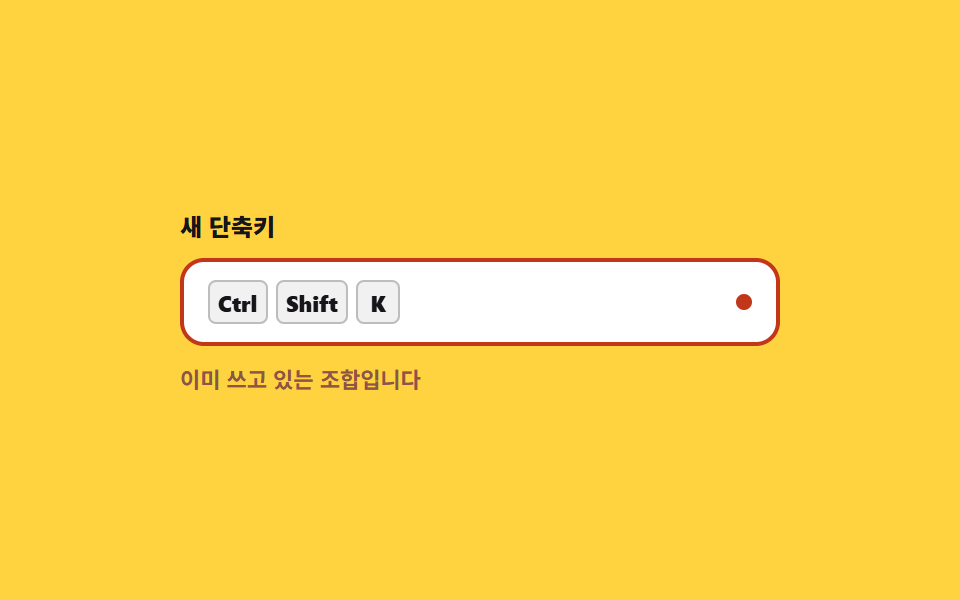
칸에 초점을 두고 조합을 그대로 누르면 Ctrl+Shift+K 처럼 적힙니다. preventDefault 로 브라우저 기본 동작을 막고, 한글 입력 중에는 isComposing 을 보고 건너뜁니다.
쓰임환경설정의 단축키 변경 화면, 게임·에디터의 키 바인딩
preventDefaultisComposingkeydown
<main class="stage">
<div class="rc is-demo" id="rc">
  <p class="rc__label" id="fieldLabel">새 단축키</p>
  <div class="rc__field" id="field" tabindex="0" role="textbox" aria-readonly="true" aria-labelledby="fieldLabel">
    <span class="rc__slot">
      <span class="rc__hint">조합을 눌러 주세요</span>
      <span class="rc__combo" id="combo" aria-live="polite"><kbd class="rc__key">Ctrl</kbd><kbd class="rc__key">Shift</kbd><kbd class="rc__key">K</kbd></span>
    </span>
    <span class="rc__rec" aria-hidden="true"></span>
  </div>
  <p class="rc__warn">이미 쓰고 있는 조합입니다</p>
</div>
</main>
@use "../../../../site/static/demo-tokens" as *;
// 단축키 녹화 입력칸 — 칸이 초점을 가진 동안 누른 조합을 그대로 받아 적는다.
// 안내 문구와 키캡 줄은 같은 격자 칸(grid-area: 1 / 1)에 겹쳐 두어 글자가 바뀌어도 칸 높이가 흔들리지 않는다.
// 격자 미리보기(.is-demo)는 Ctrl → Shift → K 가 차례로 찍히고 충돌 경고가 떴다가 90% 안에 되돌아오는 2초 루프.
$duration: $dur-instant;
$easing: $ease-pop;
$color: $subject-ink;
@include stage($stage-yellow);
.rc { display: flex; flex-direction: column; gap: $sp-2; width: min(100%, 300px); }
.rc__label { margin: 0; font-weight: 800; font-size: clamp(11px, 3vw, 12px); color: $subject-ink; }
.rc__field {
display: flex; align-items: center; justify-content: space-between; gap: $sp-2;
box-sizing: border-box; min-height: 44px; padding: $sp-2 $sp-3;
background: $stage-paper; border: 2px solid rgba(23, 20, 26, .18); border-radius: $r-control;
transition: border-color $duration $ease-spring;
}
.rc__field:focus-visible { outline: 3px solid $subject-blue; outline-offset: 2px; }
.rc.is-conflict .rc__field { border-color: $error; }
.rc__slot { display: grid; align-items: center; justify-items: start; min-width: 0; }
.rc__slot > * { grid-area: 1 / 1; }
.rc__hint { font-weight: 600; font-size: clamp(10px, 2.8vw, 11px); color: rgba(23, 20, 26, .72); }
.rc__combo { display: flex; align-items: center; gap: $sp-1; visibility: hidden; }
.rc.has-combo .rc__hint { visibility: hidden; }
.rc.has-combo .rc__combo { visibility: visible; }
.rc__key {
display: grid; place-items: center; box-sizing: border-box; height: 22px; min-width: 22px;
border-radius: $r-xs; border: 1px solid rgba(23, 20, 26, .24);
background: rgba(23, 20, 26, .06); color: $color;
font-family: inherit; font-weight: 800; font-size: 11px; line-height: 1; padding: 0 $sp-1;
}
// 녹화 중임을 알리는 점 — 스스로 완결한 동그라미라 중심에서 커진다 (blog-demo 규칙 8)
.rc__rec {
flex: 0 0 auto; width: 8px; height: 8px; border-radius: 50%;
background: $error; transform-origin: 50% 50%;
}
.rc__warn {
margin: 0; font-weight: 700; font-size: clamp(10px, 2.8vw, 11px); color: #905347; visibility: hidden;
}
.rc.is-conflict .rc__warn { visibility: visible; }
// ── 격자 미리보기 루프: 0~15% 안내 문구 · 16/34/52% 에 키캡이 하나씩 · 64% 충돌 경고까지 쌓고 멈춘다.
// 루프 안에서 키캡을 다시 지우면 그 빈 칸이 최대 변화 프레임이 되어 poster 로 뽑힌다 (255 실측) —
// 되돌림은 0% 경계에서만 일어나고, poster 는 경고가 켜지는 장면이 된다
.rc.is-demo .rc__hint {
animation-name: rcHint; animation-duration: $dur-loop; animation-timing-function: steps(1, end);
animation-iteration-count: infinite; animation-fill-mode: backwards;
}
@keyframes rcHint {
0%, 15% { visibility: visible; }
16%, 100% { visibility: hidden; }
}
.rc.is-demo .rc__combo { visibility: visible; }
.rc.is-demo .rc__key {
animation-duration: $dur-loop; animation-timing-function: $easing;
animation-iteration-count: infinite; animation-fill-mode: backwards;
}
.rc.is-demo .rc__key:nth-child(1) { animation-name: rcKey1; }
.rc.is-demo .rc__key:nth-child(2) { animation-name: rcKey2; }
.rc.is-demo .rc__key:nth-child(3) { animation-name: rcKey3; }
// 등장 시각은 animation-delay 가 아니라 키프레임 퍼센트로 준다 — delay 를 쓰면 세 키캡의 주기가
// 서로 어긋나 복귀 프레임에서 안내 문구와 키캡이 겹친다 (이 편 실측)
// 키캡은 제자리에서 나타난다 — 커지는 중심은 자기 자신 (blog-demo 규칙 8)
@keyframes rcKey1 {
0%, 15% { visibility: hidden; transform: scale(.6); }
16% { visibility: visible; transform: scale(.6); }
22%, 100% { visibility: visible; transform: scale(1); }
}
@keyframes rcKey2 {
0%, 33% { visibility: hidden; transform: scale(.6); }
34% { visibility: visible; transform: scale(.6); }
40%, 100% { visibility: visible; transform: scale(1); }
}
@keyframes rcKey3 {
0%, 51% { visibility: hidden; transform: scale(.6); }
52% { visibility: visible; transform: scale(.6); }
58%, 100% { visibility: visible; transform: scale(1); }
}
.rc.is-demo .rc__rec {
animation-name: rcBlink; animation-duration: $dur-loop; animation-timing-function: $ease-out;
animation-iteration-count: infinite; animation-fill-mode: backwards;
}
@keyframes rcBlink {
0%, 44% { transform: scale(1); }
50% { transform: scale(1.75); }
56%, 100% { transform: scale(1); }
}
.rc.is-demo .rc__warn {
animation-name: rcWarn; animation-duration: $dur-loop; animation-timing-function: steps(1, end);
animation-iteration-count: infinite; animation-fill-mode: backwards;
}
@keyframes rcWarn {
0%, 63% { visibility: hidden; }
64%, 100% { visibility: visible; }
}
.rc.is-demo .rc__field {
animation-name: rcBorder; animation-duration: $dur-loop; animation-timing-function: steps(1, end);
animation-iteration-count: infinite; animation-fill-mode: backwards;
}
@keyframes rcBorder {
0%, 63% { border-color: rgba(23, 20, 26, .18); }
64%, 100% { border-color: $error; }
}
@media (max-width: 340px) {
.rc__field { min-height: 40px; padding: $sp-1 $sp-2; }
}
@media (prefers-reduced-motion: reduce) {
.rc.is-demo .rc__hint,
.rc.is-demo .rc__key,
.rc.is-demo .rc__rec,
.rc.is-demo .rc__warn,
.rc.is-demo .rc__field { animation: none !important; }
.rc.is-demo .rc__combo { visibility: hidden !important; }
.rc__field { transition: none !important; }
}html, body {
margin: 0;
overflow: hidden;
}
.stage {
box-sizing: border-box;
min-height: 100vh;
display: grid;
place-items: center;
margin: 0;
background: #ffd23f;
font-family: -apple-system, "Segoe UI", "Noto Sans KR", sans-serif;
padding: clamp(8px, 4vw, 24px);
}
.rc {
display: flex;
flex-direction: column;
gap: 8px;
width: min(100%, 300px);
}
.rc__label {
margin: 0;
font-weight: 800;
font-size: clamp(11px, 3vw, 12px);
color: #17141a;
}
.rc__field {
display: flex;
align-items: center;
justify-content: space-between;
gap: 8px;
box-sizing: border-box;
min-height: 44px;
padding: 8px 12px;
background: #ffffff;
border: 2px solid rgba(23, 20, 26, 0.18);
border-radius: 12px;
transition: border-color 140ms cubic-bezier(0.2, 0.8, 0.2, 1);
}
.rc__field:focus-visible {
outline: 3px solid #2f6df6;
outline-offset: 2px;
}
.rc.is-conflict .rc__field {
border-color: #c2361a;
}
.rc__slot {
display: grid;
align-items: center;
justify-items: start;
min-width: 0;
}
.rc__slot > * {
grid-area: 1/1;
}
.rc__hint {
font-weight: 600;
font-size: clamp(10px, 2.8vw, 11px);
color: rgba(23, 20, 26, 0.72);
}
.rc__combo {
display: flex;
align-items: center;
gap: 4px;
visibility: hidden;
}
.rc.has-combo .rc__hint {
visibility: hidden;
}
.rc.has-combo .rc__combo {
visibility: visible;
}
.rc__key {
display: grid;
place-items: center;
box-sizing: border-box;
height: 22px;
min-width: 22px;
border-radius: 4px;
border: 1px solid rgba(23, 20, 26, 0.24);
background: rgba(23, 20, 26, 0.06);
color: #17141a;
font-family: inherit;
font-weight: 800;
font-size: 11px;
line-height: 1;
padding: 0 4px;
}
.rc__rec {
flex: 0 0 auto;
width: 8px;
height: 8px;
border-radius: 50%;
background: #c2361a;
transform-origin: 50% 50%;
}
.rc__warn {
margin: 0;
font-weight: 700;
font-size: clamp(10px, 2.8vw, 11px);
color: #905347;
visibility: hidden;
}
.rc.is-conflict .rc__warn {
visibility: visible;
}
.rc.is-demo .rc__hint {
animation-name: rcHint;
animation-duration: 2s;
animation-timing-function: steps(1, end);
animation-iteration-count: infinite;
animation-fill-mode: backwards;
}
@keyframes rcHint {
0%, 15% {
visibility: visible;
}
16%, 100% {
visibility: hidden;
}
}
.rc.is-demo .rc__combo {
visibility: visible;
}
.rc.is-demo .rc__key {
animation-duration: 2s;
animation-timing-function: cubic-bezier(0.2, 1.4, 0.4, 1);
animation-iteration-count: infinite;
animation-fill-mode: backwards;
}
.rc.is-demo .rc__key:nth-child(1) {
animation-name: rcKey1;
}
.rc.is-demo .rc__key:nth-child(2) {
animation-name: rcKey2;
}
.rc.is-demo .rc__key:nth-child(3) {
animation-name: rcKey3;
}
@keyframes rcKey1 {
0%, 15% {
visibility: hidden;
transform: scale(0.6);
}
16% {
visibility: visible;
transform: scale(0.6);
}
22%, 100% {
visibility: visible;
transform: scale(1);
}
}
@keyframes rcKey2 {
0%, 33% {
visibility: hidden;
transform: scale(0.6);
}
34% {
visibility: visible;
transform: scale(0.6);
}
40%, 100% {
visibility: visible;
transform: scale(1);
}
}
@keyframes rcKey3 {
0%, 51% {
visibility: hidden;
transform: scale(0.6);
}
52% {
visibility: visible;
transform: scale(0.6);
}
58%, 100% {
visibility: visible;
transform: scale(1);
}
}
.rc.is-demo .rc__rec {
animation-name: rcBlink;
animation-duration: 2s;
animation-timing-function: ease-out;
animation-iteration-count: infinite;
animation-fill-mode: backwards;
}
@keyframes rcBlink {
0%, 44% {
transform: scale(1);
}
50% {
transform: scale(1.75);
}
56%, 100% {
transform: scale(1);
}
}
.rc.is-demo .rc__warn {
animation-name: rcWarn;
animation-duration: 2s;
animation-timing-function: steps(1, end);
animation-iteration-count: infinite;
animation-fill-mode: backwards;
}
@keyframes rcWarn {
0%, 63% {
visibility: hidden;
}
64%, 100% {
visibility: visible;
}
}
.rc.is-demo .rc__field {
animation-name: rcBorder;
animation-duration: 2s;
animation-timing-function: steps(1, end);
animation-iteration-count: infinite;
animation-fill-mode: backwards;
}
@keyframes rcBorder {
0%, 63% {
border-color: rgba(23, 20, 26, 0.18);
}
64%, 100% {
border-color: #c2361a;
}
}
@media (max-width: 340px) {
.rc__field {
min-height: 40px;
padding: 4px 8px;
}
}
@media (prefers-reduced-motion: reduce) {
.rc.is-demo .rc__hint,
.rc.is-demo .rc__key,
.rc.is-demo .rc__rec,
.rc.is-demo .rc__warn,
.rc.is-demo .rc__field {
animation: none !important;
}
.rc.is-demo .rc__combo {
visibility: hidden !important;
}
.rc__field {
transition: none !important;
}
}var rc = document.getElementById('rc');
var field = document.getElementById('field');
var combo = document.getElementById('combo');
var TAKEN = ['Ctrl+Shift+K'];
var MODIFIER_KEYS = ['Control', 'Alt', 'Shift', 'Meta'];
function renderCombo(parts) {
combo.textContent = '';
parts.forEach(function (part) {
var cap = document.createElement('kbd');
cap.className = 'rc__key';
cap.textContent = part;
combo.appendChild(cap);
});
rc.classList.toggle('has-combo', parts.length > 1);
rc.classList.toggle('is-conflict', TAKEN.indexOf(parts.join('+')) >= 0);
}
field.addEventListener('keydown', function (e) {
// 한글·일본어 입력기가 조합 중일 때 오는 키는 글자를 만드는 중이라 단축키가 아니다
if (e.isComposing) { return; }
if (e.key === 'Tab') { return; }
// 칸이 초점을 가진 동안에는 Ctrl+S 같은 브라우저 기본 동작을 막고 조합만 받아 적는다
e.preventDefault();
rc.classList.remove('is-demo');
var parts = [];
if (e.ctrlKey) { parts.push('Ctrl'); }
if (e.altKey) { parts.push('Alt'); }
if (e.shiftKey) { parts.push('Shift'); }
if (e.metaKey) { parts.push('Meta'); }
if (MODIFIER_KEYS.indexOf(e.key) < 0) {
parts.push(e.key.length === 1 ? e.key.toUpperCase() : e.key);
}
renderCombo(parts);
});// ShortcutRecorder — vanilla 판(run/288/demo/06-shortcut-recorder-input/index.html) 의 React 포트.
// 칸이 초점을 가진 동안 누른 조합을 그대로 받아 적는다. IME 조합 중(isComposing)은 건너뛴다.
import { useState } from "react";
import type { CSSProperties } from "react";
import styles from "./ShortcutRecorder.module.scss";
export type ShortcutRecorderProps = {
/** 격자 미리보기용 2초 자동 루프. 칸에서 키를 누르면 꺼진다 */
demo?: boolean;
duration?: number;
easing?: string;
color?: string;
};
type Vars = CSSProperties & { "--duration"?: string; "--easing"?: string; "--color"?: string };
/** React 이벤트 제네릭이 ambient 에 없어 쓰는 필드만 지역 타입으로 선언한다 */
type KeyEvt = {
key: string;
isComposing: boolean;
ctrlKey: boolean;
altKey: boolean;
shiftKey: boolean;
metaKey: boolean;
preventDefault(): void;
};
const TAKEN = ["Ctrl+Shift+K"];
const MODIFIER_KEYS = ["Control", "Alt", "Shift", "Meta"];
/** 미리보기 루프가 보여 주는 조합 — 실제 입력이 들어오면 그 조합으로 갈린다 */
const PREVIEW = ["Ctrl", "Shift", "K"];
export default function ShortcutRecorder({
demo = true,
duration = 140,
easing = "cubic-bezier(.2, 1.4, .4, 1)",
color = "#17141a",
}: ShortcutRecorderProps) {
const [live, setLive] = useState(demo);
const [parts, setParts] = useState<string[]>(PREVIEW);
const [recorded, setRecorded] = useState(false);
const vars: Vars = { "--duration": `${duration}ms`, "--easing": easing, "--color": color };
function handleKeyDown(e: KeyEvt) {
// 한글·일본어 입력기가 조합 중일 때 오는 키는 글자를 만드는 중이라 단축키가 아니다
if (e.isComposing) { return; }
if (e.key === "Tab") { return; }
// 칸이 초점을 가진 동안에는 Ctrl+S 같은 브라우저 기본 동작을 막고 조합만 받아 적는다
e.preventDefault();
setLive(false);
const next: string[] = [];
if (e.ctrlKey) { next.push("Ctrl"); }
if (e.altKey) { next.push("Alt"); }
if (e.shiftKey) { next.push("Shift"); }
if (e.metaKey) { next.push("Meta"); }
if (MODIFIER_KEYS.indexOf(e.key) < 0) {
next.push(e.key.length === 1 ? e.key.toUpperCase() : e.key);
}
setParts(next);
setRecorded(next.length > 1);
}
const conflict = recorded && TAKEN.indexOf(parts.join("+")) >= 0;
const cls = [styles.root, live ? styles.isDemo : "", recorded ? styles.hasCombo : "", conflict ? styles.isConflict : ""]
.filter(Boolean)
.join(" ");
return (
<main className={styles.stage} style={vars}>
<div className={cls}>
<p className={styles.label} id="fieldLabel">새 단축키</p>
<div className={styles.field} tabIndex={0} role="textbox" aria-readonly="true" aria-labelledby="fieldLabel" onKeyDown={handleKeyDown}>
<span className={styles.slot}>
<span className={styles.hint}>조합을 눌러 주세요</span>
<span className={styles.combo} aria-live="polite">
{parts.map((part) => (
<kbd className={styles.key} key={part}>{part}</kbd>
))}
</span>
</span>
<span className={styles.rec} aria-hidden="true" />
</div>
<p className={styles.warn}>이미 쓰고 있는 조합입니다</p>
</div>
</main>
);
}06 단축키 녹화 입력칸 — 측정 누적면적 2.931% · 움직인 프레임 11/23GODRICH 원작 · zip 에 SCSS·React 포함 · 키보드 단축키 UI 9종 — 키캡부터 도움말 시트까지
이 데모가 속한 글
 키보드 단축키 UI 9종 — 키캡부터 도움말 시트까지단축키 UI는 키보드로 화면을 다루게 하는 키캡·표시·안내를 짜는 일입니다. 여기 아홉 가지는 키캡 세 스타일부터 플랫폼 자동 전환·녹화·충돌 표·도움말 시트까지 CSS 와 약간의 JS 로 만들어 둔 것이라, 붙여 이 글의 데모 전부 보기