01뷰포트 채우는 헤드라인
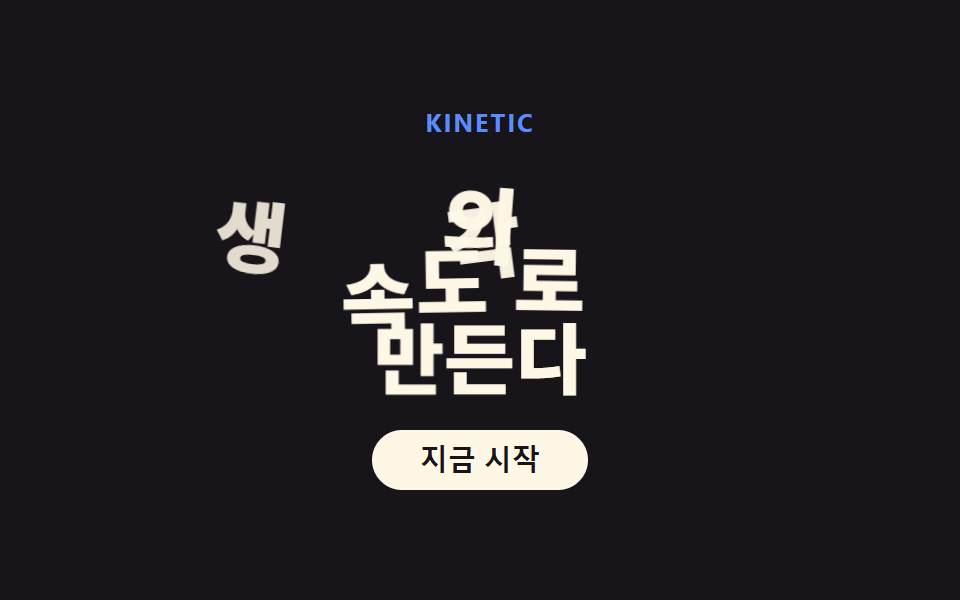
헤드라인 글자 크기를 clamp()로 뷰포트에 맞춰 키우고, 단어마다 시차를 두고 아래에서 올라오며 나타난다.
쓰임랜딩 첫 화면, 포트폴리오 인트로
clamp() 가변폭단어 단위 staggeroverflow: hidden 마스크
<main class="stage">
  <div class="hero is-demo">
    <p class="hero__eyebrow">KINETIC</p>
    <h1 class="hero__headline">
      <span class="word"><span class="word__inner">생각의</span></span>
      <span class="word"><span class="word__inner">속도로</span></span>
      <span class="word"><span class="word__inner">만든다</span></span>
    </h1>
    <button class="hero__cta" type="button">지금 시작</button>
  </div>
</main>
@use "../../../../site/static/demo-tokens" as *;
$duration: $dur-loop; // 세 단어가 차례로 올라오는 한 주기
$easing: $ease-spring; // 처음 빠르고 끝은 부드럽게
$color: $subject-blue; // 눈썹 강조 색
@include stage($stage-ink);
.hero {
display: flex;
flex-direction: column;
align-items: center;
text-align: center;
}
.hero__eyebrow {
margin: 0 0 $sp-2;
color: $subject-blue-light; // 먹 무대 위 파란 글자 — AA 4.5 (blog-design 글자 대비)
font-weight: 700;
font-size: clamp(11px, 2.6vw, 13px);
line-height: 1;
letter-spacing: .08em;
text-transform: uppercase;
}
.hero__headline {
margin: 0 0 $sp-4;
display: flex;
flex-direction: column;
align-items: center;
}
// 단어마다 상자 — 마스크 대신 벡터필드 진입으로 바뀌어 overflow 는 visible
// (형태2차 한 겹, 2026-09-14: 글자별 노이즈 오프셋 + 진입 시 회전 힘장을 따라 자리 잡기 — 077 품질기준선)
.word {
overflow: visible;
position: relative;
}
.word__inner {
display: flex;
flex-wrap: nowrap;
}
// 글자 낱개 — index.html 말미 스크립트가 텍스트를 이 span 으로 쪼개고
// 결정론 해시로 --nx0·--ny0·--nr0(출발점) · --wx·--wy·--wr(힘장 경유점) 을 심는다. 프레임은 여기 CSS 가 다 만든다.
.char {
display: inline-block;
font-weight: 800;
font-size: clamp(28px, 8vw, 56px);
line-height: 1.08;
color: $subject-cream;
animation: char-flow $duration $easing infinite;
}
.char--space { width: .28em; }
@keyframes char-flow {
0%, 4% { transform: translate(var(--nx0, 0), var(--ny0, 40px)) rotate(var(--nr0, 0deg)) scale(.55); opacity: 0; }
16% { transform: translate(var(--wx, 0), var(--wy, 14px)) rotate(var(--wr, 0deg)) scale(1.08); opacity: 1; }
30%, 78% { transform: translate(0, 0) rotate(0deg) scale(1); opacity: 1; }
96%, 100% { transform: translate(var(--nx0, 0), var(--ny0, 40px)) rotate(var(--nr0, 0deg)) scale(.55); opacity: 0; }
}
.hero__cta {
border: 0;
border-radius: $r-pill;
background: $subject-cream;
color: $subject-ink;
padding: $sp-2 $sp-6;
font-weight: 700;
font-size: clamp(12px, 3vw, 14px);
line-height: 1;
}
@media (prefers-reduced-motion: reduce) {
.char { animation: none; transform: none; opacity: 1; }
}html, body {
margin: 0;
overflow: hidden;
}
.stage {
box-sizing: border-box;
min-height: 100vh;
display: grid;
place-items: center;
margin: 0;
background: #17141a;
font-family: -apple-system, "Segoe UI", "Noto Sans KR", sans-serif;
padding: clamp(8px, 4vw, 24px);
}
.hero {
display: flex;
flex-direction: column;
align-items: center;
text-align: center;
}
.hero__eyebrow {
margin: 0 0 8px;
color: #5b8cf8;
font-weight: 700;
font-size: clamp(11px, 2.6vw, 13px);
line-height: 1;
letter-spacing: 0.08em;
text-transform: uppercase;
}
.hero__headline {
margin: 0 0 16px;
display: flex;
flex-direction: column;
align-items: center;
}
.word {
overflow: visible;
position: relative;
}
.word__inner {
display: flex;
flex-wrap: nowrap;
}
.char {
display: inline-block;
font-weight: 800;
font-size: clamp(28px, 8vw, 56px);
line-height: 1.08;
color: #fff7e6;
animation: char-flow 2s cubic-bezier(0.2, 0.8, 0.2, 1) infinite;
}
.char--space {
width: 0.28em;
}
@keyframes char-flow {
0%, 4% {
transform: translate(var(--nx0, 0), var(--ny0, 40px)) rotate(var(--nr0, 0deg)) scale(0.55);
opacity: 0;
}
16% {
transform: translate(var(--wx, 0), var(--wy, 14px)) rotate(var(--wr, 0deg)) scale(1.08);
opacity: 1;
}
30%, 78% {
transform: translate(0, 0) rotate(0deg) scale(1);
opacity: 1;
}
96%, 100% {
transform: translate(var(--nx0, 0), var(--ny0, 40px)) rotate(var(--nr0, 0deg)) scale(0.55);
opacity: 0;
}
}
.hero__cta {
border: 0;
border-radius: 999px;
background: #fff7e6;
color: #17141a;
padding: 8px 24px;
font-weight: 700;
font-size: clamp(12px, 3vw, 14px);
line-height: 1;
}
@media (prefers-reduced-motion: reduce) {
.char {
animation: none;
transform: none;
opacity: 1;
}
}// 글자별 노이즈 오프셋 + 벡터필드 진입 (형태2차) — 글자를 span 으로 쪼개고
// 결정론 해시로 출발점/경유점 변수만 심는다. 애니메이션 자체는 style.scss 의 keyframes 가 만든다.
// 원리: 각 글자의 (글자index, 단어index) 로부터 0..1 해시를 3개 뽑아
// 출발점 --nx0/--ny0/--nr0 : 화면 밖 아래쪽, 글자마다 제각각인 흩뿌림
// 경유점 --wx/--wy/--wr : 회전 힘장 v(x,y) = ω×(x,y) 를 출발점에서 dt 만큼 적분한 한 점 —
// 직선이 아니라 힘장을 따라 휘어져 들어온다
(function () {
function hash(n) { // 정수 → 0..1 결정론 난수 (sin 해시 — 077 캔버스 축과 같은 계열)
var s = Math.sin(n * 127.1 + 311.7) * 43758.5453;
return s - Math.floor(s);
}
document.querySelectorAll('.hero .word__inner').forEach(function (word, w) {
var text = word.textContent;
word.textContent = '';
for (var c = 0; c < text.length; c++) {
var ch = document.createElement('span');
if (text[c] === ' ') { ch.className = 'char char--space'; }
else {
ch.className = 'char';
ch.textContent = text[c];
var s = w * 97 + c * 13 + 5;
var h1 = hash(s), h2 = hash(s + 1), h3 = hash(s + 2), h4 = hash(s + 3);
var ang = h1 * Math.PI * 2; // 흩뿌리는 방향
var rad = 26 + h2 * 46; // 흩뿌리는 반경(px)
var x0 = Math.cos(ang) * rad, y0 = 40 + h3 * 34; // 출발 오프셋
var rot0 = (h4 - .5) * 44; // 출발 기울기(deg)
// 회전 힘장 v(p) = ω × p 를 출발점에서 dt 적분 — v = ω*(-y, x), dt=0.55, ω=0.9
var wx = x0 - 0.9 * y0 * 0.55, wy = y0 + 0.9 * x0 * 0.55;
var wr = rot0 * 0.4; // 경유점에서 절반쯤 펴져 있다
ch.style.setProperty('--nx0', x0.toFixed(1) + 'px');
ch.style.setProperty('--ny0', y0.toFixed(1) + 'px');
ch.style.setProperty('--nr0', rot0.toFixed(1) + 'deg');
ch.style.setProperty('--wx', (wx * .8).toFixed(1) + 'px');
ch.style.setProperty('--wy', (wy * .18 + 8).toFixed(1) + 'px');
ch.style.setProperty('--wr', wr.toFixed(1) + 'deg');
ch.style.animationDelay = (-w * 0.18 - c * 0.045).toFixed(3) + 's';
}
word.appendChild(ch);
}
});
})();import type { CSSProperties } from "react";
import styles from "./KineticHero.module.scss";
export type KineticHeroProps = {
eyebrow?: string;
word1?: string;
word2?: string;
word3?: string;
cta?: string;
/** 한 주기(기본 2000ms) */
duration?: number;
easing?: string;
color?: string;
};
type Vars = CSSProperties & { "--duration"?: string; "--easing"?: string; "--color"?: string };
type CharVars = CSSProperties & {
"--nx0"?: string; "--ny0"?: string; "--nr0"?: string;
"--wx"?: string; "--wy"?: string; "--wr"?: string;
};
/** 정수 → 0..1 결정론 난수 (sin 해시 — vanilla 01 과 동일 계열) */
function hash(n: number): number {
const s = Math.sin(n * 127.1 + 311.7) * 43758.5453;
return s - Math.floor(s);
}
/** 한 글자 = 출발점(노이즈) + 힘장 경유점 변수 묶음. vanilla index.html 스크립트와 같은 식. */
function charVars(w: number, c: number): CharVars {
const s = w * 97 + c * 13 + 5;
const h1 = hash(s), h2 = hash(s + 1), h3 = hash(s + 2), h4 = hash(s + 3);
const ang = h1 * Math.PI * 2; // 흩뿌리는 방향
const rad = 26 + h2 * 46; // 흩뿌리는 반경(px)
const x0 = Math.cos(ang) * rad, y0 = 40 + h3 * 34; // 출발 오프셋
const rot0 = (h4 - .5) * 44; // 출발 기울기(deg)
// 회전 힘장 v(p) = ω × p 를 출발점에서 dt 적분 — v = ω*(-y, x), dt=0.55, ω=0.9
const wx = x0 - 0.9 * y0 * 0.55, wy = y0 + 0.9 * x0 * 0.55;
const wr = rot0 * 0.4;
return {
"--nx0": `${x0.toFixed(1)}px`,
"--ny0": `${y0.toFixed(1)}px`,
"--nr0": `${rot0.toFixed(1)}deg`,
"--wx": `${(wx * .8).toFixed(1)}px`,
"--wy": `${(wy * .18 + 8).toFixed(1)}px`,
"--wr": `${wr.toFixed(1)}deg`,
animationDelay: `${(-w * 0.18 - c * 0.045).toFixed(3)}s`,
};
}
export default function KineticHero({
eyebrow = "KINETIC",
word1 = "Build",
word2 = "at the",
word3 = "speed of thought",
cta = "Get started",
duration = 2000,
easing = "cubic-bezier(.2,.8,.2,1)",
color = "#2f6df6",
}: KineticHeroProps) {
const vars: Vars = { "--duration": `${duration}ms`, "--easing": easing, "--color": color };
const words = [word1, word2, word3];
return (
<div className={styles.stage} style={vars}>
<p className={styles.eyebrow}>{eyebrow}</p>
<h1 className={styles.headline}>
{words.map((w, i) => (
<span key={i} className={styles.word}>
<span className={styles.wordInner}>
{w.split("").map((ch, c) =>
ch === " " ? (
<span key={c} className={styles.charSpace} />
) : (
<span key={c} className={styles.char} style={charVars(i, c)}>{ch}</span>
)
)}
</span>
</span>
))}
</h1>
<button type="button" className={styles.cta}>{cta}</button>
</div>
);
}01 뷰포트 채우는 헤드라인 — 측정 누적면적 12.381% · 움직인 프레임 17/23GODRICH 원작 · zip 에 SCSS·React 포함 · 키네틱 타이포그래피 랜딩페이지, 코드로 뜯어봤다
이 데모가 속한 글
 키네틱 타이포그래피 랜딩페이지, 코드로 뜯어봤다키네틱 타이포그래피는 헤드라인 글자가 화면 폭에 맞춰 커지고, 단어가 순서대로 튀어 오르고, 숫자가 굴러가듯 올라가는 디자인 방식입니다. 요즘 랜딩페이지 첫 화면을 다 이렇게 만들길래, 실제로 코드까지 뜯어서 아홉 이 글의 데모 전부 보기