04반경 원 거리 슬라이더
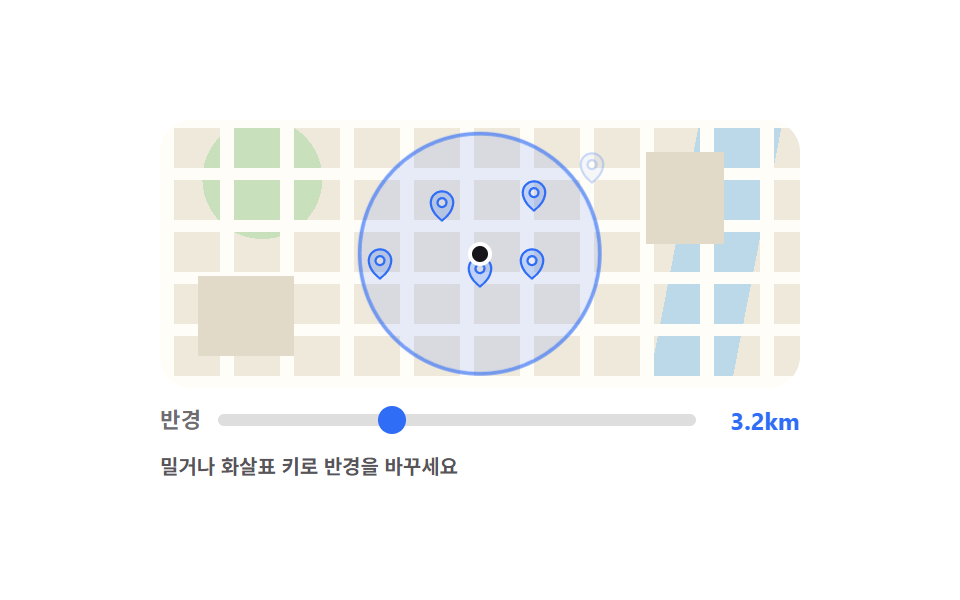
슬라이더를 밀면 반경 원이 부드럽게 커지고 거리 라벨이 바뀌며, 원 안의 핀은 진하게 밖의 핀은 흐려집니다.
쓰임가까운 매장만 거리로 걸러야 하는 내 주변 검색 화면
input rangescaleopacity
<main class="stage">
  <div class="rs is-demo">
    <div class="rs__map">
      <span class="rs__ring" aria-hidden="true"></span>
      <span class="rs__me" aria-hidden="true"></span>
      <!-- 핀마다 data-dist = 중심에서의 거리(최대 반경을 100 으로 본 값). JS 가 슬라이더 값과 견준다 -->
      <span class="rs__pin" data-dist="33" style="left:50%;top:66.5%" aria-hidden="true"><svg viewBox="0 0 256 256" width="18" height="18"><g fill="currentColor"><path d="M128 24a80 80 0 0 0-80 80c0 72 80 128 80 128s80-56 80-128a80 80 0 0 0-80-80m0 112a32 32 0 1 1 32-32a32 32 0 0 1-32 32" opacity=".2"/><path d="M128 64a40 40 0 1 0 40 40a40 40 0 0 0-40-40m0 64a24 24 0 1 1 24-24a24 24 0 0 1-24 24m0-112a88.1 88.1 0 0 0-88 88c0 31.4 14.51 64.68 42 96.25a254.2 254.2 0 0 0 41.45 38.3a8 8 0 0 0 9.18 0a254.2 254.2 0 0 0 41.37-38.3c27.45-31.57 42-64.85 42-96.25a88.1 88.1 0 0 0-88-88m0 206c-16.53-13-72-60.75-72-118a72 72 0 0 1 144 0c0 57.23-55.47 105-72 118"/></g></svg></span>
      <span class="rs__pin" data-dist="33" style="left:44%;top:41.7%" aria-hidden="true"><svg viewBox="0 0 256 256" width="18" height="18"><g fill="currentColor"><path d="M128 24a80 80 0 0 0-80 80c0 72 80 128 80 128s80-56 80-128a80 80 0 0 0-80-80m0 112a32 32 0 1 1 32-32a32 32 0 0 1-32 32" opacity=".2"/><path d="M128 64a40 40 0 1 0 40 40a40 40 0 0 0-40-40m0 64a24 24 0 1 1 24-24a24 24 0 0 1-24 24m0-112a88.1 88.1 0 0 0-88 88c0 31.4 14.51 64.68 42 96.25a254.2 254.2 0 0 0 41.45 38.3a8 8 0 0 0 9.18 0a254.2 254.2 0 0 0 41.37-38.3c27.45-31.57 42-64.85 42-96.25a88.1 88.1 0 0 0-88-88m0 206c-16.53-13-72-60.75-72-118a72 72 0 0 1 144 0c0 57.23-55.47 105-72 118"/></g></svg></span>
      <span class="rs__pin" data-dist="47" style="left:58%;top:63.5%" aria-hidden="true"><svg viewBox="0 0 256 256" width="18" height="18"><g fill="currentColor"><path d="M128 24a80 80 0 0 0-80 80c0 72 80 128 80 128s80-56 80-128a80 80 0 0 0-80-80m0 112a32 32 0 1 1 32-32a32 32 0 0 1-32 32" opacity=".2"/><path d="M128 64a40 40 0 1 0 40 40a40 40 0 0 0-40-40m0 64a24 24 0 1 1 24-24a24 24 0 0 1-24 24m0-112a88.1 88.1 0 0 0-88 88c0 31.4 14.51 64.68 42 96.25a254.2 254.2 0 0 0 41.45 38.3a8 8 0 0 0 9.18 0a254.2 254.2 0 0 0 41.37-38.3c27.45-31.57 42-64.85 42-96.25a88.1 88.1 0 0 0-88-88m0 206c-16.53-13-72-60.75-72-118a72 72 0 0 1 144 0c0 57.23-55.47 105-72 118"/></g></svg></span>
      <span class="rs__pin" data-dist="47" style="left:58.5%;top:38.3%" aria-hidden="true"><svg viewBox="0 0 256 256" width="18" height="18"><g fill="currentColor"><path d="M128 24a80 80 0 0 0-80 80c0 72 80 128 80 128s80-56 80-128a80 80 0 0 0-80-80m0 112a32 32 0 1 1 32-32a32 32 0 0 1-32 32" opacity=".2"/><path d="M128 64a40 40 0 1 0 40 40a40 40 0 0 0-40-40m0 64a24 24 0 1 1 24-24a24 24 0 0 1-24 24m0-112a88.1 88.1 0 0 0-88 88c0 31.4 14.51 64.68 42 96.25a254.2 254.2 0 0 0 41.45 38.3a8 8 0 0 0 9.18 0a254.2 254.2 0 0 0 41.37-38.3c27.45-31.57 42-64.85 42-96.25a88.1 88.1 0 0 0-88-88m0 206c-16.53-13-72-60.75-72-118a72 72 0 0 1 144 0c0 57.23-55.47 105-72 118"/></g></svg></span>
      <span class="rs__pin" data-dist="79" style="left:34.5%;top:63.3%" aria-hidden="true"><svg viewBox="0 0 256 256" width="18" height="18"><g fill="currentColor"><path d="M128 24a80 80 0 0 0-80 80c0 72 80 128 80 128s80-56 80-128a80 80 0 0 0-80-80m0 112a32 32 0 1 1 32-32a32 32 0 0 1-32 32" opacity=".2"/><path d="M128 64a40 40 0 1 0 40 40a40 40 0 0 0-40-40m0 64a24 24 0 1 1 24-24a24 24 0 0 1-24 24m0-112a88.1 88.1 0 0 0-88 88c0 31.4 14.51 64.68 42 96.25a254.2 254.2 0 0 0 41.45 38.3a8 8 0 0 0 9.18 0a254.2 254.2 0 0 0 41.37-38.3c27.45-31.57 42-64.85 42-96.25a88.1 88.1 0 0 0-88-88m0 206c-16.53-13-72-60.75-72-118a72 72 0 0 1 144 0c0 57.23-55.47 105-72 118"/></g></svg></span>
      <span class="rs__pin" data-dist="95" style="left:67.5%;top:27.8%" aria-hidden="true"><svg viewBox="0 0 256 256" width="18" height="18"><g fill="currentColor"><path d="M128 24a80 80 0 0 0-80 80c0 72 80 128 80 128s80-56 80-128a80 80 0 0 0-80-80m0 112a32 32 0 1 1 32-32a32 32 0 0 1-32 32" opacity=".2"/><path d="M128 64a40 40 0 1 0 40 40a40 40 0 0 0-40-40m0 64a24 24 0 1 1 24-24a24 24 0 0 1-24 24m0-112a88.1 88.1 0 0 0-88 88c0 31.4 14.51 64.68 42 96.25a254.2 254.2 0 0 0 41.45 38.3a8 8 0 0 0 9.18 0a254.2 254.2 0 0 0 41.37-38.3c27.45-31.57 42-64.85 42-96.25a88.1 88.1 0 0 0-88-88m0 206c-16.53-13-72-60.75-72-118a72 72 0 0 1 144 0c0 57.23-55.47 105-72 118"/></g></svg></span>
    </div>
    <div class="rs__bar">
      <label class="rs__cap" for="rs-range">반경</label>
      <input class="rs__range" id="rs-range" type="range" min="30" max="100" step="1" value="55" aria-valuetext="1.8km">
      <span class="rs__read">
        <span class="rs__km" id="rs-km">1.8km</span>
        <span class="rs__cut rs__cut--a" aria-hidden="true">1.0km</span>
        <span class="rs__cut rs__cut--b" aria-hidden="true">2.1km</span>
        <span class="rs__cut rs__cut--c" aria-hidden="true">3.2km</span>
      </span>
    </div>
    <p class="rs__hint">밀거나 화살표 키로 반경을 바꾸세요</p>
  </div>
</main>@use "../../../../site/static/demo-tokens" as *;
$duration: $dur-quick;
$easing: $ease-spring;
$color: $subject-blue;
@include stage($stage-paper);
// 가짜 지도 캔버스 — 외부 타일·이미지 없이 그라디언트만. 9개 데모가 같은 색을 쓴다
$map-land: #efe9dc;
$map-road: #fffdf7;
$map-block: #e2dac9;
$map-park: #c9e0bd;
$map-water: #bcd9ea;
.rs {
box-sizing: border-box;
width: min(320px, 88vw);
display: flex;
flex-direction: column;
gap: $sp-2;
font-family: -apple-system, "Segoe UI", "Noto Sans KR", sans-serif;
color: $subject-ink;
}
// ── 지도 ─────────────────────────────────────────────
// 세로 12 : 가로 5. 이 비율이 고정돼 있어야 핀의 data-dist(거리)와 원의 반경이 같은 자로 잰 값이 된다
.rs__map {
position: relative;
overflow: hidden;
border-radius: $r-card;
width: 100%;
aspect-ratio: 12 / 5;
background:
repeating-linear-gradient(90deg, $map-road 0 7px, transparent 7px 30px),
repeating-linear-gradient(0deg, $map-road 0 6px, transparent 6px 26px),
radial-gradient(circle at 16% 22%, $map-park 0 30px, transparent 30px),
linear-gradient(101deg, transparent 0 78%, $map-water 78% 90%, transparent 90%),
$map-land;
}
// 블록 두 개 — 지도에 변화를 준다. 배경과 함께 멈춰 있다(움직이는 건 원·핀뿐)
.rs__map::before,
.rs__map::after {
content: "";
position: absolute;
z-index: 0;
background: $map-block;
}
.rs__map::before { left: 6%; top: 58%; width: 15%; height: 30%; }
.rs__map::after { left: 76%; top: 12%; width: 12%; height: 34%; }
// 반경 원 — 지름이 지도 높이와 같을 때가 scale(1)
.rs__ring {
position: absolute;
z-index: 1;
left: 50%; top: 50%;
box-sizing: border-box;
height: 100%;
aspect-ratio: 1;
border: 2px solid rgba(47, 109, 246, .6);
border-radius: 50%;
background: rgba(47, 109, 246, .12);
transform: translate(-50%, -50%) scale(var(--k, .55));
transition: transform $duration $easing;
}
.rs__me {
position: absolute;
z-index: 3;
left: 50%; top: 50%;
width: 8px; height: 8px;
border: 2px solid $stage-paper;
border-radius: 50%;
background: $subject-ink;
transform: translate(-50%, -50%);
}
.rs__pin {
position: absolute;
z-index: 2;
display: block;
color: $color;
opacity: .26;
transform: translate(-50%, -100%);
transition: opacity $duration steps(1, end);
}
.rs__pin.is-in { opacity: 1; }
// ── 컨트롤 ────────────────────────────────────────────
.rs__bar {
display: flex;
align-items: center;
gap: $sp-2;
}
.rs__cap {
flex: 0 0 auto;
font-size: 11px; line-height: 14px; font-weight: 700;
letter-spacing: .02em;
color: rgba(23, 20, 26, .62);
}
.rs__range {
flex: 1 1 auto;
min-width: 0;
height: 16px;
margin: 0;
appearance: none;
-webkit-appearance: none;
background: transparent;
cursor: pointer;
}
.rs__range::-webkit-slider-runnable-track {
height: 6px;
border-radius: $r-pill;
background: rgba(23, 20, 26, .14);
}
.rs__range::-webkit-slider-thumb {
-webkit-appearance: none;
width: 14px; height: 14px;
margin-top: -4px;
border: 0;
border-radius: 50%;
background: $color;
}
.rs__range::-moz-range-track { height: 6px; border-radius: $r-pill; background: rgba(23, 20, 26, .14); }
.rs__range::-moz-range-thumb { width: 14px; height: 14px; border: 0; border-radius: 50%; background: $color; }
.rs__range:focus-visible { outline: 2px solid $color; outline-offset: 2px; border-radius: $r-pill; }
// 거리 읽기 — 사람이 잡으면 .rs__km 이 실시간, 자동 루프 때는 컷 3장이 번갈아 뜬다
.rs__read {
position: relative;
flex: 0 0 auto;
width: 44px;
height: 16px;
text-align: right;
}
.rs__km,
.rs__cut {
position: absolute;
right: 0; top: 0;
font-size: 12px; line-height: 16px; font-weight: 700;
font-variant-numeric: tabular-nums;
color: $color;
white-space: nowrap;
}
.rs__cut { opacity: 0; }
.rs.is-demo .rs__km { opacity: 0; }
.rs__hint {
margin: 0;
font-size: 10px; line-height: 14px; font-weight: 600;
color: rgba($stage-ink, .72);
}
// ── 자동 루프 (2s) ────────────────────────────────────
// 반경 값 v 는 0%→50% 에서 30→100 으로, 50%→85% 에서 100→30 으로 선형으로 움직인다.
// 핀과 거리 컷은 그 v 가 임계를 넘는 시각에 steps(1, end) 로 딱 끊어 바뀐다 — 반투명 교차가 없다.
.rs.is-demo .rs__ring {
transition: none;
animation-name: rs-ring;
animation-duration: $dur-loop;
animation-timing-function: linear;
animation-iteration-count: infinite;
}
.rs.is-demo .rs__pin {
transition: none;
animation-duration: $dur-loop;
animation-timing-function: steps(1, end);
animation-iteration-count: infinite;
}
.rs.is-demo .rs__pin[data-dist="33"] { animation-name: rs-pin-33; }
.rs.is-demo .rs__pin[data-dist="47"] { animation-name: rs-pin-47; }
.rs.is-demo .rs__pin[data-dist="79"] { animation-name: rs-pin-79; }
.rs.is-demo .rs__pin[data-dist="95"] { animation-name: rs-pin-95; }
.rs.is-demo .rs__cut {
animation-duration: $dur-loop;
animation-timing-function: steps(1, end);
animation-iteration-count: infinite;
}
.rs.is-demo .rs__cut--a { animation-name: rs-km-a; }
.rs.is-demo .rs__cut--b { animation-name: rs-km-b; }
.rs.is-demo .rs__cut--c { animation-name: rs-km-c; }
@keyframes rs-ring {
0% { transform: translate(-50%, -50%) scale(.3); }
50% { transform: translate(-50%, -50%) scale(1); }
85% { transform: translate(-50%, -50%) scale(.3); }
100% { transform: translate(-50%, -50%) scale(.3); }
}
@keyframes rs-pin-33 { 0% { opacity: .26; } 2.14% { opacity: 1; } 83.5% { opacity: .26; } 100% { opacity: .26; } }
@keyframes rs-pin-47 { 0% { opacity: .26; } 12.14% { opacity: 1; } 76.5% { opacity: .26; } 100% { opacity: .26; } }
@keyframes rs-pin-79 { 0% { opacity: .26; } 35% { opacity: 1; } 60.5% { opacity: .26; } 100% { opacity: .26; } }
@keyframes rs-pin-95 { 0% { opacity: .26; } 46.43% { opacity: 1; } 52.5% { opacity: .26; } 100% { opacity: .26; } }
@keyframes rs-km-a { 0% { opacity: 1; } 14.29% { opacity: 0; } 75% { opacity: 1; } 100% { opacity: 1; } }
@keyframes rs-km-b { 0% { opacity: 0; } 14.29% { opacity: 1; } 35.71% { opacity: 0; } 60% { opacity: 1; } 75% { opacity: 0; } 100% { opacity: 0; } }
@keyframes rs-km-c { 0% { opacity: 0; } 35.71% { opacity: 1; } 60% { opacity: 0; } 100% { opacity: 0; } }
// 320×200 — 무대 여백을 뺀 174px 안에 들어가도록 간격을 내린다(올리지 않는다)
@media (max-width: 360px) {
.rs { gap: $sp-1; }
}
@media (prefers-reduced-motion: reduce) {
.rs.is-demo .rs__ring,
.rs.is-demo .rs__pin,
.rs.is-demo .rs__cut { animation: none !important; }
.rs.is-demo .rs__km { opacity: 1; } // 컷이 멈추면 실시간 값이 대신 보인다
.rs__ring, .rs__pin { transition: none; }
}html, body {
margin: 0;
overflow: hidden;
}
.stage {
box-sizing: border-box;
min-height: 100vh;
display: grid;
place-items: center;
margin: 0;
background: #ffffff;
font-family: -apple-system, "Segoe UI", "Noto Sans KR", sans-serif;
padding: clamp(8px, 4vw, 24px);
}
.rs {
box-sizing: border-box;
width: min(320px, 88vw);
display: flex;
flex-direction: column;
gap: 8px;
font-family: -apple-system, "Segoe UI", "Noto Sans KR", sans-serif;
color: #17141a;
}
.rs__map {
position: relative;
overflow: hidden;
border-radius: 16px;
width: 100%;
aspect-ratio: 12/5;
background: repeating-linear-gradient(90deg, #fffdf7 0 7px, transparent 7px 30px), repeating-linear-gradient(0deg, #fffdf7 0 6px, transparent 6px 26px), radial-gradient(circle at 16% 22%, #c9e0bd 0 30px, transparent 30px), linear-gradient(101deg, transparent 0 78%, #bcd9ea 78% 90%, transparent 90%), #efe9dc;
}
.rs__map::before,
.rs__map::after {
content: "";
position: absolute;
z-index: 0;
background: #e2dac9;
}
.rs__map::before {
left: 6%;
top: 58%;
width: 15%;
height: 30%;
}
.rs__map::after {
left: 76%;
top: 12%;
width: 12%;
height: 34%;
}
.rs__ring {
position: absolute;
z-index: 1;
left: 50%;
top: 50%;
box-sizing: border-box;
height: 100%;
aspect-ratio: 1;
border: 2px solid rgba(47, 109, 246, 0.6);
border-radius: 50%;
background: rgba(47, 109, 246, 0.12);
transform: translate(-50%, -50%) scale(var(--k, 0.55));
transition: transform 220ms cubic-bezier(0.2, 0.8, 0.2, 1);
}
.rs__me {
position: absolute;
z-index: 3;
left: 50%;
top: 50%;
width: 8px;
height: 8px;
border: 2px solid #ffffff;
border-radius: 50%;
background: #17141a;
transform: translate(-50%, -50%);
}
.rs__pin {
position: absolute;
z-index: 2;
display: block;
color: #2f6df6;
opacity: 0.26;
transform: translate(-50%, -100%);
transition: opacity 220ms steps(1, end);
}
.rs__pin.is-in {
opacity: 1;
}
.rs__bar {
display: flex;
align-items: center;
gap: 8px;
}
.rs__cap {
flex: 0 0 auto;
font-size: 11px;
line-height: 14px;
font-weight: 700;
letter-spacing: 0.02em;
color: rgba(23, 20, 26, 0.62);
}
.rs__range {
flex: 1 1 auto;
min-width: 0;
height: 16px;
margin: 0;
appearance: none;
-webkit-appearance: none;
background: transparent;
cursor: pointer;
}
.rs__range::-webkit-slider-runnable-track {
height: 6px;
border-radius: 999px;
background: rgba(23, 20, 26, 0.14);
}
.rs__range::-webkit-slider-thumb {
-webkit-appearance: none;
width: 14px;
height: 14px;
margin-top: -4px;
border: 0;
border-radius: 50%;
background: #2f6df6;
}
.rs__range::-moz-range-track {
height: 6px;
border-radius: 999px;
background: rgba(23, 20, 26, 0.14);
}
.rs__range::-moz-range-thumb {
width: 14px;
height: 14px;
border: 0;
border-radius: 50%;
background: #2f6df6;
}
.rs__range:focus-visible {
outline: 2px solid #2f6df6;
outline-offset: 2px;
border-radius: 999px;
}
.rs__read {
position: relative;
flex: 0 0 auto;
width: 44px;
height: 16px;
text-align: right;
}
.rs__km,
.rs__cut {
position: absolute;
right: 0;
top: 0;
font-size: 12px;
line-height: 16px;
font-weight: 700;
font-variant-numeric: tabular-nums;
color: #2f6df6;
white-space: nowrap;
}
.rs__cut {
opacity: 0;
}
.rs.is-demo .rs__km {
opacity: 0;
}
.rs__hint {
margin: 0;
font-size: 10px;
line-height: 14px;
font-weight: 600;
color: rgba(23, 20, 26, 0.72);
}
.rs.is-demo .rs__ring {
transition: none;
animation-name: rs-ring;
animation-duration: 2s;
animation-timing-function: linear;
animation-iteration-count: infinite;
}
.rs.is-demo .rs__pin {
transition: none;
animation-duration: 2s;
animation-timing-function: steps(1, end);
animation-iteration-count: infinite;
}
.rs.is-demo .rs__pin[data-dist="33"] {
animation-name: rs-pin-33;
}
.rs.is-demo .rs__pin[data-dist="47"] {
animation-name: rs-pin-47;
}
.rs.is-demo .rs__pin[data-dist="79"] {
animation-name: rs-pin-79;
}
.rs.is-demo .rs__pin[data-dist="95"] {
animation-name: rs-pin-95;
}
.rs.is-demo .rs__cut {
animation-duration: 2s;
animation-timing-function: steps(1, end);
animation-iteration-count: infinite;
}
.rs.is-demo .rs__cut--a {
animation-name: rs-km-a;
}
.rs.is-demo .rs__cut--b {
animation-name: rs-km-b;
}
.rs.is-demo .rs__cut--c {
animation-name: rs-km-c;
}
@keyframes rs-ring {
0% {
transform: translate(-50%, -50%) scale(0.3);
}
50% {
transform: translate(-50%, -50%) scale(1);
}
85% {
transform: translate(-50%, -50%) scale(0.3);
}
100% {
transform: translate(-50%, -50%) scale(0.3);
}
}
@keyframes rs-pin-33 {
0% {
opacity: 0.26;
}
2.14% {
opacity: 1;
}
83.5% {
opacity: 0.26;
}
100% {
opacity: 0.26;
}
}
@keyframes rs-pin-47 {
0% {
opacity: 0.26;
}
12.14% {
opacity: 1;
}
76.5% {
opacity: 0.26;
}
100% {
opacity: 0.26;
}
}
@keyframes rs-pin-79 {
0% {
opacity: 0.26;
}
35% {
opacity: 1;
}
60.5% {
opacity: 0.26;
}
100% {
opacity: 0.26;
}
}
@keyframes rs-pin-95 {
0% {
opacity: 0.26;
}
46.43% {
opacity: 1;
}
52.5% {
opacity: 0.26;
}
100% {
opacity: 0.26;
}
}
@keyframes rs-km-a {
0% {
opacity: 1;
}
14.29% {
opacity: 0;
}
75% {
opacity: 1;
}
100% {
opacity: 1;
}
}
@keyframes rs-km-b {
0% {
opacity: 0;
}
14.29% {
opacity: 1;
}
35.71% {
opacity: 0;
}
60% {
opacity: 1;
}
75% {
opacity: 0;
}
100% {
opacity: 0;
}
}
@keyframes rs-km-c {
0% {
opacity: 0;
}
35.71% {
opacity: 1;
}
60% {
opacity: 0;
}
100% {
opacity: 0;
}
}
@media (max-width: 360px) {
.rs {
gap: 4px;
}
}
@media (prefers-reduced-motion: reduce) {
.rs.is-demo .rs__ring,
.rs.is-demo .rs__pin,
.rs.is-demo .rs__cut {
animation: none !important;
}
.rs.is-demo .rs__km {
opacity: 1;
}
.rs__ring, .rs__pin {
transition: none;
}
}// 실제 동작: 슬라이더를 밀면(마우스) 또는 화살표 키를 누르면(키보드) 반경 원이 커지고,
// 핀마다 data-dist 를 슬라이더 값과 견줘 원 안에 든 핀만 진해진다.
var rsRoot = document.querySelector('.rs');
var rsRange = document.getElementById('rs-range');
var rsRing = rsRoot.querySelector('.rs__ring');
var rsKm = document.getElementById('rs-km');
var rsPins = [].slice.call(rsRoot.querySelectorAll('.rs__pin'));
var RS_MAX_KM = 3.2;
function rsPaint() {
var v = Number(rsRange.value);
var t = (v / 100 * RS_MAX_KM).toFixed(1) + 'km';
rsRing.style.setProperty('--k', v / 100);
rsKm.textContent = t;
rsRange.setAttribute('aria-valuetext', t);
rsPins.forEach(function (p) {
p.classList.toggle('is-in', Number(p.getAttribute('data-dist')) <= v);
});
}
function rsLive() {
rsRoot.classList.remove('is-demo'); // 사람이 잡으면 자동 루프를 멈춘다
rsPaint();
}
rsRange.addEventListener('input', rsLive);
rsRange.addEventListener('pointerdown', rsLive);
rsRange.addEventListener('keydown', function (e) {
if (e.key.indexOf('Arrow') === 0 || e.key === 'Home' || e.key === 'End') rsLive();
});
rsPaint();import { useState } from "react";
import type { CSSProperties } from "react";
import styles from "./RadiusSlider.module.scss";
export type RadiusPin = {
/** 지도 안 가로 위치 (예: "58%") */
left: string;
/** 지도 안 세로 위치 (예: "34%") */
top: string;
/** 중심에서의 거리 — 최대 반경을 100 으로 본 값. 슬라이더 값과 바로 견준다 */
dist: number;
};
export type RadiusSliderProps = {
label?: string;
hint?: string;
pins?: RadiusPin[];
maxKm?: number;
duration?: number;
easing?: string;
color?: string;
};
type Vars = CSSProperties & {
"--duration"?: string;
"--easing"?: string;
"--color"?: string;
"--k"?: string;
};
type ChangeEvt = { target: { value: string } };
const DEFAULT_PINS: RadiusPin[] = [
{ left: "50%", top: "66.5%", dist: 33 },
{ left: "44%", top: "41.7%", dist: 33 },
{ left: "58%", top: "63.5%", dist: 47 },
{ left: "58.5%", top: "38.3%", dist: 47 },
{ left: "34.5%", top: "63.3%", dist: 79 },
{ left: "67.5%", top: "27.8%", dist: 95 },
];
function PinIcon() {
return (
<svg viewBox="0 0 256 256" width="18" height="18" aria-hidden="true">
<g fill="currentColor">
<path d="M128 24a80 80 0 0 0-80 80c0 72 80 128 80 128s80-56 80-128a80 80 0 0 0-80-80m0 112a32 32 0 1 1 32-32a32 32 0 0 1-32 32" opacity=".2" />
<path d="M128 64a40 40 0 1 0 40 40a40 40 0 0 0-40-40m0 64a24 24 0 1 1 24-24a24 24 0 0 1-24 24m0-112a88.1 88.1 0 0 0-88 88c0 31.4 14.51 64.68 42 96.25a254.2 254.2 0 0 0 41.45 38.3a8 8 0 0 0 9.18 0a254.2 254.2 0 0 0 41.37-38.3c27.45-31.57 42-64.85 42-96.25a88.1 88.1 0 0 0-88-88m0 206c-16.53-13-72-60.75-72-118a72 72 0 0 1 144 0c0 57.23-55.47 105-72 118" />
</g>
</svg>
);
}
export default function RadiusSlider({
label = "Radius",
hint = "Drag, or use the arrow keys",
pins = DEFAULT_PINS,
maxKm = 3.2,
duration = 220,
easing = "cubic-bezier(.2,.8,.2,1)",
color = "#2f6df6",
}: RadiusSliderProps) {
const [value, setValue] = useState(55);
const km = ((value / 100) * maxKm).toFixed(1) + "km";
const vars: Vars = { "--duration": `${duration}ms`, "--easing": easing, "--color": color };
const ringVars: CSSProperties = { transform: `translate(-50%, -50%) scale(${value / 100})` };
return (
<div className={styles.rs} style={vars}>
<div className={styles.map}>
<span className={styles.ring} style={ringVars} aria-hidden="true" />
<span className={styles.me} aria-hidden="true" />
{pins.map((p, i) => (
<span
key={`${p.left}-${p.top}-${i}`}
className={`${styles.pin} ${p.dist <= value ? styles.isIn : ""}`}
style={{ left: p.left, top: p.top }}
aria-hidden="true"
>
<PinIcon />
</span>
))}
</div>
<div className={styles.bar}>
<label className={styles.cap} htmlFor="rs-range">{label}</label>
<input
id="rs-range"
className={styles.range}
type="range"
min={30}
max={100}
step={1}
value={value}
aria-valuetext={km}
onChange={(e: ChangeEvt) => setValue(Number(e.target.value))}
/>
<span className={styles.read}>{km}</span>
</div>
<p className={styles.hint}>{hint}</p>
</div>
);
}04 반경 원 거리 슬라이더 — 측정 누적면적 9.331% · 움직인 프레임 21/23GODRICH 원작 · zip 에 SCSS·React 포함 · 지도 ui 디자인 9종 — 누르면 핀이 떨어지는 위치 선택 화면
이 데모가 속한 글
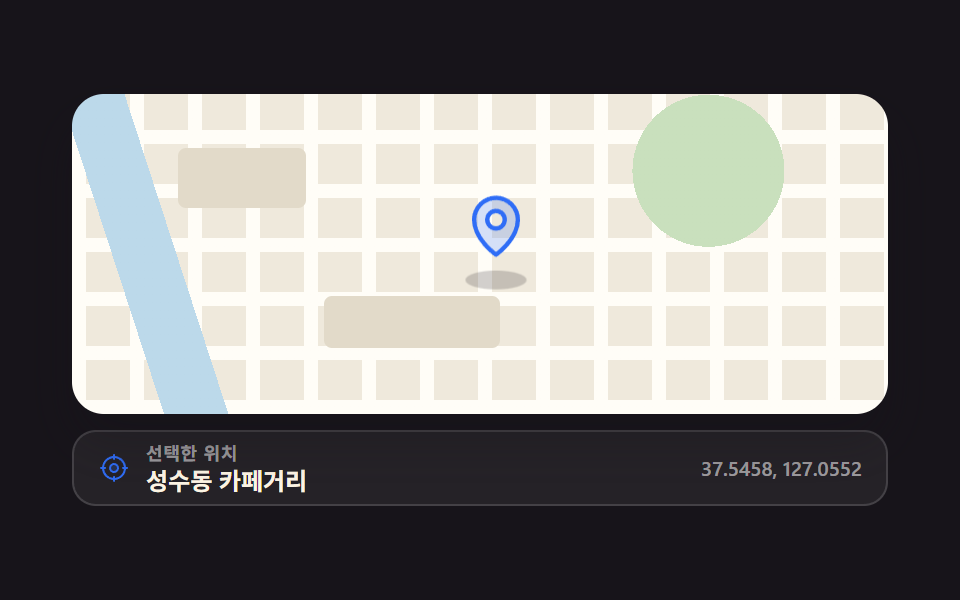 지도 ui 디자인 9종 — 누르면 핀이 떨어지는 위치 선택 화면지도 ui 디자인은 배달·예약 화면에서 "어디로 보낼까"를 지도 위에서 고르게 만드는 화면 설계입니다. 아홉 개 전부 지도 API 없이 CSS 격자로 그린 가짜 지도 위에서 돌아가고, 첫 번째는 누르면 핀이 떨어지는 이 글의 데모 전부 보기