06가장자리 스와이프 백
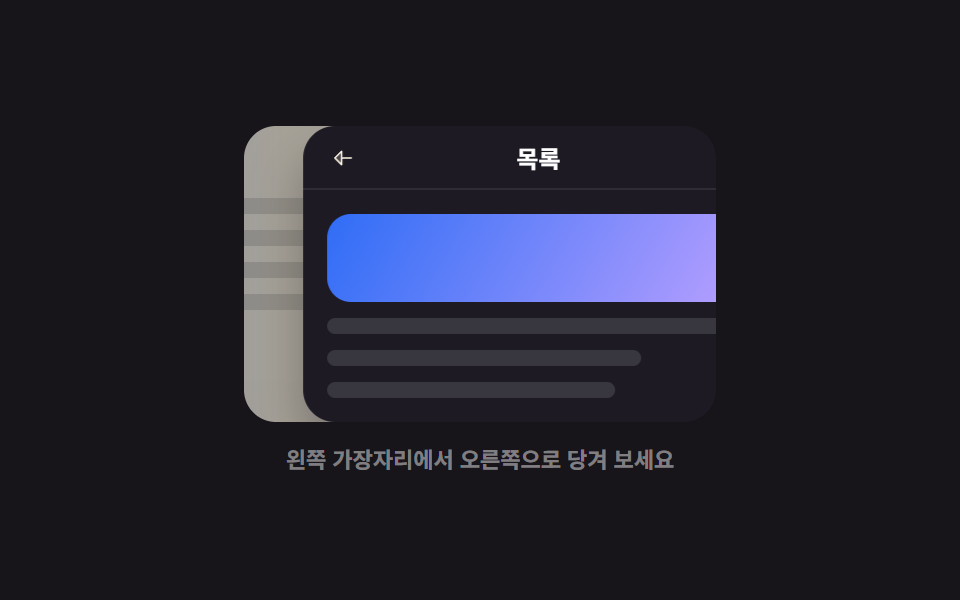
화면 왼쪽 가장자리에서 오른쪽으로 당기면 뒤에 있을 페이지가 반투명하게 미리 따라 나오고, 끝까지 당겨 놓아야 뒤로 이동이 확정되며 중간에 떼면 닫힙니다.
쓰임모바일 웹에서도 앱처럼 손가락 하나로 페이지를 되돌리게 하고 싶을 때
translateXthresholdhistory
<main class="stage">
  <div class="eb is-demo" id="eb-root">
    <div class="eb__frame" id="eb-frame">
      <div class="eb__prev" id="eb-prev" aria-hidden="true">
        <span class="eb__ptitle">목록</span>
        <i class="eb__ln"></i><i class="eb__ln"></i><i class="eb__ln"></i><i class="eb__ln"></i>
      </div>
      <div class="eb__cur" id="eb-cur">
        <div class="eb__bar">
          <button class="eb__back" type="button" id="eb-back" aria-label="뒤로 가기">
            <svg viewBox="0 0 256 256" width="14" height="14"><g fill="currentColor"><path d="M112 56v144l-72-72Z" opacity=".2"/><path d="M216 120h-96V56a8 8 0 0 0-13.66-5.66l-72 72a8 8 0 0 0 0 11.32l72 72A8 8 0 0 0 120 200v-64h96a8 8 0 0 0 0-16m-112 60.69L51.31 128L104 75.31Z"/></g></svg>
          </button>
          <span class="eb__ctitle eb__ctitle--a">상세 페이지</span>
          <span class="eb__ctitle eb__ctitle--b">목록</span>
        </div>
        <div class="eb__body">
          <span class="eb__hero"></span>
          <i class="eb__ln"></i><i class="eb__ln"></i><i class="eb__ln"></i>
        </div>
      </div>
      <span class="eb__edge" aria-hidden="true"></span>
    </div>
    <p class="eb__hint">왼쪽 가장자리에서 오른쪽으로 당겨 보세요</p>
  </div>
</main>@use "../../../../site/static/demo-tokens" as *;
$duration: $dur-base;
$easing: $ease-spring;
$color: $subject-blue;
@include stage($stage-ink);
.eb { display: flex; flex-direction: column; align-items: center; gap: $sp-3; user-select: none; -webkit-user-select: none; }
.eb__frame {
position: relative;
width: 236px;
height: 148px;
border-radius: $r-card;
overflow: hidden;
background: #101014;
touch-action: pan-y;
}
.eb__prev {
position: absolute;
inset: 0;
box-sizing: border-box;
display: flex;
flex-direction: column;
gap: $sp-2;
padding: $sp-3;
background: $subject-cream;
transform: translateX(-46%);
opacity: .45;
transition: transform $duration $easing, opacity $duration $easing;
}
.eb__ptitle { font-size: 13px; line-height: 16px; font-weight: 800; color: $subject-ink; }
.eb__ln { display: block; height: 8px; border-radius: $r-xs; background: rgba(23, 20, 26, .14); }
.eb__ln:nth-child(3) { width: 86%; }
.eb__ln:nth-child(4) { width: 68%; }
.eb__cur {
position: absolute;
inset: 0;
box-sizing: border-box;
display: flex;
flex-direction: column;
background: #1d1a24;
border-radius: $r-card;
box-shadow: $shadow-raised;
transition: transform $duration $easing;
}
.eb__bar {
display: flex;
align-items: center;
gap: $sp-2;
height: 32px;
padding: 0 $sp-2;
border-bottom: 1px solid rgba(255, 255, 255, .08);
}
.eb__back {
display: inline-flex; align-items: center; justify-content: center;
width: 24px; height: 24px;
border: 0;
background: none;
border-radius: 50%;
color: $subject-cream;
cursor: pointer;
transition: background $dur-quick $easing;
}
.eb__back:hover { background: rgba(255, 255, 255, .14); }
.eb__back:focus-visible { outline: 2px solid $color; outline-offset: 2px; }
.eb__ctitle {
font-size: 12px; line-height: 14px; font-weight: 700;
color: #fff;
opacity: 0;
transition: opacity $dur-quick steps(1, end);
}
.eb__ctitle.is-on { opacity: 1; }
.eb__body { display: flex; flex-direction: column; gap: $sp-2; padding: $sp-3; }
.eb__hero {
display: block;
height: 44px;
border-radius: $r-control;
background: linear-gradient(120deg, $color, $subject-lilac);
}
.eb__cur .eb__ln { background: rgba(255, 255, 255, .12); }
.eb__cur .eb__ln:nth-child(3) { width: 74%; }
.eb__edge {
position: absolute;
left: 0; top: 0; bottom: 0;
width: 20px;
background: linear-gradient(90deg, rgba(47, 109, 246, .5), transparent);
pointer-events: none;
}
.eb__hint {
margin: 0;
font-size: 11px; line-height: 14px; font-weight: 600;
color: rgba(255, 255, 255, .45);
}
// ── 자동 루프: 가장자리 당기기 → 확정(제목 교체) → 유지 → 되돌아가기 ──
.eb.is-demo .eb__prev { animation: eb-prev $dur-loop $easing infinite; }
@keyframes eb-prev {
0%, 10% { transform: translateX(-46%); opacity: .45; }
36%, 62% { transform: translateX(0); opacity: 1; }
86%, 100% { transform: translateX(-46%); opacity: .45; }
}
.eb.is-demo .eb__cur { animation: eb-cur $dur-loop $easing infinite; }
@keyframes eb-cur {
0%, 10% { transform: translateX(0); }
36%, 62% { transform: translateX(38%); }
86%, 100% { transform: translateX(0); }
}
.eb.is-demo .eb__ctitle { transition: none; }
.eb.is-demo .eb__ctitle--a { animation: eb-ta $dur-loop steps(1, end) infinite; }
.eb.is-demo .eb__ctitle--b { animation: eb-tb $dur-loop steps(1, end) infinite; }
@keyframes eb-ta { 0%, 35% { opacity: 1; } 36%, 85% { opacity: 0; } 86%, 100% { opacity: 1; } }
@keyframes eb-tb { 0%, 35% { opacity: 0; } 36%, 85% { opacity: 1; } 86%, 100% { opacity: 0; } }
.eb.is-demo .eb__edge { animation: eb-edge $dur-loop ease-in-out infinite; }
@keyframes eb-edge {
0%, 6% { opacity: 1; }
14%, 62% { opacity: 0; }
86%, 100% { opacity: 1; }
}
@media (prefers-reduced-motion: reduce) {
.eb.is-demo .eb__prev,
.eb.is-demo .eb__cur,
.eb.is-demo .eb__ctitle,
.eb.is-demo .eb__edge { animation: none !important; }
.eb__prev, .eb__cur { transition: none; }
}html, body {
margin: 0;
overflow: hidden;
}
.stage {
box-sizing: border-box;
min-height: 100vh;
display: grid;
place-items: center;
margin: 0;
background: #17141a;
font-family: -apple-system, "Segoe UI", "Noto Sans KR", sans-serif;
padding: clamp(8px, 4vw, 24px);
}
.eb {
display: flex;
flex-direction: column;
align-items: center;
gap: 12px;
user-select: none;
-webkit-user-select: none;
}
.eb__frame {
position: relative;
width: 236px;
height: 148px;
border-radius: 16px;
overflow: hidden;
background: #101014;
touch-action: pan-y;
}
.eb__prev {
position: absolute;
inset: 0;
box-sizing: border-box;
display: flex;
flex-direction: column;
gap: 8px;
padding: 12px;
background: #fff7e6;
transform: translateX(-46%);
opacity: 0.45;
transition: transform 300ms cubic-bezier(0.2, 0.8, 0.2, 1), opacity 300ms cubic-bezier(0.2, 0.8, 0.2, 1);
}
.eb__ptitle {
font-size: 13px;
line-height: 16px;
font-weight: 800;
color: #17141a;
}
.eb__ln {
display: block;
height: 8px;
border-radius: 4px;
background: rgba(23, 20, 26, 0.14);
}
.eb__ln:nth-child(3) {
width: 86%;
}
.eb__ln:nth-child(4) {
width: 68%;
}
.eb__cur {
position: absolute;
inset: 0;
box-sizing: border-box;
display: flex;
flex-direction: column;
background: #1d1a24;
border-radius: 16px;
box-shadow: 0 14px 24px rgba(23, 20, 26, 0.32);
transition: transform 300ms cubic-bezier(0.2, 0.8, 0.2, 1);
}
.eb__bar {
display: flex;
align-items: center;
gap: 8px;
height: 32px;
padding: 0 8px;
border-bottom: 1px solid rgba(255, 255, 255, 0.08);
}
.eb__back {
display: inline-flex;
align-items: center;
justify-content: center;
width: 24px;
height: 24px;
border: 0;
background: none;
border-radius: 50%;
color: #fff7e6;
cursor: pointer;
transition: background 220ms cubic-bezier(0.2, 0.8, 0.2, 1);
}
.eb__back:hover {
background: rgba(255, 255, 255, 0.14);
}
.eb__back:focus-visible {
outline: 2px solid #2f6df6;
outline-offset: 2px;
}
.eb__ctitle {
font-size: 12px;
line-height: 14px;
font-weight: 700;
color: #fff;
opacity: 0;
transition: opacity 220ms steps(1, end);
}
.eb__ctitle.is-on {
opacity: 1;
}
.eb__body {
display: flex;
flex-direction: column;
gap: 8px;
padding: 12px;
}
.eb__hero {
display: block;
height: 44px;
border-radius: 12px;
background: linear-gradient(120deg, #2f6df6, #b9a0ff);
}
.eb__cur .eb__ln {
background: rgba(255, 255, 255, 0.12);
}
.eb__cur .eb__ln:nth-child(3) {
width: 74%;
}
.eb__edge {
position: absolute;
left: 0;
top: 0;
bottom: 0;
width: 20px;
background: linear-gradient(90deg, rgba(47, 109, 246, 0.5), transparent);
pointer-events: none;
}
.eb__hint {
margin: 0;
font-size: 11px;
line-height: 14px;
font-weight: 600;
color: rgba(255, 255, 255, 0.45);
}
.eb.is-demo .eb__prev {
animation: eb-prev 2s cubic-bezier(0.2, 0.8, 0.2, 1) infinite;
}
@keyframes eb-prev {
0%, 10% {
transform: translateX(-46%);
opacity: 0.45;
}
36%, 62% {
transform: translateX(0);
opacity: 1;
}
86%, 100% {
transform: translateX(-46%);
opacity: 0.45;
}
}
.eb.is-demo .eb__cur {
animation: eb-cur 2s cubic-bezier(0.2, 0.8, 0.2, 1) infinite;
}
@keyframes eb-cur {
0%, 10% {
transform: translateX(0);
}
36%, 62% {
transform: translateX(38%);
}
86%, 100% {
transform: translateX(0);
}
}
.eb.is-demo .eb__ctitle {
transition: none;
}
.eb.is-demo .eb__ctitle--a {
animation: eb-ta 2s steps(1, end) infinite;
}
.eb.is-demo .eb__ctitle--b {
animation: eb-tb 2s steps(1, end) infinite;
}
@keyframes eb-ta {
0%, 35% {
opacity: 1;
}
36%, 85% {
opacity: 0;
}
86%, 100% {
opacity: 1;
}
}
@keyframes eb-tb {
0%, 35% {
opacity: 0;
}
36%, 85% {
opacity: 1;
}
86%, 100% {
opacity: 0;
}
}
.eb.is-demo .eb__edge {
animation: eb-edge 2s ease-in-out infinite;
}
@keyframes eb-edge {
0%, 6% {
opacity: 1;
}
14%, 62% {
opacity: 0;
}
86%, 100% {
opacity: 1;
}
}
@media (prefers-reduced-motion: reduce) {
.eb.is-demo .eb__prev,
.eb.is-demo .eb__cur,
.eb.is-demo .eb__ctitle,
.eb.is-demo .eb__edge {
animation: none !important;
}
.eb__prev, .eb__cur {
transition: none;
}
}// 실제 동작: 왼쪽 가장자리에서 당기면 이전 페이지가 반투명하게 따라 나오고, 끝까지 당겨야 확정.
var root = document.getElementById('eb-root');
var frame = document.getElementById('eb-frame');
var prev = document.getElementById('eb-prev');
var cur = document.getElementById('eb-cur');
var back = document.getElementById('eb-back');
var TITLES = ['eb__ctitle--a', 'eb__ctitle--b'];
var atDetail = true, x0 = 0, dragging = false;
function paint(p) { // p: 0..1
prev.style.transform = 'translateX(' + (-46 + p * 46) + '%)';
prev.style.opacity = String(.45 + p * .55);
cur.style.transform = 'translateX(' + (p * 38) + '%)';
}
function settle() { paint(atDetail ? 0 : 1); }
frame.addEventListener('pointerdown', function (e) {
var r = frame.getBoundingClientRect();
if (e.clientX - r.left > 28) return; // 가장자리 잡기 영역
root.classList.remove('is-demo');
dragging = true; x0 = e.clientX;
frame.setPointerCapture(e.pointerId);
prev.style.transition = 'none';
cur.style.transition = 'none';
e.preventDefault();
});
frame.addEventListener('pointermove', function (e) {
if (!dragging) return;
var p = Math.max(0, Math.min(1, (e.clientX - x0) / (frame.clientWidth * .55)));
paint(p);
});
function drop(e) {
if (!dragging) return;
dragging = false;
prev.style.transition = '';
cur.style.transition = '';
var p = Math.max(0, Math.min(1, (e.clientX - x0) / (frame.clientWidth * .55)));
if (p > .72) {
atDetail = false;
document.querySelectorAll('.eb__ctitle').forEach(function (t) { t.classList.toggle('is-on', t.classList.contains(TITLES[atDetail ? 0 : 1])); });
settle();
} else { settle(); }
}
frame.addEventListener('pointerup', drop);
frame.addEventListener('pointercancel', drop);
back.addEventListener('click', function () {
root.classList.remove('is-demo');
atDetail = !atDetail;
document.querySelectorAll('.eb__ctitle').forEach(function (t) { t.classList.toggle('is-on', t.classList.contains(TITLES[atDetail ? 0 : 1])); });
prev.style.transition = '';
cur.style.transition = '';
settle();
});
document.querySelector('.eb__ctitle--a').classList.add('is-on');
settle();import { useRef, useState } from "react";
import type { CSSProperties } from "react";
import styles from "./EdgeSwipeBack.module.scss";
export type EdgeSwipeBackProps = {
currentLabel?: string;
backLabel?: string;
duration?: number;
easing?: string;
color?: string;
};
type PEvt = { clientX: number; clientY: number; pointerId: number; preventDefault(): void; currentTarget: { setPointerCapture(id: number): void } };
type Box<T> = { current: T };
type Vars = CSSProperties & { "--duration"?: string; "--easing"?: string; "--color"?: string };
const IconBack = () => (
<svg viewBox="0 0 256 256" width="14" height="14"><g fill="currentColor"><path d="M112 56v144l-72-72Z" opacity=".2"/><path d="M216 120h-96V56a8 8 0 0 0-13.66-5.66l-72 72a8 8 0 0 0 0 11.32l72 72A8 8 0 0 0 120 200v-64h96a8 8 0 0 0 0-16m-112 60.69L51.31 128L104 75.31Z"/></g></svg>
);
export default function EdgeSwipeBack({
currentLabel = "Detail page",
backLabel = "List",
duration = 300,
easing = "cubic-bezier(.2,.8,.2,1)",
color = "#2f6df6",
}: EdgeSwipeBackProps) {
const [p, setP] = useState(0); // 0..1 진행
const [atDetail, setAtDetail] = useState(true);
const frameRef = useRef<HTMLDivElement>(null);
const drag = useRef({ on: false, x0: 0 }) as Box<{ on: boolean; x0: number }>;
const vars: Vars = { "--duration": `${duration}ms`, "--easing": easing, "--color": color };
const shown = atDetail ? p : 1 - p; // 화면에 보이는 당김 정도
function onDown(e: PEvt) {
const r = (frameRef.current as HTMLDivElement).getBoundingClientRect();
if (e.clientX - r.left > 28) return;
drag.current = { on: true, x0: e.clientX };
e.currentTarget.setPointerCapture(e.pointerId);
e.preventDefault();
}
function onMove(e: PEvt) {
if (!drag.current.on) return;
const r = (frameRef.current as HTMLDivElement).getBoundingClientRect();
setP(Math.max(0, Math.min(1, (e.clientX - drag.current.x0) / (r.width * 0.55))));
}
function onUp() {
if (!drag.current.on) return;
drag.current.on = false;
if (p > 0.72) setAtDetail(false);
setP(0);
}
function goBack() {
setAtDetail((d) => !d);
setP(0);
}
return (
<div className={styles.eb} style={vars}>
<div
ref={frameRef}
className={styles.frame}
onPointerDown={onDown}
onPointerMove={onMove}
onPointerUp={onUp}
onPointerCancel={onUp}
>
<div
className={styles.prev}
style={{ transform: `translateX(${-46 + shown * 46}%)`, opacity: 0.45 + shown * 0.55 }}
aria-hidden="true"
>
<span className={styles.ptitle}>{backLabel}</span>
<i className={styles.ln} /><i className={`${styles.ln} ${styles.lnS}`} /><i className={`${styles.ln} ${styles.lnM}`} /><i className={styles.ln} />
</div>
<div className={styles.cur} style={{ transform: `translateX(${shown * 38}%)` }}>
<div className={styles.bar}>
<button type="button" className={styles.back} aria-label="Go back" onClick={goBack}>
<IconBack />
</button>
<span className={styles.ctitle}>{atDetail ? currentLabel : backLabel}</span>
</div>
<div className={styles.body}>
<span className={styles.hero} />
<i className={`${styles.ln} ${styles.lnDark}`} /><i className={`${styles.ln} ${styles.lnDark} ${styles.lnS}`} />
</div>
</div>
<span className={styles.edge} aria-hidden="true" style={{ opacity: 1 - shown }} />
</div>
<p className={styles.hint}>Drag in from the left edge</p>
</div>
);
}06 가장자리 스와이프 백 — 측정 누적면적 15.798% · 움직인 프레임 14/23GODRICH 원작 · zip 에 SCSS·React 포함 · 모바일 터치 제스처 9종 — 손가락 하나로 돌아가는 UI
이 데모가 속한 글
 모바일 터치 제스처 9종 — 손가락 하나로 돌아가는 UI모바일 터치 제스처는 손가락이 화면에 닿아 움직인 거리와 속도를 읽어 화면을 바꾸는 조작 방식입니다. 아홉 개 중 둘은 손을 떼는 순간에야 결과가 갈리고, 하나는 끝까지 밀지 않으면 아무 일도 일어나지 않습니다. 이 글의 데모 전부 보기