07러버밴드 경계 저항
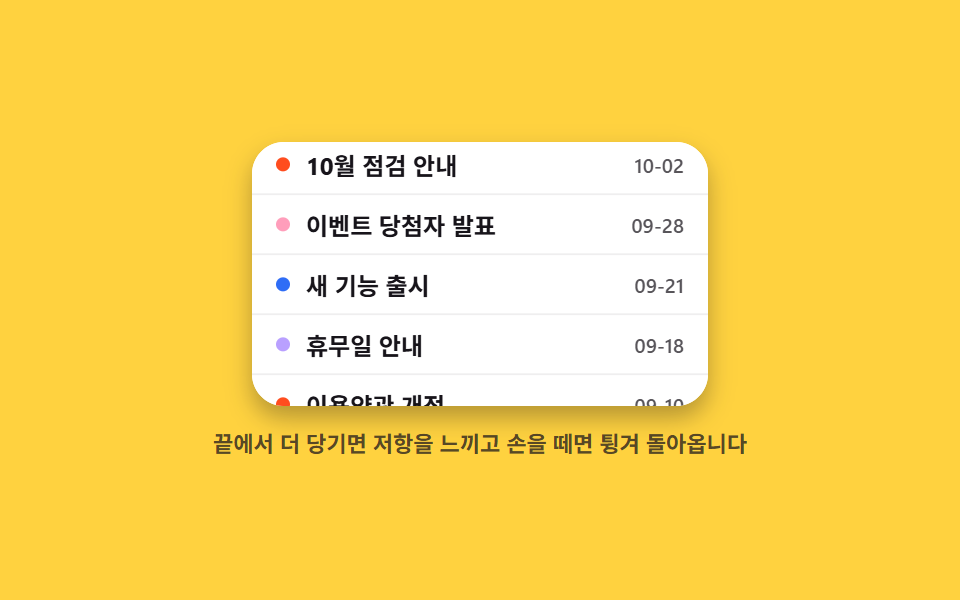
목록 끝에서 더 당기면 점점 저항이 커지며 내용이 늘어나다 따라가고, 손을 떼면 원래 길이로 탄력 있게 튕겨 돌아옵니다.
쓰임더 이상 위에 콘텐츠가 없다는 걸 부드럽게 알려 주고 싶은 짧은 목록·캔버스 화면
overscrollresistancecubic-bezier
<main class="stage">
  <div class="rb is-demo" id="rb-root">
    <div class="rb__view" id="rb-view" tabindex="0" role="group" aria-label="공지 목록 — 화살표 키로 끝 확인">
      <span class="rb__end rb__end--top" id="rb-top" aria-hidden="true">이전 공지가 없습니다</span>
      <div class="rb__inner" id="rb-inner">
        <div class="rb__row"><span class="rb__dot"></span><strong>10월 점검 안내</strong><time>10-02</time></div>
        <div class="rb__row"><span class="rb__dot rb__dot--pink"></span><strong>이벤트 당첨자 발표</strong><time>09-28</time></div>
        <div class="rb__row"><span class="rb__dot rb__dot--blue"></span><strong>새 기능 출시</strong><time>09-21</time></div>
        <div class="rb__row"><span class="rb__dot rb__dot--lilac"></span><strong>휴무일 안내</strong><time>09-18</time></div>
        <div class="rb__row"><span class="rb__dot"></span><strong>이용약관 개정</strong><time>09-10</time></div>
      </div>
      <span class="rb__end rb__end--bottom" id="rb-bottom" aria-hidden="true">마지막 공지입니다</span>
    </div>
    <p class="rb__hint">끝에서 더 당기면 저항을 느끼고 손을 떼면 튕겨 돌아옵니다</p>
  </div>
</main>
@use "../../../../site/static/demo-tokens" as *;
$duration: $dur-enter;
$easing: $ease-pop;
$color: $subject-ink;
@include stage($stage-yellow);
.rb { display: flex; flex-direction: column; align-items: center; gap: $sp-3; user-select: none; -webkit-user-select: none; }
.rb__view {
position: relative;
width: min(228px, 84vw);
height: 132px;
overflow: hidden;
background: #fff;
border-radius: $r-card;
box-shadow: $shadow-press;
touch-action: none;
cursor: grab;
}
.rb__view:active { cursor: grabbing; }
.rb__view:focus-visible { outline: 3px solid rgba(23, 20, 26, .5); outline-offset: 2px; }
.rb__inner {
transition: transform $duration $easing;
will-change: transform;
}
.rb__row {
box-sizing: border-box;
display: flex;
align-items: center;
gap: $sp-2;
height: 30px;
padding: 0 $sp-3;
border-bottom: 1px solid rgba(23, 20, 26, .07);
background: #fff;
}
.rb__row strong { flex: 1; font-size: 12px; line-height: 14px; font-weight: 700; color: $subject-ink; }
.rb__row time { font-size: 10px; line-height: 12px; font-weight: 600; color: rgba(23, 20, 26, .72); }
.rb__dot { width: 7px; height: 7px; border-radius: 50%; background: $stage-orange; }
.rb__dot--pink { background: $subject-pink; }
.rb__dot--blue { background: $subject-blue; }
.rb__dot--lilac { background: $subject-lilac; }
.rb__end {
position: absolute;
left: 0; right: 0;
display: flex;
align-items: center;
justify-content: center;
height: 24px;
background: $subject-ink;
color: $subject-cream;
font-size: 10px; line-height: 12px; font-weight: 700;
opacity: 0;
transform: translateY(-100%);
transition: opacity $dur-quick steps(1, end);
pointer-events: none;
}
.rb__end--top { top: 0; }
.rb__end--bottom { bottom: 0; transform: translateY(100%); }
.rb__end.is-on { opacity: 1; }
.rb__hint {
margin: 0;
font-size: 11px; line-height: 14px; font-weight: 600;
color: rgba(23, 20, 26, .72);
}
// ── 자동 루프: 위 끝 당김(저항) → 튕겨 복귀 → 아래 끝 당김 → 복귀. 튕김은 ease-pop ──
.rb.is-demo .rb__inner { animation: rb-band $dur-loop infinite; }
@keyframes rb-band {
0%, 8% { transform: translateY(0); }
22% { transform: translateY(13px); }
30% { transform: translateY(-5px); }
36%, 46% { transform: translateY(0); }
60% { transform: translateY(-13px); }
68% { transform: translateY(5px); }
74%, 100% { transform: translateY(0); }
}
.rb.is-demo .rb__end { transition: none; }
.rb.is-demo .rb__end--top { animation: rb-endt $dur-loop steps(1, end) infinite; }
.rb.is-demo .rb__end--bottom { animation: rb-endb $dur-loop steps(1, end) infinite; }
@keyframes rb-endt { 0%, 21% { opacity: 0; } 22%, 34% { opacity: 1; } 35%, 100% { opacity: 0; } }
@keyframes rb-endb { 0%, 59% { opacity: 0; } 60%, 72% { opacity: 1; } 73%, 100% { opacity: 0; } }
@media (prefers-reduced-motion: reduce) {
.rb.is-demo .rb__inner,
.rb.is-demo .rb__end { animation: none !important; }
.rb__inner { transition: none; }
}html, body {
margin: 0;
overflow: hidden;
}
.stage {
box-sizing: border-box;
min-height: 100vh;
display: grid;
place-items: center;
margin: 0;
background: #ffd23f;
font-family: -apple-system, "Segoe UI", "Noto Sans KR", sans-serif;
padding: clamp(8px, 4vw, 24px);
}
.rb {
display: flex;
flex-direction: column;
align-items: center;
gap: 12px;
user-select: none;
-webkit-user-select: none;
}
.rb__view {
position: relative;
width: min(228px, 84vw);
height: 132px;
overflow: hidden;
background: #fff;
border-radius: 16px;
box-shadow: 0 6px 12px rgba(23, 20, 26, 0.32);
touch-action: none;
cursor: grab;
}
.rb__view:active {
cursor: grabbing;
}
.rb__view:focus-visible {
outline: 3px solid rgba(23, 20, 26, 0.5);
outline-offset: 2px;
}
.rb__inner {
transition: transform 600ms cubic-bezier(0.2, 1.4, 0.4, 1);
will-change: transform;
}
.rb__row {
box-sizing: border-box;
display: flex;
align-items: center;
gap: 8px;
height: 30px;
padding: 0 12px;
border-bottom: 1px solid rgba(23, 20, 26, 0.07);
background: #fff;
}
.rb__row strong {
flex: 1;
font-size: 12px;
line-height: 14px;
font-weight: 700;
color: #17141a;
}
.rb__row time {
font-size: 10px;
line-height: 12px;
font-weight: 600;
color: rgba(23, 20, 26, 0.72);
}
.rb__dot {
width: 7px;
height: 7px;
border-radius: 50%;
background: #ff4d1f;
}
.rb__dot--pink {
background: #ff9ebb;
}
.rb__dot--blue {
background: #2f6df6;
}
.rb__dot--lilac {
background: #b9a0ff;
}
.rb__end {
position: absolute;
left: 0;
right: 0;
display: flex;
align-items: center;
justify-content: center;
height: 24px;
background: #17141a;
color: #fff7e6;
font-size: 10px;
line-height: 12px;
font-weight: 700;
opacity: 0;
transform: translateY(-100%);
transition: opacity 220ms steps(1, end);
pointer-events: none;
}
.rb__end--top {
top: 0;
}
.rb__end--bottom {
bottom: 0;
transform: translateY(100%);
}
.rb__end.is-on {
opacity: 1;
}
.rb__hint {
margin: 0;
font-size: 11px;
line-height: 14px;
font-weight: 600;
color: rgba(23, 20, 26, 0.72);
}
.rb.is-demo .rb__inner {
animation: rb-band 2s infinite;
}
@keyframes rb-band {
0%, 8% {
transform: translateY(0);
}
22% {
transform: translateY(13px);
}
30% {
transform: translateY(-5px);
}
36%, 46% {
transform: translateY(0);
}
60% {
transform: translateY(-13px);
}
68% {
transform: translateY(5px);
}
74%, 100% {
transform: translateY(0);
}
}
.rb.is-demo .rb__end {
transition: none;
}
.rb.is-demo .rb__end--top {
animation: rb-endt 2s steps(1, end) infinite;
}
.rb.is-demo .rb__end--bottom {
animation: rb-endb 2s steps(1, end) infinite;
}
@keyframes rb-endt {
0%, 21% {
opacity: 0;
}
22%, 34% {
opacity: 1;
}
35%, 100% {
opacity: 0;
}
}
@keyframes rb-endb {
0%, 59% {
opacity: 0;
}
60%, 72% {
opacity: 1;
}
73%, 100% {
opacity: 0;
}
}
@media (prefers-reduced-motion: reduce) {
.rb.is-demo .rb__inner,
.rb.is-demo .rb__end {
animation: none !important;
}
.rb__inner {
transition: none;
}
}// 실제 동작: 끝에서 더 당기면 점점 저항(거리/3)이 붙고, 떼면 탄력으로 복귀. 화살표 키도 같은 반발을 보여준다.
var root = document.getElementById('rb-root');
var view = document.getElementById('rb-view');
var inner = document.getElementById('rb-inner');
var topEnd = document.getElementById('rb-top');
var bottomEnd = document.getElementById('rb-bottom');
var y0 = 0, dragging = false, cur = 0;
function bounds() {
return { top: 0, bottom: Math.max(0, inner.offsetHeight - view.clientHeight + 2) };
}
function paint(y) {
var b = bounds();
var yd = y;
if (yd < b.top) yd = b.top + (yd - b.top) / 3; // 위 끝: 거리의 1/3만 따라오는 저항
if (yd > b.bottom) yd = b.bottom + (yd - b.bottom) / 3;
cur = y;
inner.style.transform = 'translateY(' + (-yd) + 'px)';
topEnd.classList.toggle('is-on', y < -6);
bottomEnd.classList.toggle('is-on', y > b.bottom + 6);
}
view.addEventListener('pointerdown', function (e) {
root.classList.remove('is-demo');
dragging = true; y0 = e.clientY + cur;
view.setPointerCapture(e.pointerId);
inner.style.transition = 'none';
e.preventDefault();
});
view.addEventListener('pointermove', function (e) {
if (!dragging) return;
paint(y0 - e.clientY); // 손가락을 아래로 당기면 콘텐츠도 아래로 늘어난다
});
function drop() {
if (!dragging) return;
dragging = false;
inner.style.transition = '';
var b = bounds();
paint(Math.max(b.top, Math.min(b.bottom, cur)));
}
view.addEventListener('pointerup', drop);
view.addEventListener('pointercancel', drop);
view.addEventListener('keydown', function (e) {
var b = bounds();
if (e.key === 'ArrowUp') { root.classList.remove('is-demo'); bounce(b.top - 26); e.preventDefault(); }
else if (e.key === 'ArrowDown') { root.classList.remove('is-demo'); bounce(b.bottom + 26); e.preventDefault(); }
});
function bounce(y) {
inner.style.transition = 'none';
paint(y);
window.setTimeout(function () {
inner.style.transition = '';
var b = bounds();
paint(Math.max(b.top, Math.min(b.bottom, y)));
}, 240);
}
paint(0);import { useRef, useState } from "react";
import type { CSSProperties } from "react";
import styles from "./RubberBand.module.scss";
export type RubberBandProps = {
rows?: string[];
topLabel?: string;
bottomLabel?: string;
duration?: number;
easing?: string;
color?: string;
};
type PEvt = { clientX: number; clientY: number; pointerId: number; preventDefault(): void; currentTarget: { setPointerCapture(id: number): void } };
type KeyEvt = { key: string; preventDefault(): void };
type Box<T> = { current: T };
type Vars = CSSProperties & { "--duration"?: string; "--easing"?: string; "--color"?: string };
export default function RubberBand({
rows = ["October maintenance", "Event winners announced", "New feature released", "Holiday notice", "Terms updated"],
topLabel = "No earlier notices",
bottomLabel = "This is the last notice",
duration = 600,
easing = "cubic-bezier(.2,1.4,.4,1)",
color = "#17141a",
}: RubberBandProps) {
const [y, setY] = useState(0);
const [bounce, setBounce] = useState(false);
const viewRef = useRef<HTMLDivElement>(null);
const innerRef = useRef<HTMLDivElement>(null);
const drag = useRef({ on: false, y0: 0 }) as Box<{ on: boolean; y0: number }>;
const vars: Vars = { "--duration": `${duration}ms`, "--easing": easing, "--color": color };
function bounds() {
const v = viewRef.current, i = innerRef.current;
const bottom = v && i ? Math.max(0, i.offsetHeight - v.clientHeight + 2) : 0;
return { top: 0, bottom };
}
function display(yv: number) {
const b = bounds();
let yd = yv;
if (yd < b.top) yd = b.top + (yd - b.top) / 3;
if (yd > b.bottom) yd = b.bottom + (yd - b.bottom) / 3;
return yd;
}
function onDown(e: PEvt) {
drag.current = { on: true, y0: e.clientY + y };
e.currentTarget.setPointerCapture(e.pointerId);
setBounce(false);
e.preventDefault();
}
function onMove(e: PEvt) {
if (!drag.current.on) return;
setY(drag.current.y0 - e.clientY);
}
function onUp() {
if (!drag.current.on) return;
drag.current.on = false;
const b = bounds();
setBounce(true);
setY(Math.max(b.top, Math.min(b.bottom, y)));
}
function onKey(e: KeyEvt) {
const b = bounds();
if (e.key === "ArrowUp") { setBounce(false); setY(b.top - 26); window.setTimeout((): void => { setBounce(true); setY(0); }, 240); e.preventDefault(); }
else if (e.key === "ArrowDown") { setBounce(false); setY(b.bottom + 26); window.setTimeout((): void => { setBounce(true); setY(b.bottom); }, 240); e.preventDefault(); }
}
return (
<div className={styles.rb} style={vars}>
<div
ref={viewRef}
className={styles.view}
tabIndex={0}
role="group"
aria-label="Notice list — arrow keys check the ends"
onPointerDown={onDown}
onPointerMove={onMove}
onPointerUp={onUp}
onPointerCancel={onUp}
onKeyDown={onKey}
>
<span className={y < -6 ? styles.endOn : styles.endTop} aria-hidden="true">{topLabel}</span>
<div ref={innerRef} className={bounce ? styles.innerBounce : styles.inner} style={{ transform: `translateY(${-display(y)}px)` }}>
{rows.map((r, i) => (
<div key={r} className={styles.row}>
<span className={i % 4 === 0 ? styles.dot : i % 4 === 1 ? styles.dotPink : i % 4 === 2 ? styles.dotBlue : styles.dotLilac} />
<strong>{r}</strong>
<time>{`10-0${(5 - i)}`}</time>
</div>
))}
</div>
<span className={y > bounds().bottom + 6 ? styles.endOn : styles.endBottom} aria-hidden="true">{bottomLabel}</span>
</div>
<p className={styles.hint}>Past the end each pixel drags harder, and releasing springs it back</p>
</div>
);
}07 러버밴드 경계 저항 — 측정 누적면적 11.048% · 움직인 프레임 15/23GODRICH 원작 · zip 에 SCSS·React 포함 · 모바일 터치 제스처 9종 — 손가락 하나로 돌아가는 UI
이 데모가 속한 글
 모바일 터치 제스처 9종 — 손가락 하나로 돌아가는 UI모바일 터치 제스처는 손가락이 화면에 닿아 움직인 거리와 속도를 읽어 화면을 바꾸는 조작 방식입니다. 아홉 개 중 둘은 손을 떼는 순간에야 결과가 갈리고, 하나는 끝까지 밀지 않으면 아무 일도 일어나지 않습니다. 이 글의 데모 전부 보기