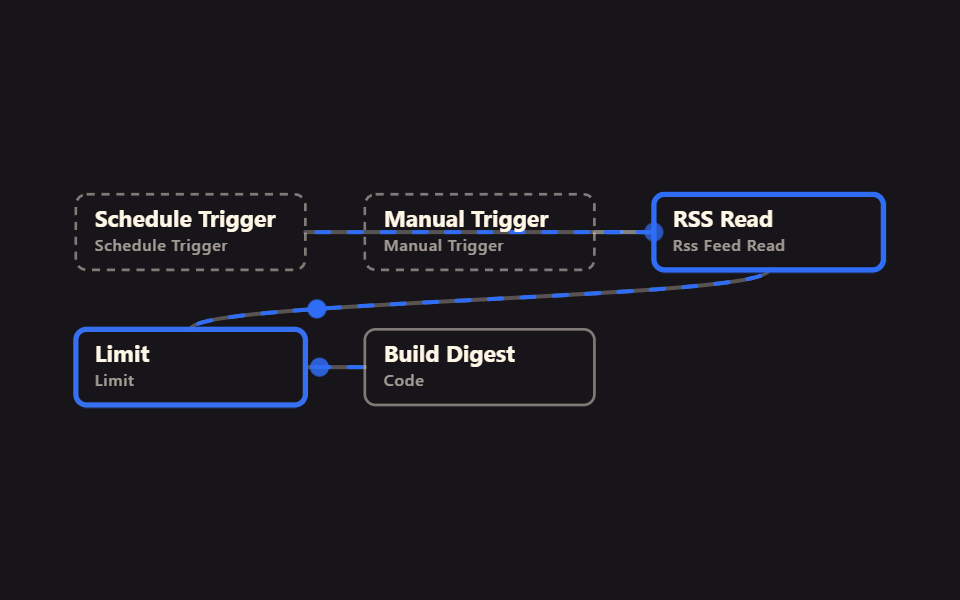
01매일 할 일 요약
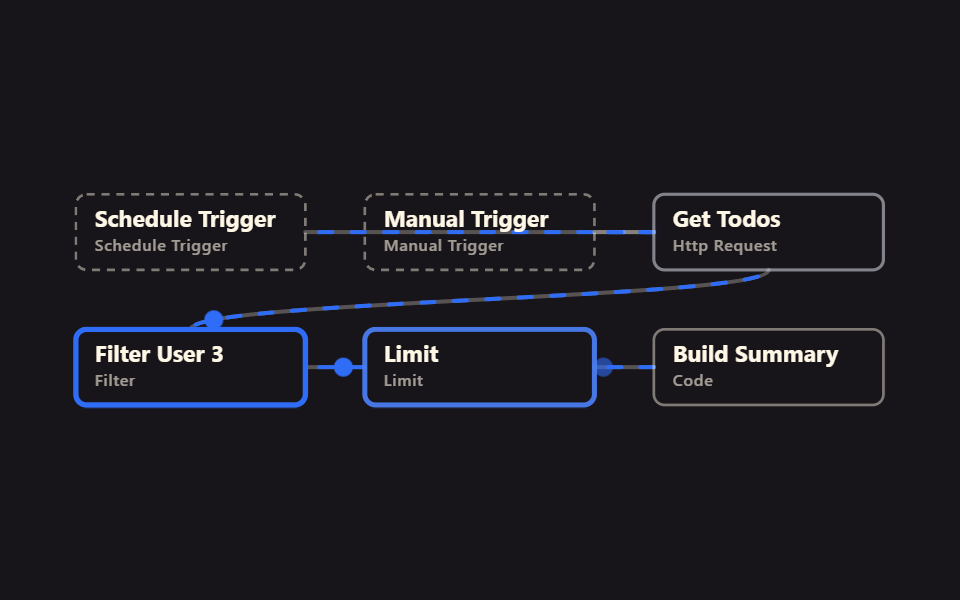
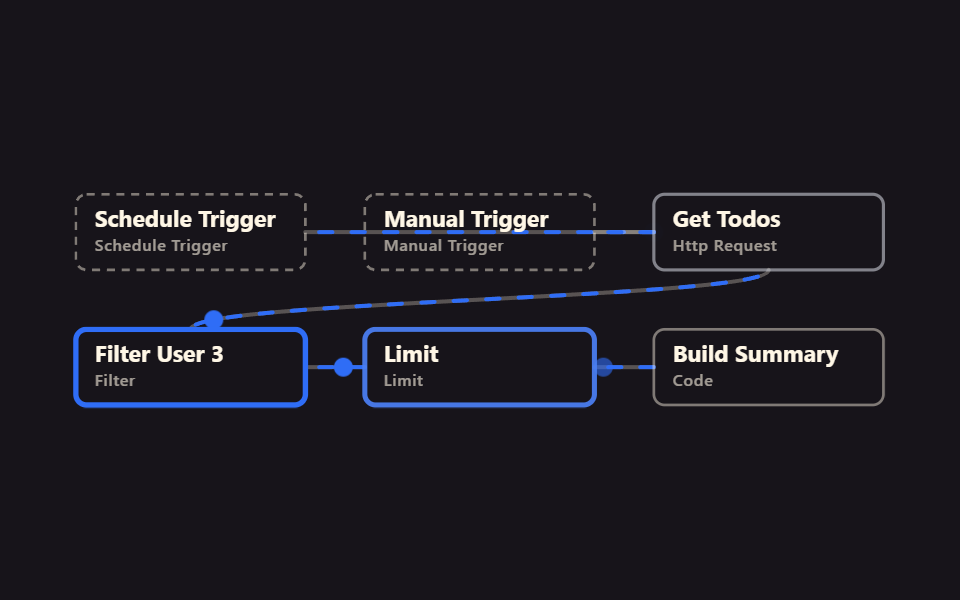
Schedule 트리거가 아침 8시마다 깨어나 HTTP 로 할 일 목록을 가져오고 Filter 가 완료된 것만 남긴 뒤 Code 노드가 다섯 줄 요약을 만든다. 가장 짧은 일간 리포트 뼈대다.
쓰임아침 업무 브리핑, 완료 항목 확인
Schedule triggerAtHourFilter → CodeV2 실행 확인
<main class="stage">
<svg class="flow" viewBox="-28 -28 654 212" xmlns="http://www.w3.org/2000/svg" role="img" aria-label="godrich 204-01 daily-todo-digest">
<path class="edge" d="M170 28 C299 28 299 28 428 28"/>
<path class="edge edge--flow" style="--i:0" d="M170 28 C299 28 299 28 428 28"/>
<circle class="pulse" style="--i:0;offset-path:path('M170 28 C299 28 299 28 428 28')" r="7"/>
<path class="edge" d="M384 28 C406 28 406 28 428 28"/>
<path class="edge edge--flow" style="--i:1" d="M384 28 C406 28 406 28 428 28"/>
<circle class="pulse" style="--i:1;offset-path:path('M384 28 C406 28 406 28 428 28')" r="7"/>
<path class="edge" d="M513 56 C513 78 85 78 85 100"/>
<path class="edge edge--flow" style="--i:2" d="M513 56 C513 78 85 78 85 100"/>
<circle class="pulse" style="--i:2;offset-path:path('M513 56 C513 78 85 78 85 100')" r="7"/>
<path class="edge" d="M170 128 C192 128 192 128 214 128"/>
<path class="edge edge--flow" style="--i:3" d="M170 128 C192 128 192 128 214 128"/>
<circle class="pulse" style="--i:3;offset-path:path('M170 128 C192 128 192 128 214 128')" r="7"/>
<path class="edge" d="M384 128 C406 128 406 128 428 128"/>
<path class="edge edge--flow" style="--i:4" d="M384 128 C406 128 406 128 428 128"/>
<circle class="pulse" style="--i:4;offset-path:path('M384 128 C406 128 406 128 428 128')" r="7"/>
<g class="node node--trigger" style="--i:0" transform="translate(0 0)"><rect class="node__box" width="170" height="56"/><text class="node__name" x="14" y="24">Schedule Trigger</text><text class="node__type" x="14" y="42">Schedule Trigger</text></g>
<g class="node node--trigger" style="--i:1" transform="translate(214 0)"><rect class="node__box" width="170" height="56"/><text class="node__name" x="14" y="24">Manual Trigger</text><text class="node__type" x="14" y="42">Manual Trigger</text></g>
<g class="node" style="--i:2" transform="translate(428 0)"><rect class="node__box" width="170" height="56"/><text class="node__name" x="14" y="24">Get Todos</text><text class="node__type" x="14" y="42">Http Request</text></g>
<g class="node" style="--i:3" transform="translate(0 100)"><rect class="node__box" width="170" height="56"/><text class="node__name" x="14" y="24">Filter User 3</text><text class="node__type" x="14" y="42">Filter</text></g>
<g class="node" style="--i:4" transform="translate(214 100)"><rect class="node__box" width="170" height="56"/><text class="node__name" x="14" y="24">Limit</text><text class="node__type" x="14" y="42">Limit</text></g>
<g class="node" style="--i:5" transform="translate(428 100)"><rect class="node__box" width="170" height="56"/><text class="node__name" x="14" y="24">Build Summary</text><text class="node__type" x="14" y="42">Code</text></g>
</svg>
</main>@use "../../../../site/static/demo-tokens" as *;
// ── 변수 3개 ──────────────────────────────────────────
$duration: $dur-loop; // 한 바퀴 (데모 2초와 같은 값 — gif 가 끊기지 않게)
$easing: linear; // 대시 흐름은 등속
$color: $subject-blue; // 강조(흐름·켜진 노드) 색
$ink: $subject-cream; // 글자·테두리
$n: 6; // 노드 수 — 켜지는 순서 간격
@include stage($stage-ink);
.flow { width: 100%; height: 100%; max-height: 100vh; display: block; overflow: visible; }
.edge { fill: none; stroke: $ink; stroke-opacity: .28; stroke-width: 3; stroke-linecap: round; }
.edge--flow { stroke: $color; stroke-opacity: 1; stroke-dasharray: 10 14; animation: flow $duration $easing infinite; }
@keyframes flow { to { stroke-dashoffset: -48; } }
.node__box { fill: transparent; stroke: $ink; stroke-opacity: .45; stroke-width: 2; rx: $r-sm; }
.node__name { fill: $ink; font-weight: 700; font-size: 17px; font-family: -apple-system, "Segoe UI", sans-serif; }
.node__type { fill: $ink; fill-opacity: .6; font-weight: 500; font-size: 12px; font-family: -apple-system, "Segoe UI", sans-serif; letter-spacing: .04em; }
.node--trigger .node__box { stroke-dasharray: 6 5; }
// 켜진 노드는 테두리가 강조색으로 두꺼워진다 (filter 대신 stroke — 렌더 비용). --i 는 <g> 에서 상속된다
.node .node__box { animation: box-lit $duration $ease-spring infinite; animation-delay: calc(var(--i) * #{$duration} / #{$n}); }
@keyframes box-lit {
0%, 100% { stroke: $ink; stroke-opacity: .45; stroke-width: 2; }
12%, 32% { stroke: $color; stroke-opacity: 1; stroke-width: 4; }
50% { stroke: $ink; stroke-opacity: .45; stroke-width: 2; }
}
.pulse { fill: $color; offset-distance: 0%; offset-rotate: 0deg; animation: travel $duration $ease-out infinite; animation-delay: calc(var(--i) * #{$duration} / #{$n}); }
@keyframes travel {
0% { offset-distance: 0%; opacity: 0; }
10% { opacity: 1; }
45% { offset-distance: 100%; opacity: 1; }
55%, 100% { offset-distance: 100%; opacity: 0; }
}
@media (prefers-reduced-motion: reduce) {
.edge--flow, .node, .node .node__box, .pulse { animation: none; }
.edge--flow { stroke-dasharray: none; } // 흐름은 멈추고 연결선만 남긴다
.pulse { display: none; }
}html, body {
margin: 0;
overflow: hidden;
}
.stage {
box-sizing: border-box;
min-height: 100vh;
display: grid;
place-items: center;
margin: 0;
background: #17141a;
font-family: -apple-system, "Segoe UI", "Noto Sans KR", sans-serif;
padding: clamp(8px, 4vw, 24px);
}
.flow {
width: 100%;
height: 100%;
max-height: 100vh;
display: block;
overflow: visible;
}
.edge {
fill: none;
stroke: #fff7e6;
stroke-opacity: 0.28;
stroke-width: 3;
stroke-linecap: round;
}
.edge--flow {
stroke: #2f6df6;
stroke-opacity: 1;
stroke-dasharray: 10 14;
animation: flow 2s linear infinite;
}
@keyframes flow {
to {
stroke-dashoffset: -48;
}
}
.node__box {
fill: transparent;
stroke: #fff7e6;
stroke-opacity: 0.45;
stroke-width: 2;
rx: 8px;
}
.node__name {
fill: #fff7e6;
font-weight: 700;
font-size: 17px;
font-family: -apple-system, "Segoe UI", sans-serif;
}
.node__type {
fill: #fff7e6;
fill-opacity: 0.6;
font-weight: 500;
font-size: 12px;
font-family: -apple-system, "Segoe UI", sans-serif;
letter-spacing: 0.04em;
}
.node--trigger .node__box {
stroke-dasharray: 6 5;
}
.node .node__box {
animation: box-lit 2s cubic-bezier(0.2, 0.8, 0.2, 1) infinite;
animation-delay: calc(var(--i) * 2s / 6);
}
@keyframes box-lit {
0%, 100% {
stroke: #fff7e6;
stroke-opacity: 0.45;
stroke-width: 2;
}
12%, 32% {
stroke: #2f6df6;
stroke-opacity: 1;
stroke-width: 4;
}
50% {
stroke: #fff7e6;
stroke-opacity: 0.45;
stroke-width: 2;
}
}
.pulse {
fill: #2f6df6;
offset-distance: 0%;
offset-rotate: 0deg;
animation: travel 2s ease-out infinite;
animation-delay: calc(var(--i) * 2s / 6);
}
@keyframes travel {
0% {
offset-distance: 0%;
opacity: 0;
}
10% {
opacity: 1;
}
45% {
offset-distance: 100%;
opacity: 1;
}
55%, 100% {
offset-distance: 100%;
opacity: 0;
}
}
@media (prefers-reduced-motion: reduce) {
.edge--flow, .node, .node .node__box, .pulse {
animation: none;
}
.edge--flow {
stroke-dasharray: none;
}
.pulse {
display: none;
}
}01 매일 할 일 요약 — 측정 누적면적 6.786% · 움직인 프레임 23/23GODRICH 원작 · zip 에 SCSS·React 포함 · 반복 업무 자동화, 계정 없이 n8n으로 먼저 확인하기
이 데모가 속한 글
 반복 업무 자동화, 계정 없이 n8n으로 먼저 확인하기n8n은 여러 앱과 API를 코드 없이 연결하는 자동화 도구입니다. 계정 다섯 개 만들기 전에, 내 반복 업무 자동화가 실제로 되는지부터 확인하고 싶은 분들을 위해 그대로 가져와 실행할 수 있는 9가지를 준비했습니다 이 글의 데모 전부 보기