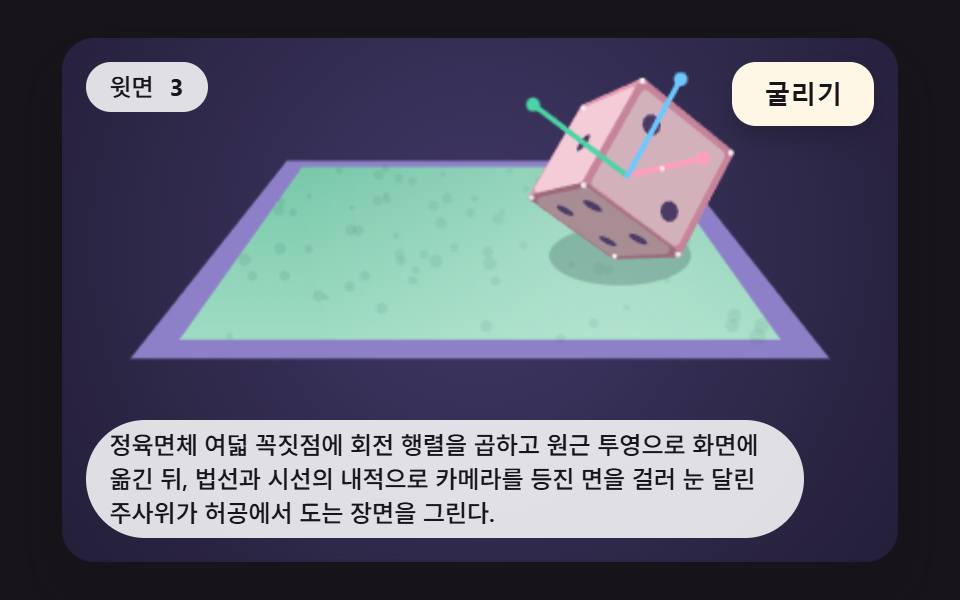
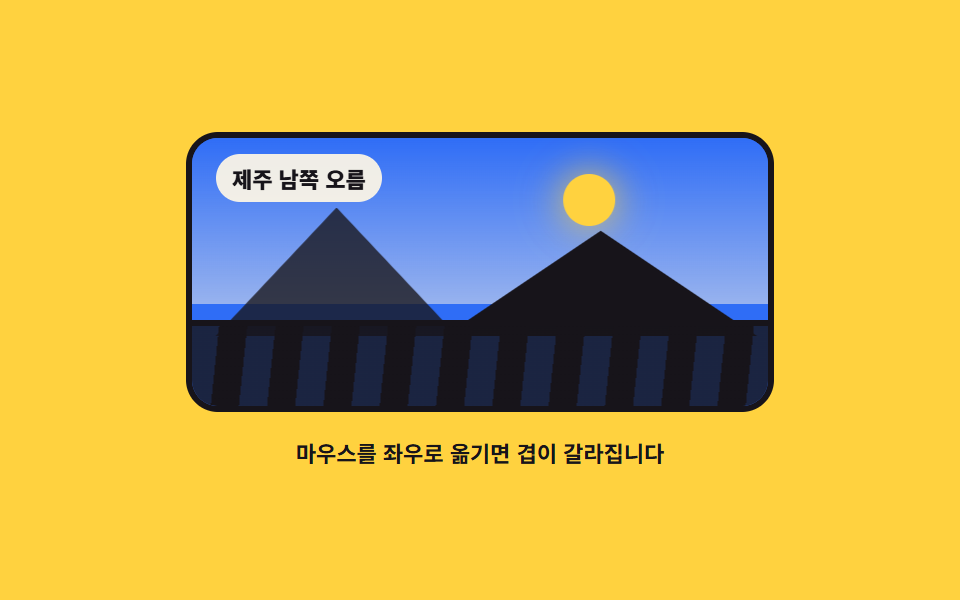
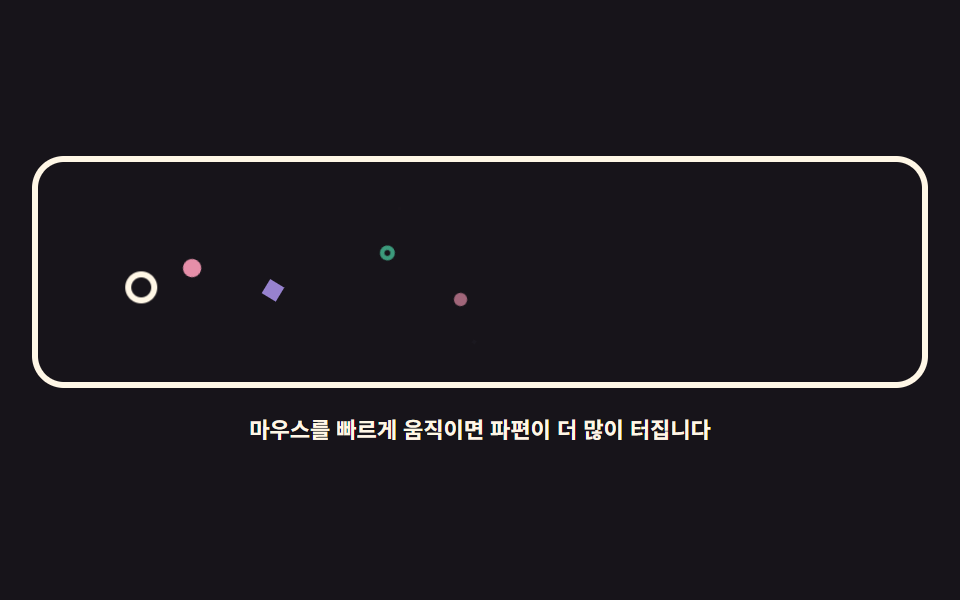
02지형 높이맵 씬 — 마우스로 도는 잔물결 구릉
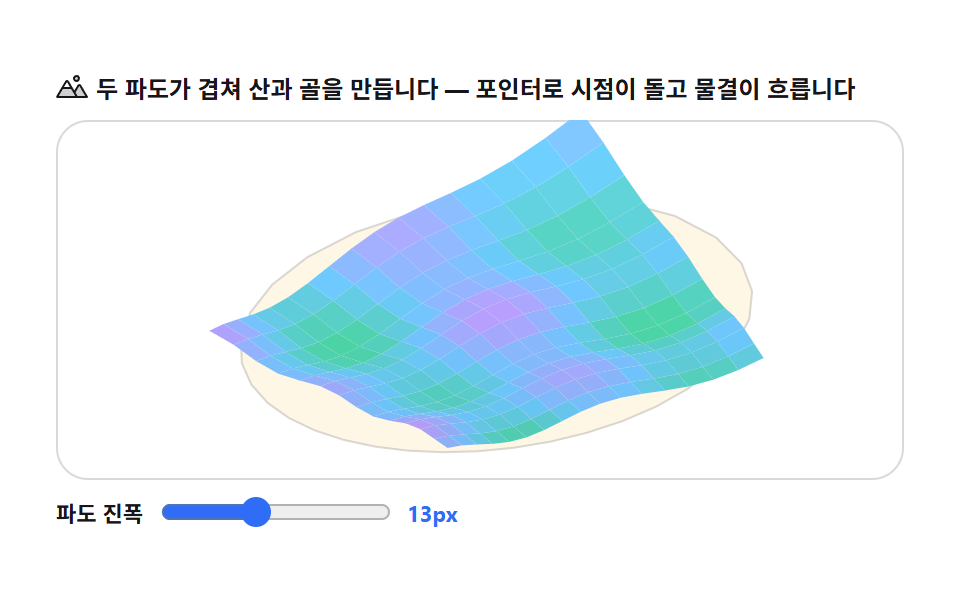
격자 점의 높이를 사인파 두 개로 계산하고 원근 투영으로 그리는, 마우스 각도로 도는 지형 씬입니다.
쓰임게임·지도 서비스 소개
focalsinbeginPath
<main class="stage">
<div class="tf is-demo" id="tfRoot">
  <p class="tf__hint">
    <svg class="tf__ico" viewBox="0 0 256 256" aria-hidden="true"><g fill="currentColor"><path d="M144 52a20 20 0 1 1 20 20a20 20 0 0 1-20-20m49.44 55.92a8 8 0 0 0-13.77 0l-33 55.75l-21-35.67H50.35L8 200h240Z" opacity=".2"/><path d="M164 80a28 28 0 1 0-28-28a28 28 0 0 0 28 28m0-40a12 12 0 1 1-12 12a12 12 0 0 1 12-12m90.88 155.92l-54.56-92.08A15.87 15.87 0 0 0 186.55 96a15.85 15.85 0 0 0-13.76 7.84L146.63 148l-44.84-76.1a16 16 0 0 0-27.58 0L1.11 195.94A8 8 0 0 0 8 208h240a8 8 0 0 0 6.88-12.08M88 80l23.57 40H64.43ZM22 192l33-56h66l33 56Zm150.57 0l-16.66-28.28L186.55 112L234 192Z"/></g></svg>
    <span>두 파도가 겹쳐 산과 골을 만듭니다 — 포인터로 시점이 돌고 물결이 흐릅니다</span>
  </p>
  <div class="tf__field" id="tfField" role="application" aria-label="지형 원근 실험판" tabindex="0">
    <canvas class="tf__cv" id="tfCv"></canvas>
  </div>
  <div class="tf__bar">
    <label class="tf__dial">파도 진폭
      <input type="range" id="tfAmp" min="4" max="26" step="1" value="13" aria-label="파도 진폭">
      <b class="tf__val" id="tfAmpVal">13px</b>
    </label>
  </div>
</div>
</main>
@use "../../../../site/static/demo-tokens" as *;
// 지형 높이맵 미니어처 — 캔버스 rAF 루프만 움직인다. CSS 는 무대·판·다이얼.
// $stage-paper 위 파스텔 지형(mint→sky→lilac 보간) — 어두운 무대 대비 밝은 톤.
$duration: $dur-loop;
$easing: $ease-spring;
$color: $subject-mint;
@include stage($stage-paper);
.tf {
--tf-mint: #{$subject-mint};
--tf-sky: #{$subject-sky};
--tf-lilac: #{$subject-lilac};
--tf-cream: #{$subject-cream};
--tf-paper: #{$stage-paper};
--tf-line: rgba(#{red($subject-ink)}, #{green($subject-ink)}, #{blue($subject-ink)}, .16);
display: flex; flex-direction: column; gap: $sp-2;
width: 100%; max-width: 424px;
}
.tf__hint {
display: flex; align-items: center; gap: $sp-1; margin: 0;
font-weight: 700; font-size: clamp(10px, 2.8vw, 12px); line-height: 1.35;
color: $subject-ink;
}
.tf__ico { width: 16px; height: 16px; flex: 0 0 auto; color: $subject-ink; }
.tf__field {
position: relative; height: 180px;
border-radius: $r-card; overflow: hidden;
background: $stage-paper;
box-shadow: inset 0 0 0 1px rgba($subject-ink, .16);
cursor: crosshair; touch-action: none;
}
.tf__field:focus-visible { outline: 2px solid $subject-blue; outline-offset: 2px; }
.tf__cv { display: block; width: 100%; height: 100%; }
.tf__bar { display: flex; align-items: center; gap: $sp-3; }
.tf__dial {
display: flex; align-items: center; gap: $sp-2;
font-weight: 700; font-size: 11px; color: $subject-ink;
}
.tf__dial input { width: 116px; margin: 0; accent-color: $subject-blue; }
.tf__val { color: $subject-blue; font-size: 11px; font-weight: 700; }
@media (max-width: 340px) {
.tf { gap: $sp-1; }
.tf__field { height: 100px; }
.tf__dial { gap: $sp-1; }
.tf__dial input { width: 68px; }
.tf__hint { font-size: 10px; }
}
// reduce — 멈춘 한 장이 남는다. 커서 신호만 거둔다.
@media (prefers-reduced-motion: reduce) {
.tf.is-still .tf__field { cursor: default !important; }
}html, body {
margin: 0;
overflow: hidden;
}
.stage {
box-sizing: border-box;
min-height: 100vh;
display: grid;
place-items: center;
margin: 0;
background: #ffffff;
font-family: -apple-system, "Segoe UI", "Noto Sans KR", sans-serif;
padding: clamp(8px, 4vw, 24px);
}
.tf {
--tf-mint: #4cd4a6;
--tf-sky: #6ec8ff;
--tf-lilac: #b9a0ff;
--tf-cream: #fff7e6;
--tf-paper: #ffffff;
--tf-line: rgba(23, 20, 26, .16);
display: flex;
flex-direction: column;
gap: 8px;
width: 100%;
max-width: 424px;
}
.tf__hint {
display: flex;
align-items: center;
gap: 4px;
margin: 0;
font-weight: 700;
font-size: clamp(10px, 2.8vw, 12px);
line-height: 1.35;
color: #17141a;
}
.tf__ico {
width: 16px;
height: 16px;
flex: 0 0 auto;
color: #17141a;
}
.tf__field {
position: relative;
height: 180px;
border-radius: 16px;
overflow: hidden;
background: #ffffff;
box-shadow: inset 0 0 0 1px rgba(23, 20, 26, 0.16);
cursor: crosshair;
touch-action: none;
}
.tf__field:focus-visible {
outline: 2px solid #2f6df6;
outline-offset: 2px;
}
.tf__cv {
display: block;
width: 100%;
height: 100%;
}
.tf__bar {
display: flex;
align-items: center;
gap: 12px;
}
.tf__dial {
display: flex;
align-items: center;
gap: 8px;
font-weight: 700;
font-size: 11px;
color: #17141a;
}
.tf__dial input {
width: 116px;
margin: 0;
accent-color: #2f6df6;
}
.tf__val {
color: #2f6df6;
font-size: 11px;
font-weight: 700;
}
@media (max-width: 340px) {
.tf {
gap: 4px;
}
.tf__field {
height: 100px;
}
.tf__dial {
gap: 4px;
}
.tf__dial input {
width: 68px;
}
.tf__hint {
font-size: 10px;
}
}
@media (prefers-reduced-motion: reduce) {
.tf.is-still .tf__field {
cursor: default !important;
}
}// 지형 높이맵 미니어처 — 17×13 격자의 높이를 두 사인파의 합으로 계산하고(계산으로 움직인다),
// 셀을 사다리꼴 리본(채운 면)으로 그린다. 선만 그리면 면적이 안 나오므로 반드시 fill.
// 카메라는 고정 고도각, 포인터 좌우로 편요(pan)·상하로 약간의 상하(pitch).
(function () {
// ── 변형 상수 블록 — 아래 값 하나만 바꿔 변형 3종을 만든다 ──
var AMP = 13; // 파도 기본 진폭(월드 단위) — 다이얼로도 움직인다
var F1 = 1.7; // x 방향 파도 주파수
var F2 = 2.3; // y 방향 파도 주파수
var LOOP_MS = 2000; // 미리보기 가상 포인터 주기
// ────────────────────────────────────────────────────
var root = document.getElementById('tfRoot');
var field = document.getElementById('tfField');
var cv = document.getElementById('tfCv');
var ctx = cv.getContext('2d');
var ampIn = document.getElementById('tfAmp');
var ampOut = document.getElementById('tfAmpVal');
var css = getComputedStyle(root);
function tok(name) { return css.getPropertyValue(name).trim(); }
var C_MINT = tok('--tf-mint');
var C_SKY = tok('--tf-sky');
var C_LILAC = tok('--tf-lilac');
var C_CREAM = tok('--tf-cream');
var C_PAPER = tok('--tf-paper');
var C_LINE = tok('--tf-line');
var COLS = 17, ROWS = 13, TAU = Math.PI * 2;
var ALT = 0.62; // 카메라 고도각(라디안) — 내려다보는 각
var reduce = window.matchMedia('(prefers-reduced-motion: reduce)').matches;
var W = 0, H = 0, dpr = 1;
var amp = Number(ampIn.value);
var heading = 0; // 편요(라디안) — 포인터 좌우
var pitch = 0; // 추가 상하(라디안) — 포인터 상하 ±0.14
var px01 = 0.5, py01 = 0.5;
var manual = false;
var last = 0, raf = 0, t0 = -1;
function fit() {
var r = field.getBoundingClientRect();
dpr = window.devicePixelRatio || 1;
W = r.width; H = r.height;
cv.width = Math.round(W * dpr);
cv.height = Math.round(H * dpr);
ctx.setTransform(dpr, 0, 0, dpr, 0, 0);
}
function height(i, j, t) {
var x = i / (COLS - 1) * TAU; // 0..TAU
var y = j / (ROWS - 1) * TAU;
return Math.sin(x * F1 + t) * 0.62 + Math.sin(y * F2 + t * 0.8) * 0.38
+ Math.sin((x + y) * 0.9 + t * 1.3) * 0.18;
}
// 셀 (i,j) 네 모서리의 월드 좌표 → 회전 → 투영
function corner(i, j, t) {
var wx = (i / (COLS - 1) - 0.5) * 430;
var wz = (j / (ROWS - 1) - 0.5) * 340;
var wy = height(i, j, t) * amp;
var ch = Math.cos(heading), sh = Math.sin(heading);
var x1 = wx * ch - wz * sh;
var z1 = wx * sh + wz * ch;
// 카메라 고도각 ALT + pitch — x축 회전으로 들여다본다
var a = ALT + pitch;
var ca = Math.cos(a), sa = Math.sin(a);
var y2 = wy * ca - z1 * sa;
var z2 = wy * sa + z1 * ca;
var focal = 300;
var s = focal / (focal + z2 + 300);
return { sx: W * 0.5 + x1 * s, sy: H * 0.62 - y2 * s, s: s, h: wy };
}
// 높이 → 색: mint → sky → lilac 파스텔 보간
function shade(h, s) {
var u = Math.max(0, Math.min(1, (h / amp) * 0.5 + 0.5)); // 0..1
function lerp(a, b, t) { return Math.round(a + (b - a) * t); }
function mix(c1, c2, t) {
return [lerp(c1[0], c2[0], t), lerp(c1[1], c2[1], t), lerp(c1[2], c2[2], t)];
}
var mint = [76, 212, 166], sky = [110, 200, 255], lilac = [185, 160, 255];
var c = u < 0.5 ? mix(mint, sky, u * 2) : mix(sky, lilac, (u - 0.5) * 2);
// 셀 방향 음영 — 북쪽 면(위 = j 작은 쪽)을 밝게, 아래를 어둡게(입체감 한 겹)
var lit = 0.9 + 0.18 * s;
return 'rgb(' + Math.round(c[0] * lit) + ',' + Math.round(c[1] * lit) + ',' + Math.round(c[2] * lit) + ')';
}
function draw(t) {
ctx.clearRect(0, 0, W, H);
var focal = 300;
// 바닥 받침 판 — 지형보다 한 단계 아래 얇은 크림 베이스(모형 받침)
var base = [];
for (var b = 0; b <= 32; b++) {
var ga = b / 32 * TAU - Math.PI / 2;
var wx = Math.cos(ga) * 252, wz = Math.sin(ga) * 208;
var ch = Math.cos(heading), sh = Math.sin(heading);
var x1 = wx * ch - wz * sh, z1 = wx * sh + wz * ch;
var a = ALT + pitch, ca = Math.cos(a), sa = Math.sin(a);
var y2 = -26 * ca - z1 * sa;
var z2 = -26 * sa + z1 * ca;
var sc = focal / (focal + z2 + 300);
base.push({ sx: W * 0.5 + x1 * sc, sy: H * 0.62 - y2 * sc });
}
ctx.beginPath();
ctx.moveTo(base[0].sx, base[0].sy);
for (var bi = 1; bi < base.length; bi++) ctx.lineTo(base[bi].sx, base[bi].sy);
ctx.closePath();
ctx.fillStyle = C_CREAM;
ctx.fill();
ctx.strokeStyle = C_LINE;
ctx.lineWidth = 1;
ctx.stroke();
// 지형 리본 — 뒤(먼 z) 행부터 앞으로. 셀마다 사다리꼴 fill(선이 아니라 면).
var count = 0;
for (var j = ROWS - 1; j >= 0; j--) {
for (var i = 0; i < COLS - 1; i++) {
var p00 = corner(i, j, t), p10 = corner(i + 1, j, t);
var p01c = corner(i, j + 1, t), p11 = corner(i + 1, j + 1, t);
ctx.beginPath();
ctx.moveTo(p00.sx, p00.sy);
ctx.lineTo(p10.sx, p10.sy);
ctx.lineTo(p11.sx, p11.sy);
ctx.lineTo(p01c.sx, p01c.sy);
ctx.closePath();
var hAvg = (p00.h + p10.h + p01c.h + p11.h) / 4;
var sAvg = (p00.s + p11.s) / 2;
ctx.fillStyle = shade(hAvg, sAvg);
ctx.fill();
count++;
}
}
// 정상 봉우리 표식 — 가장 높은 셀 위 크림 점(지도 핀 느낌)
var best = null;
for (var jj = 0; jj < ROWS; jj++) {
for (var ii = 0; ii < COLS; ii++) {
var hh = height(ii, jj, t);
if (!best || hh > best.h) best = { i: ii, j: jj, h: hh };
}
}
var pk = corner(best.i, best.j, t);
ctx.beginPath();
ctx.arc(pk.sx, pk.sy - 3, 2.6, 0, TAU);
ctx.fillStyle = C_PAPER;
ctx.fill();
}
function frame(now) {
if (t0 < 0) t0 = now;
var dt = last ? Math.min((now - last) / 1000, 0.05) : 0.016;
last = now;
var t = (now - t0) / 1000;
if (!manual) {
// 미리보기 가상 포인터 — 시드 고정 Lissajous(표 밖 자연 경로)
var ph = ((now - t0) % LOOP_MS) / LOOP_MS * TAU;
px01 = 0.5 + 0.4 * Math.sin(ph);
py01 = 0.5 + 0.34 * Math.sin(2 * ph + 0.7);
}
heading += ((px01 - 0.5) * 1.9 - heading) * 0.1;
pitch += ((py01 - 0.5) * 0.28 - pitch) * 0.1;
draw(t);
raf = requestAnimationFrame(frame);
}
function setAmp(v) {
amp = Number(v);
ampOut.textContent = amp + 'px';
if (reduce) draw(0.6);
}
ampIn.addEventListener('input', function () { setAmp(ampIn.value); });
field.addEventListener('pointermove', function (e) {
var r = field.getBoundingClientRect();
px01 = Math.min(1, Math.max(0, (e.clientX - r.left) / r.width));
py01 = Math.min(1, Math.max(0, (e.clientY - r.top) / r.height));
if (!manual) { manual = true; root.classList.remove('is-demo'); }
if (reduce) { heading = (px01 - 0.5) * 1.9; pitch = (py01 - 0.5) * 0.28; draw(0.6); }
});
field.addEventListener('pointerleave', function () {
if (manual) { px01 = 0.5; py01 = 0.5; }
});
field.addEventListener('keydown', function (e) {
var d = { ArrowLeft: [-0.07, 0], ArrowRight: [0.07, 0], ArrowUp: [0, -0.06], ArrowDown: [0, 0.06] }[e.key];
if (!d) return;
e.preventDefault();
if (!manual) { manual = true; root.classList.remove('is-demo'); }
px01 = Math.max(0, Math.min(1, px01 + d[0]));
py01 = Math.max(0, Math.min(1, py01 + d[1]));
if (reduce) { heading = (px01 - 0.5) * 1.9; pitch = (py01 - 0.5) * 0.28; draw(0.6); }
});
window.addEventListener('resize', function () { fit(); if (reduce) draw(0.6); });
fit();
if (reduce) {
// reduce — 파도가 멈춘 한 장. 봉우리가 읽히는 각도로 고정
heading = 0.5; pitch = -0.05;
draw(0.6);
root.classList.add('is-still');
} else {
raf = requestAnimationFrame(frame);
}
})();// HeightfieldTerrain — vanilla 판(run/307/demo/02-scene3d-heightfield-terrain/index.html) 의 React 포트.
// 17×13 격자의 높이를 두 사인파의 합으로 계산하고(계산으로 움직인다), 셀을 사다리꼴 리본(채운 면)으로
// 그린다. 선만 그리면 면적이 안 나오므로 반드시 fill. 카메라는 고정 고도각, 포인터 좌우로 편요(pan)
// ·상하로 약간의 상하(pitch). 미리보기는 시드 고정 Lissajous 로 자동 재생한다.
import { useEffect, useRef, useState } from "react";
import type { CSSProperties } from "react";
import styles from "./HeightfieldTerrain.module.scss";
export type HeightfieldTerrainProps = {
duration?: string;
easing?: string;
color?: string;
};
type Vars = CSSProperties & { "--duration"?: string; "--easing"?: string; "--color"?: string };
// useRef 는 T | null 을 돌려준다. 처음부터 값이 있고 절대 비지 않는 상자는 이렇게 좁혀 쓴다
type Box<T> = { current: T };
// React 의 이벤트 제네릭이 없는 환경이라 필요한 것만 로컬로 선언한다
type PointerEvt = { clientX: number; clientY: number };
type KeyEvt = { key: string; preventDefault(): void };
type InputEvt = { target: { value: string } };
type Corner = { sx: number; sy: number; s: number; h: number };
type Colors = { cream: string; paper: string; line: string };
type Size = { w: number; h: number; dpr: number };
const AMP = 13; // 파도 기본 진폭(월드 단위) — 다이얼로도 움직인다
const F1 = 1.7; // x 방향 파도 주파수
const F2 = 2.3; // y 방향 파도 주파수
const LOOP_MS = 2000; // 미리보기 가상 포인터 주기
const COLS = 17, ROWS = 13, TAU = Math.PI * 2;
const ALT = 0.62; // 카메라 고도각(라디안) — 내려다보는 각
const FOCAL = 300;
const FIELD_LABEL = "지형 원근 실험판";
const STILL_T = 0.6; // reduce 에서 그리는 파동 시각 — 봉우리가 읽히는 각도의 한 장
export default function HeightfieldTerrain({
duration = "2s",
easing = "cubic-bezier(.2, .8, .2, 1)",
color = "#4cd4a6",
}: HeightfieldTerrainProps) {
const rootRef = useRef<HTMLDivElement | null>(null);
const fieldRef = useRef<HTMLDivElement | null>(null);
const cvRef = useRef<HTMLCanvasElement | null>(null);
const ctxRef = useRef<CanvasRenderingContext2D | null>(null);
const sizeRef = useRef({ w: 0, h: 0, dpr: 1 }) as Box<Size>;
const colRef = useRef<Colors | null>(null);
const ampRef = useRef(AMP) as Box<number>;
const headingRef = useRef(0) as Box<number>; // 편요(라디안) — 포인터 좌우
const pitchRef = useRef(0) as Box<number>; // 추가 상하(라디안) — 포인터 상하 ±0.14
const pxRef = useRef(0.5) as Box<number>;
const pyRef = useRef(0.5) as Box<number>;
const manualRef = useRef(false) as Box<boolean>;
const lastRef = useRef(0) as Box<number>;
const t0Ref = useRef(-1) as Box<number>;
const rafRef = useRef(0) as Box<number>;
const [amp, setAmp] = useState(AMP);
const [still, setStill] = useState(false);
const vars: Vars = { "--duration": duration, "--easing": easing, "--color": color };
function reduced(): boolean {
return window.matchMedia("(prefers-reduced-motion: reduce)").matches;
}
function fit(): void {
const field = fieldRef.current;
const cv = cvRef.current;
if (!field || !cv) return;
const ctx = cv.getContext("2d");
if (!ctx) return;
const size = sizeRef.current;
const r = field.getBoundingClientRect();
size.dpr = window.devicePixelRatio || 1;
size.w = r.width;
size.h = r.height;
cv.width = Math.round(size.w * size.dpr);
cv.height = Math.round(size.h * size.dpr);
ctx.setTransform(size.dpr, 0, 0, size.dpr, 0, 0);
ctxRef.current = ctx;
}
function height(i: number, j: number, t: number): number {
const x = (i / (COLS - 1)) * TAU; // 0..TAU
const y = (j / (ROWS - 1)) * TAU;
return Math.sin(x * F1 + t) * 0.62 + Math.sin(y * F2 + t * 0.8) * 0.38
+ Math.sin((x + y) * 0.9 + t * 1.3) * 0.18;
}
// 셀 (i,j) 네 모서리의 월드 좌표 → 회전 → 투영
function corner(i: number, j: number, t: number): Corner {
const size = sizeRef.current;
const heading = headingRef.current, pitch = pitchRef.current, amp = ampRef.current;
const wx = (i / (COLS - 1) - 0.5) * 430;
const wz = (j / (ROWS - 1) - 0.5) * 340;
const wy = height(i, j, t) * amp;
const ch = Math.cos(heading), sh = Math.sin(heading);
const x1 = wx * ch - wz * sh;
const z1 = wx * sh + wz * ch;
// 카메라 고도각 ALT + pitch — x축 회전으로 들여다본다
const a = ALT + pitch;
const ca = Math.cos(a), sa = Math.sin(a);
const y2 = wy * ca - z1 * sa;
const z2 = wy * sa + z1 * ca;
const s = FOCAL / (FOCAL + z2 + 300);
return { sx: size.w * 0.5 + x1 * s, sy: size.h * 0.62 - y2 * s, s, h: wy };
}
// 높이 → 색: mint → sky → lilac 파스텔 보간
function shade(h: number, s: number): string {
const u = Math.max(0, Math.min(1, (h / ampRef.current) * 0.5 + 0.5)); // 0..1
const lerp = (a: number, b: number, t: number) => Math.round(a + (b - a) * t);
const mix = (c1: number[], c2: number[], t: number) =>
[lerp(c1[0], c2[0], t), lerp(c1[1], c2[1], t), lerp(c1[2], c2[2], t)];
const mint = [76, 212, 166], sky = [110, 200, 255], lilac = [185, 160, 255];
const c = u < 0.5 ? mix(mint, sky, u * 2) : mix(sky, lilac, (u - 0.5) * 2);
// 셀 방향 음영 — 북쪽 면(위 = j 작은 쪽)을 밝게, 아래를 어둡게(입체감 한 겹)
const lit = 0.9 + 0.18 * s;
return "rgb(" + Math.round(c[0] * lit) + "," + Math.round(c[1] * lit) + "," + Math.round(c[2] * lit) + ")";
}
function draw(t: number): void {
const ctx = ctxRef.current;
const col = colRef.current;
if (!ctx || !col) return;
const size = sizeRef.current;
ctx.clearRect(0, 0, size.w, size.h);
const heading = headingRef.current, pitch = pitchRef.current;
// 바닥 받침 판 — 지형보다 한 단계 아래 얇은 크림 베이스(모형 받침)
const base: { sx: number; sy: number }[] = [];
for (let b = 0; b <= 32; b++) {
const ga = (b / 32) * TAU - Math.PI / 2;
const wx = Math.cos(ga) * 252, wz = Math.sin(ga) * 208;
const ch = Math.cos(heading), sh = Math.sin(heading);
const x1 = wx * ch - wz * sh, z1 = wx * sh + wz * ch;
const a = ALT + pitch, ca = Math.cos(a), sa = Math.sin(a);
const y2 = -26 * ca - z1 * sa;
const z2 = -26 * sa + z1 * ca;
const sc = FOCAL / (FOCAL + z2 + 300);
base.push({ sx: size.w * 0.5 + x1 * sc, sy: size.h * 0.62 - y2 * sc });
}
ctx.beginPath();
ctx.moveTo(base[0].sx, base[0].sy);
for (let bi = 1; bi < base.length; bi++) ctx.lineTo(base[bi].sx, base[bi].sy);
ctx.closePath();
ctx.fillStyle = col.cream;
ctx.fill();
ctx.strokeStyle = col.line;
ctx.lineWidth = 1;
ctx.stroke();
// 지형 리본 — 뒤(먼 z) 행부터 앞으로. 셀마다 사다리꼴 fill(선이 아니라 면).
for (let j = ROWS - 1; j >= 0; j--) {
for (let i = 0; i < COLS - 1; i++) {
const p00 = corner(i, j, t), p10 = corner(i + 1, j, t);
const p01c = corner(i, j + 1, t), p11 = corner(i + 1, j + 1, t);
ctx.beginPath();
ctx.moveTo(p00.sx, p00.sy);
ctx.lineTo(p10.sx, p10.sy);
ctx.lineTo(p11.sx, p11.sy);
ctx.lineTo(p01c.sx, p01c.sy);
ctx.closePath();
const hAvg = (p00.h + p10.h + p01c.h + p11.h) / 4;
const sAvg = (p00.s + p11.s) / 2;
ctx.fillStyle = shade(hAvg, sAvg);
ctx.fill();
}
}
// 정상 봉우리 표식 — 가장 높은 셀 위 크림 점(지도 핀 느낌)
let best: { i: number; j: number; h: number } | null = null;
for (let jj = 0; jj < ROWS; jj++) {
for (let ii = 0; ii < COLS; ii++) {
const hh = height(ii, jj, t);
if (!best || hh > best.h) best = { i: ii, j: jj, h: hh };
}
}
if (best) {
const pk = corner(best.i, best.j, t);
ctx.beginPath();
ctx.arc(pk.sx, pk.sy - 3, 2.6, 0, TAU);
ctx.fillStyle = col.paper;
ctx.fill();
}
}
function frame(now: number): void {
if (t0Ref.current < 0) t0Ref.current = now;
const dt = lastRef.current ? Math.min((now - lastRef.current) / 1000, 0.05) : 0.016;
lastRef.current = now;
const t = (now - t0Ref.current) / 1000;
if (!manualRef.current) {
// 미리보기 가상 포인터 — 시드 고정 Lissajous(표 밖 자연 경로)
const ph = (((now - t0Ref.current) % LOOP_MS) / LOOP_MS) * TAU;
pxRef.current = 0.5 + 0.4 * Math.sin(ph);
pyRef.current = 0.5 + 0.34 * Math.sin(2 * ph + 0.7);
}
const aimHeading = (pxRef.current - 0.5) * 1.9;
const aimPitch = (pyRef.current - 0.5) * 0.28;
headingRef.current += (aimHeading - headingRef.current) * 0.1;
pitchRef.current += (aimPitch - pitchRef.current) * 0.1;
draw(t);
rafRef.current = requestAnimationFrame(frame);
}
function setAmpVal(v: string): void {
const val = Number(v);
ampRef.current = val;
setAmp(val);
if (reduced()) draw(STILL_T);
}
function onAmpChange(e: InputEvt): void {
setAmpVal(e.target.value);
}
function onPoint(e: PointerEvt): void {
const field = fieldRef.current;
if (!field) return;
const r = field.getBoundingClientRect();
pxRef.current = Math.min(1, Math.max(0, (e.clientX - r.left) / r.width));
pyRef.current = Math.min(1, Math.max(0, (e.clientY - r.top) / r.height));
if (!manualRef.current) manualRef.current = true;
if (reduced()) {
headingRef.current = (pxRef.current - 0.5) * 1.9;
pitchRef.current = (pyRef.current - 0.5) * 0.28;
draw(STILL_T);
}
}
function onLeave(): void {
if (manualRef.current) { pxRef.current = 0.5; pyRef.current = 0.5; }
}
function onKeyDown(e: KeyEvt): void {
const deltas: Record<string, [number, number]> = {
ArrowLeft: [-0.07, 0], ArrowRight: [0.07, 0], ArrowUp: [0, -0.06], ArrowDown: [0, 0.06],
};
const d = deltas[e.key];
if (!d) return;
e.preventDefault();
if (!manualRef.current) manualRef.current = true;
pxRef.current = Math.max(0, Math.min(1, pxRef.current + d[0]));
pyRef.current = Math.max(0, Math.min(1, pyRef.current + d[1]));
if (reduced()) {
headingRef.current = (pxRef.current - 0.5) * 1.9;
pitchRef.current = (pyRef.current - 0.5) * 0.28;
draw(STILL_T);
}
}
useEffect(() => {
const root = rootRef.current;
const cv = cvRef.current;
if (!root || !cv) return;
const cssv = (n: string) => getComputedStyle(root).getPropertyValue(n).trim();
colRef.current = {
cream: cssv("--tf-cream"),
paper: cssv("--tf-paper"),
line: cssv("--tf-line"),
};
fit();
function onResize(): void {
fit();
if (reduced()) draw(STILL_T);
}
window.addEventListener("resize", onResize);
if (reduced()) {
// reduce — 파도가 멈춘 한 장. 봉우리가 읽히는 각도로 고정
headingRef.current = 0.5; pitchRef.current = -0.05;
draw(STILL_T);
setStill(true);
} else {
rafRef.current = requestAnimationFrame(frame);
}
return () => {
window.removeEventListener("resize", onResize);
cancelAnimationFrame(rafRef.current);
};
// eslint-disable-next-line react-hooks/exhaustive-deps
}, []);
const rootCls = still ? `${styles.root} ${styles.isStill}` : styles.root;
return (
<main className={styles.stage}>
<div className={rootCls} ref={rootRef} style={vars}>
<p className={styles.hint}>
<svg className={styles.ico} viewBox="0 0 256 256" aria-hidden="true"><g fill="currentColor"><path d="M144 52a20 20 0 1 1 20 20a20 20 0 0 1-20-20m49.44 55.92a8 8 0 0 0-13.77 0l-33 55.75l-21-35.67H50.35L8 200h240Z" opacity=".2"/><path d="M164 80a28 28 0 1 0-28-28a28 28 0 0 0 28 28m0-40a12 12 0 1 1-12 12a12 12 0 0 1 12-12m90.88 155.92l-54.56-92.08A15.87 15.87 0 0 0 186.55 96a15.85 15.85 0 0 0-13.76 7.84L146.63 148l-44.84-76.1a16 16 0 0 0-27.58 0L1.11 195.94A8 8 0 0 0 8 208h240a8 8 0 0 0 6.88-12.08M88 80l23.57 40H64.43ZM22 192l33-56h66l33 56Zm150.57 0l-16.66-28.28L186.55 112L234 192Z"/></g></svg>
<span>두 파도가 겹쳐 산과 골을 만듭니다 — 포인터로 시점이 돌고 물결이 흐릅니다</span>
</p>
<div
className={styles.field}
ref={fieldRef}
role="application"
aria-label={FIELD_LABEL}
tabIndex={0}
onPointerMove={onPoint}
onPointerLeave={onLeave}
onKeyDown={onKeyDown}
>
<canvas className={styles.cv} ref={cvRef}></canvas>
</div>
<div className={styles.bar}>
<label className={styles.dial}>파도 진폭
<input
type="range" min="4" max="26" step="1" value={amp} aria-label="파도 진폭"
onChange={onAmpChange}
/>
<b className={styles.val}>{amp}px</b>
</label>
</div>
</div>
</main>
);
}02 지형 높이맵 씬 — 마우스로 도는 잔물결 구릉 — 측정 누적면적 28.832% · 움직인 프레임 23/23GODRICH 원작 · zip 에 SCSS·React 포함 · css 3d 회전 장면 9종 — 마우스를 따라 도는 입체 씬 (CSS+캔버스)
이 데모가 속한 글
 css 3d 회전 장면 9종 — 마우스를 따라 도는 입체 씬 (CSS+캔버스)css 3d 회전 장면은 마우스 위치를 각도로 바꿔 회전목마·지형·다리 같은 미니어처를 돌리는 연출입니다. Three.js 없이 캔버스 2D 위에서 좌표를 직접 계산해 원근 투영으로 그렸고, 실측에서 가장 넓게 움직 이 글의 데모 전부 보기