04부팅 점검 줄 출력
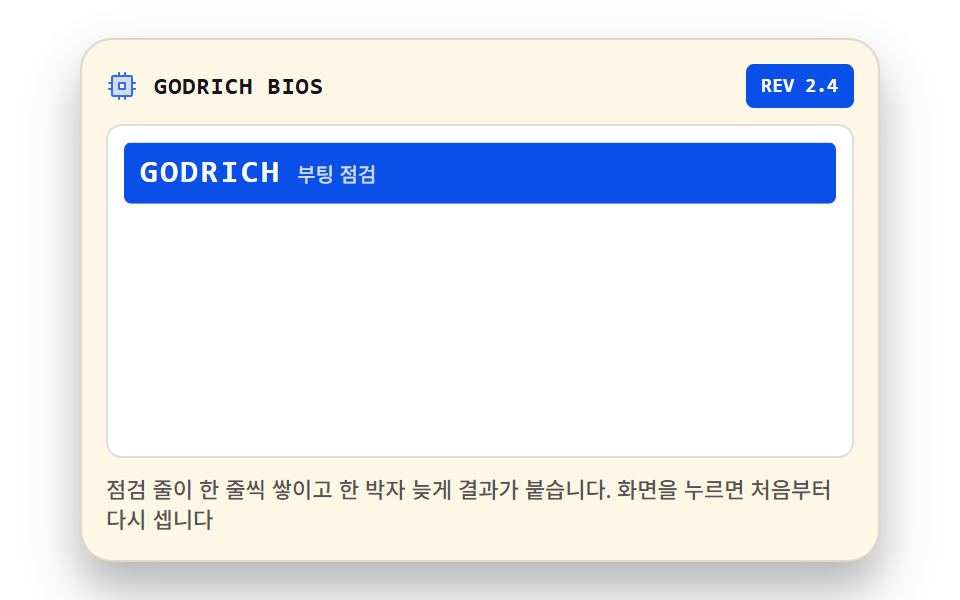
장치 점검 줄이 한 줄씩 아래로 쌓이고, 각 줄 오른쪽 끝에 결과 글자가 한 박자 늦게 붙습니다. 마지막 줄까지 차면 화면이 한 번 비워지고 처음부터 다시 셉니다.
쓰임로딩 시간을 이야기로 채우는 대기 화면
animation-fill-modeclip-pathmonospace
<main class="stage">
<div class="bl is-demo" id="bl">
  <div class="bl__bar">
    <span class="bl__ico" aria-hidden="true"><svg xmlns="http://www.w3.org/2000/svg" width="1em" height="1em" viewBox="0 0 256 256"><g fill="currentColor"><path d="M200 48H56a8 8 0 0 0-8 8v144a8 8 0 0 0 8 8h144a8 8 0 0 0 8-8V56a8 8 0 0 0-8-8m-48 104h-48v-48h48Z" opacity=".2"/><path d="M152 96h-48a8 8 0 0 0-8 8v48a8 8 0 0 0 8 8h48a8 8 0 0 0 8-8v-48a8 8 0 0 0-8-8m-8 48h-32v-32h32Zm88 0h-16v-32h16a8 8 0 0 0 0-16h-16V56a16 16 0 0 0-16-16h-40V24a8 8 0 0 0-16 0v16h-32V24a8 8 0 0 0-16 0v16H56a16 16 0 0 0-16 16v40H24a8 8 0 0 0 0 16h16v32H24a8 8 0 0 0 0 16h16v40a16 16 0 0 0 16 16h40v16a8 8 0 0 0 16 0v-16h32v16a8 8 0 0 0 16 0v-16h40a16 16 0 0 0 16-16v-40h16a8 8 0 0 0 0-16m-32 56H56V56h144z"/></g></svg></span>
    <span class="bl__name">GODRICH BIOS</span>
    <span class="bl__rev">REV 2.4</span>
  </div>
  <div class="bl__scr" id="scr" tabindex="0" role="button" aria-label="부팅 점검 다시 시작">
    <div class="bl__logo" aria-hidden="true">
      <span class="bl__lg1">GODRICH</span>
      <span class="bl__lg2">부팅 점검</span>
    </div>
    <ul class="bl__lines">
      <li class="bl__row bl__row--1"><span class="bl__lab">메모리 검사</span><span class="bl__res">65,536 KB</span></li>
      <li class="bl__row bl__row--2"><span class="bl__lab">주 디스크</span><span class="bl__res">준비</span></li>
      <li class="bl__row bl__row--3"><span class="bl__lab">키보드 연결</span><span class="bl__res">확인</span></li>
      <li class="bl__row bl__row--4"><span class="bl__lab">디스플레이</span><span class="bl__res">640×480</span></li>
      <li class="bl__row bl__row--5"><span class="bl__lab">부팅 장치</span><span class="bl__res">OK</span></li>
    </ul>
  </div>
  <p class="bl__note">점검 줄이 한 줄씩 쌓이고 한 박자 늦게 결과가 붙습니다. 화면을 누르면 처음부터 다시 셉니다</p>
</div>
</main>
@use "../../../../site/static/demo-tokens" as *;
// 부팅 점검 줄 출력 — 장치 점검 줄이 한 줄씩 아래로 쌓이고, 각 줄 오른쪽 끝에 결과 글자가
// 한 박자 늦게 붙는다. 마지막 줄까지 차면 화면이 한 번 비워지고(로고가 컷으로 돌아온 뒤 사라진다)
// 처음부터 다시 센다. 줄 등장은 clip-path 오른쪽 밀기, 결과는 컷 + 8px transform 정착.
// 타이핑 커서 점멸이나 아스키 진행바는 쓰지 않는다(294 터미널 편과 겹치지 않게).
$duration: $dur-loop;
$easing: $ease-out;
$color: $subject-blue-deep;
$mono: ui-monospace, SFMono-Regular, "SF Mono", Consolas, "Liberation Mono", monospace;
$edge: rgba(23, 20, 26, .14);
$muted: rgba(23, 20, 26, .72);
$fs: 13px;
$lh: 22px;
@include stage($stage-paper);
.bl {
display: flex; flex-direction: column; gap: $sp-2;
box-sizing: border-box; width: min(100%, 400px);
padding: $sp-3; border: 1px solid $edge; border-radius: $r-card;
background: $subject-cream; box-shadow: $shadow-raised;
}
// ── 머리 줄: BIOS 이름과 판번호
.bl__bar { display: flex; align-items: center; gap: $sp-2; }
.bl__ico { display: grid; place-items: center; color: $subject-blue; font-size: 16px; }
.bl__name {
flex: 1 1 auto; color: $subject-ink;
font-family: $mono; font-weight: 700; font-size: 12px; line-height: 1.4;
letter-spacing: 0.04em;
}
.bl__rev {
padding: $sp-1 $sp-2; border-radius: $r-xs;
background: $color; color: $stage-paper;
font-family: $mono; font-weight: 700; font-size: 10px; line-height: 1.4;
}
// ── 화면: 로고 블록과 점검 줄이 사는 곳. 누르면 처음부터 다시 센다
.bl__scr {
display: flex; flex-direction: column; gap: $sp-2;
box-sizing: border-box; padding: $sp-2;
background: $stage-paper; border: 1px solid $edge; border-radius: $r-sm;
}
.bl__scr:focus-visible { outline: 2px solid $color; outline-offset: 2px; }
// 로고 블록 — 루프에서만 잠깐 보이는 상태이므로 기본은 가려둔다(정적 경로는 줄이 채운다)
.bl__logo {
display: flex; align-items: baseline; gap: $sp-2;
padding: $sp-1 $sp-2; border-radius: $r-xs;
background: $color; color: $stage-paper;
clip-path: inset(0 100% 0 0);
}
.bl__lg1 {
font-family: $mono; font-weight: 700; font-size: 16px; line-height: 1.4;
letter-spacing: 0.08em;
}
.bl__lg2 { color: rgba(255, 255, 255, .8); font-weight: 500; font-size: 10px; line-height: 1.4; }
// ── 점검 줄: 왼쪽 장치 이름, 오른쪽 끝 결과 글자
.bl__lines { display: flex; flex-direction: column; margin: 0; padding: 0; list-style: none; }
.bl__row {
display: flex; align-items: center; justify-content: space-between;
height: $lh;
font-family: $mono; font-weight: 500; font-size: $fs; line-height: $lh;
}
.bl__lab { color: $subject-ink; white-space: nowrap; }
.bl__res { color: $color; font-weight: 700; white-space: nowrap; }
.bl__note { margin: 0; color: $muted; font-weight: 500; font-size: 11px; line-height: 1.4; }
// ── 격자 미리보기 루프(2초)
// 0% 로고가 오른쪽에서 밀려 들어오고 6% 에 완전히 나타난다. 8% 부터 왼쪽으로 빠지며
// 줄이 한 줄씩 쌓인다(12·24·36·48·60%), 결과는 각 줄이 끝난 한 박자 뒤에 컷으로 붙고
// 8px 옆에서 제자리로 미끄러져 정착한다. 75% 에 마지막 줄까지 찼다면 76% 에 줄 전체가
// 비워지며 로고가 다시 컷 인 — 이 프레임이 poster 다. 88% 부터 로고는 오른쪽으로 빠져
// 90% 이후 잠깐 빈 화면(한 번 비워지는 박자)이 되고 100% 에 이르러 처음으로 돌아온다.
.bl.is-demo .bl__logo {
animation-name: blLogo;
animation-duration: $duration; animation-timing-function: $easing;
animation-iteration-count: infinite; animation-fill-mode: backwards;
}
.bl.is-demo .bl__row {
animation-duration: $duration; animation-timing-function: $easing;
animation-iteration-count: infinite; animation-fill-mode: backwards;
}
.bl.is-demo .bl__res {
animation-duration: $duration; animation-timing-function: $easing;
animation-iteration-count: infinite; animation-fill-mode: backwards;
}
// 줄마다 등장 시각은 nth-child 지연 대신 개별 키프레임으로 나눈다 — 애니메이션 단축은
// delay 를 0 으로 되돌리므로 낱개 속성만 쓴다(240 실측)
.bl.is-demo .bl__row--1 { animation-name: blRow1; }
.bl.is-demo .bl__row--1 .bl__res { animation-name: blRes1; }
.bl.is-demo .bl__row--2 { animation-name: blRow2; }
.bl.is-demo .bl__row--2 .bl__res { animation-name: blRes2; }
.bl.is-demo .bl__row--3 { animation-name: blRow3; }
.bl.is-demo .bl__row--3 .bl__res { animation-name: blRes3; }
.bl.is-demo .bl__row--4 { animation-name: blRow4; }
.bl.is-demo .bl__row--4 .bl__res { animation-name: blRes4; }
.bl.is-demo .bl__row--5 { animation-name: blRow5; }
.bl.is-demo .bl__row--5 .bl__res { animation-name: blRes5; }
@keyframes blLogo {
0% { clip-path: inset(0 100% 0 0); }
6%, 8% { clip-path: inset(0 0 0 0); }
14%, 75% { clip-path: inset(0 0 0 100%); }
76%, 88% { clip-path: inset(0 0 0 0); }
90%, 100% { clip-path: inset(0 100% 0 0); }
}
@keyframes blRow1 {
0%, 12% { clip-path: inset(0 100% 0 0); }
17%, 75% { clip-path: inset(0 0 0 0); }
76%, 100% { clip-path: inset(0 100% 0 0); }
}
@keyframes blRow2 {
0%, 24% { clip-path: inset(0 100% 0 0); }
29%, 75% { clip-path: inset(0 0 0 0); }
76%, 100% { clip-path: inset(0 100% 0 0); }
}
@keyframes blRow3 {
0%, 36% { clip-path: inset(0 100% 0 0); }
41%, 75% { clip-path: inset(0 0 0 0); }
76%, 100% { clip-path: inset(0 100% 0 0); }
}
@keyframes blRow4 {
0%, 48% { clip-path: inset(0 100% 0 0); }
53%, 75% { clip-path: inset(0 0 0 0); }
76%, 100% { clip-path: inset(0 100% 0 0); }
}
@keyframes blRow5 {
0%, 60% { clip-path: inset(0 100% 0 0); }
65%, 75% { clip-path: inset(0 0 0 0); }
76%, 100% { clip-path: inset(0 100% 0 0); }
}
// 결과 — 컷으로 붙고(1% 안에 opacity 0→1) 이어서 8px 옆에서 제자리로 정착한다
@keyframes blRes1 {
0%, 17% { opacity: 0; transform: translateX(8px); }
18% { opacity: 1; transform: translateX(8px); }
21%, 75% { opacity: 1; transform: translateX(0); }
76%, 100% { opacity: 0; transform: translateX(0); }
}
@keyframes blRes2 {
0%, 29% { opacity: 0; transform: translateX(8px); }
30% { opacity: 1; transform: translateX(8px); }
33%, 75% { opacity: 1; transform: translateX(0); }
76%, 100% { opacity: 0; transform: translateX(0); }
}
@keyframes blRes3 {
0%, 41% { opacity: 0; transform: translateX(8px); }
42% { opacity: 1; transform: translateX(8px); }
45%, 75% { opacity: 1; transform: translateX(0); }
76%, 100% { opacity: 0; transform: translateX(0); }
}
@keyframes blRes4 {
0%, 53% { opacity: 0; transform: translateX(8px); }
54% { opacity: 1; transform: translateX(8px); }
57%, 75% { opacity: 1; transform: translateX(0); }
76%, 100% { opacity: 0; transform: translateX(0); }
}
@keyframes blRes5 {
0%, 65% { opacity: 0; transform: translateX(8px); }
66% { opacity: 1; transform: translateX(8px); }
69%, 75% { opacity: 1; transform: translateX(0); }
76%, 100% { opacity: 0; transform: translateX(0); }
}
// ── 좁은 화면: 글자와 줄 높이를 줄여 무대 안에 들어온다
@media (max-width: 340px) {
.bl { gap: $sp-1; padding: $sp-2; }
.bl__ico { font-size: 13px; }
.bl__name { font-size: 10px; }
.bl__rev { padding: 0 $sp-1; font-size: 9px; }
.bl__scr { gap: $sp-1; padding: $sp-1; }
.bl__logo { padding: 0 $sp-1; }
.bl__lg1 { font-size: 12px; }
.bl__lg2 { font-size: 9px; }
.bl__row { height: 13px; font-size: 10px; line-height: 13px; }
.bl__note { font-size: 9px; line-height: 1.3; }
}
@media (prefers-reduced-motion: reduce) {
.bl.is-demo .bl__logo, .bl.is-demo .bl__row, .bl.is-demo .bl__res {
animation: none !important;
}
// 줄은 그대로 보이고(정적 경로와 같은 모습) 로고만 가려진 채 머무른다
.bl.is-demo .bl__row { clip-path: none !important; }
.bl.is-demo .bl__res { opacity: 1 !important; transform: none !important; }
.bl.is-demo .bl__logo { clip-path: inset(0 100% 0 0) !important; }
}html, body {
margin: 0;
overflow: hidden;
}
.stage {
box-sizing: border-box;
min-height: 100vh;
display: grid;
place-items: center;
margin: 0;
background: #ffffff;
font-family: -apple-system, "Segoe UI", "Noto Sans KR", sans-serif;
padding: clamp(8px, 4vw, 24px);
}
.bl {
display: flex;
flex-direction: column;
gap: 8px;
box-sizing: border-box;
width: min(100%, 400px);
padding: 12px;
border: 1px solid rgba(23, 20, 26, 0.14);
border-radius: 16px;
background: #fff7e6;
box-shadow: 0 14px 24px rgba(23, 20, 26, 0.32);
}
.bl__bar {
display: flex;
align-items: center;
gap: 8px;
}
.bl__ico {
display: grid;
place-items: center;
color: #2f6df6;
font-size: 16px;
}
.bl__name {
flex: 1 1 auto;
color: #17141a;
font-family: ui-monospace, SFMono-Regular, "SF Mono", Consolas, "Liberation Mono", monospace;
font-weight: 700;
font-size: 12px;
line-height: 1.4;
letter-spacing: 0.04em;
}
.bl__rev {
padding: 4px 8px;
border-radius: 4px;
background: #0a4fe8;
color: #ffffff;
font-family: ui-monospace, SFMono-Regular, "SF Mono", Consolas, "Liberation Mono", monospace;
font-weight: 700;
font-size: 10px;
line-height: 1.4;
}
.bl__scr {
display: flex;
flex-direction: column;
gap: 8px;
box-sizing: border-box;
padding: 8px;
background: #ffffff;
border: 1px solid rgba(23, 20, 26, 0.14);
border-radius: 8px;
}
.bl__scr:focus-visible {
outline: 2px solid #0a4fe8;
outline-offset: 2px;
}
.bl__logo {
display: flex;
align-items: baseline;
gap: 8px;
padding: 4px 8px;
border-radius: 4px;
background: #0a4fe8;
color: #ffffff;
clip-path: inset(0 100% 0 0);
}
.bl__lg1 {
font-family: ui-monospace, SFMono-Regular, "SF Mono", Consolas, "Liberation Mono", monospace;
font-weight: 700;
font-size: 16px;
line-height: 1.4;
letter-spacing: 0.08em;
}
.bl__lg2 {
color: rgba(255, 255, 255, 0.8);
font-weight: 500;
font-size: 10px;
line-height: 1.4;
}
.bl__lines {
display: flex;
flex-direction: column;
margin: 0;
padding: 0;
list-style: none;
}
.bl__row {
display: flex;
align-items: center;
justify-content: space-between;
height: 22px;
font-family: ui-monospace, SFMono-Regular, "SF Mono", Consolas, "Liberation Mono", monospace;
font-weight: 500;
font-size: 13px;
line-height: 22px;
}
.bl__lab {
color: #17141a;
white-space: nowrap;
}
.bl__res {
color: #0a4fe8;
font-weight: 700;
white-space: nowrap;
}
.bl__note {
margin: 0;
color: rgba(23, 20, 26, 0.72);
font-weight: 500;
font-size: 11px;
line-height: 1.4;
}
.bl.is-demo .bl__logo {
animation-name: blLogo;
animation-duration: 2s;
animation-timing-function: ease-out;
animation-iteration-count: infinite;
animation-fill-mode: backwards;
}
.bl.is-demo .bl__row {
animation-duration: 2s;
animation-timing-function: ease-out;
animation-iteration-count: infinite;
animation-fill-mode: backwards;
}
.bl.is-demo .bl__res {
animation-duration: 2s;
animation-timing-function: ease-out;
animation-iteration-count: infinite;
animation-fill-mode: backwards;
}
.bl.is-demo .bl__row--1 {
animation-name: blRow1;
}
.bl.is-demo .bl__row--1 .bl__res {
animation-name: blRes1;
}
.bl.is-demo .bl__row--2 {
animation-name: blRow2;
}
.bl.is-demo .bl__row--2 .bl__res {
animation-name: blRes2;
}
.bl.is-demo .bl__row--3 {
animation-name: blRow3;
}
.bl.is-demo .bl__row--3 .bl__res {
animation-name: blRes3;
}
.bl.is-demo .bl__row--4 {
animation-name: blRow4;
}
.bl.is-demo .bl__row--4 .bl__res {
animation-name: blRes4;
}
.bl.is-demo .bl__row--5 {
animation-name: blRow5;
}
.bl.is-demo .bl__row--5 .bl__res {
animation-name: blRes5;
}
@keyframes blLogo {
0% {
clip-path: inset(0 100% 0 0);
}
6%, 8% {
clip-path: inset(0 0 0 0);
}
14%, 75% {
clip-path: inset(0 0 0 100%);
}
76%, 88% {
clip-path: inset(0 0 0 0);
}
90%, 100% {
clip-path: inset(0 100% 0 0);
}
}
@keyframes blRow1 {
0%, 12% {
clip-path: inset(0 100% 0 0);
}
17%, 75% {
clip-path: inset(0 0 0 0);
}
76%, 100% {
clip-path: inset(0 100% 0 0);
}
}
@keyframes blRow2 {
0%, 24% {
clip-path: inset(0 100% 0 0);
}
29%, 75% {
clip-path: inset(0 0 0 0);
}
76%, 100% {
clip-path: inset(0 100% 0 0);
}
}
@keyframes blRow3 {
0%, 36% {
clip-path: inset(0 100% 0 0);
}
41%, 75% {
clip-path: inset(0 0 0 0);
}
76%, 100% {
clip-path: inset(0 100% 0 0);
}
}
@keyframes blRow4 {
0%, 48% {
clip-path: inset(0 100% 0 0);
}
53%, 75% {
clip-path: inset(0 0 0 0);
}
76%, 100% {
clip-path: inset(0 100% 0 0);
}
}
@keyframes blRow5 {
0%, 60% {
clip-path: inset(0 100% 0 0);
}
65%, 75% {
clip-path: inset(0 0 0 0);
}
76%, 100% {
clip-path: inset(0 100% 0 0);
}
}
@keyframes blRes1 {
0%, 17% {
opacity: 0;
transform: translateX(8px);
}
18% {
opacity: 1;
transform: translateX(8px);
}
21%, 75% {
opacity: 1;
transform: translateX(0);
}
76%, 100% {
opacity: 0;
transform: translateX(0);
}
}
@keyframes blRes2 {
0%, 29% {
opacity: 0;
transform: translateX(8px);
}
30% {
opacity: 1;
transform: translateX(8px);
}
33%, 75% {
opacity: 1;
transform: translateX(0);
}
76%, 100% {
opacity: 0;
transform: translateX(0);
}
}
@keyframes blRes3 {
0%, 41% {
opacity: 0;
transform: translateX(8px);
}
42% {
opacity: 1;
transform: translateX(8px);
}
45%, 75% {
opacity: 1;
transform: translateX(0);
}
76%, 100% {
opacity: 0;
transform: translateX(0);
}
}
@keyframes blRes4 {
0%, 53% {
opacity: 0;
transform: translateX(8px);
}
54% {
opacity: 1;
transform: translateX(8px);
}
57%, 75% {
opacity: 1;
transform: translateX(0);
}
76%, 100% {
opacity: 0;
transform: translateX(0);
}
}
@keyframes blRes5 {
0%, 65% {
opacity: 0;
transform: translateX(8px);
}
66% {
opacity: 1;
transform: translateX(8px);
}
69%, 75% {
opacity: 1;
transform: translateX(0);
}
76%, 100% {
opacity: 0;
transform: translateX(0);
}
}
@media (max-width: 340px) {
.bl {
gap: 4px;
padding: 8px;
}
.bl__ico {
font-size: 13px;
}
.bl__name {
font-size: 10px;
}
.bl__rev {
padding: 0 4px;
font-size: 9px;
}
.bl__scr {
gap: 4px;
padding: 4px;
}
.bl__logo {
padding: 0 4px;
}
.bl__lg1 {
font-size: 12px;
}
.bl__lg2 {
font-size: 9px;
}
.bl__row {
height: 13px;
font-size: 10px;
line-height: 13px;
}
.bl__note {
font-size: 9px;
line-height: 1.3;
}
}
@media (prefers-reduced-motion: reduce) {
.bl.is-demo .bl__logo, .bl.is-demo .bl__row, .bl.is-demo .bl__res {
animation: none !important;
}
.bl.is-demo .bl__row {
clip-path: none !important;
}
.bl.is-demo .bl__res {
opacity: 1 !important;
transform: none !important;
}
.bl.is-demo .bl__logo {
clip-path: inset(0 100% 0 0) !important;
}
}var bl = document.getElementById('bl');
var scr = document.getElementById('scr');
// 화면을 누르면(또는 Enter·Space) 루프를 처음부터 다시 돌린다 — 클래스를 떼었다 붙이며 재시작
function restart() {
bl.classList.remove('is-demo');
void bl.offsetWidth;
bl.classList.add('is-demo');
}
scr.addEventListener('click', restart);
scr.addEventListener('keydown', function (e) {
if (e.key === 'Enter' || e.key === ' ') { e.preventDefault(); restart(); }
});// BootLines — vanilla 판(run/023/demo/04-os-boot-sequence-lines/index.html) 의 React 포트.
// 점검 줄이 한 줄씩 쌓이고 결과가 한 박자 늦게 붙는다. 마지막 줄 뒤 화면이 한 번 비워지고
// 다시 센다. 화면을 누르면 key 를 바꿔 통째로 다시 마운트해 루프를 처음부터 돌린다.
import { useState } from "react";
import type { CSSProperties } from "react";
import styles from "./BootLines.module.scss";
export type BootLinesProps = {
duration?: number;
easing?: string;
color?: string;
};
type Vars = CSSProperties & { "--duration"?: string; "--easing"?: string; "--color"?: string };
// ambient 타입에 React 이벤트 제네릭이 없다 — 쓰는 것만 로컬 타입으로 선언한다
type KeyEvt = { key: string; preventDefault(): void };
const SCR_ARIA = "부팅 점검 다시 시작";
const LOGO_SUB = "부팅 점검";
const NOTE = "점검 줄이 한 줄씩 쌓이고 한 박자 늦게 결과가 붙습니다. 화면을 누르면 처음부터 다시 셉니다";
const ROWS = [
{ lab: "메모리 검사", res: "65,536 KB" },
{ lab: "주 디스크", res: "준비" },
{ lab: "키보드 연결", res: "확인" },
{ lab: "디스플레이", res: "640×480" },
{ lab: "부팅 장치", res: "OK" }
];
const CPU_ICON = (
<svg xmlns="http://www.w3.org/2000/svg" width="1em" height="1em" viewBox="0 0 256 256">
<g fill="currentColor">
<path d="M200 48H56a8 8 0 0 0-8 8v144a8 8 0 0 0 8 8h144a8 8 0 0 0 8-8V56a8 8 0 0 0-8-8m-48 104h-48v-48h48Z" opacity=".2" />
<path d="M152 96h-48a8 8 0 0 0-8 8v48a8 8 0 0 0 8 8h48a8 8 0 0 0 8-8v-48a8 8 0 0 0-8-8m-8 48h-32v-32h32Zm88 0h-16v-32h16a8 8 0 0 0 0-16h-16V56a16 16 0 0 0-16-16h-40V24a8 8 0 0 0-16 0v16h-32V24a8 8 0 0 0-16 0v16H56a16 16 0 0 0-16 16v40H24a8 8 0 0 0 0 16h16v32H24a8 8 0 0 0 0 16h16v40a16 16 0 0 0 16 16h40v16a8 8 0 0 0 16 0v-16h32v16a8 8 0 0 0 16 0v-16h40a16 16 0 0 0 16-16v-40h16a8 8 0 0 0 0-16m-32 56H56V56h144z" />
</g>
</svg>
);
export default function BootLines(props: BootLinesProps) {
const duration = props.duration ?? 2000;
const easing = props.easing ?? "cubic-bezier(.2, .8, .2, 1)";
const color = props.color ?? "#0a4fe8";
const [run, setRun] = useState(0);
const vars: Vars = { "--duration": duration + "ms", "--easing": easing, "--color": color };
const restart = () => setRun((r: number) => r + 1);
const onKeyDown = (e: KeyEvt) => {
if (e.key === "Enter" || e.key === " ") {
e.preventDefault();
restart();
}
};
return (
<main className={styles.stage}>
<div key={run} className={styles.root + " " + styles.isDemo} style={vars}>
<div className={styles.bar}>
<span className={styles.ico} aria-hidden="true">{CPU_ICON}</span>
<span className={styles.name}>GODRICH BIOS</span>
<span className={styles.rev}>REV 2.4</span>
</div>
<div className={styles.scr} tabIndex={0} role="button" aria-label={SCR_ARIA}
onClick={restart} onKeyDown={onKeyDown}>
<div className={styles.logo} aria-hidden="true">
<span className={styles.lg1}>GODRICH</span>
<span className={styles.lg2}>{LOGO_SUB}</span>
</div>
<ul className={styles.lines}>
{ROWS.map((row, i) => (
<li key={i} className={styles.row + " " + styles["row" + (i + 1)]}>
<span className={styles.lab}>{row.lab}</span>
<span className={styles.res}>{row.res}</span>
</li>
))}
</ul>
</div>
<p className={styles.note}>{NOTE}</p>
</div>
</main>
);
}04 부팅 점검 줄 출력 — 측정 누적면적 9.339% · 움직인 프레임 19/23GODRICH 원작 · zip 에 SCSS·React 포함 · 윈도우 98 디자인 9종 — crt 모니터 효과까지 복붙
이 데모가 속한 글
 윈도우 98 디자인 9종 — crt 모니터 효과까지 복붙윈도우 98 디자인은 지금 웹에서도 가장 알아보기 쉬운 레트로 문법입니다. 여기 아홉 개는 그 시절 책상 위 화면을 통째로 옮긴 부품인데, 창을 끌고 최소화까지 진짜로 됩니다. 스캔라인이 흐르는 브라운관, 픽셀 커서 이 글의 데모 전부 보기