09파란 오류 화면과 재시작
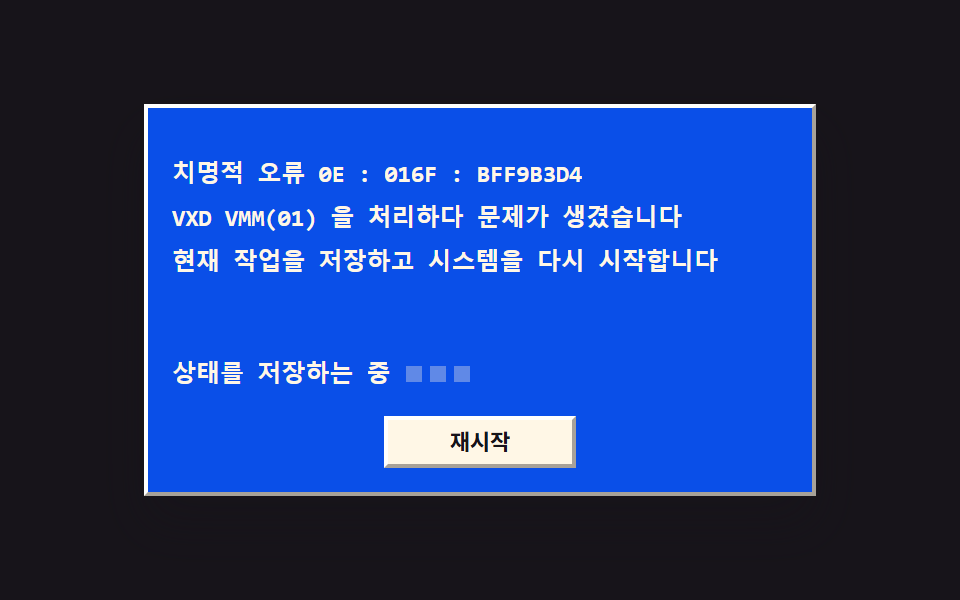
파란 바탕에 오류 문구가 한 프레임에 통째로 나타나고, 아래 안내 줄의 점 세 개가 차례로 켜집니다. 재시작 단추를 누르면 화면이 위에서 아래로 쓸려 사라지며 원래 창으로 돌아갑니다.
쓰임치명적 오류를 크게 알리는 화면
steps(1, end)clip-pathanimation-delay
<main class="stage">
<div class="bs is-demo" id="bs">
  <div class="bs__win">
    <div class="bs__title">
      <span class="bs__tico" aria-hidden="true"><svg xmlns="http://www.w3.org/2000/svg" width="14" height="14" viewBox="0 0 256 256"><g fill="currentColor"><path d="M128 144h80v72l-80-14.55Zm-96 40l64 11.64V144H32Zm96-129.45V112h80V40ZM32 112h64V60.36L32 72Z" opacity=".2"/><path d="M208 136h-80a8 8 0 0 0-8 8v57.45a8 8 0 0 0 6.57 7.88l80 14.54a7.6 7.6 0 0 0 1.43.13a8 8 0 0 0 8-8v-72a8 8 0 0 0-8-8m-8 70.41l-64-11.63V152h64ZM96 136H32a8 8 0 0 0-8 8v40a8 8 0 0 0 6.57 7.87l64 11.64a8.5 8.5 0 0 0 1.43.13a8 8 0 0 0 8-8V144a8 8 0 0 0-8-8m-8 50.05l-48-8.73V152h48ZM213.13 33.86a8 8 0 0 0-6.56-1.73l-80 14.55a8 8 0 0 0-6.57 7.87V112a8 8 0 0 0 8 8h80a8 8 0 0 0 8-8V40a8 8 0 0 0-2.87-6.14M200 104h-64V61.22l64-11.63Zm-98.87-49.78a8 8 0 0 0-6.56-1.73l-64 11.64A8 8 0 0 0 24 72v40a8 8 0 0 0 8 8h64a8 8 0 0 0 8-8V60.36a8 8 0 0 0-2.87-6.14M88 104H40V78.68L88 70Z"/></g></svg></span>
      <span class="bs__tname">시스템 정보</span>
      <span class="bs__tbtns" aria-hidden="true"><span class="bs__gb bs__gb--min"></span><span class="bs__gb"></span></span>
    </div>
    <div class="bs__body">
      <p class="bs__row"><span class="bs__k">프로세서</span><span class="bs__v">486DX2 66MHz</span></p>
      <p class="bs__row"><span class="bs__k">메모리</span><span class="bs__v">16 MB</span></p>
      <p class="bs__row"><span class="bs__k">디스크</span><span class="bs__v">540 MB</span></p>
      <div class="bs__actions">
        <button type="button" class="bs__btn" id="crash">시스템 오류</button>
      </div>
    </div>
  </div>
  <div class="bs__screen" id="screen">
    <div class="bs__err">
      <p class="bs__eline">치명적 오류 0E : 016F : BFF9B3D4</p>
      <p class="bs__eline">VXD VMM(01) 을 처리하다 문제가 생겼습니다</p>
      <p class="bs__eline">현재 작업을 저장하고 시스템을 다시 시작합니다</p>
    </div>
    <div class="bs__guide">
      <span class="bs__gtext">상태를 저장하는 중</span>
      <span class="bs__dots" aria-hidden="true"><span class="bs__dot"></span><span class="bs__dot"></span><span class="bs__dot"></span></span>
    </div>
    <div class="bs__sact">
      <button type="button" class="bs__btn bs__btn--s" id="restart">재시작</button>
    </div>
  </div>
</div>
</main>@use "../../../../site/static/demo-tokens" as *;
// 파란 오류 화면과 재시작 — 오류 문구는 steps(1, end) 컷으로 한 프레임에 통째로 나타난다
// (0%{A} 100%{B} 한 구간이면 end 타이밍이 구간 끝에서만 바뀌어 2초 내내 A 만 보이므로
// 컷 지점을 7%·8% 중간 키프레임으로 넣는다). 안내 줄의 점 세 개는 음수 animation-delay 로
// 위상을 밀어 20%·30%·40% 에 차례로 켜지고 켜진 채로 남는다. 재시작을 누르면 화면이
// clip-path 위프로 위에서 아래로 쓸려 사라지는데, 위프는 steps 와 섞지 않고 이징 짝
// 애니메이션으로 분리했다(실패표 266). 루프에서는 쓸려 나간 자리에 원래 창이 그대로
// 드러나 화면이 비지 않는다(실패표 255).
$duration: $dur-enter;
$easing: $ease-spring;
$color: $subject-blue-deep; // 크림 글자를 얹는 파란 면은 한 단계 진한 쪽(5.98:1)
$mono: ui-monospace, SFMono-Regular, "SF Mono", Consolas, "Liberation Mono", monospace;
$edge: rgba(23, 20, 26, .38);
$lite: rgba(255, 255, 255, .95);
$muted: rgba(23, 20, 26, .72);
@include stage($stage-ink);
// ── 원래 창
.bs {
position: relative;
box-sizing: border-box; width: min(100%, 336px); height: 196px;
max-height: calc(100vh - 32px);
border: 2px solid; border-color: $lite $edge $edge $lite;
background: $subject-cream; box-shadow: $shadow-raised;
}
.bs button { font-family: inherit; cursor: pointer; }
.bs button:focus-visible { outline: 2px solid $stage-yellow; outline-offset: 1px; }
.bs__win { display: flex; flex-direction: column; height: 100%; }
.bs__title {
display: flex; align-items: center; gap: $sp-1;
height: 24px; padding: 0 $sp-1; box-sizing: border-box;
background: $color; color: $subject-cream;
}
.bs__tico { display: grid; place-items: center; }
.bs__tname { flex: 1 1 auto; font-weight: 700; font-size: 12px; line-height: 1.4; white-space: nowrap; overflow: hidden; }
.bs__tbtns { display: flex; align-items: center; gap: $sp-1; }
.bs__gb { width: 14px; height: 13px; box-sizing: border-box; border: 2px solid rgba(255, 247, 230, .85); }
.bs__gb--min { border: 0; border-bottom: 2px solid rgba(255, 247, 230, .85); width: 12px; align-self: flex-end; }
.bs__body { display: flex; flex-direction: column; gap: $sp-1; padding: $sp-3; }
.bs__row { margin: 0; display: flex; align-items: baseline; justify-content: space-between; gap: $sp-2; }
.bs__k { font-weight: 500; font-size: 12px; line-height: 1.5; color: $muted; }
.bs__v { font-family: $mono; font-weight: 700; font-size: 12px; line-height: 1.5; color: $subject-ink; }
.bs__actions { display: flex; justify-content: flex-end; margin-top: $sp-2; }
// ── 단추 — 올라온 상태는 밝은 면이 위·왼쪽, 눌림은 반대
.bs__btn {
min-width: 96px; height: 26px; box-sizing: border-box; padding: 0 $sp-2;
background: $subject-cream; color: $subject-ink;
border: 2px solid; border-color: $lite $edge $edge $lite;
font-weight: 700; font-size: 11px; line-height: 1.4;
transition: transform $dur-quick $ease-out;
}
.bs__btn:active { border-color: $edge $lite $lite $edge; transform: translateY(1px); }
// ── 파란 오류 화면 — 창을 통째로 덮는다. 숨김은 visibility 로(탭 순서에서도 빠진다)
.bs__screen {
position: absolute; inset: 0; z-index: 2; box-sizing: border-box;
display: flex; flex-direction: column; gap: $sp-3; padding: $sp-3;
background: $color; clip-path: inset(0 0 0 0);
opacity: 0; visibility: hidden; pointer-events: none;
}
.bs__screen.is-crash { opacity: 1; visibility: visible; pointer-events: auto; transition: clip-path $duration $easing; }
// 재시작 — 위쪽 inset 이 100% 로 자라며 파란 면이 위에서 아래로 쓸려 나간다
.bs__screen.is-crash.is-wiped { clip-path: inset(100% 0 0 0); }
.bs__err { margin-top: $sp-3; display: flex; flex-direction: column; gap: $sp-1; }
.bs__eline { margin: 0; font-family: $mono; font-weight: 600; font-size: 12px; line-height: 1.5; color: $subject-cream; }
.bs__guide { display: flex; align-items: center; gap: $sp-2; margin-top: auto; }
.bs__gtext { font-family: $mono; font-weight: 600; font-size: 12px; line-height: 1.5; color: $subject-cream; }
.bs__dots { display: flex; align-items: center; gap: $sp-1; }
.bs__dot { width: 8px; height: 8px; background: rgba(255, 247, 230, .35); }
.bs__sact { display: flex; justify-content: center; }
// ── 격자 미리보기 루프 (2초): 8% 에 파란 화면이 컷으로 들어오고, 점이 20%·30%·40% 에
// 차례로 켜진 뒤 켜진 채로 남는다. 58% 부터 70% 까지 위프로 쓸려 나가 원래 창이 드러나고,
// 바퀴가 돌아갈 동안 화면이 비는 순간은 없다.
.bs.is-demo .bs__screen {
visibility: visible; opacity: 1; pointer-events: none;
animation-name: bsCut, bsWipe;
animation-duration: $dur-loop, $dur-loop;
animation-timing-function: steps(1, end), $easing;
animation-iteration-count: infinite, infinite;
animation-fill-mode: backwards, backwards;
}
// 점 세 개 — 같은 키프레임을 음수 animation-delay 로 위상 이동해 차례로 켠다.
// 켜진 뒤에는 자기 위상의 50% 까지(=화면이 쓸려 나간 뒤까지) 켜진 채로 남는다
.bs.is-demo .bs__dot {
animation-name: bsDot;
animation-duration: $dur-loop; animation-timing-function: steps(1, end);
animation-iteration-count: infinite; animation-fill-mode: backwards;
}
.bs.is-demo .bs__dot:nth-child(1) { animation-delay: -1600ms; }
.bs.is-demo .bs__dot:nth-child(2) { animation-delay: -1400ms; }
.bs.is-demo .bs__dot:nth-child(3) { animation-delay: -1200ms; }
// 등장 컷 — 중간 키프레임(7%)을 둬야 8% 지점에서 한 프레임에 바뀐다
@keyframes bsCut {
0%, 7% { opacity: 0; }
8%, 100% { opacity: 1; }
}
// 퇴장 위프 — steps 가 아니라 이징으로 보간되는 짝 애니메이션이다
@keyframes bsWipe {
0%, 58% { clip-path: inset(0 0 0 0); }
70%, 100% { clip-path: inset(100% 0 0 0); }
}
@keyframes bsDot {
0%, 50% { background: $stage-yellow; }
51%, 100% { background: rgba(255, 247, 230, .35); }
}
// ── 좁은 화면: 줄 글자를 한 단계 줄여 무대 안에 들어온다
@media (max-width: 340px) {
.bs { height: 168px; }
.bs__k, .bs__v { font-size: 11px; }
.bs__eline, .bs__gtext { font-size: 11px; }
.bs__err { margin-top: 0; }
.bs__body { padding: $sp-2; gap: 0; }
.bs__row + .bs__row { margin-top: $sp-1; }
}
@media (prefers-reduced-motion: reduce) {
.bs.is-demo .bs__screen, .bs.is-demo .bs__dot {
animation: none !important;
}
.bs.is-demo .bs__screen { opacity: 0 !important; visibility: hidden !important; clip-path: none !important; }
.bs.is-demo .bs__dot { background: rgba(255, 247, 230, .35) !important; }
}html, body {
margin: 0;
overflow: hidden;
}
.stage {
box-sizing: border-box;
min-height: 100vh;
display: grid;
place-items: center;
margin: 0;
background: #17141a;
font-family: -apple-system, "Segoe UI", "Noto Sans KR", sans-serif;
padding: clamp(8px, 4vw, 24px);
}
.bs {
position: relative;
box-sizing: border-box;
width: min(100%, 336px);
height: 196px;
max-height: calc(100vh - 32px);
border: 2px solid;
border-color: rgba(255, 255, 255, 0.95) rgba(23, 20, 26, 0.38) rgba(23, 20, 26, 0.38) rgba(255, 255, 255, 0.95);
background: #fff7e6;
box-shadow: 0 14px 24px rgba(23, 20, 26, 0.32);
}
.bs button {
font-family: inherit;
cursor: pointer;
}
.bs button:focus-visible {
outline: 2px solid #ffd23f;
outline-offset: 1px;
}
.bs__win {
display: flex;
flex-direction: column;
height: 100%;
}
.bs__title {
display: flex;
align-items: center;
gap: 4px;
height: 24px;
padding: 0 4px;
box-sizing: border-box;
background: #0a4fe8;
color: #fff7e6;
}
.bs__tico {
display: grid;
place-items: center;
}
.bs__tname {
flex: 1 1 auto;
font-weight: 700;
font-size: 12px;
line-height: 1.4;
white-space: nowrap;
overflow: hidden;
}
.bs__tbtns {
display: flex;
align-items: center;
gap: 4px;
}
.bs__gb {
width: 14px;
height: 13px;
box-sizing: border-box;
border: 2px solid rgba(255, 247, 230, 0.85);
}
.bs__gb--min {
border: 0;
border-bottom: 2px solid rgba(255, 247, 230, 0.85);
width: 12px;
align-self: flex-end;
}
.bs__body {
display: flex;
flex-direction: column;
gap: 4px;
padding: 12px;
}
.bs__row {
margin: 0;
display: flex;
align-items: baseline;
justify-content: space-between;
gap: 8px;
}
.bs__k {
font-weight: 500;
font-size: 12px;
line-height: 1.5;
color: rgba(23, 20, 26, 0.72);
}
.bs__v {
font-family: ui-monospace, SFMono-Regular, "SF Mono", Consolas, "Liberation Mono", monospace;
font-weight: 700;
font-size: 12px;
line-height: 1.5;
color: #17141a;
}
.bs__actions {
display: flex;
justify-content: flex-end;
margin-top: 8px;
}
.bs__btn {
min-width: 96px;
height: 26px;
box-sizing: border-box;
padding: 0 8px;
background: #fff7e6;
color: #17141a;
border: 2px solid;
border-color: rgba(255, 255, 255, 0.95) rgba(23, 20, 26, 0.38) rgba(23, 20, 26, 0.38) rgba(255, 255, 255, 0.95);
font-weight: 700;
font-size: 11px;
line-height: 1.4;
transition: transform 220ms ease-out;
}
.bs__btn:active {
border-color: rgba(23, 20, 26, 0.38) rgba(255, 255, 255, 0.95) rgba(255, 255, 255, 0.95) rgba(23, 20, 26, 0.38);
transform: translateY(1px);
}
.bs__screen {
position: absolute;
inset: 0;
z-index: 2;
box-sizing: border-box;
display: flex;
flex-direction: column;
gap: 12px;
padding: 12px;
background: #0a4fe8;
clip-path: inset(0 0 0 0);
opacity: 0;
visibility: hidden;
pointer-events: none;
}
.bs__screen.is-crash {
opacity: 1;
visibility: visible;
pointer-events: auto;
transition: clip-path 600ms cubic-bezier(0.2, 0.8, 0.2, 1);
}
.bs__screen.is-crash.is-wiped {
clip-path: inset(100% 0 0 0);
}
.bs__err {
margin-top: 12px;
display: flex;
flex-direction: column;
gap: 4px;
}
.bs__eline {
margin: 0;
font-family: ui-monospace, SFMono-Regular, "SF Mono", Consolas, "Liberation Mono", monospace;
font-weight: 600;
font-size: 12px;
line-height: 1.5;
color: #fff7e6;
}
.bs__guide {
display: flex;
align-items: center;
gap: 8px;
margin-top: auto;
}
.bs__gtext {
font-family: ui-monospace, SFMono-Regular, "SF Mono", Consolas, "Liberation Mono", monospace;
font-weight: 600;
font-size: 12px;
line-height: 1.5;
color: #fff7e6;
}
.bs__dots {
display: flex;
align-items: center;
gap: 4px;
}
.bs__dot {
width: 8px;
height: 8px;
background: rgba(255, 247, 230, 0.35);
}
.bs__sact {
display: flex;
justify-content: center;
}
.bs.is-demo .bs__screen {
visibility: visible;
opacity: 1;
pointer-events: none;
animation-name: bsCut, bsWipe;
animation-duration: 2s, 2s;
animation-timing-function: steps(1, end), cubic-bezier(0.2, 0.8, 0.2, 1);
animation-iteration-count: infinite, infinite;
animation-fill-mode: backwards, backwards;
}
.bs.is-demo .bs__dot {
animation-name: bsDot;
animation-duration: 2s;
animation-timing-function: steps(1, end);
animation-iteration-count: infinite;
animation-fill-mode: backwards;
}
.bs.is-demo .bs__dot:nth-child(1) {
animation-delay: -1600ms;
}
.bs.is-demo .bs__dot:nth-child(2) {
animation-delay: -1400ms;
}
.bs.is-demo .bs__dot:nth-child(3) {
animation-delay: -1200ms;
}
@keyframes bsCut {
0%, 7% {
opacity: 0;
}
8%, 100% {
opacity: 1;
}
}
@keyframes bsWipe {
0%, 58% {
clip-path: inset(0 0 0 0);
}
70%, 100% {
clip-path: inset(100% 0 0 0);
}
}
@keyframes bsDot {
0%, 50% {
background: #ffd23f;
}
51%, 100% {
background: rgba(255, 247, 230, 0.35);
}
}
@media (max-width: 340px) {
.bs {
height: 168px;
}
.bs__k, .bs__v {
font-size: 11px;
}
.bs__eline, .bs__gtext {
font-size: 11px;
}
.bs__err {
margin-top: 0;
}
.bs__body {
padding: 8px;
gap: 0;
}
.bs__row + .bs__row {
margin-top: 4px;
}
}
@media (prefers-reduced-motion: reduce) {
.bs.is-demo .bs__screen, .bs.is-demo .bs__dot {
animation: none !important;
}
.bs.is-demo .bs__screen {
opacity: 0 !important;
visibility: hidden !important;
clip-path: none !important;
}
.bs.is-demo .bs__dot {
background: rgba(255, 247, 230, 0.35) !important;
}
}var root = document.getElementById('bs');
var screen = document.getElementById('screen');
var crash = document.getElementById('crash');
var restart = document.getElementById('restart');
// 사람 손이 닿으면 격자 미리보기 루프를 끊고 실제 조작 경로로 돌아간다
root.addEventListener('pointerdown', function () { root.classList.remove('is-demo'); });
// 시스템 오류 — 파란 화면이 한 프레임에 통째로 뜬다(전환이라 트랜지션 없이 클래스만)
crash.addEventListener('click', function () {
screen.classList.remove('is-wiped');
screen.classList.add('is-crash');
restart.focus({ preventScroll: true });
});
// 재시작 — 화면이 위에서 아래로 쓸려 사라지고 원래 창이 드러난다
restart.addEventListener('click', function () { screen.classList.add('is-wiped'); });
screen.addEventListener('transitionend', function (e) {
if (e.propertyName !== 'clip-path') return;
screen.classList.remove('is-crash', 'is-wiped');
});// BlueScreen — vanilla 판(run/023/demo/09-os-bluescreen-reboot/index.html) 의 React 포트.
// 오류 문구는 steps(1, end) 컷으로 한 프레임에 통째로 나타나고(중간 키프레임 7%·8% 가 컷 지점),
// 안내 줄의 점 세 개는 음수 animation-delay 로 위상을 밀어 차례로 켜진 뒤 켜진 채로 남는다.
// 재시작을 누르면 clip-path 위프(이징 짝 애니메이션)로 위에서 아래로 쓸려 사라지고 원래 창이
// 드러난다 — 퇴장이 주제여도 루프에서 화면이 비는 순간은 없다.
import { useRef, useState } from "react";
import type { CSSProperties } from "react";
import styles from "./BlueScreen.module.scss";
export type BlueScreenProps = {
duration?: number;
easing?: string;
color?: string;
winTitle?: string;
crashText?: string;
restartText?: string;
};
type Vars = CSSProperties & { "--duration"?: string; "--easing"?: string; "--color"?: string };
// ambient 타입에 TransitionEvent 가 없다 — 쓰는 속성만 로컬 타입으로 선언한다
type TransEvt = { propertyName: string };
// useRef<T> 는 { current: T | null } 을 돌려준다 — ambient 타입에 맞춘 상자 타입
type Box<T> = { current: T | null };
const WIN_TITLE = "시스템 정보";
const CRASH = "시스템 오류";
const RESTART = "재시작";
const ROWS: { k: string; v: string }[] = [
{ k: "프로세서", v: "486DX2 66MHz" },
{ k: "메모리", v: "16 MB" },
{ k: "디스크", v: "540 MB" },
];
const ERR_LINES = [
"치명적 오류 0E : 016F : BFF9B3D4",
"VXD VMM(01) 을 처리하다 문제가 생겼습니다",
"현재 작업을 저장하고 시스템을 다시 시작합니다",
];
const GUIDE = "상태를 저장하는 중";
export default function BlueScreen(props: BlueScreenProps) {
const duration = props.duration ?? 600;
const easing = props.easing ?? "cubic-bezier(.2, .8, .2, 1)";
const color = props.color ?? "#0a4fe8";
const winTitle = props.winTitle ?? WIN_TITLE;
const crashText = props.crashText ?? CRASH;
const restartText = props.restartText ?? RESTART;
const [preview, setPreview] = useState<boolean>(true);
const [crashed, setCrashed] = useState<boolean>(false);
const [wiped, setWiped] = useState<boolean>(false);
const restartRef = useRef<HTMLButtonElement>(null) as Box<HTMLButtonElement>;
const leave = () => setPreview(false);
// 시스템 오류 — 파란 화면이 한 프레임에 통째로 뜬다(전환이라 트랜지션 없이 상태만).
// 포커스는 iframe 안 데모라 부모 스크롤을 밀지 않도록 preventScroll 과 함께
const onCrash = () => {
setWiped(false);
setCrashed(true);
if (restartRef.current) restartRef.current.focus({ preventScroll: true });
};
// 재시작 — 화면이 위에서 아래로 쓸려 사라지고 원래 창이 드러난다
const onRestart = () => setWiped(true);
const onWipeEnd = (e: TransEvt) => {
if (e.propertyName !== "clip-path") return;
setCrashed(false);
setWiped(false);
};
const vars: Vars = { "--duration": duration + "ms", "--easing": easing, "--color": color };
return (
<main className={styles.stage}>
<div
className={styles.root + (preview ? " " + styles.isDemo : "")}
style={vars}
onPointerDown={leave}
>
<div className={styles.win}>
<div className={styles.title}>
<span className={styles.tico} aria-hidden="true">
<svg xmlns="http://www.w3.org/2000/svg" width="14" height="14" viewBox="0 0 256 256">
<g fill="currentColor">
<path d="M128 144h80v72l-80-14.55Zm-96 40l64 11.64V144H32Zm96-129.45V112h80V40ZM32 112h64V60.36L32 72Z" opacity=".2" />
<path d="M208 136h-80a8 8 0 0 0-8 8v57.45a8 8 0 0 0 6.57 7.88l80 14.54a7.6 7.6 0 0 0 1.43.13a8 8 0 0 0 8-8v-72a8 8 0 0 0-8-8m-8 70.41l-64-11.63V152h64ZM96 136H32a8 8 0 0 0-8 8v40a8 8 0 0 0 6.57 7.87l64 11.64a8.5 8.5 0 0 0 1.43.13a8 8 0 0 0 8-8V144a8 8 0 0 0-8-8m-8 50.05l-48-8.73V152h48ZM213.13 33.86a8 8 0 0 0-6.56-1.73l-80 14.55a8 8 0 0 0-6.57 7.87V112a8 8 0 0 0 8 8h80a8 8 0 0 0 8-8V40a8 8 0 0 0-2.87-6.14M200 104h-64V61.22l64-11.63Zm-98.87-49.78a8 8 0 0 0-6.56-1.73l-64 11.64A8 8 0 0 0 24 72v40a8 8 0 0 0 8 8h64a8 8 0 0 0 8-8V60.36a8 8 0 0 0-2.87-6.14M88 104H40V78.68L88 70Z" />
</g>
</svg>
</span>
<span className={styles.tname}>{winTitle}</span>
<span className={styles.tbtns} aria-hidden="true">
<span className={styles.gb + " " + styles.gbMin} />
<span className={styles.gb} />
</span>
</div>
<div className={styles.wbody}>
{ROWS.map((row, i) => (
<p key={i} className={styles.row + (i > 0 ? " " + styles.rowGap : "")}>
<span className={styles.k}>{row.k}</span>
<span className={styles.v}>{row.v}</span>
</p>
))}
<div className={styles.actions}>
<button type="button" className={styles.btn} onClick={onCrash}>
{crashText}
</button>
</div>
</div>
</div>
<div
className={
styles.screen +
(crashed ? " " + styles.isCrash : "") +
(wiped ? " " + styles.isWiped : "")
}
onTransitionEnd={onWipeEnd}
>
<div className={styles.err}>
{ERR_LINES.map((text, i) => (
<p key={i} className={styles.eline}>
{text}
</p>
))}
</div>
<div className={styles.guide}>
<span className={styles.gtext}>{GUIDE}</span>
<span className={styles.dots} aria-hidden="true">
<span className={styles.dot} />
<span className={styles.dot} />
<span className={styles.dot} />
</span>
</div>
<div className={styles.sact}>
<button
type="button"
className={styles.btn + " " + styles.btnS}
ref={restartRef}
onClick={onRestart}
>
{restartText}
</button>
</div>
</div>
</div>
</main>
);
}09 파란 오류 화면과 재시작 — 측정 누적면적 36.953% · 움직인 프레임 8/23GODRICH 원작 · zip 에 SCSS·React 포함 · 윈도우 98 디자인 9종 — crt 모니터 효과까지 복붙
이 데모가 속한 글
 윈도우 98 디자인 9종 — crt 모니터 효과까지 복붙윈도우 98 디자인은 지금 웹에서도 가장 알아보기 쉬운 레트로 문법입니다. 여기 아홉 개는 그 시절 책상 위 화면을 통째로 옮긴 부품인데, 창을 끌고 최소화까지 진짜로 됩니다. 스캔라인이 흐르는 브라운관, 픽셀 커서 이 글의 데모 전부 보기