02오버스크롤 탄성 — 스크롤 끝 지점을 넘어가면 늘어난 값이 되돌아오는 방식
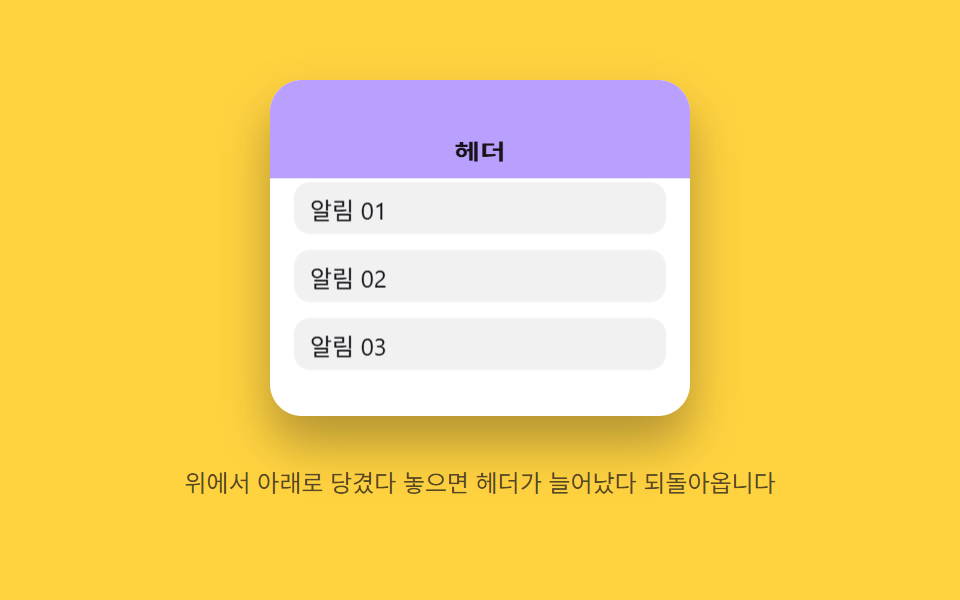
끝 지점을 넘어 당기면 늘어난 값이 손을 놓은 뒤 원래 값으로 튕기듯 돌아옵니다.
쓰임모바일 상단 헤더, 앱형 랜딩 페이지
PULL_RESISTSPRING_KSPRING_C
<main class="stage">
<div class="eoh is-demo" id="eoh">
  <div class="eoh__frame" id="eohFrame" role="application" aria-label="오버스크롤 헤더 실험판">
    <div class="eoh__header" id="eohHeader">헤더</div>
    <div class="eoh__body" id="eohBody">
      <div class="eoh__row">알림 01</div>
      <div class="eoh__row">알림 02</div>
      <div class="eoh__row">알림 03</div>
    </div>
  </div>
  <p class="eoh__hint">위에서 아래로 당겼다 놓으면 헤더가 늘어났다 되돌아옵니다</p>
</div>
</main>
@use "../../../../site/static/demo-tokens" as *;
// 계산 겹(저항·스프링 적분)은 JS 에 있다 — 여기는 정적 배치만.
@include stage($stage-yellow);
.stage { position: relative; }
.eoh {
display: flex;
flex-direction: column;
align-items: center;
gap: $sp-3;
}
.eoh__frame {
position: relative;
width: 210px;
height: 168px;
overflow: hidden;
border-radius: $r-card;
background: $stage-paper;
box-shadow: $shadow-raised;
touch-action: none;
overscroll-behavior: contain;
cursor: grab;
}
.eoh__header {
position: absolute;
left: 0;
top: 0;
width: 100%;
height: 56px;
transform-origin: top center;
display: flex;
align-items: flex-end;
justify-content: center;
padding-bottom: $sp-2;
background: $subject-lilac;
color: $subject-ink;
font-size: 14px;
font-weight: 700;
will-change: transform;
}
.eoh__body {
position: relative;
margin-top: 56px;
padding: $sp-2 $sp-3;
display: flex;
flex-direction: column;
gap: $sp-2;
will-change: transform;
}
.eoh__row {
height: 26px;
flex: 0 0 auto;
display: flex;
align-items: center;
padding-left: $sp-2;
border-radius: $r-sm;
background: rgba($subject-ink, .06);
color: $subject-ink;
font-size: 12px;
}
.eoh__hint {
color: rgba($subject-ink, .72);
font-size: 12px;
text-align: center;
}
@media (max-width: 340px) {
.eoh { gap: $sp-2; }
.eoh__frame { width: 160px; height: 96px; }
.eoh__header { height: 36px; font-size: 12px; }
.eoh__body { margin-top: 36px; }
.eoh__row { height: 18px; font-size: 11px; }
.eoh__hint { font-size: 11px; }
}
@media (prefers-reduced-motion: reduce) {
.eoh__header, .eoh__body { transition: none !important; }
}html, body {
margin: 0;
overflow: hidden;
}
.stage {
box-sizing: border-box;
min-height: 100vh;
display: grid;
place-items: center;
margin: 0;
background: #ffd23f;
font-family: -apple-system, "Segoe UI", "Noto Sans KR", sans-serif;
padding: clamp(8px, 4vw, 24px);
}
.stage {
position: relative;
}
.eoh {
display: flex;
flex-direction: column;
align-items: center;
gap: 12px;
}
.eoh__frame {
position: relative;
width: 210px;
height: 168px;
overflow: hidden;
border-radius: 16px;
background: #ffffff;
box-shadow: 0 14px 24px rgba(23, 20, 26, 0.32);
touch-action: none;
overscroll-behavior: contain;
cursor: grab;
}
.eoh__header {
position: absolute;
left: 0;
top: 0;
width: 100%;
height: 56px;
transform-origin: top center;
display: flex;
align-items: flex-end;
justify-content: center;
padding-bottom: 8px;
background: #b9a0ff;
color: #17141a;
font-size: 14px;
font-weight: 700;
will-change: transform;
}
.eoh__body {
position: relative;
margin-top: 56px;
padding: 8px 12px;
display: flex;
flex-direction: column;
gap: 8px;
will-change: transform;
}
.eoh__row {
height: 26px;
flex: 0 0 auto;
display: flex;
align-items: center;
padding-left: 8px;
border-radius: 8px;
background: rgba(23, 20, 26, 0.06);
color: #17141a;
font-size: 12px;
}
.eoh__hint {
color: rgba(23, 20, 26, 0.72);
font-size: 12px;
text-align: center;
}
@media (max-width: 340px) {
.eoh {
gap: 8px;
}
.eoh__frame {
width: 160px;
height: 96px;
}
.eoh__header {
height: 36px;
font-size: 12px;
}
.eoh__body {
margin-top: 36px;
}
.eoh__row {
height: 18px;
font-size: 11px;
}
.eoh__hint {
font-size: 11px;
}
}
@media (prefers-reduced-motion: reduce) {
.eoh__header, .eoh__body {
transition: none !important;
}
}(function () {
var root = document.getElementById('eoh');
var frame = document.getElementById('eohFrame');
var header = document.getElementById('eohHeader');
var body = document.getElementById('eohBody');
var reduce = window.matchMedia('(prefers-reduced-motion: reduce)').matches;
// 계산 겹: 당긴 거리(dist)는 제곱근으로 저항을 걸어 늘어난 값(stretch)을 만든다(고무줄 저항).
// 손을 놓으면 stretch 를 목표 1 로 스프링 적분(SPRING_K·SPRING_C)해 되돌린다 — 속성 트윈이 아니라
// 매 프레임 가속도를 계산해 쌓는 진짜 스프링.
var PULL_RESIST = 9;
var MAX_STRETCH = 1.85;
var SPRING_K = 210;
var SPRING_C = 15;
var HEADER_H = 56;
var stretch = 1, sVel = 0, raf = null;
function paint() {
header.style.transform = 'scaleY(' + stretch.toFixed(3) + ')';
var extra = HEADER_H * (stretch - 1);
body.style.transform = 'translateY(' + extra.toFixed(1) + 'px)';
}
function stopSpring() { if (raf !== null) { cancelAnimationFrame(raf); raf = null; } }
function springTick() {
var force = -SPRING_K * (stretch - 1) - SPRING_C * sVel;
sVel += force * (1 / 60) * 0.06;
stretch += sVel;
paint();
if (Math.abs(stretch - 1) < 0.003 && Math.abs(sVel) < 0.003) {
stretch = 1; sVel = 0; paint(); raf = null; return;
}
raf = requestAnimationFrame(springTick);
}
function release() {
if (reduce) { stretch = 1; sVel = 0; paint(); return; }
stopSpring();
raf = requestAnimationFrame(springTick);
}
function pullTo(dist) {
var d = Math.max(0, dist);
stretch = Math.min(MAX_STRETCH, 1 + Math.sqrt(d) / PULL_RESIST);
paint();
}
function wireReal() {
var dragging = false, startY = 0;
frame.addEventListener('pointerdown', function (e) {
root.classList.remove('is-demo'); stopAutoplay(); stopSpring();
dragging = true; startY = e.clientY; sVel = 0;
frame.setPointerCapture(e.pointerId);
});
frame.addEventListener('pointermove', function (e) {
if (!dragging) { return; }
pullTo(e.clientY - startY);
});
frame.addEventListener('pointerup', function () {
if (!dragging) { return; }
dragging = false;
release();
});
frame.addEventListener('wheel', function (e) {
if (e.deltaY >= 0) { return; }
e.preventDefault();
root.classList.remove('is-demo'); stopAutoplay(); stopSpring();
pullTo((stretch - 1) * PULL_RESIST * PULL_RESIST + (-e.deltaY) * 1.4);
release();
}, { passive: false });
}
wireReal();
paint();
// 자동 루프: 당김 거리를 늘렸다가 놓기를 반복해 같은 저항→스프링 경로를 재현한다.
var autoTimer = null, phase = 0;
function autoTick() {
phase += 1;
var d = 58 + Math.sin(phase * 1.1) * 20;
pullTo(d);
setTimeout(function () { if (!root.classList.contains('is-demo')) { return; } release(); }, 260);
}
function stopAutoplay() { if (autoTimer) { clearInterval(autoTimer); autoTimer = null; } }
if (!reduce) { autoTimer = setInterval(autoTick, 900); autoTick(); }
})();import { useEffect, useRef } from "react";
import styles from "./ScrollMomentumElasticOverscrollHeader.module.scss";
export type ScrollMomentumElasticOverscrollHeaderProps = {
color?: string;
};
export default function ScrollMomentumElasticOverscrollHeader({
color = "#b9a0ff",
}: ScrollMomentumElasticOverscrollHeaderProps) {
const rootRef = useRef<HTMLDivElement | null>(null);
useEffect(() => {
const root = rootRef.current;
if (!root) return;
const frame = root.querySelector<HTMLDivElement>(`.${styles.frame}`);
const header = root.querySelector<HTMLDivElement>(`.${styles.header}`);
const body = root.querySelector<HTMLDivElement>(`.${styles.body}`);
if (!frame || !header || !body) return;
const reduce = window.matchMedia("(prefers-reduced-motion: reduce)").matches;
// 계산 겹: 당긴 거리(dist)는 제곱근으로 저항을 걸어 늘어난 값(stretch)을 만든다(고무줄 저항).
// 손을 놓으면 stretch 를 목표 1 로 스프링 적분(SPRING_K·SPRING_C)해 되돌린다.
const PULL_RESIST = 9;
const MAX_STRETCH = 1.85;
const SPRING_K = 210;
const SPRING_C = 15;
const HEADER_H = 56;
let stretch = 1, sVel = 0, raf: number | null = null;
function paint() {
header!.style.transform = "scaleY(" + stretch.toFixed(3) + ")";
const extra = HEADER_H * (stretch - 1);
body!.style.transform = "translateY(" + extra.toFixed(1) + "px)";
}
function stopSpring() { if (raf !== null) { cancelAnimationFrame(raf); raf = null; } }
function springTick() {
const force = -SPRING_K * (stretch - 1) - SPRING_C * sVel;
sVel += force * (1 / 60) * 0.06;
stretch += sVel;
paint();
if (Math.abs(stretch - 1) < 0.003 && Math.abs(sVel) < 0.003) {
stretch = 1; sVel = 0; paint(); raf = null; return;
}
raf = requestAnimationFrame(springTick);
}
function release() {
if (reduce) { stretch = 1; sVel = 0; paint(); return; }
stopSpring();
raf = requestAnimationFrame(springTick);
}
function pullTo(dist: number) {
const d = Math.max(0, dist);
stretch = Math.min(MAX_STRETCH, 1 + Math.sqrt(d) / PULL_RESIST);
paint();
}
let dragging = false, startY = 0;
function onPointerDown(e: PointerEvent) {
stopAutoplay(); stopSpring();
dragging = true; startY = e.clientY; sVel = 0;
frame!.setPointerCapture(e.pointerId);
}
function onPointerMove(e: PointerEvent) {
if (!dragging) return;
pullTo(e.clientY - startY);
}
function onPointerUp() {
if (!dragging) return;
dragging = false;
release();
}
function onWheel(e: WheelEvent) {
if (e.deltaY >= 0) return;
e.preventDefault();
stopAutoplay(); stopSpring();
pullTo((stretch - 1) * PULL_RESIST * PULL_RESIST + -e.deltaY * 1.4);
release();
}
frame.addEventListener("pointerdown", onPointerDown);
frame.addEventListener("pointermove", onPointerMove);
frame.addEventListener("pointerup", onPointerUp);
frame.addEventListener("wheel", onWheel, { passive: false });
paint();
let autoTimer: number | null = null, phase = 0;
let releaseTimeout: number | null = null;
function autoTick() {
phase += 1;
const d = 58 + Math.sin(phase * 1.1) * 20;
pullTo(d);
releaseTimeout = window.setTimeout(() => { release(); }, 260);
}
function stopAutoplay() {
if (autoTimer !== null) { window.clearInterval(autoTimer); autoTimer = null; }
if (releaseTimeout !== null) { window.clearTimeout(releaseTimeout); releaseTimeout = null; }
}
if (!reduce) { autoTimer = window.setInterval(autoTick, 900); autoTick(); }
return () => {
stopAutoplay();
stopSpring();
frame.removeEventListener("pointerdown", onPointerDown);
frame.removeEventListener("pointermove", onPointerMove);
frame.removeEventListener("pointerup", onPointerUp);
frame.removeEventListener("wheel", onWheel);
};
}, []);
return (
<div ref={rootRef} className={styles.stage}>
<div className={styles.eoh}>
<div className={styles.frame} role="application" aria-label="오버스크롤 헤더 실험판">
<div className={styles.header} style={{ background: color }}>헤더</div>
<div className={styles.body}>
<div className={styles.row}>알림 01</div>
<div className={styles.row}>알림 02</div>
<div className={styles.row}>알림 03</div>
</div>
</div>
<p className={styles.hint}>위에서 아래로 당겼다 놓으면 헤더가 늘어났다 되돌아옵니다</p>
</div>
</div>
);
}02 오버스크롤 탄성 — 스크롤 끝 지점을 넘어가면 늘어난 값이 되돌아오는 방식 — 측정 누적면적 21.332% · 움직인 프레임 23/23GODRICH 원작 · zip 에 SCSS·React 포함 · 관성 스크롤 9종 — 멈춘 뒤에도 값이 스스로 줄어드는 아홉 가지 방식
이 데모가 속한 글
 관성 스크롤 9종 — 멈춘 뒤에도 값이 스스로 줄어드는 아홉 가지 방식관성 스크롤은 손을 뗀 뒤에도 이동·강도 값이 곧바로 0이 되지 않고 이전 값을 이어받아 계산으로 줄어드는 스크롤 인터랙션을 말하는데, 아홉 개 중 하나는 스크롤이 멈춘 뒤에도 이동 값이 속도를 이어받아 서서히 줄어 이 글의 데모 전부 보기