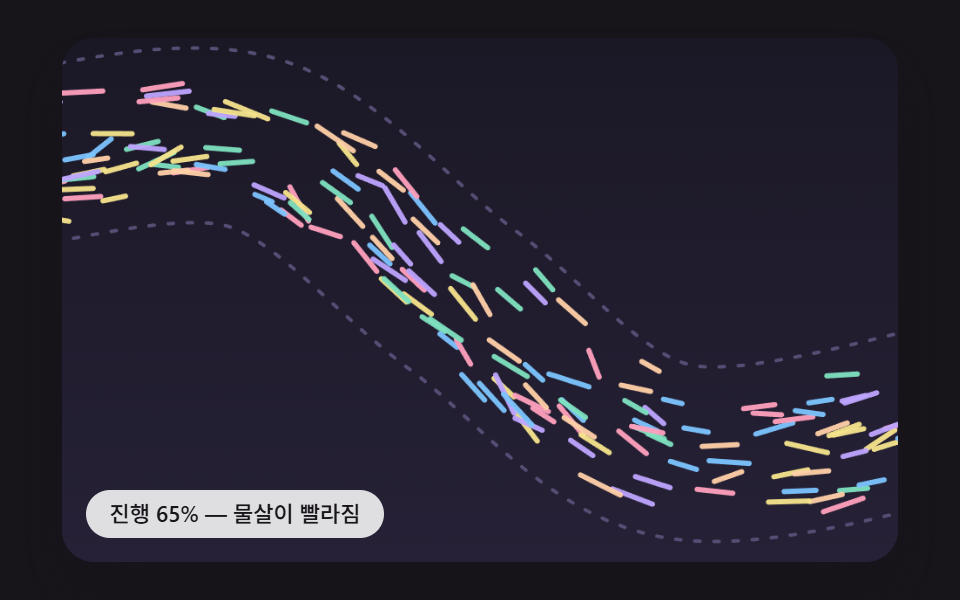
09노이즈 흐름 왜곡 — 스크롤 값이 2D 노이즈 필드의 오프셋 값을 밀어, 파티클 경로가 매끈하게 휘는 흐름으로 바뀌는 방식
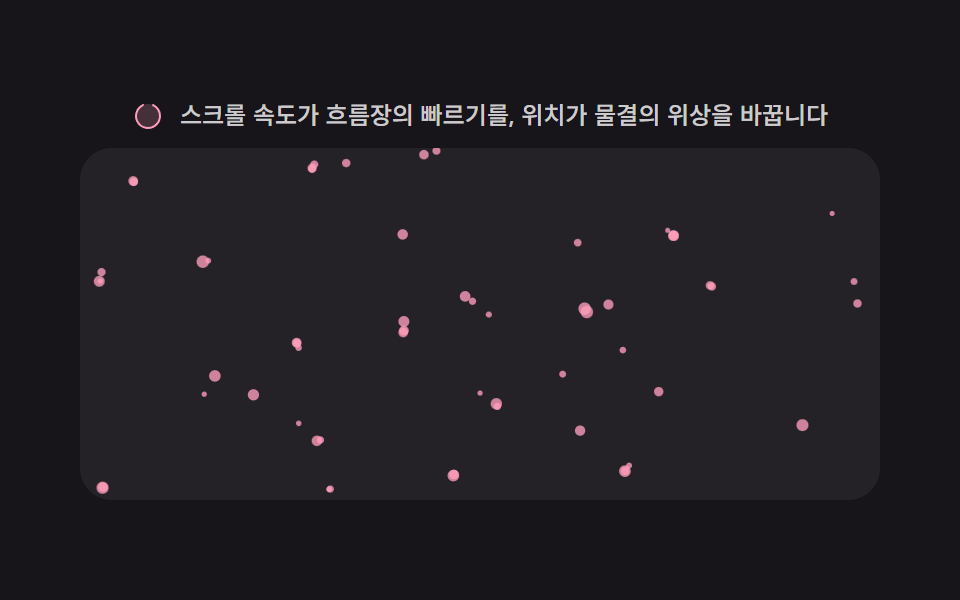
스크롤 값이 늘어날수록 노이즈 필드의 오프셋 값이 이동해, 같은 자리의 파티클 경로도 시간에 따라 다른 방향으로 매끈하게 휩니다.
쓰임제너러티브한 느낌의 아트 배경, 크리에이티브 포트폴리오 배경
valueNoiseSCROLL_WARPNOISE_SCALE
<main class="stage">
<div class="sp" id="sp">
  <p class="sp__hint">
    <svg class="sp__ico" viewBox="0 0 256 256" aria-hidden="true"><g fill="currentColor"><path d="M224 128a96 96 0 1 1-96-96a96 96 0 0 1 96 96" opacity=".2"/><path d="M232 128a104 104 0 0 1-208 0c0-41 23.81-78.36 60.66-95.27a8 8 0 0 1 6.68 14.54C60.15 61.59 40 93.27 40 128a88 88 0 0 0 176 0c0-34.73-20.15-66.41-51.34-80.73a8 8 0 0 1 6.68-14.54C208.19 49.64 232 87 232 128"/></g></svg>
    <span>스크롤 속도가 흐름장의 빠르기를, 위치가 물결의 위상을 바꿉니다</span>
  </p>
  <div class="sp__viewport" id="viewport" tabindex="0" role="region" aria-label="입자 노이즈 흐름 스크롤 영역">
    <canvas class="sp__cv" id="cv" aria-hidden="true"></canvas>
    <b class="sp__val" id="val" aria-hidden="true">0%</b>
    <div class="sp__track" aria-hidden="true"></div>
  </div>
</div>
</main>
@use "../../../../site/static/demo-tokens" as *;
// 변형 3개는 이 위 세 변수만 바꾼다. 계산 겹(값-노이즈 흐름장)은 index.html 의 valueNoise()/step() 에 있다.
$duration: 2s;
$easing: $ease-out;
$color: $subject-pink;
@include stage($stage-ink);
.sp {
--particle-color: #{$color};
display: flex;
flex-direction: column;
align-items: center;
gap: $sp-2;
width: min(400px, 92vw);
}
.sp__hint {
display: flex;
align-items: center;
gap: $sp-2;
margin: 0;
color: rgba($stage-paper, .78);
font-size: 12px;
font-weight: 500;
line-height: 1.3;
}
.sp__ico {
width: 16px;
height: 16px;
flex: none;
color: $color;
}
.sp__viewport {
position: relative;
width: 100%;
height: 176px;
overflow-y: auto;
overflow-x: hidden;
border-radius: $r-card;
background: rgba($stage-paper, .06);
touch-action: pan-y;
scrollbar-width: thin;
}
.sp__cv {
position: sticky;
top: 0;
left: 0;
display: block;
width: 100%;
height: 176px;
}
.sp__track {
height: 320%;
}
.sp__val {
position: absolute;
top: $sp-2;
right: $sp-2;
padding: $sp-1 $sp-2;
border-radius: $r-pill;
background: rgba($stage-paper, .18);
color: $stage-paper;
font-size: 11px;
font-weight: 700;
line-height: 1.6;
pointer-events: none;
transition: opacity $duration $easing;
}
@media (max-width: 340px) {
.sp__hint { font-size: 11px; }
.sp__viewport, .sp__cv { height: 120px; }
}
@media (prefers-reduced-motion: reduce) {
.sp__viewport { scroll-behavior: auto; }
.sp__val { transition: none; }
}html, body {
margin: 0;
overflow: hidden;
}
.stage {
box-sizing: border-box;
min-height: 100vh;
display: grid;
place-items: center;
margin: 0;
background: #17141a;
font-family: -apple-system, "Segoe UI", "Noto Sans KR", sans-serif;
padding: clamp(8px, 4vw, 24px);
}
.sp {
--particle-color: #ff9ebb;
display: flex;
flex-direction: column;
align-items: center;
gap: 8px;
width: min(400px, 92vw);
}
.sp__hint {
display: flex;
align-items: center;
gap: 8px;
margin: 0;
color: rgba(255, 255, 255, 0.78);
font-size: 12px;
font-weight: 500;
line-height: 1.3;
}
.sp__ico {
width: 16px;
height: 16px;
flex: none;
color: #ff9ebb;
}
.sp__viewport {
position: relative;
width: 100%;
height: 176px;
overflow-y: auto;
overflow-x: hidden;
border-radius: 16px;
background: rgba(255, 255, 255, 0.06);
touch-action: pan-y;
scrollbar-width: thin;
}
.sp__cv {
position: sticky;
top: 0;
left: 0;
display: block;
width: 100%;
height: 176px;
}
.sp__track {
height: 320%;
}
.sp__val {
position: absolute;
top: 8px;
right: 8px;
padding: 4px 8px;
border-radius: 999px;
background: rgba(255, 255, 255, 0.18);
color: #ffffff;
font-size: 11px;
font-weight: 700;
line-height: 1.6;
pointer-events: none;
transition: opacity 2s ease-out;
}
@media (max-width: 340px) {
.sp__hint {
font-size: 11px;
}
.sp__viewport, .sp__cv {
height: 120px;
}
}
@media (prefers-reduced-motion: reduce) {
.sp__viewport {
scroll-behavior: auto;
}
.sp__val {
transition: none;
}
}(function () {
var root = document.getElementById('sp');
var viewport = document.getElementById('viewport');
var cv = document.getElementById('cv');
var ctx = cv.getContext('2d');
var val = document.getElementById('val');
var reduce = window.matchMedia('(prefers-reduced-motion: reduce)').matches;
var isDemo = true;
function makeLcg(seed) {
var s = seed >>> 0;
return function () { s = (s * 1664525 + 1013904223) >>> 0; return s / 4294967296; };
}
var rng = makeLcg(8675309);
var css = getComputedStyle(root);
var PARTICLE_COLOR = css.getPropertyValue('--particle-color').trim() || '#ff9ebb';
// 계산 겹: 자체 구현 2D 값-노이즈 흐름장(value-noise flow field) — 라이브러리 없이 순열 표를
// 직접 만들어(makeLcg 로 섞음) 격자 꼭짓점 해시값을 스무스스텝으로 보간한다. 그 값을 각도로 써서
// 입자마다 흐르는 방향을 정하므로 입자가 "따라 흐르는" 모습이 나온다.
var PERM_SIZE = 256;
var perm = (function () {
var p = [];
for (var i = 0; i < PERM_SIZE; i++) p.push(i);
for (var j = PERM_SIZE - 1; j > 0; j--) {
var k = Math.floor(rng() * (j + 1));
var t = p[j]; p[j] = p[k]; p[k] = t;
}
return p.concat(p);
})();
function hash2(ix, iy) {
var a = perm[(ix & 255)];
return perm[(a + iy) & 255] / 255;
}
function smooth(t) { return t * t * (3 - 2 * t); }
function valueNoise(x, y) {
var x0 = Math.floor(x), y0 = Math.floor(y);
var fx = smooth(x - x0), fy = smooth(y - y0);
var v00 = hash2(x0, y0), v10 = hash2(x0 + 1, y0);
var v01 = hash2(x0, y0 + 1), v11 = hash2(x0 + 1, y0 + 1);
var a = v00 + (v10 - v00) * fx;
var b = v01 + (v11 - v01) * fx;
return a + (b - a) * fy;
}
var NOISE_SCALE = 0.045; // 공간 주파수 — 낮을수록 큰 소용돌이 결
var TIME_GAIN = 0.00014; // 시간에 따라 장이 흘러가는 속도
var SCROLL_WARP = 3.4; // 스크롤 위치가 노이즈 좌표를 미는 양 (위상 이동)
var BASE_SPEED = 34; // 기본 흐름 속력 (px/s)
var FLOW_SPEED = 0.6; // 흐름 속력 배수 (변형 대상 상수)
var COUNT = 60;
var W = 0, H = 0, dpr = 1;
var dots = [];
function fit() {
var r = viewport.getBoundingClientRect();
dpr = window.devicePixelRatio || 1;
W = r.width; H = r.height;
cv.width = Math.round(W * dpr);
cv.height = Math.round(H * dpr);
ctx.setTransform(dpr, 0, 0, dpr, 0, 0);
if (dots.length === 0) initDots();
}
function initDots() {
dots = [];
for (var i = 0; i < COUNT; i++) {
dots.push({ x: rng() * W, y: rng() * H, r: 1.2 + rng() * 1.9 });
}
}
var scrollPos = 0, scrollVel = 0, scrollDir = 0, idleMs = 0, lastTop = 0, lastT = 0;
function sampleScroll(now) {
var top = viewport.scrollTop;
var max = Math.max(1, viewport.scrollHeight - viewport.clientHeight);
scrollPos = top / max;
var dt = lastT ? Math.max(1, now - lastT) : 16;
var v = (top - lastTop) / dt * 1000;
scrollVel += (v - scrollVel) * 0.3;
if (Math.abs(scrollVel) > 4) { scrollDir = scrollVel > 0 ? 1 : -1; idleMs = 0; } else { idleMs += dt; }
lastTop = top; lastT = now;
}
viewport.addEventListener('scroll', function () {
sampleScroll(performance.now());
if (reduce) paintStatic();
});
function human() { if (isDemo) { root.classList.remove('is-demo'); isDemo = false; } }
['wheel', 'touchstart', 'pointerdown'].forEach(function (evt) {
viewport.addEventListener(evt, human, { passive: true });
});
function fieldAngle(x, y, now) {
var nx = x * NOISE_SCALE + now * TIME_GAIN + scrollPos * SCROLL_WARP;
var ny = y * NOISE_SCALE;
return valueNoise(nx, ny) * Math.PI * 4;
}
function step(now, dtSec) {
var speedGain = 1 + Math.min(2.2, Math.abs(scrollVel) / 180);
for (var i = 0; i < dots.length; i++) {
var d = dots[i];
var ang = fieldAngle(d.x, d.y, now);
var speed = BASE_SPEED * FLOW_SPEED * speedGain;
d.x += Math.cos(ang) * speed * dtSec;
d.y += Math.sin(ang) * speed * dtSec;
if (d.x < 0) d.x += W; else if (d.x > W) d.x -= W;
if (d.y < 0) d.y += H; else if (d.y > H) d.y -= H;
}
}
function paint() {
ctx.clearRect(0, 0, W, H);
ctx.fillStyle = PARTICLE_COLOR;
for (var i = 0; i < dots.length; i++) {
var d = dots[i];
ctx.globalAlpha = 0.78;
ctx.beginPath(); ctx.arc(d.x, d.y, d.r, 0, Math.PI * 2); ctx.fill();
}
ctx.globalAlpha = 1;
}
function updateVal() { val.textContent = Math.round(scrollPos * 100) + '%'; }
function paintStatic() {
for (var i = 0; i < dots.length; i++) {
var d = dots[i];
var ang = fieldAngle(d.x, d.y, 0);
d.x += Math.cos(ang) * 6;
d.y += Math.sin(ang) * 6;
if (d.x < 0) d.x += W; else if (d.x > W) d.x -= W;
if (d.y < 0) d.y += H; else if (d.y > H) d.y -= H;
}
paint();
updateVal();
}
var lastFrameT = 0;
function frame(now) {
if (!lastFrameT) lastFrameT = now;
var dtSec = Math.min(0.05, (now - lastFrameT) / 1000);
lastFrameT = now;
step(now, dtSec);
paint();
updateVal();
requestAnimationFrame(frame);
}
var DRIVE_PERIOD_MS = 2000;
var driveStart = 0;
function triangle(frac) { return frac < 0.5 ? frac * 2 : 2 - frac * 2; }
function driveTick(now) {
if (!driveStart) driveStart = now;
if (isDemo && !reduce) {
var frac = ((now - driveStart) % DRIVE_PERIOD_MS) / DRIVE_PERIOD_MS;
var w = triangle(frac);
var max = Math.max(1, viewport.scrollHeight - viewport.clientHeight);
viewport.scrollTop = w * max;
}
requestAnimationFrame(driveTick);
}
window.addEventListener('resize', fit);
fit();
if (reduce) {
root.classList.add('is-still');
sampleScroll(performance.now());
paintStatic();
} else {
requestAnimationFrame(frame);
requestAnimationFrame(driveTick);
}
})();// NoiseFlow — vanilla 판(run/370/demo/09-scroll-particle-noise-flow/index.html) 의 React 포트.
// 계산 겹: 자체 구현 2D 값-노이즈 흐름장(value-noise flow field) — 라이브러리 없이 순열 표를
// 직접 만들어(makeLcg 로 섞음) 격자 꼭짓점 해시값을 스무스스텝으로 보간한다. 그 값을 각도로 써서
// 입자마다 흐르는 방향을 정하므로 입자가 "따라 흐르는" 모습이 나온다.
import { useEffect, useRef } from "react";
import styles from "./NoiseFlow.module.scss";
type Box<T> = { current: T };
interface Dot { x: number; y: number; r: number; }
export default function NoiseFlow() {
const rootRef = useRef(null) as unknown as Box<HTMLDivElement>;
const viewportRef = useRef(null) as unknown as Box<HTMLDivElement>;
const canvasRef = useRef(null) as unknown as Box<HTMLCanvasElement>;
const valRef = useRef(null) as unknown as Box<HTMLElement>;
const rafFrameRef = useRef(0) as unknown as Box<number>;
const rafDriveRef = useRef(0) as unknown as Box<number>;
useEffect(() => {
const root = rootRef.current;
const viewport = viewportRef.current;
const canvas = canvasRef.current;
const val = valRef.current;
if (!root || !viewport || !canvas || !val) return;
const ctx = canvas.getContext("2d");
if (!ctx) return;
const reduce = window.matchMedia("(prefers-reduced-motion: reduce)").matches;
let isDemo = true;
function makeLcg(seed: number) {
let s = seed >>> 0;
return function () { s = (s * 1664525 + 1013904223) >>> 0; return s / 4294967296; };
}
const rng = makeLcg(8675309);
const css = getComputedStyle(root);
const PARTICLE_COLOR = css.getPropertyValue("--particle-color").trim() || "#ff9ebb";
const PERM_SIZE = 256;
const permBase: number[] = [];
for (let i = 0; i < PERM_SIZE; i++) permBase.push(i);
for (let j = PERM_SIZE - 1; j > 0; j--) {
const k = Math.floor(rng() * (j + 1));
const t = permBase[j]; permBase[j] = permBase[k]; permBase[k] = t;
}
const perm = permBase.concat(permBase);
function hash2(ix: number, iy: number) {
const a = perm[ix & 255];
return perm[(a + iy) & 255] / 255;
}
function smooth(t: number) { return t * t * (3 - 2 * t); }
function valueNoise(x: number, y: number) {
const x0 = Math.floor(x), y0 = Math.floor(y);
const fx = smooth(x - x0), fy = smooth(y - y0);
const v00 = hash2(x0, y0), v10 = hash2(x0 + 1, y0);
const v01 = hash2(x0, y0 + 1), v11 = hash2(x0 + 1, y0 + 1);
const a = v00 + (v10 - v00) * fx;
const b = v01 + (v11 - v01) * fx;
return a + (b - a) * fy;
}
const NOISE_SCALE = 0.045;
const TIME_GAIN = 0.00014;
const SCROLL_WARP = 3.4;
const BASE_SPEED = 34;
const FLOW_SPEED = 0.6;
const COUNT = 60;
let W = 0, H = 0, dpr = 1;
let dots: Dot[] = [];
function initDots() {
dots = [];
for (let i = 0; i < COUNT; i++) {
dots.push({ x: rng() * W, y: rng() * H, r: 1.2 + rng() * 1.9 });
}
}
function fit() {
const r = viewport!.getBoundingClientRect();
dpr = window.devicePixelRatio || 1;
W = r.width; H = r.height;
canvas!.width = Math.round(W * dpr);
canvas!.height = Math.round(H * dpr);
ctx!.setTransform(dpr, 0, 0, dpr, 0, 0);
if (dots.length === 0) initDots();
}
let scrollPos = 0, scrollVel = 0, scrollDir = 0, idleMs = 0, lastTop = 0, lastT = 0;
function sampleScroll(now: number) {
const top = viewport!.scrollTop;
const max = Math.max(1, viewport!.scrollHeight - viewport!.clientHeight);
scrollPos = top / max;
const dt = lastT ? Math.max(1, now - lastT) : 16;
const v = (top - lastTop) / dt * 1000;
scrollVel += (v - scrollVel) * 0.3;
if (Math.abs(scrollVel) > 4) { scrollDir = scrollVel > 0 ? 1 : -1; idleMs = 0; } else { idleMs += dt; }
lastTop = top; lastT = now;
}
function onScroll() {
sampleScroll(performance.now());
if (reduce) paintStatic();
}
viewport.addEventListener("scroll", onScroll);
function human() { if (isDemo) { isDemo = false; } }
viewport.addEventListener("wheel", human, { passive: true });
viewport.addEventListener("touchstart", human, { passive: true });
viewport.addEventListener("pointerdown", human, { passive: true });
function fieldAngle(x: number, y: number, now: number) {
const nx = x * NOISE_SCALE + now * TIME_GAIN + scrollPos * SCROLL_WARP;
const ny = y * NOISE_SCALE;
return valueNoise(nx, ny) * Math.PI * 4;
}
function step(now: number, dtSec: number) {
const speedGain = 1 + Math.min(2.2, Math.abs(scrollVel) / 180);
for (let i = 0; i < dots.length; i++) {
const d = dots[i];
const ang = fieldAngle(d.x, d.y, now);
const speed = BASE_SPEED * FLOW_SPEED * speedGain;
d.x += Math.cos(ang) * speed * dtSec;
d.y += Math.sin(ang) * speed * dtSec;
if (d.x < 0) d.x += W; else if (d.x > W) d.x -= W;
if (d.y < 0) d.y += H; else if (d.y > H) d.y -= H;
}
}
function paint() {
ctx!.clearRect(0, 0, W, H);
ctx!.fillStyle = PARTICLE_COLOR;
for (let i = 0; i < dots.length; i++) {
const d = dots[i];
ctx!.globalAlpha = 0.78;
ctx!.beginPath(); ctx!.arc(d.x, d.y, d.r, 0, Math.PI * 2); ctx!.fill();
}
ctx!.globalAlpha = 1;
}
function updateVal() { val!.textContent = Math.round(scrollPos * 100) + "%"; }
function paintStatic() {
for (let i = 0; i < dots.length; i++) {
const d = dots[i];
const ang = fieldAngle(d.x, d.y, 0);
d.x += Math.cos(ang) * 6;
d.y += Math.sin(ang) * 6;
if (d.x < 0) d.x += W; else if (d.x > W) d.x -= W;
if (d.y < 0) d.y += H; else if (d.y > H) d.y -= H;
}
paint();
updateVal();
}
let lastFrameT = 0;
function frame(now: number) {
if (!lastFrameT) lastFrameT = now;
const dtSec = Math.min(0.05, (now - lastFrameT) / 1000);
lastFrameT = now;
step(now, dtSec);
paint();
updateVal();
rafFrameRef.current = requestAnimationFrame(frame);
}
const DRIVE_PERIOD_MS = 2000;
let driveStart = 0;
function triangle(frac: number) { return frac < 0.5 ? frac * 2 : 2 - frac * 2; }
function driveTick(now: number) {
if (!driveStart) driveStart = now;
if (isDemo && !reduce) {
const frac = ((now - driveStart) % DRIVE_PERIOD_MS) / DRIVE_PERIOD_MS;
const w = triangle(frac);
const max = Math.max(1, viewport!.scrollHeight - viewport!.clientHeight);
viewport!.scrollTop = w * max;
}
rafDriveRef.current = requestAnimationFrame(driveTick);
}
function onResize() { fit(); }
window.addEventListener("resize", onResize);
fit();
if (reduce) {
sampleScroll(performance.now());
paintStatic();
} else {
rafFrameRef.current = requestAnimationFrame(frame);
rafDriveRef.current = requestAnimationFrame(driveTick);
}
return () => {
window.removeEventListener("resize", onResize);
viewport.removeEventListener("scroll", onScroll);
viewport.removeEventListener("wheel", human);
viewport.removeEventListener("touchstart", human);
viewport.removeEventListener("pointerdown", human);
cancelAnimationFrame(rafFrameRef.current);
cancelAnimationFrame(rafDriveRef.current);
};
}, []);
return (
<main className={styles.stage}>
<div className={styles.root} ref={rootRef}>
<p className={styles.hint}>
<svg className={styles.icon} viewBox="0 0 256 256" aria-hidden="true"><g fill="currentColor"><path d="M224 128a96 96 0 1 1-96-96a96 96 0 0 1 96 96" opacity=".2" /><path d="M232 128a104 104 0 0 1-208 0c0-41 23.81-78.36 60.66-95.27a8 8 0 0 1 6.68 14.54C60.15 61.59 40 93.27 40 128a88 88 0 0 0 176 0c0-34.73-20.15-66.41-51.34-80.73a8 8 0 0 1 6.68-14.54C208.19 49.64 232 87 232 128" /></g></svg>
<span>스크롤 속도가 흐름장의 빠르기를, 위치가 물결의 위상을 바꿉니다</span>
</p>
<div className={styles.viewport} ref={viewportRef} tabIndex={0} role="region" aria-label="입자 노이즈 흐름 스크롤 영역">
<canvas className={styles.canvas} ref={canvasRef} aria-hidden="true" />
<b className={styles.val} ref={valRef} aria-hidden="true">0%</b>
<div className={styles.track} aria-hidden="true" />
</div>
</div>
</main>
);
}09 노이즈 흐름 왜곡 — 스크롤 값이 2D 노이즈 필드의 오프셋 값을 밀어, 파티클 경로가 매끈하게 휘는 흐름으로 바뀌는 방식 — 측정 누적면적 13.367% · 움직인 프레임 23/23GODRICH 원작 · zip 에 SCSS·React 포함 · 스크롤 파티클 배경 9종 — 값 하나로 흐름이 달라지는 캔버스 장면
이 데모가 속한 글
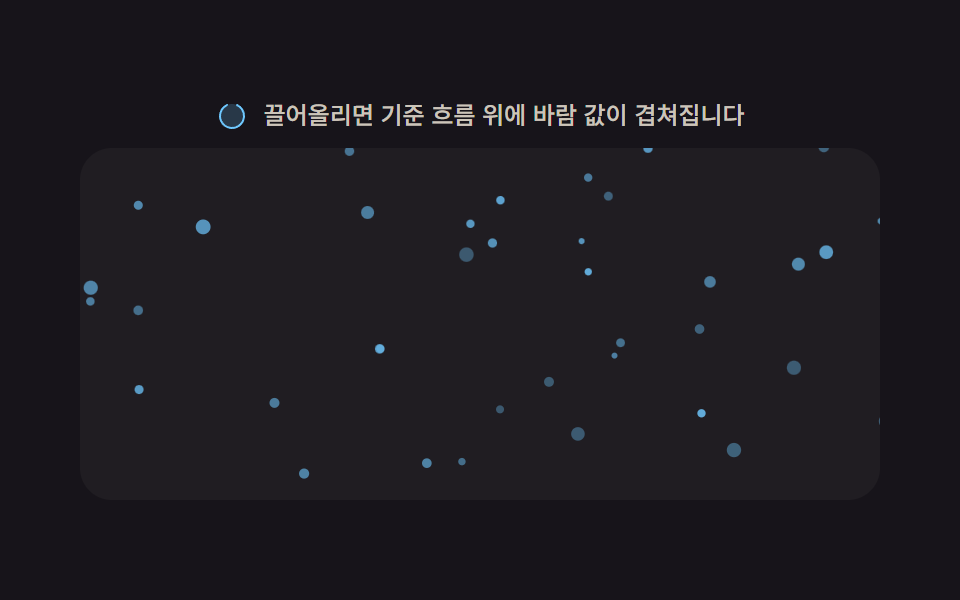 스크롤 파티클 배경 9종 — 값 하나로 흐름이 달라지는 캔버스 장면파티클 배경 9종을 값 기준으로 나누면, 아홉 가지 중 하나는 스크롤 속도 값이 빨라질수록 파티클이 생성되는 빈도 값이 늘어나고, 하나는 파티클마다 다른 깊이 값에 따라 같은 스크롤 이동량이 서로 다른 거리로 적용되 이 글의 데모 전부 보기