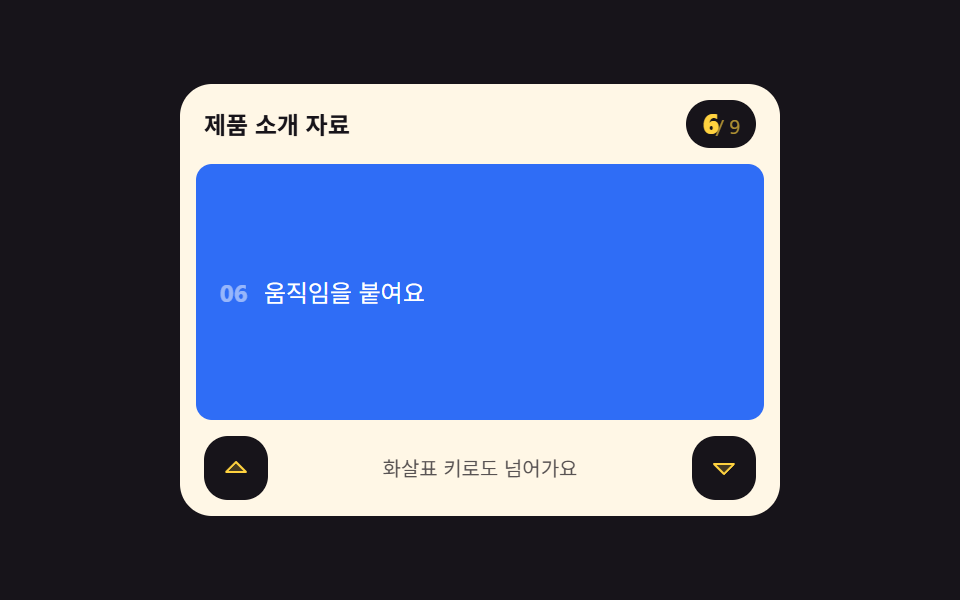
05몇 번째 구간인지 세어 주는 카운터
구간을 지날 때마다 「3 / 9」 숫자가 바뀌고 지금 구간에 aria-current 가 옮겨 붙습니다. 위아래 화살표 키를 받은 keydown 이 scrollTo 로 앞뒤 구간을 정확히 물어다 놓아, 손가락 없이도 자리를 옮길 수 있습니다.
쓰임한 화면에 한 장면씩 넘기는 발표 자료, 단계가 정해진 설명 문서
scrollTokeydownaria-current
<main class="stage">
  <section class="sc is-demo" id="sc" aria-label="구간 카운터">
    <header class="sc__head">
      <p class="sc__title">제품 소개 자료</p>
      <p class="sc__count">
        <b class="sc__now" id="sc-now">1</b>
        <span class="sc__num sc__num--1" aria-hidden="true">1</span>
        <span class="sc__num sc__num--3" aria-hidden="true">3</span>
        <span class="sc__num sc__num--6" aria-hidden="true">6</span>
        <span class="sc__num sc__num--9" aria-hidden="true">9</span>
        <span class="sc__slash"> / 9</span>
      </p>
    </header>
    <div class="sc__view" id="sc-view" tabindex="0" role="region" aria-label="장면 목록 — 위아래 화살표 키로 이동">
      <div class="sc__track" id="sc-track">
        <article class="sc__sec" data-i="0"><b>01</b><span>처음 보는 화면</span></article>
        <article class="sc__sec" data-i="1"><b>02</b><span>무엇을 만들까요</span></article>
        <article class="sc__sec" data-i="2"><b>03</b><span>재료를 고르세요</span></article>
        <article class="sc__sec" data-i="3"><b>04</b><span>조립이 시작돼요</span></article>
        <article class="sc__sec" data-i="4"><b>05</b><span>색을 입힙니다</span></article>
        <article class="sc__sec" data-i="5"><b>06</b><span>움직임을 붙여요</span></article>
        <article class="sc__sec" data-i="6"><b>07</b><span>검사를 지나가요</span></article>
        <article class="sc__sec" data-i="7"><b>08</b><span>포장하는 장면</span></article>
        <article class="sc__sec" data-i="8"><b>09</b><span>다음 이야기로</span></article>
      </div>
    </div>
    <footer class="sc__keys">
      <button class="sc__key" type="button" id="sc-up" aria-label="이전 장면"><svg viewBox="0 0 256 256" width="1em" height="1em" fill="currentColor" aria-hidden="true"><path d="M208,160H48l80-80Z" opacity="0.2"/><path d="M213.66,154.34l-80-80a8,8,0,0,0-11.32,0l-80,80A8,8,0,0,0,48,168H208a8,8,0,0,0,5.66-13.66ZM67.31,152,128,91.31,188.69,152Z"/></svg></button>
      <span class="sc__hint">화살표 키로도 넘어가요</span>
      <button class="sc__key" type="button" id="sc-down" aria-label="다음 장면"><svg viewBox="0 0 256 256" width="1em" height="1em" fill="currentColor" aria-hidden="true"><path d="M208,96l-80,80L48,96Z" opacity="0.2"/><path d="M215.39,92.94A8,8,0,0,0,208,88H48a8,8,0,0,0-5.66,13.66l80,80a8,8,0,0,0,11.32,0l80-80A8,8,0,0,0,215.39,92.94ZM128,164.69,67.31,104H188.69Z"/></svg></button>
    </footer>
  </section>
</main>@use "../../../../site/static/demo-tokens" as *;
// 구간 카운터 — 장면을 지날 때마다 「3 / 9」 가 바뀌고 화살표 키로도 앞뒤로 넘어간다
$duration: $dur-loop;
$easing: $ease-spring;
$color: $subject-cream;
@include stage($stage-ink);
.sc {
position: relative;
box-sizing: border-box;
width: min(300px, 92vw);
border-radius: $r-card;
background: $subject-cream;
color: $subject-ink;
font-family: -apple-system, "Segoe UI", "Noto Sans KR", sans-serif;
overflow: hidden;
}
.sc__head {
display: flex;
align-items: baseline;
justify-content: space-between;
gap: $sp-2;
padding: $sp-2 $sp-3 0;
}
.sc__title {
margin: 0;
font-size: 12px;
font-weight: 700;
line-height: 1.3;
}
.sc__count {
position: relative;
display: inline-flex;
align-items: baseline;
gap: 0;
margin: 0;
padding: $sp-1 $sp-2;
border-radius: $r-pill;
background: $subject-ink;
color: $stage-yellow;
font-size: 12px;
line-height: 1.2;
}
.sc__now { font-size: 14px; font-weight: 800; font-variant-numeric: tabular-nums; }
.sc__slash { opacity: .65; font-size: 10px; }
// 격자 미리보기에서 카운터 숫자 넷을 같은 자리에 겹쳐 두고 컷으로 갈아 끼운다
.sc__num {
display: none;
font-size: 14px;
font-weight: 800;
line-height: 1.2;
font-variant-numeric: tabular-nums;
}
.sc__view {
box-sizing: border-box;
height: 128px;
margin: $sp-2 $sp-2 0;
overflow-y: auto;
scrollbar-width: none;
scroll-snap-type: y mandatory;
&::-webkit-scrollbar { display: none; }
&:focus-visible { outline: 2px solid $subject-blue; outline-offset: 2px; }
}
.sc__track {
display: grid;
}
.sc__sec {
display: flex;
align-items: center;
gap: $sp-2;
height: 128px;
padding: 0 $sp-3;
border-radius: $r-sm;
background: rgba(23, 20, 26, .05);
font-size: 12px;
line-height: 1.4;
scroll-snap-align: start;
scroll-snap-stop: always;
// 정적 경로 — aria-current 장면만 진하게
opacity: .6;
transition: opacity $dur-quick $easing, background $dur-quick $easing;
}
.sc__sec b { font-size: 12px; opacity: .5; }
.sc__sec[aria-current="true"] {
opacity: 1;
background: $subject-blue;
color: #fff;
}
.sc__sec[aria-current="true"] b { opacity: .85; }
.sc__keys {
display: flex;
align-items: center;
justify-content: space-between;
gap: $sp-2;
padding: $sp-2 $sp-3;
}
.sc__key {
display: inline-grid;
place-items: center;
width: 32px;
height: 32px;
margin: 0;
padding: 0;
border: 0;
border-radius: $r-control;
background: $subject-ink;
color: $stage-yellow;
font-size: 16px;
line-height: 1;
cursor: pointer;
transition: transform $dur-instant $ease-out;
&:focus-visible { outline: 2px solid $subject-blue; outline-offset: 2px; }
&:active { transform: scale(.9); }
}
.sc__hint {
margin: 0;
font-size: 10px;
line-height: 1.4;
color: rgba($stage-ink, .72);
}
// ── 격자 미리보기 루프 — 장면이 1 → 3 → 6 → 9 를 지나고 88% 에 첫 장면으로 돌아온다 ──
@keyframes sc-flow {
0%, 26% { transform: translateY(0); }
34%, 54% { transform: translateY(-256px); }
62%, 76% { transform: translateY(-640px); }
84% { transform: translateY(-1024px); }
88%, 100% { transform: translateY(0); }
}
// 숫자는 각자의 창에만 보이는 steps 컷 — 반투명 겹침이 없다
@keyframes sc-n1 { 0%, 29% { opacity: 1; } 30%, 87% { opacity: 0; } 88%, 100% { opacity: 1; } }
@keyframes sc-n3 { 0%, 33% { opacity: 0; } 34%, 53% { opacity: 1; } 54%, 100% { opacity: 0; } }
@keyframes sc-n6 { 0%, 61% { opacity: 0; } 62%, 75% { opacity: 1; } 76%, 100% { opacity: 0; } }
@keyframes sc-n9 { 0%, 83% { opacity: 0; } 84%, 87% { opacity: 1; } 88%, 100% { opacity: 0; } }
.sc.is-demo {
// 숫자 칸의 폭은 .sc__now 가 그대로 잡아 둔다 — display:none 으로 빼면 알약이 슬래시 폭으로 쪼그라들어
// 겹쳐 둔 숫자가 「/ 9」 위로 올라탄다 (실측: 알약이 「/6」 으로 보였다)
.sc__now { color: transparent; }
.sc__num { display: block; position: absolute; left: $sp-2; }
.sc__num--1 { animation-name: sc-n1; animation-duration: $duration; animation-timing-function: steps(1, end); animation-iteration-count: infinite; }
.sc__num--3 { animation-name: sc-n3; animation-duration: $duration; animation-timing-function: steps(1, end); animation-iteration-count: infinite; }
.sc__num--6 { animation-name: sc-n6; animation-duration: $duration; animation-timing-function: steps(1, end); animation-iteration-count: infinite; }
.sc__num--9 { animation-name: sc-n9; animation-duration: $duration; animation-timing-function: steps(1, end); animation-iteration-count: infinite; }
.sc__track {
animation-name: sc-flow;
animation-duration: $duration;
animation-timing-function: $easing;
animation-iteration-count: infinite;
// 미리보기 동안에는 스냅이 트랙을 다시 붙잡지 않게 한다 (262 실측)
scroll-snap-type: none;
}
// 정적(스냅) 경로에서 aria-current 는 JS 가 다니, 미리보기에서는 첫 장면이 켜진 모습으로 시작한다
.sc__sec[data-i="0"] { opacity: 1; background: $subject-blue; color: #fff; }
@keyframes sc-sec-0 { 0%, 29% { opacity: 1; background: $subject-blue; color: #fff; } 30%, 87% { opacity: .6; background: rgba(23, 20, 26, .05); color: $subject-ink; } 88%, 100% { opacity: 1; background: $subject-blue; color: #fff; } }
.sc__sec[data-i="0"] { animation-name: sc-sec-0; animation-duration: $duration; animation-timing-function: steps(1, end); animation-iteration-count: infinite; }
@keyframes sc-sec-2 { 0%, 33% { opacity: .6; background: rgba(23, 20, 26, .05); color: $subject-ink; } 34%, 53% { opacity: 1; background: $subject-blue; color: #fff; } 54%, 100% { opacity: .6; background: rgba(23, 20, 26, .05); color: $subject-ink; } }
.sc__sec[data-i="2"] { animation-name: sc-sec-2; animation-duration: $duration; animation-timing-function: steps(1, end); animation-iteration-count: infinite; }
@keyframes sc-sec-5 { 0%, 61% { opacity: .6; background: rgba(23, 20, 26, .05); color: $subject-ink; } 62%, 75% { opacity: 1; background: $subject-blue; color: #fff; } 76%, 100% { opacity: .6; background: rgba(23, 20, 26, .05); color: $subject-ink; } }
.sc__sec[data-i="5"] { animation-name: sc-sec-5; animation-duration: $duration; animation-timing-function: steps(1, end); animation-iteration-count: infinite; }
@keyframes sc-sec-8 { 0%, 83% { opacity: .6; background: rgba(23, 20, 26, .05); color: $subject-ink; } 84%, 87% { opacity: 1; background: $subject-blue; color: #fff; } 88%, 100% { opacity: .6; background: rgba(23, 20, 26, .05); color: $subject-ink; } }
.sc__sec[data-i="8"] { animation-name: sc-sec-8; animation-duration: $duration; animation-timing-function: steps(1, end); animation-iteration-count: infinite; }
}
@media (max-width: 340px) {
// 폰 320×200 무대의 세로 여유는 174px — 머리 31 + 키 줄 48 을 빼면 장면 창은 84px 이 상한
.sc__view { height: 84px; }
.sc__sec { height: 84px; font-size: 11px; }
// 장면 높이가 바뀌면 루프의 이동 거리도 같이 바뀌어야 한다 (84 × 2·5·8)
@keyframes sc-flow {
0%, 26% { transform: translateY(0); }
34%, 54% { transform: translateY(-168px); }
62%, 76% { transform: translateY(-420px); }
84% { transform: translateY(-672px); }
88%, 100% { transform: translateY(0); }
}
}
@media (prefers-reduced-motion: reduce) {
.sc.is-demo .sc__track,
.sc.is-demo .sc__num,
.sc.is-demo .sc__sec { animation: none !important; transform: none !important; }
// 정지 상태 — 첫 장면과 카운터 1 만 보인다
.sc.is-demo .sc__num--1 { opacity: 1 !important; }
.sc.is-demo .sc__num--3,
.sc.is-demo .sc__num--6,
.sc.is-demo .sc__num--9 { opacity: 0 !important; }
.sc.is-demo .sc__sec[data-i="0"] { opacity: 1 !important; background: $subject-blue !important; color: #fff !important; }
}html, body {
margin: 0;
overflow: hidden;
}
.stage {
box-sizing: border-box;
min-height: 100vh;
display: grid;
place-items: center;
margin: 0;
background: #17141a;
font-family: -apple-system, "Segoe UI", "Noto Sans KR", sans-serif;
padding: clamp(8px, 4vw, 24px);
}
.sc {
position: relative;
box-sizing: border-box;
width: min(300px, 92vw);
border-radius: 16px;
background: #fff7e6;
color: #17141a;
font-family: -apple-system, "Segoe UI", "Noto Sans KR", sans-serif;
overflow: hidden;
}
.sc__head {
display: flex;
align-items: baseline;
justify-content: space-between;
gap: 8px;
padding: 8px 12px 0;
}
.sc__title {
margin: 0;
font-size: 12px;
font-weight: 700;
line-height: 1.3;
}
.sc__count {
position: relative;
display: inline-flex;
align-items: baseline;
gap: 0;
margin: 0;
padding: 4px 8px;
border-radius: 999px;
background: #17141a;
color: #ffd23f;
font-size: 12px;
line-height: 1.2;
}
.sc__now {
font-size: 14px;
font-weight: 800;
font-variant-numeric: tabular-nums;
}
.sc__slash {
opacity: 0.65;
font-size: 10px;
}
.sc__num {
display: none;
font-size: 14px;
font-weight: 800;
line-height: 1.2;
font-variant-numeric: tabular-nums;
}
.sc__view {
box-sizing: border-box;
height: 128px;
margin: 8px 8px 0;
overflow-y: auto;
scrollbar-width: none;
scroll-snap-type: y mandatory;
}
.sc__view::-webkit-scrollbar {
display: none;
}
.sc__view:focus-visible {
outline: 2px solid #2f6df6;
outline-offset: 2px;
}
.sc__track {
display: grid;
}
.sc__sec {
display: flex;
align-items: center;
gap: 8px;
height: 128px;
padding: 0 12px;
border-radius: 8px;
background: rgba(23, 20, 26, 0.05);
font-size: 12px;
line-height: 1.4;
scroll-snap-align: start;
scroll-snap-stop: always;
opacity: 0.6;
transition: opacity 220ms cubic-bezier(0.2, 0.8, 0.2, 1), background 220ms cubic-bezier(0.2, 0.8, 0.2, 1);
}
.sc__sec b {
font-size: 12px;
opacity: 0.5;
}
.sc__sec[aria-current=true] {
opacity: 1;
background: #2f6df6;
color: #fff;
}
.sc__sec[aria-current=true] b {
opacity: 0.85;
}
.sc__keys {
display: flex;
align-items: center;
justify-content: space-between;
gap: 8px;
padding: 8px 12px;
}
.sc__key {
display: inline-grid;
place-items: center;
width: 32px;
height: 32px;
margin: 0;
padding: 0;
border: 0;
border-radius: 12px;
background: #17141a;
color: #ffd23f;
font-size: 16px;
line-height: 1;
cursor: pointer;
transition: transform 140ms ease-out;
}
.sc__key:focus-visible {
outline: 2px solid #2f6df6;
outline-offset: 2px;
}
.sc__key:active {
transform: scale(0.9);
}
.sc__hint {
margin: 0;
font-size: 10px;
line-height: 1.4;
color: rgba(23, 20, 26, 0.72);
}
@keyframes sc-flow {
0%, 26% {
transform: translateY(0);
}
34%, 54% {
transform: translateY(-256px);
}
62%, 76% {
transform: translateY(-640px);
}
84% {
transform: translateY(-1024px);
}
88%, 100% {
transform: translateY(0);
}
}
@keyframes sc-n1 {
0%, 29% {
opacity: 1;
}
30%, 87% {
opacity: 0;
}
88%, 100% {
opacity: 1;
}
}
@keyframes sc-n3 {
0%, 33% {
opacity: 0;
}
34%, 53% {
opacity: 1;
}
54%, 100% {
opacity: 0;
}
}
@keyframes sc-n6 {
0%, 61% {
opacity: 0;
}
62%, 75% {
opacity: 1;
}
76%, 100% {
opacity: 0;
}
}
@keyframes sc-n9 {
0%, 83% {
opacity: 0;
}
84%, 87% {
opacity: 1;
}
88%, 100% {
opacity: 0;
}
}
.sc.is-demo .sc__now {
color: transparent;
}
.sc.is-demo .sc__num {
display: block;
position: absolute;
left: 8px;
}
.sc.is-demo .sc__num--1 {
animation-name: sc-n1;
animation-duration: 2s;
animation-timing-function: steps(1, end);
animation-iteration-count: infinite;
}
.sc.is-demo .sc__num--3 {
animation-name: sc-n3;
animation-duration: 2s;
animation-timing-function: steps(1, end);
animation-iteration-count: infinite;
}
.sc.is-demo .sc__num--6 {
animation-name: sc-n6;
animation-duration: 2s;
animation-timing-function: steps(1, end);
animation-iteration-count: infinite;
}
.sc.is-demo .sc__num--9 {
animation-name: sc-n9;
animation-duration: 2s;
animation-timing-function: steps(1, end);
animation-iteration-count: infinite;
}
.sc.is-demo .sc__track {
animation-name: sc-flow;
animation-duration: 2s;
animation-timing-function: cubic-bezier(0.2, 0.8, 0.2, 1);
animation-iteration-count: infinite;
scroll-snap-type: none;
}
.sc.is-demo .sc__sec[data-i="0"] {
opacity: 1;
background: #2f6df6;
color: #fff;
}
@keyframes sc-sec-0 {
0%, 29% {
opacity: 1;
background: #2f6df6;
color: #fff;
}
30%, 87% {
opacity: 0.6;
background: rgba(23, 20, 26, 0.05);
color: #17141a;
}
88%, 100% {
opacity: 1;
background: #2f6df6;
color: #fff;
}
}
.sc.is-demo .sc__sec[data-i="0"] {
animation-name: sc-sec-0;
animation-duration: 2s;
animation-timing-function: steps(1, end);
animation-iteration-count: infinite;
}
@keyframes sc-sec-2 {
0%, 33% {
opacity: 0.6;
background: rgba(23, 20, 26, 0.05);
color: #17141a;
}
34%, 53% {
opacity: 1;
background: #2f6df6;
color: #fff;
}
54%, 100% {
opacity: 0.6;
background: rgba(23, 20, 26, 0.05);
color: #17141a;
}
}
.sc.is-demo .sc__sec[data-i="2"] {
animation-name: sc-sec-2;
animation-duration: 2s;
animation-timing-function: steps(1, end);
animation-iteration-count: infinite;
}
@keyframes sc-sec-5 {
0%, 61% {
opacity: 0.6;
background: rgba(23, 20, 26, 0.05);
color: #17141a;
}
62%, 75% {
opacity: 1;
background: #2f6df6;
color: #fff;
}
76%, 100% {
opacity: 0.6;
background: rgba(23, 20, 26, 0.05);
color: #17141a;
}
}
.sc.is-demo .sc__sec[data-i="5"] {
animation-name: sc-sec-5;
animation-duration: 2s;
animation-timing-function: steps(1, end);
animation-iteration-count: infinite;
}
@keyframes sc-sec-8 {
0%, 83% {
opacity: 0.6;
background: rgba(23, 20, 26, 0.05);
color: #17141a;
}
84%, 87% {
opacity: 1;
background: #2f6df6;
color: #fff;
}
88%, 100% {
opacity: 0.6;
background: rgba(23, 20, 26, 0.05);
color: #17141a;
}
}
.sc.is-demo .sc__sec[data-i="8"] {
animation-name: sc-sec-8;
animation-duration: 2s;
animation-timing-function: steps(1, end);
animation-iteration-count: infinite;
}
@media (max-width: 340px) {
.sc__view {
height: 84px;
}
.sc__sec {
height: 84px;
font-size: 11px;
}
@keyframes sc-flow {
0%, 26% {
transform: translateY(0);
}
34%, 54% {
transform: translateY(-168px);
}
62%, 76% {
transform: translateY(-420px);
}
84% {
transform: translateY(-672px);
}
88%, 100% {
transform: translateY(0);
}
}
}
@media (prefers-reduced-motion: reduce) {
.sc.is-demo .sc__track,
.sc.is-demo .sc__num,
.sc.is-demo .sc__sec {
animation: none !important;
transform: none !important;
}
.sc.is-demo .sc__num--1 {
opacity: 1 !important;
}
.sc.is-demo .sc__num--3,
.sc.is-demo .sc__num--6,
.sc.is-demo .sc__num--9 {
opacity: 0 !important;
}
.sc.is-demo .sc__sec[data-i="0"] {
opacity: 1 !important;
background: #2f6df6 !important;
color: #fff !important;
}
}// 구간 카운터 — 스크롤로 지나간 장면을 세고, keydown 화살표로도 앞뒤 장면을 부른다
var sc = document.getElementById('sc');
var view = document.getElementById('sc-view');
var now = document.getElementById('sc-now');
var secs = Array.prototype.slice.call(document.querySelectorAll('.sc__sec'));
function currentIndex() {
var mid = view.scrollTop + view.clientHeight / 2;
var best = 0, dist = 1e9;
secs.forEach(function (s, i) {
var d = Math.abs(s.offsetTop + s.offsetHeight / 2 - mid);
if (d < dist) { dist = d; best = i; }
});
return best;
}
function paint() {
var i = currentIndex();
now.textContent = i + 1;
secs.forEach(function (s, j) {
if (j === i) s.setAttribute('aria-current', 'true');
else s.removeAttribute('aria-current');
});
}
function goTo(i) {
sc.classList.remove('is-demo');
i = Math.max(0, Math.min(secs.length - 1, i));
view.scrollTo({ top: secs[i].offsetTop, behavior: 'smooth' });
}
view.addEventListener('scroll', function () { sc.classList.remove('is-demo'); paint(); }, { passive: true });
view.addEventListener('keydown', function (e) {
if (e.key === 'ArrowDown') { e.preventDefault(); goTo(currentIndex() + 1); }
if (e.key === 'ArrowUp') { e.preventDefault(); goTo(currentIndex() - 1); }
});
document.getElementById('sc-up').addEventListener('click', function () { goTo(currentIndex() - 1); });
document.getElementById('sc-down').addEventListener('click', function () { goTo(currentIndex() + 1); });import { useRef, useState } from "react";
import type { CSSProperties } from "react";
import styles from "./SectionCounterKeys.module.scss";
export type SectionCounterKeysProps = {
title?: string;
scenes?: [string, string][];
hint?: string;
groupLabel?: string;
listLabel?: string;
prevLabel?: string;
nextLabel?: string;
/** 격자 미리보기용 2초 자동 루프. 사람이 손대면 꺼진다 */
demo?: boolean;
duration?: number;
easing?: string;
color?: string;
};
type Vars = CSSProperties & { "--duration"?: string; "--easing"?: string; "--color"?: string };
// ambient 가 얇아 DOM·이벤트 타입을 못 쓴다 — 필요한 꼴만 로컬 타입으로 선언
type ScrollBox = { scrollTop: number; clientHeight: number; scrollTo: (o: { top: number; behavior: string }) => void };
type SecBox = { offsetTop: number; offsetHeight: number };
type KeyEvt = { key: string; preventDefault(): void };
const DEFAULT_SCENES: [string, string][] = [
["01", "처음 보는 화면"],
["02", "무엇을 만들까요"],
["03", "재료를 고르세요"],
["04", "조립이 시작돼요"],
["05", "색을 입힙니다"],
["06", "움직임을 붙여요"],
["07", "검사를 지나가요"],
["08", "포장하는 장면"],
["09", "다음 이야기로"],
];
function CaretUpIcon() {
return <svg viewBox="0 0 256 256" width="1em" height="1em" fill="currentColor" aria-hidden="true"><path d="M208,160H48l80-80Z" opacity="0.2"/><path d="M213.66,154.34l-80-80a8,8,0,0,0-11.32,0l-80,80A8,8,0,0,0,48,168H208a8,8,0,0,0,5.66-13.66ZM67.31,152,128,91.31,188.69,152Z"/></svg>;
}
function CaretDownIcon() {
return <svg viewBox="0 0 256 256" width="1em" height="1em" fill="currentColor" aria-hidden="true"><path d="M208,96l-80,80L48,96Z" opacity="0.2"/><path d="M215.39,92.94A8,8,0,0,0,208,88H48a8,8,0,0,0-5.66,13.66l80,80a8,8,0,0,0,11.32,0l80-80A8,8,0,0,0,215.39,92.94ZM128,164.69,67.31,104H188.69Z"/></svg>;
}
export default function SectionCounterKeys({
title = "제품 소개 자료",
scenes = DEFAULT_SCENES,
hint = "화살표 키로도 넘어가요",
groupLabel = "구간 카운터",
listLabel = "장면 목록 — 위아래 화살표 키로 이동",
prevLabel = "이전 장면",
nextLabel = "다음 장면",
demo = true,
duration = 2000,
easing = "cubic-bezier(.2,.8,.2,1)",
color = "#fff7e6",
}: SectionCounterKeysProps) {
const [current, setCurrent] = useState(0);
const [live, setLive] = useState(demo);
const viewRef = useRef<ScrollBox>(null);
const secRefs = useRef<(SecBox | null)[]>([]);
const vars: Vars = { "--duration": `${duration}ms`, "--easing": easing, "--color": color };
// 뷰포트 가운데에 가장 가까운 장면이 몇 번째인지
function pick(): number {
const view = viewRef.current;
if (!view) return 0;
const mid = view.scrollTop + view.clientHeight / 2;
let best = 0;
let dist = 1e9;
(secRefs.current || []).forEach((s, i) => {
if (!s) return;
const d = Math.abs(s.offsetTop + s.offsetHeight / 2 - mid);
if (d < dist) { dist = d; best = i; }
});
return best;
}
function onScroll() {
setLive(false);
setCurrent(pick());
}
function go(i: number) {
setLive(false);
const view = viewRef.current;
const s = (secRefs.current || [])[Math.max(0, Math.min(scenes.length - 1, i))];
if (!view || !s) return;
view.scrollTo({ top: s.offsetTop, behavior: "smooth" });
}
// keydown — 위아래 화살표로 앞뒤 장면을 부른다
function onKey(e: KeyEvt) {
if (e.key === "ArrowDown") { e.preventDefault(); go(pick() + 1); }
if (e.key === "ArrowUp") { e.preventDefault(); go(pick() - 1); }
}
const cls = [styles.sc, live ? styles.isDemo : ""].filter(Boolean).join(" ");
const nums = ["n1", "n3", "n6", "n9"];
return (
<section className={cls} style={vars} aria-label={groupLabel}>
<header className={styles.head}>
<p className={styles.stitle}>{title}</p>
<p className={styles.count}>
{live ? (
nums.map((n, i) => (
<span className={`${styles.num} ${styles[n]}`} key={n} aria-hidden="true">{[1, 3, 6, 9][i]}</span>
))
) : (
<b className={styles.now}>{current + 1}</b>
)}
<span className={styles.slash}> / {scenes.length}</span>
</p>
</header>
<div className={styles.view} ref={viewRef} onScroll={onScroll} onKeyDown={onKey} tabIndex={0} role="region" aria-label={listLabel}>
<div className={styles.track}>
{scenes.map(([num, label], i) => (
<article
key={num}
ref={(el: SecBox | null) => { if (secRefs.current) secRefs.current[i] = el; }}
className={`${styles.sec} ${styles["s" + i]}`}
aria-current={i === current ? "true" : undefined}
>
<b>{num}</b><span>{label}</span>
</article>
))}
</div>
</div>
<footer className={styles.keys}>
<button className={styles.key} type="button" aria-label={prevLabel} onClick={() => go(pick() - 1)}>
<CaretUpIcon />
</button>
<span className={styles.hint}>{hint}</span>
<button className={styles.key} type="button" aria-label={nextLabel} onClick={() => go(pick() + 1)}>
<CaretDownIcon />
</button>
</footer>
</section>
);
}05 몇 번째 구간인지 세어 주는 카운터 — 측정 누적면적 25.274% · 움직인 프레임 10/23GODRICH 원작 · zip 에 SCSS·React 포함 · 스크롤 인디케이터 9종 — 어디까지 읽었는지 보여주는
이 데모가 속한 글
 스크롤 인디케이터 9종 — 어디까지 읽었는지 보여주는스크롤 인디케이터는 지금 이 화면의 어디쯤을 보고 있는지, 아래로 얼마나 더 남았는지를 눈에 보이게 그려 주는 장치입니다. 여기 모은 아홉 벌은 HTML·SCSS·JS 만으로 짜여 있어 복사해 붙이면 그 자리에서 움 이 글의 데모 전부 보기