01고정 그림 · 스텝 텍스트
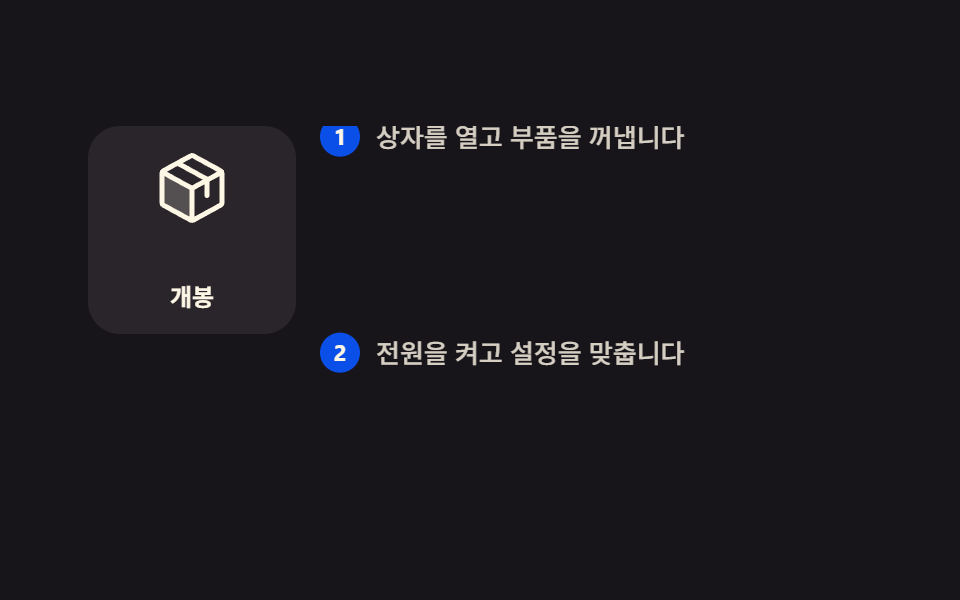
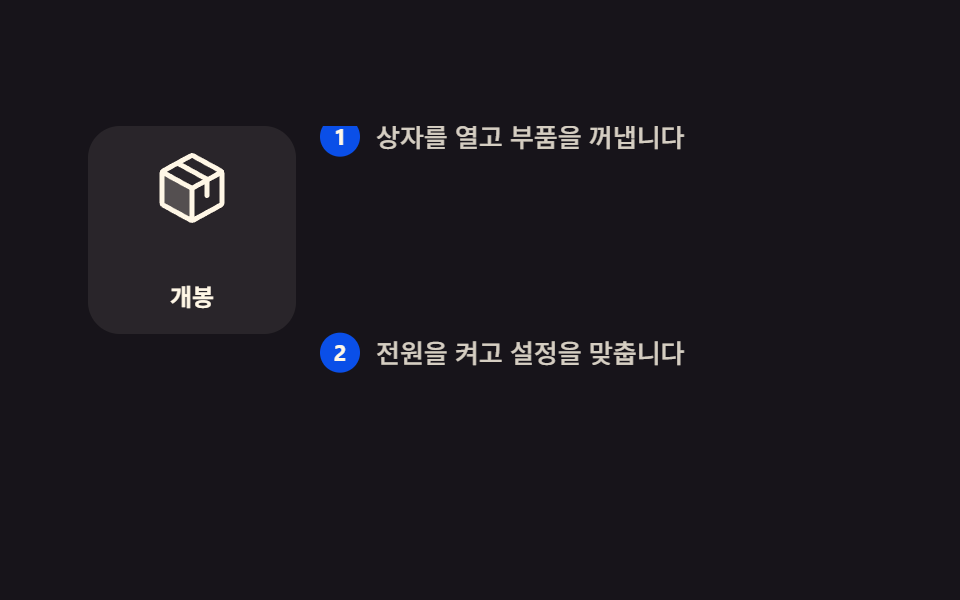
화면을 둘로 갈라 왼쪽 그림만 제자리에 붙여 두고, 오른쪽 설명 문단이 올라올 때마다 왼쪽 그림이 한 프레임에 딱 끊어져 다음 장으로 바뀝니다.
쓰임제품이 어떻게 동작하는지 단계별로 보여주는 소개 페이지, 데이터 기사처럼 그림 하나를 두고 설명이 길어지는 화면
position: stickysteps(1, end)grid-template-columns
<main class="stage">
  <div class="sf is-demo">
    <div class="sf__scroller">
      <div class="sf__grid">
        <div class="sf__figure">
          <div class="sf__panel sf__panel--1">
            <svg viewBox="0 0 256 256" width="40" height="40" aria-hidden="true"><g fill="currentColor"><path d="M128 129.09V232a8 8 0 0 1-3.84-1l-88-48.18a8 8 0 0 1-4.16-7V80.18a8 8 0 0 1 .7-3.25Z" opacity=".2"/><path d="m223.68 66.15l-88-48.15a15.88 15.88 0 0 0-15.36 0l-88 48.17a16 16 0 0 0-8.32 14v95.64a16 16 0 0 0 8.32 14l88 48.17a15.88 15.88 0 0 0 15.36 0l88-48.17a16 16 0 0 0 8.32-14V80.18a16 16 0 0 0-8.32-14.03M128 32l80.34 44l-29.77 16.3l-80.35-44Zm0 88L47.66 76l33.9-18.56l80.34 44ZM40 90l80 43.78v85.79l-80-43.75Zm176 85.78l-80 43.79v-85.75l32-17.51V152a8 8 0 0 0 16 0v-44.45L216 90v85.77Z"/></g></svg>
            <span class="sf__cap">개봉</span>
          </div>
          <div class="sf__panel sf__panel--2">
            <svg viewBox="0 0 256 256" width="40" height="40" aria-hidden="true"><g fill="currentColor"><path d="m207.86 123.18l16.78-21a99 99 0 0 0-10.07-24.29l-26.7-3a81 81 0 0 0-6.81-6.81l-3-26.71a99.4 99.4 0 0 0-24.3-10l-21 16.77a82 82 0 0 0-9.64 0l-21-16.78a99 99 0 0 0-24.21 10.07l-3 26.7a81 81 0 0 0-6.81 6.81l-26.71 3a99.4 99.4 0 0 0-10 24.3l16.77 21a82 82 0 0 0 0 9.64l-16.78 21a99 99 0 0 0 10.07 24.29l26.7 3a81 81 0 0 0 6.81 6.81l3 26.71a99.4 99.4 0 0 0 24.3 10l21-16.77a82 82 0 0 0 9.64 0l21 16.78a99 99 0 0 0 24.29-10.07l3-26.7a81 81 0 0 0 6.81-6.81l26.71-3a99.4 99.4 0 0 0 10-24.3l-16.77-21a82 82 0 0 0-.08-9.64M128 168a40 40 0 1 1 40-40a40 40 0 0 1-40 40" opacity=".2"/><path d="M128 80a48 48 0 1 0 48 48a48.05 48.05 0 0 0-48-48m0 80a32 32 0 1 1 32-32a32 32 0 0 1-32 32m88-29.84q.06-2.16 0-4.32l14.92-18.64a8 8 0 0 0 1.48-7.06a107.6 107.6 0 0 0-10.88-26.25a8 8 0 0 0-6-3.93l-23.72-2.64q-1.48-1.56-3-3L186 40.54a8 8 0 0 0-3.94-6a107.3 107.3 0 0 0-26.25-10.86a8 8 0 0 0-7.06 1.48L130.16 40h-4.32L107.2 25.11a8 8 0 0 0-7.06-1.48a107.6 107.6 0 0 0-26.25 10.88a8 8 0 0 0-3.93 6l-2.64 23.76q-1.56 1.49-3 3L40.54 70a8 8 0 0 0-6 3.94a107.7 107.7 0 0 0-10.87 26.25a8 8 0 0 0 1.49 7.06L40 125.84v4.32L25.11 148.8a8 8 0 0 0-1.48 7.06a107.6 107.6 0 0 0 10.88 26.25a8 8 0 0 0 6 3.93l23.72 2.64q1.49 1.56 3 3L70 215.46a8 8 0 0 0 3.94 6a107.7 107.7 0 0 0 26.25 10.87a8 8 0 0 0 7.06-1.49L125.84 216q2.16.06 4.32 0l18.64 14.92a8 8 0 0 0 7.06 1.48a107.2 107.2 0 0 0 26.25-10.88a8 8 0 0 0 3.93-6l2.64-23.72q1.56-1.48 3-3l23.78-2.8a8 8 0 0 0 6-3.94a107.7 107.7 0 0 0 10.87-26.25a8 8 0 0 0-1.49-7.06Zm-16.1-6.5a74 74 0 0 1 0 8.68a8 8 0 0 0 1.74 5.48l14.19 17.73a91.6 91.6 0 0 1-6.23 15l-22.6 2.56a8 8 0 0 0-5.1 2.64a74 74 0 0 1-6.14 6.14a8 8 0 0 0-2.64 5.1l-2.51 22.58a91.3 91.3 0 0 1-15 6.23l-17.74-14.19a8 8 0 0 0-5-1.75h-.48a74 74 0 0 1-8.68 0a8.06 8.06 0 0 0-5.48 1.74l-17.78 14.2a91.6 91.6 0 0 1-15-6.23L82.89 187a8 8 0 0 0-2.64-5.1a74 74 0 0 1-6.14-6.14a8 8 0 0 0-5.1-2.64l-22.58-2.52a91.3 91.3 0 0 1-6.23-15l14.19-17.74a8 8 0 0 0 1.74-5.48a74 74 0 0 1 0-8.68a8 8 0 0 0-1.74-5.48L40.2 100.45a91.6 91.6 0 0 1 6.23-15L69 82.89a8 8 0 0 0 5.1-2.64a74 74 0 0 1 6.14-6.14A8 8 0 0 0 82.89 69l2.51-22.57a91.3 91.3 0 0 1 15-6.23l17.74 14.19a8 8 0 0 0 5.48 1.74a74 74 0 0 1 8.68 0a8.06 8.06 0 0 0 5.48-1.74l17.77-14.19a91.6 91.6 0 0 1 15 6.23L173.11 69a8 8 0 0 0 2.64 5.1a74 74 0 0 1 6.14 6.14a8 8 0 0 0 5.1 2.64l22.58 2.51a91.3 91.3 0 0 1 6.23 15l-14.19 17.74a8 8 0 0 0-1.74 5.53Z"/></g></svg>
            <span class="sf__cap">설정</span>
          </div>
          <div class="sf__panel sf__panel--3">
            <svg viewBox="0 0 256 256" width="40" height="40" aria-hidden="true"><g fill="currentColor"><path d="M184 120v61.65a8 8 0 0 1-2.34 5.65l-34.35 34.35a8 8 0 0 1-13.57-4.53L128 176Zm-48-48H74.35a8 8 0 0 0-5.65 2.34l-34.35 34.35a8 8 0 0 0 4.53 13.57L80 128ZM40 216c37.65 0 50.69-19.69 54.56-28.18l-26.38-26.38C59.69 165.31 40 178.35 40 216" opacity=".2"/><path d="M223.85 47.12a16 16 0 0 0-15-15c-12.58-.75-44.73.4-71.41 27.07L132.69 64H74.36A15.9 15.9 0 0 0 63 68.68L28.7 103a16 16 0 0 0 9.07 27.16l38.47 5.37l44.21 44.21l5.37 38.49a15.94 15.94 0 0 0 10.78 12.92a16.1 16.1 0 0 0 5.1.83a15.9 15.9 0 0 0 11.3-4.68l34.32-34.3a15.9 15.9 0 0 0 4.68-11.36v-58.33l4.77-4.77c26.68-26.68 27.83-58.83 27.08-71.42M74.36 80h42.33l-39.53 39.52L40 114.34Zm74.41-9.45a76.65 76.65 0 0 1 59.11-22.47a76.46 76.46 0 0 1-22.42 59.16L128 164.68L91.32 128ZM176 181.64L141.67 216l-5.19-37.17L176 139.31Zm-74.16 9.5C97.34 201 82.29 224 40 224a8 8 0 0 1-8-8c0-42.29 23-57.34 32.86-61.85a8 8 0 0 1 6.64 14.56c-6.43 2.93-20.62 12.36-23.12 38.91c26.55-2.5 36-16.69 38.91-23.12a8 8 0 1 1 14.56 6.64Z"/></g></svg>
            <span class="sf__cap">발사</span>
          </div>
        </div>
        <div class="sf__steps">
          <p class="sf__step"><b class="sf__n">1</b>상자를 열고 부품을 꺼냅니다</p>
          <p class="sf__step"><b class="sf__n">2</b>전원을 켜고 설정을 맞춥니다</p>
          <p class="sf__step"><b class="sf__n">3</b>준비가 끝나면 발사합니다</p>
        </div>
      </div>
    </div>
  </div>
</main>@use "../../../../site/static/demo-tokens" as *;
// ── 변수 3개 ──────────────────────────────────────────
$duration: 1s; // 미리보기 루프 한 쪽 방향. alternate 라 한 바퀴는 2s
$easing: linear; // 스크롤 스크럽은 등속이라야 스크롤 양과 화면이 1:1 로 맞는다
$color: $subject-blue-deep;
@include stage($stage-ink);
.sf { width: min(392px, 92vw); }
.sf__scroller {
height: clamp(148px, 58vh, 176px);
overflow-y: auto;
scrollbar-width: none;
&::-webkit-scrollbar { display: none; }
}
.sf__grid {
display: grid;
grid-template-columns: 104px 1fr;
gap: $sp-3;
}
// ── 실제 동작 ① 왼쪽 그림만 제자리에 붙는다 ──────────────
.sf__figure {
position: sticky;
top: 0;
align-self: start;
display: grid;
height: 104px;
border-radius: $r-card;
background: rgba(255, 247, 230, .08);
}
// ── 실제 동작 ② 스크롤 진행이 그림 번호를 고른다.
// steps(1, end) 라 두 장이 반투명하게 겹치는 중간 프레임이 없다 ──
.sf__panel {
grid-area: 1 / 1;
display: grid;
place-items: center;
gap: $sp-1;
color: $subject-cream;
animation-name: sf-p1;
animation-duration: 1s;
animation-timing-function: steps(1, end);
animation-fill-mode: both;
animation-timeline: scroll(nearest block);
}
.sf__panel--2 { animation-name: sf-p2; }
.sf__panel--3 { animation-name: sf-p3; color: $stage-yellow; }
// 문단이 화면 한가운데를 지나는 지점 = 28% · 76% (문단 96px · 화면 176px 실측)
@keyframes sf-p1 { 0% { opacity: 1 } 28% { opacity: 0 } 100% { opacity: 0 } }
@keyframes sf-p2 { 0% { opacity: 0 } 28% { opacity: 1 } 76% { opacity: 0 } 100% { opacity: 0 } }
@keyframes sf-p3 { 0% { opacity: 0 } 76% { opacity: 1 } 100% { opacity: 1 } }
.sf__cap {
color: inherit;
font-size: 12px;
line-height: 16px;
font-weight: 700;
}
// 마지막 문단도 화면 한가운데까지 올라오려면 뒤에 반 화면만큼 여백이 있어야 한다
.sf__steps {
display: grid;
padding-bottom: 88px;
}
.sf__step {
display: flex;
align-items: flex-start;
gap: $sp-2;
min-height: 96px;
margin: 0;
padding: $sp-3 0 0;
color: rgba(255, 247, 230, .82);
font-size: 13px;
line-height: 20px;
font-weight: 500;
}
.sf__n {
display: grid;
place-items: center;
flex: 0 0 auto;
width: 20px;
height: 20px;
border-radius: 50%;
background: $color;
color: $subject-cream;
font-size: 11px;
line-height: 12px;
font-weight: 700;
}
// ── 격자 미리보기 루프 ────────────────────────────────
// 스크롤 상자(.sf__scroller) 자체가 아니라 **안쪽 트랙(.sf__steps)** 만 민다.
// 상자에 transform 을 걸면 100% 가 상자 자기 폭이라 내용이 통째로 날아간다(051 실측).
.sf.is-demo .sf__steps {
animation-name: sf-scrub;
animation-duration: $duration;
animation-timing-function: $easing;
animation-direction: alternate;
animation-iteration-count: infinite;
animation-fill-mode: both;
}
.sf.is-demo .sf__panel {
animation-duration: $duration;
animation-direction: alternate;
animation-iteration-count: infinite;
animation-timeline: auto;
}
@keyframes sf-scrub {
from { transform: translateY(0); }
to { transform: translateY(-200px); }
}
@media (prefers-reduced-motion: reduce) {
.sf__panel { animation: none !important; opacity: 0; }
.sf__panel--1 { opacity: 1; }
.sf.is-demo .sf__steps { animation: none !important; transform: none; }
}html, body {
margin: 0;
overflow: hidden;
}
.stage {
box-sizing: border-box;
min-height: 100vh;
display: grid;
place-items: center;
margin: 0;
background: #17141a;
font-family: -apple-system, "Segoe UI", "Noto Sans KR", sans-serif;
padding: clamp(8px, 4vw, 24px);
}
.sf {
width: min(392px, 92vw);
}
.sf__scroller {
height: clamp(148px, 58vh, 176px);
overflow-y: auto;
scrollbar-width: none;
}
.sf__scroller::-webkit-scrollbar {
display: none;
}
.sf__grid {
display: grid;
grid-template-columns: 104px 1fr;
gap: 12px;
}
.sf__figure {
position: sticky;
top: 0;
align-self: start;
display: grid;
height: 104px;
border-radius: 16px;
background: rgba(255, 247, 230, 0.08);
}
.sf__panel {
grid-area: 1/1;
display: grid;
place-items: center;
gap: 4px;
color: #fff7e6;
animation-name: sf-p1;
animation-duration: 1s;
animation-timing-function: steps(1, end);
animation-fill-mode: both;
animation-timeline: scroll(nearest block);
}
.sf__panel--2 {
animation-name: sf-p2;
}
.sf__panel--3 {
animation-name: sf-p3;
color: #ffd23f;
}
@keyframes sf-p1 {
0% {
opacity: 1;
}
28% {
opacity: 0;
}
100% {
opacity: 0;
}
}
@keyframes sf-p2 {
0% {
opacity: 0;
}
28% {
opacity: 1;
}
76% {
opacity: 0;
}
100% {
opacity: 0;
}
}
@keyframes sf-p3 {
0% {
opacity: 0;
}
76% {
opacity: 1;
}
100% {
opacity: 1;
}
}
.sf__cap {
color: inherit;
font-size: 12px;
line-height: 16px;
font-weight: 700;
}
.sf__steps {
display: grid;
padding-bottom: 88px;
}
.sf__step {
display: flex;
align-items: flex-start;
gap: 8px;
min-height: 96px;
margin: 0;
padding: 12px 0 0;
color: rgba(255, 247, 230, 0.82);
font-size: 13px;
line-height: 20px;
font-weight: 500;
}
.sf__n {
display: grid;
place-items: center;
flex: 0 0 auto;
width: 20px;
height: 20px;
border-radius: 50%;
background: #0a4fe8;
color: #fff7e6;
font-size: 11px;
line-height: 12px;
font-weight: 700;
}
.sf.is-demo .sf__steps {
animation-name: sf-scrub;
animation-duration: 1s;
animation-timing-function: linear;
animation-direction: alternate;
animation-iteration-count: infinite;
animation-fill-mode: both;
}
.sf.is-demo .sf__panel {
animation-duration: 1s;
animation-direction: alternate;
animation-iteration-count: infinite;
animation-timeline: auto;
}
@keyframes sf-scrub {
from {
transform: translateY(0);
}
to {
transform: translateY(-200px);
}
}
@media (prefers-reduced-motion: reduce) {
.sf__panel {
animation: none !important;
opacity: 0;
}
.sf__panel--1 {
opacity: 1;
}
.sf.is-demo .sf__steps {
animation: none !important;
transform: none;
}
}// 실제 동작은 CSS 만으로 끝난다: 왼쪽은 position: sticky, 그림 교체는 animation-timeline: scroll().
// is-demo 는 격자 미리보기용 루프일 뿐이라 손을 대는 순간 뗀다.
var r = document.querySelector('.sf');
var s = r.querySelector('.sf__scroller');
function stopDemo(){ r.classList.remove('is-demo'); }
r.addEventListener('pointerdown', stopDemo);
s.addEventListener('scroll', stopDemo, { passive: true });import type { CSSProperties, ReactNode } from "react";
import styles from "./StickyFigureSteps.module.scss";
export type StickyFigureStepsProps = {
steps?: string[];
captions?: string[];
/** 격자 미리보기 루프. 실제 페이지에서는 false 로 두고 스크롤이 끌게 한다 */
preview?: boolean;
duration?: number;
easing?: string;
color?: string;
};
type Vars = CSSProperties & { "--duration"?: string; "--easing"?: string; "--color"?: string };
const IconPackage = (): ReactNode => (
<svg viewBox="0 0 256 256" width="40" height="40" aria-hidden="true"><g fill="currentColor"><path d="M128 129.09V232a8 8 0 0 1-3.84-1l-88-48.18a8 8 0 0 1-4.16-7V80.18a8 8 0 0 1 .7-3.25Z" opacity=".2"/><path d="m223.68 66.15l-88-48.15a15.88 15.88 0 0 0-15.36 0l-88 48.17a16 16 0 0 0-8.32 14v95.64a16 16 0 0 0 8.32 14l88 48.17a15.88 15.88 0 0 0 15.36 0l88-48.17a16 16 0 0 0 8.32-14V80.18a16 16 0 0 0-8.32-14.03M128 32l80.34 44l-29.77 16.3l-80.35-44Zm0 88L47.66 76l33.9-18.56l80.34 44ZM40 90l80 43.78v85.79l-80-43.75Zm176 85.78l-80 43.79v-85.75l32-17.51V152a8 8 0 0 0 16 0v-44.45L216 90v85.77Z"/></g></svg>
);
const IconGear = (): ReactNode => (
<svg viewBox="0 0 256 256" width="40" height="40" aria-hidden="true"><g fill="currentColor"><path d="M128 168a40 40 0 1 1 40-40a40 40 0 0 1-40 40" opacity=".2"/><path d="M128 80a48 48 0 1 0 48 48a48.05 48.05 0 0 0-48-48m0 80a32 32 0 1 1 32-32a32 32 0 0 1-32 32m88-29.84q.06-2.16 0-4.32l14.92-18.64a8 8 0 0 0 1.48-7.06a107.6 107.6 0 0 0-10.88-26.25a8 8 0 0 0-6-3.93l-23.72-2.64q-1.48-1.56-3-3L186 40.54a8 8 0 0 0-3.94-6a107.3 107.3 0 0 0-26.25-10.86a8 8 0 0 0-7.06 1.48L130.16 40h-4.32L107.2 25.11a8 8 0 0 0-7.06-1.48a107.6 107.6 0 0 0-26.25 10.88a8 8 0 0 0-3.93 6l-2.64 23.76q-1.56 1.49-3 3L40.54 70a8 8 0 0 0-6 3.94a107.7 107.7 0 0 0-10.87 26.25a8 8 0 0 0 1.49 7.06L40 125.84v4.32L25.11 148.8a8 8 0 0 0-1.48 7.06a107.6 107.6 0 0 0 10.88 26.25a8 8 0 0 0 6 3.93l23.72 2.64q1.49 1.56 3 3L70 215.46a8 8 0 0 0 3.94 6a107.7 107.7 0 0 0 26.25 10.87a8 8 0 0 0 7.06-1.49L125.84 216q2.16.06 4.32 0l18.64 14.92a8 8 0 0 0 7.06 1.48a107.2 107.2 0 0 0 26.25-10.88a8 8 0 0 0 3.93-6l2.64-23.72q1.56-1.48 3-3l23.78-2.8a8 8 0 0 0 6-3.94a107.7 107.7 0 0 0 10.87-26.25a8 8 0 0 0-1.49-7.06Z"/></g></svg>
);
const IconRocket = (): ReactNode => (
<svg viewBox="0 0 256 256" width="40" height="40" aria-hidden="true"><g fill="currentColor"><path d="M184 120v61.65a8 8 0 0 1-2.34 5.65l-34.35 34.35a8 8 0 0 1-13.57-4.53L128 176Zm-48-48H74.35a8 8 0 0 0-5.65 2.34l-34.35 34.35a8 8 0 0 0 4.53 13.57L80 128ZM40 216c37.65 0 50.69-19.69 54.56-28.18l-26.38-26.38C59.69 165.31 40 178.35 40 216" opacity=".2"/><path d="M223.85 47.12a16 16 0 0 0-15-15c-12.58-.75-44.73.4-71.41 27.07L132.69 64H74.36A15.9 15.9 0 0 0 63 68.68L28.7 103a16 16 0 0 0 9.07 27.16l38.47 5.37l44.21 44.21l5.37 38.49a15.94 15.94 0 0 0 10.78 12.92a16.1 16.1 0 0 0 5.1.83a15.9 15.9 0 0 0 11.3-4.68l34.32-34.3a15.9 15.9 0 0 0 4.68-11.36v-58.33l4.77-4.77c26.68-26.68 27.83-58.83 27.08-71.42M74.36 80h42.33l-39.53 39.52L40 114.34Zm74.41-9.45a76.65 76.65 0 0 1 59.11-22.47a76.46 76.46 0 0 1-22.42 59.16L128 164.68L91.32 128ZM176 181.64L141.67 216l-5.19-37.17L176 139.31Z"/></g></svg>
);
const ICONS = [IconPackage, IconGear, IconRocket];
export default function StickyFigureSteps({
steps = ["Open the box and take the parts out.", "Power it on and dial in the settings.", "Once it is ready, launch."],
captions = ["Unbox", "Set up", "Launch"],
preview = true,
duration = 1000,
easing = "linear",
color = "#0a4fe8",
}: StickyFigureStepsProps): ReactNode {
const vars: Vars = { "--duration": `${duration}ms`, "--easing": easing, "--color": color };
const cls = preview ? `${styles.sf} ${styles.isDemo}` : styles.sf;
return (
<div className={cls} style={vars}>
<div className={styles.scroller}>
<div className={styles.grid}>
<div className={styles.figure}>
{captions.map((c: string, i: number): ReactNode => {
const Icon = ICONS[i % ICONS.length];
return (
<div className={`${styles.panel} ${styles[`panel${i + 1}`]}`} key={c}>
<Icon />
<span className={styles.cap}>{c}</span>
</div>
);
})}
</div>
<div className={styles.steps}>
{steps.map((s: string, i: number): ReactNode => (
<p className={styles.step} key={s}><b className={styles.n}>{i + 1}</b>{s}</p>
))}
</div>
</div>
</div>
</div>
);
}01 고정 그림 · 스텝 텍스트 — 측정 누적면적 16.031% · 움직인 프레임 23/23GODRICH 원작 · zip 에 SCSS·React 포함 · 스크롤 스토리텔링 섹션 9종 — 복붙하는 CSS 장면 구성
이 데모가 속한 글
 스크롤 스토리텔링 섹션 9종 — 복붙하는 CSS 장면 구성스크롤 스토리텔링은 스크롤 위치를 시간축 삼아 한 구간 안의 장면을 차례로 바꾸는 구성입니다. 여기 아홉 개는 효과가 아니라 장면을 짜는 방식이 서로 다르고, 전부 라이브러리 없이 CSS만으로 돕니다. 이 글의 데모 전부 보기