09끝에서 올라오는 CTA
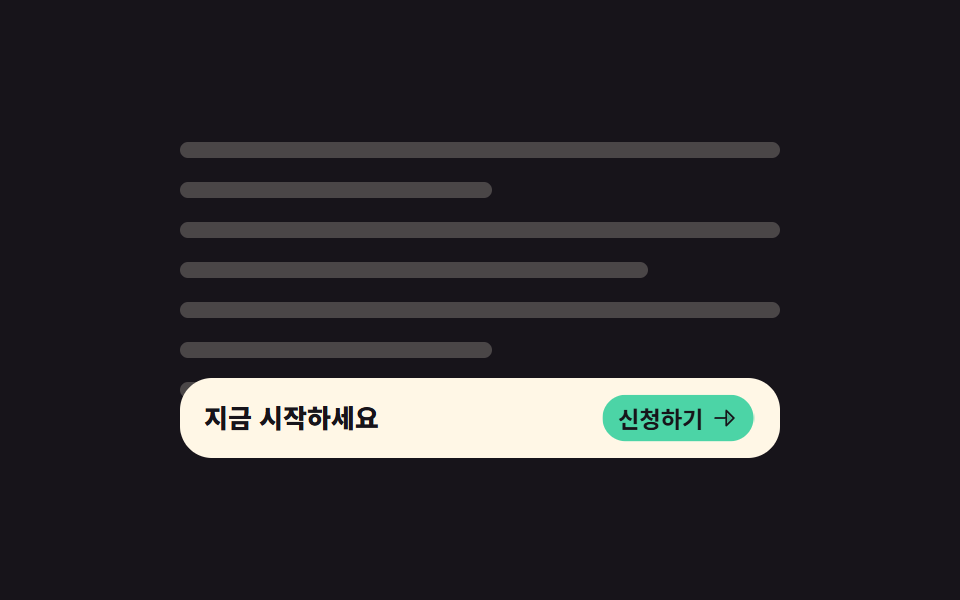
본문을 읽는 동안은 아무것도 없다가 마지막 문단이 화면에 들어오는 순간 아래쪽 막대가 올라오고, 그 안의 버튼이 한 박자 늦게 커집니다.
쓰임긴 글 끝에서만 신청·구매를 권하고 싶은 랜딩, 읽는 동안에는 방해하지 않아야 하는 구독 유도 구간
view-timeline-nameposition: stickytranslateY
<main class="stage">
  <div class="ec is-demo">
    <div class="ec__scroller">
      <div class="ec__doc" aria-hidden="true">
        <span class="ec__line"></span>
        <span class="ec__line ec__line--short"></span>
        <span class="ec__line"></span>
        <span class="ec__line ec__line--mid"></span>
        <span class="ec__line"></span>
        <span class="ec__line ec__line--short"></span>
        <span class="ec__line ec__line--mid"></span>
        <span class="ec__line"></span>
      </div>
      <div class="ec__end">
        <div class="ec__bar">
          <span class="ec__txt">지금 시작하세요</span>
          <span class="ec__btn">
            <span class="ec__btnlabel">신청하기</span>
            <svg viewBox="0 0 256 256" width="14" height="14" aria-hidden="true"><g fill="currentColor"><path d="m216 128l-72 72V56Z" opacity=".2"/><path d="m221.66 122.34l-72-72A8 8 0 0 0 136 56v64H40a8 8 0 0 0 0 16h96v64a8 8 0 0 0 13.66 5.66l72-72a8 8 0 0 0 0-11.32M152 180.69V75.31L204.69 128Z"/></g></svg>
          </span>
        </div>
      </div>
    </div>
  </div>
</main>@use "../../../../site/static/demo-tokens" as *;
// ── 변수 3개 ──────────────────────────────────────────
$duration: 1s; // alternate 라 한 바퀴는 2s
$easing: $ease-pop;
$color: $subject-mint;
@include stage($stage-ink);
.ec {
--h: clamp(148px, 58vh, 176px);
width: min(300px, 90vw);
}
.ec__scroller {
height: var(--h);
overflow-y: auto;
scrollbar-width: none;
&::-webkit-scrollbar { display: none; }
}
.ec__doc {
display: grid;
gap: $sp-3;
padding: $sp-2 0;
}
.ec__line {
height: 8px;
border-radius: $r-pill;
background: rgba(255, 247, 230, .22);
}
.ec__line--short { width: 52%; }
.ec__line--mid { width: 78%; }
// ── 실제 동작: 마지막 구간이 자기 진행률을 타임라인으로 내놓는다.
// 조상이 만든 view-timeline 은 후손이 그대로 쓸 수 있다 ──
.ec__end {
display: flex;
align-items: flex-end;
height: var(--h);
view-timeline-name: --ec-end;
view-timeline-axis: block;
}
// 막대는 마지막 구간 안에서만 화면 바닥에 붙는다 — 읽는 동안에는 자리조차 없다
.ec__bar {
position: sticky;
bottom: $sp-2;
display: flex;
align-items: center;
justify-content: space-between;
gap: $sp-2;
width: 100%;
padding: $sp-2 $sp-3;
border-radius: $r-card;
background: $subject-cream;
transform: translateY(140%);
animation-name: ec-rise;
animation-duration: 1s;
animation-timing-function: $easing;
animation-fill-mode: both;
animation-timeline: --ec-end;
animation-range: entry 0% entry 80%;
}
@keyframes ec-rise {
from { transform: translateY(140%); }
to { transform: translateY(0); }
}
.ec__txt {
color: $subject-ink;
font-size: 13px;
line-height: 18px;
font-weight: 800;
}
.ec__btn {
display: inline-flex;
align-items: center;
gap: $sp-1;
padding: $sp-1 $sp-2;
border-radius: $r-pill;
background: $color;
color: $subject-ink;
font-size: 12px;
line-height: 16px;
font-weight: 700;
transform: scale(.82);
animation-name: ec-pop;
animation-duration: 1s;
animation-timing-function: $easing;
animation-fill-mode: both;
animation-timeline: --ec-end;
animation-range: entry 24% entry 100%;
}
@keyframes ec-pop {
from { transform: scale(.82); }
to { transform: scale(1); }
}
// ── 격자 미리보기 루프 — 본문은 가만히 두고 막대만 올라온다.
// 본문 줄을 같이 굴리면 8줄이 한꺼번에 움직여 변한 픽셀 면적이 막대보다 커지고,
// 대표 이미지(면적이 가장 크게 변한 장)가 정작 주인공 없는 본문 장면으로 뽑힌다(실측) ──
// 미리보기에서는 스크롤을 실제로 하지 않으니 sticky 가 걸릴 일이 없다 —
// 그대로 두면 막대가 마지막 구간과 함께 화면 아래에 남아 한 프레임도 안 보인다.
// 루프 동안만 화면 바닥에 절대 배치로 세워 둔다
.ec.is-demo .ec__scroller { position: relative; }
.ec.is-demo .ec__bar {
position: absolute;
left: 0;
right: 0;
bottom: $sp-2;
width: auto;
animation-name: ec-rise-demo;
animation-duration: $duration;
// 끝으로 갈수록 빨라지는 곡선이라 가장 크게 변한 장 = 막대가 거의 다 올라온 순간이다
animation-timing-function: ease-in;
animation-direction: alternate;
animation-iteration-count: infinite;
animation-timeline: auto;
}
.ec.is-demo .ec__btn {
animation-name: ec-pop-demo;
animation-duration: $duration;
animation-direction: alternate;
animation-iteration-count: infinite;
animation-timeline: auto;
}
// 본문이 먼저 다 올라가 멈춘 **뒤에** 막대가 혼자 올라온다.
// 둘이 겹치면 대표 이미지(앞 프레임과 가장 크게 달라진 장)가 본문만 움직이는
// 장면으로 뽑혀 정작 주인공인 CTA 가 없는 그림이 된다
@keyframes ec-rise-demo {
0%, 16% { transform: translateY(220%); }
70%, 100% { transform: translateY(0); }
}
@keyframes ec-pop-demo {
0%, 72% { transform: scale(.82); }
88%, 100% { transform: scale(1); }
}
@media (prefers-reduced-motion: reduce) {
.ec__bar { animation: none !important; transform: translateY(0); }
.ec__btn { animation: none !important; transform: scale(1); }
}html, body {
margin: 0;
overflow: hidden;
}
.stage {
box-sizing: border-box;
min-height: 100vh;
display: grid;
place-items: center;
margin: 0;
background: #17141a;
font-family: -apple-system, "Segoe UI", "Noto Sans KR", sans-serif;
padding: clamp(8px, 4vw, 24px);
}
.ec {
--h: clamp(148px, 58vh, 176px);
width: min(300px, 90vw);
}
.ec__scroller {
height: var(--h);
overflow-y: auto;
scrollbar-width: none;
}
.ec__scroller::-webkit-scrollbar {
display: none;
}
.ec__doc {
display: grid;
gap: 12px;
padding: 8px 0;
}
.ec__line {
height: 8px;
border-radius: 999px;
background: rgba(255, 247, 230, 0.22);
}
.ec__line--short {
width: 52%;
}
.ec__line--mid {
width: 78%;
}
.ec__end {
display: flex;
align-items: flex-end;
height: var(--h);
view-timeline-name: --ec-end;
view-timeline-axis: block;
}
.ec__bar {
position: sticky;
bottom: 8px;
display: flex;
align-items: center;
justify-content: space-between;
gap: 8px;
width: 100%;
padding: 8px 12px;
border-radius: 16px;
background: #fff7e6;
transform: translateY(140%);
animation-name: ec-rise;
animation-duration: 1s;
animation-timing-function: cubic-bezier(0.2, 1.4, 0.4, 1);
animation-fill-mode: both;
animation-timeline: --ec-end;
animation-range: entry 0% entry 80%;
}
@keyframes ec-rise {
from {
transform: translateY(140%);
}
to {
transform: translateY(0);
}
}
.ec__txt {
color: #17141a;
font-size: 13px;
line-height: 18px;
font-weight: 800;
}
.ec__btn {
display: inline-flex;
align-items: center;
gap: 4px;
padding: 4px 8px;
border-radius: 999px;
background: #4cd4a6;
color: #17141a;
font-size: 12px;
line-height: 16px;
font-weight: 700;
transform: scale(0.82);
animation-name: ec-pop;
animation-duration: 1s;
animation-timing-function: cubic-bezier(0.2, 1.4, 0.4, 1);
animation-fill-mode: both;
animation-timeline: --ec-end;
animation-range: entry 24% entry 100%;
}
@keyframes ec-pop {
from {
transform: scale(0.82);
}
to {
transform: scale(1);
}
}
.ec.is-demo .ec__scroller {
position: relative;
}
.ec.is-demo .ec__bar {
position: absolute;
left: 0;
right: 0;
bottom: 8px;
width: auto;
animation-name: ec-rise-demo;
animation-duration: 1s;
animation-timing-function: ease-in;
animation-direction: alternate;
animation-iteration-count: infinite;
animation-timeline: auto;
}
.ec.is-demo .ec__btn {
animation-name: ec-pop-demo;
animation-duration: 1s;
animation-direction: alternate;
animation-iteration-count: infinite;
animation-timeline: auto;
}
@keyframes ec-rise-demo {
0%, 16% {
transform: translateY(220%);
}
70%, 100% {
transform: translateY(0);
}
}
@keyframes ec-pop-demo {
0%, 72% {
transform: scale(0.82);
}
88%, 100% {
transform: scale(1);
}
}
@media (prefers-reduced-motion: reduce) {
.ec__bar {
animation: none !important;
transform: translateY(0);
}
.ec__btn {
animation: none !important;
transform: scale(1);
}
}// 실제 동작은 CSS 만: 마지막 구간(.ec__end)이 view-timeline 을 만들고,
// 그 안에 position: sticky 로 붙은 막대가 그 진행률만큼 올라온다.
var r = document.querySelector('.ec');
var s = r.querySelector('.ec__scroller');
function stopDemo(){ r.classList.remove('is-demo'); }
r.addEventListener('pointerdown', stopDemo);
s.addEventListener('scroll', stopDemo, { passive: true });import type { CSSProperties, ReactNode } from "react";
import styles from "./EndcapCtaRise.module.scss";
export type EndcapCtaRiseProps = {
headline?: string;
button?: string;
lines?: number;
preview?: boolean;
duration?: number;
easing?: string;
color?: string;
};
type Vars = CSSProperties & { "--duration"?: string; "--easing"?: string; "--color"?: string };
const IconArrow = (): ReactNode => (
<svg viewBox="0 0 256 256" width="14" height="14" aria-hidden="true"><g fill="currentColor"><path d="m216 128l-72 72V56Z" opacity=".2"/><path d="m221.66 122.34l-72-72A8 8 0 0 0 136 56v64H40a8 8 0 0 0 0 16h96v64a8 8 0 0 0 13.66 5.66l72-72a8 8 0 0 0 0-11.32M152 180.69V75.31L204.69 128Z"/></g></svg>
);
const WIDTHS = ["", "short", "", "mid", "", "short", "mid", ""];
export default function EndcapCtaRise({
headline = "Start now",
button = "Sign up",
lines = 8,
preview = true,
duration = 1000,
easing = "cubic-bezier(.2, 1.4, .4, 1)",
color = "#4cd4a6",
}: EndcapCtaRiseProps): ReactNode {
const vars: Vars = { "--duration": `${duration}ms`, "--easing": easing, "--color": color };
const cls = preview ? `${styles.ec} ${styles.isDemo}` : styles.ec;
const list: number[] = [];
for (let i = 0; i < lines; i += 1) list.push(i);
return (
<div className={cls} style={vars}>
<div className={styles.scroller}>
<div className={styles.doc} aria-hidden="true">
{list.map((i: number): ReactNode => {
const w = WIDTHS[i % WIDTHS.length];
return <span className={w ? `${styles.line} ${styles[w]}` : styles.line} key={i} />;
})}
</div>
<div className={styles.end}>
<div className={styles.bar}>
<span className={styles.txt}>{headline}</span>
<span className={styles.btn}>
<span className={styles.btnlabel}>{button}</span>
<IconArrow />
</span>
</div>
</div>
</div>
</div>
);
}09 끝에서 올라오는 CTA — 측정 누적면적 9.936% · 움직인 프레임 12/23GODRICH 원작 · zip 에 SCSS·React 포함 · 스크롤 스토리텔링 섹션 9종 — 복붙하는 CSS 장면 구성
이 데모가 속한 글
 스크롤 스토리텔링 섹션 9종 — 복붙하는 CSS 장면 구성스크롤 스토리텔링은 스크롤 위치를 시간축 삼아 한 구간 안의 장면을 차례로 바꾸는 구성입니다. 여기 아홉 개는 효과가 아니라 장면을 짜는 방식이 서로 다르고, 전부 라이브러리 없이 CSS만으로 돕니다. 이 글의 데모 전부 보기