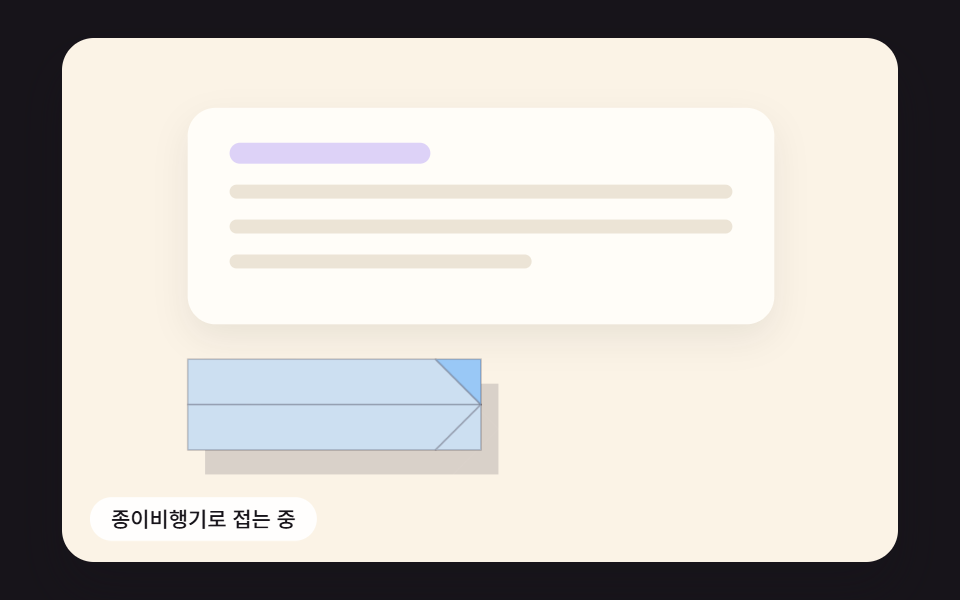
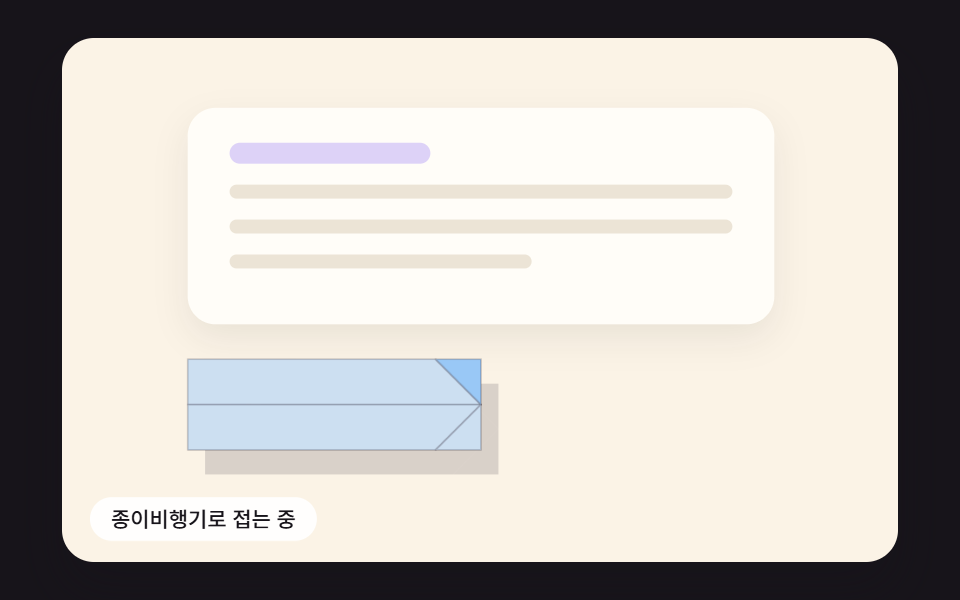
01누르면 종이비행기로 접혀 곡선을 따라 기울며 날아가는 전송 버튼
버튼 면을 꼭짓점 몇 개의 평면으로 보고 접는 선을 축으로 회전시켜 원근 투영으로 그린 뒤, 3차 베지어 곡선을 따라 날리며 곡선의 접선 각도만큼 기수를 돌린다.
쓰임문의 폼·메시지 보내기 버튼
FOLD_STEPSFLIGHT_CTRLBANK_GAIN
<main class="stage">
<div class="sb is-demo" id="sb">
  <div class="sb__scene" data-role="scene">
    <div class="pp__card" aria-hidden="true">
      <span class="pp__line pp__line--title"></span>
      <span class="pp__line"></span>
      <span class="pp__line"></span>
      <span class="pp__line pp__line--short"></span>
    </div>
    <canvas class="sb__canvas" data-role="canvas" width="480" height="300" aria-hidden="true"></canvas>
    <button class="pp__send" data-role="send" type="button"><svg xmlns="http://www.w3.org/2000/svg" class="pp__icon" aria-hidden="true" focusable="false" viewBox="0 0 256 256"><g fill="currentColor"><path d="m223.69 42.18l-58.22 192a8 8 0 0 1-14.92 1.25L108 148l-87.42-42.55a8 8 0 0 1 1.25-14.92l192-58.22a8 8 0 0 1 9.86 9.87" opacity=".2"/><path d="M227.32 28.68a16 16 0 0 0-15.66-4.08h-.15L19.57 82.84a16 16 0 0 0-2.49 29.8L102 154l41.3 84.87a15.86 15.86 0 0 0 14.44 9.13q.69 0 1.38-.06a15.88 15.88 0 0 0 14-11.51l58.2-191.94v-.15a16 16 0 0 0-4-15.66m-69.49 203.17l-.05.14v-.07l-40.06-82.3l48-48a8 8 0 0 0-11.31-11.31l-48 48l-82.33-40.06h-.07h.14L216 40Z"/></g></svg><span class="pp__label" data-role="label">보내기</span></button>
    <p class="sb__status" data-role="status" aria-live="off">보낼 준비 됨</p>
  </div>
</div>
</main>
@use "../../../../site/static/demo-tokens" as *;
@include stage($stage-ink);
.sb {
position: relative;
width: min(92vw, calc(160vh - 12.8vw));
aspect-ratio: 480 / 300;
margin: 0 auto;
border-radius: $r-card;
overflow: hidden;
box-shadow: $shadow-raised;
}
// 장면 판 — 480×300 좌표로 짜 두고 스크립트가 상자 폭에 맞춰 scale 한다.
// 기준점이 왼쪽 위 모서리인 이유: 판이 상자 왼쪽 위에 붙어 있어 모서리 기준으로 줄여야 줄인 판이 상자와 겹친다
.sb__scene {
position: absolute;
left: 0;
top: 0;
width: 480px;
height: 300px;
transform-origin: 0 0;
}
.sb__canvas {
position: absolute;
left: 0;
top: 0;
width: 480px;
height: 300px;
pointer-events: none;
}
.sb__status {
position: absolute;
left: $sp-4;
bottom: $sp-3;
box-sizing: border-box;
max-width: 260px;
margin: 0;
padding: $sp-1 $sp-3;
border-radius: $r-pill;
background: rgba(255, 255, 255, .9);
color: $subject-ink;
font-weight: 500;
font-size: 12px;
line-height: 1.4;
pointer-events: none;
}
.sb__status--top {
top: $sp-3;
bottom: auto;
}
.sb__status--side {
max-width: 140px;
border-radius: $r-control;
}
.sb { background: #fbf3e6; }
// 문의 카드 — 글자 대신 회색 줄로 내용 자리만 보인다
.pp__card {
position: absolute;
left: 72px;
top: 40px;
width: 336px;
height: 124px;
box-sizing: border-box;
padding: $sp-5 $sp-6;
border-radius: $r-card;
background: #fffdf8;
box-shadow: 0 8px 20px rgba(23, 20, 26, .08);
display: flex;
flex-direction: column;
gap: $sp-3;
}
.pp__line {
display: block;
height: 8px;
border-radius: $r-pill;
background: #ece4d6;
}
.pp__line--title {
width: 40%;
height: 12px;
background: #ddd2f7;
}
.pp__line--short { width: 60%; }
// 버튼 자리 = 스크립트의 BTN_CX 156 · BTN_CY 210 (왼쪽 72 + 너비 절반 84, 위 184 + 높이 절반 26)
.pp__send {
position: absolute;
left: 72px;
top: 184px;
width: 168px;
height: 52px;
margin: 0;
padding: 0 $sp-4;
border: 0;
border-radius: $r-sm;
background: #9ed0ff;
color: $subject-ink;
font: inherit;
font-weight: 700;
font-size: 16px;
line-height: 1;
display: flex;
align-items: center;
justify-content: center;
gap: $sp-2;
cursor: pointer;
}
.pp__send.is-sent { background: #b4ecd9; }
.pp__send:focus-visible {
outline: 3px solid $subject-ink;
outline-offset: 3px;
}
.pp__icon {
width: 20px;
height: 20px;
flex: none;
}
@media (max-width: 340px) {
// 이 폭에서는 장면이 0.6 배 남짓으로 줄어든다 — 상태 줄 글자를 키워 줄인 뒤에도 읽히게 한다
.sb__status { font-size: 16px; }
}
@media (prefers-reduced-motion: reduce) {
// 움직임은 전부 스크립트가 그리고, 스크립트는 reduce 에서 루프를 돌리지 않고 결과 상태만 둔다. CSS 쪽 전환도 막아 둔다
.sb__scene * {
transition: none !important;
animation: none !important;
}
}html, body {
margin: 0;
overflow: hidden;
}
.stage {
box-sizing: border-box;
min-height: 100vh;
display: grid;
place-items: center;
margin: 0;
background: #17141a;
font-family: -apple-system, "Segoe UI", "Noto Sans KR", sans-serif;
padding: clamp(8px, 4vw, 24px);
}
.sb {
position: relative;
width: min(92vw, 160vh - 12.8vw);
aspect-ratio: 480/300;
margin: 0 auto;
border-radius: 16px;
overflow: hidden;
box-shadow: 0 14px 24px rgba(23, 20, 26, 0.32);
}
.sb__scene {
position: absolute;
left: 0;
top: 0;
width: 480px;
height: 300px;
transform-origin: 0 0;
}
.sb__canvas {
position: absolute;
left: 0;
top: 0;
width: 480px;
height: 300px;
pointer-events: none;
}
.sb__status {
position: absolute;
left: 16px;
bottom: 12px;
box-sizing: border-box;
max-width: 260px;
margin: 0;
padding: 4px 12px;
border-radius: 999px;
background: rgba(255, 255, 255, 0.9);
color: #17141a;
font-weight: 500;
font-size: 12px;
line-height: 1.4;
pointer-events: none;
}
.sb__status--top {
top: 12px;
bottom: auto;
}
.sb__status--side {
max-width: 140px;
border-radius: 12px;
}
.sb {
background: #fbf3e6;
}
.pp__card {
position: absolute;
left: 72px;
top: 40px;
width: 336px;
height: 124px;
box-sizing: border-box;
padding: 20px 24px;
border-radius: 16px;
background: #fffdf8;
box-shadow: 0 8px 20px rgba(23, 20, 26, 0.08);
display: flex;
flex-direction: column;
gap: 12px;
}
.pp__line {
display: block;
height: 8px;
border-radius: 999px;
background: #ece4d6;
}
.pp__line--title {
width: 40%;
height: 12px;
background: #ddd2f7;
}
.pp__line--short {
width: 60%;
}
.pp__send {
position: absolute;
left: 72px;
top: 184px;
width: 168px;
height: 52px;
margin: 0;
padding: 0 16px;
border: 0;
border-radius: 8px;
background: #9ed0ff;
color: #17141a;
font: inherit;
font-weight: 700;
font-size: 16px;
line-height: 1;
display: flex;
align-items: center;
justify-content: center;
gap: 8px;
cursor: pointer;
}
.pp__send.is-sent {
background: #b4ecd9;
}
.pp__send:focus-visible {
outline: 3px solid #17141a;
outline-offset: 3px;
}
.pp__icon {
width: 20px;
height: 20px;
flex: none;
}
@media (max-width: 340px) {
.sb__status {
font-size: 16px;
}
}
@media (prefers-reduced-motion: reduce) {
.sb__scene * {
transition: none !important;
animation: none !important;
}
}(function () {
const root = document.getElementById("sb");
if (!root) return;
const W = 480;
const H = 300;
const FIXED_DT = 16;
// 파스텔 팔레트 — 캔버스와 스크립트가 칠하는 색은 여기서만 고른다 (scss 쪽 색은 demo-tokens)
const INK = [38, 33, 52];
const PAPER = [255, 252, 246];
const CREAM = [255, 243, 224];
const SKY = [158, 208, 255];
const LILAC = [200, 184, 255];
const MINT = [156, 228, 204];
const PINK = [255, 182, 204];
const PEACH = [255, 214, 184];
function clamp(v, lo, hi) { return v < lo ? lo : (v > hi ? hi : v); }
function lerp(a, b, t) { return a + (b - a) * t; }
function easeOut(x) { const c = clamp(x, 0, 1); return 1 - Math.pow(1 - c, 3); }
function easeInOut(x) {
const c = clamp(x, 0, 1);
return c < 0.5 ? 4 * c * c * c : 1 - Math.pow(-2 * c + 2, 3) / 2;
}
function rgba(c, a) {
return 'rgba(' + Math.round(c[0]) + ',' + Math.round(c[1]) + ',' + Math.round(c[2]) + ',' + clamp(a, 0, 1).toFixed(3) + ')';
}
function mix(a, b, t) { return [lerp(a[0], b[0], t), lerp(a[1], b[1], t), lerp(a[2], b[2], t)]; }
// 시드 고정 난수 — 같은 시드면 같은 값이 다시 나온다 (32비트 정수 섞기)
function makeRng(seed) {
let s = seed >>> 0;
return function () {
s = (s + 0x6d2b79f5) >>> 0;
let t = s;
t = Math.imul(t ^ (t >>> 15), t | 1);
t ^= t + Math.imul(t ^ (t >>> 7), t | 61);
return ((t ^ (t >>> 14)) >>> 0) / 4294967296;
};
}
const sceneEl = root.querySelector('[data-role="scene"]');
const statusEl = root.querySelector('[data-role="status"]');
if (!sceneEl || !statusEl) {
return;
}
const scene = sceneEl;
const status = statusEl;
const reduceQuery = window.matchMedia('(prefers-reduced-motion: reduce)');
const still = reduceQuery.matches;
const resizeHooks = [];
// 자동 시연 중인가 — 사람이 처음 만지는 순간 시연을 멈추고 처음 상태로 돌린 뒤 상태 줄을 읽어 주기 시작한다
let demo = root.classList.contains('is-demo');
function wake() {
if (!demo) {
return;
}
demo = false;
root.classList.remove('is-demo');
status.setAttribute('aria-live', 'polite');
resetIdle();
}
function say(text) {
if (status.textContent !== text) {
status.textContent = text;
}
}
// 장면 배율 — 480×300 좌표로 짠 판을 상자 폭에 맞춰 통째로 줄인다
let k = 1;
function fitScene() {
const w = root.clientWidth;
k = w > 0 ? w / W : 1;
scene.style.transform = 'scale(' + k.toFixed(4) + ')';
}
// 화면 좌표(CSS px) → 장면 좌표(480×300). 줄인 배율 k 로 나눠야 판 안의 위치가 된다
function toScene(clientX, clientY) {
const r = root.getBoundingClientRect();
return [(clientX - r.left) / k, (clientY - r.top) / k];
}
// 캡처 단계에서 듣는다 — 버튼 자신의 pointerdown 보다 먼저 시연을 끝내야 사람의 첫 누름이 처음 상태에서 시작한다
root.addEventListener('pointerdown', wake, true);
root.addEventListener('keydown', wake, true);
const canvasEl = root.querySelector('[data-role="canvas"]');
const ctxRaw = canvasEl ? canvasEl.getContext('2d') : null;
if (!canvasEl || !ctxRaw) {
return;
}
const cv = canvasEl;
const ctx = ctxRaw;
let dprNow = 1;
function fitCanvas() {
// 배율은 2 에서 자른다 — 배율 3 기기에서 화소가 2.25배로 늘어 프레임마다 일이 그만큼 커지지 않게
const dpr = Math.min(window.devicePixelRatio || 1, 2);
dprNow = dpr;
cv.width = Math.round(W * dpr);
cv.height = Math.round(H * dpr);
ctx.setTransform(dpr, 0, 0, dpr, 0, 0);
}
fitCanvas();
resizeHooks.push(fitCanvas);
// 버튼 자리(장면 px) — scss 의 .pp__send 위치·크기와 같은 값이어야 접기 시작 순간 종이가 버튼과 겹친다
const BTN_CX = 156;
const BTN_CY = 210;
// 종이 한 장 = 버튼 면 168×52. 가운데가 원점이고 u 는 기수 쪽(오른쪽), v 는 아래쪽, w 는 화면 안쪽(멀어지는 쪽)
// 면 네 장 — 0 위 모서리 삼각형 · 1 아래 모서리 삼각형 · 2 위 몸통 · 3 아래 몸통
const FACETS = [
[[84, 0], [84, -26], [58, -26]],
[[84, 0], [84, 26], [58, 26]],
[[-84, -26], [58, -26], [84, 0], [-84, 0]],
[[-84, 0], [84, 0], [58, 26], [-84, 26]],
];
// 접기 순서 — 접는 선(a 에서 b 로)을 축으로 그 선에 붙은 면의 꼭짓점을 deg 만큼 돌린다. 앞 단계가 끝난 자리 위에서 다음 단계가 돈다
const FOLD_STEPS = [
{ ms: 240, hinges: [{ a: [84, 0], b: [58, -26], deg: -180, facets: [0] }] },
{ ms: 240, hinges: [{ a: [84, 0], b: [58, 26], deg: 180, facets: [1] }] },
{ ms: 300, hinges: [{ a: [-84, 0], b: [84, 0], deg: 64, facets: [0, 2] }, { a: [-84, 0], b: [84, 0], deg: -64, facets: [1, 3] }] },
];
const FOLD_TOTAL = FOLD_STEPS.reduce(function (s, f) { return s + f.ms; }, 0);
// 3차 베지어 조종점 네 개 [x, y, 깊이] — 버튼 자리에서 출발해 오른쪽 아래로 처졌다가 위로 감아 올라 멀어진다
const FLIGHT_CTRL = [[156, 210, 0], [318, 268, 30], [352, 64, 150], [560, 26, 320]];
// 선회율(초당 기수가 도는 라디안)에 곱해 날개 기울기(라디안)를 만드는 계수
const BANK_GAIN = 0.3;
const BANK_MAX = 0.95;
const FLIGHT_MS = 1100;
const PRESS_MS = 110;
const BACK_MS = 320;
const FOCAL = 620;
const CAM_X = 240;
const CAM_Y = 150;
const DEMO_CYCLE = 3000;
const TXT_IDLE = '보내기';
const TXT_SENT = '보냈어요';
const TXT_READY = '보낼 준비 됨';
const TXT_FOLD = '종이비행기로 접는 중';
const TXT_FLY = '곡선을 따라 날아가는 중';
const TXT_DONE = '보냄 — 문의가 접수됐어요';
const sendEl = root.querySelector('[data-role="send"]');
const labelEl = root.querySelector('[data-role="label"]');
if (!sendEl || !labelEl) {
return;
}
const send = sendEl;
const label = labelEl;
let phase = 'idle';
let pt = 0;
let bank = 0;
let demoNext = 200;
// 꼭짓점 p 를 점 a 를 지나는 단위 축 d 둘레로 ang 라디안 돌린다 (로드리게스 회전)
function rotateAround(p, a, d, ang) {
const vx = p[0] - a[0];
const vy = p[1] - a[1];
const vz = p[2] - a[2];
const c = Math.cos(ang);
const s = Math.sin(ang);
const dot = d[0] * vx + d[1] * vy + d[2] * vz;
const cx = d[1] * vz - d[2] * vy;
const cy = d[2] * vx - d[0] * vz;
const cz = d[0] * vy - d[1] * vx;
return [
a[0] + vx * c + cx * s + d[0] * dot * (1 - c),
a[1] + vy * c + cy * s + d[1] * dot * (1 - c),
a[2] + vz * c + cz * s + d[2] * dot * (1 - c),
];
}
// 접기 시각 t(ms) 의 면 네 장 꼭짓점 — 단계마다 진행률을 easeInOut 으로 깎아 접는 선 둘레로 돌린다
function foldedFacets(t) {
const out = FACETS.map(function (f) {
return f.map(function (q) { return [q[0], q[1], 0]; });
});
let start = 0;
for (const st of FOLD_STEPS) {
const p = easeInOut((t - start) / st.ms);
start += st.ms;
if (p <= 0) {
continue;
}
for (const hg of st.hinges) {
const a = [hg.a[0], hg.a[1], 0];
const len = Math.hypot(hg.b[0] - hg.a[0], hg.b[1] - hg.a[1]);
const d = [(hg.b[0] - hg.a[0]) / len, (hg.b[1] - hg.a[1]) / len, 0];
const ang = hg.deg * p * Math.PI / 180;
for (const fi of hg.facets) {
out[fi] = out[fi].map(function (q) { return rotateAround(q, a, d, ang); });
}
}
}
return out;
}
function bezier(t) {
const u = 1 - t;
const b0 = u * u * u;
const b1 = 3 * u * u * t;
const b2 = 3 * u * t * t;
const b3 = t * t * t;
const c = FLIGHT_CTRL;
return [
b0 * c[0][0] + b1 * c[1][0] + b2 * c[2][0] + b3 * c[3][0],
b0 * c[0][1] + b1 * c[1][1] + b2 * c[2][1] + b3 * c[3][1],
b0 * c[0][2] + b1 * c[1][2] + b2 * c[2][2] + b3 * c[3][2],
];
}
// 접선 = 베지어를 t 로 미분한 것. 화면 평면 성분의 각도가 기수 방향이다
function headingAt(t) {
const u = 1 - t;
const c = FLIGHT_CTRL;
const dx = 3 * u * u * (c[1][0] - c[0][0]) + 6 * u * t * (c[2][0] - c[1][0]) + 3 * t * t * (c[3][0] - c[2][0]);
const dy = 3 * u * u * (c[1][1] - c[0][1]) + 6 * u * t * (c[2][1] - c[1][1]) + 3 * t * t * (c[3][1] - c[2][1]);
return Math.atan2(dy, dx);
}
// 비행 진행률 → 곡선 매개변수. 출발은 느리고 갈수록 빨라진다
function flightParam(p) { return Math.pow(clamp(p, 0, 1), 1.45); }
// 목표 기울기 = 선회율 × BANK_GAIN. 선회율은 앞뒤 1% 지점의 기수 각도 차를 그 사이 시간으로 나눈 값
function bankTarget(p) {
const p0 = clamp(p - 0.01, 0, 1);
const p1 = clamp(p + 0.01, 0, 1);
let dh = headingAt(flightParam(p1)) - headingAt(flightParam(p0));
if (dh > Math.PI) {
dh -= Math.PI * 2;
}
if (dh < -Math.PI) {
dh += Math.PI * 2;
}
const rate = dh / ((p1 - p0) * FLIGHT_MS / 1000);
return clamp(rate * BANK_GAIN, -BANK_MAX, BANK_MAX);
}
// 원근 투영 — 깊이 z 만큼 멀어지면 화면 가운데 쪽으로 FOCAL/(FOCAL+z) 배 당겨진다
function project(p) {
const s = FOCAL / (FOCAL + p[2]);
return [CAM_X + (p[0] - CAM_X) * s, CAM_Y + (p[1] - CAM_Y) * s];
}
// 접힌 면을 날개 기울기(u 축 둘레) → 기수 회전(화면 평면) → 자리 이동 순서로 옮긴다
function place(q, pos, heading, roll, scale) {
const u = q[0] * scale;
const v = q[1] * scale;
const w = q[2] * scale;
const v2 = v * Math.cos(roll) - w * Math.sin(roll);
const w2 = v * Math.sin(roll) + w * Math.cos(roll);
const ch = Math.cos(heading);
const sh = Math.sin(heading);
return [pos[0] + u * ch - v2 * sh, pos[1] + u * sh + v2 * ch, pos[2] + w2];
}
const LIGHT = [-0.35, -0.55, -0.76];
// 바닥 그림자 — 같은 면을 깊이 z 에 비례해 오른쪽 아래로 밀어(10 + 0.08z) 옅게 칠한다. 멀어질수록 그림자가 떨어지고 옅어진다
function drawShadow(facets, pos, heading, roll, scale) {
const off = 10 + pos[2] * 0.08;
ctx.fillStyle = rgba(INK, clamp(0.16 - pos[2] * 0.0003, 0.05, 0.16));
for (const f of facets) {
ctx.beginPath();
f.forEach(function (q, j) {
const s = project(place(q, pos, heading, roll, scale));
if (j === 0) {
ctx.moveTo(s[0] + off, s[1] + off * 1.4);
}
else {
ctx.lineTo(s[0] + off, s[1] + off * 1.4);
}
});
ctx.closePath();
ctx.fill();
}
}
function drawPlane(facets, pos, heading, roll, scale) {
drawShadow(facets, pos, heading, roll, scale);
const items = facets.map(function (f, i) {
const pts = f.map(function (q) { return place(q, pos, heading, roll, scale); });
let z = 0;
for (const p of pts) {
z += p[2];
}
// 접혀 올라온 모서리 두 장은 몸통과 같은 평면에 눕는다 — 0.8 만큼 앞으로 쳐서 늘 몸통 위에 그린다
return { pts: pts, key: z / pts.length - (i < 2 ? 0.8 : 0), i: i };
});
// 화가 알고리즘 — 먼 면부터 칠해 가까운 면이 덮게 한다
items.sort(function (a, b) { return b.key - a.key; });
for (const it of items) {
const p = it.pts;
const ax = p[1][0] - p[0][0], ay = p[1][1] - p[0][1], az = p[1][2] - p[0][2];
const bx = p[2][0] - p[0][0], by = p[2][1] - p[0][1], bz = p[2][2] - p[0][2];
let nx = ay * bz - az * by;
let ny = az * bx - ax * bz;
let nz = ax * by - ay * bx;
const nl = Math.hypot(nx, ny, nz) || 1;
nx /= nl;
ny /= nl;
nz /= nl;
const ll = Math.hypot(LIGHT[0], LIGHT[1], LIGHT[2]);
const lit = Math.abs(nx * LIGHT[0] + ny * LIGHT[1] + nz * LIGHT[2]) / ll;
const back = nz > 0;
const base = back ? mix(SKY, PAPER, 0.55) : SKY;
const shade = mix(mix(base, INK, 0.28), base, 0.35 + 0.65 * lit);
ctx.beginPath();
const s0 = project(p[0]);
ctx.moveTo(s0[0], s0[1]);
for (let j = 1; j < p.length; j += 1) {
const s = project(p[j]);
ctx.lineTo(s[0], s[1]);
}
ctx.closePath();
ctx.fillStyle = rgba(shade, 1);
ctx.fill();
ctx.strokeStyle = rgba(INK, 0.22);
ctx.lineWidth = 1;
ctx.lineJoin = 'round';
ctx.stroke();
}
}
function drawTrail(tNow) {
for (let t = 0; t < tNow; t += 0.018) {
const p = project(bezier(t));
const fade = 1 - (tNow - t) / Math.max(tNow, 0.001);
ctx.fillStyle = rgba(INK, 0.08 + 0.22 * fade);
ctx.beginPath();
ctx.arc(p[0], p[1], 1.6, 0, Math.PI * 2);
ctx.fill();
}
}
// 자리표시 — 버튼 자리(72, 184, 168×52)를 보냄 색(scss 의 #b4ecd9)으로 옅게
const SENT = [180, 236, 217];
const GHOST_ALPHA = 0.5;
function drawGhost(a) {
if (a <= 0.01) {
return;
}
ctx.fillStyle = rgba(SENT, a);
ctx.beginPath();
ctx.roundRect(BTN_CX - 84, BTN_CY - 26, 168, 52, 8);
ctx.fill();
}
function setButton(scale, alpha, labelAlpha) {
send.style.transform = scale === 1 ? '' : 'scale(' + scale.toFixed(3) + ')';
send.style.opacity = alpha === 1 ? '' : alpha.toFixed(3);
label.style.opacity = labelAlpha === 1 ? '' : labelAlpha.toFixed(3);
}
function resetIdle() {
phase = 'idle';
pt = 0;
bank = 0;
label.textContent = TXT_IDLE;
send.classList.remove('is-sent');
setButton(1, 1, 1);
say(TXT_READY);
}
function finish() {
phase = 'done';
pt = 0;
label.textContent = TXT_SENT;
send.classList.add('is-sent');
setButton(1, 1, 1);
say(TXT_DONE);
}
function settle() { finish(); }
function press() {
if (phase !== 'idle' && phase !== 'done') {
return;
}
if (still) {
finish();
return;
}
if (phase === 'done') {
resetIdle();
}
phase = 'press';
pt = 0;
say(TXT_FOLD);
}
function step() {
if (phase === 'idle' || phase === 'done') {
return;
}
pt += FIXED_DT;
if (phase === 'press' && pt >= PRESS_MS) {
phase = 'fold';
pt = 0;
}
else if (phase === 'fold' && pt >= FOLD_TOTAL) {
phase = 'fly';
pt = 0;
say(TXT_FLY);
}
else if (phase === 'fly') {
const p = pt / FLIGHT_MS;
// 기울기는 목표로 곧장 꺾지 않고 프레임마다 25% 씩 다가간다 — 날개가 바람을 타듯 넘어간다
bank += (bankTarget(p) - bank) * 0.25;
if (pt >= FLIGHT_MS) {
phase = 'back';
pt = 0;
label.textContent = TXT_SENT;
send.classList.add('is-sent');
}
}
else if (phase === 'back' && pt >= BACK_MS) {
finish();
}
}
function demoTick(t) {
if (t < demoNext) {
return;
}
demoNext += DEMO_CYCLE;
resetIdle();
press();
}
function draw() {
ctx.clearRect(0, 0, W, H);
if (phase === 'press') {
const p = pt / PRESS_MS;
setButton(1 - 0.06 * Math.sin(p * Math.PI), 1, 1 - p);
}
else if (phase === 'fold') {
setButton(1, 0, 0);
const h0 = headingAt(0) * easeInOut(pt / FOLD_TOTAL);
drawPlane(foldedFacets(pt), [BTN_CX, BTN_CY, 0], h0, 0, 1);
}
else if (phase === 'fly') {
setButton(1, 0, 0);
const p = clamp(pt / FLIGHT_MS, 0, 1);
const t = flightParam(p);
// 비운 자리는 날기 시작과 함께 보냄 색 자리표시로 채운다 — 어느 프레임에서도 버튼 자리가 빈 구멍이 아니다
drawGhost(GHOST_ALPHA * easeOut(p / 0.3));
drawTrail(t);
drawPlane(foldedFacets(FOLD_TOTAL), bezier(t), headingAt(t), bank, lerp(1, 0.62, easeOut(p / 0.4)));
}
else if (phase === 'back') {
const p = clamp(pt / BACK_MS, 0, 1);
drawGhost(GHOST_ALPHA * (1 - p));
// 되돌아오는 버튼은 0.9 에서 시작해 1 을 살짝 넘었다 돌아온다 (뒤로 당기는 이징)
const c = 1.7;
const e = 1 + (c + 1) * Math.pow(p - 1, 3) + c * Math.pow(p - 1, 2);
setButton(lerp(0.9, 1, e), lerp(GHOST_ALPHA, 1, p), 1);
}
}
send.addEventListener('click', function () { press(); });
resetIdle();
let rafId = 0;
let lastTs = -1;
let acc = 0;
let clock = 0;
function onResize() {
fitScene();
for (const f of resizeHooks) {
f();
}
draw();
}
fitScene();
window.addEventListener('resize', onResize);
function frame(ts) {
if (lastTs < 0) {
lastTs = ts;
}
// 탭이 숨었다 돌아와도 한 번에 100ms 까지만 따라잡는다 — 순간이동 대신 이어서 움직인다
acc += Math.min(ts - lastTs, 100);
lastTs = ts;
let n = 0;
while (acc >= FIXED_DT && n < 6) {
clock += FIXED_DT;
if (demo) {
demoTick(clock);
}
step();
acc -= FIXED_DT;
n += 1;
}
draw();
rafId = window.requestAnimationFrame(frame);
}
if (still) {
settle();
draw();
}
else {
rafId = window.requestAnimationFrame(frame);
}
return function () {
window.cancelAnimationFrame(rafId);
window.removeEventListener('resize', onResize);
};
})();// SendPaperPlaneFoldFlight - vanilla 판(01-send-btn-paper-plane-fold-flight) 의 React 포트. 같은 계산을 useEffect 안에서 돌린다.
import { useEffect, useRef } from "react";
import styles from "./SendPaperPlaneFoldFlight.module.scss";
const cx = (s: string): string => s.split(" ").map((n) => styles[n] ?? n).join(" ");
export default function SendPaperPlaneFoldFlight() {
const rootRef = useRef<HTMLDivElement | null>(null);
useEffect(() => {
const rootEl = rootRef.current;
if (!rootEl) return;
const root: HTMLElement = rootEl;
type RGB = [number, number, number];
const W = 480;
const H = 300;
const FIXED_DT = 16;
// 파스텔 팔레트 — 캔버스와 스크립트가 칠하는 색은 여기서만 고른다 (scss 쪽 색은 demo-tokens)
const INK: RGB = [38, 33, 52];
const PAPER: RGB = [255, 252, 246];
const CREAM: RGB = [255, 243, 224];
const SKY: RGB = [158, 208, 255];
const LILAC: RGB = [200, 184, 255];
const MINT: RGB = [156, 228, 204];
const PINK: RGB = [255, 182, 204];
const PEACH: RGB = [255, 214, 184];
function clamp(v: number, lo: number, hi: number): number { return v < lo ? lo : (v > hi ? hi : v); }
function lerp(a: number, b: number, t: number): number { return a + (b - a) * t; }
function easeOut(x: number): number { const c = clamp(x, 0, 1); return 1 - Math.pow(1 - c, 3); }
function easeInOut(x: number): number {
const c = clamp(x, 0, 1);
return c < 0.5 ? 4 * c * c * c : 1 - Math.pow(-2 * c + 2, 3) / 2;
}
function rgba(c: RGB, a: number): string {
return 'rgba(' + Math.round(c[0]) + ',' + Math.round(c[1]) + ',' + Math.round(c[2]) + ',' + clamp(a, 0, 1).toFixed(3) + ')';
}
function mix(a: RGB, b: RGB, t: number): RGB { return [lerp(a[0], b[0], t), lerp(a[1], b[1], t), lerp(a[2], b[2], t)]; }
// 시드 고정 난수 — 같은 시드면 같은 값이 다시 나온다 (32비트 정수 섞기)
function makeRng(seed: number): () => number {
let s = seed >>> 0;
return function (): number {
s = (s + 0x6d2b79f5) >>> 0;
let t = s;
t = Math.imul(t ^ (t >>> 15), t | 1);
t ^= t + Math.imul(t ^ (t >>> 7), t | 61);
return ((t ^ (t >>> 14)) >>> 0) / 4294967296;
};
}
const sceneEl = root.querySelector('[data-role="scene"]') as HTMLElement | null;
const statusEl = root.querySelector('[data-role="status"]') as HTMLElement | null;
if (!sceneEl || !statusEl) { return; }
const scene: HTMLElement = sceneEl;
const status: HTMLElement = statusEl;
const reduceQuery = window.matchMedia('(prefers-reduced-motion: reduce)');
const still = reduceQuery.matches;
const resizeHooks: Array<() => void> = [];
// 자동 시연 중인가 — 사람이 처음 만지는 순간 시연을 멈추고 처음 상태로 돌린 뒤 상태 줄을 읽어 주기 시작한다
let demo = root.classList.contains('is-demo');
function wake(): void {
if (!demo) { return; }
demo = false;
root.classList.remove('is-demo');
status.setAttribute('aria-live', 'polite');
resetIdle();
}
function say(text: string): void {
if (status.textContent !== text) { status.textContent = text; }
}
// 장면 배율 — 480×300 좌표로 짠 판을 상자 폭에 맞춰 통째로 줄인다
let k = 1;
function fitScene(): void {
const w = root.clientWidth;
k = w > 0 ? w / W : 1;
scene.style.transform = 'scale(' + k.toFixed(4) + ')';
}
// 화면 좌표(CSS px) → 장면 좌표(480×300). 줄인 배율 k 로 나눠야 판 안의 위치가 된다
function toScene(clientX: number, clientY: number): [number, number] {
const r = root.getBoundingClientRect();
return [(clientX - r.left) / k, (clientY - r.top) / k];
}
// 캡처 단계에서 듣는다 — 버튼 자신의 pointerdown 보다 먼저 시연을 끝내야 사람의 첫 누름이 처음 상태에서 시작한다
root.addEventListener('pointerdown', wake, true);
root.addEventListener('keydown', wake, true);
const canvasEl = root.querySelector('[data-role="canvas"]') as HTMLCanvasElement | null;
const ctxRaw = canvasEl ? canvasEl.getContext('2d') : null;
if (!canvasEl || !ctxRaw) { return; }
const cv: HTMLCanvasElement = canvasEl;
const ctx: CanvasRenderingContext2D = ctxRaw;
let dprNow = 1;
function fitCanvas(): void {
// 배율은 2 에서 자른다 — 배율 3 기기에서 화소가 2.25배로 늘어 프레임마다 일이 그만큼 커지지 않게
const dpr = Math.min(window.devicePixelRatio || 1, 2);
dprNow = dpr;
cv.width = Math.round(W * dpr);
cv.height = Math.round(H * dpr);
ctx.setTransform(dpr, 0, 0, dpr, 0, 0);
}
fitCanvas();
resizeHooks.push(fitCanvas);
type V3 = [number, number, number];
type Hinge = { a: [number, number]; b: [number, number]; deg: number; facets: number[] };
type FoldStep = { ms: number; hinges: Hinge[] };
type Phase = 'idle' | 'press' | 'fold' | 'fly' | 'back' | 'done';
// 버튼 자리(장면 px) — scss 의 .pp__send 위치·크기와 같은 값이어야 접기 시작 순간 종이가 버튼과 겹친다
const BTN_CX = 156;
const BTN_CY = 210;
// 종이 한 장 = 버튼 면 168×52. 가운데가 원점이고 u 는 기수 쪽(오른쪽), v 는 아래쪽, w 는 화면 안쪽(멀어지는 쪽)
// 면 네 장 — 0 위 모서리 삼각형 · 1 아래 모서리 삼각형 · 2 위 몸통 · 3 아래 몸통
const FACETS: Array<Array<[number, number]>> = [
[[84, 0], [84, -26], [58, -26]],
[[84, 0], [84, 26], [58, 26]],
[[-84, -26], [58, -26], [84, 0], [-84, 0]],
[[-84, 0], [84, 0], [58, 26], [-84, 26]],
];
// 접기 순서 — 접는 선(a 에서 b 로)을 축으로 그 선에 붙은 면의 꼭짓점을 deg 만큼 돌린다. 앞 단계가 끝난 자리 위에서 다음 단계가 돈다
const FOLD_STEPS: FoldStep[] = [
{ ms: 240, hinges: [{ a: [84, 0], b: [58, -26], deg: -180, facets: [0] }] },
{ ms: 240, hinges: [{ a: [84, 0], b: [58, 26], deg: 180, facets: [1] }] },
{ ms: 300, hinges: [{ a: [-84, 0], b: [84, 0], deg: 64, facets: [0, 2] }, { a: [-84, 0], b: [84, 0], deg: -64, facets: [1, 3] }] },
];
const FOLD_TOTAL = FOLD_STEPS.reduce(function (s: number, f: FoldStep): number { return s + f.ms; }, 0);
// 3차 베지어 조종점 네 개 [x, y, 깊이] — 버튼 자리에서 출발해 오른쪽 아래로 처졌다가 위로 감아 올라 멀어진다
const FLIGHT_CTRL: V3[] = [[156, 210, 0], [318, 268, 30], [352, 64, 150], [560, 26, 320]];
// 선회율(초당 기수가 도는 라디안)에 곱해 날개 기울기(라디안)를 만드는 계수
const BANK_GAIN = 0.3;
const BANK_MAX = 0.95;
const FLIGHT_MS = 1100;
const PRESS_MS = 110;
const BACK_MS = 320;
const FOCAL = 620;
const CAM_X = 240;
const CAM_Y = 150;
const DEMO_CYCLE = 3000;
const TXT_IDLE = '보내기';
const TXT_SENT = '보냈어요';
const TXT_READY = '보낼 준비 됨';
const TXT_FOLD = '종이비행기로 접는 중';
const TXT_FLY = '곡선을 따라 날아가는 중';
const TXT_DONE = '보냄 — 문의가 접수됐어요';
const sendEl = root.querySelector('[data-role="send"]') as HTMLButtonElement | null;
const labelEl = root.querySelector('[data-role="label"]') as HTMLElement | null;
if (!sendEl || !labelEl) { return; }
const send: HTMLButtonElement = sendEl;
const label: HTMLElement = labelEl;
let phase: Phase = 'idle';
let pt = 0;
let bank = 0;
let demoNext = 200;
// 꼭짓점 p 를 점 a 를 지나는 단위 축 d 둘레로 ang 라디안 돌린다 (로드리게스 회전)
function rotateAround(p: V3, a: V3, d: V3, ang: number): V3 {
const vx = p[0] - a[0];
const vy = p[1] - a[1];
const vz = p[2] - a[2];
const c = Math.cos(ang);
const s = Math.sin(ang);
const dot = d[0] * vx + d[1] * vy + d[2] * vz;
const cx = d[1] * vz - d[2] * vy;
const cy = d[2] * vx - d[0] * vz;
const cz = d[0] * vy - d[1] * vx;
return [
a[0] + vx * c + cx * s + d[0] * dot * (1 - c),
a[1] + vy * c + cy * s + d[1] * dot * (1 - c),
a[2] + vz * c + cz * s + d[2] * dot * (1 - c),
];
}
// 접기 시각 t(ms) 의 면 네 장 꼭짓점 — 단계마다 진행률을 easeInOut 으로 깎아 접는 선 둘레로 돌린다
function foldedFacets(t: number): V3[][] {
const out: V3[][] = FACETS.map(function (f: Array<[number, number]>): V3[] {
return f.map(function (q: [number, number]): V3 { return [q[0], q[1], 0]; });
});
let start = 0;
for (const st of FOLD_STEPS) {
const p = easeInOut((t - start) / st.ms);
start += st.ms;
if (p <= 0) { continue; }
for (const hg of st.hinges) {
const a: V3 = [hg.a[0], hg.a[1], 0];
const len = Math.hypot(hg.b[0] - hg.a[0], hg.b[1] - hg.a[1]);
const d: V3 = [(hg.b[0] - hg.a[0]) / len, (hg.b[1] - hg.a[1]) / len, 0];
const ang = hg.deg * p * Math.PI / 180;
for (const fi of hg.facets) {
out[fi] = out[fi].map(function (q: V3): V3 { return rotateAround(q, a, d, ang); });
}
}
}
return out;
}
function bezier(t: number): V3 {
const u = 1 - t;
const b0 = u * u * u;
const b1 = 3 * u * u * t;
const b2 = 3 * u * t * t;
const b3 = t * t * t;
const c = FLIGHT_CTRL;
return [
b0 * c[0][0] + b1 * c[1][0] + b2 * c[2][0] + b3 * c[3][0],
b0 * c[0][1] + b1 * c[1][1] + b2 * c[2][1] + b3 * c[3][1],
b0 * c[0][2] + b1 * c[1][2] + b2 * c[2][2] + b3 * c[3][2],
];
}
// 접선 = 베지어를 t 로 미분한 것. 화면 평면 성분의 각도가 기수 방향이다
function headingAt(t: number): number {
const u = 1 - t;
const c = FLIGHT_CTRL;
const dx = 3 * u * u * (c[1][0] - c[0][0]) + 6 * u * t * (c[2][0] - c[1][0]) + 3 * t * t * (c[3][0] - c[2][0]);
const dy = 3 * u * u * (c[1][1] - c[0][1]) + 6 * u * t * (c[2][1] - c[1][1]) + 3 * t * t * (c[3][1] - c[2][1]);
return Math.atan2(dy, dx);
}
// 비행 진행률 → 곡선 매개변수. 출발은 느리고 갈수록 빨라진다
function flightParam(p: number): number { return Math.pow(clamp(p, 0, 1), 1.45); }
// 목표 기울기 = 선회율 × BANK_GAIN. 선회율은 앞뒤 1% 지점의 기수 각도 차를 그 사이 시간으로 나눈 값
function bankTarget(p: number): number {
const p0 = clamp(p - 0.01, 0, 1);
const p1 = clamp(p + 0.01, 0, 1);
let dh = headingAt(flightParam(p1)) - headingAt(flightParam(p0));
if (dh > Math.PI) { dh -= Math.PI * 2; }
if (dh < -Math.PI) { dh += Math.PI * 2; }
const rate = dh / ((p1 - p0) * FLIGHT_MS / 1000);
return clamp(rate * BANK_GAIN, -BANK_MAX, BANK_MAX);
}
// 원근 투영 — 깊이 z 만큼 멀어지면 화면 가운데 쪽으로 FOCAL/(FOCAL+z) 배 당겨진다
function project(p: V3): [number, number] {
const s = FOCAL / (FOCAL + p[2]);
return [CAM_X + (p[0] - CAM_X) * s, CAM_Y + (p[1] - CAM_Y) * s];
}
// 접힌 면을 날개 기울기(u 축 둘레) → 기수 회전(화면 평면) → 자리 이동 순서로 옮긴다
function place(q: V3, pos: V3, heading: number, roll: number, scale: number): V3 {
const u = q[0] * scale;
const v = q[1] * scale;
const w = q[2] * scale;
const v2 = v * Math.cos(roll) - w * Math.sin(roll);
const w2 = v * Math.sin(roll) + w * Math.cos(roll);
const ch = Math.cos(heading);
const sh = Math.sin(heading);
return [pos[0] + u * ch - v2 * sh, pos[1] + u * sh + v2 * ch, pos[2] + w2];
}
const LIGHT: V3 = [-0.35, -0.55, -0.76];
// 바닥 그림자 — 같은 면을 깊이 z 에 비례해 오른쪽 아래로 밀어(10 + 0.08z) 옅게 칠한다. 멀어질수록 그림자가 떨어지고 옅어진다
function drawShadow(facets: V3[][], pos: V3, heading: number, roll: number, scale: number): void {
const off = 10 + pos[2] * 0.08;
ctx.fillStyle = rgba(INK, clamp(0.16 - pos[2] * 0.0003, 0.05, 0.16));
for (const f of facets) {
ctx.beginPath();
f.forEach(function (q: V3, j: number): void {
const s = project(place(q, pos, heading, roll, scale));
if (j === 0) { ctx.moveTo(s[0] + off, s[1] + off * 1.4); } else { ctx.lineTo(s[0] + off, s[1] + off * 1.4); }
});
ctx.closePath();
ctx.fill();
}
}
function drawPlane(facets: V3[][], pos: V3, heading: number, roll: number, scale: number): void {
drawShadow(facets, pos, heading, roll, scale);
const items = facets.map(function (f: V3[], i: number): { pts: V3[]; key: number; i: number } {
const pts = f.map(function (q: V3): V3 { return place(q, pos, heading, roll, scale); });
let z = 0;
for (const p of pts) { z += p[2]; }
// 접혀 올라온 모서리 두 장은 몸통과 같은 평면에 눕는다 — 0.8 만큼 앞으로 쳐서 늘 몸통 위에 그린다
return { pts: pts, key: z / pts.length - (i < 2 ? 0.8 : 0), i: i };
});
// 화가 알고리즘 — 먼 면부터 칠해 가까운 면이 덮게 한다
items.sort(function (a, b): number { return b.key - a.key; });
for (const it of items) {
const p = it.pts;
const ax = p[1][0] - p[0][0], ay = p[1][1] - p[0][1], az = p[1][2] - p[0][2];
const bx = p[2][0] - p[0][0], by = p[2][1] - p[0][1], bz = p[2][2] - p[0][2];
let nx = ay * bz - az * by;
let ny = az * bx - ax * bz;
let nz = ax * by - ay * bx;
const nl = Math.hypot(nx, ny, nz) || 1;
nx /= nl; ny /= nl; nz /= nl;
const ll = Math.hypot(LIGHT[0], LIGHT[1], LIGHT[2]);
const lit = Math.abs(nx * LIGHT[0] + ny * LIGHT[1] + nz * LIGHT[2]) / ll;
const back = nz > 0;
const base = back ? mix(SKY, PAPER, 0.55) : SKY;
const shade = mix(mix(base, INK, 0.28), base, 0.35 + 0.65 * lit);
ctx.beginPath();
const s0 = project(p[0]);
ctx.moveTo(s0[0], s0[1]);
for (let j = 1; j < p.length; j += 1) {
const s = project(p[j]);
ctx.lineTo(s[0], s[1]);
}
ctx.closePath();
ctx.fillStyle = rgba(shade, 1);
ctx.fill();
ctx.strokeStyle = rgba(INK, 0.22);
ctx.lineWidth = 1;
ctx.lineJoin = 'round';
ctx.stroke();
}
}
function drawTrail(tNow: number): void {
for (let t = 0; t < tNow; t += 0.018) {
const p = project(bezier(t));
const fade = 1 - (tNow - t) / Math.max(tNow, 0.001);
ctx.fillStyle = rgba(INK, 0.08 + 0.22 * fade);
ctx.beginPath();
ctx.arc(p[0], p[1], 1.6, 0, Math.PI * 2);
ctx.fill();
}
}
// 자리표시 — 버튼 자리(72, 184, 168×52)를 보냄 색(scss 의 #b4ecd9)으로 옅게
const SENT: RGB = [180, 236, 217];
const GHOST_ALPHA = 0.5;
function drawGhost(a: number): void {
if (a <= 0.01) { return; }
ctx.fillStyle = rgba(SENT, a);
ctx.beginPath();
ctx.roundRect(BTN_CX - 84, BTN_CY - 26, 168, 52, 8);
ctx.fill();
}
function setButton(scale: number, alpha: number, labelAlpha: number): void {
send.style.transform = scale === 1 ? '' : 'scale(' + scale.toFixed(3) + ')';
send.style.opacity = alpha === 1 ? '' : alpha.toFixed(3);
label.style.opacity = labelAlpha === 1 ? '' : labelAlpha.toFixed(3);
}
function resetIdle(): void {
phase = 'idle';
pt = 0;
bank = 0;
label.textContent = TXT_IDLE;
send.classList.remove('is-sent');
setButton(1, 1, 1);
say(TXT_READY);
}
function finish(): void {
phase = 'done';
pt = 0;
label.textContent = TXT_SENT;
send.classList.add('is-sent');
setButton(1, 1, 1);
say(TXT_DONE);
}
function settle(): void { finish(); }
function press(): void {
if (phase !== 'idle' && phase !== 'done') { return; }
if (still) { finish(); return; }
if (phase === 'done') { resetIdle(); }
phase = 'press';
pt = 0;
say(TXT_FOLD);
}
function step(): void {
if (phase === 'idle' || phase === 'done') { return; }
pt += FIXED_DT;
if (phase === 'press' && pt >= PRESS_MS) { phase = 'fold'; pt = 0; }
else if (phase === 'fold' && pt >= FOLD_TOTAL) { phase = 'fly'; pt = 0; say(TXT_FLY); }
else if (phase === 'fly') {
const p = pt / FLIGHT_MS;
// 기울기는 목표로 곧장 꺾지 않고 프레임마다 25% 씩 다가간다 — 날개가 바람을 타듯 넘어간다
bank += (bankTarget(p) - bank) * 0.25;
if (pt >= FLIGHT_MS) {
phase = 'back';
pt = 0;
label.textContent = TXT_SENT;
send.classList.add('is-sent');
}
} else if (phase === 'back' && pt >= BACK_MS) { finish(); }
}
function demoTick(t: number): void {
if (t < demoNext) { return; }
demoNext += DEMO_CYCLE;
resetIdle();
press();
}
function draw(): void {
ctx.clearRect(0, 0, W, H);
if (phase === 'press') {
const p = pt / PRESS_MS;
setButton(1 - 0.06 * Math.sin(p * Math.PI), 1, 1 - p);
} else if (phase === 'fold') {
setButton(1, 0, 0);
const h0 = headingAt(0) * easeInOut(pt / FOLD_TOTAL);
drawPlane(foldedFacets(pt), [BTN_CX, BTN_CY, 0], h0, 0, 1);
} else if (phase === 'fly') {
setButton(1, 0, 0);
const p = clamp(pt / FLIGHT_MS, 0, 1);
const t = flightParam(p);
// 비운 자리는 날기 시작과 함께 보냄 색 자리표시로 채운다 — 어느 프레임에서도 버튼 자리가 빈 구멍이 아니다
drawGhost(GHOST_ALPHA * easeOut(p / 0.3));
drawTrail(t);
drawPlane(foldedFacets(FOLD_TOTAL), bezier(t), headingAt(t), bank, lerp(1, 0.62, easeOut(p / 0.4)));
} else if (phase === 'back') {
const p = clamp(pt / BACK_MS, 0, 1);
drawGhost(GHOST_ALPHA * (1 - p));
// 되돌아오는 버튼은 0.9 에서 시작해 1 을 살짝 넘었다 돌아온다 (뒤로 당기는 이징)
const c = 1.7;
const e = 1 + (c + 1) * Math.pow(p - 1, 3) + c * Math.pow(p - 1, 2);
setButton(lerp(0.9, 1, e), lerp(GHOST_ALPHA, 1, p), 1);
}
}
send.addEventListener('click', function (): void { press(); });
resetIdle();
let rafId = 0;
let lastTs = -1;
let acc = 0;
let clock = 0;
function onResize(): void {
fitScene();
for (const f of resizeHooks) { f(); }
draw();
}
fitScene();
window.addEventListener('resize', onResize);
function frame(ts: number): void {
if (lastTs < 0) { lastTs = ts; }
// 탭이 숨었다 돌아와도 한 번에 100ms 까지만 따라잡는다 — 순간이동 대신 이어서 움직인다
acc += Math.min(ts - lastTs, 100);
lastTs = ts;
let n = 0;
while (acc >= FIXED_DT && n < 6) {
clock += FIXED_DT;
if (demo) { demoTick(clock); }
step();
acc -= FIXED_DT;
n += 1;
}
draw();
rafId = window.requestAnimationFrame(frame);
}
if (still) {
settle();
draw();
} else {
rafId = window.requestAnimationFrame(frame);
}
return function (): void {
window.cancelAnimationFrame(rafId);
window.removeEventListener('resize', onResize);
};
}, []);
return (
<div className={cx("sb") + " is-demo"} ref={rootRef}>
<div className={cx("sb__scene")} data-role="scene">
<div className={cx("pp__card")} aria-hidden="true">
<span className={cx("pp__line pp__line--title")}></span>
<span className={cx("pp__line")}></span>
<span className={cx("pp__line")}></span>
<span className={cx("pp__line pp__line--short")}></span>
</div>
<canvas className={cx("sb__canvas")} data-role="canvas" width={480} height={300} aria-hidden="true"></canvas>
<button className={cx("pp__send")} data-role="send" type="button"><svg xmlns="http://www.w3.org/2000/svg" className={cx("pp__icon")} aria-hidden="true" focusable="false" viewBox="0 0 256 256"><g fill="currentColor"><path d="m223.69 42.18l-58.22 192a8 8 0 0 1-14.92 1.25L108 148l-87.42-42.55a8 8 0 0 1 1.25-14.92l192-58.22a8 8 0 0 1 9.86 9.87" opacity=".2"/><path d="M227.32 28.68a16 16 0 0 0-15.66-4.08h-.15L19.57 82.84a16 16 0 0 0-2.49 29.8L102 154l41.3 84.87a15.86 15.86 0 0 0 14.44 9.13q.69 0 1.38-.06a15.88 15.88 0 0 0 14-11.51l58.2-191.94v-.15a16 16 0 0 0-4-15.66m-69.49 203.17l-.05.14v-.07l-40.06-82.3l48-48a8 8 0 0 0-11.31-11.31l-48 48l-82.33-40.06h-.07h.14L216 40Z"/></g></svg><span className={cx("pp__label")} data-role="label">보내기</span></button>
<p className={cx("sb__status")} data-role="status" aria-live="off">보낼 준비 됨</p>
</div>
</div>
);
}01 누르면 종이비행기로 접혀 곡선을 따라 기울며 날아가는 전송 버튼 — 측정 누적면적 12.511% · 움직인 프레임 21/23GODRICH 원작 · zip 에 SCSS·React 포함 · 버튼 애니메이션 효과 9종 — 전송 버튼이 접혀 날아가는 계산
이 데모가 속한 글
 버튼 애니메이션 효과 9종 — 전송 버튼이 접혀 날아가는 계산전송 버튼은 눌린 뒤에도 '보냈다'를 보여 줘야 한다 — 01번은 버튼이 종이비행기로 접혀 곡선을 따라 기울며 날고, 02번은 스프링으로 눌렸다 튕기며 그림자 높이가 따라 바뀌고, 08번은 실패하면 점점 잦아드는 흔 이 글의 데모 전부 보기