08차단기 브레이커 스위치
손잡이를 아래로 젖히면 경고 줄무늬와 함께 무겁게 떨어져 OFF 표시가 켜집니다. 젖혀지는 순간의 멈칫함은 한 단계짜리 스텝 이징으로 답니다.
쓰임배반판 차단기 목업, 위험 구역 잠금 화면
role="switch"aria-checkedrepeating-linear-gradientsteps(1,end)
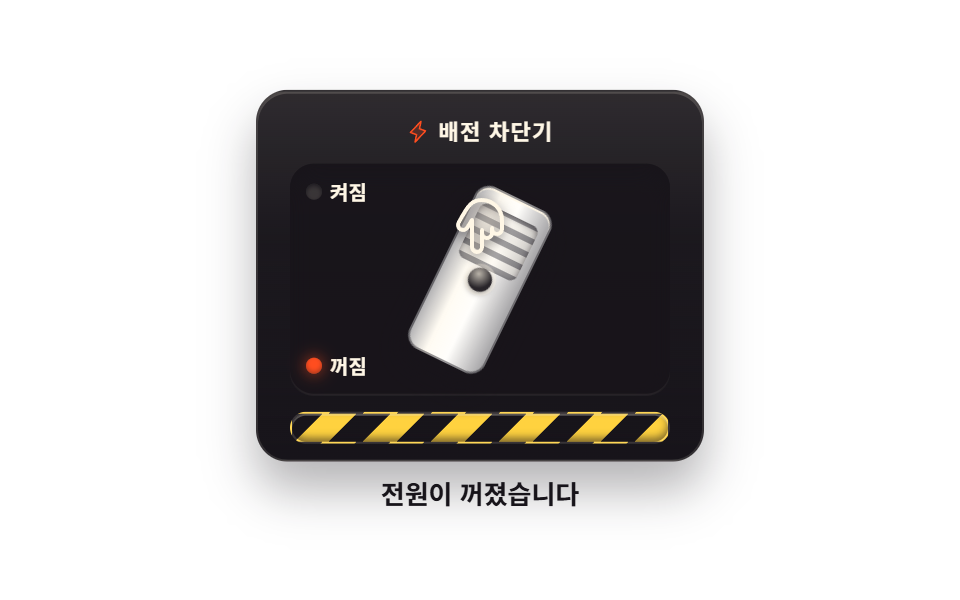
<main class="stage">
  <div class="bkWrap is-demo" id="bkWrap" data-on="true">
    <button class="bk" id="bk" type="button" role="switch" aria-checked="true" aria-label="전원 차단기">
      <span class="bk__plate">
        <span class="bk__brand">
          <svg class="bk__spark" viewBox="0 0 256 256" aria-hidden="true" fill="currentColor"><g><path d="m96 240l16-80l-64-24L160 16l-16 80l64 24Z" opacity=".2"/><path d="M215.79 118.17a8 8 0 0 0-5-5.66L153.18 90.9l14.66-73.33a8 8 0 0 0-13.69-7l-112 120a8 8 0 0 0 3 13l57.63 21.61l-14.62 73.25a8 8 0 0 0 13.69 7l112-120a8 8 0 0 0 1.94-7.26M109.37 214l10.47-52.38a8 8 0 0 0-5-9.06L62 132.71l84.62-90.66l-10.46 52.38a8 8 0 0 0 5 9.06l52.8 19.8Z"/></g></svg>
          <span>배전 차단기</span>
        </span>
        <span class="bk__slot">
          <span class="bk__mark bk__mark--on"><i class="bk__led"></i>켜짐</span>
          <span class="bk__mark bk__mark--off"><i class="bk__led"></i>꺼짐</span>
          <span class="bk__lever"><span class="bk__grip" aria-hidden="true"></span></span>
        </span>
        <span class="bk__hazard" aria-hidden="true"></span>
      </span>
      <span class="bk__hand" aria-hidden="true">
        <svg class="bk__handIco" viewBox="0 0 256 256" fill="currentColor"><g><path d="M216 116v36a80 80 0 0 1-80 80c-44.18 0-55.81-24-93.32-90a20 20 0 0 1 34.64-20L96 152V44a20 20 0 0 1 40 0v56a20 20 0 0 1 40 0v16a20 20 0 0 1 40 0" opacity=".2"/><path d="M196 88a27.86 27.86 0 0 0-13.35 3.39A28 28 0 0 0 144 74.7V44a28 28 0 0 0-56 0v80l-3.82-6.13A28 28 0 0 0 35.73 146l4.67 8.23C74.81 214.89 89.05 240 136 240a88.1 88.1 0 0 0 88-88v-36a28 28 0 0 0-28-28m12 64a72.08 72.08 0 0 1-72 72c-37.63 0-47.84-18-81.68-77.68l-4.69-8.27V138A12 12 0 0 1 54 121.61a11.9 11.9 0 0 1 6-1.6a12 12 0 0 1 10.41 6a2 2 0 0 0 .14.23l18.67 30A8 8 0 0 0 104 152V44a12 12 0 0 1 24 0v68a8 8 0 0 0 16 0v-12a12 12 0 0 1 24 0v20a8 8 0 0 0 16 0v-4a12 12 0 0 1 24 0Z"/></g></svg>
      </span>
    </button>
    <p class="bk__status">
      <span class="bk__state bk__state--on">전원이 켜졌습니다</span>
      <span class="bk__state bk__state--off">전원이 꺼졌습니다</span>
    </p>
  </div>
</main>@use "../../../../site/static/demo-tokens" as *;
// 차단기 브레이커 스위치 — 배반판 모듈 전체가 하나의 button(role="switch"). 손잡이를 아래로
// 젖히면(=클릭하면) 무게에 눌려 한 번 멈칫하다가 떨어져 내려간다. 그 멈칫함은 steps(1,end)
// 한 단계 이징으로 담는다 — 손이 다 눌리고도 손잡이가 잠깐 버티다가 스르록 떨어진다.
// 켜짐·꺼짐은 표시등(색) + 손잡이 각도(위치) + 아래 글월(글자) 셋으로 알리므로 색만으로는
// 알리지 않는다. 격자 미리보기(.is-demo)는 손이 내려와 두 번 누르는 장면을 2초에 한 바퀴.
// 페이페이 흉내가 아니라 재질 — 판은 먹 플라스틱, 손잡이는 $color 캡, 홈은 깎인 그림자.
$duration: $dur-quick;
$easing: $ease-spring;
$color: $stage-paper;
@include stage($stage-paper);
.bkWrap { display: flex; flex-direction: column; align-items: center; gap: $sp-2; }
.bk {
position: relative; display: block; margin: 0; padding: 0; border: 0; background: none;
font-family: inherit; cursor: pointer;
}
.bk:focus-visible { outline: 2px solid $subject-blue; outline-offset: 4px; }
.bk__plate {
display: flex; flex-direction: column; box-sizing: border-box;
width: clamp(200px, 54vw, 224px); padding: $sp-3 0 $sp-2;
background: linear-gradient(180deg, rgba($subject-cream, .1), rgba($subject-cream, .02) 40%, rgba($stage-ink, .4)), $subject-ink;
border: 1px solid rgba($subject-cream, .12); border-radius: $r-card;
box-shadow: 0 14px 24px rgba(23, 20, 26, .32), inset 0 1px 0 rgba($subject-cream, .16);
}
.bk__brand {
display: flex; align-items: center; justify-content: center; gap: $sp-1;
font-weight: 700; font-size: clamp(10px, 2.8vw, 11px); line-height: 1.4;
letter-spacing: .06em; color: $subject-cream;
}
.bk__spark { width: 12px; height: 12px; flex: 0 0 auto; color: $stage-orange; }
// 손잡이 슬롯 — 판보다 한 단계 깊게 파인 구멍
.bk__slot {
position: relative; height: clamp(96px, 26vw, 116px); margin: $sp-2 $sp-4 0;
background: rgba($stage-ink, .85); border-radius: $r-control;
box-shadow: inset 0 4px 10px rgba($stage-ink, .9), inset 0 -1px 0 rgba($subject-cream, .08);
}
// 켜짐·꺼짐 표시 — 슬롯 왼쪽에 세로로. 표시등은 색, 글자는 글자로 각자 역할
.bk__mark {
position: absolute; left: $sp-2; z-index: 1;
display: flex; align-items: center; gap: $sp-1;
font-weight: 700; font-size: clamp(9px, 2.6vw, 10px); line-height: 1.3; color: $subject-cream;
}
.bk__mark--on { top: $sp-2; }
.bk__mark--off { bottom: $sp-2; }
.bk__led {
position: relative; width: 8px; height: 8px; border-radius: 50%; flex: 0 0 auto;
background: rgba($subject-cream, .14); box-shadow: inset 0 1px 2px rgba($stage-ink, .8);
}
// 켜진 쪽 빛 점 — 주황 점 + 번짐을 가상 요소로 분리해 visibility 컷으로만 켠다.
// 상태는 여기에만 색을 쓴다(각도·글자와 함께 세 가지 신호 중 하나)
.bk__led::after {
content: ""; position: absolute; inset: 0; border-radius: 50%;
background: $stage-orange;
box-shadow: 0 0 8px rgba($stage-orange, .8), inset 0 -1px 2px rgba($stage-ink, .35);
visibility: hidden;
}
.bkWrap[data-on="true"] .bk__mark--on .bk__led::after,
.bkWrap[data-on="false"] .bk__mark--off .bk__led::after { visibility: visible; }
// 손잡이 — 가운데 핀을 축으로 ±26 도. 실제 조작은 steps(1,end) 전환 한 번으로 떨어뜨린다
.bk__lever {
position: absolute; left: 50%; top: 50%; width: clamp(34px, 9vw, 40px); height: clamp(76px, 20vw, 88px);
background: linear-gradient(90deg, rgba($stage-ink, .32), rgba($subject-cream, .5) 28%, rgba($subject-cream, .16) 55%, rgba($stage-ink, .38)), $color;
border: 1px solid rgba($stage-ink, .45); border-radius: $r-sm;
box-shadow: 0 8px 14px rgba($stage-ink, .55), inset 0 1px 0 rgba($subject-cream, .85);
transform: translate(-50%, -50%) rotate(-26deg);
transform-origin: 50% 50%;
transition: transform $duration steps(1,end);
}
.bkWrap[data-on="false"] .bk__lever { transform: translate(-50%, -50%) rotate(26deg); }
// 잡는 홈 — 손가락이 걸리는 가로줄
.bk__grip {
position: absolute; left: $sp-1; right: $sp-1; top: $sp-2; height: 34%;
border-radius: $r-xs;
background: repeating-linear-gradient(0deg, rgba($stage-ink, .38) 0 3px, rgba($subject-cream, .28) 3px 7px);
box-shadow: inset 0 1px 3px rgba($stage-ink, .5);
}
// 축 핀 — 손잡이 한가운데 박힌 금속못
.bk__lever::after {
content: ""; position: absolute; left: 50%; top: 50%; width: 12px; height: 12px;
transform: translate(-50%, -50%); border-radius: 50%;
background: radial-gradient(circle at 35% 30%, rgba($subject-cream, .7), rgba($subject-cream, .08) 62%), $subject-ink;
box-shadow: 0 0 0 2px rgba($subject-cream, .35), 0 1px 3px rgba($stage-ink, .7);
}
// 경고 줄무늬 — 노랑과 먹의 사선 반복
.bk__hazard {
height: 14px; margin: $sp-2 $sp-4 0; border-radius: $r-pill;
background: repeating-linear-gradient(-45deg, $stage-yellow 0 12px, rgba($stage-ink, .92) 12px 24px);
border: 1px solid rgba($subject-cream, .14);
box-shadow: inset 0 -2px 4px rgba($stage-ink, .55), inset 0 1px 0 rgba($subject-cream, .3);
}
// 누르는 손 — 세로 반전한 Phosphor 손가락. 손끝이 손잡이에 닿는다
.bk__hand {
position: absolute; left: 50%; top: clamp(46px, 13vw, 54px); z-index: 2;
width: 32px; height: 32px; margin-left: -16px; pointer-events: none;
color: $subject-cream; filter: drop-shadow(0 2px 3px rgba($stage-ink, .6));
transform: translateY(-20px);
}
.bk__handIco { width: 100%; height: 100%; transform: scaleY(-1); }
.bk__status {
position: relative; margin: 0; width: 200px; height: 20px;
font-weight: 700; font-size: clamp(11px, 3vw, 13px); line-height: 20px; color: $subject-ink;
}
.bk__state { position: absolute; inset: 0; text-align: center; }
.bk__state--off { visibility: hidden; }
.bkWrap[data-on="false"] .bk__state--off { visibility: visible; }
.bkWrap[data-on="false"] .bk__state--on { visibility: hidden; }
// ── 격자 미리보기: 손이 내려와 두 번 누른다 ─────────────────────────
// 손이 완전히 눌리는 22% 와 64% 에서 잠깐 멈칫하다가(멈칫 = steps 구간) 27% · 70% 에
// 손잡이가 떨어진다. 복귀는 84% 안에 끝나고 마지막 16% 는 켜짐 그대로 멈춘다.
.bkWrap.is-demo .bk__lever {
animation-name: bkLever; animation-duration: $dur-loop;
animation-timing-function: steps(1,end); animation-iteration-count: infinite;
}
.bkWrap.is-demo .bk__hand {
animation-name: bkHand; animation-duration: $dur-loop;
animation-timing-function: $easing; animation-iteration-count: infinite;
}
.bkWrap.is-demo .bk__plate {
animation-name: bkThud; animation-duration: $dur-loop;
animation-timing-function: $ease-out; animation-iteration-count: infinite;
}
.bkWrap.is-demo .bk__mark--on .bk__led::after,
.bkWrap.is-demo .bk__state--on { animation-name: bkShowOn; animation-duration: $dur-loop; animation-iteration-count: infinite; }
.bkWrap.is-demo .bk__mark--off .bk__led::after,
.bkWrap.is-demo .bk__state--off { animation-name: bkShowOff; animation-duration: $dur-loop; animation-iteration-count: infinite; }
// steps(1,end) 는 구간 끝에서야 값을 바꾼다 — 컷 지점을 중간 키프레임(27% · 70%)으로 둬야
// 2초 내내 첫 값만 보이는 정지화가 되지 않는다. 27% 와 70% 는 12fps 샘플 시점(25.0 · 29.17 ·
// 66.67 · 70.83%) 사이의 빈칸이라 손잡이·표시등·글월이 같은 간격 안에서 함께 뒤집힌다.
@keyframes bkLever {
0%, 25% { transform: translate(-50%, -50%) rotate(-26deg); }
27%, 68% { transform: translate(-50%, -50%) rotate(26deg); }
70%, 100% { transform: translate(-50%, -50%) rotate(-26deg); }
}
@keyframes bkHand {
0% { transform: translateY(-20px); }
12% { transform: translateY(0); }
22% { transform: translateY(16px); }
30%, 52% { transform: translateY(0); }
64% { transform: translateY(16px); }
72% { transform: translateY(0); }
84%, 100% { transform: translateY(-20px); }
}
// 떨어질 때 판이 한 번 가라앉는다 — 무게
@keyframes bkThud {
0%, 25% { transform: translateY(0); }
29% { transform: translateY(2px); }
33%, 70% { transform: translateY(0); }
74% { transform: translateY(2px); }
78%, 100% { transform: translateY(0); }
}
// 표시등과 글월은 visibility 컷 — 반투명 유령 프레임이 없다(짝 키프레임의 한가운데서 뒤집힌다)
@keyframes bkShowOn {
0%, 26% { visibility: visible; }
28%, 69% { visibility: hidden; }
71%, 100% { visibility: visible; }
}
@keyframes bkShowOff {
0%, 26% { visibility: hidden; }
28%, 69% { visibility: visible; }
71%, 100% { visibility: hidden; }
}
@media (max-width: 340px) {
.bkWrap { gap: $sp-1; }
.bk__plate { padding-top: $sp-2; padding-bottom: $sp-1; }
.bk__slot { height: 88px; margin-top: $sp-1; }
.bk__hazard { height: 12px; margin-top: $sp-1; }
.bk__hand { top: 42px; }
.bk__status { height: 16px; line-height: 16px; }
}
// reduce 에서는 켜짐(손잡이 위) 한 장으로 선다 — 정적 경로가 화면을 채운다
@media (prefers-reduced-motion: reduce) {
.bkWrap.is-demo .bk__lever,
.bkWrap.is-demo .bk__hand,
.bkWrap.is-demo .bk__plate,
.bkWrap.is-demo .bk__mark--on .bk__led::after,
.bkWrap.is-demo .bk__mark--off .bk__led::after,
.bkWrap.is-demo .bk__state--on,
.bkWrap.is-demo .bk__state--off { animation: none !important; }
.bk__lever { transition: none !important; }
}html, body {
margin: 0;
overflow: hidden;
}
.stage {
box-sizing: border-box;
min-height: 100vh;
display: grid;
place-items: center;
margin: 0;
background: #ffffff;
font-family: -apple-system, "Segoe UI", "Noto Sans KR", sans-serif;
padding: clamp(8px, 4vw, 24px);
}
.bkWrap {
display: flex;
flex-direction: column;
align-items: center;
gap: 8px;
}
.bk {
position: relative;
display: block;
margin: 0;
padding: 0;
border: 0;
background: none;
font-family: inherit;
cursor: pointer;
}
.bk:focus-visible {
outline: 2px solid #2f6df6;
outline-offset: 4px;
}
.bk__plate {
display: flex;
flex-direction: column;
box-sizing: border-box;
width: clamp(200px, 54vw, 224px);
padding: 12px 0 8px;
background: linear-gradient(180deg, rgba(255, 247, 230, 0.1), rgba(255, 247, 230, 0.02) 40%, rgba(23, 20, 26, 0.4)), #17141a;
border: 1px solid rgba(255, 247, 230, 0.12);
border-radius: 16px;
box-shadow: 0 14px 24px rgba(23, 20, 26, 0.32), inset 0 1px 0 rgba(255, 247, 230, 0.16);
}
.bk__brand {
display: flex;
align-items: center;
justify-content: center;
gap: 4px;
font-weight: 700;
font-size: clamp(10px, 2.8vw, 11px);
line-height: 1.4;
letter-spacing: 0.06em;
color: #fff7e6;
}
.bk__spark {
width: 12px;
height: 12px;
flex: 0 0 auto;
color: #ff4d1f;
}
.bk__slot {
position: relative;
height: clamp(96px, 26vw, 116px);
margin: 8px 16px 0;
background: rgba(23, 20, 26, 0.85);
border-radius: 12px;
box-shadow: inset 0 4px 10px rgba(23, 20, 26, 0.9), inset 0 -1px 0 rgba(255, 247, 230, 0.08);
}
.bk__mark {
position: absolute;
left: 8px;
z-index: 1;
display: flex;
align-items: center;
gap: 4px;
font-weight: 700;
font-size: clamp(9px, 2.6vw, 10px);
line-height: 1.3;
color: #fff7e6;
}
.bk__mark--on {
top: 8px;
}
.bk__mark--off {
bottom: 8px;
}
.bk__led {
position: relative;
width: 8px;
height: 8px;
border-radius: 50%;
flex: 0 0 auto;
background: rgba(255, 247, 230, 0.14);
box-shadow: inset 0 1px 2px rgba(23, 20, 26, 0.8);
}
.bk__led::after {
content: "";
position: absolute;
inset: 0;
border-radius: 50%;
background: #ff4d1f;
box-shadow: 0 0 8px rgba(255, 77, 31, 0.8), inset 0 -1px 2px rgba(23, 20, 26, 0.35);
visibility: hidden;
}
.bkWrap[data-on=true] .bk__mark--on .bk__led::after,
.bkWrap[data-on=false] .bk__mark--off .bk__led::after {
visibility: visible;
}
.bk__lever {
position: absolute;
left: 50%;
top: 50%;
width: clamp(34px, 9vw, 40px);
height: clamp(76px, 20vw, 88px);
background: linear-gradient(90deg, rgba(23, 20, 26, 0.32), rgba(255, 247, 230, 0.5) 28%, rgba(255, 247, 230, 0.16) 55%, rgba(23, 20, 26, 0.38)), #ffffff;
border: 1px solid rgba(23, 20, 26, 0.45);
border-radius: 8px;
box-shadow: 0 8px 14px rgba(23, 20, 26, 0.55), inset 0 1px 0 rgba(255, 247, 230, 0.85);
transform: translate(-50%, -50%) rotate(-26deg);
transform-origin: 50% 50%;
transition: transform 220ms steps(1, end);
}
.bkWrap[data-on=false] .bk__lever {
transform: translate(-50%, -50%) rotate(26deg);
}
.bk__grip {
position: absolute;
left: 4px;
right: 4px;
top: 8px;
height: 34%;
border-radius: 4px;
background: repeating-linear-gradient(0deg, rgba(23, 20, 26, 0.38) 0 3px, rgba(255, 247, 230, 0.28) 3px 7px);
box-shadow: inset 0 1px 3px rgba(23, 20, 26, 0.5);
}
.bk__lever::after {
content: "";
position: absolute;
left: 50%;
top: 50%;
width: 12px;
height: 12px;
transform: translate(-50%, -50%);
border-radius: 50%;
background: radial-gradient(circle at 35% 30%, rgba(255, 247, 230, 0.7), rgba(255, 247, 230, 0.08) 62%), #17141a;
box-shadow: 0 0 0 2px rgba(255, 247, 230, 0.35), 0 1px 3px rgba(23, 20, 26, 0.7);
}
.bk__hazard {
height: 14px;
margin: 8px 16px 0;
border-radius: 999px;
background: repeating-linear-gradient(-45deg, #ffd23f 0 12px, rgba(23, 20, 26, 0.92) 12px 24px);
border: 1px solid rgba(255, 247, 230, 0.14);
box-shadow: inset 0 -2px 4px rgba(23, 20, 26, 0.55), inset 0 1px 0 rgba(255, 247, 230, 0.3);
}
.bk__hand {
position: absolute;
left: 50%;
top: clamp(46px, 13vw, 54px);
z-index: 2;
width: 32px;
height: 32px;
margin-left: -16px;
pointer-events: none;
color: #fff7e6;
filter: drop-shadow(0 2px 3px rgba(23, 20, 26, 0.6));
transform: translateY(-20px);
}
.bk__handIco {
width: 100%;
height: 100%;
transform: scaleY(-1);
}
.bk__status {
position: relative;
margin: 0;
width: 200px;
height: 20px;
font-weight: 700;
font-size: clamp(11px, 3vw, 13px);
line-height: 20px;
color: #17141a;
}
.bk__state {
position: absolute;
inset: 0;
text-align: center;
}
.bk__state--off {
visibility: hidden;
}
.bkWrap[data-on=false] .bk__state--off {
visibility: visible;
}
.bkWrap[data-on=false] .bk__state--on {
visibility: hidden;
}
.bkWrap.is-demo .bk__lever {
animation-name: bkLever;
animation-duration: 2s;
animation-timing-function: steps(1, end);
animation-iteration-count: infinite;
}
.bkWrap.is-demo .bk__hand {
animation-name: bkHand;
animation-duration: 2s;
animation-timing-function: cubic-bezier(0.2, 0.8, 0.2, 1);
animation-iteration-count: infinite;
}
.bkWrap.is-demo .bk__plate {
animation-name: bkThud;
animation-duration: 2s;
animation-timing-function: ease-out;
animation-iteration-count: infinite;
}
.bkWrap.is-demo .bk__mark--on .bk__led::after,
.bkWrap.is-demo .bk__state--on {
animation-name: bkShowOn;
animation-duration: 2s;
animation-iteration-count: infinite;
}
.bkWrap.is-demo .bk__mark--off .bk__led::after,
.bkWrap.is-demo .bk__state--off {
animation-name: bkShowOff;
animation-duration: 2s;
animation-iteration-count: infinite;
}
@keyframes bkLever {
0%, 25% {
transform: translate(-50%, -50%) rotate(-26deg);
}
27%, 68% {
transform: translate(-50%, -50%) rotate(26deg);
}
70%, 100% {
transform: translate(-50%, -50%) rotate(-26deg);
}
}
@keyframes bkHand {
0% {
transform: translateY(-20px);
}
12% {
transform: translateY(0);
}
22% {
transform: translateY(16px);
}
30%, 52% {
transform: translateY(0);
}
64% {
transform: translateY(16px);
}
72% {
transform: translateY(0);
}
84%, 100% {
transform: translateY(-20px);
}
}
@keyframes bkThud {
0%, 25% {
transform: translateY(0);
}
29% {
transform: translateY(2px);
}
33%, 70% {
transform: translateY(0);
}
74% {
transform: translateY(2px);
}
78%, 100% {
transform: translateY(0);
}
}
@keyframes bkShowOn {
0%, 26% {
visibility: visible;
}
28%, 69% {
visibility: hidden;
}
71%, 100% {
visibility: visible;
}
}
@keyframes bkShowOff {
0%, 26% {
visibility: hidden;
}
28%, 69% {
visibility: visible;
}
71%, 100% {
visibility: hidden;
}
}
@media (max-width: 340px) {
.bkWrap {
gap: 4px;
}
.bk__plate {
padding-top: 8px;
padding-bottom: 4px;
}
.bk__slot {
height: 88px;
margin-top: 4px;
}
.bk__hazard {
height: 12px;
margin-top: 4px;
}
.bk__hand {
top: 42px;
}
.bk__status {
height: 16px;
line-height: 16px;
}
}
@media (prefers-reduced-motion: reduce) {
.bkWrap.is-demo .bk__lever,
.bkWrap.is-demo .bk__hand,
.bkWrap.is-demo .bk__plate,
.bkWrap.is-demo .bk__mark--on .bk__led::after,
.bkWrap.is-demo .bk__mark--off .bk__led::after,
.bkWrap.is-demo .bk__state--on,
.bkWrap.is-demo .bk__state--off {
animation: none !important;
}
.bk__lever {
transition: none !important;
}
}var wrap = document.getElementById('bkWrap');
var sw = document.getElementById('bk');
// 손잡이·표시등·글월은 전부 data-on 하나로 갈린다. 화면 글자를 JS 가 건드리지 않는다.
sw.addEventListener('click', function () {
wrap.classList.remove('is-demo');
var on = sw.getAttribute('aria-checked') !== 'true';
sw.setAttribute('aria-checked', on ? 'true' : 'false');
wrap.setAttribute('data-on', on ? 'true' : 'false');
});
wrap.addEventListener('pointerdown', function () { wrap.classList.remove('is-demo'); });// BreakerSwitch — vanilla 판(run/013/demo/08-skeuo-breaker-switch) 의 React 포트.
// 손잡이·표시등·글월은 전부 on 상태 하나로 갈린다. 값·키프레임은 vanilla 와 같다.
import { useState } from "react";
import type { CSSProperties } from "react";
import styles from "./BreakerSwitch.module.scss";
export type BreakerSwitchProps = {
duration?: number;
easing?: string;
color?: string;
};
type Vars = CSSProperties & { "--duration"?: string; "--easing"?: string; "--color"?: string };
const BRAND = "배전 차단기";
const MARK_ON = "켜짐";
const MARK_OFF = "꺼짐";
const STATE_ON = "전원이 켜졌습니다";
const STATE_OFF = "전원이 꺼졌습니다";
const ARIA_LABEL = "전원 차단기";
export default function BreakerSwitch({
duration = 220,
easing = "cubic-bezier(.2, .8, .2, 1)",
color = "#ffffff",
}: BreakerSwitchProps) {
const [on, setOn] = useState(true);
const [demo, setDemo] = useState(true);
const vars: Vars = { "--duration": `${duration}ms`, "--easing": easing, "--color": color };
function toggle() {
setDemo(false);
setOn(!on);
}
const cls = [styles.root, demo ? styles.isDemo : ""].filter(Boolean).join(" ");
return (
<main className={styles.stage}>
<div className={cls} data-on={on ? "true" : "false"} style={vars}>
<button
className={styles.switch}
type="button"
role="switch"
aria-checked={on}
aria-label={ARIA_LABEL}
onClick={toggle}
>
<span className={styles.plate}>
<span className={styles.brand}>
<svg className={styles.spark} viewBox="0 0 256 256" aria-hidden="true" fill="currentColor"><g><path d="m96 240l16-80l-64-24L160 16l-16 80l64 24Z" opacity=".2"/><path d="M215.79 118.17a8 8 0 0 0-5-5.66L153.18 90.9l14.66-73.33a8 8 0 0 0-13.69-7l-112 120a8 8 0 0 0 3 13l57.63 21.61l-14.62 73.25a8 8 0 0 0 13.69 7l112-120a8 8 0 0 0 1.94-7.26M109.37 214l10.47-52.38a8 8 0 0 0-5-9.06L62 132.71l84.62-90.66l-10.46 52.38a8 8 0 0 0 5 9.06l52.8 19.8Z"/></g></svg>
<span>{BRAND}</span>
</span>
<span className={styles.slot}>
<span className={`${styles.mark} ${styles.markOn}`}><i className={styles.led}></i>{MARK_ON}</span>
<span className={`${styles.mark} ${styles.markOff}`}><i className={styles.led}></i>{MARK_OFF}</span>
<span className={styles.lever}><span className={styles.grip} aria-hidden="true"></span></span>
</span>
<span className={styles.hazard} aria-hidden="true"></span>
</span>
<span className={styles.hand} aria-hidden="true">
<svg className={styles.handIco} viewBox="0 0 256 256" fill="currentColor"><g><path d="M216 116v36a80 80 0 0 1-80 80c-44.18 0-55.81-24-93.32-90a20 20 0 0 1 34.64-20L96 152V44a20 20 0 0 1 40 0v56a20 20 0 0 1 40 0v16a20 20 0 0 1 40 0" opacity=".2"/><path d="M196 88a27.86 27.86 0 0 0-13.35 3.39A28 28 0 0 0 144 74.7V44a28 28 0 0 0-56 0v80l-3.82-6.13A28 28 0 0 0 35.73 146l4.67 8.23C74.81 214.89 89.05 240 136 240a88.1 88.1 0 0 0 88-88v-36a28 28 0 0 0-28-28m12 64a72.08 72.08 0 0 1-72 72c-37.63 0-47.84-18-81.68-77.68l-4.69-8.27V138A12 12 0 0 1 54 121.61a11.9 11.9 0 0 1 6-1.6a12 12 0 0 1 10.41 6a2 2 0 0 0 .14.23l18.67 30A8 8 0 0 0 104 152V44a12 12 0 0 1 24 0v68a8 8 0 0 0 16 0v-12a12 12 0 0 1 24 0v20a8 8 0 0 0 16 0v-4a12 12 0 0 1 24 0Z"/></g></svg>
</span>
</button>
<p className={styles.status}>
<span className={`${styles.state} ${styles.stateOn}`}>{STATE_ON}</span>
<span className={`${styles.state} ${styles.stateOff}`}>{STATE_OFF}</span>
</p>
</div>
</main>
);
}08 차단기 브레이커 스위치 — 측정 누적면적 7.954% · 움직인 프레임 16/23GODRICH 원작 · zip 에 SCSS·React 포함 · CSS 스위치 버튼 9종 — 실물처럼 눌리는 레버·다이얼·이젝트
이 데모가 속한 글
 CSS 스위치 버튼 9종 — 실물처럼 눌리는 레버·다이얼·이젝트css 스위치 버튼은 화면에서 켜고 끄는 스위치를 실물 레버·로커·다이얼처럼 보이게 만든 버튼입니다. 여기 아홉 개는 라이브러리 없이 SCSS 와 짧은 JS 로만 짰고, 누르면 그 자리에서 기울고 돌고 튀어나오며 화 이 글의 데모 전부 보기