08물리적으로 눌리는 버튼
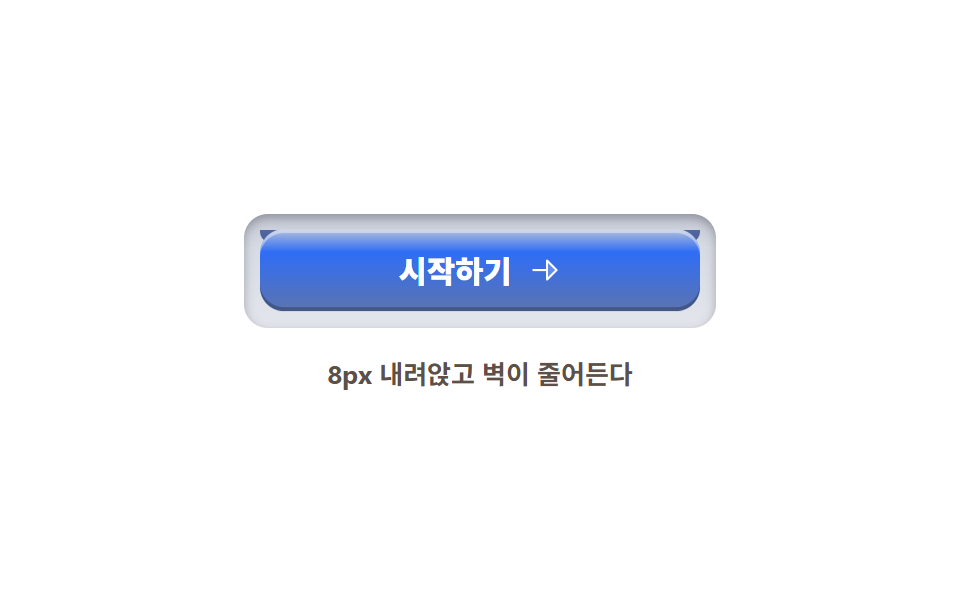
키캡이 8px 내려앉는 동안 밑의 옆벽 요소가 scaleY로 4분의 1로 줄어 누르는 깊이를 만들고, 놓으면 스프링처럼 튀어 오릅니다.
쓰임최종 전환 버튼, 결제 확인, 게임형 UI
옆벽 scaleY8px 스트로크radius 12
<main class="stage">
  <section class="physkey">
    <div class="physkey__well">
      <span class="physkey__wall" aria-hidden="true"></span>
      <button class="physkey__cap" type="button">
        <span class="physkey__label">시작하기</span>
        <svg xmlns="http://www.w3.org/2000/svg" width="1em" height="1em" viewBox="0 0 256 256" aria-hidden="true"><g fill="currentColor"><path d="m216 128l-72 72V56Z" opacity=".2"/><path d="m221.66 122.34l-72-72A8 8 0 0 0 136 56v64H40a8 8 0 0 0 0 16h96v64a8 8 0 0 0 13.66 5.66l72-72a8 8 0 0 0 0-11.32M152 180.69V75.31L204.69 128Z"/></g></svg>
      </button>
    </div>
    <p class="physkey__caption">8px 내려앉고 벽이 줄어든다</p>
  </section>
</main>
@use "../../../../site/static/demo-tokens" as *;
// 스큐어모픽 키 — 윗면(cap)·옆벽(wall)·홈(well) 셋으로 물리적 눌림을 만든다.
// 벽은 box-shadow 가 아니라 별도 요소: scaleY 로 줄어드는 것도 transform 이다
$key-face-1: #b5c0da; // 윗면 밝은 모서리
$key-face-2: $subject-blue; // 윗면 (토큰)
$key-face-3: #5d74af; // 윗면 어두운 모서리
$wall: #5067a2; // 옆벽
$wall-deep: #475b90; // 옆벽 아래
$well: #d7dbe4; // 키가 빠져나가는 홈
$duration: $dur-loop; // 눌림 → 유지 → 복귀 한 주기
$easing: $ease-spring; // 놓으면 스프링처럼 튀어 오른다
$color: $key-face-2;
@include stage($stage-paper);
.physkey {
display: flex;
flex-direction: column;
align-items: center;
gap: $sp-4;
}
// 홈 — 키가 앉는 구멍. 윗면보다 넓다
.physkey__well {
position: relative;
box-sizing: border-box;
width: clamp(180px, 56vw, 236px);
padding: 8px;
border-radius: $r-control;
background: linear-gradient(180deg, #c3c8d4, $well 30%, #e3e6ec);
box-shadow: inset 0 2px 5px rgba(23, 20, 26, .3);
}
// 옆벽 — cap 아래의 두께. 눌리면 scaleY 로 4분의 1이 된다 (transform-origin top)
.physkey__wall {
position: absolute;
left: 8px; right: 8px;
top: 8px;
height: 8px;
border-radius: 0 0 $r-control $r-control;
background: linear-gradient(180deg, $wall, $wall-deep);
transform-origin: 50% 0; // 규칙8: 옆벽 윗변 붙어 압축
animation: wallPress $duration $easing infinite;
}
// 윗면 — 8px 내려앉는다. 라벨과 아이콘이 같이 내려간다
.physkey__cap {
position: relative;
z-index: 1;
box-sizing: border-box;
display: inline-flex;
align-items: center;
justify-content: center;
gap: $sp-2;
width: 100%;
padding: $sp-3 $sp-4;
border: 0;
border-radius: $r-control;
background: linear-gradient(180deg, $key-face-1 0%, $key-face-2 28%, $key-face-3 100%);
color: #ffffff;
font-weight: 800; font-size: clamp(13px, 3.2vw, 16px); line-height: 1;
font-family: inherit;
box-shadow: inset 0 2px 0 rgba(255, 255, 255, .4), inset 0 -2px 0 rgba(0, 0, 0, .25);
cursor: pointer;
animation: capPress $duration $easing infinite;
}
.physkey__cap:focus-visible {
outline: 3px solid #5d74af;
outline-offset: 3px;
}
.physkey__label {
font-family: inherit;
}
.physkey__cap svg {
width: 1.1em;
height: 1.1em;
}
.physkey__caption {
margin: 0;
color: #5c5048;
font-weight: 700; font-size: clamp(11px, 2.8vw, 13px); line-height: 1;
font-family: inherit;
}
// 눌림: cap 8px 하강 ↔ 벽 scaleY .25. 놓으면 한 번 튀어 오른 뒤 정지 — 벽도 살짝 늘어난다
@keyframes capPress {
0%, 12% { transform: translateY(0); }
32%, 46% { transform: translateY(8px); }
62% { transform: translateY(-3px); }
76%, 100% { transform: translateY(0); }
}
@keyframes wallPress {
0%, 12% { transform: scaleY(1); }
32%, 46% { transform: scaleY(.25); }
62% { transform: scaleY(1.1); }
76%, 100% { transform: scaleY(1); }
}
@media (max-width: 340px), (max-height: 220px) {
.physkey__well { padding: 4px; width: 188px; }
.physkey__wall { left: 4px; right: 4px; top: 4px; height: 8px; }
.physkey__caption { display: none; }
.physkey { gap: $sp-3; }
}
@media (prefers-reduced-motion: reduce) {
.physkey__cap { animation: none !important; }
.physkey__wall { animation: none !important; }
}html, body {
margin: 0;
overflow: hidden;
}
.stage {
box-sizing: border-box;
min-height: 100vh;
display: grid;
place-items: center;
margin: 0;
background: #ffffff;
font-family: -apple-system, "Segoe UI", "Noto Sans KR", sans-serif;
padding: clamp(8px, 4vw, 24px);
}
.physkey {
display: flex;
flex-direction: column;
align-items: center;
gap: 16px;
}
.physkey__well {
position: relative;
box-sizing: border-box;
width: clamp(180px, 56vw, 236px);
padding: 8px;
border-radius: 12px;
background: linear-gradient(180deg, #c3c8d4, #d7dbe4 30%, #e3e6ec);
box-shadow: inset 0 2px 5px rgba(23, 20, 26, 0.3);
}
.physkey__wall {
position: absolute;
left: 8px;
right: 8px;
top: 8px;
height: 8px;
border-radius: 0 0 12px 12px;
background: linear-gradient(180deg, #5067a2, #475b90);
transform-origin: 50% 0;
animation: wallPress 2s cubic-bezier(0.2, 0.8, 0.2, 1) infinite;
}
.physkey__cap {
position: relative;
z-index: 1;
box-sizing: border-box;
display: inline-flex;
align-items: center;
justify-content: center;
gap: 8px;
width: 100%;
padding: 12px 16px;
border: 0;
border-radius: 12px;
background: linear-gradient(180deg, #b5c0da 0%, #2f6df6 28%, #5d74af 100%);
color: #ffffff;
font-weight: 800;
font-size: clamp(13px, 3.2vw, 16px);
line-height: 1;
font-family: inherit;
box-shadow: inset 0 2px 0 rgba(255, 255, 255, 0.4), inset 0 -2px 0 rgba(0, 0, 0, 0.25);
cursor: pointer;
animation: capPress 2s cubic-bezier(0.2, 0.8, 0.2, 1) infinite;
}
.physkey__cap:focus-visible {
outline: 3px solid #5d74af;
outline-offset: 3px;
}
.physkey__label {
font-family: inherit;
}
.physkey__cap svg {
width: 1.1em;
height: 1.1em;
}
.physkey__caption {
margin: 0;
color: #5c5048;
font-weight: 700;
font-size: clamp(11px, 2.8vw, 13px);
line-height: 1;
font-family: inherit;
}
@keyframes capPress {
0%, 12% {
transform: translateY(0);
}
32%, 46% {
transform: translateY(8px);
}
62% {
transform: translateY(-3px);
}
76%, 100% {
transform: translateY(0);
}
}
@keyframes wallPress {
0%, 12% {
transform: scaleY(1);
}
32%, 46% {
transform: scaleY(0.25);
}
62% {
transform: scaleY(1.1);
}
76%, 100% {
transform: scaleY(1);
}
}
@media (max-width: 340px), (max-height: 220px) {
.physkey__well {
padding: 4px;
width: 188px;
}
.physkey__wall {
left: 4px;
right: 4px;
top: 4px;
height: 8px;
}
.physkey__caption {
display: none;
}
.physkey {
gap: 12px;
}
}
@media (prefers-reduced-motion: reduce) {
.physkey__cap {
animation: none !important;
}
.physkey__wall {
animation: none !important;
}
}import type { CSSProperties } from "react";
import styles from "./PressableKey.module.scss";
export type PressableKeyProps = {
label?: string;
caption?: string;
/** 한 주기(기본 2000ms) */
duration?: number;
easing?: string;
color?: string;
};
type Vars = CSSProperties & { "--duration"?: string; "--easing"?: string; "--color"?: string };
export default function PressableKey({
label = "시작하기",
caption = "8px 내려앉고 벽이 줄어든다",
duration = 2000,
easing = "cubic-bezier(.2,.8,.2,1)",
color = "#2f6df6",
}: PressableKeyProps) {
const vars: Vars = { "--duration": `${duration}ms`, "--easing": easing, "--color": color };
return (
<section className={styles.physkey} style={vars}>
<div className={styles.well}>
<span className={styles.wall} aria-hidden="true" />
<button type="button" className={styles.cap}>
<span className={styles.label}>{label}</span>
<svg xmlns="http://www.w3.org/2000/svg" width="1em" height="1em" viewBox="0 0 256 256" aria-hidden="true"><g fill="currentColor"><path d="m216 128l-72 72V56Z" opacity=".2"/><path d="m221.66 122.34l-72-72A8 8 0 0 0 136 56v64H40a8 8 0 0 0 0 16h96v64a8 8 0 0 0 13.66 5.66l72-72a8 8 0 0 0 0-11.32M152 180.69V75.31L204.69 128Z"/></g></svg>
</button>
</div>
<p className={styles.caption}>{caption}</p>
</section>
);
}08 물리적으로 눌리는 버튼 — 측정 누적면적 7.858% · 움직인 프레임 12/23GODRICH 원작 · zip 에 SCSS·React 포함 · 스큐어모피즘 디자인 랜딩 키트, 질감 부품 9개
이 데모가 속한 글
 스큐어모피즘 디자인 랜딩 키트, 질감 부품 9개스큐어모피즘 디자인은 가죽·금속·나무 같은 실물 질감을 화면에 옮겨 담는 스타일입니다. 사진 한 장 없이 가죽·금속·나무를 CSS 값만으로 만들어, 2024년 이후 제품 사이트에서 한두 군데씩 다시 돌아온 그 질감을 이 글의 데모 전부 보기