03프롬프트 테마 전환
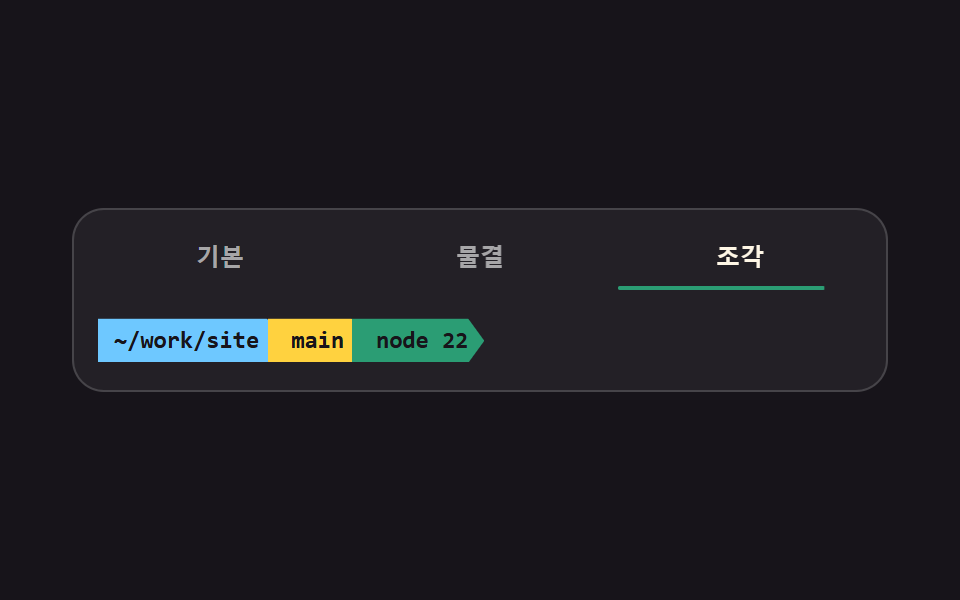
같은 한 줄 프롬프트를 기본·물결·조각 세 가지 모양으로 갈아 끼웁니다. 조각 모양의 꺾인 이음매는 clip-path 로 잘라 만들고, 고른 모양은 aria-pressed 로 표시합니다.
쓰임터미널 설정 도구의 미리보기, 개발 환경 소개 글의 프롬프트 예시
clip-patharia-pressedsteps(1, end)
<main class="stage">
<div class="pt is-demo" id="pt" data-shape="plain">
<div class="pt__pick" role="group" aria-label="프롬프트 모양">
<button class="pt__btn" type="button" data-shape="plain" aria-pressed="true">기본<span class="pt__bar" aria-hidden="true"></span></button>
<button class="pt__btn" type="button" data-shape="wave" aria-pressed="false">물결<span class="pt__bar" aria-hidden="true"></span></button>
<button class="pt__btn" type="button" data-shape="seg" aria-pressed="false">조각<span class="pt__bar" aria-hidden="true"></span></button>
</div>
<div class="pt__screen">
<div class="pt__view pt__view--plain">
<span class="pt__path">~/work/site</span>
<span class="pt__git">git:(main)</span>
<span class="pt__caret">❯</span>
</div>
<div class="pt__view pt__view--wave">
<span class="pt__user">you</span><span class="pt__at">@</span><span class="pt__host">mac</span>
<span class="pt__path">~/work/site</span>
<span class="pt__caret pt__caret--wave">❯❯</span>
</div>
<div class="pt__view pt__view--seg">
<span class="pt__seg pt__seg--a">~/work/site</span><span class="pt__seg pt__seg--b">main</span><span class="pt__seg pt__seg--c">node 22</span>
</div>
</div>
</div>
</main>@use "../../../../site/static/demo-tokens" as *;
// 프롬프트 테마 전환 — 같은 한 줄 프롬프트를 기본·물결·조각 세 모양으로 갈아 끼운다.
// 세 모양은 같은 격자 칸(grid-area: 1 / 1)에 겹쳐 두어 모양이 바뀌어도 화면 높이가 안 흔들린다.
// 조각 모양의 꺾인 이음매는 clip-path 로 잘라 만든다 — 삼각형을 따로 겹치지 않는다.
// 갈아 끼우기는 steps(1, end) 컷이고, 프레임을 채우는 작은 움직임은 버튼 밑줄의 scaleX 다
// (컷만 있으면 움직인 프레임이 두세 장에 그친다 — 252 실측).
$duration: $dur-quick;
$easing: $ease-spring;
$color: $chart-3;
$mono: ui-monospace, SFMono-Regular, "SF Mono", Consolas, "Liberation Mono", monospace;
$line: rgba(255, 255, 255, .16);
$dim: rgba(255, 255, 255, .6);
$notch: 8px;
@include stage($stage-ink);
.pt {
display: flex; flex-direction: column; gap: $sp-3;
box-sizing: border-box; width: min(100%, 408px);
padding: $sp-3; border: 1px solid $line; border-radius: $r-card;
background: rgba(255, 255, 255, .05); font-family: $mono;
}
.pt__pick { display: grid; grid-template-columns: repeat(3, 1fr); gap: $sp-2; }
.pt__btn {
position: relative; box-sizing: border-box; width: 100%; padding: $sp-1 0 $sp-2;
border: 0; border-radius: 0; background: none; color: $dim; cursor: pointer;
font-family: inherit; font-weight: 700; font-size: clamp(11px, 3vw, 12px); line-height: 1.4;
}
.pt__btn[aria-pressed="true"] { color: $subject-cream; }
.pt__btn:focus-visible { outline: 2px solid $subject-blue; outline-offset: 2px; }
// 밑줄은 버튼 아래 변에 붙은 요소라 왼쪽 변을 원점으로 자란다 (blog-demo 규칙 8 의 예외 항목)
.pt__bar {
position: absolute; left: 0; right: 0; bottom: 0; height: 2px; border-radius: $r-pill;
background: $color; transform: scaleX(0); transform-origin: left center;
transition: transform $duration $easing;
}
.pt__btn[aria-pressed="true"] .pt__bar { transform: scaleX(1); }
.pt__screen { display: grid; min-height: 26px; align-items: center; }
.pt__screen > * { grid-area: 1 / 1; }
.pt__view {
display: flex; align-items: center; gap: $sp-2; min-width: 0;
font-weight: 600; font-size: clamp(10px, 2.8vw, 12px); line-height: 1.4;
white-space: nowrap; visibility: hidden;
}
.pt[data-shape="plain"] .pt__view--plain,
.pt[data-shape="wave"] .pt__view--wave,
.pt[data-shape="seg"] .pt__view--seg { visibility: visible; }
// 경로는 하늘색이다 — 판 바탕 #232025 위에서 $subject-blue 는 3.57:1 로 본문 기준 4.5:1 에 못 미친다.
// $subject-sky 로 올려 8.74:1 (이 편 실측, run/294/_probe/contrast.py)
.pt__path { color: $subject-sky; }
.pt__git { color: $stage-yellow; }
.pt__caret { color: $color; font-weight: 800; }
.pt__user { color: $color; }
.pt__at { color: $dim; }
.pt__host { color: $subject-cream; }
.pt__caret--wave { color: $subject-pink; letter-spacing: -1px; }
.pt__view--wave { gap: 0; }
.pt__view--wave .pt__path { margin-left: $sp-2; }
.pt__view--wave .pt__caret--wave { margin-left: $sp-2; }
// ── 조각 모양: 오른쪽 끝을 화살표로 깎고 다음 조각이 그 홈에 물린다
.pt__view--seg { gap: 0; }
.pt__seg {
display: inline-flex; align-items: center;
box-sizing: border-box; height: 22px; padding: 0 $sp-3 0 $sp-2;
color: $stage-ink; font-weight: 700;
clip-path: polygon(0 0, calc(100% - #{$notch}) 0, 100% 50%, calc(100% - #{$notch}) 100%, 0 100%);
}
.pt__seg--a { background: $subject-sky; padding-left: $sp-2; }
.pt__seg--b { background: $stage-yellow; margin-left: -$notch; padding-left: $sp-3; }
.pt__seg--c { background: $color; margin-left: -$notch; padding-left: $sp-3; padding-right: $sp-2; }
// ── 격자 미리보기 루프 (2초): 기본 → 물결 → 조각 을 컷으로, 밑줄은 그때마다 scaleX 로 자란다
.pt.is-demo .pt__view,
.pt.is-demo .pt__btn {
animation-duration: $dur-loop; animation-timing-function: steps(1, end);
animation-iteration-count: infinite; animation-fill-mode: backwards;
}
.pt.is-demo .pt__view--plain { animation-name: ptShow1; }
.pt.is-demo .pt__view--wave { animation-name: ptShow2; }
.pt.is-demo .pt__view--seg { animation-name: ptShow3; }
@keyframes ptShow1 {
0%, 33% { visibility: visible; }
34%, 100% { visibility: hidden; }
}
@keyframes ptShow2 {
0%, 33% { visibility: hidden; }
34%, 66% { visibility: visible; }
67%, 100% { visibility: hidden; }
}
@keyframes ptShow3 {
0%, 66% { visibility: hidden; }
67%, 100% { visibility: visible; }
}
.pt.is-demo .pt__btn:nth-child(1) { animation-name: ptOn1; }
.pt.is-demo .pt__btn:nth-child(2) { animation-name: ptOn2; }
.pt.is-demo .pt__btn:nth-child(3) { animation-name: ptOn3; }
@keyframes ptOn1 {
0%, 33% { color: $subject-cream; }
34%, 100% { color: $dim; }
}
@keyframes ptOn2 {
0%, 33% { color: $dim; }
34%, 66% { color: $subject-cream; }
67%, 100% { color: $dim; }
}
@keyframes ptOn3 {
0%, 66% { color: $dim; }
67%, 100% { color: $subject-cream; }
}
// 밑줄만 연속 보간이다 — steps 와 한 요소에 섞으면 채움이 컷으로 죽는다 (266-09 실측)
.pt.is-demo .pt__btn:nth-child(1) .pt__bar { animation-name: ptBar1; }
.pt.is-demo .pt__btn:nth-child(2) .pt__bar { animation-name: ptBar2; }
.pt.is-demo .pt__btn:nth-child(3) .pt__bar { animation-name: ptBar3; }
.pt.is-demo .pt__bar {
animation-duration: $dur-loop; animation-timing-function: $easing;
animation-iteration-count: infinite; animation-fill-mode: backwards;
}
@keyframes ptBar1 {
0% { transform: scaleX(0); }
12%, 33% { transform: scaleX(1); }
34%, 100% { transform: scaleX(0); }
}
@keyframes ptBar2 {
0%, 34% { transform: scaleX(0); }
46%, 66% { transform: scaleX(1); }
67%, 100% { transform: scaleX(0); }
}
@keyframes ptBar3 {
0%, 67% { transform: scaleX(0); }
79%, 100% { transform: scaleX(1); }
}
@media (max-width: 340px) {
.pt { padding: $sp-2; gap: $sp-2; }
.pt__seg { padding-right: $sp-2; }
.pt__seg--b, .pt__seg--c { padding-left: $sp-2; }
}
@media (prefers-reduced-motion: reduce) {
.pt.is-demo .pt__view,
.pt.is-demo .pt__btn,
.pt.is-demo .pt__bar { animation: none !important; }
.pt.is-demo .pt__view--plain { visibility: visible !important; }
.pt.is-demo .pt__view--wave,
.pt.is-demo .pt__view--seg { visibility: hidden !important; }
.pt__bar { transition: none !important; }
}html, body {
margin: 0;
overflow: hidden;
}
.stage {
box-sizing: border-box;
min-height: 100vh;
display: grid;
place-items: center;
margin: 0;
background: #17141a;
font-family: -apple-system, "Segoe UI", "Noto Sans KR", sans-serif;
padding: clamp(8px, 4vw, 24px);
}
.pt {
display: flex;
flex-direction: column;
gap: 12px;
box-sizing: border-box;
width: min(100%, 408px);
padding: 12px;
border: 1px solid rgba(255, 255, 255, 0.16);
border-radius: 16px;
background: rgba(255, 255, 255, 0.05);
font-family: ui-monospace, SFMono-Regular, "SF Mono", Consolas, "Liberation Mono", monospace;
}
.pt__pick {
display: grid;
grid-template-columns: repeat(3, 1fr);
gap: 8px;
}
.pt__btn {
position: relative;
box-sizing: border-box;
width: 100%;
padding: 4px 0 8px;
border: 0;
border-radius: 0;
background: none;
color: rgba(255, 255, 255, 0.6);
cursor: pointer;
font-family: inherit;
font-weight: 700;
font-size: clamp(11px, 3vw, 12px);
line-height: 1.4;
}
.pt__btn[aria-pressed=true] {
color: #fff7e6;
}
.pt__btn:focus-visible {
outline: 2px solid #2f6df6;
outline-offset: 2px;
}
.pt__bar {
position: absolute;
left: 0;
right: 0;
bottom: 0;
height: 2px;
border-radius: 999px;
background: #2b9d74;
transform: scaleX(0);
transform-origin: left center;
transition: transform 220ms cubic-bezier(0.2, 0.8, 0.2, 1);
}
.pt__btn[aria-pressed=true] .pt__bar {
transform: scaleX(1);
}
.pt__screen {
display: grid;
min-height: 26px;
align-items: center;
}
.pt__screen > * {
grid-area: 1/1;
}
.pt__view {
display: flex;
align-items: center;
gap: 8px;
min-width: 0;
font-weight: 600;
font-size: clamp(10px, 2.8vw, 12px);
line-height: 1.4;
white-space: nowrap;
visibility: hidden;
}
.pt[data-shape=plain] .pt__view--plain,
.pt[data-shape=wave] .pt__view--wave,
.pt[data-shape=seg] .pt__view--seg {
visibility: visible;
}
.pt__path {
color: #6ec8ff;
}
.pt__git {
color: #ffd23f;
}
.pt__caret {
color: #2b9d74;
font-weight: 800;
}
.pt__user {
color: #2b9d74;
}
.pt__at {
color: rgba(255, 255, 255, 0.6);
}
.pt__host {
color: #fff7e6;
}
.pt__caret--wave {
color: #ff9ebb;
letter-spacing: -1px;
}
.pt__view--wave {
gap: 0;
}
.pt__view--wave .pt__path {
margin-left: 8px;
}
.pt__view--wave .pt__caret--wave {
margin-left: 8px;
}
.pt__view--seg {
gap: 0;
}
.pt__seg {
display: inline-flex;
align-items: center;
box-sizing: border-box;
height: 22px;
padding: 0 12px 0 8px;
color: #17141a;
font-weight: 700;
clip-path: polygon(0 0, calc(100% - 8px) 0, 100% 50%, calc(100% - 8px) 100%, 0 100%);
}
.pt__seg--a {
background: #6ec8ff;
padding-left: 8px;
}
.pt__seg--b {
background: #ffd23f;
margin-left: -8px;
padding-left: 12px;
}
.pt__seg--c {
background: #2b9d74;
margin-left: -8px;
padding-left: 12px;
padding-right: 8px;
}
.pt.is-demo .pt__view,
.pt.is-demo .pt__btn {
animation-duration: 2s;
animation-timing-function: steps(1, end);
animation-iteration-count: infinite;
animation-fill-mode: backwards;
}
.pt.is-demo .pt__view--plain {
animation-name: ptShow1;
}
.pt.is-demo .pt__view--wave {
animation-name: ptShow2;
}
.pt.is-demo .pt__view--seg {
animation-name: ptShow3;
}
@keyframes ptShow1 {
0%, 33% {
visibility: visible;
}
34%, 100% {
visibility: hidden;
}
}
@keyframes ptShow2 {
0%, 33% {
visibility: hidden;
}
34%, 66% {
visibility: visible;
}
67%, 100% {
visibility: hidden;
}
}
@keyframes ptShow3 {
0%, 66% {
visibility: hidden;
}
67%, 100% {
visibility: visible;
}
}
.pt.is-demo .pt__btn:nth-child(1) {
animation-name: ptOn1;
}
.pt.is-demo .pt__btn:nth-child(2) {
animation-name: ptOn2;
}
.pt.is-demo .pt__btn:nth-child(3) {
animation-name: ptOn3;
}
@keyframes ptOn1 {
0%, 33% {
color: #fff7e6;
}
34%, 100% {
color: rgba(255, 255, 255, 0.6);
}
}
@keyframes ptOn2 {
0%, 33% {
color: rgba(255, 255, 255, 0.6);
}
34%, 66% {
color: #fff7e6;
}
67%, 100% {
color: rgba(255, 255, 255, 0.6);
}
}
@keyframes ptOn3 {
0%, 66% {
color: rgba(255, 255, 255, 0.6);
}
67%, 100% {
color: #fff7e6;
}
}
.pt.is-demo .pt__btn:nth-child(1) .pt__bar {
animation-name: ptBar1;
}
.pt.is-demo .pt__btn:nth-child(2) .pt__bar {
animation-name: ptBar2;
}
.pt.is-demo .pt__btn:nth-child(3) .pt__bar {
animation-name: ptBar3;
}
.pt.is-demo .pt__bar {
animation-duration: 2s;
animation-timing-function: cubic-bezier(0.2, 0.8, 0.2, 1);
animation-iteration-count: infinite;
animation-fill-mode: backwards;
}
@keyframes ptBar1 {
0% {
transform: scaleX(0);
}
12%, 33% {
transform: scaleX(1);
}
34%, 100% {
transform: scaleX(0);
}
}
@keyframes ptBar2 {
0%, 34% {
transform: scaleX(0);
}
46%, 66% {
transform: scaleX(1);
}
67%, 100% {
transform: scaleX(0);
}
}
@keyframes ptBar3 {
0%, 67% {
transform: scaleX(0);
}
79%, 100% {
transform: scaleX(1);
}
}
@media (max-width: 340px) {
.pt {
padding: 8px;
gap: 8px;
}
.pt__seg {
padding-right: 8px;
}
.pt__seg--b, .pt__seg--c {
padding-left: 8px;
}
}
@media (prefers-reduced-motion: reduce) {
.pt.is-demo .pt__view,
.pt.is-demo .pt__btn,
.pt.is-demo .pt__bar {
animation: none !important;
}
.pt.is-demo .pt__view--plain {
visibility: visible !important;
}
.pt.is-demo .pt__view--wave,
.pt.is-demo .pt__view--seg {
visibility: hidden !important;
}
.pt__bar {
transition: none !important;
}
}var pt = document.getElementById('pt');
var btns = Array.prototype.slice.call(pt.querySelectorAll('.pt__btn'));
function pickShape(shape) {
pt.classList.remove('is-demo');
pt.setAttribute('data-shape', shape);
btns.forEach(function (b) { b.setAttribute('aria-pressed', String(b.dataset.shape === shape)); });
}
btns.forEach(function (b) { b.addEventListener('click', function () { pickShape(b.dataset.shape); }); });// PromptThemeSwitcher — vanilla 판(run/294/demo/03-terminal-prompt-theme-switcher/index.html) 의 React 포트.
// 같은 한 줄 프롬프트를 기본·물결·조각 세 모양으로 갈아 끼운다. 버튼을 한 번 누르면
// 격자 미리보기 루프(demo)가 꺼지고 사람이 고른 모양만 남는다.
import { useState } from "react";
import type { CSSProperties } from "react";
import styles from "./PromptThemeSwitcher.module.scss";
export type PromptThemeSwitcherProps = {
/** 격자 미리보기용 2초 자동 루프. 모양 버튼을 누르면 꺼진다 */
demo?: boolean;
duration?: number;
easing?: string;
color?: string;
};
type Vars = CSSProperties & { "--duration"?: string; "--easing"?: string; "--color"?: string };
/** 값은 data-shape 에 그대로 들어가는 영어 key, 이름은 화면에 찍히는 한국어 문구 */
const SHAPES = [
{ value: "plain", label: "기본" },
{ value: "wave", label: "물결" },
{ value: "seg", label: "조각" },
];
export default function PromptThemeSwitcher({
demo = true,
duration = 220,
easing = "cubic-bezier(.2, .8, .2, 1)",
color = "#2b9d74",
}: PromptThemeSwitcherProps) {
const [live, setLive] = useState(demo);
const [shape, setShape] = useState("plain");
const vars: Vars = { "--duration": `${duration}ms`, "--easing": easing, "--color": color };
function pickShape(next: string) {
setLive(false);
setShape(next);
}
const cls = [styles.root, live ? styles.isDemo : ""].filter(Boolean).join(" ");
return (
<main className={styles.stage} style={vars}>
<div className={cls} data-shape={shape}>
<div className={styles.pick} role="group" aria-label="프롬프트 모양">
{SHAPES.map((s) => (
<button
className={styles.btn}
type="button"
key={s.value}
data-shape={s.value}
aria-pressed={shape === s.value}
onClick={() => pickShape(s.value)}
>
{s.label}
<span className={styles.bar} aria-hidden="true" />
</button>
))}
</div>
<div className={styles.screen}>
<div className={`${styles.view} ${styles.viewPlain}`}>
<span className={styles.path}>~/work/site</span>
<span className={styles.git}>git:(main)</span>
<span className={styles.caret}>❯</span>
</div>
<div className={`${styles.view} ${styles.viewWave}`}>
<span className={styles.user}>you</span><span className={styles.at}>@</span><span className={styles.host}>mac</span>
<span className={styles.path}>~/work/site</span>
<span className={`${styles.caret} ${styles.caretWave}`}>❯❯</span>
</div>
<div className={`${styles.view} ${styles.viewSeg}`}>
<span className={`${styles.seg} ${styles.segA}`}>~/work/site</span><span className={`${styles.seg} ${styles.segB}`}>main</span><span className={`${styles.seg} ${styles.segC}`}>node 22</span>
</div>
</div>
</div>
</main>
);
}03 프롬프트 테마 전환 — 측정 누적면적 3.626% · 움직인 프레임 11/23GODRICH 원작 · zip 에 SCSS·React 포함 · 터미널 UI 9종 — 설치 명령 상자부터 튜토리얼 창까지
이 데모가 속한 글
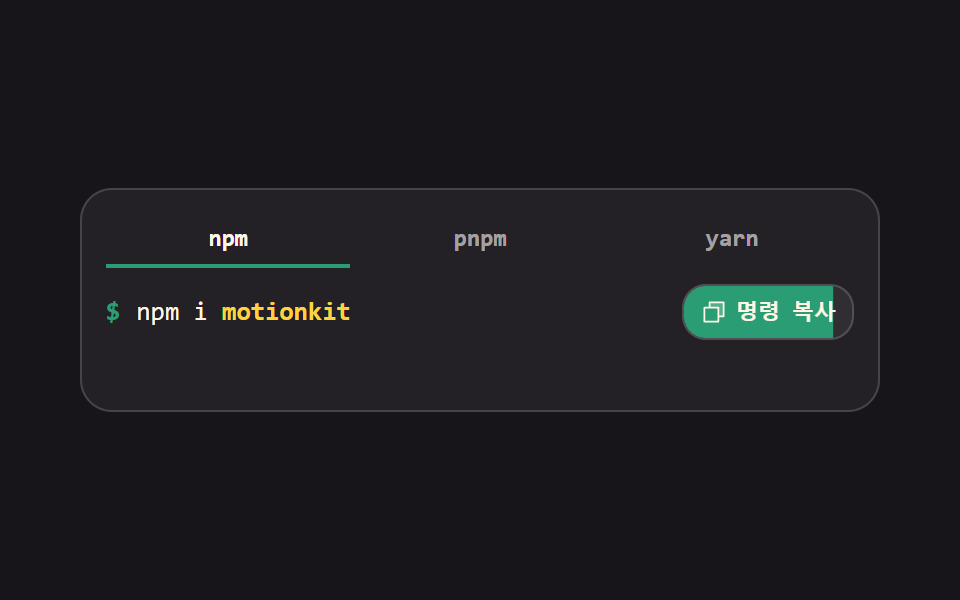 터미널 UI 9종 — 설치 명령 상자부터 튜토리얼 창까지터미널 UI는 웹 화면 안에 검은 명령창처럼 보이도록 짜 넣는 조각입니다. 여기 아홉 가지는 설치 명령 복사 상자부터 로그 창·문자 진행 막대·크기를 바꾸는 창·튜토리얼 창까지, 붙여 넣으면 바로 도는 형태로 만들어 이 글의 데모 전부 보기