07연쇄 도미노
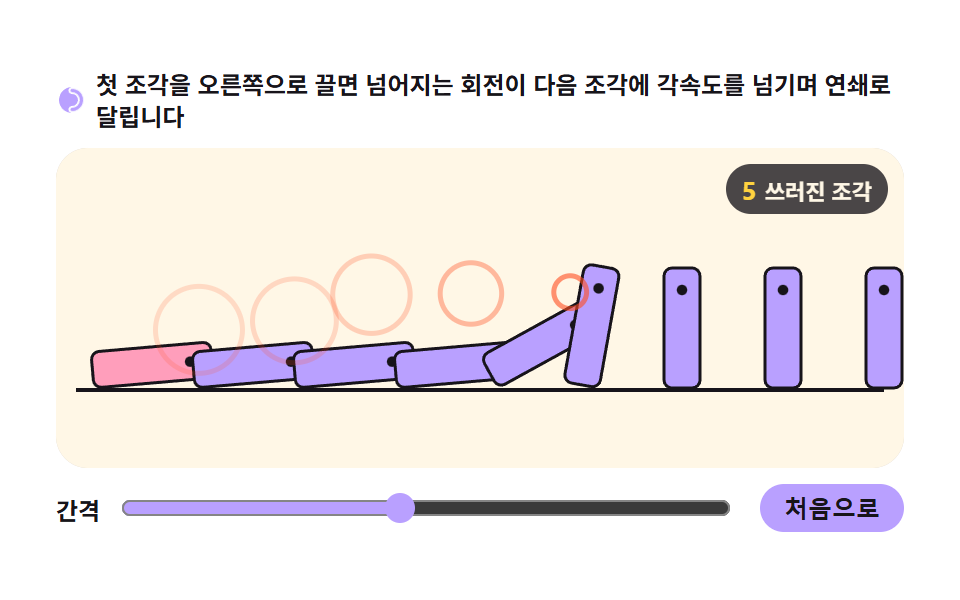
도미노마다 회전 각도가 임계값을 넘으면 다음 도미노에 초기 각속도를 넘겨주는 연쇄 트리거이고, 각 조각은 자신의 무게중심 기준 회전 물리로만 쓰러집니다.
쓰임완료 단계를 순서대로 보여주는 온보딩, 스크롤 유도 연쇄 연출
requestAnimationFramepointerdownrotate
<main class="stage">
<div class="dm" id="dm">
  <p class="dm__hint">
    <svg class="dm__ico" viewBox="0 0 256 256" aria-hidden="true"><g fill="currentColor"><path d="M224,128a96,96,0,0,1-96,96c-11.4,0-20-8.6-20-20s8.9-20,20-20a56,56,0,0,0,0-112c-11.1,0-20-8.9-20-20s8.6-20,20-20A96,96,0,0,1,224,128Z" opacity=".2"/><path d="M128,24A104,104,0,0,0,128,232c-15.8,0-28-12.3-28-28s12.4-28,28-28a48,48,0,0,0,0-96c-15.6,0-28-12.4-28-28S112.2,24,128,24Zm0,16c-6.9,0-12,5.2-12,12s5.3,12,12,12a64,64,0,0,1,0,128c-6.7,0-12,5.4-12,12s5.1,12,12,12a88,88,0,0,0,0-176Z"/></g></svg>
    <span>첫 조각을 오른쪽으로 끌면 넘어지는 회전이 다음 조각에 각속도를 넘기며 연쇄로 달립니다</span>
  </p>
  <div class="dm__field" id="field" role="application" aria-label="도미노 실험판" tabindex="0">
    <canvas class="dm__cv" id="cv"></canvas>
    <b class="dm__badge" aria-hidden="true"><span class="dm__badgeNum" id="fellVal">0</span><span class="dm__badgeUnit">쓰러진 조각</span></b>
  </div>
  <div class="dm__bar">
    <label class="dm__dial">간격
      <input type="range" id="gap" min="0.5" max="1.6" step="0.05" value="1" aria-label="조각 간격 배율">
    </label>
    <button class="dm__reset" id="reset" type="button">처음으로</button>
  </div>
</div>
</main>
@use "../../../../site/static/demo-tokens" as *;
// 연쇄 도미노 — 움직임은 전부 캔버스 rAF 루프 안의 각도 Verlet 회전 적분에 있다.
// @keyframes 를 하나도 두지 않는다 — CSS 애니메이션이 0개여야 렌더러가 실시간으로 24장을 찍는다(01 scss 주석).
// 캔버스가 쓰는 색은 여기서 커스텀 프로퍼티로 내려보낸다 — 값은 토큰 한 곳에만 둔다.
$duration: $dur-loop;
$easing: $ease-spring;
$color: $subject-lilac;
@include stage($stage-paper);
.dm {
--bg: #{$subject-cream};
--ink: #{$subject-ink};
--chip: #{$color};
--chip2: #{$subject-pink};
--warn: #{$stage-orange};
display: flex; flex-direction: column; gap: $sp-2;
width: 100%; max-width: 424px;
}
.dm__hint {
display: flex; align-items: center; gap: $sp-1; margin: 0;
font-weight: 700; font-size: clamp(10px, 2.8vw, 12px); line-height: 1.35;
color: $subject-ink;
}
.dm__ico { width: 16px; height: 16px; flex: 0 0 auto; color: $color; }
.dm__field {
position: relative; height: 160px;
border-radius: $r-card; overflow: hidden;
background: var(--bg);
box-shadow: inset 0 0 0 1px rgba($subject-ink, .16);
cursor: grab; touch-action: none;
}
.dm__field:focus-visible { outline: 2px solid $color; outline-offset: 2px; }
.dm__field:active { cursor: grabbing; }
.dm__cv { display: block; width: 100%; height: 100%; }
// 쓰러진 조각 수 — 연쇄가 번진 거리의 실측값
.dm__badge {
position: absolute; right: $sp-2; top: $sp-2;
display: flex; align-items: baseline; gap: $sp-1;
padding: $sp-1 $sp-2; border-radius: $r-pill;
background: rgba($subject-ink, .78);
color: $subject-cream; font-weight: 700; font-size: 11px;
}
.dm__badgeNum { font-size: 13px; color: $stage-yellow; }
.dm__badgeUnit { font-weight: 700; }
.dm__bar {
display: flex; align-items: center; gap: $sp-3;
}
.dm__dial {
display: flex; align-items: center; gap: $sp-2; flex: 1 1 auto;
font-weight: 700; font-size: 12px; color: $subject-ink;
}
.dm__dial input[type="range"] { flex: 1 1 auto; accent-color: $color; }
.dm__reset {
flex: 0 0 auto; border: 0; border-radius: $r-pill;
padding: $sp-1 $sp-3; font-weight: 700; font-size: 12px;
background: $color; color: $subject-ink; cursor: pointer;
}
.dm__reset:active { transform: translateY(1px); }
@media (max-width: 340px) {
.dm { gap: $sp-1; }
.dm__field { height: 114px; }
.dm__badge { font-size: 10px; padding: 0 $sp-1; }
.dm__badgeNum { font-size: 11px; }
.dm__bar { gap: $sp-2; }
.dm__dial { font-size: 11px; }
.dm__reset { font-size: 11px; padding: $sp-1 $sp-2; }
}
// reduce — 자동 시연 푸시는 JS 가 끄고(matchMedia 로 판정), 첫 조각을 끌어 넘기는 조작은 살린다.
// reduce 드래그는 임계각을 넘는 순간 즉시 연쇄 속도만 넣고 배속 관성을 생략한다.
@media (prefers-reduced-motion: reduce) {
.dm.is-still .dm__field { cursor: default !important; }
.dm.is-still .dm__badge { opacity: .92 !important; }
}html, body {
margin: 0;
overflow: hidden;
}
.stage {
box-sizing: border-box;
min-height: 100vh;
display: grid;
place-items: center;
margin: 0;
background: #ffffff;
font-family: -apple-system, "Segoe UI", "Noto Sans KR", sans-serif;
padding: clamp(8px, 4vw, 24px);
}
.dm {
--bg: #fff7e6;
--ink: #17141a;
--chip: #b9a0ff;
--chip2: #ff9ebb;
--warn: #ff4d1f;
display: flex;
flex-direction: column;
gap: 8px;
width: 100%;
max-width: 424px;
}
.dm__hint {
display: flex;
align-items: center;
gap: 4px;
margin: 0;
font-weight: 700;
font-size: clamp(10px, 2.8vw, 12px);
line-height: 1.35;
color: #17141a;
}
.dm__ico {
width: 16px;
height: 16px;
flex: 0 0 auto;
color: #b9a0ff;
}
.dm__field {
position: relative;
height: 160px;
border-radius: 16px;
overflow: hidden;
background: var(--bg);
box-shadow: inset 0 0 0 1px rgba(23, 20, 26, 0.16);
cursor: grab;
touch-action: none;
}
.dm__field:focus-visible {
outline: 2px solid #b9a0ff;
outline-offset: 2px;
}
.dm__field:active {
cursor: grabbing;
}
.dm__cv {
display: block;
width: 100%;
height: 100%;
}
.dm__badge {
position: absolute;
right: 8px;
top: 8px;
display: flex;
align-items: baseline;
gap: 4px;
padding: 4px 8px;
border-radius: 999px;
background: rgba(23, 20, 26, 0.78);
color: #fff7e6;
font-weight: 700;
font-size: 11px;
}
.dm__badgeNum {
font-size: 13px;
color: #ffd23f;
}
.dm__badgeUnit {
font-weight: 700;
}
.dm__bar {
display: flex;
align-items: center;
gap: 12px;
}
.dm__dial {
display: flex;
align-items: center;
gap: 8px;
flex: 1 1 auto;
font-weight: 700;
font-size: 12px;
color: #17141a;
}
.dm__dial input[type=range] {
flex: 1 1 auto;
accent-color: #b9a0ff;
}
.dm__reset {
flex: 0 0 auto;
border: 0;
border-radius: 999px;
padding: 4px 12px;
font-weight: 700;
font-size: 12px;
background: #b9a0ff;
color: #17141a;
cursor: pointer;
}
.dm__reset:active {
transform: translateY(1px);
}
@media (max-width: 340px) {
.dm {
gap: 4px;
}
.dm__field {
height: 114px;
}
.dm__badge {
font-size: 10px;
padding: 0 4px;
}
.dm__badgeNum {
font-size: 11px;
}
.dm__bar {
gap: 8px;
}
.dm__dial {
font-size: 11px;
}
.dm__reset {
font-size: 11px;
padding: 4px 8px;
}
}
@media (prefers-reduced-motion: reduce) {
.dm.is-still .dm__field {
cursor: default !important;
}
.dm.is-still .dm__badge {
opacity: 0.92 !important;
}
}// 연쇄 도미노 — 각도 Verlet(a += a - pa + angacc·dt², 각속도 변수 없음)로 조각의 기움을 적분한다.
// 각 조각은 받침점(쓰러지는 방향 앞 아래모서리) 기준으로 회전한다. 무게중심이 받침점 바로 위로 오는
// 임계각을 넘기 전엔 복원 모멘트가 각도를 0으로 되돌리고, 넘으면 모멘트가 방향을 바꿔 급가속한다.
// 쓰러지던 조각의 윗모서리가 다음 조각 몸통에 닿는 순간(윗모서리 위치를 계산하는 기하 근사) 그
// 순간 선속도를 다음 조각의 초기 각속도로 넘겨 연쇄가 번진다.
var root = document.getElementById('dm');
var field = document.getElementById('field');
var cv = document.getElementById('cv');
var gapIn = document.getElementById('gap');
var fellVal = document.getElementById('fellVal');
var reduce = window.matchMedia('(prefers-reduced-motion: reduce)');
var ctx = cv.getContext('2d');
var css = getComputedStyle(root);
var BG = css.getPropertyValue('--bg').trim();
var INK = css.getPropertyValue('--ink').trim();
var CHIP = css.getPropertyValue('--chip').trim();
var CHIP2 = css.getPropertyValue('--chip2').trim();
var WARN = css.getPropertyValue('--warn').trim();
var N = 9; // 조각 수
var HW = 9; // 조각 두께의 절반(px)
var H2 = 60; // 조각 높이(px)
var KICK = 0.46; // 접촉 선속도 → 다음 조각 각속도 전달률
var LOOP = 1900; // 전부 쓰러진 뒤 리셋 대기(ms)
var REDO = 4200; // 자동 시연: 밀기 주기(ms)
var gapScale = 1.0; // 간격 슬라이더 배율
var tiles = []; // { x, a, pa, down, hit }
var flash = []; // 연쇄 전달 표시 { x, y, t }
var W = 0, H = 0, dpr = 1;
var manual = false;
var push = { on: false, t0: 0 }; // 자동 시연 푸시
var resetAt = 0;
var t0 = performance.now();
var startT = t0; // 자동 시연 주기 기준 — 첫 바퀴는 페이지가 뜬 직후 곧바로 시작해
// 짧은 캡처 창(2초)에도 연쇄가 반드시 담기게 한다. 이후부턴 REDO 주기.
function fit() {
var r = field.getBoundingClientRect();
dpr = window.devicePixelRatio || 1;
W = r.width; H = r.height;
cv.width = Math.round(W * dpr);
cv.height = Math.round(H * dpr);
ctx.setTransform(dpr, 0, 0, dpr, 0, 0);
build();
}
function build() {
tiles = [];
flash = [];
var usable = W - 20;
var pitch0 = usable / (N - 1); // 간격 1.0일 때 중심 간격
var gap0 = Math.max(10, pitch0 - HW * 2); // 기본 틈 = 남는 공간
var pitch = HW * 2 + gap0 * gapScale; // 슬라이더는 틈만 배율로 늘린다
var total = (N - 1) * pitch + HW * 2;
var x0 = (W - total) / 2 + HW;
for (var i = 0; i < N; i++) {
tiles.push({ x: x0 + i * pitch, a: 0, pa: 0, down: false, hit: false });
}
fellVal.textContent = '0';
}
function groundY() { return H - 40; }
// 받침점 — 쓰러지는 방향(오른쪽) 앞 아래모서리
function pivotX(i) { return tiles[i].x + HW; }
// 기울기 a 일 때 윗 앞모서리 위치(받침점 기준 회전)
function topOf(i, a) {
return { x: pivotX(i) + Math.sin(a) * H2, y: groundY() - Math.cos(a) * H2 };
}
function step(now) {
var dt = Math.min((now - t0) / 1000, 0.033);
t0 = now;
// 자동 시연 푸시 — 첫 조각에 0.26초 사인파 각가속도를 얹는다(사람이 안 만졌을 때만)
if (push.on) {
var ph = (now - push.t0) / 260;
if (ph < 1) tiles[0].pa -= 320 * Math.sin(ph * Math.PI) * dt; // pa 를 깎아 (a - pa) 속도를 얹는다
else push.on = false;
}
var crit = Math.atan2(HW, H2); // 무게중심이 받침점 위로 오는 임계각
var rest = 1.485; // 바닥에 거의 눕는 각도
var fell = 0;
for (var i = 0; i < N; i++) {
var t = tiles[i];
var angacc;
if (t.a >= crit) {
t.down = true;
angacc = 2200 / H2 * Math.sin(t.a + 0.18); // 넘어가는 모멘트 — 갈수록 커진다
} else {
angacc = -2600 / H2 * Math.sin(crit - t.a); // 복원 모멘트 — 다시 세워지려는 쪽
}
// 각도 Verlet: a += a - pa + angacc·dt²
var aa = t.a;
t.a = t.a + (t.a - t.pa) * 0.996 + angacc * dt * dt;
t.pa = aa;
if (t.a < 0) { t.a = 0; t.pa = t.a; } // 바닥 반발 흡수
if (t.a > rest) { t.a = rest; t.pa = t.a - (t.pa - t.a) * 0.1; } // 눕고 살짝 튀다 멈춘다
// 다음 조각에 닿았는가 — 윗 앞모서리가 이번 프레임에 다음 조각 몸통 창을 "지나쳤는가"로 본다.
// 순간 좌표만 재면 빠르게 쓰러지는 조각은 18px 창을 한 프레임에 건너뛰어 닿았는데도 못 본다
// (실측: 480px 판에서 첫 조각이 프레임당 60px 를 움직여 연쇄가 아예 안 일어났다).
// 직전 프레임 모서리는 각도로 되살린다: pa = 직전 a.
if (i < N - 1 && !tiles[i + 1].hit) {
var tp = topOf(i, t.a);
var tpPrev = topOf(i, t.pa);
var nx = tiles[i + 1].x;
var topY = groundY() - H2;
var crossed = tp.x >= nx - HW && tpPrev.x <= nx + HW; // 이번 프레임에 창을 통과했다
if (crossed && tp.y >= topY) {
var tipV = (t.a - t.pa) * H2; // 윗모서리의 순간 선속도(px/프레임)
if (tipV > 0.02) {
tiles[i + 1].pa -= tipV / H2 * KICK; // 초기 각속도 전달 — 연쇄 트리거
flash.push({ x: tp.x, y: Math.max(tp.y, topY), t: now });
}
tiles[i + 1].hit = true;
}
}
if (t.down) fell++;
}
for (var k = flash.length - 1; k >= 0; k--) if (now - flash[k].t > 460) flash.splice(k, 1);
fellVal.textContent = String(fell);
// 자동 시연: 전부 쓰러졌면 잠시 뒤 다시 세우고, 다시 밀기 주기가 돌아오면 민다
if (manual) return;
if (fell === N) {
if (!resetAt) resetAt = now + LOOP;
else if (now > resetAt) { build(); resetAt = 0; }
} else resetAt = 0;
if (!push.on && !tiles[0].down && tiles[0].a === 0 && (now - startT) % REDO < 40) {
push.on = true; push.t0 = now;
}
// 첫 바퀴 예외 — 로드 후 200ms 안에 무조건 한 번 민다(위 주기 판정은 페이지 로드 시각과 무관한
// performance.now() 원점을 쓰므로, 캡처가 시작되기 전에 창이 이미 지나가 버릴 수 있다)
if (!push.on && !tiles[0].down && !tiles[0].hit && tiles[0].a === 0 && now - startT < 200) {
push.on = true; push.t0 = now;
}
}
function draw(now) {
ctx.fillStyle = BG;
ctx.fillRect(0, 0, W, H);
// 바닥 받침대
ctx.fillStyle = INK;
ctx.fillRect(10, groundY(), W - 20, 2);
// 조각 — 받침점(앞 아래모서리)으로 translate 하고 a 만큼 회전해 두께×높이 사각형을 그린다
for (var i = 0; i < N; i++) {
var t = tiles[i];
ctx.save();
ctx.translate(pivotX(i), groundY());
ctx.rotate(t.a);
ctx.fillStyle = i === 0 ? CHIP2 : CHIP;
ctx.beginPath();
ctx.roundRect(-HW * 2, -H2, HW * 2, H2, 4);
ctx.fill();
ctx.strokeStyle = INK;
ctx.lineWidth = 1.5;
ctx.stroke();
// 몸통 점 하나 — 회전하는 물체임을 눈으로 보여주는 표지
ctx.fillStyle = INK;
ctx.beginPath(); ctx.arc(-HW, -H2 + 11, 2.6, 0, Math.PI * 2); ctx.fill();
ctx.restore();
}
// 연쇄 전달 하이라이트 — 닿은 자리에서 퍼지는 링
for (var f = 0; f < flash.length; f++) {
var age = (now - flash[f].t) / 460;
ctx.strokeStyle = 'rgba(255,77,31,' + (0.7 * (1 - age)).toFixed(2) + ')';
ctx.lineWidth = 2.5;
ctx.beginPath();
ctx.arc(flash[f].x, flash[f].y, 5 + age * 22, 0, Math.PI * 2);
ctx.stroke();
}
// 첫 조각 화살표 — 밀어야 할 방향(아직 안 넘어졌고 자동 시연 중일 때)
if (!tiles[0].down && !manual && tiles[0].a < 0.05) {
var pv = pivotX(0);
var b = Math.sin(now / 280) * 3.5;
ctx.fillStyle = WARN;
ctx.beginPath();
ctx.moveTo(pv - 14 + b, groundY() - H2 * 0.55);
ctx.lineTo(pv - 26 + b, groundY() - H2 * 0.55 - 7);
ctx.lineTo(pv - 26 + b, groundY() - H2 * 0.55 + 7);
ctx.closePath();
ctx.fill();
}
}
function frame(now) {
step(now);
draw(now);
requestAnimationFrame(frame);
}
// 조작 — 첫 조각을 pointerdown 드래그로 민다. 끈 만큼 꺾이고, 놓는 순간의 변화량이 초기 각속도가 된다
var dragging = false, dragX0 = 0, dragPrevA = 0, dragV = 0, dragT = 0;
field.addEventListener('pointerdown', function (e) {
var r = field.getBoundingClientRect();
var x = e.clientX - r.left, y = e.clientY - r.top;
if (Math.abs(x - pivotX(0)) < 70 && y > groundY() - H2 - 46) {
manual = true;
dragging = true; dragX0 = x; dragPrevA = tiles[0].a; dragV = 0; dragT = now2();
field.setPointerCapture(e.pointerId);
}
});
function now2() { return performance.now(); }
field.addEventListener('pointermove', function (e) {
if (!dragging) return;
var r = field.getBoundingClientRect();
var dx = (e.clientX - r.left) - dragX0;
var target = Math.max(0, Math.min(1.2, dx / 70));
var t = performance.now();
var dts = Math.max(0.008, (t - dragT) / 1000);
dragV = (target - dragPrevA) / dts; // 드래그 각속도(rad/s)
dragT = t;
dragPrevA = target;
tiles[0].a = target;
tiles[0].pa = target;
if (reduce.matches && target > 0.30) {
// reduce — 관성 연쇄 배속은 생략하고 임계를 넘는 순간 즉시 연쇄 시작 속도만 넣는다
tiles[0].pa -= 5;
dragging = false;
}
});
window.addEventListener('pointerup', function () {
if (!dragging) return;
dragging = false;
var kick = Math.max(0, dragV) * 0.30; // 놓는 순간 각속도 → Verlet 프레임 속도 환산
tiles[0].pa = tiles[0].a - Math.min(kick, 0.09);
});
document.getElementById('reset').addEventListener('click', function () {
manual = false; resetAt = 0; build();
push.on = true; push.t0 = performance.now();
});
gapIn.addEventListener('input', function () {
gapScale = Number(gapIn.value);
build();
});
window.addEventListener('resize', fit);
fit();
requestAnimationFrame(frame);// DominoChain — vanilla 판(run/306/demo/07-domino-chain-propagation/index.html) 의 React 포트.
// 각도 Verlet(a += a - pa + angacc·dt², 각속도 변수 없음)로 조각의 기움을 적분한다.
// 받침점(앞 아래모서리) 기준 회전, 무게중심 임계각, 윗모서리 접촉 → 다음 조각 초기 각속도 전달.
// 값·수치는 vanilla 와 같다. 첫 조각을 끌면 미리보기 푸시를 끄고 진짜 조작으로 넘어간다.
import { useEffect, useRef, useState } from "react";
import type { CSSProperties, PointerEvent as ReactPointerEvent } from "react";
import styles from "./DominoChain.module.scss";
export type DominoChainProps = {
duration?: number;
easing?: string;
color?: string;
};
type Vars = CSSProperties & { "--duration"?: string; "--easing"?: string; "--color"?: string };
type Box<T> = { current: T }; // 절대 비지 않는 ref 상자 (292 관례)
type InputEvt = { target: { value: string } };
type Tile = { x: number; a: number; pa: number; down: boolean; hit: boolean };
type Flash = { x: number; y: number; t: number };
const N = 9; // 조각 수
const HW = 9; // 조각 두께의 절반(px)
const H2 = 60; // 조각 높이(px)
const KICK = 0.46; // 접촉 선속도 → 다음 조각 각속도 전달률
const LOOP = 1900; // 전부 쓰러진 뒤 리셋 대기(ms)
const REDO = 4200; // 자동 시연: 밀기 주기(ms)
const FIELD_LABEL = "도미노 실험판";
const HINT_TEXT = "첫 조각을 오른쪽으로 끌면 넘어지는 회전이 다음 조각에 각속도를 넘기며 연쇄로 달립니다";
export default function DominoChain({
duration = 2000,
easing = "cubic-bezier(.2, .8, .2, 1)",
color = "#b9a0ff",
}: DominoChainProps) {
const rootRef = useRef<HTMLDivElement | null>(null);
const fieldRef = useRef<HTMLDivElement | null>(null);
const cvRef = useRef<HTMLCanvasElement | null>(null);
const fellRef = useRef<HTMLSpanElement | null>(null);
const tilesRef = useRef<Tile[]>([]) as Box<Tile[]>;
const flashRef = useRef<Flash[]>([]) as Box<Flash[]>;
const sizeRef = useRef({ W: 0, H: 0 }) as Box<{ W: number; H: number }>;
const gapRef = useRef(1) as Box<number>;
const manualRef = useRef(false) as Box<boolean>;
const pushRef = useRef({ on: false, t0: 0 }) as Box<{ on: boolean; t0: number }>;
const resetAtRef = useRef(0) as Box<number>;
const draggingRef = useRef(false) as Box<boolean>;
const dragRef = useRef({ x0: 0, prevA: 0, v: 0, t: 0 }) as Box<{ x0: number; prevA: number; v: number; t: number }>;
const rafRef = useRef(0) as Box<number>;
const [gap, setGap] = useState(1);
const vars: Vars = { "--duration": `${duration}ms`, "--easing": easing, "--color": color };
function reduced(): boolean {
return window.matchMedia("(prefers-reduced-motion: reduce)").matches;
}
function groundY(): number { return sizeRef.current.H - 40; }
// 받침점 — 쓰러지는 방향(오른쪽) 앞 아래모서리
function pivotX(i: number): number { return tilesRef.current[i].x + HW; }
// 기울기 a 일 때 윗 앞모서리 위치(받침점 기준 회전)
function topOf(i: number, a: number): { x: number; y: number } {
return { x: pivotX(i) + Math.sin(a) * H2, y: groundY() - Math.cos(a) * H2 };
}
function fit(): void {
const field = fieldRef.current;
const cv = cvRef.current;
if (!field || !cv) return;
const r = field.getBoundingClientRect();
const dpr = window.devicePixelRatio || 1;
sizeRef.current.W = r.width;
sizeRef.current.H = r.height;
cv.width = Math.round(r.width * dpr);
cv.height = Math.round(r.height * dpr);
cv.getContext("2d")?.setTransform(dpr, 0, 0, dpr, 0, 0);
}
function build(): void {
const { W } = sizeRef.current;
const tiles: Tile[] = [];
const usable = W - 20;
const pitch0 = usable / (N - 1); // 간격 1.0일 때 중심 간격
const gap0 = Math.max(10, pitch0 - HW * 2); // 기본 틈 = 남는 공간
const pitch = HW * 2 + gap0 * gapRef.current; // 슬라이더는 틈만 배율로 늘린다
const total = (N - 1) * pitch + HW * 2;
const x0 = (W - total) / 2 + HW;
for (let i = 0; i < N; i++) {
tiles.push({ x: x0 + i * pitch, a: 0, pa: 0, down: false, hit: false });
}
tilesRef.current = tiles;
flashRef.current = [];
if (fellRef.current) fellRef.current.textContent = "0";
}
function step(now: number, dt: number): void {
const tiles = tilesRef.current;
const flash = flashRef.current;
// 자동 시연 푸시 — 첫 조각에 0.26초 사인파 각가속도를 얹는다(사람이 안 만졌을 때만)
const push = pushRef.current;
if (push.on) {
const ph = (now - push.t0) / 260;
if (ph < 1) tiles[0].pa -= 320 * Math.sin(ph * Math.PI) * dt; // pa 를 깎아 (a - pa) 속도를 얹는다
else push.on = false;
}
const crit = Math.atan2(HW, H2); // 무게중심이 받침점 위로 오는 임계각
const rest = 1.485; // 바닥에 거의 눕는 각도
let fell = 0;
for (let i = 0; i < N; i++) {
const t = tiles[i];
let angacc: number;
if (t.a >= crit) {
t.down = true;
angacc = 2200 / H2 * Math.sin(t.a + 0.18); // 넘어가는 모멘트 — 갈수록 커진다
} else {
angacc = -2600 / H2 * Math.sin(crit - t.a); // 복원 모멘트 — 다시 세워지려는 쪽
}
// 각도 Verlet: a += a - pa + angacc·dt²
const aa = t.a;
t.a = t.a + (t.a - t.pa) * 0.996 + angacc * dt * dt;
t.pa = aa;
if (t.a < 0) { t.a = 0; t.pa = t.a; } // 바닥 반발 흡수
if (t.a > rest) { t.a = rest; t.pa = t.a - (t.pa - t.a) * 0.1; } // 눕고 살짝 튀다 멈춘다
// 다음 조각에 닿았는가 — 윗 앞모서리가 다음 조각 몸통 사각형에 들어오는 순간
if (i < N - 1 && t.a > 0.2 && !tiles[i + 1].hit) {
const tp = topOf(i, t.a);
const nx = tiles[i + 1].x;
const topY = groundY() - H2;
if (tp.x >= nx - HW && tp.x <= nx + HW && tp.y >= topY) {
const tipV = (t.a - t.pa) * H2; // 윗모서리의 순간 선속도(px/프레임)
if (tipV > 0.35) {
tiles[i + 1].pa -= (tipV / H2) * KICK; // 초기 각속도 전달 — 연쇄 트리거
flash.push({ x: tp.x, y: Math.max(tp.y, topY), t: now });
}
tiles[i + 1].hit = true;
}
}
if (t.down) fell++;
}
for (let k = flash.length - 1; k >= 0; k--) if (now - flash[k].t > 460) flash.splice(k, 1);
if (fellRef.current) fellRef.current.textContent = String(fell);
// 자동 시연: 전부 쓰러졌으면 잠시 뒤 다시 세우고, 다시 밀기 주기가 돌아오면 민다
if (manualRef.current) return;
if (fell === N) {
if (!resetAtRef.current) resetAtRef.current = now + LOOP;
else if (now > resetAtRef.current) { build(); resetAtRef.current = 0; }
} else resetAtRef.current = 0;
if (!push.on && !tiles[0].down && tiles[0].a === 0 && now % REDO < 40) {
push.on = true; push.t0 = now;
}
}
function draw(now: number): void {
const cv = cvRef.current;
const ctx = cv?.getContext("2d");
if (!cv || !ctx) return;
const { W } = sizeRef.current;
const c = colorsRef.current;
ctx.fillStyle = c.bg;
ctx.fillRect(0, 0, W, sizeRef.current.H);
// 바닥 받침대
ctx.fillStyle = c.ink;
ctx.fillRect(10, groundY(), W - 20, 2);
// 조각 — 받침점(앞 아래모서리)으로 translate 하고 a 만큼 회전해 두께×높이 사각형을 그린다
const tiles = tilesRef.current;
for (let i = 0; i < N; i++) {
const t = tiles[i];
ctx.save();
ctx.translate(pivotX(i), groundY());
ctx.rotate(t.a);
ctx.fillStyle = i === 0 ? c.chip2 : c.chip;
ctx.beginPath();
ctx.roundRect(-HW * 2, -H2, HW * 2, H2, 4);
ctx.fill();
ctx.strokeStyle = c.ink;
ctx.lineWidth = 1.5;
ctx.stroke();
// 몸통 점 하나 — 회전하는 물체임을 눈으로 보여주는 표지
ctx.fillStyle = c.ink;
ctx.beginPath(); ctx.arc(-HW, -H2 + 11, 2.6, 0, Math.PI * 2); ctx.fill();
ctx.restore();
}
// 연쇄 전달 하이라이트 — 닿은 자리에서 퍼지는 링
const flash = flashRef.current;
for (let f = 0; f < flash.length; f++) {
const age = (now - flash[f].t) / 460;
ctx.strokeStyle = `rgba(255,77,31,${(0.7 * (1 - age)).toFixed(2)})`;
ctx.lineWidth = 2.5;
ctx.beginPath();
ctx.arc(flash[f].x, flash[f].y, 5 + age * 22, 0, Math.PI * 2);
ctx.stroke();
}
// 첫 조각 화살표 — 밀어야 할 방향(아직 안 넘어졌고 자동 시연 중일 때)
if (!tiles[0].down && !manualRef.current && tiles[0].a < 0.05) {
const pv = pivotX(0);
const b = Math.sin(now / 280) * 3.5;
ctx.fillStyle = c.warn;
ctx.beginPath();
ctx.moveTo(pv - 14 + b, groundY() - H2 * 0.55);
ctx.lineTo(pv - 26 + b, groundY() - H2 * 0.55 - 7);
ctx.lineTo(pv - 26 + b, groundY() - H2 * 0.55 + 7);
ctx.closePath();
ctx.fill();
}
}
const colorsRef = useRef({ bg: "", ink: "", chip: "", chip2: "", warn: "" }) as Box<{
bg: string; ink: string; chip: string; chip2: string; warn: string;
}>;
useEffect(() => {
const root = rootRef.current;
if (root) {
// 캔버스가 쓰는 색은 module.scss 의 커스텀 프로퍼티에서 읽는다 — 값은 토큰 한 곳에만 둔다
const css = getComputedStyle(root);
const c = colorsRef.current;
c.bg = css.getPropertyValue("--bg").trim();
c.ink = css.getPropertyValue("--ink").trim();
c.chip = css.getPropertyValue("--chip").trim();
c.chip2 = css.getPropertyValue("--chip2").trim();
c.warn = css.getPropertyValue("--warn").trim();
}
fit();
build();
let last = performance.now();
function frame(now: number): void {
const dt = Math.min((now - last) / 1000, 0.033);
last = now;
step(now, dt);
draw(now);
rafRef.current = requestAnimationFrame(frame);
}
rafRef.current = requestAnimationFrame(frame);
function onResize(): void { fit(); build(); }
window.addEventListener("resize", onResize);
return () => {
window.removeEventListener("resize", onResize);
cancelAnimationFrame(rafRef.current);
};
}, []);
function onPointerDown(event: ReactPointerEvent<HTMLDivElement>): void {
const field = fieldRef.current;
if (!field) return;
const r = field.getBoundingClientRect();
const x = event.clientX - r.left, y = event.clientY - r.top;
if (Math.abs(x - pivotX(0)) < 70 && y > groundY() - H2 - 46) {
manualRef.current = true;
draggingRef.current = true;
dragRef.current = { x0: x, prevA: tilesRef.current[0].a, v: 0, t: performance.now() };
field.setPointerCapture(event.pointerId);
}
}
function onPointerMove(event: ReactPointerEvent<HTMLDivElement>): void {
if (!draggingRef.current) return;
const field = fieldRef.current;
if (!field) return;
const r = field.getBoundingClientRect();
const dx = event.clientX - r.left - dragRef.current.x0;
const target = Math.max(0, Math.min(1.2, dx / 70));
const t = performance.now();
const dts = Math.max(0.008, (t - dragRef.current.t) / 1000);
dragRef.current.v = (target - dragRef.current.prevA) / dts; // 드래그 각속도(rad/s)
dragRef.current.t = t;
dragRef.current.prevA = target;
const tile0 = tilesRef.current[0];
tile0.a = target;
tile0.pa = target;
if (reduced() && target > 0.3) {
// reduce — 관성 연쇄 배속은 생략하고 임계를 넘는 순간 즉시 연쇄 시작 속도만 넣는다
tile0.pa -= 5;
draggingRef.current = false;
}
}
function onPointerUp(): void {
if (!draggingRef.current) return;
draggingRef.current = false;
const kick = Math.max(0, dragRef.current.v) * 0.3; // 놓는 순간 각속도 → Verlet 프레임 속도 환산
const tile0 = tilesRef.current[0];
tile0.pa = tile0.a - Math.min(kick, 0.09);
}
function onReset(): void {
manualRef.current = false;
resetAtRef.current = 0;
build();
pushRef.current = { on: true, t0: performance.now() };
}
return (
<main className={styles.stage}>
<div className={styles.root} ref={rootRef} style={vars}>
<p className={styles.hint}>
<svg className={styles.ico} viewBox="0 0 256 256" aria-hidden="true"><g fill="currentColor"><path d="M224,128a96,96,0,0,1-96,96c-11.4,0-20-8.6-20-20s8.9-20,20-20a56,56,0,0,0,0-112c-11.1,0-20-8.9-20-20s8.6-20,20-20A96,96,0,0,1,224,128Z" opacity=".2"/><path d="M128,24A104,104,0,0,0,128,232c-15.8,0-28-12.3-28-28s12.4-28,28-28a48,48,0,0,0,0-96c-15.6,0-28-12.4-28-28S112.2,24,128,24Zm0,16c-6.9,0-12,5.2-12,12s5.3,12,12,12a64,64,0,0,1,0,128c-6.7,0-12,5.4-12,12s5.1,12,12,12a88,88,0,0,0,0-176Z"/></g></svg>
<span>{HINT_TEXT}</span>
</p>
<div
className={styles.field}
ref={fieldRef}
role="application"
aria-label={FIELD_LABEL}
tabIndex={0}
onPointerDown={onPointerDown}
onPointerMove={onPointerMove}
onPointerUp={onPointerUp}
onPointerCancel={onPointerUp}
>
<canvas className={styles.cv} ref={cvRef}></canvas>
<b className={styles.badge} aria-hidden="true"><span className={styles.badgeNum} ref={fellRef}>0</span><span className={styles.badgeUnit}>쓰러진 조각</span></b>
</div>
<div className={styles.bar}>
<label className={styles.dial}>간격
<input
type="range" min={0.5} max={1.6} step={0.05} value={gap} aria-label="조각 간격 배율"
onChange={(event: InputEvt) => { const v = Number(event.target.value); gapRef.current = v; setGap(v); build(); }}
/>
</label>
<button className={styles.reset} type="button" onClick={onReset}>처음으로</button>
</div>
</div>
</main>
);
}07 연쇄 도미노 — 측정 누적면적 12.262% · 움직인 프레임 11/23GODRICH 원작 · zip 에 SCSS·React 포함 · 자바스크립트 물리엔진 원리 9종 — Verlet 로프부터 래그돌까지
이 데모가 속한 글
 자바스크립트 물리엔진 원리 9종 — Verlet 로프부터 래그돌까지자바스크립트 물리엔진은 로프가 늘어나고 천이 찢어지며 젤리가 출렁이는 움직임을 계산으로 만들어 냅니다. 이 아홉 판은 라이브러리 없이 캔버스와 Verlet 적분만으로 관절 인형·부력·도미노 연쇄·액체 방울까지 움직이 이 글의 데모 전부 보기